Skip to content

Why ESET is a leader for managed service providers serving SMBs

Michal Jankech, ESET Vice President of SMB and MSP Segment

In a unique report put out by Analysys Mason in 2021, ESET scored among the leaders for small- and medium-sized business (SMB) endpoint security vendors. The reason for this placement is clear: backed by a strong managed service provider (MSP) program tailored to the needs of SMBs, ESET has shown consistent financial growth in serving the SMB market around the world.)

Similarly, in 2022, Canalys published a unique report called the MSP Tech Stack, which layers five core MSP technologies positioning cybersecurity at the bottom. Although ESET did not feature among the cybersecurity vendors in this report, ESET is poised to reach a milestone in product development where it will meet the two entry criteria:

1.    Over 10% of revenue sourced via MSPs.
2.    A strong detection and response capability ready for MSPs.

The first criterion on revenue source is a mark already hit by ESET. The second criterion is on track to be met with the release of ESET Inspect Cloud – ESET’s XDR-enabling technology, which was already released for businesses in March 2022 – into ESET’s MSP program later this year.

The Canalys MSP Tech Stack serves as an insightful lens into the MSP world because it reveals the delicate balance between trust and freedom sought by MSPs: the trust to select any one vendor as a long-term, stable partner committed to its MSP program, and the freedom to mix and match several trusted vendors from the tech stack to access the best technologies available.

Finding a trusted security partner

Many events cause MSPs concern, like unwanted changes to partner programs, acquisitions between vendors serving the MSP community, or the widespread blocking of sales in the wake of the Ukraine invasion followed by the breaking and forging of many partnerships. In addition to this tumultuous time for service chains around the world, the concerns about cyberthreats remain ever present with governments simultaneously advising the solicitation of help from security experts and caution about the security posture of third-party vendors.

For many MSPs trudging through this complexity, turning to ESET as an EU-headquartered security provider may be a perfect fit, to put it boldly. Since its origins 35 years ago, ESET has been proud to be a privately owned company not beholden to stockholders and thus free to engage with partners to design an MSP program built on their feedback and the actual needs of SMBs. This means that ESET can offer partners a stable relationship set to last for many years.

But to be stable is not to be stagnant. ESET continually strives to enhance its MSP portfolio and improve the quality of its security products along with their integrations and features for MSPs. The key examples demonstrating this commitment are ESET PROTECT and ESET Inspect.

Prevent, detect, and respond from the cloud

ESET PROTECT represents ESET’s tiered approach to providing businesses with subscriptions for scalable protection centered around a management console. When this move was made in 2021, a key feature was the release of a cloud-based version of ESET PROTECT. This new foray to the cloud was not an isolated event but a paradigm shift of becoming cloud first in the way ESET plans to serve businesses and MSPs in the future.

Of course, ESET was already leveraging the power of the cloud to provide increased protection for many years. But the birth of ESET PROTECT was a new way for MSPs to scale their efforts and focus their time now unencumbered by on-premises concerns. This was followed in 2021 by the genesis of yet another cloud product – ESET Cloud Office Security – which directly protects cloud-based tools, chiefly Microsoft 365.

Yet, after having traversed all this ground to the cloud, the appetite of MSPs for cloud-provisioned protection has only been sharpened. And the succulent steak for this meal, ESET Inspect Cloud, is the detection and response module laying the foundation of ESET’s pursuit of XDR.

Interested in partnering via ESET’s MSP program? Read more here.

Apart from ESET Inspect, other plans are in store for MSPs. To give only a few hints now, ESET has long-term plans to offer multifactor authentication from the cloud, to build a vulnerability and patch management solution, and to launch a unified license management solution capable of serving the needs of all partners’ distribution model types.


Further reading:

  1. MSPs must master cybersecurity II
  2. Criminal hacking hits managed service providers: Reasons and responses
  3. No-cost ESET plugins for MSPs streamline security via low-effort dashboard
  4. With more businesses moving to the cloud and adopting SaaS, ESET Cloud Office Security provides easily managed security to MSPs and their Microsoft 365 clients
  5. A new business offering for a new business world
  6. Bringing cloud-based management to the managed service providers’ tool kit with ESET PROTECT Cloud

About Version 2 Digital

Version 2 Digital is one of the most dynamic IT companies in Asia. The company distributes a wide range of IT products across various areas including cyber security, cloud, data protection, end points, infrastructures, system monitoring, storage, networking, business productivity and communication products.

Through an extensive network of channels, point of sales, resellers, and partnership companies, Version 2 offers quality products and services which are highly acclaimed in the market. Its customers cover a wide spectrum which include Global 1000 enterprises, regional listed companies, different vertical industries, public utilities, Government, a vast number of successful SMEs, and consumers in various Asian cities.

About ESET
For 30 years, ESET® has been developing industry-leading IT security software and services for businesses and consumers worldwide. With solutions ranging from endpoint security to encryption and two-factor authentication, ESET’s high-performing, easy-to-use products give individuals and businesses the peace of mind to enjoy the full potential of their technology. ESET unobtrusively protects and monitors 24/7, updating defenses in real time to keep users safe and businesses running without interruption. Evolving threats require an evolving IT security company. Backed by R&D facilities worldwide, ESET became the first IT security company to earn 100 Virus Bulletin VB100 awards, identifying every single “in-the-wild” malware without interruption since 2003.

What is remote network monitoring?

Remote network monitoring is a technical specialty that was born almost at the same time as networks themselves. Since then, many strategies have emerged when it comes to monitoring network elements.

In this article we will talk about the current techniques based on SNMP polling and network statistic collection through Netflow, and we will also mention outdated systems such as RMON.

Most techniques are purpose-oriented, so they are especially useful. Some more modern ones use combined techniques to offer higher control and network knowledge.

What advantages does each one of them offer?

What is remote network monitoring?

Remote network monitoring consists of detecting and knowing the status of any device connected to the network.

It can be network-specific hardware (such as a router, server, printer) or a specialized device (such as a probe or IoT element).

Simple, right?

Then let’s talk about the different techniques you have to monitor a network remotely.

Basic Remote Network Monitoring Techniques

Often this monitoring takes place through basic techniques.

With basic techniques we mean something as well known as pinging and checking whether the computer responds to the network.

What is pinging? It is a communication mechanism that allows you to find out whether a computer is connected and responds when you “knock” on its door.

To use it you just have to know its IP address.

Other basic techniques include measuring latency times (network lagging) or packet loss (network packet loss).

Advanced Remote Network Monitoring Tool – Netflow

The most common and already much more network specific techniques include the use of the SNMP protocol (Simple Network Monitoring Protocol) that helps to obtain specific information from devices connected to the network: number of connections, incoming traffic through its network interface, firmware version, CPU temperature, etc.

Something that, if we use technical terms, is known as SNMP polling.

Other tools use protocols from the Netflow family (JFlow, SFlow, Netflow) to obtain statistical information about network usage.

This statistical information is incredibly useful to be able to analyze the use of the network, detect bottlenecks and, above all, to have a clear vision of what the communication flows between the different elements of a network are.

Advanced Network Remote Monitoring Techniques – RMON

There is an almost obsolete protocol called RMON. However, it is worth mentioning, because we can still find it in some installations.

This protocol used a technology network monitoring technology that listened to the wire to obtain statistical information using a specific SNMP agent. Something like what Netflow does.

Advanced Remote Network Monitoring Tools – SNMP Traps

On the other hand, most devices still use SNMP TRAPS to report incidents in asynchronous mode.

Although it is a very old method, it is still used today as a monitoring method on almost all network devices.

Not to be mistaken with the SNMP Polling that we discussed at the beginning!

Benefits of Network Monitoring

The most important and simple benefit is to find out the status of the network:

  • Whether it is active
  • Whether it is overloaded
  • Which devices have the most traffic
  • What kind of traffic is circulating over the network
  • Bottlenecks
  • Jams

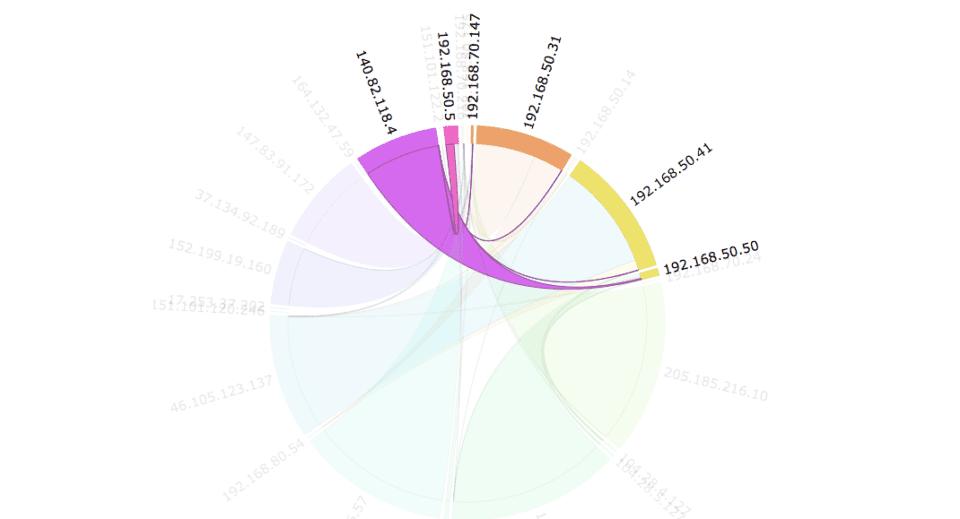
An example of a traffic flow diagram captured with Pandora FMS could be the following:

Remote network monitoring tools

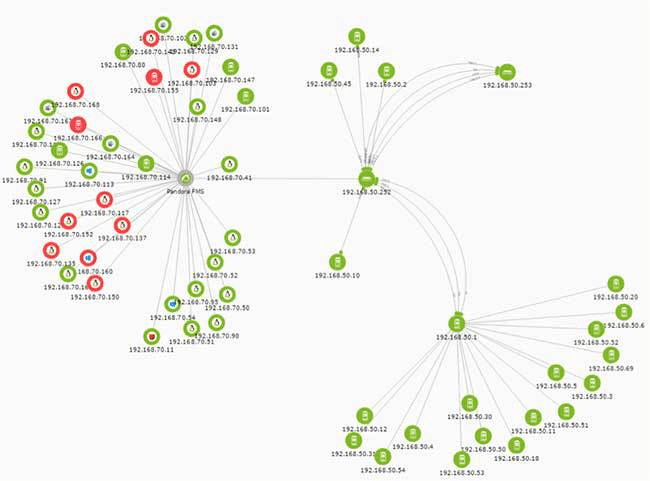
Most network management and monitoring systems automatically detect connected systems and draw a network map representing the network.

The most advanced tools allow you to update that map in real time and see even the physical connections between interfaces (known as a link-level topology or Layer 2).

For example, like this automatic network map generated with Pandora FMS:

Remote monitoring in network management

Some systems incorporate what is known as IPAM (IP Address Management) and, at the same time, monitor the network status, allowing IP addressing to be mapped and controlled so that you know which networks are free and how they are used.

How does a remote network monitoring service work?

Generally, a tool like this one has a central server that allows you to detect systems and launch network tests (ping, icmp, snmp) to find out the status of each device. 

To know the network in detail through its network flows in real time, you will need to configure the network routers and switches with the Netflow protocol and send that information to a Netflow collector. Although only professional medium/top-range network equipment supports the use of Netflow.

If you use an advanced monitoring tool, it will have its own Netflow collector.

Sometimes it is necessary to monitor devices that are in inaccessible networks, so intermediate polling servers, called proxies or satellites, are used.

These secondary servers perform network scans and monitoring on the devices nearby, and then send the collected data to a central system.

But what do we do with all this numerical data?

It is essential that the monitoring tool you use has graphs, reports and visual screens to display that data.

If we’re already talking about the top-of-the-range tools, those visual network maps will allow you to manually correct and add the details you need to manage those networks.

What are the best remote network monitoring software?

The professional tools that cover SNMP, Netflow, network maps and IPAM that work best today are:

  • SolarWinds
  • Whatsup Gold
  • Pandora FMS

Although they differ from each other in several respects, you may cover all your monitoring needs with any of them.

Would you like to know more about remote network monitoring tools? Then this will no doubt interest you:

Best network monitoring systems

Not all market tools cover these areas.

Some only support basic SNMP, but do not support Netflow. Others do not have good discovery or map editing capabilities and most of them do not have IPAM features. 

The basic thing a good network monitoring tool should have is:

  • SNMP v1, v2 and v3 capabilities
  • To be able to use proxy servers
  • SNMP Trap Collection
  • Device Discovery
  • Map drawing

About Version 2 Digital

Version 2 Digital is one of the most dynamic IT companies in Asia. The company distributes a wide range of IT products across various areas including cyber security, cloud, data protection, end points, infrastructures, system monitoring, storage, networking, business productivity and communication products.

Through an extensive network of channels, point of sales, resellers, and partnership companies, Version 2 offers quality products and services which are highly acclaimed in the market. Its customers cover a wide spectrum which include Global 1000 enterprises, regional listed companies, different vertical industries, public utilities, Government, a vast number of successful SMEs, and consumers in various Asian cities.

About PandoraFMS
Pandora FMS is a flexible monitoring system, capable of monitoring devices, infrastructures, applications, services and business processes.
Of course, one of the things that Pandora FMS can control is the hard disks of your computers.

透過視覺溝通工具引導和改善使用者體驗——ArtVersion 使用案例分享

Goran Paunovic 於1999年成立 ArtVersion 創意機構。 ArtVersion 協助《財富》世界500大企業、大型公司、中型公司,甚至新創公司加強網頁設計和使用者體驗(UX)設計的成果。

ArtVersion 的作品在 Vega Digital Awards 和 MUSE Creative Awards 中揚名國際,這兩項比賽都是由享有盛譽的 International Awards Associate(IAA)所精心策劃。目前,創辦人 Goran Paunovic 使用 IPEVO 愛比科技的 VZ-X 作為與網路設計及開發相關的網頁易用性和使用者測試的工具。Goran 強調:「VZ-X對於幫助我們了解使用者在使用我們所設計的網站或應用程式時的行為起了關鍵性的作用,是個不可或缺的工具。」

戈蘭·帕諾維奇(Goran Paunovic) — ArtVersion 創辦人。

在使用愛比科技產品前,Goran 解釋:「ArtVersion 『為體驗而設計』的過程是反覆的試驗。在特別採用愛比科技 VZ-X 產品前,我們描述使用者行為或優先考慮事項的方式更像是一種猜謎遊戲。此外,因為沒有熟知的科技可以更有效率的指導整個過程,貫徹『為體驗而設計』變得更加費力和耗時。」

多虧了愛比科技的VZ-X 無線教學攝影機,ArtVersion 對於如何更好的開發使用者旅程以優化網路體驗有了更清晰的方向:「我們的團隊可以在理解具體數據後進行透徹的觀察,進而得出更多答案。準確評估行為數據在產品或體驗設計中至關重要,而愛比科技的 VZ-X 無線教學攝影機使創作過程與客戶(以及之後的線上使用者)更貼近。IPEVO 的 VZ-X 產品驗證了我們夢寐以求的行為分析,為 ArtVersion 團隊提供了更好的響應性式網頁設計方法。」

最近,ArtVersion 的網站因其傑出的使用者經驗 (UX) 設計、視覺敘事和行動應用獲得 awwwwards 的認可。因此,Goran 強烈推薦愛比科技的產品給網頁和平面設計專業人士:「對於在設計領域的其他工作者來說,VZ-X是一款敏捷的產品,可以幫助動態使用者體驗。此外,VZ-X匯編資料的能力不僅可以應用於網頁設計或圖形設計,還可以廣泛的應用於其他行業。除了 VZ-X 產品的科技方面,它還是個很棒的協作工具,可以透過無線連接模式將影像投影在大銀幕上,分享資訊給大家。」


ArtVersion 榮獲四次 Vega 數位獎。

About Version 2

Version 2 Digital is one of the most dynamic IT companies in Asia. The company distributes a wide range of IT products across various areas including cyber security, cloud, data protection, end points, infrastructures, system monitoring, storage, networking, business productivity and communication products. Through an extensive network of channels, point of sales, resellers, and partnership companies, Version 2 offers quality products and services which are highly acclaimed in the market. Its customers cover a wide spectrum which include Global 1000 enterprises, regional listed companies, different vertical industries, public utilities, Government, a vast number of successful SMEs, and consumers in various Asian cities.

關於IPEVO
IPEVO源自於PChome Online硬體事業部門,2007年7月正式獨立。自2004年於台灣營運Skype網絡電信服務,使台灣成為Skype全球發展中最成功的市場。2005年起以IPEVO品牌推出一系列Skype專屬硬件產品,將Skype虛擬服務轉化為使用者實質經驗。IPEVO以簡單、實際且具有價值的經驗為產品目標,其簡潔俐落的產品風格呼應著IPEVO的核心思考與產品精神。目前已研發之產品包括:Skype有線USB話機、Skype無線話機、Skype會議系統、Skype視訊設備、Stand-alone免電腦Skype話機。

PCI-DSS: What is this and why should I be compliant

But along with the efficiency ofIn a completely digital world, it is normal for all sensitive data of a person or company to circulate and be stored on computers or mobile devices. Whether through websites, folders or applications.

 control and information disclosure, risks also came along. In different corners of the Internet, there are hidden threats that can steal personal data and cause a tremendous headache to any user.

Among these most common threats in everyday virtual life, we can highlight malware, short for malicious software.

What is Malware?

Malware is a type of computer program designed to infect a person’s device and harm them in many ways. It has various means of infecting computers and mobile devices, and it can also take many forms.

Spyware, viruses, worms, and Trojans are among these threats. Viruses are perhaps the most well-known type of malware and so are called because they are able to replicate various forms of themselves and spread across the network.

Each of them has a different “function”. Spyware, for example, copy and transmit personal information such as credit card numbers. Therefore, being well disguised in any corner of the Internet, the user must know how to identify them to protect themselves in every way.

Looking for more protection for your network? Then visit our website

and request a demo of our services!

How to Identify Malware

Malware can manifest itself in many different ways on devices. Paying attention to these signs is important to be able to neutralize any threat right away.

  • Reduced operating system speed, when browsing the internet or using local applications;
  • System shutdown, crash, or Blue Screen;
  • System and antivirus update failures;
  • Sudden appearance of new toolbars, extensions, or plugins;
  • Mysterious loss of disk space;
  • Change of browser homepage without permission or links that lead to unwanted destinations on the Internet;
  • Excessive ads in pop-up windows on the screen of devices;
  • The high usage of system resources and the computer’s fan working at a fast pace.

Nevertheless, even if everything is working normally on the devices, it does not mean everything is fine. A more powerful malware can hide on the computer and perform illegal activities without awakening any system alerts, managing to steal passwords or sensitive files.

How is The User Infected with Malware?

There are many ways in which a user can be tricked, infected by malware, and put their system and data at risk. The two most common ways it can access your system are on the Internet and through email.

Anything downloaded from the Internet to a device that does not have a quality anti-malware security application can pose risks to the user. The most common ways by which this can happen are:

  • Browsing on compromised websites;
  • Downloading infected music files;
  • Installing new toolbars from an unknown provider;
  • Clicking on game demos;
  • Configuring software from a risky source;
  • Opening suspicious email attachments.

But some can also hide in legitimate apps, especially when downloaded from websites or via messages, rather than through an app store.

Therefore, it is recommended to always use reliable sources of mobile apps or install apps from reputable providers, always downloading directly from the provider and never from other websites.

Even if a user installs something from a reputable source, failing to pay attention to requests for permission to install other program packages at the same time could end up installing unwanted software.

But there are much simpler ways to come across malware. Just visiting a malicious website, for example, or viewing a page and/or an infected ad, a malware download can take place.

How to Protect Yourself from Malware?

In order to protect your computer or network from malware, two things are necessary: always being vigilant to everything that appears on the Internet and using protection tools. It is always good to be on the lookout for any messages or suspicious activity on the system.

Sending emails is one of the main paths where malware is found. Seemingly harmless and unsuspecting messages can be the perfect trick to deceive the

user. It can be disguised as a message from a well-known company, banks, or even people you know in your family and friendship circles.

Emails that ask for passwords (mainly their confirmation) through links are quite common and dangerous. Thus, it is always good to be aware of everything you receive and analyze the situation carefully to find out if it is in fact true.

But personal surveillance alone is not enough. As already mentioned, malware can hide very well over the network and deceive any type of person, whether they are experienced in the matter or not.

When it comes to data security, especially for companies, it is essential to have reinforced security so that there is no risk of data leaks that could compromise an entire work.

An antivirus software package that is very efficient is what guarantees a technological defense capable of protecting computers and other electronic devices. It does a general system check to ensure it is malware-free.

It has a regular update that allows it to recognize the latest threats. It is also possible to warn of previously unknown malware threats based on their own technical resources.

With this anti-virus protection, it is also possible to detect suspicious websites, especially those that might trick the user into revealing passwords or account numbers. Effective protection also helps finances. They protect account information and provide password management.

However, this protection should be easy to use, simple to download and install. No protection is completely absolute, but using the right protection tools and having an awareness of what’s happening on the network ensures your data can be as protected as possible.

Do you want to learn more about how to protect your data from malicious attacks? Then visit our blog for more information and stay on top of everything you need to know!

About Version 2 Digital

Version 2 Digital is one of the most dynamic IT companies in Asia. The company distributes a wide range of IT products across various areas including cyber security, cloud, data protection, end points, infrastructures, system monitoring, storage, networking, business productivity and communication products.

Through an extensive network of channels, point of sales, resellers, and partnership companies, Version 2 offers quality products and services which are highly acclaimed in the market. Its customers cover a wide spectrum which include Global 1000 enterprises, regional listed companies, different vertical industries, public utilities, Government, a vast number of successful SMEs, and consumers in various Asian cities.

About Segura®
Segura® strive to ensure the sovereignty of companies over actions and privileged information. To this end, we work against data theft through traceability of administrator actions on networks, servers, databases and a multitude of devices. In addition, we pursue compliance with auditing requirements and the most demanding standards, including PCI DSS, Sarbanes-Oxley, ISO 27001 and HIPAA.

×

Hello!

Click one of our contacts below to chat on WhatsApp

×