Skip to content

Load Balancer: what is it and what is its importance?

When a given system is heavily accessed, it is recommended to invest in a load balancer.

This solves the problem of slowness caused by system overload as it distributes traffic among different web servers in the resource pool. Thus, you can optimize its performance and significantly reduce its response time.

In this article, we bring more details about this solution, which can be applied in hardware and software, alone or together. Our text is divided into items to make it easier for you to understand the subject. These are:

  • What is a Load Balancer and How Does it Work?
  • Benefits of a Load Balancer
  • Brief History of the Load Balancers
  • Load Balancing and Cloud Environments
  • Load Balancing Algorithms
  • Other Load Balancing Algorithms
  • Situations where Load Balancing is Essential

Enjoy it!

  • What is a Load Balancer and How Does it Work?

As mentioned in the introduction, a load balancer is intended to distribute traffic to different web servers in the resource pool. This way, it ensures no server is overloaded. 

The consequence is the reduction of the server’s response time, which starts to work with maximum performance. 

This is because this solution has the function of routing requests to the right places, providing performance and security for complex IT environments and the operations developed through them.

Let’s suppose you have three computers, but only two are operating, while the third is idle. In this case, load balancing will redistribute the workload between the equipment in order to ensure efficiency in their deliveries.

  • Benefits of a Load Balancer

Using a load balancer is very beneficial for several reasons. Check out its main benefits:

  • It increases efficiency: When you have a heavy workload, your network slows down. With load balancing, you can distribute it on more than one computer and/or server, increasing efficiency.
  • It allows you to manage the traffic flow: Many companies deal with a large volume of traffic in their daily activities. This traffic must be managed in such a way as not to overload the system and maintain the speed of operations. A load balancer helps manage traffic by distributing the workload across multiple computers or servers. 
  • It upgrades without downtime: With load balancing, networks gain more flexibility. The redundancy inherent in this solution makes it possible to transfer the workload to a defined server or server cluster for the others to be updated. Thus, these updates will not affect data access and operations.
  • It eliminates system failures: A load balancer also helps prevent network failures, which can occur as a result of failures in a server cluster. 

When configuring or updating your network, you should create server clusters using the same application. In this way, you can remove a failed server from your system easily. What’s more, the load balancer also allows you to transfer the workload to a functioning server without causing problems.

  • Brief History of the Load Balancers

This concept was created in 1990, with the proposal to enable the distribution of traffic in networks through specific hardware.

Subsequently, the development of Application Delivery Controllers (ADCs) provided more security to the load balancer, as new ways were sought to guarantee access to applications without interruptions and at any time.

ADCs can be: Hardware Appliance, Virtual Appliance, and Software Native Load Balancers. Today, ADCs created from software have the function of performing operations as hardware would and in a more scalable, functional, and flexible way.

  • Load Balancing and Cloud Environments

Large workloads in cloud environments can overload a single server. For this reason, load balancing is ideal for ensuring operations are performed efficiently in this context.

Another important function of a load balancer is to ensure the scalability of a cloud: This is what provides more speed for servers and the execution of various applications through the distribution of traffic.

With load balancing, servers receive inbound traffic in a coordinated fashion. Thus, it is possible to avoid that some servers are overloaded while others are with zero traffic.

Moreover, a load balancer makes it possible to identify unavailable servers to direct traffic to those that are operating. That way, you can have infrastructures in different places, as long as you sign up with a cloud service provider.

This is critical as regions can experience natural disasters and become inoperable. In this case, traffic is directed to another region, which has not been impacted by the catastrophe.

A load balancer can also determine which server is likely to be overloaded in the least amount of time and share the traffic with others. This capability reduces the possibility of service becoming unavailable.

The more demands an organization has, the greater will be the traffic of employees, suppliers, partners, and clients. 

As such, your cloud infrastructure must be able to support this load without becoming unavailable or reducing its responsiveness. That is the purpose of load balancing.

  • Load Balancing Algorithms

Load distribution is performed using an algorithm. This means the user has access to the websites using a URL associated with an IP and the load balancer, which directs the request to the server. 

Load sharing is directly related to the type of algorithm used, and the four most known are:

  • Round Robin: This is a method capable of placing incoming requests in a queue. With load balancer management, one can distribute these requests to servers, responding to them according to the availability of computers.

This solution is adaptable to locations where the servers have the same features. On the other hand, the algorithm can assign overload to less powerful equipment.

  • Weighted Round Robin: 

Unlike traditional Round Robin, it works according to the capacity of each server, which is pre-set with a value. It works like this: While the most powerful can have a value of 10, it is possible to assign the least powerful a value of 1. 

With that, the most powerful equipment will receive the greatest load. Therefore, this method is more recommended for use with different servers.

  • Least Connections

Round Robin and Weighted Round Robin do not work taking the number of connections the servers will handle into account. Thus, some servers can be overloaded, when receiving a backlog of connections. 

This problem is easily solved by Least Connections, which works considering the requests that already exist on the server when distributing new ones. 

However, this algorithm may not work depending on the technical capabilities of the servers. For this reason, it is recommended to be used in environments whose servers have the same features. 

  • Weighted Least Connections

This algorithm works as a complement to Least Connections. In an infrastructure whose servers have different resources, it considers the requests for each piece of equipment, in addition to the weighting established by the administrator.

As with Weighted Round Robin, the most powerful server has the most weight. With this, one can distribute the load strategically, as new requests are directed to a server with the lowest assets/weight.

  • Other Load Balancing Algorithms

In addition to the four best-known load balancing algorithms presented in the previous topic, other types perform load balancing. Check some methods below:

  • Lower Bandwidth Algorithm: In this case, traffic is measured in Mbps. Thus, it is possible to send requests to servers with a smaller number of Mbps of traffic.
  • URL Hashing: This algorithm is capable of evenly distributing writes across multiple websites and directing reads to a specific website.
  • Resource-based Algorithm (Adaptive SDN): This method involves knowledge of all application layers and the inputs of an SDN controller, which determines decisions regarding traffic distribution.
  • Resource-based Algorithm: Here, a computer program is installed on the server so that it provides the current load for balancing. This is possible based on an assessment of the servers and the availability of resources that allow traffic to be properly directed.
  • Source IP Hashing: It mixes client and server IP addresses, creating a unique hash key, capable of allocating traffic to certain servers.
  • Situations where Load Balancing is Essential

To understand the importance of investing in load balancing, it is worth looking at the cost-effectiveness of this investment. In other words, how much it costs to have this service and how much your business can lose without correct load distribution.

If you have an e-commerce business operating during periods such as Black Friday, Christmas, Mother’s Day, Valentine’s Day, or other important dates for commerce, for example, the load balancer can avoid major losses.

In this article, we discussed what a load balancer is, its benefits, and its importance for companies. If our content was helpful to you, please share it with more people who might be interested in the subject.


About Version 2 Digital

Version 2 Digital is one of the most dynamic IT companies in Asia. The company distributes a wide range of IT products across various areas including cyber security, cloud, data protection, end points, infrastructures, system monitoring, storage, networking, business productivity and communication products.

Through an extensive network of channels, point of sales, resellers, and partnership companies, Version 2 offers quality products and services which are highly acclaimed in the market. Its customers cover a wide spectrum which include Global 1000 enterprises, regional listed companies, different vertical industries, public utilities, Government, a vast number of successful SMEs, and consumers in various Asian cities.

About Segura®
Segura® strive to ensure the sovereignty of companies over actions and privileged information. To this end, we work against data theft through traceability of administrator actions on networks, servers, databases and a multitude of devices. In addition, we pursue compliance with auditing requirements and the most demanding standards, including PCI DSS, Sarbanes-Oxley, ISO 27001 and HIPAA.

訊連科技攜手筑波醫電打造非接觸刷臉門禁篩檢系統 獲衛生福利部桃園醫院採用,落實防疫與提升醫護人員安全

【2022年01月12日,台北訊】全球頂尖人臉辨識技術開發商訊連科技(5203.TW) 宣布,採用旗下FaceMe® AI人臉辨識技術、由筑波醫電開發之「AI雙眼龍-紅外線熱感及可見光自動檢篩系統」(TC-800)獲衛生福利部桃園醫院(以下簡稱部立桃園醫院)採用,為負壓隔離病房之醫護人員提供一站式的非接觸性門禁篩檢系統。該系統可於0.5秒內,透過熱像儀量測體溫,並使用人臉辨識技術辨識醫護人員身分、及記錄進出時間。除可大幅減低人力紀錄時間外,更可減少接觸之風險,保障醫護人員及負壓隔離病房之病人之健康及安全。

筑波醫電隸屬於筑波集團,於2018年成立,著力於人們早期病變篩檢系統的精準醫療設備產品研發與生產。筑波醫電開發的AI雙眼龍(TC-800)為一高規格之熱像儀,可提供體溫量測、人臉辨識、口罩偵測及進出紀錄等功能,能於0.5秒內動態感測10至30人之體溫,溫度超過37.5。C還會有警示音、拍照、錄影等功能。TC-800也具備整合口罩辨識、人流計次甚至醫院插健保卡查詢TOCC功能,登錄的資料可以保存28天,除可設置於醫院外,也可適用於科技大廠、購物中心、辦公大樓、校園等大型場域入口處,以非接觸性方式,大幅提升防疫期間健康偵測及身分確認之效率。

筑波醫電公司董事長許深福表示:「筑波從3C到3醫,開發各項智慧系統方案,致力於滿足各類大型機構在疫情期間的防疫門禁管理需求。TC-800目前已獲得許多政府機構、學研單位、高科技大廠應用的認可,並外銷至美國、日本、東南亞國家等。」

為因應防疫安全所需與更有效管理人員出入,部立桃園醫院於7A負壓隔離病房的出入口設置了筑波醫電TC-800。以往負壓隔離病房之醫護人員出入皆需要人工紀錄作業,難以避免接觸風險,疫情期間更必須提升院內防疫層級。TC-800結合使用了訊連FaceMe®人臉辨識技術,可於醫護人員進出負壓隔離病房時,一次完成體溫管控、身份辨識及記錄出入時間,大幅提升記錄效率、並有效避免接觸風險。TC-800讓醫護人員只需要熟悉現有的出入流程與注意自我防護,不必擔心於進入病房的過程有接觸感染,在第一線即實施嚴謹管控。

新聞圖:配置於部立桃園醫院負壓隔離病房之筑波醫電TC-800

「因應國際疫情升溫,本院擔任第一線防疫的重責大任,更需要守住防疫前線。筑波醫電所提供的TC-800系統功能運行穩定、良好,協助提升了院內的防疫層級。」部立桃園醫院徐永年院長表示:「負壓隔離病房的各醫護人員肩負龐大壓力,為避免院內感染及讓病患得到更好的照護,採無接觸式的出入管控實為必要。結合了訊連FaceMe®人臉辨識技術的TC-800系統可大幅減輕工作負擔,降低人工錯誤率及提升防疫效率。」

「COVID-19疫情及各種變種病毒持續為國際疫情帶來威脅,對第一線的醫護人員來說,除了照顧病患外,保持自身的身心安全,對醫療能量維持至關重要。」訊連科技黃肇雄執行長表示:「透過AI人臉辨識技術打造的非接觸性門禁系統,已成為防疫不可或缺的一環。很榮幸與筑波醫電合作之解決方案可獲得部立桃園醫院採用,為第一線醫護人員的身心健康把關。」

FaceMe® 人臉辨識引擎為全球頂尖之人臉辨識技術,可支援Windows、Linux、Android 、 iOS、JetPack等多種作業系統,及運行於包含物聯網、邊緣運算裝置及伺服器等硬體。FaceMe®可協助軟、硬體開發商及系統整合商,快速將人臉辨識技術導入至門禁安控、智慧金融、智慧零售或智慧居家等不同應用場景及軟、硬體解決方案。

About Version 2

Version 2 Digital is one of the most dynamic IT companies in Asia. The company distributes a wide range of IT products across various areas including cyber security, cloud, data protection, end points, infrastructures, system monitoring, storage, networking, business productivity and communication products. Through an extensive network of channels, point of sales, resellers, and partnership companies, Version 2 offers quality products and services which are highly acclaimed in the market. Its customers cover a wide spectrum which include Global 1000 enterprises, regional listed companies, different vertical industries, public utilities, Government, a vast number of successful SMEs, and consumers in various Asian cities.

關於CyberLink
訊連科技創立於1996年,擁有頂尖視訊與音訊技術的影音軟體公司,專精於數位影音軟體及多媒體串流應用解決方案產品研發,並以「抓準技術板塊,擴大全球行銷布局」的策略,深根台灣、佈局全球,展現亮麗的成績。訊連科技以先進的技術提供完美的高解析影音播放效果、以尖端的科技提供完整的高解析度擷取、編輯、製片及燒錄功能且完整支援各種高解析度影片及音訊格式。產品包括:「威力導演」、「PowerDVD」、「威力製片」、「威力酷燒」等。

What is, how to install WSL2 and why is it great news for the IT industry?

What is and how to install WSL2 and why is it great news for IT?

Background

Before diving into what WSL2 is, how to install it, and how to use it – which we will – I would like to add some background information you might relate to if you were born in the 80s like me.

From a very young age I have felt attracted to computers, and in my childhood they were not as common as they are today, when almost everyone has one within reach.

I think my first encounter with a computer was when I was 11 or 12 years old, with an old computer that my father had in his office. I remember spending hours in front of the screen, although I’m not quite sure what I was doing, because at that time there was no internet.

That old computer had Windows 3.1; my first computer also meant my first Operating System was Windows, which I used in all its versions (and I will also spoil that I still use it). From then on I kept on using it, in fact, I didn’t know about anything else until I got to college and some friends told me about Linux (Mac was not an alternative for me).

Since I met Linux I fell in love with the penguin operating system, its philosophy and its fantastic terminal, so I started testing it on my home computer, with all the compatibility issues it involved at the time, when you spent half a day installing and two more looking for drivers. However it was a new experience and, although frustrating, totally rewarding when you achieved this sense of accomplishment. Of course, for me it was no more than an experiment for many years.

Half of my professional life revolved around Windows, from my first jobs as a microcomputer technician to managing servers and services based on Microsoft OS. I even studied at a Microsoft partner academy and got certified in Microsoft Windows Server 2012. It wasn’t until early 2013 that I had my first professional experience with Linux on an old web server that someone had to maintain. Indeed, that someone was me and I devoted many more hours than necessary to that lonely server.

Like many of you, I find myself in the following position: I love Linux and its ecosystem but it seems to me that Microsoft does a very good job on its OS and, for some reason, I always end up coming back to it. The ideal thing would be to have the best of both worlds. I’ve tried dual boot, virtualization, and cwin, but none felt like a full experience. I thought it was the best I could get even if it wasn’t ideal and just moved on, until Microsoft announced WSL.

What is WSL?

WSL stands for Windows Subsystem for Linux, which was nothing more than a compatibility layer for native Linux environments within Windows. Its first version was announced in 2016 and it was big news. I remember having the Ubuntu 16.04 terminal running natively on Windows and thinking “this is what I’ve been waiting for, everything I need without losing compatibility”.

Unfortunately WSL, although very useful, had several shortcomings: all the executions were interpreted, there was no access to all the hardware of the machine, the overall performance was quite poor, etc. I didn’t stop using it, but it wasn’t suitable for everyone. Still, it was the first step. In 2019 they announced WSL2, which would no longer be interpreted, it would have the entire native Linux kernel and would be running on Windows at full performance. WSL2 was recently released for all Windows 10 2004 version users. It seems that having everything I needed is now becoming a reality. It’s not perfect, that’s for sure, but it’s impressive how well it works.

Why WSL2 and not a Linux distro?

“It depends”, that’s the answer. Many of you, due to company policies, will not be able to change the OS of your computer or will be stuck with Windows for using the Office suite or Adobe tools, or even because you feel more comfortable on Windows rather than Linux.

In my case, I have the freedom to choose the operating system I use, my company does not enforce any restrictions as long as it stays updated and has an antivirus active. I have tried using Linux straight away and in the end I always have to go back to Windows or virtualize it and I prefer to virtualize Linux on Windows rather than the other way around.

In my day to day I have many different tasks, although I have a WSL2 terminal always open on one of my virtual desktops, I spend half of the day in meetings with different providers (webex on Linux is a nightmare). I use different VPNs and virtual client desktops, I edit videos for Pandora FMS YouTube channel, etc. And I do many of these things with tools that do not work quite well in Linux, so WSL2 has given me the almost perfect solution for my daily tasks.

(If you think you would be interested in reading an article about my workflow and all the tools I use, leave a message in the comment box).

Deploy WSL2

If you are here, it is because you relate to one of the cases here exposed. Installing WSL2 is very simple, but let’s go step by step.

Remember that you must have Windows 10 version 2004 or higher to be able to use WSL2.

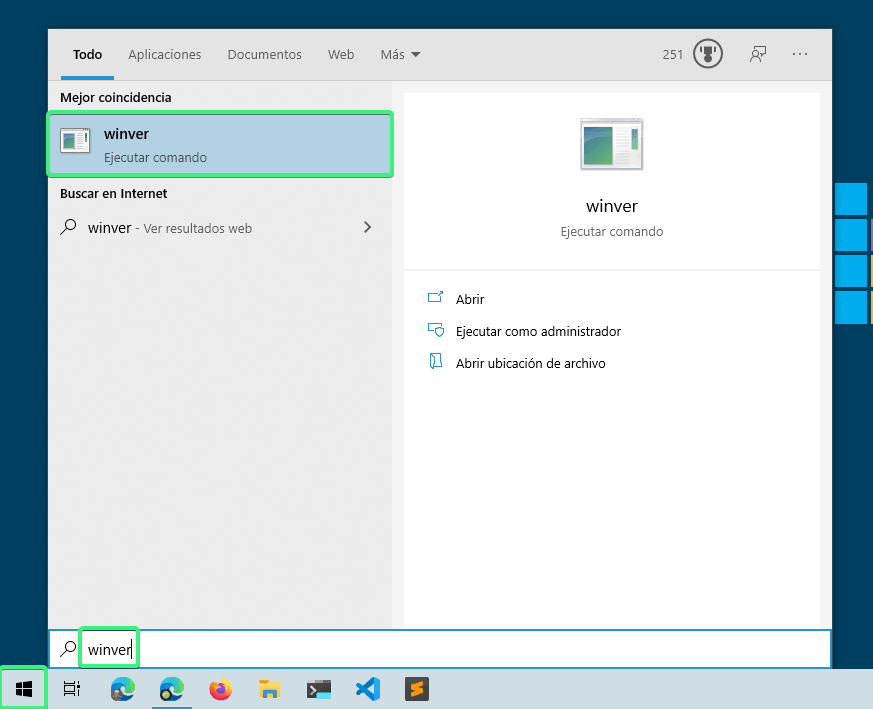
Checking it is as simple as pressing the start key, typing winver and pressing enter.

wsl2

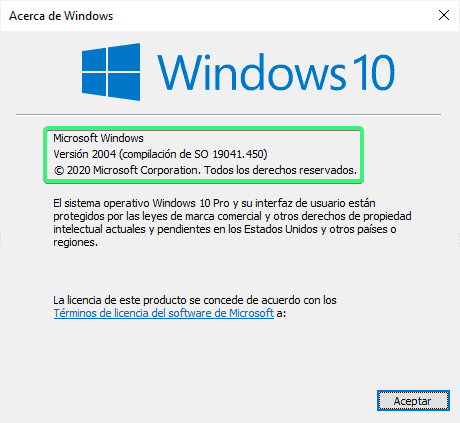
It will show you a screen like this, where you will see Windows 10 version.

wsl2

If you comply with the correct Windows version, let’s get to work. If not, it is time to go update Windows.

Step 1: Enable WSL on your system.

The easiest way is to open a PowerShell terminal as administrator and run:

dism.exe /online /enable-feature /featurename:Microsoft-Windows-Subsystem-Linux /all /norestart

Don’t close the terminal or restart yet.

Step 2: Enable virtualization.

Execute the following command in the PowerShell terminal open as Admin.

dism.exe /online /enable-feature /featurename:VirtualMachinePlatform /all /norestart

Now restart the machine.


Step 3:
Activate WSL version 2 as default.

Open a PowerShell terminal again as administrator and execute:

wsl --set-default-version 2

You will see a message similar to: “WSL 2 requires an update to its kernel component. For information, please visit https://aka.ms/wsl2kernel. Go to the URL and download the package following the wizard steps.

wsl2

Step 4: Download the distro, preferably from Windows store. Type in wsl in the search engine so that the options come out (personally I use Arch, but it is not in the store so it is a bit more complicated to install). I recommend installing Ubuntu, the first to be released and in my opinion the one with the most covering support.

wsl2

Once downloaded, open it and the distro installation will start. It will ask for the username and password. For the Linux system you can set the one you prefer, it has nothing to do with the Windows user.

wsl2

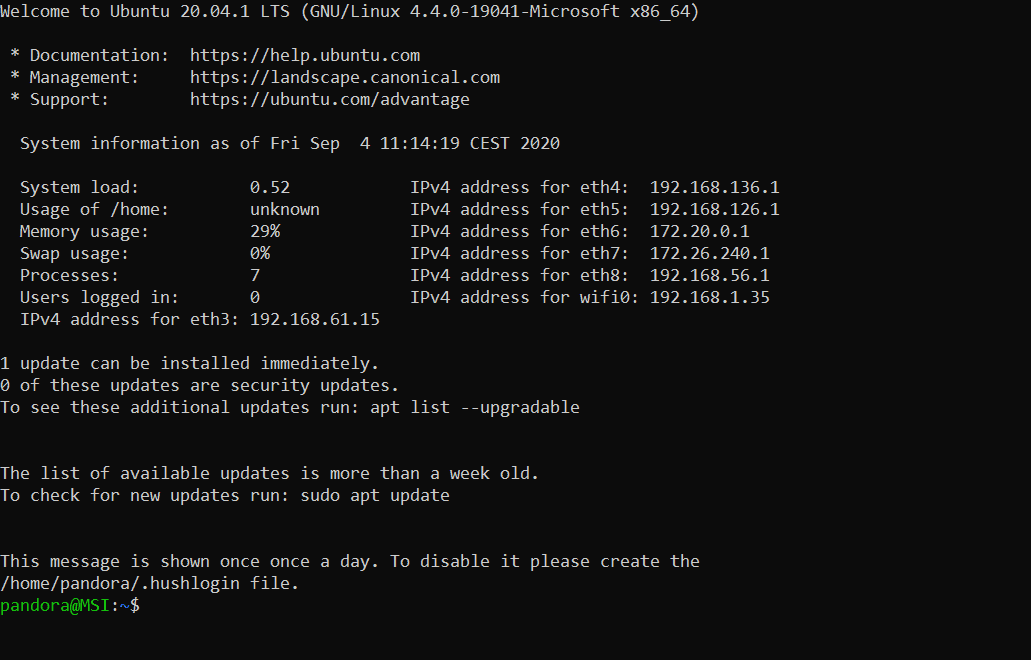
Once the installation is finished, you will see a screen similar to the following and the prompt ready to use Ubuntu bash.

wsl2

Step 5: Check the installation from a PowerShell terminal, executing:

wsl --list --verbose

Where it will list the distros installed and their versions. I already said that it used arch and yes I also have Windows running in WSL2 for Docker. In your case, it will show just the one that you have installed, in this case Ubuntu, and it would have to be version 2.

wsl2

Conclusions

With these simple steps you will have Ubuntu installed within Windows with its kernel at 100% and you can run all the tools you need, such as Docker natively directly in the Linux kernel (something that before with HyperV was not working for me and that WSL1 did not support).

Implementation is not perfect, it has many advantages but it also has some problems to figure out. Even so, I think it is the best current implementation to have a hybrid system where to enjoy the best of both worlds, so I recommend it 100%.

If you are interested in the subject, we can write an article listing the advantages, disadvantages and alternative solutions to certain problems that this technology currently poses. Let me know if you are interested in the comments.

About Version 2 Digital

Version 2 Digital is one of the most dynamic IT companies in Asia. The company distributes a wide range of IT products across various areas including cyber security, cloud, data protection, end points, infrastructures, system monitoring, storage, networking, business productivity and communication products.

Through an extensive network of channels, point of sales, resellers, and partnership companies, Version 2 offers quality products and services which are highly acclaimed in the market. Its customers cover a wide spectrum which include Global 1000 enterprises, regional listed companies, different vertical industries, public utilities, Government, a vast number of successful SMEs, and consumers in various Asian cities.

About PandoraFMS
Pandora FMS is a flexible monitoring system, capable of monitoring devices, infrastructures, applications, services and business processes.
Of course, one of the things that Pandora FMS can control is the hard disks of your computers.

What is Virtual Patching?

This article will give you an insight into virtual patching, what makes patching hard for businesses, the value of virtual patching and how to fix virtual patching issues. Let’s get started.

What is Virtual Patching?

Virtual patching is the process of developing and deploying a short-term strategy to reduce the risks of exploitation that are connected with the discovery of new security vulnerabilities. It removes the possibility of hackers finding and exploiting application or system security flaws. 

The main objective of virtual patching is to stop malicious actors from gaining access to a vulnerable application while implementing security solutions. 

It enables developers and security administrators to keep a system or application functional until a vulnerability solution is discovered, developed and tested. The patch is installed on a few host systems and can be replicated across the application environment. Nevertheless, virtual patching is not a permanent solution and does not always detect all system or software vulnerabilities. 

Value of Virtual Patching

Virtual patching is also known as vulnerability shielding, which protects against threats that exploit new and known vulnerabilities. Virtual patching works by enforcing layers of security guidelines and regulations that prevent and intercept exploits from following network routes to and from exposures. 

A multi-layered virtual patching method is ideal. This includes features for reviewing and blocking risky activities in business-critical traffic, detecting and preventing intrusions, stopping assaults on web-facing applications and deploying adaptably on cloud or physical platforms. 

Here is how virtual patching complements an organization’s existing security technology, vulnerability and patch management policies:

  • Prevents Unnecessary Downtime: Virtual patching offers organizations more flexibility in enforcing patch management practices on their timetable. This limits the possibility of income loss because of unnecessary or unplanned disruptions in corporate activities. 
  • Allows for Greater Flexibility: Virtual patching removes the need to distribute workarounds or emergency patches. It simplifies tasks such as knowing the specific places in the network that require patching or if there’s a need to apply patches to all systems.
  • You Will Get More Time: Virtual patching helps security teams to assess the vulnerability and test and install the necessary patches. In-house applications are at an advantage since they offer programmers and developers more time to resolve vulnerabilities in their code. 
  • It Offers an Additional Layer of Security: Virtual patching extends security controls to IT infrastructures for outdated systems and end-of-support operating systems such as Window Server 2008.
  • Improves Regulatory Compliance: Virtual patching help organizations in meeting timeliness requirements such as EU General Data Protection Regulation (GDPR) and the Payment Card Industry Security Standard (PCI DSS) (PCI).

When you study the different ways in which organizations can’t change the source code immediately, the benefits of virtual patching become clear. Based on the organization, the advantages include the following:

  • It lowers risk until a vendor-supplied patch is released or while a patch is tested and applied.
  • It enables businesses to keep typical patching cycles.
  • Because libraries and support code files are not changed, there is less chance of introducing conflicts.
  • It is a scalable approach because it is done on a few sites rather than on all hosts.
  • It reduces or eliminates the time and money spent on emergency patching.
  • It protects mission-critical systems that cannot be taken offline.

From the perspective of a web application security expert, virtual patching opens up another way for offering services to your clients. In recent years, if source code could not be modified based on the above reasons, there is nothing else a consultant could do to assist in solving the issues. A consultant can now offer to use virtual patches to solve problems that are outside the application code. 

Why is Virtual Patching Difficult for Businesses?

Some of the difficulties that organizations experience while implementing a virtual patch management system include the following:

  • The number of vulnerabilities that must be patched: This is true for organizations that must patch a growing number of vulnerabilities as their IT infrastructures are always upgraded.
  • Continuity of operations: While applying updates frequently is a desirable practice, many businesses find the patching process so long, expensive and disruptive that they choose to reschedule it or completely stop it in order to minimize operational disruption.
  • Systems that are no longer patchable: Patches may no longer be delivered to applications and systems that have reached the end of their life cycle, even if they are still needed to perform mission-critical tasks. Examples include embedded systems, such as IoT devices, POS terminals and industrial control systems that always contain software or components that cannot be patched.
  • Patch cycle frequency: This can make patching challenging to control especially when determining which vulnerabilities are urgent or important.
  • Visibility is limited: More extensive internet infrastructures require more complicated update processes. This could be exacerbated by a fragmented IT infrastructure, which is normally made up of several operating systems or application versions that are sometimes also geographically scattered.

What Happens to IT Infrastructures That Are Not Patched? 

When a vulnerability is discovered or reported, organizations need to be very quick and timely. It’s a golden chance for threat actors and cybercriminals. It takes 69 days for a typical firm to fix a critical vulnerability in its application. On average, it takes 60 days for businesses to realize they have been breached.

This window of vulnerability exposes unpatched systems to attacks. Threat actors began ransomware attacks against unpatched servers in January 2020, putting the networks of over 80,000 businesses at risk.

Conclusion

In today’s evolving environment, keeping up with security issues in complex software and web apps can be exhausting. In these circumstances, virtual patching is the best solution. It mitigates risk by patching web app vulnerabilities.

Virtual patches have different benefits over regular patching cycles, which consume a huge amount of time and money. Virtual patches can be installed within a few minutes at a low cost. Additionally, they should be incorporated in the security toolbox with other security technologies such as intrusion prevention systems, firewalls and better defense against developing threats.

Photo by Shubham Dhage on Unsplash

About Version 2 Digital

Version 2 Digital is one of the most dynamic IT companies in Asia. The company distributes a wide range of IT products across various areas including cyber security, cloud, data protection, end points, infrastructures, system monitoring, storage, networking, business productivity and communication products.

Through an extensive network of channels, point of sales, resellers, and partnership companies, Version 2 offers quality products and services which are highly acclaimed in the market. Its customers cover a wide spectrum which include Global 1000 enterprises, regional listed companies, different vertical industries, public utilities, Government, a vast number of successful SMEs, and consumers in various Asian cities.

About VRX
VRX is a consolidated vulnerability management platform that protects assets in real time. Its rich, integrated features efficiently pinpoint and remediate the largest risks to your cyber infrastructure. Resolve the most pressing threats with efficient automation features and precise contextual analysis.

×

Hello!

Click one of our contacts below to chat on WhatsApp

×