Skip to content

10 reasons to change your monitoring software

Every change is for the better and we give you ten reasons to change your monitoring software.

Cuando se habla de cambiar de software, no sé por qué, me viene a la mente la compra de música. Bueno, yo soy de los de antes: vinilos, cassettes, a principios de siglo los CD y DVD… Claro, ahora es diferente, actualmente existe el pago por suscripción, que reproduce en línea, y donde generalmente se ofrece el álbum de turno o paquetes completos con muchas estrellas musicales…

We could start right there, highlighting the difference between “the cloud and the earth”, running software on the Internet versus having one on your own physical servers. Both have their costs, we know. In fact, we already gave detailed information in another article on the subject. Because before talking about changing your monitoring software we must start there, the money. That’s the reason why you will have to take into account several factors, so let’s go for pencil and paper (virtual) and let’s start numbering!

1) Pandora FMS offers several forms of installation and download, as well as modes of operation. That is one reason to consider switching monitoring software. This mechanism allows you to grow, and, if necessary, reinstall at any time. You don’t have to buy a whole package either: in Pandora FMS you start by installing the Community version and as you see the benefits for yourself, you can move on to installing and testing the Enterprise version, without obligations or hassle. There you will always have the installers, both online and offline, as many times as you need them.

2) Do you have a feature in mind that cannot be found in any monitoring software? Don’t be embarrassed, it happens. I, at the very least, am very picky about how to insert text and data into text or number boxes. When you focus on them, I like for the text to be selected in a specific color, for example. And don’t even let me begin on entering numerical amounts or phone numbers.

And Pandora FMS does not have exactly that requirement either… However, you just have to go through the Community version that is open source and through its forum to get the help you need to develop the idea.

Better yet, you may have already been successful but now you want a more ambitious and highly customized improvement for your company: try the Enterprise version, where they will give you professional advice and offer you extraordinary improvement plans tailored to your needs. After all, only you know what is best for your company and what it needs. An exactly tailored suit or smehting ready-to-wear ? You choose!

3) With Pandora FMS you will be able to monitor at first remotely, without interfering much in your work processes, continue with an advanced remote configuration and, if everything goes smoothly, advance to monitoring with Software Agents, which are installed on each device. While you change -and advance- Pandora FMS has already outlined the path until (for now) June 2023. Exploring and changing monitoring software can be done before it’s necessary, even if it’s late.

4) Using great monitoring software, widely used worldwide and also used by large corporations, is not a guarantee of good security. I invite you to read about the case that took many headlines in the press, social networks, radio and television. Take this chance to have a coffee and take a deep breath to come back, there are still six reasons to change your monitoring software.

5) Because you don’t believe in magic wands. Neither do I, and in Pandora FMS that is very clear for them. Each client has a different problem and it is necessary to adapt to each particular case. But it will not be by magic, you have to invest time and effort, and in that domain Pandora FMS offers decades of proven experience.

6) Because “we just know that we do not know anything”. Without the aim to go in depth into the philosophical field, we must always pay attention to constant learning. Perhaps the documentation of your software is quite poor and it would be a good time to change it. Pandora FMS has forums of users of the Community version, documentation, tutorials and this blog that you are reading today. With all of them you can learn at your own pace, but if you want or rather need a push – certification included – check out our training in monitoring. Psst, with the Enterprise license this last one is included, don’t miss the chance!

7) Another reason to change your monitoring software is indeed not to change anything! Perhaps you simply need a monitoring contingency plan or an alternative of audit or measurement of result comparison. For example, I am a client of DigitalOcean, a company that provides virtual computers and that has both monitoring processes (Software Agent type) in each droplet (virtual machine), as well as at large-scale with Prometheus in its hypervisors. However, remote checks and Pandora FMS Software Agents are more useful for me, which also helps me verify information. It is not that I don’t trust the monitoring software implemented by my own provider, but rather you must always have different options, see the full horizon to be able to choose the way forward.

8) Because two are better than one: eHorus is a remote access program that can later be integrated with Pandora FMS. EHorus remote access software can be integrated into Pandora FMS, so you may combine computer – or client – monitoring, find out the bandwidth consumption of your network, the software installed on your PC, see logs and events and connect to the computers you need from the monitoring console itself. Test without commitment nor cost for up to 10 devices.

9) Because three is better than one. We add another reason to change your monitoring software, Integria IMS. Fully compatible and integrated with Pandora FMS. Integria IMS incorporates your forms for clients in your own Web, feeding Integria IMS directly through API. In addition you will have access to lots of articles, downloadable files, multi language, categorized and with access control to manage incidences. Monitor changes and performances on your machines with Pandora FMS agents!

10) Is the “billiard ball” with the number ten missing? You yourself can add the tenth reason to change your monitoring software. Tell us about your experience with other software, you can leave your comments below, visit our channel at YouTube, Linkedin or Twitter.

About Version 2 Digital

Version 2 Digital is one of the most dynamic IT companies in Asia. The company distributes a wide range of IT products across various areas including cyber security, cloud, data protection, end points, infrastructures, system monitoring, storage, networking, business productivity and communication products.

Through an extensive network of channels, point of sales, resellers, and partnership companies, Version 2 offers quality products and services which are highly acclaimed in the market. Its customers cover a wide spectrum which include Global 1000 enterprises, regional listed companies, different vertical industries, public utilities, Government, a vast number of successful SMEs, and consumers in various Asian cities.

About PandoraFMS
Pandora FMS is a flexible monitoring system, capable of monitoring devices, infrastructures, applications, services and business processes.
Of course, one of the things that Pandora FMS can control is the hard disks of your computers.

Good teleworking practices according to our great department heads

Do you know what good teleworking practices? We tell you everything!

Hey dear readers! This time our article may be particularly useful for you, are you teleworking while reading this? Yes? Well be honest, are you wearing your pants? You can shake your head with a smile on your mouth, or simply say to the monitor in front of you: “No, I NEVER wear my pants during work hours, THANK YOU TELEWORK!”. Yes, teleworking has brought very good things, such as less stress, reduction of expenses for the company, and decrease in absenteeism. For this reason and to emphasize that even if we do not wear pants we are responsible and mature, today, in Pandora FMS blog we want to discuss good teleworking practices.

As you know, in this blog we are more empirical than Aristotle and David Hume together, so we will address the question of good telework practices by asking our heads of department. They, more than anyone else, take charge of the situation and manage it among their workers, with enviable leadership and musky affection.

What are the good teleworking practices you promote in your department?

Sara Martín, head of Human Resources, Training and Community of Pandora FMS.

Between HR and management, we had to start by creating a manual of operating procedures for teleworking, or good teleworking practices. Creating basic rules so that people would be as comfortable as possible reconciling their family and work lives. Among the good teleworking practices that we try to carry out, are the following: a flexible schedule, breaks during the day, give importance to security with access through a VPN, a safe antivirus, use internal tools such as the company’s chat or videoconferencing, and then each department chooses how to organize themselves, there are some who prefer a daily meeting, another twice a week, etc.

Then there are several recommendations we make for anyone who is telecommuting:

  1. Have your own fixed schedule routine. (Breakfast, break, lunch.)
  2. Have your computer protected by password. So your child and cat don’t write messages when you’re in the toilet or eating.
  3. Your computer must have up-to-date security updates.
  4. Socialize through collaborative tools, don’t let telecommuting make you forget that you’re still working with people.
  5. Take special care of communicating with the rest of the team. Use the webcam and video conferencing whenever possible.
  6. Separate your personal life from your work life. When your workday is over, you should be able to disconnect.
  7. Ask your colleagues for help as if we were all in the office.
  8. Go to HR whenever you need it, their job is to help you.
  9. Take into account digital disconnection: workers have the right to forget about emails or work calls outside of their working hours.
  10. Respect the right to privacy.

Kornelia Konstantinova, Head of the Marketing and Communication Department.

In Communication, we are proud of our “Decalogue, formal but incredible, for good teleworking”. A series of flexible guidelines like the junco and robust like the quebracho. Someday we will sculpt them in stone or make T-shirts. Here I list them:

  1. Flexible working hours.
  2. Camaraderie.
  3. Team trust.
  4. People come first.
  5. Take care of mental health.
  6. More efficient and less time-consuming meetings.
  7. Information security and data protection.
  8. Physical activity and exercises.
  9. Healthy eating.
  10. Rest.

They are so practical and versatile that they can be both good teleworking practices and a self-help manual for dealing with the fact that you have reached thirty.

Daniel Rodríguez, Head of the department of QA

The fundamental rule for us QA is basic, but of course important and conciliatory with the work: Keep a schedule as regular as possible.

Keeping track of work time is the key, since being from home it is very easy to get distracted and keep on thinking “I finish this and I’m done” or some similar procrastination thought.

Regarding this, we could add an appendix to our motto:
Try to have a different work space than that for leisure. You know, if possible another room or table… Especially not to continue in the same place once the day is over. You have to discern.

Mario Pulido, head of the Department of Systems/Support

I no longer know if they are good practices or not, but the truth is that from minute one we started teleworking, the contact between the entire team has been constant. We have a meet constantly open where we are present when we are available, or need each other, and where we comment on whatever happens to us. Just like we would in the office.

The team also shares their screens when a test or intervention is complicated, and the rest of us are there, to support and indicate possible solutions. That way, despite not being together, we never feel alone.

Sancho Lerena, CEO of Pandora FMS

The key point here is to understand well what is expected from you and define objectives. Share those goals and how to measure them. The more mature a person is, the more freedom they can have. In the end, it all comes down to setting goals and being able to evaluate them. Having good communication so that when there are problems, those objectives can be redefined or corrections made to reach the established goals. Everything else is incidental, and what the global Covid pandemic has shown us is that a paradigm shift is possible. Have I already said that we are a 100% teleworking organization?

Ramón Novoa, leader of the Artificial Intelligence department of Ártica PFMS

First of all, it is very important to define what is understood by teleworking and adapt the procedures to each situation. An offshoring team is not managed the same way as one that occasionally allows teleworking.Communication in hybrid teams in which one part works remotely and the other actually present is particularly complicated.

Examples of good practices that have helped us so far are: maintaining good documentation, easily accessible and without duplication; establish procedures and expedited communication channels that avoid misunderstandings; define clear goals and measurable objectives; etc.

Having the right tools to carry out these tasks is no less important, but today it is easier thanks to the number of applications available in the cloud. In any case, they must be well documented to avoid compatibility problems. Open formats can be of great help.

Finally, I would like to highlight the importance of fostering informal communication to improve personal relationships. We have to be able to take advantage of the many advantages that teleworking offers, and minimize the inconveniences.

And that was it, I know that our program of testimonies of the departmental heads about good telework practices seemed short. Any day we will create something like the Opra’s…, “Pandora’s”, what do you think? Would you like it? We would make loads of money with that talking show.

About Version 2 Digital

Version 2 Digital is one of the most dynamic IT companies in Asia. The company distributes a wide range of IT products across various areas including cyber security, cloud, data protection, end points, infrastructures, system monitoring, storage, networking, business productivity and communication products.

Through an extensive network of channels, point of sales, resellers, and partnership companies, Version 2 offers quality products and services which are highly acclaimed in the market. Its customers cover a wide spectrum which include Global 1000 enterprises, regional listed companies, different vertical industries, public utilities, Government, a vast number of successful SMEs, and consumers in various Asian cities.

About PandoraFMS
Pandora FMS is a flexible monitoring system, capable of monitoring devices, infrastructures, applications, services and business processes.
Of course, one of the things that Pandora FMS can control is the hard disks of your computers.

Google Authenticator and Pandora FMS, defend yourself from cyberattacks

Double authentication with Google Authenticator in Pandora FMS

Introduction – Internet and its issues

For a long time, the Internet has been an easily accessible place for most people around the world, full of information, fun, and in general, it is an almost indispensable tool for most companies, if not all, and very useful in many other areas, such as education, administration, etc. But, since evil is a latent quality in the human being, this useful tool has also become a double-edged sword.

We speak of “cyberattacks”, or computer attacks. These “cyberattacks” are a set of code in a programming language, usually C, prepared to exploit a vulnerability in a system, or to find them. Although the most effective ones are created by people with great computer knowledge, some use already created programs, although yes, less effective than the first. That is why we hear news about cyberattacks on a daily basis. With each year that goes by, these cyberattacks multiply exponentially, being one of the biggest concerns for companies around the world. Because of this, protecting your system must be your highest priority in fighting against this problem.

From firewalls to applications, you must add all the security measures at your reach to your computing devices, both in the work environment and in your personal space, to guarantee the highest security. Although cybercriminals are more focused on attacking companies, obviously because there are more benefits, it never hurts to protect your personal life.

Problem Description – Password Attacks

Among all possible computer attacks, one of the most frequent ones is the brute force attack or password attack. This attack consists of using a series of commands or programs, together with a combination of alphanumeric characters and sets of symbols, simulating a username and password. Later, these data are launched against the entity, application or web page, as can be the case of Pandora FMS. It has that name because it is a constant attack, it does not try to exploit any specific vulnerability, but simply seeks to crack the username and password by constantly launching that code, with all possible user and password combinations. Although there are thousands of other attacks, we will focus on this one in particular, since it is one of the easiest to perform.

Solution – Google Authenticator

One of the simplest and most useful solutions to try to minimize this problem is to use a two-step authentication program (2FA). The most recommended and used one is the Google version, called “Google Authenticator“. It is a mobile application, available for both Android and iOS. This application consists of linking our account with the application itself, by scanning a QR code. Once you scan it, it will show you a 6-digit number that you must enter to verify your identity and link your account with Google’s. After having linked it, the application will provide you with a 6-digit number, with an expiration of thirty seconds, which you must enter each time you log into your account, and thus verify that you are the owner of said account.

Pandora FMS offers the possibility of configuring this application integrating its use with the server. That way, when you want to log in to Pandora FMS console, it will be necessary to enter a “code”, and thus guarantee that only the user who can obtain that code through the application can log in.

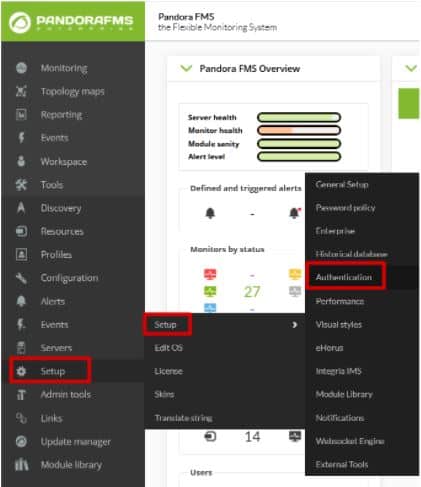
Configuring that tool is as simple as going to the “Authentication” section within the “Setup” tab.

Google-Authenticator

Here the task will be as simple as activating “Double authentication” and, if desired, forcing its use on all users. Once it is done, click on “Update”.

Google-Authenticator

Google-Authenticator

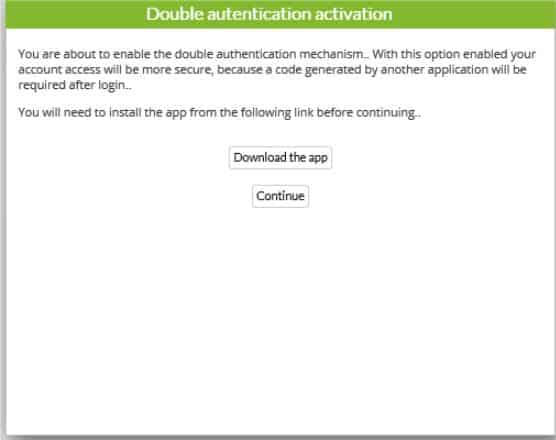
When updating, a window will appear asking you to download the Google authenticator application. Remember it is a mobile application, and, although the link redirects you to the website, you may download it from the Android Play Store or Apple App Store. If you already had it, you would only have to click continue.

Google-Authenticator

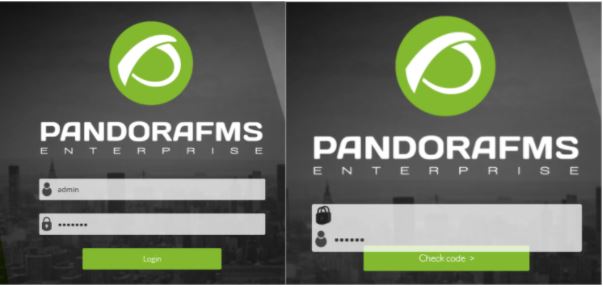
Then, open the application and scan the QR code with it. This will add an account to your application’s registry where a 6-digit number will appear. In case this fails, click “Refresh code”. If everything goes well, continue.

Google-Authenticator

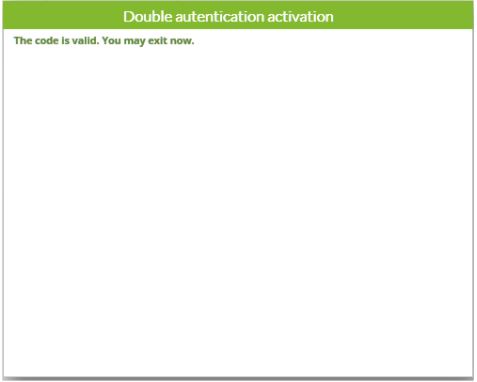
The last window that will appear will be to ask you for the code that was generated in the application, to finish linking your Pandora FMS user with the device where the codes are generated. You will only have to enter this code and you will have finished the configuration of your double authenticator.

Google-Authenticator

To do the test, log out of Pandora FMS and re-enter the credentials of your user, and this time instead of showing you the console it will ask you to enter the application code.

Google-Authenticator

Farewell

Once you have correctly configured this tool, your system will be somewhat more secure, although of course, that does not mean that it is impenetrable, since every day, the so-called “hackers” create new codes to violate this type of security. That is why we always recommend changing passwords frequently and keeping all your devices updated to the latest version of their programs and software in general and continue adding new security measures throughout your network.

About Version 2 Digital

Version 2 Digital is one of the most dynamic IT companies in Asia. The company distributes a wide range of IT products across various areas including cyber security, cloud, data protection, end points, infrastructures, system monitoring, storage, networking, business productivity and communication products.

Through an extensive network of channels, point of sales, resellers, and partnership companies, Version 2 offers quality products and services which are highly acclaimed in the market. Its customers cover a wide spectrum which include Global 1000 enterprises, regional listed companies, different vertical industries, public utilities, Government, a vast number of successful SMEs, and consumers in various Asian cities.

About PandoraFMS
Pandora FMS is a flexible monitoring system, capable of monitoring devices, infrastructures, applications, services and business processes.
Of course, one of the things that Pandora FMS can control is the hard disks of your computers.
PuTTY from a monitoring perspective

What is PuTTY and some useful tips to use it easily

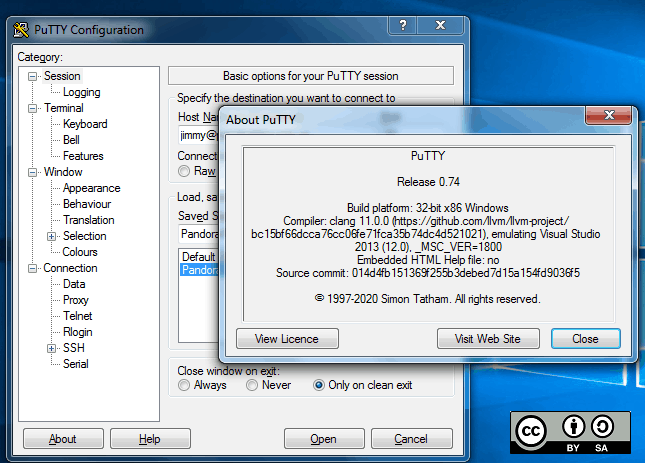
PuTTY is a free program (MIT license) for x86 and AMD 64 architectures (now in experimental stages for ARM). It was developed in 1997!, by Simon Tatham, a British programmer. In this blog, we have been reviewing this useful program for several years, and even the great Pandora FMS team has confirmed it just now in 2020, in the list of network commands for Microsoft Windows® and GNU/Linux®. What if it deserves its own article? Read and judge for yourselves.

Before GNU/Linux®

For those of you who visit us for the first time (welcome all) I will tell you that, when I started hitting the keyboard keys, Mr. Linus Torvalds had not even begun to study at the University of Helsinki, Finland. Age aside, we didn’t even have a graphical environment on our computers, as we know them today. Each program managed the best it could, making calls directly to the hardware, which was expensive and primal and in turn did not allow for more powerful operating systems.

The command line or terminal window was the one we used for almost everything and when operating systems with a graphical interface arrived, this resource was relegated to communicating network computers, given its low cost in terms of data transmission and its powerful use (for example, with a single command you may shut down or restart a computer, and many other things). The surprising thing is that even today we continue to use this work scheme, and even more so in terms of monitoring.

The world of computers today

Since the birth of GNU/Linux® its natural niche has been the server sector, especially web servers. By 2012, Pandora FMS team, with a keen eye, noticed the irruption of Android® in computing and we surely know that today the number of mobile phones with this operating system far exceeds the rest of devices.

Oh, I almost forgot, Android® is a somewhat weird GNU/Linux®, because manufacturers and phone operators do not let us use our “own” computers as root users. Leaving aside the arrival of 5G technology and new mobile operating systems, Android® has no major problems downloading multiple applications, to connect our beloved and precious servers with GNU/Linux (administration, monitoring).

The Windows® platform still retains a powerful slice on desktop systems (mostly for its use in video games). For administration and/or monitoring tasks just getting your hands on a handful of applications is more than enough. Here is where PuTTY, a free tool written in C language, comes into play. I guess here the name PuTTY is the complement of getty (short for get TTY) a program written in Unix by Wietse Zweitze Venema (co-author of the popular Postfix email server) and ported to GNU/Linux. In both worlds, getty has the function of detecting a connection, requesting user credentials, and authenticating them. PuTTY would then be, I guess, an abbreviation for put TTY. Let us also take into account that TTY is the abbreviation of TeleTYpewriter, the first devices based on a typewriter but electrically connected for sending and receiving written messages by telegraph (Télétype® or teletype).

Of course, PuTTY is not the only one – nor will it be the last – that you can use for teletasks: I recognize that Cmder is also a very useful program that includes more options for Windows®: cmd, Powershell® and SSH. But that, ladies and gentlemen, that is another story.

putty
PuTTY main screen

EU-FOSSA 2

European Union Free and Open Source Software Auditing project included PuTTY, in 2019, in the rewards program for hunting software bugs (bug bounty), which I consider shows its importance for computing.

To date, the European Commission has committed € 320,000 in reward payments (up to € 10,000 for revealing a software bug) in this project, and in the case of PuTTY (January to July 2019) they made 34 reports that were rewarded with an average of 285 euros each (I estimate more than twenty thousand euros in total, the highest prize was 6,772.08 euros). With such incentives it is clear that version 0.71 was born specifically by the initiative of all of Europe, considering PuTTY a common good. In this article I talk about the most recent version 0.74, paying my tribute.

Human resources

While money is important, we human beings are even more important, since we bear symbols and we give meaning to this Universe. PuTTY has, apart from Simon Tatham, a small but very select group of developers:

  • Alexandra Lanes: code reviewer who… responds to development emails. Yes, after the bug bounty program, sponsored by the European Commission, they went back to their previous scheme of receiving all improvements, criticisms, comments, etc., by email. Back to old school!
  • Jacob Nevins: Helps receiving email, and sometimes also encrypts.
  • Ben Harris: With high character encoding studies, he helps in the process of porting to other platforms.

In detail, what does PuTTY do for us?

Don’t ask that, ask what you can do with PuTTY. To sum it up a lot, PuTTY turns your powerful computer with a certain number of cores and huge amounts of RAM (with hard disk space and a monitor that would make film director George Lucas turn pale) into… a dumb terminal window. Yes, sometimes little things do titanic jobs, and the other way around!

Do not take the dumb terminal the wrong way, I call it that because everything we write on this side is sent to a Unix or Linux machine (this is usually abbreviated as *nix) and everything sent from there is reflected on our screen.

At a higher level (and I respect that opinion) there are those who think that personal computers have died… If we see it that way, anyone would say let’s move on this is over, but wait, there are still a few things left.

putty
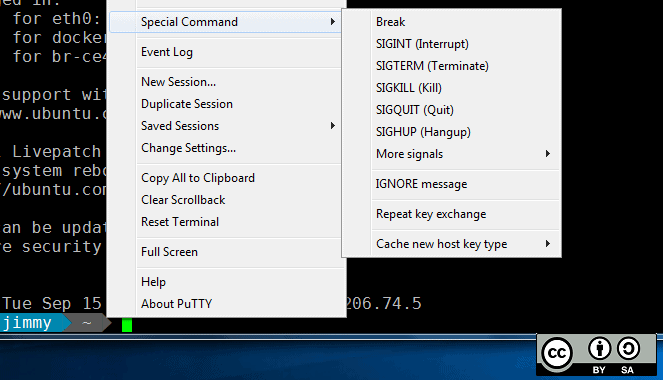
PuTTY special commands for SSH

PuTTY Features

  • PuTTY, by default, will communicate with you through SSH safely, through certificates (public and private key), although if you want to skip security, you have to explicitly request SSH-1.
  • PuTTY has its own format (PuTTY Private Key or PPK) to store the public key without encryption on your disk but with the guarantee of Message Authentication Code (MAC – yes, yet another repeated acronym). That means you need an extra step if you already had a certificate made for OpenSSH, which is the current standard. Otherwise, PuTTY has its own certificate generator in several different formats. The author indicates that the difficulty for PuTTY to stop using PPK is the number of tweets they send them: the more messages, the easier it is. Their account on Twitter is… they don’t have an account on that social network (humor is also an indication of intelligence).
  • If you wish for higher security, you can use a security sentence to your pair of keys when generating them, but then you have to enter that sentence in each connection, each time. PuTTY has Pageant, who stays in memory and does that work for you.
  • PuTTY can use the connection protocol created by Richard Stallman himself – father of the free software movement – back in 1983: SUPDUP. I in particular did not know about it, so I just learned something new with you… Who uses that protocol currently? You see, geek stuff!
  • The PuTTY code has been used by third parties as the basis for an experimental SSH server (developing free software is spreading). PuTTY is written in C language and it is monolithic, it does not use dynamic link libraries, so if you download the appropriate version already compiled in 32 or 64 bits, it is ready to be executed.

putty
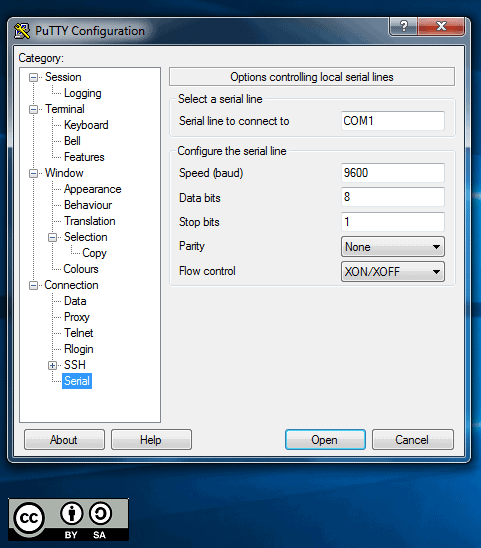
“PuTTY preferences for serial port”

  • Some Cisco® brand network switches use a serial port, conveniently disguised as an RJ-45 terminal, through which you can manage and/or monitor these devices (some other commercial brands do the same). I recommend using the serial port of the motherboard (buy an extension cable for the external slot of the case) which guarantees a better connection than USB to 9-pin serial port adapter cables. Once you have all this, PuTTY will kindly connect you to the serial port, usually COM1
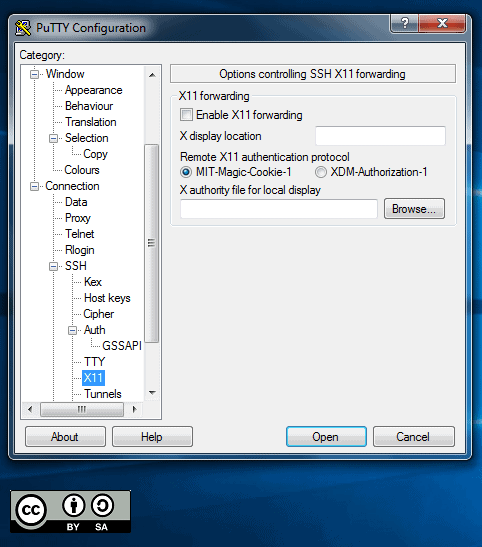
  • In a similar way, you can set a graphical server X on the *xnix machine you will connect to and forward said output through PuTTY to your local machine, in order to use a program like Xming to monitor user experience (in a web browser, for example)./li>

putty
PuTTY preferences X11 forwarding

Tips to save time

When working with PuTTY, these suggestions are very welcomed:

By clicking and dragging directly, it will be copied to the clipboard, without using CTRL + C. If you want to select a rectangular area just press the ALT key before clicking in the session window opened with PuTTY. Remember that clicking with the right button inside the window will paste (CTRL + V) what you have on the clipboard, although you may also use SHIFT + INSERT to paste.

By secondary clicking on the title bar of the window you will have some very interesting options, such as:

  • Work in full screen. This allows you to work without distractions.
  • Duplicate the session, that is, another terminal window with the same server (there is also another option to open a totally new connection or choose between the profiles you have saved).
  • In the configuration option, you can check the option to reuse the connection and then when connecting, right click and choose to duplicate session. From there, all the connections you make will use a single path, even if you use CMD.exe to run other PuTTY executables (psftp,plink, etc.) followed by the profile name you use for the connection and the rest of required parameters.
  • Depending on the type of connection you have established, PuTTY can offer the most used special commands, for example in SSH you will have SIGKILL, SIGTERM, etc
  • Remember that PuTTY stores, by default, the last 200 lines that you worked with (regardless of how keyboard shortcuts are handled in the terminal), because with the configuration option you can increase it to 5,000, just as an example. What use is this to us? Well, if for some reason you lose the connection, then right click again on the title bar of the window and select “Restart connection” and you will still keep everything you have written up to 5,000 lines up!

Remember the lock icon on web pages? Based on that same concept, and to avoid malicious SSH servers (ask them to send you questions of some kind about your passwords) PuTTY has an ingenious method of drawing an icon to differentiate – and legitimize – the warnings and questions that PuTTY asks you in the terminal window. However, this defense cannot be done in Windows CMD windows like for Plink (this executable is used to automate connections and you may never use it directly, but I make an exception).

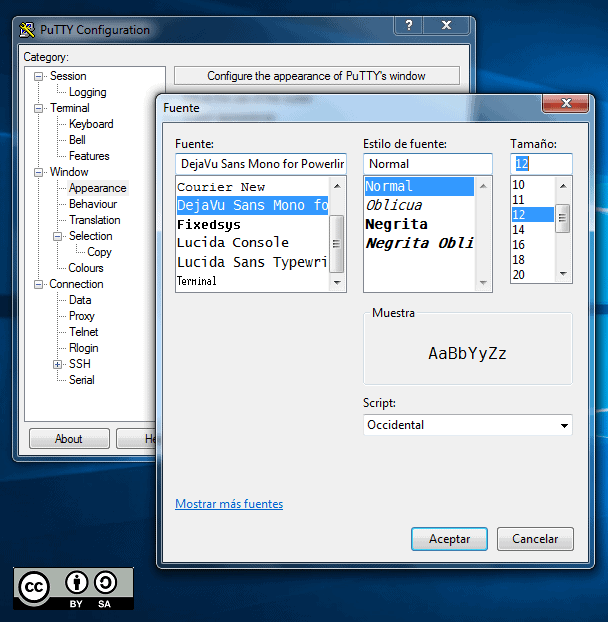
If you use Powerline to give each of your remote machines a professional look (and to differentiate them as well), you can clone the repository and take the fonts and install them in Windows®. Then upload the necessary profile and set the recently installed font to your liking. In any case, PuTTY also allows customizing colors, styles and behaviors when resizing the terminal window and many other things.

putty
PuTTY configured with Powerline font

PuTTY and Pandora FMS

As you can see, PuTTY is actually an additional tool for monitoring as it helps you test and/or debug applications in general because, although SSH is its strength, it has other protocols such as Telnet and even live TCP! How can you contribute to PuTTY? Apart from receiving donations through Paypal, there is something you can do that will make the authors happier: spread and tell others about this software. For example, you can set up your very own mirror site that syncs monthly with the original. If you want to get more committed you can download its source code and help debugging.

About Version 2 Digital

Version 2 Digital is one of the most dynamic IT companies in Asia. The company distributes a wide range of IT products across various areas including cyber security, cloud, data protection, end points, infrastructures, system monitoring, storage, networking, business productivity and communication products.

Through an extensive network of channels, point of sales, resellers, and partnership companies, Version 2 offers quality products and services which are highly acclaimed in the market. Its customers cover a wide spectrum which include Global 1000 enterprises, regional listed companies, different vertical industries, public utilities, Government, a vast number of successful SMEs, and consumers in various Asian cities.

About PandoraFMS
Pandora FMS is a flexible monitoring system, capable of monitoring devices, infrastructures, applications, services and business processes.
Of course, one of the things that Pandora FMS can control is the hard disks of your computers.

Do you already know what Active Directory is and how to use it with Pandora FMS?

What is Active Directory and how to use it with Pandora FMS?

As you may already know, in this blog, we’re so into answering the big questions. After answering in previous episodes what the meaning of our existence is or explaining everything you need to know about Office 365 Monitoring, in today’s episode we are going to discuss what Active Directory is. I hope you are very comfortable sitting in your respective gamer chairs or in your two-seater sofas, because here we go!

What is Active Directory?

Active Directory is a tool that provides directory services, which entails many benefits in the business sector. Many companies have a large number of employees, they need a connected device to do their work, and there we have Active Directory, with it we can build a network of devices for users or employees.

How to collect information on user and service monitoring with Active Directory?

We already know that obtaining information is a very important section of monitoring. All these data can be very useful for us to see the status of something, find a possible problem or simply improve a certain system. Active Discovery is a process by which information can be collected while managing everything in a very simple way. We will be able to see what we need from a single computer, which will make the task much easier, since we will not have to act on each of the devices. In this article, we are going to give you the guidelines to configure Active Discovery and be able to use it.

What are the benefits of using Active Directory?

  • It is focused on professional and business use. It allows you to manage everything easily and without having to intervene in the computers of each user, which saves a lot of time.
  • Store data in real time. With data related to users and their authentication.
  • User authentication. If everything’s ok, the user’s information will reach the computer. This means that if one computer breaks down, you will be able to access it from another with authentication.
  • Easily manage all servers and applications, ensuring that everything runs at peak performance.
  • Prevention of replication errors. To verify that all replications are being performed optimally. Active Directory monitoring is essential, since you will obtain accurate information from them.
  • Obtaining information from remote sites and much more…

And here Pandora FMS comes into play

It is our standard: One of the principles of Pandora FMS is its flexibility. It is highly configurable and by using plugins you will be able to do almost anything in terms of monitoring. Making use of Active Directory in Pandora FMS is quite simple. You can use a specific plugin with which to collect different types of data. Like, for example, the number of users connected or inactive to be able to see them from the console. The data you may obtain is easily configurable from a simple txt, which will be the configuration file. The plugin can be found at the following link: https://pandorafms.com/library/active-directory/ Once downloaded, install it on the console. This short and simple process that will offer you great advantages will be explained below.

What is needed for the plugin to work?

  1. Powershell v3.0 or higher.
  2. Active Directory Powershell Module.
  3. Repadmin. The plugin needs a configuration file that will be divided into the following blocks and will be called “adparams.txt” :
  4. In user, you can choose whether to see the full list of all users or one in particular. In unused, a list of users that have not been used for at least two months. 1 to enable it and 0 to disable it.
  5. Spn allows you to see spn suffixes. 1 to enable and 0 to disable, as in the previous point.
  6. Upn allows you to see spn suffixes. 1 to enable and 0 to disable.
  7. You may also add the test block, which retrieves the information from the AD diagnostic tests that the dcdiag tool returns. 1 to enable and 0 to disable. Example: #tests Tests = 0
  8. We can run the plugin manually, calling executable.exe, writing the following output through the powershell terminal: [path_plugin]\active_directory.exe [path_conf]\adparams.txt
  9. It is recommended to save the file in pandora_agent/util.
  10. In the remote configuration of the agent that we have installed, add the following:
  11. When the interval goes by, modules collected by the users of Active Discovery, the connectivity, the status of the service or the suffixes spn and upn will be obtained.

Execution from the web console

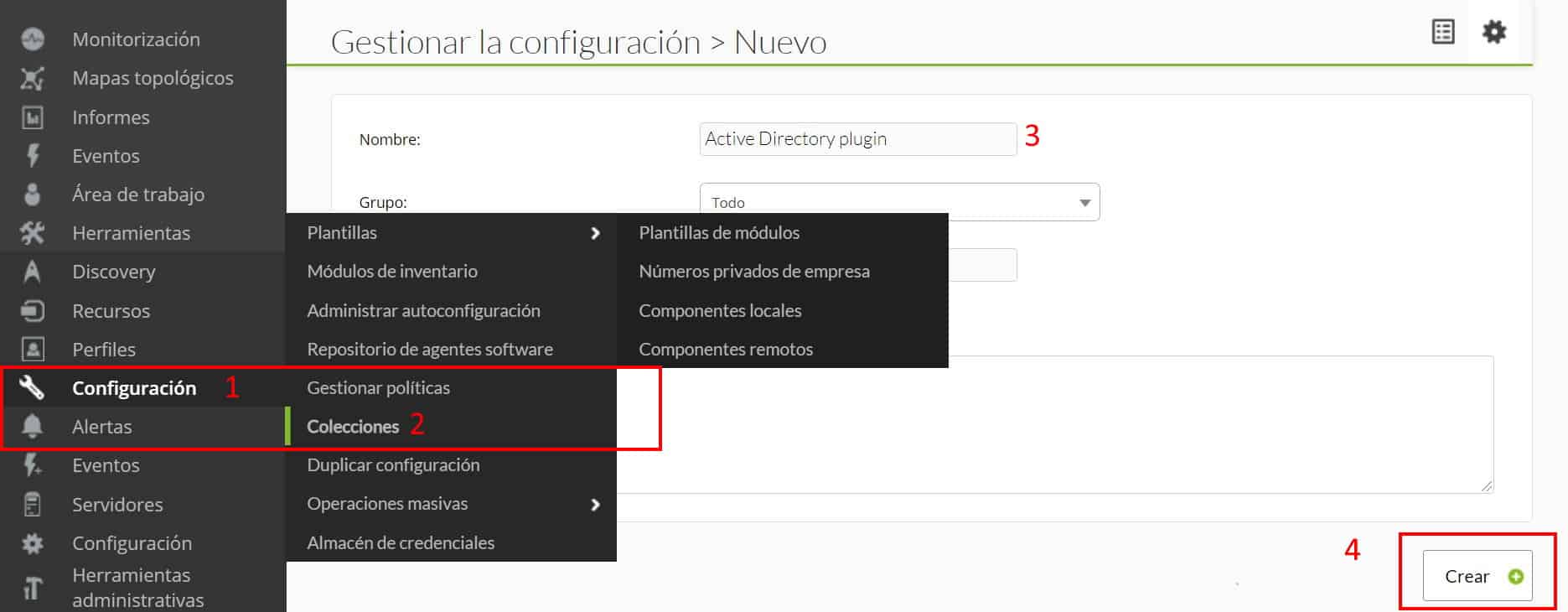
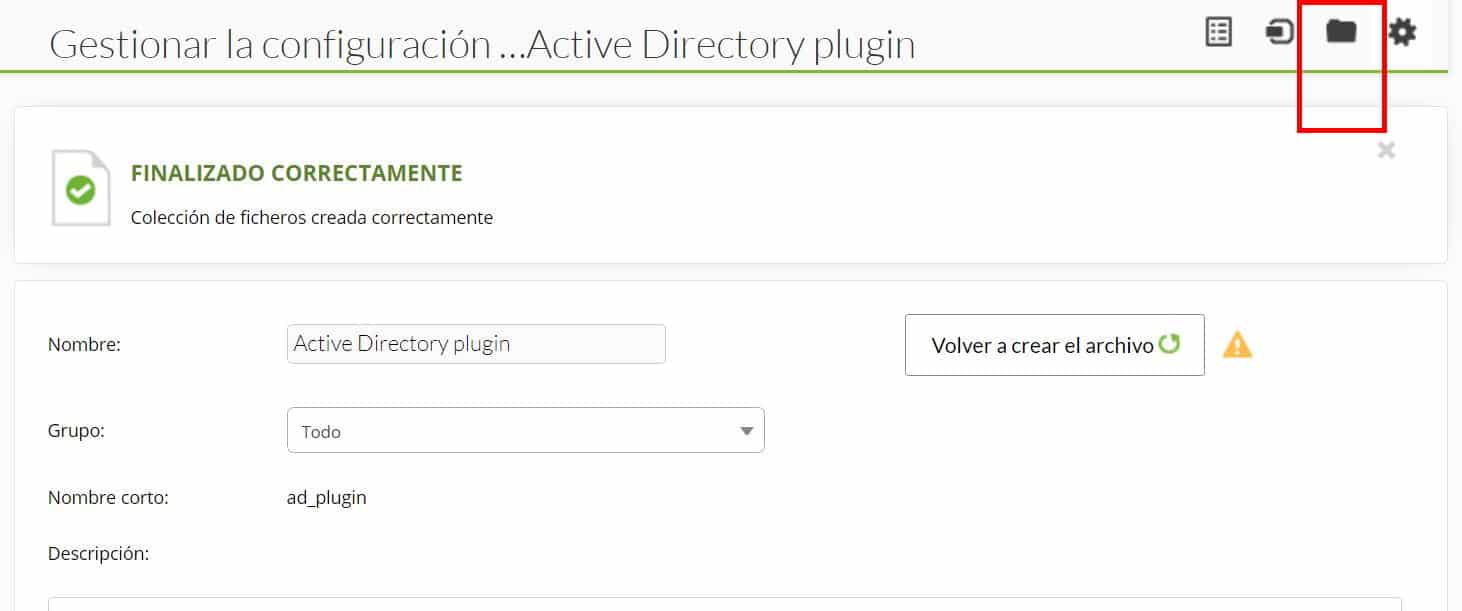
To be able to run it from the console, the plugin will be distributed through collections. In configuration -> collections, create a collection, it will be named “Active Directory plugin” and short name “Ad_plugin”, in the following image you can see the process.

Go to files after creating the collection :

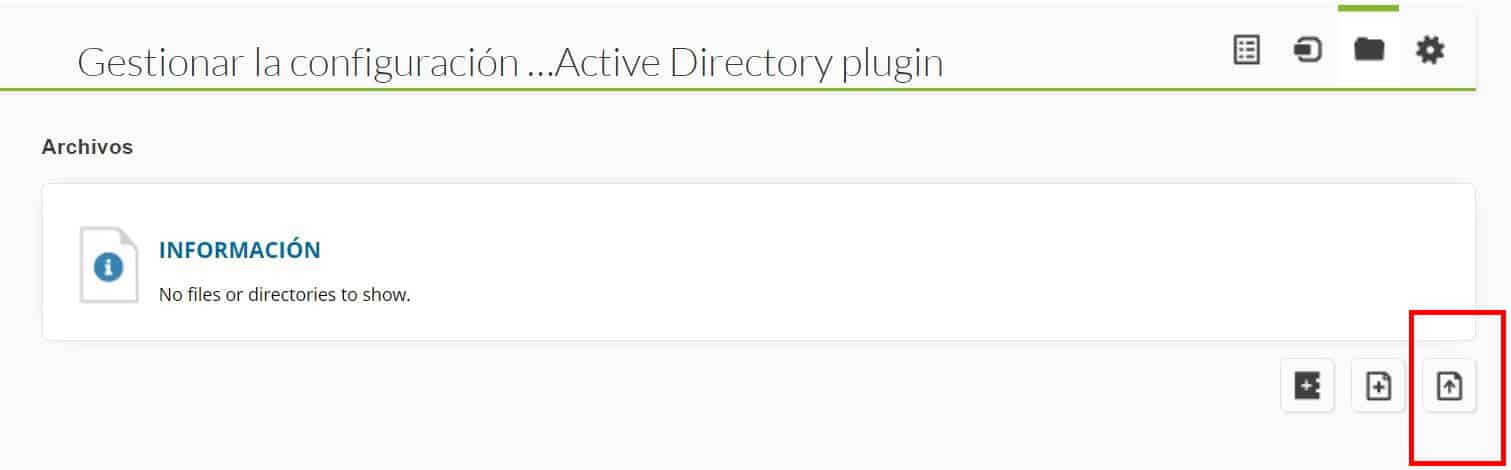
Click on “Upload Files”:

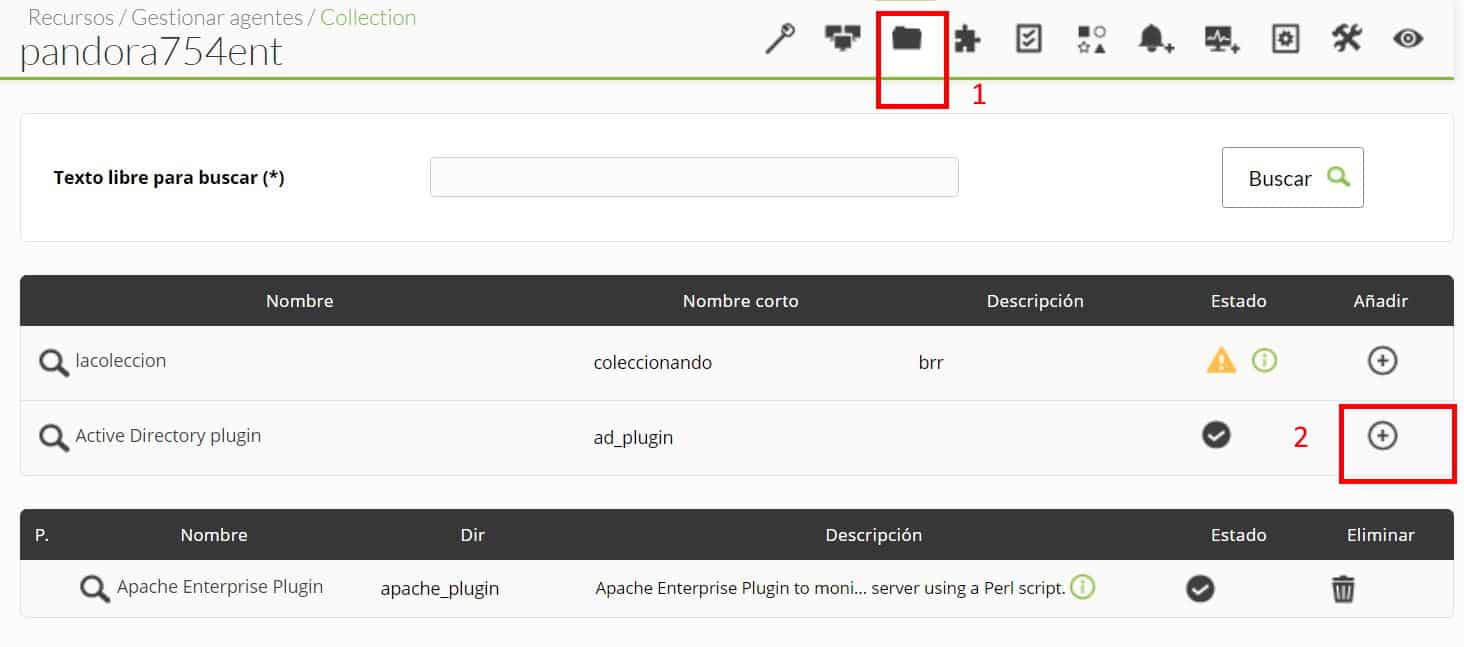
And upload the executable of the plugin and the configuration file that we created previously, then return to the previous menu and click “Create a file again” and later “Update”. In the agent where you want to use the plugin, go to the collections section and add it:

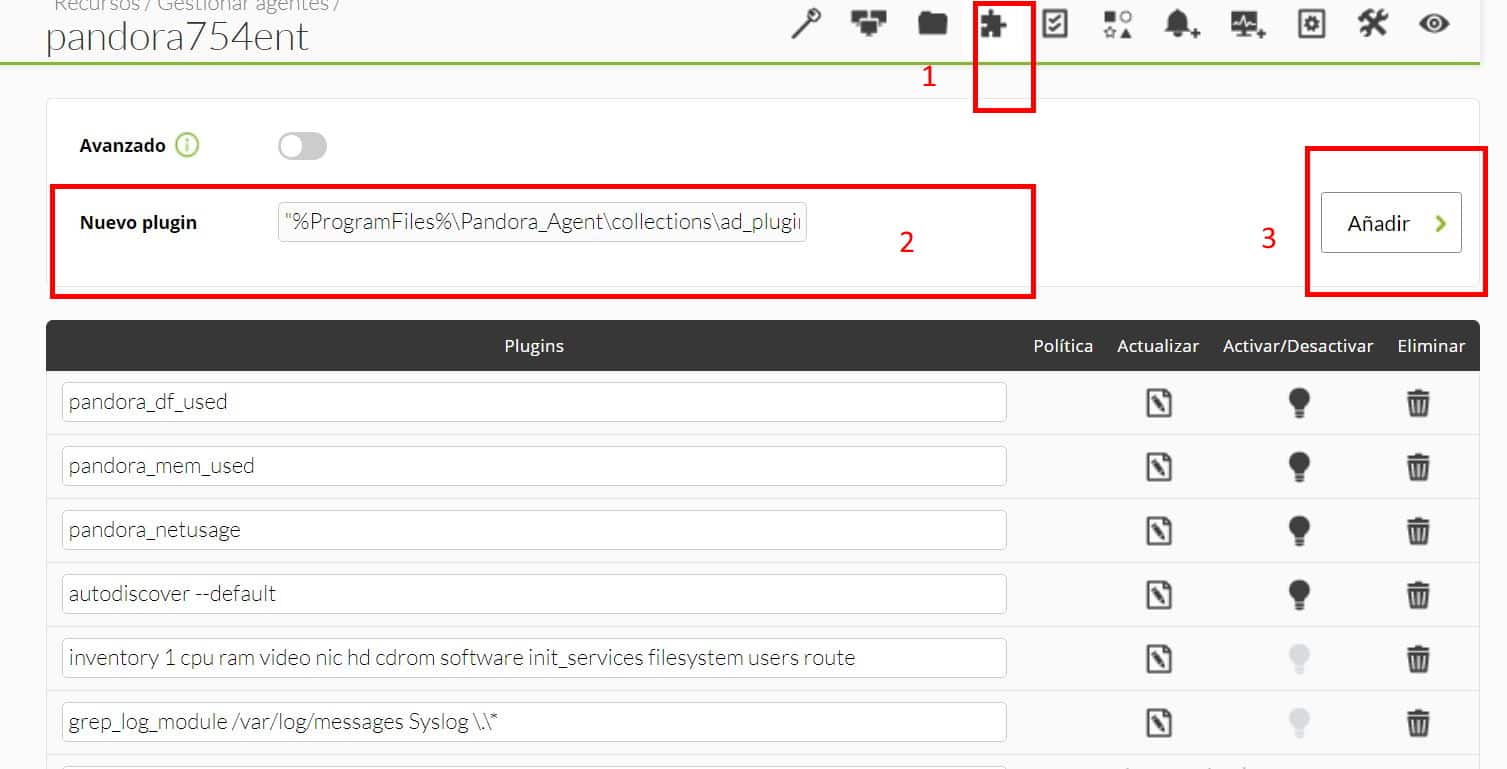
Next, go to “Agent plugins” and add the route with the plugin execution. In this case, as it is by means of collections, they will be created in the software agent installation path.

The path by default would be the view in the image (2).

Modules generated by the plugin

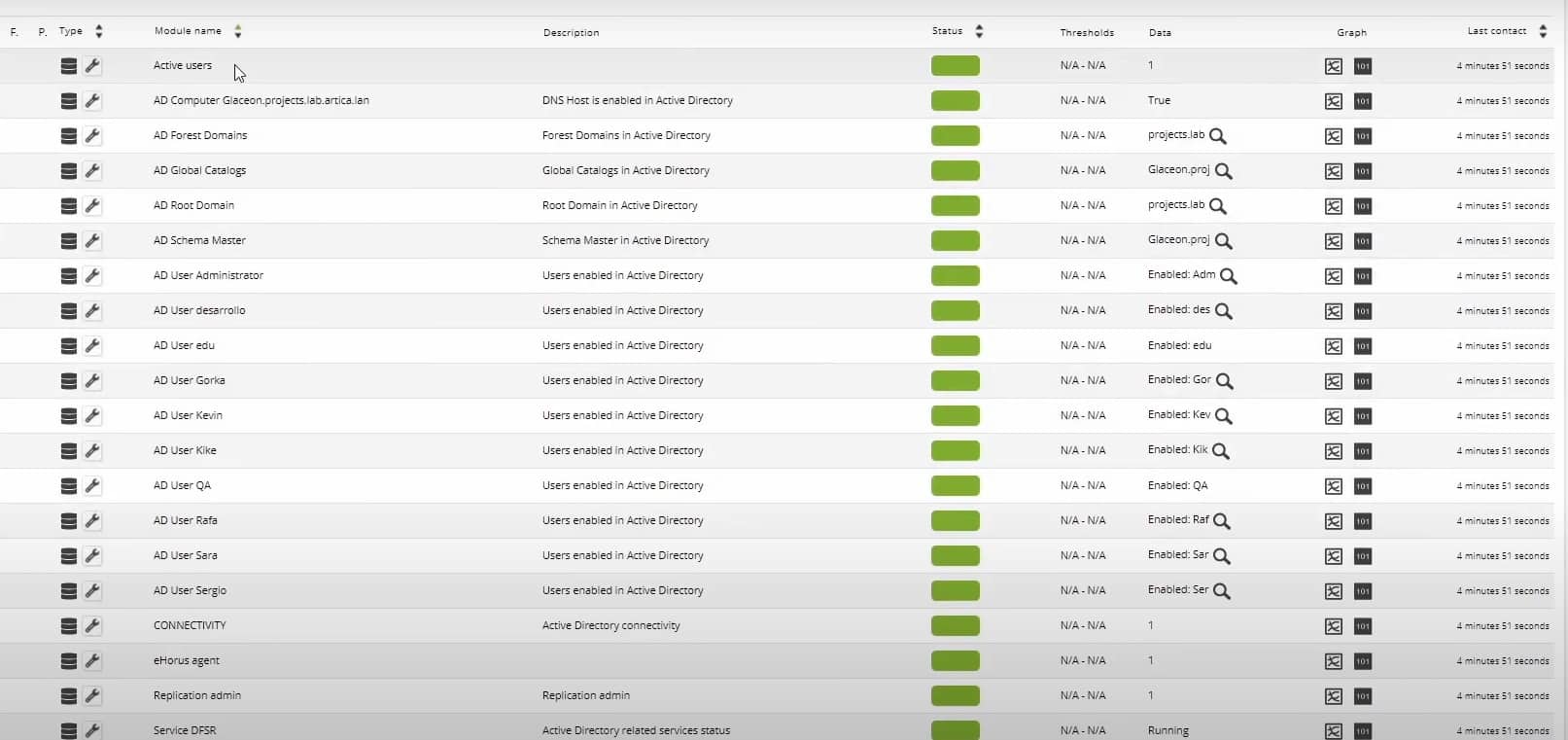
These will be the modules returned by a standard run.

Monitoring:

  • AD Users
  • Unused AD User
  • AD Schema Master
  • AD Root Domain
  • AD Forest Domains
  • AD Computer DNS Host Name
  • AD Global Catalogs
  • AD SPN suffixes
  • AD UPN suffixes
  • Connectivity
  • Replication admin
  • Service DNS status
  • Service DFS Replication status
  • Service Kerberos Key Distribution Center status
  • Service Active Directory Domain Services status
  • Test Advertising status
  • Test FrsEvent status
  • Test SysVolCheck status
  • Test KccEvent status
  • Test KnowsOfRoleHolders status
  • Test MachineAccount status
  • Test NCSecDesc status
  • Test Netlogons status
  • Test ObjectsReplicated status
  • Test Replication status
  • Test RidManager status
  • Test Services status
  • Test SystemLog status
  • Test VerifyReferences status

Service NetLogon status

  • Service Intersite Messaging status

And this is how they would look like in the created agent:

And, up to here that would be everything required to be able to make the plugin work. It was easy, huh? I hope many things in this life, but above all I hope this article was useful, especially to help you understand better Active Directory and how to use it in such a simple way in Pandora FMS. I will not take anymore of your time, indeed, I say goodbye, not before, of course, encouraging you to read other articles on the blog that may be to your liking and taste.

About Version 2 Digital

Version 2 Digital is one of the most dynamic IT companies in Asia. The company distributes a wide range of IT products across various areas including cyber security, cloud, data protection, end points, infrastructures, system monitoring, storage, networking, business productivity and communication products.

Through an extensive network of channels, point of sales, resellers, and partnership companies, Version 2 offers quality products and services which are highly acclaimed in the market. Its customers cover a wide spectrum which include Global 1000 enterprises, regional listed companies, different vertical industries, public utilities, Government, a vast number of successful SMEs, and consumers in various Asian cities.

About PandoraFMS
Pandora FMS is a flexible monitoring system, capable of monitoring devices, infrastructures, applications, services and business processes.
Of course, one of the things that Pandora FMS can control is the hard disks of your computers.
×

Hello!

Click one of our contacts below to chat on WhatsApp

×