Skip to content

runZero 3.1: Sync Active Directory, import assets from Shodan, and launch integrations from Explorers

What’s new with runZero 3.1?

  • Sync your Active Directory users, groups, and machines with runZero
  • Import assets and external services from Shodan
  • Launch integrations from Explorers

Connect and sync Active Directory with runZero

runZero Professional and Enterprise users can now enrich their inventory with asset data from Microsoft Active Directory and Azure AD. runZero Enterprise users will also be able to view, search, analyze, and export users and groups imported from Active Directory. This integration brings Active Directory context to your existing assets and simplifies the process of identifying unmanaged assets. Once the sync completes users can query the asset inventory to identify unmanaged assets on the network. Using a query like source:runzero AND NOT (source:azuread OR source:ldap) will return a list of assets that weren’t in the integration results. Enterprise users can also leverage queries to search the attributes of users and groups. For example, to find accounts that have never logged in, you can use the following query: last_logon_at:<1. To get started, set up a connection to Azure AD or your Active Directory domain controller. Active Directory integrations runZero Enterprise users can now sync data about their public-facing assets from Shodan Search. Assets and services pulled in from Shodan can be correlated against public-facing assets in your runZero inventory. All Shodan users can craft custom queries to gather Shodan data about public assets and services, and licensed Shodan users can also add filters for more specific criteria. Licensed Shodan users can also have runZero automatically build a filtered query to search all external IP addresses in your inventory. This correlation supports cyber hygiene and attack surface management efforts across IT and security teams. The external view of your environment provided by Shodan may not match the current state of your assets. By first importing the public data for your external IP addresses from Shodan then scanning them with runZero, you can determine what has changed. Reviewing the Assets changed section of a completed task will let you see what has changed on your public-facing assets since the last scan. To start pulling asset and service data from Shodan, set up a connection. Shodan Search integration

Launch integrations from Explorers

You can now run third-party integrations from your runZero Explorers as well as the runZero cloud. This feature is useful for IT and security teams that restrict the allowed network traffic connecting to the APIs of their various tools and platforms. This capability also allows integrations to on-premise tools to run as an independent connector in addition to being run as part of network scans. To run an integration from an Explorer, use the Connect menu to choose the source and then select an available Explorer from the configuration dialog. Connector Tasks on Explorers

Add custom fingerprints to runZero

runZero users that have a self-hosted platform or standalone scanner now have the ability to add custom asset and service fingerprints. Following the structure and format of the open-source Recog fingerprint database, users can author their own fingerprint XML files and add them to a directory that the runZero platform or scanner can access. This capability can be useful in adding new fingerprint coverage for unique or custom assets and services, such as a device prototype or a proprietary, internal-use application or service. Custom fingerprints can also be configured to override similar runZero fingerprints by using a same-or-higher certainty value.

Release notes

The runZero 3.1 release includes a rollup of all the 3.0.x updates, which includes all of the following features, improvements, and updates.

New features

  • runZero Enterprise customers can now sync assets from Shodan.
  • runZero Enterprise customers can now sync assets from Azure Active Directory.
  • runZero Enterprise customers can now sync assets from Microsoft Active Directory via LDAP.
  • Connector tasks now can optionally be run from an Explorer on a network.
  • The Events datatable has been redesigned and is now more performant.
  • The Qualys integration now provides a more descriptive error message when rate-limited by the Qualys API.
  • Network File System (NFS) protocol detection on TCP ports has been improved.
  • A bug that prevented editing certain probe options when configuring a scan has been resolved.
  • Fingerprint updates.

Product improvements

  • Event details have been added to alert templates by default.
  • Task statistics for asset counts are now included in CSV exports and can be used in task searches.
  • The license-limit-exceeded event has been added to alert when the live asset count exceeds an accounts license.
  • Dashboard metrics now account for unscanned assets imported from third-party integrations.
  • Internal recurring tasks for metrics calculation no longer show in the recurring task count.
  • A notice was added to the MFA page to inform users that they can continue to use the old rumble.run domain until they re-enroll their authenticators for the new runzero.com domain.
  • Font rendering in Safari browsers now matches Firefox and Chrome.
  • UI improvements were made to the queries table.
  • Inventory searches now support runZero as an asset source type.

Performance improvements

  • The Events datatable has been redesigned and is now more performant.
  • The Asset Route Pathing Report is now more performant due to improved algorithm cycle detection.
  • Web screenshots are now limited to a maximum of 16 concurrent processes.
  • Web screenshots will now run concurrently on arm64 macOS systems.
  • Improved error handling for the GCP integration.
  • Improved parsing of input hostnames.
  • Dashboard insights have been limited to a maximum of three rows.
  • Processing performance for foreign asset data has been improved.

Fingerprinting changes

  • Improved Network File System (NFS) protocol detection on TCP ports.
  • Added OS fingerprinting support for our new Active Directory and Azure AD integrations.
  • Added a new ldap.notes attribute for assets with exposed LDAP/ActiveDirectory services, decoding well-known oids into a user-friendly representation to help with asset hunting.
  • Improved Endpoint Mapper (EPM) fingerprinting, including new service/configuration coverage and support for Unix domain sockets.
  • Improved VMware guest asset fingerprinting coverage.
  • Improved GitLab fingerprinting to include version information, when available.
  • A bug where a TLS common name (CN) field could contain more than the hostname has been resolved.
  • A bug where a Pegasystems version fingerprint could capture additional data has been resolved.
  • Additional support added for products by Amcrest, Aruba, ASUS, AudioCodes, Avaya, Bosch, Brother, CAREL, Continia Software, D-Link, Datapath, Dell, Epiphan Video, ESET, eufy, HikVision, Honeywell, HP, IBM, iRobot, KE2, Kirk Telecom, Kong, Lenovo, Lorex, Meross, MSB Technology, Netgear, NVIDIA, Panasonic, Proofpoint, Roku, Saia-Burgess Controls, Samsung, Soundweb London, Spectrum Instrumentation, TP-LINK, TRENDnet, Uniview, Vikylin, VMware, XAC Automation, Yamaha, and Zyxel.

Integration improvements

  • The Qualys integration now provides a more descriptive error message when rate limited by the Qualys API.
  • A new optional filter has been added to the Crowdstrike connector.
  • The performance of the Qualys connector has been improved.
  • The Tenable integration now excludes terminated and deleted assets.
  • The timeout for Qualys connection tasks has been increased from 60 seconds to 5 minutes.

Bug fixes

  • A bug that prevented editing certain probe options when configuring a scan has been resolved.
  • A bug where a TLS common name (CN) field could contain more than the hostname has been resolved.
  • A bug where a Pegasystems version fingerprint could capture additional data has been resolved.
  • A bug that could cause the browser to freeze when viewing assets with many attributes has been resolved.
  • A bug that could prevent rendering dashboard insights has been resolved.
  • A bug that could result in minimal assets being skipped has been resolved.
  • A bug that could result in the wrong insight counts on the dashboard has been resolved.
  • A bug that could cause attributes and screenshots to be removed from offline assets has been resolved.
  • A bug that prevented using certain organization and export tokens has been resolved.
  • A bug that caused the token to be missing from password reset emails has been resolved.
  • A bug that could cause query timeouts has been resolved.
  • A bug that could cause large Qualys imports to timeout has been resolved.
  • A bug that prevented Qualys from being fully imported from large sites has been resolved.
  • A bug that led to slow exports and job processing has been resolved.
  • A bug that affected formatting of _asset.match values has been resolved.
  • A bug that caused internal tasks for metrics calculation to generate scan-completed events has been resolved.
  • A bug that prevented reports for specific asset attributes has been resolved.
  • A bug that could prevent exporting asset attributes has been resolved.
  • A bug that could prevent CrowdStrike tasks from processing has been resolved.
  • A bug that could prevent the generation of some asset attribute reports has been resolved.
  • A bug that could cause offline self-hosted platform updates to fail has been resolved.
  • A bug that could prevent exporting selected assets and asset search results has been resolved.
  • A bug that could prevent starter accounts from setting up recurring tasks has been resolved.
  • A bug affecting organization selection when a default organization is set has been resolved.
  • A bug that could cause SSH probes to occasionally deadlock has been resolved.
  • A bug that prevented WebAuthn from registering correctly on console.runzero.com has been resolved.
  • A bug that could cause the topology in the asset details page to be mangled has been resolved.
  • A bug that could affect the default probes selector functionality has been resolved.

About Version 2 Digital

Version 2 Digital is one of the most dynamic IT companies in Asia. The company distributes a wide range of IT products across various areas including cyber security, cloud, data protection, end points, infrastructures, system monitoring, storage, networking, business productivity and communication products.

Through an extensive network of channels, point of sales, resellers, and partnership companies, Version 2 offers quality products and services which are highly acclaimed in the market. Its customers cover a wide spectrum which include Global 1000 enterprises, regional listed companies, different vertical industries, public utilities, Government, a vast number of successful SMEs, and consumers in various Asian cities.

About runZero
runZero, a network discovery and asset inventory solution, was founded in 2018 by HD Moore, the creator of Metasploit. HD envisioned a modern active discovery solution that could find and identify everything on a network–without credentials. As a security researcher and penetration tester, he often employed benign ways to get information leaks and piece them together to build device profiles. Eventually, this work led him to leverage applied research and the discovery techniques developed for security and penetration testing to create runZero.

What I’ve learned working at runZero as a UX/UI designer

When I joined the company a little over a year ago, I knew almost nothing about networking. For example, I couldn’t tell you the difference between an authenticated and unauthenticated scan. Most of my networking knowledge came from working with my own home network. I could identify my modem, knew how to connect it to the router, and then set up my network from there. I understood that I had a designated IP address, and that I could connect to the Internet through an Ethernet cable or through my WiFi. I also knew that the Internet and mobile data came from the giant lines and towers outside. Joining runZero unlocked a huge opportunity for me to expand my perspective and learn more about networks.

I know every company says that they have great people, but I feel like runZero has an exceptional team that really prioritizes collaboration and knowledge sharing. runZero cultivates a culture of learning, making it easy for me to pick up so much information about networking and network discovery. The things I’ve learned are practical, which means I can use in my everyday life. For example, one time, I scanned a local nail salon’s network (with their permission, of course), and I discovered a PAX point-of-sale (POS) device. Thanks to runZero I knew about a worrisome incident involving PAX POS devices. I was able to explain the issue to the owners and helped them understand how using PAX devices could affect their business. I’ve also gotten into the habit of scanning new devices that I come across or acquire, like a new phone or printer. I love that I am able to practically use the knowledge I learn at runZero in my everyday life.

Something I really appreciate about runZero is the investment in our people. runZero sent a bunch of us to DEFCON recently, which provided a great opportunity for us to immerse ourselves in the security world. Without my recent experience in the industry, I would have been a fish out of water. While I spent a lot of time attending talks, I was also reeled into other things, like learning to solder and participating in CTFs (capture the flag). Working through CTF challenges was an exciting way to drive personal growth and bond with my colleagues. Attending security conferences in the future will be invaluable for my professional growth, as well as writing blog posts like this one! Professional development is crucial for my role because it helps me better understand the industry, and as a result, design and deliver better user interfaces and experiences for our customers.

My journey at runZero has taken me deep into the world of networking and network discovery. I’ve enjoyed both applying and sharing what I have learned, as well as continuing to grow. And now I can tell you the difference between authenticated and unauthenticated scanning! The tech world is constantly evolving, and so am I.

About Version 2 Digital

Version 2 Digital is one of the most dynamic IT companies in Asia. The company distributes a wide range of IT products across various areas including cyber security, cloud, data protection, end points, infrastructures, system monitoring, storage, networking, business productivity and communication products.

Through an extensive network of channels, point of sales, resellers, and partnership companies, Version 2 offers quality products and services which are highly acclaimed in the market. Its customers cover a wide spectrum which include Global 1000 enterprises, regional listed companies, different vertical industries, public utilities, Government, a vast number of successful SMEs, and consumers in various Asian cities.

About runZero
runZero, a network discovery and asset inventory solution, was founded in 2018 by HD Moore, the creator of Metasploit. HD envisioned a modern active discovery solution that could find and identify everything on a network–without credentials. As a security researcher and penetration tester, he often employed benign ways to get information leaks and piece them together to build device profiles. Eventually, this work led him to leverage applied research and the discovery techniques developed for security and penetration testing to create runZero.

Transient assets: managing the unmanageable

Transient assets can introduce unique challenges to tracking asset inventory and securing your network, especially in the education sector. Students and faculty rely on a diverse range of personal devices and expect to be able to use them everywhere, resulting in high ratios of transient devices on those networks. The term “transient assets” refers to assets that regularly connect and disconnect from your network or other assets. As defined by Applied Risk, a “transient cyber asset is a portable device, such as an operational laptop, which is capable of processing or transporting executable code.” While laptops are often thought of first, mobile devices, IoT devices, and many other device types can be transient if they aren’t always connected to your network. While the surge of remote work and resultant bring-your-own-device (BYOD) has brought the challenge to the doorstep of many industries, the educational sector has been juggling the security implications of transient assets for years.

What’s the problem?

Transient devices aren’t inherently problematic, but failing to track them as part of your inventory can cause security gaps. While organizations that commonly have short-term visitors can segregate a guest network from the rest of the environment, some organizations that see a lot of transient devices need to allow authenticated access to their internal network and data.

Educational organizations tend to see some of the highest ratios of transient devices as students and faculty come and go. Students and faculty are often provisioned accounts and accesses much like staff or employees. As a result, it is especially important to effectively inventory and track these transient devices so that access to internal assets or data can be monitored.

The core security concern related to transient assets is that they are often unknown and unmanageable. While unmanaged devices are a challenge in their own right, transient devices are sometimes better described as unmanageable. Normal BYOD or device provisioning policies can require enrollment in management platforms, but that isn’t typically an option for handling transient devices. As an example in the education sector, students (and their parents or guardians) are unlikely to agree to have their personal devices monitored at the host-level, so the institution needs to be able to build their inventory from network scanning.

On the radar

Grabbing the list of unique MAC addresses connecting to your network over time is a common first step to understanding the scope of transient devices, but that method won’t tell you much about the asset or give you a complete inventory over time. Network scanning is essential to fill in the gaps, and an effective scanning tool can provide detailed information about the assets discovered. Not only will you have a list of IP:MAC address pairings, but you’ll know about device types, hardware, operating systems, and first and last seen dates. Once you have a sense of the scope of those attributes and network traits like commonly detected ports, protocols, and services, you can start categorizing assets until you have a clear picture of what assets show up where and when. From this baseline, you can better identify anomalies and abnormalities, supplementing your security tools with accurate asset attributes so that you can track down problems or security violations.

Zero unknown assets

Building a complete inventory of assets connecting to your network is easy with runZero. The unique combination of unauthenticated active network scanning with comprehensive asset fingerprinting will help you build and maintain a context-rich asset inventory. From there, you can leverage sites, tags, and rules to categorize assets based on the unique needs of your organization. runZero readily detects when assets get new IP addresses and can even notify you by email or Slack, reducing asset duplication in environments with high numbers of transient devices being assigned IP addresses dynamically. Paired with detailed asset attributes, you can use your runZero inventory to really understand what’s on your network at any given time.

About Version 2 Digital

Version 2 Digital is one of the most dynamic IT companies in Asia. The company distributes a wide range of IT products across various areas including cyber security, cloud, data protection, end points, infrastructures, system monitoring, storage, networking, business productivity and communication products.

Through an extensive network of channels, point of sales, resellers, and partnership companies, Version 2 offers quality products and services which are highly acclaimed in the market. Its customers cover a wide spectrum which include Global 1000 enterprises, regional listed companies, different vertical industries, public utilities, Government, a vast number of successful SMEs, and consumers in various Asian cities.

About runZero
runZero, a network discovery and asset inventory solution, was founded in 2018 by HD Moore, the creator of Metasploit. HD envisioned a modern active discovery solution that could find and identify everything on a network–without credentials. As a security researcher and penetration tester, he often employed benign ways to get information leaks and piece them together to build device profiles. Eventually, this work led him to leverage applied research and the discovery techniques developed for security and penetration testing to create runZero.

Strengthen your vulnerability management program with asset inventory

Vulnerability scanning plays a crucial role in any enterprise security program, providing visibility into assets that are unpatched, misconfigured, or vulnerable to known exploits. Customers tell us that they can take action on their vulnerability scan results most effectively when paired with comprehensive asset and network context.

runZero’s vulnerability management integrations let Enterprise users:

  • Add asset and network context to their vulnerability data
  • Identify gaps in vulnerability scan coverage
  • Expedite response to new vulnerabilities

Adding context to your vulnerability data

Just like the other inventory views, the vulnerability inventory supports the use of queries to filter your results. You can craft a query using the supported tags, Boolean operators, and numeric comparison operators. A query like this one will list the critical vulnerability results found on your Cisco hardware: hw:Cisco AND severity:critical. Try this one to identify vulnerabilities with a CVSSv2 score of 6.5 or more on EOL assets: os_eol:6.5.

Some organizations find it helpful to prioritize remediating vulnerabilities on public-facing assets. With runZero you can easily find them by querying your vulnerability results using fields related to IP addresses. Not only can you use filters like cidr: to include or exclude particular address ranges, but you can also use has_public:t to find results on assets with public IP addresses. Just like in the other inventories, these query parameters can be combined to find exactly the results you need.

Closing vulnerability scan gaps

Being able to track down assets impacted by newly disclosed vulnerabilities is great, but how can you be sure you’re scanning everything by addressing gaps in your scan policies? As a starting point, you can evaluate the assets that have been identified by runZero but are not included in your vulnerability results. You can leverage the source column to identify assets that are known by runZero but are not included in your vulnerability scan results. Try out this query in your asset inventory to see which IP addresses you may not be vulnerability scanning (if you changed the minimum severity setting in your integration configuration, this may not be as accurate for you): source:runZero AND NOT source:[VM vendor]. Swap [VM vendor] with the name of your integrated vulnerability management vendor in any query to find the right results:

  • Qualys: source:runZero AND NOT source:qualys
  • Rapid7: source:runZero AND NOT source:rapid7
  • Tenable: source:runZero AND NOT source:tenable

The same logic can be used to find high-value assets or subnets that are not covered by your vulnerability scanning. If you’ve been using sites or tags to organize your assets, you could use the site: or tag: query fields with AND NOT source:[VM vendor] to find matching assets that have not been vulnerability scanned. You can also search for services or protocols that might be a cause for concern, such as protocol:smb AND NOT source:[VM vendor] to find SMB services on assets that haven’t been vulnerability scanned. The query logic also supports filtering by IP address ranges or subnets, meaning you could use cidr:192.168.30.0/24 AND NOT source:[VM vendor] to find unscanned assets in that subnet.

Since many vulnerability management solutions support importing a line-delimited list of IP addresses into a scan policy, you could use the results of these queries as a scan range. Simply export them to a CSV from the runZero Console then copy the address column into a text file. Or, if you’d prefer to use the export API, the following command will pull the results into JSONL format, filter for the address field, and clean up the extra characters. Just switch [VM vendor] in the URL to the right value and you’ll be left with a line-delimited text file of all the addresses that you might not be vulnerability scanning.

curl --location --request GET 'https://console.runzero.com/api/v1.0/export/org/assets.jsonl?search=source%3A%22runzero%22%20AND%20NOT%20source%3A%22[VM vendor]%22&fields=addresses' \
 --header 'Authorization: Bearer ' \
 |  jq -r ".addresses[]?" | sort | uniq > IPsNotVulnScanned.txt

Expediting your response

When the latest vulnerability hits the news, you can use runZero in many cases to quickly check for impacted assets. runZero’s Rapid Response series is a great way for readers to stay on top of breaking security news and track down affected assets. The ability to query across vulnerability and asset details can help you find impacted assets while you’re getting your vulnerability scanner ready for a full analysis. This is just one example of how a comprehensive asset inventory can work in tandem with your vulnerability management tools.

runZero’s rich datasets of devices, manufacturers, and operating systems, coupled with our highly-tuned scanning and processing logic, provides high quality and high confidence asset and service fingerprints. Pulling your vulnerability data into runZero lets you leverage our extensive fingerprinting capabilities to enrich your vulnerability scan results with the asset and network data being gathered by your runZero Explorers, letting you find vulnerabilities impacting specific operating systems, hardware, or services.

With the data already collected by your runZero Explorers, you can quickly identify vulnerable or exploitable assets based on various datapoints, like vendor name and service version. For example, you can use the following query to find BIG-IP assets that might be vulnerable to authentication bypass without having to run a new scan.

_asset.protocol:http AND protocol:http AND (service.vendor:F5 OR html.title:"=BIG-IP%" OR html.copyright:"F5 Networks, Inc" OR http.body:"/tmui/" OR favicon.ico.image.md5:04d9541338e525258daf47cc844d59f3)

When updated vulnerability scan data is available, you can use queries to find results that match a specific CVE or scan plugin ID to better prioritize your remediation efforts. For example, this query can help you find external-facing assets with vulnerable Log4Shell installations: has_public:t AND cve:CVE-2021-44228.

About Version 2 Digital

Version 2 Digital is one of the most dynamic IT companies in Asia. The company distributes a wide range of IT products across various areas including cyber security, cloud, data protection, end points, infrastructures, system monitoring, storage, networking, business productivity and communication products.

Through an extensive network of channels, point of sales, resellers, and partnership companies, Version 2 offers quality products and services which are highly acclaimed in the market. Its customers cover a wide spectrum which include Global 1000 enterprises, regional listed companies, different vertical industries, public utilities, Government, a vast number of successful SMEs, and consumers in various Asian cities.

About runZero
runZero, a network discovery and asset inventory solution, was founded in 2018 by HD Moore, the creator of Metasploit. HD envisioned a modern active discovery solution that could find and identify everything on a network–without credentials. As a security researcher and penetration tester, he often employed benign ways to get information leaks and piece them together to build device profiles. Eventually, this work led him to leverage applied research and the discovery techniques developed for security and penetration testing to create runZero.

runZero 3.0: Check out our new name, and sync assets, software, and vulnerability data from Qualys

What’s new with runZero 3.0?

  • Meet our new brand: runZero!
  • Sync assets, software, & vulnerability data from Qualys

Introducing runZero

Rumble is officially runZero! This name change reflects our growth as a product and as a company. Over the past year, Rumble has added so many new capabilities, presenting an opportunity to evolve so that our brand reflects all of our existing and planned features. runZero continues our mission of making asset inventory easy, fast, and accurate, while giving us runway to grow our platform.

Gathering vulnerability data from Qualys

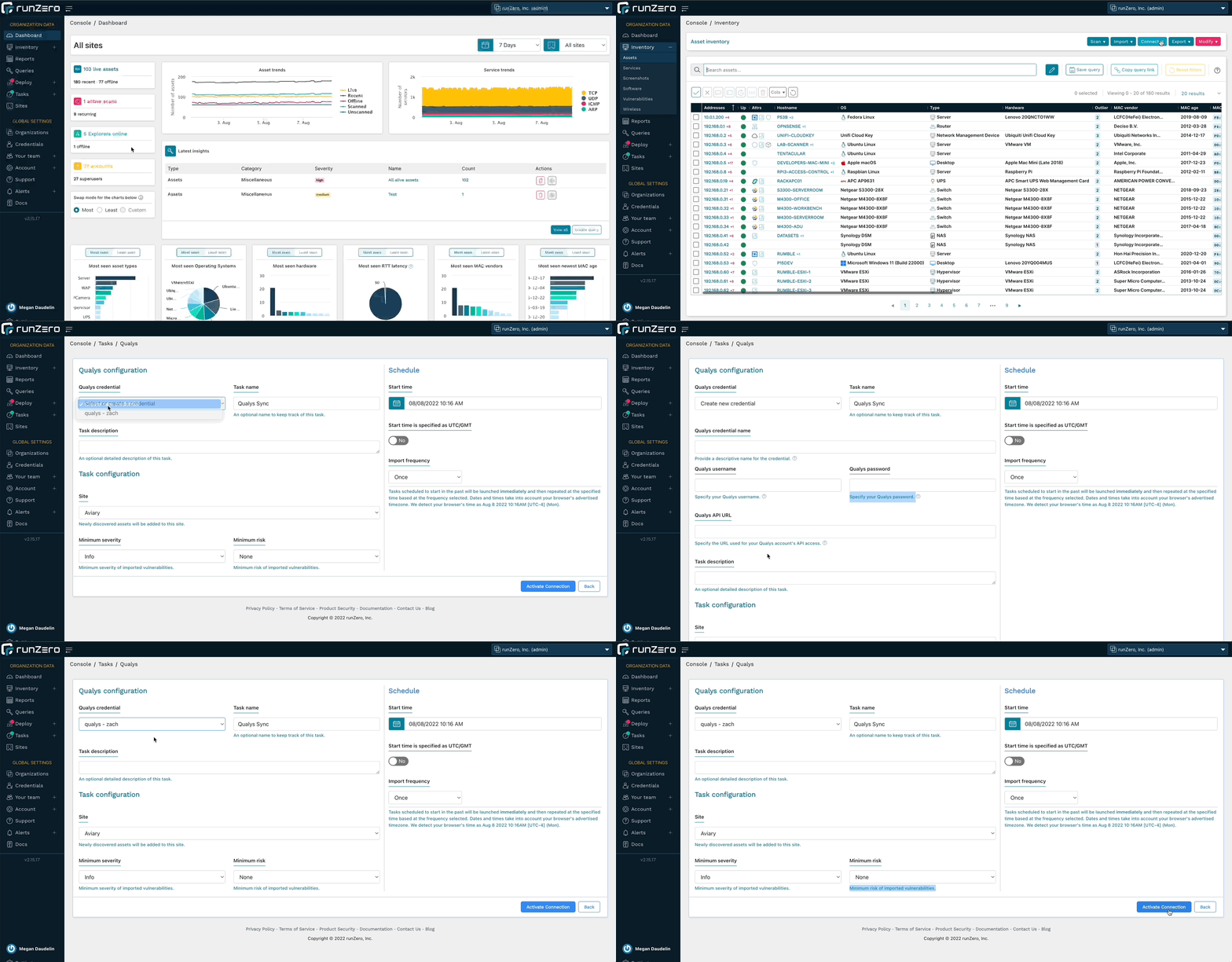
runZero Enterprise users can now enrich their inventory with vulnerability data from Qualys. This allows you to search for Qualys attributes, software entries, and vulnerabilities in runZero, as well as find assets not scanned by Qualys. runZero automatically correlates Qualys assets to runZero assets based on unique fields. Vulnerability data can be viewed in the asset detail view as well as a dedicated inventory tab. Vulnerability attributes include CVSS score, relevant CVEs, vulnerability description, and any recommended remediations.

To get started, set up a connection to Qualys.

Qualys integration

Release notes

The runZero 3.0 release includes a rollup of all the 2.15.x updates, which includes all of the following features, improvements, and updates.

New features

  • Rumble is now runZero and the product UX has been updated to match.
  • runZero Enterprise customers can now sync asset and vulnerability data from Qualys VMDR.
  • Users can now specify a Default Organization in the profile settings page.
  • A custom query to find DrayTek Vigor routers has been added.
  • The Organization API now supports asset merging.

Product improvements

  • Outlier calculations and insight queries now automatically run as daily analysis tasks.
  • Outlier calculations and insight queries can be regenerated on demand using the Metrics menu on the Tasks overview page.
  • Merging assets with foreign attributes from the same source now retains all sets of foreign attributes.
  • Software entries imported from SentinelOne and Tenable now report their service addresses.
  • The Software and Vulnerabilities datatables now have a “view more details” button.
  • The Asset and Service attributes reports can now be filtered by Site.
  • API keys are now shown hidden by default and can be copied to the clipboard through a click.
  • Vulnerability details are now available on the Vulnerability Inventory screen.
  • Improved ability to extract Microsoft Windows information from web services.
  • Improved ability to extract information from NetBIOS, including new detection of Domain Controller roles.
  • Hosted Zone scan limits have been increased.
  • The runZero Explorer now logs configuration file loading and reports any syntax errors.
  • Hostname identification from LDAP responses has been improved.
  • Filtering of non-unique MAC addresses has been improved.
  • Inconsistent SNMP data handling has been improved for certain classes of devices.
  • The API now returns all attributes, sources, and subnets for a single asset.
  • The runZero Explorer now runs as a delayed auto start process on Windows to increase reliability after reboots.
  • The Organization Overview report now includes navigation links to return to the top of the report.
  • Click-to-copy functionality has been restored for MAC addresses displayed on inventory pages.
  • Asset export query errors now return HTTP 400 status code with descriptive bodies.

Performance improvements

  • The Queries datatable has been redesigned and is now more performant.
  • The Route Pathing report is now more performant and aborts early in out-of-memory scenarios.
  • Processing speed for large Nexpose and Tenable imports has been improved.
  • Improved support for processing very large scans.
  • Improved performance of the software and vulnerabilities tables.

Fingerprinting changes

  • Improved operating system fingerprints for Amazon, Azure, and GCP integrations.
  • Improved operating system fingerprints for Red Hat Enterprise Linux / CentOS, Fedora, Rocky, and Ubuntu releases.
  • Improved fingerprints for Windows operating system.
  • Added the ability to fingerprint McAfee ePolicy Orchestrator (ePO) and Agent.
  • Improved NetBIOS, NTLM, and LDAP fingerprinting logic.
  • Improved coverage for networking gear, including vendors Cisco, Dell, and Extreme Networks.
  • Improved NTP banner fingerprints.
  • Printer detection has been improved.
  • OS fingerprinting will now use Rapid7 fingerprints, when Rapid7 is the only data source.
  • Additional support for products by 2N, Axis, D-Link, DrayTek, FortiNet, Foscam, FrontRow, Hisense, Impinj, Kentec, OleumTech, Schneider Electric, SEL, Synology, and VMware.

Integration improvements

  • Improved hostname-based merging for Rapid7 imports.
  • Improved support for processing very large Rapid7 imports.
  • Software will now be populated from Rapid7 imports.
  • Rapid7 foreign attributes have been adjusted for clarity.
  • Services will now be populated from Censys.
  • The InsightVM integration now supports larger imports.

Bug fixes

  • A bug in the AWS Configuration UI causing the “Lambda instances” option to not persist has been resolved.
  • A bug that could prevent external users from being directed to their main SSO login page has been resolved.
  • A bug which could cause stale software entries to be retained has been fixed.
  • A bug in the Insights table which could render very large buttons has been fixed.
  • A bug that could lead to a 500 error when accessing the users endpoint of the organization API has been resolved.
  • A bug that could cause tooltips to persist on the screen has been resolved.
  • A bug that could cause the vulnerabilities table to appear empty when sorted by the details column has been fixed.
  • A bug that could cause the HTTP probe to abort early has been resolved.
  • The asset tag update and bulk asset tag update APIs now work as documented.
  • Fixed a bug which prevented all org admins from deleting other users.
  • The User Last Activity date now shows the correct date.
  • A bug that could prevent connector tasks from running in parallel while connecting to third-party APIs has been resolved.
  • A bug that prevented organization administrators from deleting other users has been resolved.
  • A bug affecting inventory multi-select operations has been resolved.
  • A bug preventing inventory column selection has been resolved.
  • A bug that could indefinitely stall a task has been resolved.
  • A bug affecting license warning banners has been fixed.
  • A bug affecting macOS Explorer upgrades on M1 systems has been fixed.
  • A bug that prevented importing VMware assets has been fixed.
  • When a templated task fails due to an Explorer being unavailable, copying the failed task now retains the connection to the template.
  • A bug in the Overview report which showed blank addresses for Unscanned assets has been resolved.
  • A bug that caused scan copies to get assigned to a different site has been resolved.
  • A bug that prevented OS icons from showing on inventory tables has been resolved.
  • A bug that prevented copying or updating Nessus connector tasks has been resolved.
  • A bug that could lead to an error in the External Asset Report when no assets were present has been resolved.
  • A bug that could cause the Export API to return a 500 instead of 400 for invalid queries has been resolved.
  • A bug that caused some Explorer updates to fail on Windows has been resolved.

About Version 2 Digital

Version 2 Digital is one of the most dynamic IT companies in Asia. The company distributes a wide range of IT products across various areas including cyber security, cloud, data protection, end points, infrastructures, system monitoring, storage, networking, business productivity and communication products.

Through an extensive network of channels, point of sales, resellers, and partnership companies, Version 2 offers quality products and services which are highly acclaimed in the market. Its customers cover a wide spectrum which include Global 1000 enterprises, regional listed companies, different vertical industries, public utilities, Government, a vast number of successful SMEs, and consumers in various Asian cities.

About runZero
runZero, a network discovery and asset inventory solution, was founded in 2018 by HD Moore, the creator of Metasploit. HD envisioned a modern active discovery solution that could find and identify everything on a network–without credentials. As a security researcher and penetration tester, he often employed benign ways to get information leaks and piece them together to build device profiles. Eventually, this work led him to leverage applied research and the discovery techniques developed for security and penetration testing to create runZero.

×

Hello!

Click one of our contacts below to chat on WhatsApp

×