Skip to content

ESET Research: Infamous IoT botnet Mozi taken down via a kill switch

  • ESET researchers have observed the sudden demise of one of the most prolific Internet of Things (IoT) botnets: Mozi has been responsible for the exploitation of hundreds of thousands of devices a year since 2019.
  • ESET observed a drop in Mozi’s activity in India and China in August, later discovering a kill switch that disabled the malware and stripped the Mozi bots of their functionality.
  • There are two potential instigators for this takedown: the original Mozi botnet creator or Chinese law enforcement, perhaps enlisting or forcing the cooperation of the original actor or actors. The sequential targeting of India and then China suggests that the takedown was carried out deliberately, with one country targeted first and the other a week later.

BRATISLAVA — November 1, 2023 — ESET Research recently observed the sudden demise of one of the most prolific Internet of Things (IoT) botnets, named Mozi, infamous for exploiting vulnerabilities in hundreds of thousands of IoT devices each year. User Datagram Protocol (UDP) observed an unanticipated drop in activity that began in India and was also observed in China a week later. The change was caused by an update to Mozi bots that stripped them of their functionality. A few weeks following these events, ESET researchers were able to identify and analyze the kill switch that caused Mozi’s demise.

“The demise of one of the most prolific IoT botnets is a fascinating case of cyber forensics, providing us with intriguing technical information on how such botnets in the wild are created, operated, and dismantled,” says ESET researcher Ivan Bešina, who investigated the disappearance of Mozi.

On September 27, 2023, ESET researchers spotted the control payload (configuration file) inside a UDP message missing the typical content; its new activity was in fact to act as the kill switch responsible for Mozi’s takedown. The kill switch stopped the parent process – the original Mozi malware – and disabled certain system services, replaced the original Mozi file with itself, executed certain router/device configuration commands, and disabled access to various ports.

Despite the drastic reduction in functionality, the Mozi bots have maintained persistence, indicating a deliberate and calculated takedown. ESET analysis of the kill switch showed a strong connection between the botnet’s original source code and recently used control payloads that were signed by the correct private keys.

“There are two potential instigators for this takedown: the original Mozi botnet creator or Chinese law enforcement, perhaps enlisting or forcing the cooperation of the original actor or actors. The sequential targeting of India and then China suggests that the takedown was carried out deliberately, with one country targeted first and the other a week later,” explains Bešina.

For more technical information about the demise of the Mozi botnet, check out the blog post “Who killed Mozi? Finally putting the IoT zombie botnet in its grave” Make sure to follow ESET Research on Twitter (now known as X) for the latest news from ESET Research.

About Version 2 Digital

Version 2 Digital is one of the most dynamic IT companies in Asia. The company distributes a wide range of IT products across various areas including cyber security, cloud, data protection, end points, infrastructures, system monitoring, storage, networking, business productivity and communication products.

Through an extensive network of channels, point of sales, resellers, and partnership companies, Version 2 offers quality products and services which are highly acclaimed in the market. Its customers cover a wide spectrum which include Global 1000 enterprises, regional listed companies, different vertical industries, public utilities, Government, a vast number of successful SMEs, and consumers in various Asian cities.

About ESET
For 30 years, ESET® has been developing industry-leading IT security software and services for businesses and consumers worldwide. With solutions ranging from endpoint security to encryption and two-factor authentication, ESET’s high-performing, easy-to-use products give individuals and businesses the peace of mind to enjoy the full potential of their technology. ESET unobtrusively protects and monitors 24/7, updating defenses in real time to keep users safe and businesses running without interruption. Evolving threats require an evolving IT security company. Backed by R&D facilities worldwide, ESET became the first IT security company to earn 100 Virus Bulletin VB100 awards, identifying every single “in-the-wild” malware without interruption since 2003.


23.9.8 ‘Voyager’ released

Enhancements

  • Improve security posture of the Comet Server web interface by adding additional XSS protections

Bug Fixes

  • Fixed an issue with CVE-2023-44487 HTTP/2 Rapid Reset Attack
  • Fixed an issue with MySQL streaming restore raising packet size errors when restoring large blobs
  • Fixed an issue that prevented using Spanned storage for Storage Role in the Comet Server web interface
  • Fixed a cosmetic issue with spacing around the warning message when viewing stale vault analysis information in the Comet Server web interface

About Version 2 Digital

Version 2 Digital is one of the most dynamic IT companies in Asia. The company distributes a wide range of IT products across various areas including cyber security, cloud, data protection, end points, infrastructures, system monitoring, storage, networking, business productivity and communication products.

Through an extensive network of channels, point of sales, resellers, and partnership companies, Version 2 offers quality products and services which are highly acclaimed in the market. Its customers cover a wide spectrum which include Global 1000 enterprises, regional listed companies, different vertical industries, public utilities, Government, a vast number of successful SMEs, and consumers in various Asian cities.

About Comet
We are a team of dedicated professionals committed to developing reliable and secure backup solutions for MSP’s, Businesses and IT professionals. With over 10 years of experience in the industry, we understand the importance of having a reliable backup solution in place to protect your valuable data. That’s why we’ve developed a comprehensive suite of backup solutions that are easy to use, scalable and highly secure.

Why backups are key ransomware targets

And 10 best practices for being ransomware resilient

“Ransomware is the new normal.” We’ve all heard it, and we’re going to keep hearing it. Why’s that exactly? Cyberthreats such as ransomware are a constant concern, and now more than ever, safeguarding your data (and business) against ransomware attacks is a necessity as the frequency of ransomware attacks continues to increase and new regulatory standards for cybersecurity are introduced.

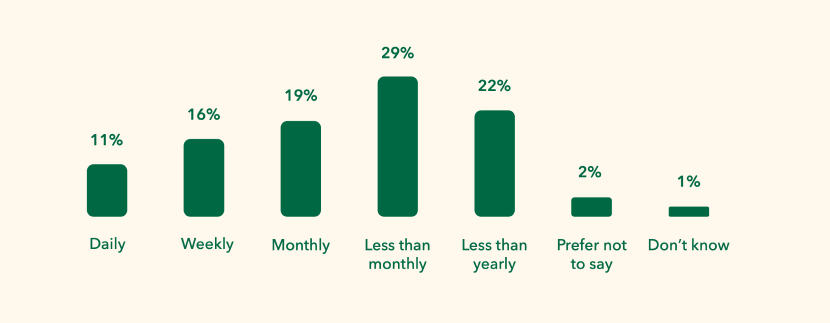
The frequency of attempted ransomware attacks
respondents experienced over the past 12 months​:

How often businesses experienced a ransomware attack during the past 12 months, according to ESG research

IT managers, CISOs, and CIOs are acutely aware of the pivotal role data protection plays in their organizations and are searching for a ransomware solution, but it’s not “just” the data at risk, it’s the entire business impact. And ransomware is increasingly targeting backup data.

So, what’s the level of concern across those tasked with cyber resilience?

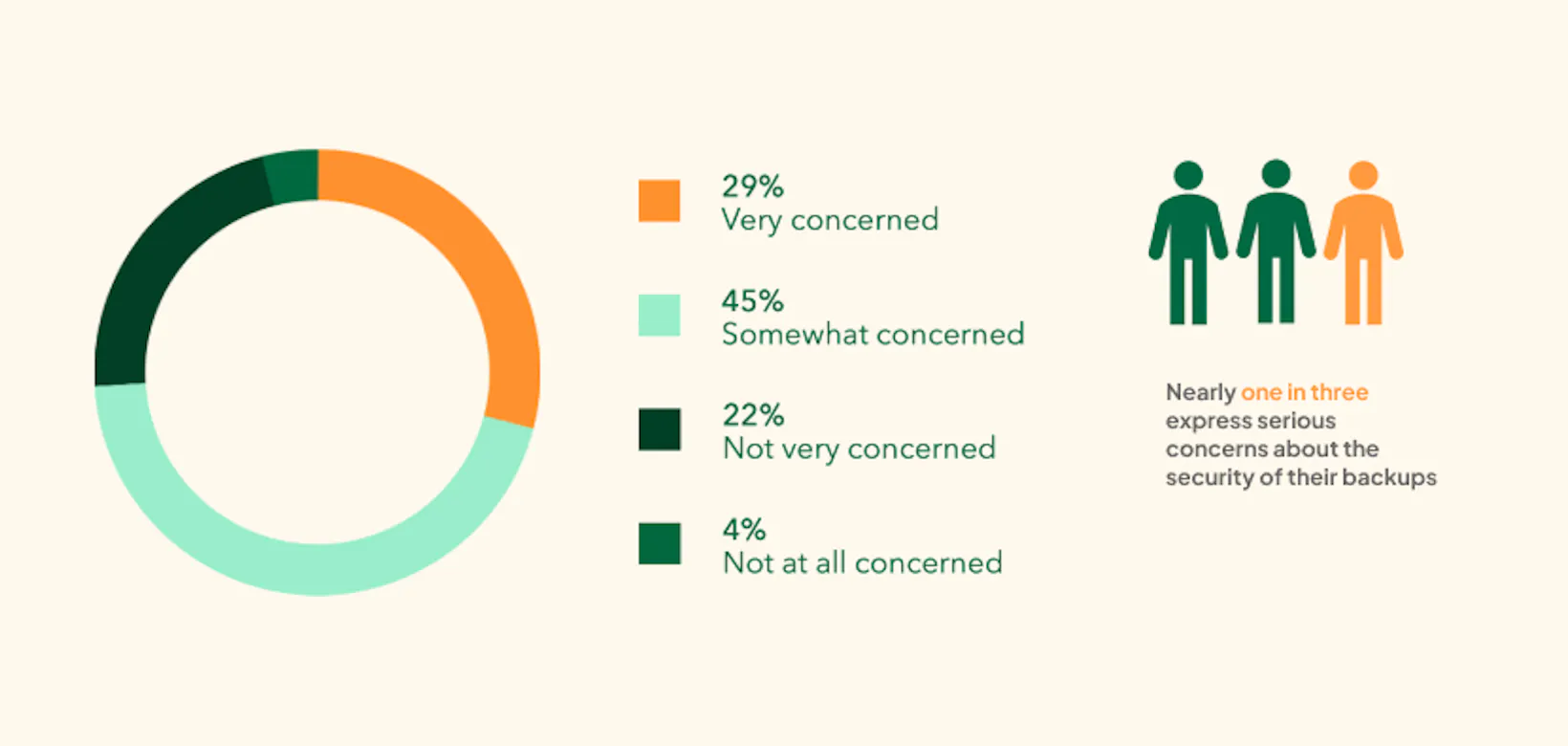
According to ESG research, nearly 1 in 3 have serious concerns about the security of their backups

According to the Enterprise Strategy Group (ESG) report, “2023 Ransomware Preparedness: Lighting the Way to Readiness and Mitigation,” of the 600 IT and cybersecurity professionals surveyed, only 4% were not concerned at all about ransomware attacks affecting their data protection copies. So, that’s a whopping 96% that have at least some level of concern for their backup data — with nearly one in three voicing serious concerns.

Access the full report

Let’s look into the current ransomware landscape to understand why backups are being targeted by ransomware and the measures (both proactive and reactive) that companies should have in place to not fall victim to the ransomware threat. This will lead us into data protection best practices that ensure cyber readiness.

6 Reasons why backup is targeted by ransomware


  • Data recovery: Ransomware attackers understand that organizations rely on their backups to recover from data loss incidents. By encrypting or deleting backup data, cybercriminals significantly reduce the victim’s ability to restore their systems and data without paying the ransom. 
  • Business continuity: When backup data is compromised, an organization’s ability to continue its operations is severely hampered. Ransomware aims to disrupt business continuity and inflict financial damage. Targeting backups achieves this goal effectively. 
  • Data value: Backups often contain a comprehensive historical record of an organization’s data, which can be extremely valuable. This includes sensitive customer information, intellectual property, and financial records. Ransomware attackers can threaten to expose or sell this data to further pressure victims into paying the ransom, or leverage compliance-critical data that organizations need to avoid serious liabilities, substantial fines, and reputational damage. 
  • Access and control: Once ransomware infects a system, it often seeks to propagate to other devices on the network. By compromising backups, the attacker gains a strategic foothold in the organization’s infrastructure, making it easier to continue the attack, demand ransom, and potentially cause more damage. This is very much a valid concern for businesses utilizing Entra ID. Learn more about the control plane and why data cloud protection is a must for Entra ID (Azure AD).
  • Lack of separation: In many cases, cloud backups are stored on the same network or in the same cloud environment as the primary data. This is true with Microsoft backups and others using public cloud. If ransomware infiltrates one part of the network, it can easily spread to backups that lack adequate separation, rendering them vulnerable. 

    Put simply, one attack could reach all your production data and backup data. This brings to mind the adage of not putting all your eggs in one basket and is why true backup requires having backup data on a logically separate infrastructure. 
  • Minimal security measures: Historically, cloud backups have not received the same level of security scrutiny as production data. Many organizations focus their security efforts on their active systems and underestimate the need to secure backups adequately. If your backups aren’t stored safely and independently, how can you restore your data from them in the event of an attack? With new cybersecurity regulations being introduced, organizations need to put their attention on how to secure their backups in a way that is compliant with regulations.

The protection gap

The protection gap in data security refers to the potential vulnerability that exists between an organization’s primary data and its ability to recover or restore that data in case of data loss or a cyberattack.

This gap stems from the fact that while organizations invest in various security measures to protect their active data, they may overlook comprehensive backup and recovery strategies. This oversight can leave critical data exposed and susceptible to loss, damage, or theft.

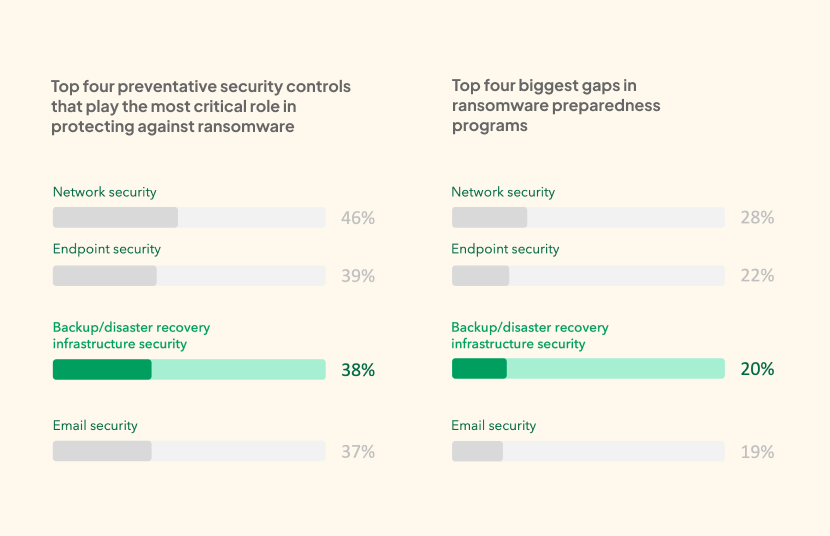
We can see from the respondents’ answers in the report that backup infrastructure security is one of the most critical to protect, as well as one of the areas with the biggest gaps in ransomware preparedness.

Top four preventative security controls, as well as the top four gaps in ransomware preparedness:

Top security controls critical in protecting against ransomware, as well as the top four gaps in ransomware preparedness

What are the common vulnerabilities in data protection?


  • Inadequate access controls: Weak or improperly configured access controls can allow unauthorized users or malware to infiltrate backup systems, compromising the integrity of the data stored there.
  • Lack of air gapping: In cases where backup systems share a network with primary systems, ransomware can easily move between them. The absence of air gapping (network segmentation) increases the risk of cross-contamination.
  • Insufficient authentication: If backups lack robust authentication mechanisms, malicious actors can gain unauthorized access to backup data, manipulate it, or delete it without hindrance.
  • No data immutability: Without data immutability, backup data is vulnerable to tampering by ransomware. Attackers can alter or delete backup files, rendering them useless for recovery.
  • Single points of failure: Relying on a single backup solution or location can result in a single point of failure. If this point is compromised by ransomware, an organization may lose both primary and backup data.

Understanding the vulnerabilities and the tactics used by ransomware to attack backup systems is essential for developing a comprehensive defense strategy to protect valuable data assets and maintain business continuity.

Safeguarding your data: Data protection best practices

Organizations employ various strategies and technologies to protect their cloud-based backups and ensure data integrity, and there are well-established best practices proven effective at keeping data safe and companies compliant with all regulatory bodies, such as NIS2 and GDPR. These methods are essential for safeguarding cloud data against various threats, including ransomware.

Here’s 10 best practices that organizations typically follow to ensure their cloud-based backups are protected and that their businesses meet regulatory and compliance standards: 


  • Access control: Access to cloud backup systems is tightly controlled. Only authorized personnel are granted permission to modify or delete backup data stored in the cloud. Access control mechanisms may include role-based access control (RBAC) and multi-factor authentication (MFA) to enhance security. It’s also important to limit the number of subprocessors to as few as possible: Some backup solutions even have zero subprocessors.

  • Encryption: Backup data stored in the cloud is encrypted both in transit and at rest. This ensures that even if an attacker gains access to the data, it remains unintelligible without the right decryption keys.

  • Data immutability: Immutability features are implemented to prevent the unauthorized modification or deletion of backup data. This safeguards the integrity of the cloud backups, making them resilient to ransomware attacks.

  • Regular cloud backups: Organizations perform regular backups of their cloud data to ensure that information is backed up frequently. This minimizes the amount of data that could be lost in an attack or data corruption.
  • Offline and air-gapped backups: Some organizations maintain offline or air-gapped cloud backups. These backups are physically disconnected from the network, making them immune to online attacks, including ransomware. Air-gapped cloud backups are especially effective in preventing data loss due to cyber threats.
  • Versioning/snapshot: Cloud-based backup systems often support versioning, allowing organizations to recover previous versions of files stored in the cloud. This feature is crucial for restoring data to a known-good state when ransomware has altered files.
  • Geographic redundancy/sovereignty: Large organizations may store cloud backups in multiple geographic locations within the cloud infrastructure to mitigate the risk of data loss due to regional incidents or localized cyberattacks. It’s vital that your data protection provider offers regional data centers and that they guarantee no data transmission outside of your selected region.
  • Regular testing: Cloud-based backup systems are regularly tested to ensure that they are functioning as expected. This involves not only verifying the backup process but also performing restoration tests to confirm that cloud data can be successfully recovered.
  • Monitoring and alerts: Continuous monitoring of cloud backup systems and alerts for suspicious activities are set up. Any unusual access or data modification triggers alerts that can be addressed promptly.
  • “Offsite storage” in the cloud: Backups are often stored offsite in cloud services. This protects cloud data in the event of on-premises disasters, such as fires or floods. But in cloud storage, having backup data outside of the production environment is key: Read more about this in the 3-2-1 backup rule blog.

By implementing these protective measures, organizations can maintain the security and availability of their cloud-based backup data, reducing the risk of data loss due to ransomware and other potential threats and thereby strengthening cyber resilience.

As organizations have become aware of the vulnerabilities in their data protection processes for backup and recovery, many are taking extra precautions to safeguard their backup copies, which are crucial for recovery in case of a crisis.

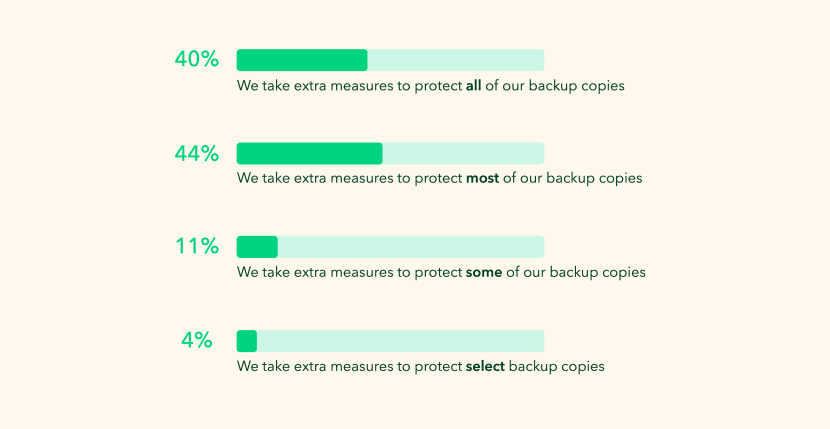
Let’s look at the percentage of organizations taking additional measures to protect their backup copies​:

According to ESG research, the percentage of organizations taking additional measure to protect their backup copies

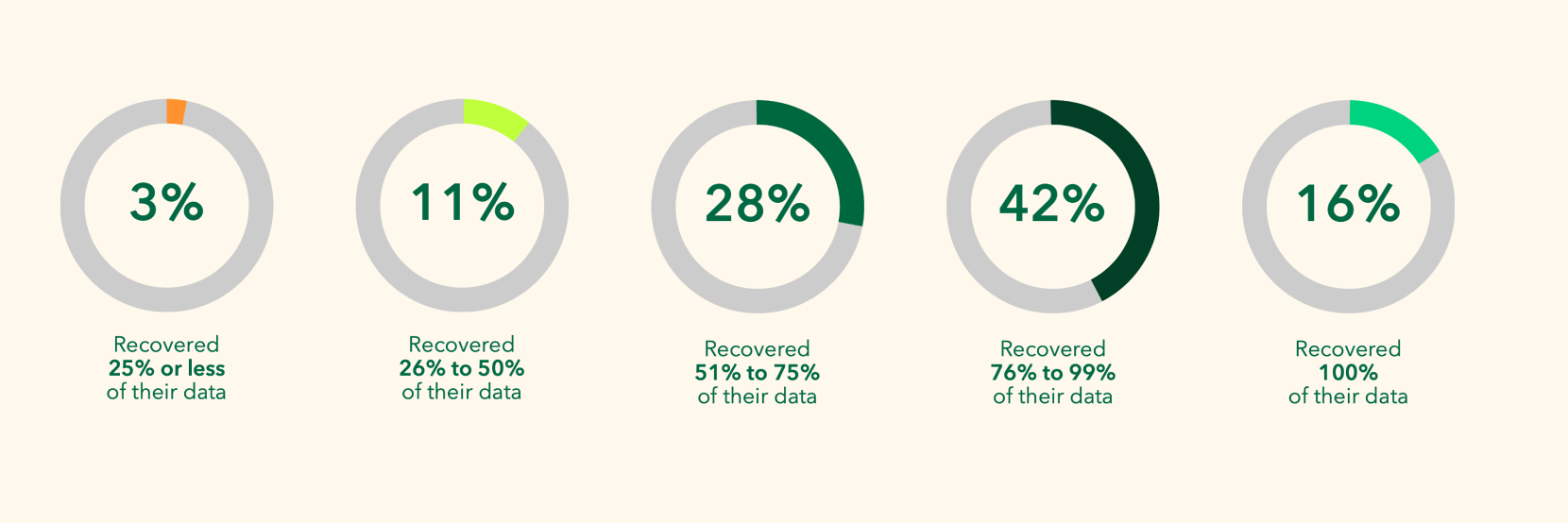
As awareness grows of the vulnerabilities and data protection best practices, it’s unfortunately only 40% of organizations that are making extra efforts to protect all their backup copies. This gap in data protection is highlighted in the finding that after a ransomware attack, not all data can be recovered.

The amount of data organizations were able to recover after a ransomware attack:

Percentage of data able to be recovered by organizations after a ransomware attack, according to ESG research

The numbers show that there is still a lot to be done to prepare for the ransomware threat. To continue learning about what to do to improve your cyber resiliency and avoid being ransomed, join us for our expert-led webinar on November 28. Together with industry experts from Enterprise Strategy Group, we will be sharing even more insights and discussing best practices and data protection strategies that effectively combat the threat of ransomware.

Join our webinar!

This post is part one of a five-part series on the role backups play in the protection against ransomware, so check back soon to catch the next installment, which will cover the importance of air gapping in data protection.

About Version 2 Digital

Version 2 Digital is one of the most dynamic IT companies in Asia. The company distributes a wide range of IT products across various areas including cyber security, cloud, data protection, end points, infrastructures, system monitoring, storage, networking, business productivity and communication products.

Through an extensive network of channels, point of sales, resellers, and partnership companies, Version 2 offers quality products and services which are highly acclaimed in the market. Its customers cover a wide spectrum which include Global 1000 enterprises, regional listed companies, different vertical industries, public utilities, Government, a vast number of successful SMEs, and consumers in various Asian cities.

About Keepit
At Keepit, we believe in a digital future where all software is delivered as a service. Keepit’s mission is to protect data in the cloud Keepit is a software company specializing in Cloud-to-Cloud data backup and recovery. Deriving from +20 year experience in building best-in-class data protection and hosting services, Keepit is pioneering the way to secure and protect cloud data at scale.

What is Active Directory Integration (ADI)?

Active Directory (AD) was introduced two decades ago to provide centralized user and rights management as well as Windows PC configurations for private networks behind firewalls. Email was the first factor to upend that model for access control, and was followed by the proliferation of cloud services and devices that transformed networks into a digital estate.

The perimeter model that AD supported worked well, until it didn’t. Its shortcomings helped lay the groundwork for the Zero Trust approach to identity and access management (IAM). Zero Trust brings access control (the perimeter) closer to identities and devices by enforcing explicit trust before granting access to resources.

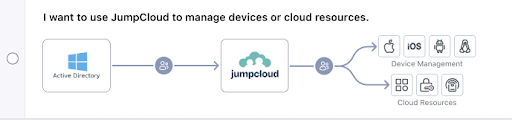
JumpCloud’s open directory platform makes it possible to modernize AD for Zero Trust. It works by combining cloud IAM with universal endpoint management (UEM) and other essential services to manage today’s IT infrastructures, which are a hybrid of everything, everywhere. JumpCloud’s Active Directory Integration (ADI) feature integrates AD with the open directory.

ADI makes it possible for multi-domain environments to extend AD environments to the cloud without locking small to medium-sized enterprises (SMEs) into a suite of vertically integrated tools. That approach to AD modernization can limit freedom of choice and distract from your overall mission by making IT management significantly more difficult. This article provides an overview of what ADI is and how it works to help SMEs reestablish the strong access control that was lost when AD’s network perimeter model failed to meet today’s IT infrastructure needs.

Note: JumpCloud helps you follow Microsoft’s Zero Trust Rapid Modernization Plan (RaMP) for a privileged access strategy to secure AD.

AD Integration Deployment Models

AD integration

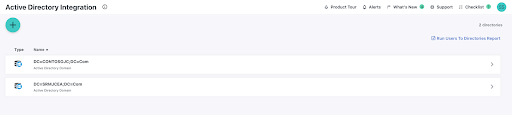
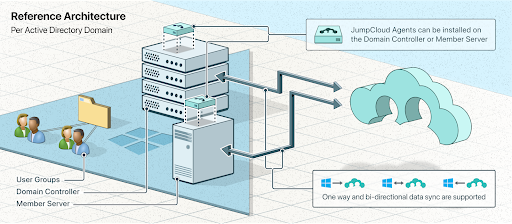
ADI continuously syncs users, groups, and passwords between AD and JumpCloud. Its components are installed on a member server and configured to import and sync identities for each domain. It provides several options for authentication flows: bi-directional syncing and one-way syncing (in either direction). Pass-through authentication back to AD is supported to uphold security and compliance requirements for local authentication and authorization.

Note: Microsoft’s Entra ID cloud directory will not synchronize groups unless the subscription is a Premium SKU.

Bi-Directional Synchronization

JumpCloud Architecture

Bi-directionality means that password changes that occur on the integrated platform get synchronized and changed in AD. This makes it possible for friction-free user access with single-sign on (SSO). It also enables advanced identity lifecycle management. For example, you can use JumpCloud to sync human resources systems with JumpCloud and back to AD.

AD integrations are often one-way, where AD is the source of truth and a third-party application or IT resource authenticates user access against AD. Resources such as web applications require SSO in order to meet modern security and usability requirements. A cloud directory provides SSO with the added benefit of multi-factor authentication (MFA) and conditional access to enable a Zero Trust security strategy that “assumes breach” and verifies requests.

This approach modernizes AD to extend access control to every device and resource without requiring admins to perform consolidation, migration, or deep integrations with multiple point solutions. Admins can manage users, groups, and access in either AD or JumpCloud.

There’s also an available migration path to JumpCloud, if and when it makes sense to leave AD.

Note: Microsoft requires its customers that modernize AD using Entra ID to purchase premium subscriptions for password write-back.

Pass-Through Authentication

synchronization

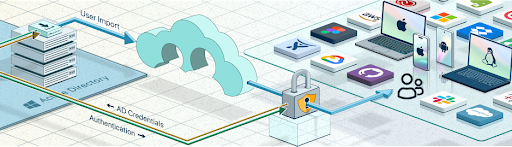
Some sectors are required to retain oversight of their credential store for certainty and compliance. JumpCloud’s open directory can federate authentication AD through ADI, which extends AD to other resources and devices without running afoul of those rules.

Note: Outbound authentication flows from AD to JumpCloud enable AD users to access cloud resources and non-Windows devices.

Modernizing AD with JumpCloud

JumpCloud is modern, user-friendly, and makes it possible for admins to manage SSO and UEM from a single console with minimal effort. It also extends SSO to common network protocols, adding convenience, while reducing the risk of unauthorized access to infrastructure. A Zero Trust IAM strategy complements your existing investment in network perimeter security.

A crucial part of reestablishing access control over your digital estate comes from the ability to integrate AD with non-Windows systems.

modernize AD flow chart

Universal Endpoint Management

JumpCloud’s UEM adds the ability to integrate Android, macOS, and Linux devices into Active Directory-controlled environments with mobile device management (MDM) support for Windows. Untrusted endpoints can become a weak link in a Zero Trust strategy; UEM ensures that there’s a baseline of policies and patch management (optional) to reduce your attack surface.

End users don’t have to jump through hoops to stay compliant with password policies, password resets, and other critical functions. And, they can do this from anywhere — with no VPN. Built-in remote assist is available to support your users with both attended and unattended sessions.

Note:

Agents provide telemetry and reporting on device and user activity.

SSO and Modern Authentication 

ADI synced identities connect through SSO to networking infrastructure with RADIUS, cloud infrastructure and web apps with OIDC and SAML, file servers on-prem and in the cloud, legacy applications via LDAP, and more by using JumpCloud’s RESTful API.

Note:

JumpCloud offers an integrated password manager for when SSO isn’t possible.

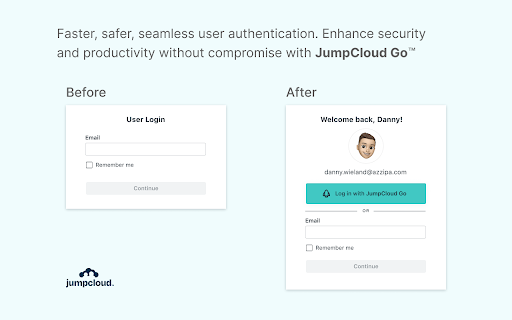
The platform also includes JumpCloud Go™, a hardware-protected and phishing-resistant passwordless login for JumpCloud managed devices. It provides modern authentication that’s more secure and simpler and safer for your users. JumpCloud Go is supported on MacOS and Windows and integrates with device biometric authenticators (Apple Touch ID or Windows Hello) to satisfy traditional password sign-in challenges. It will provide high MFA authenticator assurance.

JumpCloud Go
Modern authentication helps to harden AD against the latest security threats.

Adopting SSO and UEM is recommended for all organizations that use AD, per Microsoft’s Cybersecurity Reference Architectures (MCRA). JumpCloud provides SMEs with an alternative to Microsoft’s prescribed path by keeping your identity provider (IdP) and IT stack independent. JumpCloud has essential IAM, UEM, and system management capabilities in a single place.

Try JumpCloud ADI

Still wondering what Active Directory Integration is and how it can modernize AD? See for yourself when you sign up for a free trial of JumpCloud. It’s included with the open directory platform at no additional charge. JumpCloud has professional service options to assist with onboarding users. JumpCloud is also a Google partner and integrates with Google Workspace, making both services better together with a modern IT management and productivity package.

About Version 2 Digital

Version 2 Digital is one of the most dynamic IT companies in Asia. The company distributes a wide range of IT products across various areas including cyber security, cloud, data protection, end points, infrastructures, system monitoring, storage, networking, business productivity and communication products.

Through an extensive network of channels, point of sales, resellers, and partnership companies, Version 2 offers quality products and services which are highly acclaimed in the market. Its customers cover a wide spectrum which include Global 1000 enterprises, regional listed companies, different vertical industries, public utilities, Government, a vast number of successful SMEs, and consumers in various Asian cities.

About JumpCloud
At JumpCloud, our mission is to build a world-class cloud directory. Not just the evolution of Active Directory to the cloud, but a reinvention of how modern IT teams get work done. The JumpCloud Directory Platform is a directory for your users, their IT resources, your fleet of devices, and the secure connections between them with full control, security, and visibility.

NordLayer services in review: Device Posture Security

Mobility and device versatility make business digital possibilities nearly endless. However, overcoming one technical or security challenge means another will soon emerge. Just like enabling secure remote user access to the company network raises another issue for IT administrators — how to ensure only compliant devices enter the network? 

Customized internal policies must be synced with the organization’s business model and sensitive data levels. Specific rules define how identities are managed to access the company network; on another security level, they are redistributed to access unrestricted resources.

In this process, the absent layer of security guarantees entering devices match the set organization’s security criteria to prevent potential security breaches. Companies can address this challenge by adopting Zero Trust Network Access-based endpoint controls.

A service like Device Posture Security provides a comprehensive solution for organizations looking to bolster their security. By monitoring – and, if required, blocking – devices that connect to the company network, organizations can mitigate risk levels of exposing sensitive information to dangerous scenarios.

Device Posture Security using NordLayer

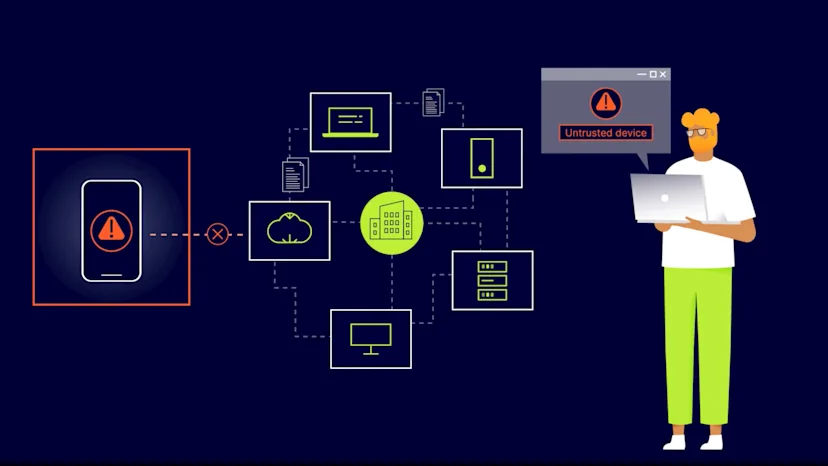
NordLayer’s Device Posture Security service is based on the ZTNA security model, meaning that all devices are treated as untrusted until they can prove trustworthy.

This approach ensures that organizations have complete visibility and control over the devices connecting to their network.

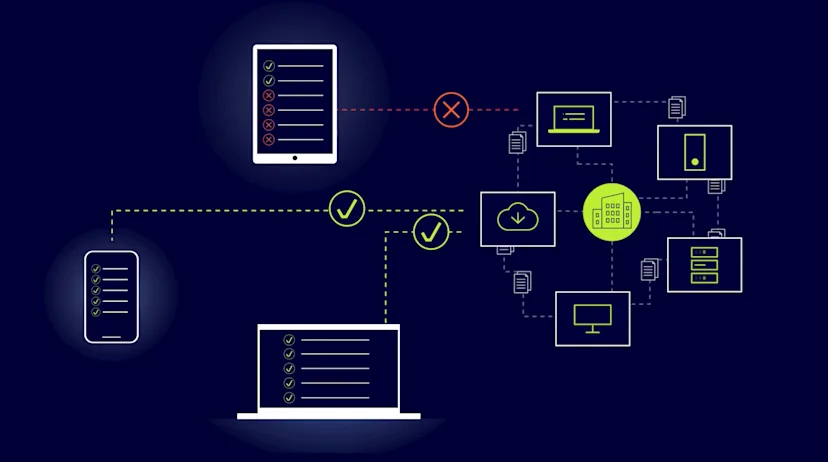
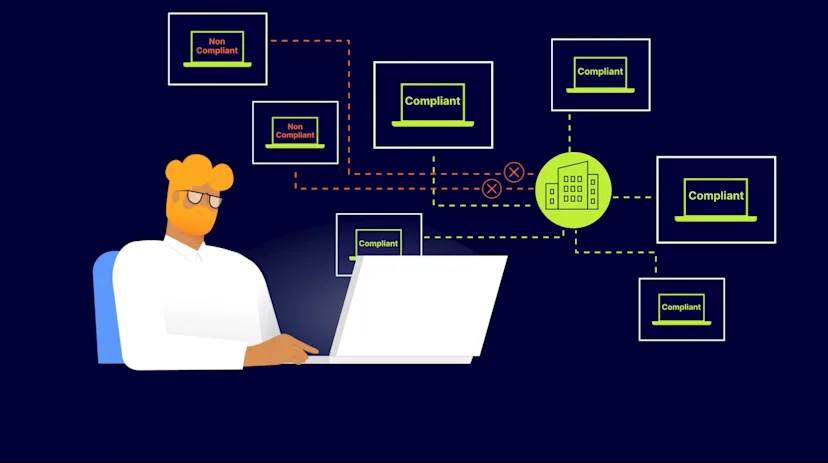
The Device Posture Security functionality helps monitor who connects to the company network according to predefined rules and enables non-compliant device blocking capability to meet ZTNA requirements.

Click to tweet

Primarily, NordLayer-introduced Device Posture Security service allowed monitoring network-entering devices. Now the technology is enhanced with blocking functionality that enables network administrators to take action once a non-compliant device is detected.

How does NordLayer’s Device Posture Security service work?

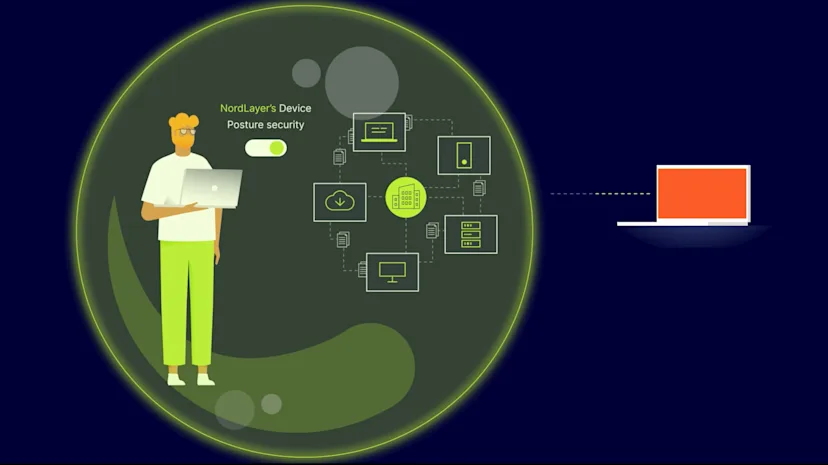
The cloud-based service monitors all devices with an installed/running NordLayer application.

Device Posture Security allows organization admins to perform several actions for more accurate and extensive network supervision:

  • The service qualifies admins to get notified about new devices entering the network and lets to identify them

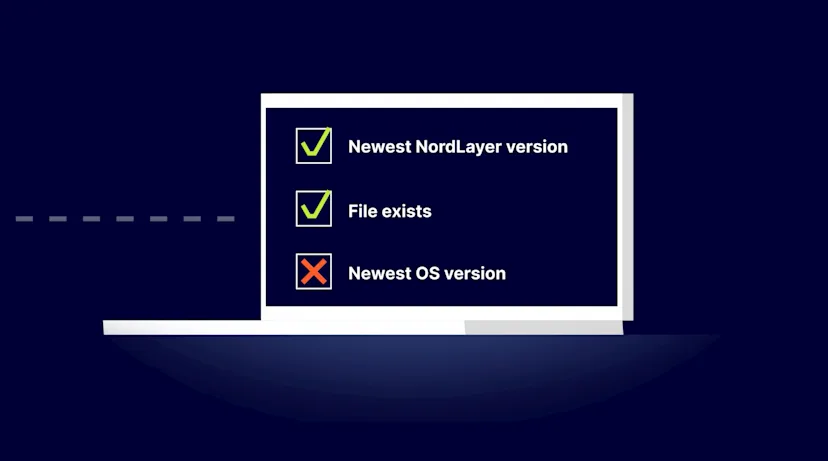
  • Inspect if the compatible operating system (OS) of every entering device is used, and check its version against the supported OSs’ list

  • Verify the newest NordLayer application version is utilized

  • Scan organization-enlisted devices to see if they contain an admin-installed file that allows determining corporate devices from personal ones

  • Browse a History tab with the logged activity of all connected devices for investigation and auditing network activity

More in-depth information allows for following the internal procedures to enforce OS or application updates to ensure the most recent patches and bug fixes are in place.

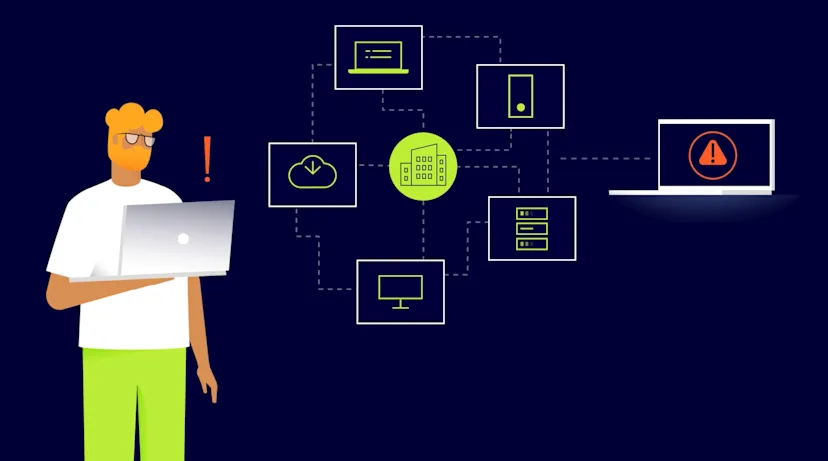
The Device Posture Security service helps close potential security gaps by checking if the device is not jailbroken/rooted or doesn’t miss an organization-enrolled file. If the device doesn’t comply, admins can disconnect it from the network to protect it.

How NordLayer’s Device Posture Security is different?

NordLayer’s Device Security Posture contains two capabilities. Until the latest service upgrade, it was dedicated only to device posture monitoring. The full composition of the service now offers monitoring and device account-blocking capability functions.

DPS

The ability to monitor and allow only trusted devices to access digital company resources helps adopt the ZTNA approach, allowing organizations to enjoy peace of mind knowing that all devices connecting to their network meet their security standards.

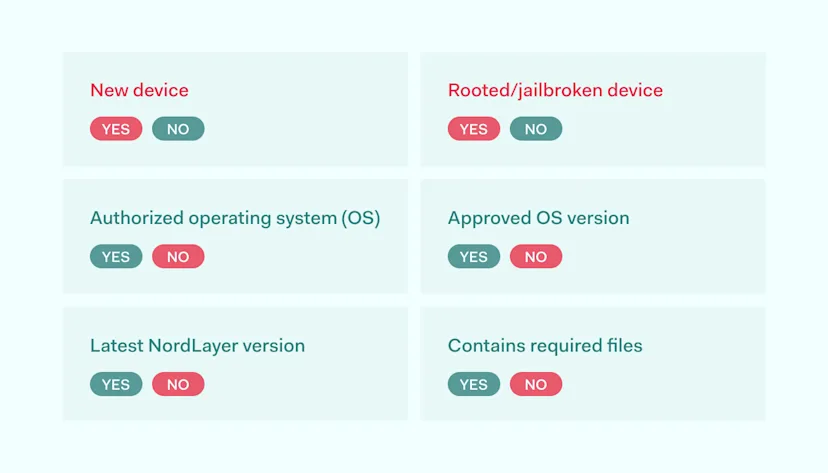
  • Only trusted devices are permitted. Device Posture Security enables organization administrators to verify every device within the network separately, whether it’s a known endpoint. If the device is unrecognized, an alert is triggered for the admin to review if it complies with company security policy requirements.

  • Use of allowlisted operating systems. The NordLayer application is available on Windows, macOS, and Linux operating systems. However, a company can only settle to work with one OS, like macOS. Thus, the service will notify the system if a user tries to use a device with any other but enabled OS.

  • Ensuring utilized OS versions are up-to-date. Due to security patching requirements, companies can define a threshold by which OS versions comply with internal policies. Therefore, if the system detects an outdated operating system version that deviates from set rules, it informs the administrator to take relevant action.

  • Establishing the use of the latest NordLayer app version. Following NordLayer’s Release Notes, IT managers can see the latest information about new and essential feature launches that apply to the most recent application version.

  • Existing File check. Administrators can store a specific file that labels the device as approved to log and recognize corporate devices. This action distinguishes corporate-approved devices from personal ones, even if they consist of the same operating system and version.

To ensure organization members use the latest app version, the admin must create a Device Posture Security profile with the desired NordLayer version to determine who should update the app.

NordLayer’s Device Posture Security offering builds a practical, security-by-design-based approach to business network protection. Thus, the service allows close supervision of endpoints within the network if they are up-to-date as required. Automated device inspection helps prevent overlooked security gaps whether the organization has only a dozen or a few hundred users.

Benefits of Device Posture Security

Regular check-ups of in-network operating devices establish a threat prevention-based approach to internal compliance management. The service enables organization network admins to act more centrally, define the scope of the rules, and maintain high security levels without spending long hours or hiring a squad to carry out such tasks.

Enforcing rules centrally

Created security policies can be enforced in a matter of moments for the full-scale organization within a few mouse clicks.

The Control Panel allows administrators to see what teams fall under the security requirements and must follow the rules.

Increasing device visibility to the admin

The larger the company, the bigger the endpoint network to supervise. Especially when users practice having a few devices per member, multiplying the work scope for the administrators.

Device Posture Security reveals and registers every endpoint within the company network, collecting information in the History tab and limiting the possibility of slipping for unauthorized or faulty devices at a given time.

Understanding whether the device is compliant and up-to-date

The service allows network admins to see more in-depth information on whether the endpoints comply with organization security requirements.

Tracking what operating system and which version and NordLayer application edition is used creates a more action-based cybersecurity strategy for the organization.

Giving access to block untrusted devices

Device Posture Security allows network administrators to reject untrustworthy devices from the company network.

If the admin sees that the device is jailbroken or rooted, lacks a specific organization-deployed file, or needs an update—they can enforce action to be performed outside the organization and confirm device entrance to access resources only when the endpoint can be trusted.

Preventing non-compliant devices from accessing your network

The NordLayer service gives the option to see any deviating devices in the network that were infected or outdated while being there.

However, taking action at an entry level is as important. Blocking a non-compliant device beforehand helps avoid any back peddling with uncertain consequences if such a device is detected after entering the network.

Entering NordLayer’s Device Posture Security

Device Posture Security makes your organization more robust to digital threats and brings it one step closer to implementing the ZTNA model approach to the cybersecurity strategy. The Device Posture Security service setup and deployment are made straightforward to achieve it effectively.

NordLayer provides information about devices on the Control Panel. Device security check logs contain information such as timestamps when the last check was done or device deviation detected, endpoint identification information, and its status. The device status is based on admin-defined rules the organization must comply with.

For comprehensive tracking, organization-allowed devices can fall under the category of a fully compliant device or initiate an alert whether the device is unknown, operated by a forbidden OS, if the version needs an update, or device doesn’t contain a specific file required per internal security policy. As predefined by a set of rules, any deviation prevents the device from accessing company resources.

Device posture security checks are performed regularly. If a device becomes not compliant, an alert is triggered, and the user is disconnected from Virtual Private Gateway—such action was unavailable utilizing the Device Posture Monitoring service. With device account blocking, the Device Posture Security provides extra protection for company data without additional labor and resources.

Let’s discuss the NordLayer solution for your business network access security now.

About Version 2 Digital

Version 2 Digital is one of the most dynamic IT companies in Asia. The company distributes a wide range of IT products across various areas including cyber security, cloud, data protection, end points, infrastructures, system monitoring, storage, networking, business productivity and communication products.

Through an extensive network of channels, point of sales, resellers, and partnership companies, Version 2 offers quality products and services which are highly acclaimed in the market. Its customers cover a wide spectrum which include Global 1000 enterprises, regional listed companies, different vertical industries, public utilities, Government, a vast number of successful SMEs, and consumers in various Asian cities.

About NordLayer
NordLayer is an adaptive network access security solution for modern businesses – from the world’s most trusted cybersecurity brand, Nord Security.

The web has become a chaotic space where safety and trust have been compromised by cybercrime and data protection issues. Therefore, our team has a global mission to shape a more trusted and peaceful online future for people everywhere.

×

Hello!

Click one of our contacts below to chat on WhatsApp

×