Skip to content

Pandora ITSM 105: New Tools for More Efficient IT Management

With the new Pandora ITSM version 105, you now have features designed to improve your workflow and optimize ticket and project management.


Key Enhancements in Pandora ITSM 105

New Filtering System

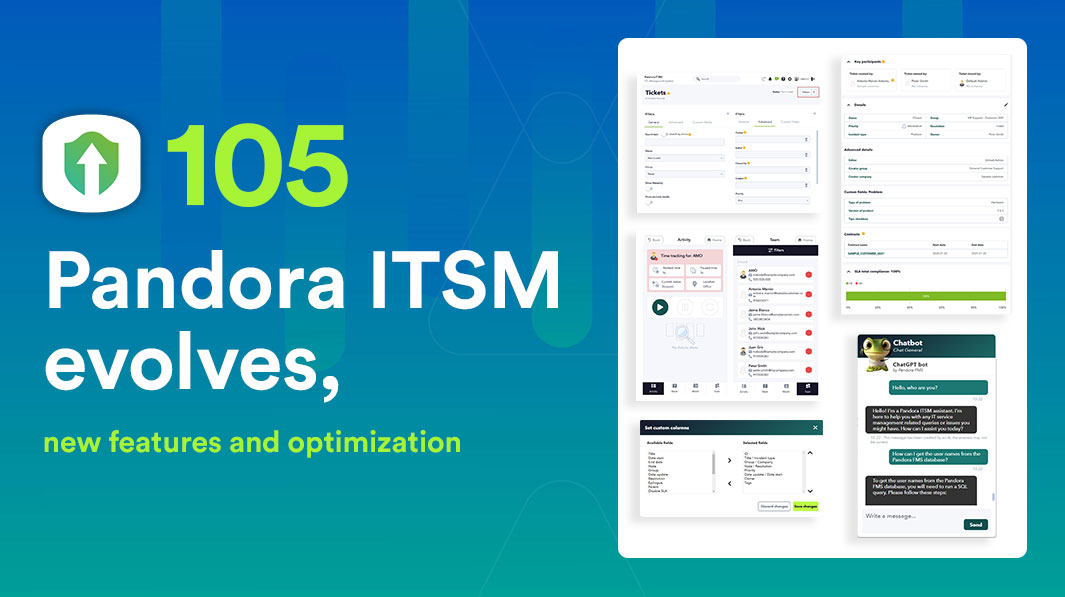
You can now filter and view results more efficiently in Tickets, Users, Project Board, Contracts, and Invoices. This system will expand to more sections in future versions, allowing for greater flexibility in daily management.

Enhanced Ticket View

The layout of fields in tickets has been reorganized to improve visibility and ease of use. Additionally, a new contracts section has been included to streamline access to relevant information, ensuring a better user experience.

Customizable Ticket Design

You can now rearrange, add, or remove fields in the ticket view according to your needs, with real-time editable settings through the new filters. This flexibility allows each team to tailor Pandora ITSM to their specific workflow.

Mobile Timetracker Optimization

The mobile version of the timetracker has been redesigned to be more intuitive and functional. All options available in the web console have been incorporated, ensuring that users can efficiently manage their time anytime and from any device.

ChatGPT Support in Chat

ChatGPT has been integrated into Pandora ITSM’s chat feature, providing quick and accurate responses to technical or support inquiries. This integration enhances user assistance and facilitates real-time issue resolution.

Tags in Tickets and Projects

It is now possible to add tags to tickets and projects, making it easier to categorize and search for relevant information. This feature allows for quicker access to work items and improves internal organization.

New Project Management View

With a visual interface similar to Trello, this new view simplifies task and project management with tags, custom statuses, and greater organizational flexibility. Additionally, it enables easy task movement between columns for more dynamic tracking.

New Workflow for Timetracker

The timetracker workflow has been optimized, allowing the configuration of alerts and automated reminders to improve workday tracking. It is now possible to schedule notifications that warn about work-hour limits or forgotten check-ins.

Improvements in Management and Security

New Licensing System

Starting with this version, clients who update will need to request a new license through the Warp Update > License menu. This change ensures greater security and control over active licenses on the platform.

Database Update

To optimize performance and compatibility, upgrading to Pandora ITSM 105 requires migrating from MySQL 5 to MySQL 8. This update ensures greater stability and performance in data management, improving the overall operation of the platform. Refer to the official documentation for more details.

Other Improvements and Fixes

  • A new notification section has been added for super administrators.
  • Enhancements in data export and report customization.
  • Optimized interface for work unit management.
  • Updated integration with third-party systems for better compatibility.

Explore all the new features of Pandora ITSM 105 and optimize your team’s management.

Visit our official Wiki or check the technical documentation for more details on this version.

About Version 2 Digital

Version 2 Digital is one of the most dynamic IT companies in Asia. The company distributes a wide range of IT products across various areas including cyber security, cloud, data protection, end points, infrastructures, system monitoring, storage, networking, business productivity and communication products.

Through an extensive network of channels, point of sales, resellers, and partnership companies, Version 2 offers quality products and services which are highly acclaimed in the market. Its customers cover a wide spectrum which include Global 1000 enterprises, regional listed companies, different vertical industries, public utilities, Government, a vast number of successful SMEs, and consumers in various Asian cities.

About PandoraFMS
Pandora FMS is a flexible monitoring system, capable of monitoring devices, infrastructures, applications, services and business processes.
Of course, one of the things that Pandora FMS can control is the hard disks of your computers.

Regulatory Compliance and NordPass

What is regulatory compliance?

Regulatory compliance refers to various processes and procedures of adhering to the laws, regulations, and standards set by various governing bodies. The regulations can come from numerous sources such as local, state, federal, or even international agencies, industry groups, and professional associations. The intention behind various regulatory compliance is to protect consumers and other stakeholders.

Importance of regulatory compliance

The aim of regulatory compliance is to make sure that businesses and organizations operate in a secure, responsible, and ethical manner. Regulatory compliance can also provide businesses and organizations with a competitive advantage by helping to create a culture of transparency and credibility with customers, employees, and other involved parties. Furthermore, adhering to regulatory compliance can improve internal processes, risk management procedures, and mitigate potential legal issues, which in turn lays a great foundation for a sustainable organization.

However, it’s critical to remember that most regulatory compliance is mandatory. Failing to comply with any of the mandatory regulations can result in hefty fines. For instance, LinkedIn Ireland has been fined more than $300 million by the Irish Data Protection Commission (DPC) for violation of the General Data Protection Regulation (GDPR). Met —the company formerly known as Facebook—was also recently fined over $250 million by the Irish DPC as well for a security breach that exposed the sensitive data of over 28 million users worldwide.

Besides financial losses, non-compliance can cause major damage to the organization’s reputation as clients may lose trust in the organization. This can even lead to serious legal issues.

Below are some of the most common regulatory compliance standards.

National Institute of Standards and Technology (NIST)

The National Institute of Standards and Technology (NIST) is a US federal agency that develops technology, metrics, and standards to drive innovation and ensure operational security within a business environment. NIST compliance is mandatory for all US-based federal information systems except those related to national security. However, the standard can be adopted by any organization.

To be NIST-compliant, a company needs to implement access controls to limit the risk of unauthorized access, develop a comprehensive incident response plan, and devise audit procedures and schedules.

General Data Protection Regulation (GDPR)

The General Data Protection Regulation (GDPR) is a data protection law that applies to businesses and organizations operating within the European Union (EU) and the European Economic Area (EEA). It sets out rules for how organizations can collect, use, and store personal data, and provides individuals the right to access and control their personal data.

To adhere to the GDPR, organizations and businesses need to implement measures such as obtaining consent from individuals before collecting their data, providing clear and concise information about their data collection practices, and implementing appropriate security measures to protect personal data.

Health Insurance Portability and Accountability Act (HIPAA)

The Health Insurance Portability and Accountability Act (HIPAA) is a US law that sets out standards for the protection of personal health information. The law applies to healthcare providers and all other entities that handle personal health information in the US.

To meet the requirements set out by the HIPAA, organizations need to implement secure systems for storing and transmitting personal health information, providing training to employees on HIPAA requirements, and implementing access controls to prevent unauthorized access to personal health information.

Payment Card Industry Data Security Standard (PCI DSS)

The Payment Card Industry Data Security Standard (PCI DSS) is a set of security standards that apply internationally to organizations that handle credit card transactions. The regulatory standard sets out requirements for protecting cardholder data and preventing unauthorized access to such data.

The PCI DSS regulations require businesses and organizations that process payment card information to implement secure systems for storing and transmitting cardholder data, conduct regular security assessments, and implement further security controls to prevent unauthorized access to cardholder data.

ISO/IEC 27001

The ISO/IEC 27001 is an international standard that outlines best practices for an information security management system (ISMS). The standard has been developed to help organizations protect their information assets and manage risks related to information security. The ISO/IEC 27001 is not a mandatory requirement.

To meet the ISO/IEC 27001 compliance, organizations need to conduct regular risk assessments, implement controls to protect against unauthorized access, and regularly review and update their information security management systems.

California Consumer Privacy Act (CCPA)

The California Consumer Privacy Act (CCPA) is a privacy law that in many ways mimics its European counterpart — the GDPR. However, the CCPA applies to businesses operating in California and it provides California residents with the right to access and control their personal data, and imposes certain requirements on businesses that collect and handle personal data.

For an organization to be CCPA compliant, it needs to implement security measures to protect customer data. Furthermore, companies are also required to provide clear and concise information about data collection practices, allowing California residents to request access to and deletion of their personal data.

Gramm-Leach-Bliley Act (GLBA)

The Gramm-Leach-Bliley Act (GLBA) is a US law that applies to financial institutions within the US. Like many of the regulatory compliance standards we already discussed, GLBA requires financial institutions to implement safeguards that would protect personal information as well as to disclose their data collection and sharing practices to customers.

To comply with the GLBA regulatory standards, financial institutions may need to implement secure systems for storing and transmitting personal financial information, providing customers with information about their data collection and sharing practices, and implementing access controls to prevent unauthorized access to personal financial information.

Center for Internet Security (CIS)

The Center for Internet Security (CIS) is a nonprofit organization that provides cybersecurity guidance and best practices to help organizations protect their systems and data. The CIS comprises 18 Critical Security Controls for identifying and protecting against the most common cyber threats.

To be CIS compliant, companies and organizations need to establish a comprehensive cybersecurity perimeter to ensure protection of their data and information management systems.

For a detailed guide on how NordPass can ease compliance with CIS controls, make use of our comprehensive CIS compliance guide.

Opinion 498

The Formal Opinion 498 outlined by the American Bar Association (ABA) provides guidance for US-based lawyers and law firms with regard to virtual practice. While the ABA Model Rules of Professional Conduct permit virtual practice, the Formal Opinion 498 provides an additional set of guidelines for virtual practice.

To follow the guidelines set out by the Opinion 498, organizations or individuals are urged to establish secure information management systems and protect them with complex passwords to ensure secure storage and access to client data.

Agence nationale de la sécurité des systèmes d’information (ANSSI)

ANSSI compliance combines a set of security standards set by the French National Cybersecurity Agency. The ANSSI has been developed as a regulatory standard in France to protect sensitive information and systems from cyber threats such as hacking, malware, and data breaches. Companies that store and handle sensitive information may be required to comply with the ANSSI standards in order to ensure the security of that information.

Compliance with the ANSSI standards may involve regular audits, penetration testing, and other security measures to identify and address vulnerabilities in a company’s systems.

Network and Information Security Directive 2 (NIS2)

The Network and Information Security Directive 2 (NIS2) is an updated cybersecurity directive issued by the European Union to make the critical sectors like energy, healthcare, finance, and digital infrastructure more resilient. The updated directive extends the scope of cybersecurity obligations for organizations through enhanced risk management measures, incident reporting procedures, and supply chain security. More specifically, under the NIS2, organizations are expected to implement security measures, conduct periodic cybersecurity training sessions, and introduce a stricter timeframe for reporting security incidents.

Digital Operational Resilience Act (DORA)

The Digital Operational Resilience Act (DORA) is an EU regulation developed to help raise the cyber resilience of financial institutions, such as banks, insurance companies, and investment firms. DORA provides a framework for managing IT risks by requiring organizations to adopt tight security controls, regularly assess their cybersecurity posture, and ensure that third-party vendors are in compliance with resilience standards. The regulation also dictates detailed incident reporting and response mechanisms to improve the financial sector’s resilience to cyber threats.

How can NordPass help with regulatory compliance?

Meeting regulations and staying compliant can be a complex and time-consuming process, as businesses and organizations must stay up-to-date with the latest regulatory requirements and implement appropriate policies, procedures, and tools.

However, with the right tools at your disposal compliance can be less of a hassle than you might think. One such tool is NordPass — a secure and easy-to-use password manager designed for business use and it can help your organization comply with the security guidelines and requirements outlined in the regulatory compliance standards listed above. But how exactly can it help?

Strong passwords and secure password storage

Most regulatory compliance standards require organizations to implement some sort of security measures to limit the possibility of unauthorized access.

For instance, PCI DSS, GLBA, GDPR, and CIS Controls all have outlined guidelines for ensuring the security of personal data processing and storage.

This is where NordPass comes in as a tool that can help. Designed by the principles of zero-knowledge architecture and equipped with an advanced XChaCha20 encryption algorithm, NordPass offers a secure way to store and access business passwords and other sensitive information in line with regulatory requirements.

Password Policy — a NordPass feature — can also play a critical role in compliance. Using Password Policy, companies can set certain specifications for password complexity for the entire organization, which can significantly fortify the overall security of the organization.

To easily follow Password Policy rules and specifications, users can use our very own Password Generator — a tool that can generate a password adhering to all the specifications outlined in the Password Policy in just a few clicks.

On top of that, NordPass can ensure that all of your organization’s passwords are stored securely and in line with the regulatory requirements.

Secure access management

Some compliance standards require organizations to implement secure access management solutions. For example, this is the case with ANSSI compliance as well as with HIPAA and NIST.

Here NordPass and its Admin Panel can play a major role because it is designed to provide organizations a way to effectively and easily manage access privileges across the entire organization.

Via the Admin Panel, solution Owners and Admins can grant or revoke access to systems as well as monitor member activity within the organization. The Admin Panel is also the place where you can set the Password Policy for the organization, ensuring that passwords throughout the company adhere to certain specifications.

Additionally, NordPass comes equipped with a feature called Activity Log, which allows organization Admins to review user action such as system access and item sharing. For advanced monitoring and security analysis, NordPass integrates directly with Splunk. Organizations that use other Security Information and Event Management (SIEM) solutions can still transfer or audit logs by exporting them in JSON format. 

Sharing Hub is another integral feature that provides organization Owners with a detailed overview of all shared items and folders within the organization. Leveraging the Sharing Hub, Owners get details on who shared what and with whom, ensuring transparency and oversight of data.  

Breach Monitoring

Regulatory compliance standards also tend to outline best practices for responding to a security incident such as a data breach. This is explicitly outlined in the GDPR’s Article 33, which states that data breach including personal data breach should be reported within 72 hours to the supervisory authority. Failing to do so may result in a fine of 10 million or 2% of annual revenue.

NordPass is equipped with a Data Breach Scanner — a tool that can scan the entire company’s domain list for potential breaches. Because the Data Breach Scanner issues a notification to all members of the organization, the company potentially affected by a breach can act quickly and efficiently to contain it.

The NordPass Password Health tool can help you detect potentially, weak, old, or reused passwords throughout the organization and significantly reduce the risk of unauthorized access. On top of that, NordPass offers the Exposed Passwords feature, which scans your organization’s saved passwords against a database of known compromised credentials found on the dark web. If any of the passwords have been leaked in a breach, the Exposed Passwords feature will notify you of that, allowing you to promptly update them to maintain proper account security. 

Bottom line

These days, regulatory compliance is an inseparable part of running a business. Fail to comply and be ready to face hefty fines and serious reputational damage. However, compliance is never easy. But with the right tools at your disposal, the whole process can be a lot smoother.

NordPass can be a tool to assist organizations in meeting various requirements in an easier and more efficient way. By staying compliant, organizations can not only avoid costly fines and legal issues, but also gain a competitive advantage by building a culture of transparency and credibility with their customer base or investors.

About NordPass
NordPass is developed by Nord Security, a company leading the global market of cybersecurity products.

The web has become a chaotic space where safety and trust have been compromised by cybercrime and data protection issues. Therefore, our team has a global mission to shape a more trusted and peaceful online future for people everywhere.

About Version 2 Digital

Version 2 Digital is one of the most dynamic IT companies in Asia. The company distributes a wide range of IT products across various areas including cyber security, cloud, data protection, end points, infrastructures, system monitoring, storage, networking, business productivity and communication products.

Through an extensive network of channels, point of sales, resellers, and partnership companies, Version 2 offers quality products and services which are highly acclaimed in the market. Its customers cover a wide spectrum which include Global 1000 enterprises, regional listed companies, different vertical industries, public utilities, Government, a vast number of successful SMEs, and consumers in various Asian cities.

Technology scalability & simplified app management on Apple devices

Summary: Jamf makes it simple to manage the NordLayer app on Apple devices, giving teams the flexibility to grow—without the usual IT headaches.

As businesses grow, so do their tech needs. More people, more devices, and more locations mean IT teams have to keep everything secure and running smoothly without slowing anyone down. For remote-first companies, that challenge is even bigger. Managing security and apps at scale can feel overwhelming, like juggling too many balls at once.

That’s where smart integrations, like Jamf and NordLayer, come in. Jamf makes it easy to manage the NordLayer app on Apple devices, giving teams the flexibility to grow without the usual IT headaches. This means your business can scale efficiently while keeping security tight and IT workloads manageable.

In this article, we’ll examine why technology scalability matters, the challenges of managing security at scale, and how NordLayer and Jamf collaborate to make it easier.

Technology scalability in IT and security

Technology scalability is the ability to expand your IT setup without compromising on performance or security. As companies grow, so does the need for flexible, secure solutions that work across remote and hybrid teams.

For remote-first or hybrid teams, scalability means easy access to tools, the ability to manage security from anywhere, and the flexibility to adapt to changing needs. It also ensures smooth collaboration across different locations. However, growth brings challenges, particularly in terms of security and managing an increased number of devices.

In short, IT scalability is about staying flexible, adapting to change, and maintaining strong security as your business grows.

Challenges of managing security at scale

We’ve already mentioned that when a business grows, so do the complexities of managing technologies. An increasing number of people, devices, and locations adds to the IT teams’ plate. The pressure is on to keep everything secure and running smoothly. For remote-first companies, it’s even trickier. Securing apps and devices at scale can quickly become overwhelming.

For teams scaling quickly, the challenge is onboarding and offboarding employees across multiple devices. IT teams need to keep security consistent across Apple devices, ensure compliance, and stay on top of updates without constantly doing it manually. On top of that, finding the right balance between strong security and a smooth experience for both IT teams and employees adds complexity.

These challenges show why automated solutions are key. They simplify device management and improve security without adding more work. With streamlined processes, businesses can grow faster while keeping everything secure.

How Jamf simplifies NordLayer app management on Apple devices

Managing security shouldn’t feel like a chore. Yet, for many IT managers, keeping apps updated and configured across Apple devices is an endless loop of manual work. That’s where Jamf, a leader in Apple Mobile Management (MDM), and NordLayer step in, offering a seamless, automated solution that cuts the hassle and boosts security.

IT teams need tools that operate in the background rather than adding extra work. Jamf integration with NordLayer makes security effortless, keeping Apple devices protected without IT constantly stepping in.

Managing NordLayer is simple with Jamf Cloud. Here’s how to set up centralized distribution in just a few easy steps:

  • Automated deployment: Roll out NordLayer to all Apple devices in a few clicks without complex setup.
  • Automatic updates: Ensure devices always have the latest security features, with no manual updates needed.
  • Security policy enforcement: Keep NordLayer security policies in place automatically, reducing compliance risks.
  • Centralized management with NordLayer’s Control Panel: Easily handle deployments and security updates of all Apple devices from one dashboard.
Quote_Arturas

This automated approach enables IT teams to work smarter, spending less time on NordLayer app management and more on strategic priorities.

“As more businesses rely on Apple devices, security needs to be both strong and simple. The NordLayer and Jamf integration delivers just that—seamless protection without extra complexity,“ says Artūras Bubokas, Product Manager at NordLayer.

Benefits of using Jamf and NordLayer

By combining Jamf’s seamless Apple device management with NordLayer’s strong network security, businesses get an automated, hassle-free solution. The result? Stronger security, less manual work, and more time for IT teams to focus on what truly matters.

Stronger network security, less hassle

Now, let’s break down the key benefits of this integration.

  • Saves IT time: Cuts down on manual configuration and troubleshooting
  • Boosts security: Ensures consistent, up-to-date security across Apple devices
  • Reduces costs: Lowers IT overhead with automated management
  • Improves user experience: Integrates security seamlessly without disrupting workflows
  • Supports growth: Scales easily as teams and devices expand

How to deploy NordLayer via Jamf

Here is how you can set up NordLayer on Apple devices in a few steps:

  • Download NordLayer package (.pkg for macOS, App Store link for iOS)
  • Upload it to the Jamf Cloud and configure policies
  • Automate installation and updates for all Apple devices
  • Ensure compliance with security policies using Jamf’s management tools

For more information on how to integrate Jamf and NordLayer, please check our mini-guide.

How NordLayer can help

A strong, scalable security strategy is essential for modern businesses, especially with the growing number of Apple devices in the workplace. The NordLayer & Jamf integration makes security simple, giving IT teams full control while keeping users productive. With easy deployment, automated updates, and centralized management, businesses can protect company resources without disrupting workflows.

About NordLayer
NordLayer is an adaptive network access security solution for modern businesses – from the world’s most trusted cybersecurity brand, Nord Security.

The web has become a chaotic space where safety and trust have been compromised by cybercrime and data protection issues. Therefore, our team has a global mission to shape a more trusted and peaceful online future for people everywhere.

About Version 2 Digital

Version 2 Digital is one of the most dynamic IT companies in Asia. The company distributes a wide range of IT products across various areas including cyber security, cloud, data protection, end points, infrastructures, system monitoring, storage, networking, business productivity and communication products.

Through an extensive network of channels, point of sales, resellers, and partnership companies, Version 2 offers quality products and services which are highly acclaimed in the market. Its customers cover a wide spectrum which include Global 1000 enterprises, regional listed companies, different vertical industries, public utilities, Government, a vast number of successful SMEs, and consumers in various Asian cities.

How long should a password be?

Can you remember the last time you didn’t need to access at least one of your passwords? It’s probably been a while. After all, the average person handles around 168 passwords. With this scale, you might find yourself wondering if you can really prioritize your security or take some leeway to remember how to access your accounts in the first place.

It doesn’t help that the numbers vary across the board—some think you can get away with 6 characters, others go for numbers in the 20s. Let’s settle it once and for all and answer a few pressing questions. At the end of the day, how long should a password be on average, and how should its structure look to keep you safe online?

Let’s not beat around the bush—the length of your passwords is one of the key cybersecurity checkpoints you can tick off. The exact number of characters is something of a point of contention.

Our recommendation is to use a random mix of 8 characters (including upper- and lowercase letters, numbers, and special symbols) as the bare minimum for your password; however, the longer you go, the better.

Alternatively, you can choose to use a passphrase—a sequence of words or other text that you can use to authenticate your identity. For example, you can use a line from your favorite movie or book. However, make sure no one knows what that specific phrase is. A unique passphrase is as effective as a highly complex password because the spaces between words count as special characters.

The case for longer passwords

But why does it matter so much how long a password is? To answer this question, we first need to understand one of the biggest threats to password safety—brute-force attacks. Cybercriminals use special software to try millions (even billions, if the computer is powerful enough) of character combinations to find passwords that work. They usually start with every word in a dictionary, so passwords that contain only one or two words are not resilient.

With fewer characters, you can’t create as many secure, randomized combinations to protect your accounts. If you go any shorter than 8 characters, the chances of your passwords getting brute-forced increase. The more personal and work accounts you have, the more variety you need—and a longer password accounts for it.

In NordPass’ 2024 list of the Top 200 Most Common Passwords, the first 10 entries consisted of passwords ranging from 5 to 9 characters. Most were sequences of numbers and lowercase letters based on the keyboard layout—think 123456 or qwerty. Such combinations are easy bait for cybercriminals, who require less than a second to break through and claim the account for themselves.

Top 10 worst passwords

The problem is not just how short the passwords are but also how frequently they’re reused. If a person comes up with a 6-character password containing only letters and numbers, the hacker can run a program to easily find the matching combination. Then, they can use the password with the related email address and easily obtain all accounts belonging to their victim. Longer passwords with more variety require more guesses to predict, increasing the time required to breach them.

To address the problem of weak passwords, various password policies and guidelines are set in place to help both businesses and individuals manage their personal data better. The National Institute of Standards and Technology (NIST) updated its password security guidelines in 2024, clarifying how the expectations for credential security have shifted. According to the new guidelines, passwords should be up to 64 characters long—a long passphrase can be used in favor of a password—and should only be changed if there’s clear evidence that they’ve been compromised. Passwords should also be generated and stored using a password manager for better security.


Balancing length and complexity

What keeps you safe online and what makes it easy for you to be online in the first place requires a delicate balance. As mentioned earlier, password length plays a key role in its predictability. The fewer characters you use, the less time it takes to crack it. Likewise, the more variety you add, the more time and resources are needed to figure it out.

Passphrases are a great help here. They ensure your credentials are long and complex without the clutter of random characters. If you pick a quote, you’ll probably use at least 4 or 5 words. This automatically racks up the password length, granting it a higher resilience against cyber threats.

You might wonder how resilient passphrases are against brute-force attacks targeting dictionary words. The length of the passphrase is actually an advantage here despite it using words from a known corpus—it increases the guessing difficulty level, and fishing out every word, space, and punctuation mark in that order is resource-intensive, making it more difficult for cybercriminals to detect an exact match.

Now, let’s sprinkle in some complexity. Of the options “password123” and “PAl4p5e*tDgF!3”—the 111th entry in the aforementioned Top 200 list and a completely random keysmash—the former would take under a second to crack, while the latter would need hundreds of years.

The randomized example does not follow an easily detectable pattern and contains every character we’ve mentioned so far—upper- and lowercase letters, numbers, and special symbols. If you took a similar combination and kept adding random characters in random spots, the complexity level would increase. In short, length adds complexity, and complexity is exactly what you want for your credentials.

Tips for creating secure, long passwords

Passphrases are a solid idea for strong credentials. However, some websites and apps don’t recognize spaces as special characters, which makes it harder to use more memorable passwords. How do you come up with really good ones, and how do you make sure you don’t forget them?

One thing you can try is a spin on a passphrase—take the words in a phrase, omit some letters, replace them with special characters, and voila! You’ve got a strong password concept on your hands. For example, let’s take the classic phrase “The quick brown fox jumps over the lazy dog” and turn it into “1.Qui.bro.fo.jum.ove.1.laz.dO.” We’ve replaced “the” with 1, left the first 2 or 3 letters of the other words, capitalized the first and last letters, and finished with a full stop for good measure. The result? A password that would take centuries to breach.

That said, avoid simply taking a word and replacing its letters with numbers, like “0v3r” for “over”—hackers are familiar with such “tricks” and have added them to their brute-force checklist. Instead of following a predictable pattern, get creative—switch random letters with numbers that wouldn’t otherwise match (like a 5 for L instead of the anticipated S) and build a cipher only you know. We’ve got more inspiring ideas you can use to level up your inner password generator in our dedicated article.

If you’re unsure whether your new credential meets the ideal strong password criteria, you can test it using our secure password checker. Don’t worry—we don’t store the passwords you type into this tool to ensure that your data remains secure, whether it’s just an idea or already in use.

The simplest way to sort out your password length troubles and leave the worries of mixing them up behind is to get a tool that does it for you—and NordPass knows how to get it done right. NordPass is an intuitive password manager that keeps all your credentials securely encrypted.

Thanks to its built-in Password Generator, you won’t have to worry about coming up with passwords on your own ever again. You won’t need to remember them either, as the autofill feature will detect your login attempts and input your credentials for you in seconds. In fact, with NordPass, the only password you need to remember is the Master Password to access your vault. Everything else will be handled for you with our browser extension and mobile app.

Reinforce all your accounts with ease and embrace the long password lifestyle with NordPass.


About NordPass
NordPass is developed by Nord Security, a company leading the global market of cybersecurity products.

The web has become a chaotic space where safety and trust have been compromised by cybercrime and data protection issues. Therefore, our team has a global mission to shape a more trusted and peaceful online future for people everywhere.

About Version 2 Digital

Version 2 Digital is one of the most dynamic IT companies in Asia. The company distributes a wide range of IT products across various areas including cyber security, cloud, data protection, end points, infrastructures, system monitoring, storage, networking, business productivity and communication products.

Through an extensive network of channels, point of sales, resellers, and partnership companies, Version 2 offers quality products and services which are highly acclaimed in the market. Its customers cover a wide spectrum which include Global 1000 enterprises, regional listed companies, different vertical industries, public utilities, Government, a vast number of successful SMEs, and consumers in various Asian cities.

Task management: definition, examples, methods, software

Definition: What is task management?

Task management is the way organizations systematically plan work, set priorities and monitor task progress. Tasks are often assigned to fixed processes or projects. The aim is to prioritize them effectively, delegate them and complete them on time. 

The challenge is to have an adequate overview and use resources as optimally as possible. This means both teams and individuals can work productively, in an organized manner, with clear responsibilities and realistic schedules.

How does personal task management manifest itself?

There are many different preferences, methods and tools for organizing, prioritizing and completing tasks in a timely manner. Tools may include calendars, digital boards, Kanban views, to-do lists or whiteboards. Various approaches, like timeboxing, are employed to organize tasks and stay organized.

It is always important that the approach works individually and that it also favors teamwork on the other. A brief example: A team member may plan his tasks using a digital task board. This gives him a good overview and creates transparency for his colleagues.

Task management vs. project management

Tasks may or may not belong to projects. To ensure that projects are implemented successfully and do not experience unnecessary delays, those responsible must spend time planning all of the tasks and their implementation. Project management software can support this effort.


“Task management is fundamental for both standard processes and project management.”

Tasks, workflows and processes

At work, many things build on each other: tasks are related to one another. This drives workflows and processes. As such, task management interacts strongly with workflow management and process management.

Here is a brief overview:

  1. Tasks: They form the smallest unit and represent defined activities to be completed and assigned to a specific goal. There is usually a responsible person and a deadline attached to the task.
  2. Workflows: These consist of a sequence of tasks that are completed according to a specific pattern. Workflows outline how tasks are related to each other and how they are carried out. Good workflows promote collaboration and goal-oriented interdependencies between different tasks.
  3. Processes: Processes are made up of several workflows. They are a recurring and holistic sequence of work steps that aim to achieve a specific result. Rules, standards or activities such as process automation help here. 

Examples of good and bad task management 

The key word when it comes to successfully handling tasks is “management”. Targeted management makes a decisive difference in the efficiency of a team.

Example: Hardware for onboarding 

The following example contrasts poor task management with efficient and optimized management. The results in the onboarding experience are clear. 

Poor task management in onboarding

An IT employee is informed by email that they need to procure the necessary hardware for a new employee. However, the task was created so far in advance that it was lost in the employee’s inbox. It was not marked as “Important” or “Urgent” and no separate discussion took place about it. 

To make matters worse, the assignment of the task made little sense. The IT employee had little experience in this area and was already very busy with other tasks. The employee was frustrated. The task should have been assigned to an experienced and less busy colleague.

Now, it’s time for the onboarding and all the required items are not available. The newly hired person has to begin onboarding without the tools required for his work. 

How to make onboarding better with task management

Task management thrives on structure and planning – and the IT employee’s team takes this into account. Before he was assigned the task, a team meeting was held. All members briefly went through their current tasks, including their importance, urgency and prioritization. 

Based on this, he was assigned the task with a generous lead time. He added the task to his personal task board, which he keeps a constant eye on. The task description contained all the important details. The task had deadlines for all subtasks and contacts in case anything is unclear or help is needed.

The IT employee was able to prepare the onboarding in a structured, calm and conscientious manner. There were no “nasty surprises” to fear. The new colleague arrived to find the hardware ready and available on their first day.


Important components of a task

Individual tasks are more than just a bullet point on a list that needs to be ticked off. The details make all the difference: they vary depending on the complexity and depth of the planning. They provide structure and organizational clarity. 


“If a task has all the important components and sufficient information, it tends to be completed more quickly and with the desired result.”


Information is – at a higher level – the main component of a task. In this sense, the requirements of task management overlap strongly with those of information management. The task details can ultimately be broken down and categorized in a meaningful way, as shown below. 

Title and description 

The title should be as meaningful as possible. It should indicate the context and not raise any questions for the person responsible. In addition, the description must be as clear and concise as possible and contain the desired goal. 

Responsibilities

The task must first be clearly assigned to a person with primary responsibility. This may also be several team members at once. Stakeholders should also be informed about the status of the task in question. In addition, there are often dependencies, so that communication with those responsible for other tasks is necessary. 

Priority (importance) 

Task priority is a simple clear classification of how important the respective task is. It helps those responsible with planning and deciding how much concentration to devote to the task. A traffic light system or gradations from priority 1 to 5 are therefore possible.

Current processing status

Having task progress defined is an important step. However, it is even more effective and time-saving if the processing status is displayed directly. 

These assignments, for example, make sense: 

  • “Planned”
  • “In progress”
  • “Under review”
  • “Revision”
  • “Completed”

Time period and effort

For most tasks, the end date – often called the deadline or due date – plays an important role. Less attention is usually paid to the start date of a task, but it is more important in terms of duration. 

Those who focus exclusively on the end date have to estimate for themselves how much effort the task requires. It makes it hard to consider room for disruptive factors and are more likely to miss the deadline. If both the start and end date are specified, there is clarity on how and when to tackle it.

Attachments / resources

Successfully completed tasks don’t just happen. Attachments with documents containing further information, samples, examples or descriptions of contexts are often required. These help the person responsible fully understands a task and can complete it with the desired result. 

Such attachments can also contain working materials or exemplary solutions of comparable tasks. Attachments work best when they are part of a knowledge base, providing access to relevant knowledge in a structured and clear way.

Hierarchy and subtasks

Most tasks are related to other tasks. There are often higher-level tasks that are broken down into subtasks. This structure defines the procedure more precisely and monitors progress more granularly.


Task management methods

There are various approaches to task management. All can be effective depending on the type of task, the collaboration model and individual preferences. 

Here is an overview of a few methods as examples. 

1. To-do list

The simple To-do list is the basis of task management. It is a simple but effective method for organizing tasks. It is advisable to prioritize the respective tasks or to create a ranking according to importance. 

For example, the six most important tasks can be placed on a to-do list each day. The list is ranked in order of importance or urgency. 

2. Kanban

A Kanban board can be digital with drag ‘n drop tasks or physical with sticky notes. Tasks are visualized in columns such as “to do”, “in progress”, “under review” and “completed”. The organization in columns can be designed in a variety of ways. For example, the Kanban view in OTRS is suitable for continuous improvements and progress reports.


3. Timeboxing

Timeboxing works as a time management method. Instead of using a list, a worker enters tasks – with a specific timebox – in a calendar. Such a box sets a fixed time for the task’s completion. 

Timeboxing can be combined with the Pomodoro technique. This is a system in which one works with focus for 25 minutes and then takes a break for 5 minutes.

4. Not-to-do list

This method reverses the idea of the typical to-do list – and can also be used alongside one. Workers write down the tasks that they can skip, postpone or delegate. It helps them to reduce stress and focus on important tasks. 

This approach can help enormously with prioritization. It’s a means for questioning apparent to-dos and making way for really important tasks.

5. Agile task management (Scrum)

This method is aimed at teamwork. It has spread from agile software development and provides clearly defined processes for working together while handling tasks on one’s own. 

Scrum is particularly suitable for teams that complete their tasks in sprints (e.g. in 2-week cycles). These teams coordinate regularly in meetings, such as short stand-ups. A scrum team typically consists of a product owner, a scrum master and developers. 

6. Getting things done (GTD)

This method is about breaking tasks down into specific steps and organizing them. It reduces mental burden while the task is in progress. Users record all their pending tasks in a system. This allows them to prioritize tasks without being disturbed and without the risk of forgetting something important.


How can software help with task management?

Modern task management solutions provide an excellent overview of tasks, improve organization, put tasks in relation to each other, remind you of due dates, offer time-saving automation and much more. 

Here are the most important advantages of task management tools in a nutshell: 

  • Users have a good overview by having tasks centrally collected in one place. Everyone knows what is assigned. Structure is added by categorization. And information, like deadlines and reminders, is stored with the task. 
  • Visualizations help to identify progress and dependencies between tasks and to react accordingly.  
  • In order to collaborate and coordinate better, teams can share tasks with each other, communicate clearly and task-specifically in real time. 
  • Teams save a lot of time by having a tool automatically send notifications about tasks. 
  • Software can create reports that show project progress, identify bottlenecks and measure success.
  • With cloud-based software, task management can be synchronized to all desired devices. This makes tasks accessible at any time and from anywhere.

Task management with a ticket system

A ticket system can be used flexibly, including for task management. This type of task management system is particularly popular in IT and support. It records tasks quickly and processes them in an organized manner.

For other areas, too, the main advantages are that tasks can be tracked easily and all those involved are informed. Workflow automation saves a lot of time and all information is available in an organized manner in a ticket.

This is an example of a team process:

  1. Record the task: Those involved record the pending tasks in tickets. The tickets are assigned to the responsible persons and include descriptions, attachments, prioritization (according to importance and urgency) and, if necessary, categories. 
  2. Set the task status: The tickets are each assigned a status – such as “open”, “in progress” and “closed”. Anyone working on a task documents the progress directly in the ticket.
  3. Discuss the task as needed: Comment functions allow queries and discussions to be made directly in the ticket. Notifications keep everyone involved up to date. 
  4. Escalate if needed: As ticket systems support automated workflows, a ticket can be automatically forwarded to the line manager as part of escalation management.
  5. Close the ticket: Once the task in question has been completed, the ticket is closed. It can be archived for later analysis or documentation. 
  6. Analyze overall task management: The collected data provides the team with insights into which measures were successful. They can evaluate how work can be improved in the future. 


Conclusion: task management – a crucial process

Virtually all operational, value-added creative work can be expressed in tasks. As a model, the more information and details tasks contain, the more accurate and valid they are. Task management is not just about organization and simple processing. It is also about dependencies between tasks, the connection with workflows and improving processes to achieve overarching goals. 

In short, the more thorough and focused task management is, the more likely teams are to make progress, achieve tangible results, find work enjoyable and continue to develop. Investing time in task management pays off.

Teams and individuals are faced with the challenge of choosing a suitable and target-oriented method for task management. The right software support often makes the decisive difference. It offers an overview when there are many tasks. It helps teams  act more effectively, stay more focused, work more successfully. 

Find out how OTRS can support you with task management.

About OTRS

OTRS (originally Open-Source Ticket Request System) is a service management suite. The suite contains an agent portal, admin dashboard and customer portal. In the agent portal, teams process tickets and requests from customers (internal or external). There are various ways in which this information, as well as customer and related data can be viewed. As the name implies, the admin dashboard allows system administrators to manage the system: Options are many, but include roles and groups, process automation, channel integration, and CMDB/database options. The third component, the customer portal, is much like a customizable webpage where information can be shared with customers and requests can be tracked on the customer side.

About Version 2 Digital

Version 2 Digital is one of the most dynamic IT companies in Asia. The company distributes a wide range of IT products across various areas including cyber security, cloud, data protection, end points, infrastructures, system monitoring, storage, networking, business productivity and communication products.

Through an extensive network of channels, point of sales, resellers, and partnership companies, Version 2 offers quality products and services which are highly acclaimed in the market. Its customers cover a wide spectrum which include Global 1000 enterprises, regional listed companies, different vertical industries, public utilities, Government, a vast number of successful SMEs, and consumers in various Asian cities.

×

Hello!

Click one of our contacts below to chat on WhatsApp

×