Skip to content

Intelligent resilience: The future of SaaS data protection

Today, data isn’t just important, it’s everything. This puts data resilience at the center of business continuity. Increasingly, more and more business-critical data lives in SaaS applications: according to BetterCloud organizations use an average of 112 SaaS aps in 2024. That number was 80 in 2020. And according to analyst firm Forrester, eighty-two percent of enterprise cloud decision-makers say that their organizations have adopted or are adopting public cloud. The challenge? Protecting that data from loss, corruption, or cyber threats—without disrupting day-to-day operations – becomes more complicated in the cloud. It also becomes critical to get it right, which means not just prioritizing the ability to recover from data loss, but also prioritizing the capabilities and foresight to stay ahead of risks in the first place. In other words, “intelligent resilience” —making smart choices before disaster strikes and future-proofing your SaaS data so your business keeps running, no matter what.

What does intelligent resilience look like?

Achieving intelligent resilience requires a proactive approach. At Keepit, we break it down to four steps:
  •  Identify what data needs protection.
  •  Identify risks—and how to mitigate them.
  •  Identify the right tools and partners.
  • Test and implement what you’ve learned for a safer tomorrow.
Sounds simple, right? But not all data protection solutions are built for intelligent resilience. Many are adapted from legacy systems or come with hidden costs and complexity. Keepit takes a different approach: As global experts in SaaS data protection, we’ve purpose-built a cloud platform that ensures businesses can recover and restore their data without delay. But we also take backup and recovery a step further.

Keepit is intelligently built

Not all backup solutions are created equal. Many legacy vendors have repurposed on-premise technology for the cloud—but retrofitting doesn’t always mean readiness. Keepit is cloud-native and purpose-built for SaaS environments.
  • Scalable and adaptive. Unlike on-prem solutions forced into the cloud, Keepit scales seamlessly as your business grows.
  • Purpose-built for SaaS. Our solution is designed to work smoothly across applications, ensuring seamless protection.
Security is at the core of everything we do. Keepit employs AES encryption directly on our storage systems and ensures end-to-end encryption both in transit and at rest. Our traffic flows securely over major internet exchanges, eliminating unnecessary exposure. And most importantly, our backups are immutable by design. That means once data is stored, it cannot be changed or deleted—guaranteeing true protection against ransomware attacks or accidental deletions.

Keepit delivers intelligent insights and recovery

Backing up data is just one part of the equation. The real value comes from how quickly and efficiently you can access, restore, and act on that data. Instant access to all versions of your data 
  • No waiting for hydration periods—data can be previewed, shared, or restored instantly.
  • An intuitive search function and audit logs make it easy to track changes.
Flexible restore options 
  • Recover data in bulk or at a granular level, ensuring fast and precise restoration.
Actionable insights 
  • A centralized dashboard provides real-time visibility into backup and recovery health.
  • Early warnings help detect anomalies or threats before they become major issues.
  • Integration with security tools ensures data protection is part of a broader security strategy.
Transparency and accountability 
  • Custom reports document compliance and disaster recovery readiness, giving businesses confidence in their resilience strategy.

Keepit is the intelligent choice

Choosing the right data protection solution isn’t just about features—it’s about value. Keepit is built to be cost-effective, time-saving, and independent.  Predictable and stable cost
  • Simple, seat-based pricing with unlimited storage
  • No hidden fees—no charges for data ingress, egress, or transfer.
  • Customizable retention, ensuring you store what you need for as long as you need it.
Time-saving usability
  • No maintenance or infrastructure required—freeing up IT teams for core business initiatives.
  • Easy setup and an intuitive interface ensure rapid adoption.
Vendor-independent cloud in your chosen region
  • Keepit operates independent data centers in seven regions across three continents.
  • Our fully separate backup environment ensures your data is never tied to the same infrastructure as your production environment.
Resilience starts with intelligent choices Intelligent resilience isn’t just about recovering from failure—it’s about staying ahead of it. Keepit empowers businesses to protect their most valuable asset—data—without complexity, hidden costs, or vendor lock-in. Because in today’s digital world, data resilience isn’t optional. It’s essential. Keepit: Intelligent data protection for today and tomorrow.

Keepit is on a mission to bring intelligent resilience to the world. Join us in a city near you

About Keepit
At Keepit, we believe in a digital future where all software is delivered as a service. Keepit’s mission is to protect data in the cloud Keepit is a software company specializing in Cloud-to-Cloud data backup and recovery. Deriving from +20 year experience in building best-in-class data protection and hosting services, Keepit is pioneering the way to secure and protect cloud data at scale.

About Version 2 Digital

Version 2 Digital is one of the most dynamic IT companies in Asia. The company distributes a wide range of IT products across various areas including cyber security, cloud, data protection, end points, infrastructures, system monitoring, storage, networking, business productivity and communication products.

Through an extensive network of channels, point of sales, resellers, and partnership companies, Version 2 offers quality products and services which are highly acclaimed in the market. Its customers cover a wide spectrum which include Global 1000 enterprises, regional listed companies, different vertical industries, public utilities, Government, a vast number of successful SMEs, and consumers in various Asian cities.

Parallels RAS 20.2 正式登場!

Parallels RAS 20.2 正式登場!立即更新,體驗專為管理員與終端使用者度身訂做的全新功能與改良升級,進一步提升靈活性、便利性及整體效能。

以下是 20.2 版本的幾項重點功能:

  • VMware 數據存儲靈活性提升:VMware 使用者現可為虛擬機複製選擇不同數據存儲,強化高可用性與自動化效率。
  • 全面支援 Windows Server 2025:所有基礎架構組件已兼容 Windows Server 2025,Microsoft Hyper-V 2025 支援即將推出。
  • 工作區使用體驗升級:新增 Z-order 功能,讓遙距應用程式與本地應用程式自然層疊,帶來更流暢的使用者體驗。
  • Azure 虛擬桌面代理修復便捷化:IT 管理員可集中修復並重新部署不可用的 Azure 虛擬桌面代理,加速故障恢復。
  • Azure 虛擬桌面代理維護排程:管理員可設定兩個維護時段,避免更新影響業務高峰期。
  • Linux 進階攝影機重定向:Parallels Client for Linux 現支援進階攝影機與音訊重定向,提升遙距視訊會議品質。
  • Android 與 iOS / iPadOS 攝影機支援:遙距會話中可使用流動設備攝影機,提升倉庫管理等工作流程效率。
  • RADIUS MFA 自動化增強:支援超過五個自動化選項,簡化選擇流程並提升易用性。
  • 輕量級身份提供者整合:Parallels RAS 現可無縫銜接第三方身份提供者(如 Azure、Okta),無需額外配置 RAS 註冊伺服器。


欲深入了解 Parallels RAS 20.2 的所有新功能與改進,歡迎登入 Parallels Portal 或聯絡我們!

關於 Parallels

Parallels 是全球領先的跨平台解決方案品牌,為公司企業和個人用戶提供簡單的方式,讓他們在任何設備或操作系統上使用和存取所需的應用程式和檔案。無論是 Windows、Mac、ChromeOS、iOS、Android 還是雲端服務,Parallels 都能幫助客戶充分利用最佳技術。Parallels 解決了複雜的工程與使用者體驗問題,讓企業和個人用戶能夠隨時隨地簡單且具成本效益地使用應用程式。

About Version 2

Version 2 Digital is one of the most dynamic IT companies in Asia. The company distributes a wide range of IT products across various areas including cyber security, cloud, data protection, end points, infrastructures, system monitoring, storage, networking, business productivity and communication products. Through an extensive network of channels, point of sales, resellers, and partnership companies, Version 2 offers quality products and services which are highly acclaimed in the market. Its customers cover a wide spectrum which include Global 1000 enterprises, regional listed companies, different vertical industries, public utilities, Government, a vast number of successful SMEs, and consumers in various Asian cities.

Efficient Backup: Ready for the Worst-Case Scenario

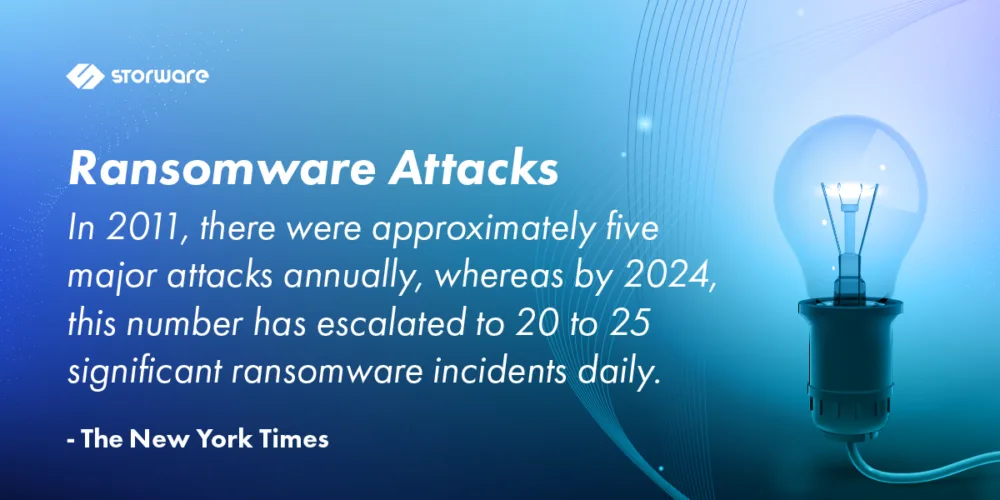
The efficiency and reliability of backups are becoming increasingly important. Statistics on incidents are staggering, and there are also internal infrastructure problems. The growing cryptocurrency market allows for the unpunished collection of ransoms. And companies themselves do not want to inform the public about problems, because they additionally expose themselves to image losses.

Decision-makers are becoming aware that a cyberattack or failure can paralyze the work of a company or institution at any time. Nowadays, you have to be prepared for the worst-case scenario and have a proven plan on how to quickly return to normal work mode when something bad happens.

The definition of IT infrastructure downtime is not unambiguous. However, it most often refers to time not spent on productive work as a result of a cyberattack.

Of course, sometimes such downtime is the result of internal errors, natural disasters, or incorrect configuration of IT systems.

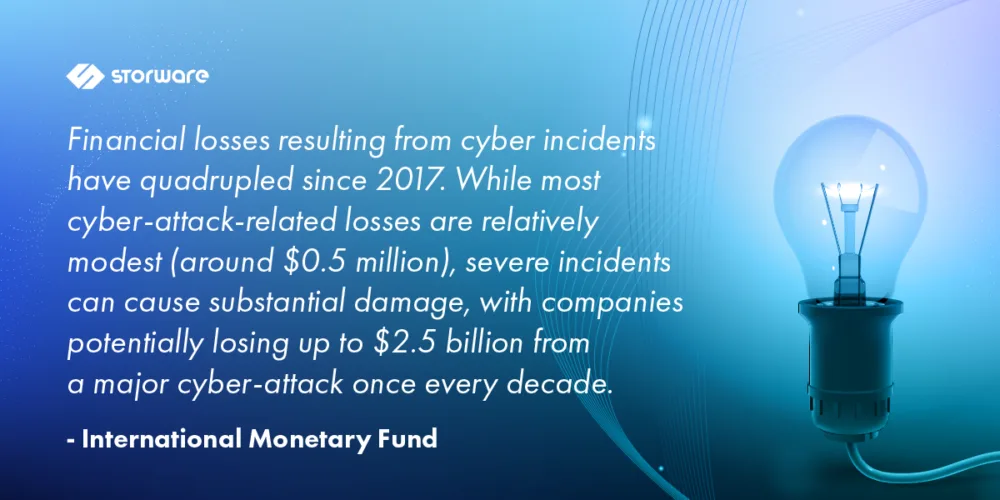
The activity of companies can be stopped for several hours, but sometimes the downtime lasts longer. This was the case, for example, with the well-known American brewery Moison Coors in 2021. The cyberattack halted the operation of the plant for several weeks, which made it impossible to produce almost 2 million hectoliters of beer. As you can easily guess, the financial losses were huge. Similar, though no less dramatic, examples can be multiplied endlessly.

In order to minimize the risk of a cyberattack, enterprises use various methods: they implement advanced security systems and introduce cybersecurity training. Prevention is important, but you must always be prepared for the worst-case scenario. Therefore, business continuity plans are implemented, which establish procedures for creating backups and recovering data after a failure.

More Data, Longer Backup Window

The constant increase in data means that the backup window is extended. Meanwhile, the business needs of companies and the allocation of resources are completely different. Backup, in an ideal world, should happen in the background and not interfere with the main tasks of the IT infrastructure. Is it possible to reconcile one with the other?

It seems that everything is a matter of scale. This depends on the company’s profile, its size, as well as the type and amount of data processed. In the case of small production plants, the efficiency of the backup is not so important. However, there are many sectors of the economy where even a short failure means a serious drop in revenue. In addition to operational delays, there are issues related to compliance, for which severe financial penalties are threatened.

At first glance, planning a backup process seems to be relatively simple – just enough storage media for storing data and some software. However, the larger the organization, the greater the scale of difficulties, because the efficiency of creating backups is influenced by a whole lot of factors.

The basic issue during planning is the identification of computers covered by the backup. And it is not just about their number, but also operating systems, network technologies, any connected disks or tape drives, as well as applications whose backups need to be performed, e.g. Microsoft Exchange.

You also need to consider the types of data, such as text, graphics, or databases. How compressible is the data? How many files are involved? Will the data be encrypted? It is known that encrypted backups may run slower.

What Type of Backup to Choose?

When planning a backup, one of the three available methods is selected: full, incremental, differential. Making the right decision has an impact not only on the amount of disk space needed, but also the time of restoring and saving data. However, the first backup will always be full (and usually its execution takes the longest).

Choosing the right variant is not an easy matter and there is no golden mean here. Each of the methods mentioned earlier has weaknesses and strengths.

Performing a full backup is time-consuming and requires a lot of disk space, but in return it provides full protection and the ability to quickly restore all data.

The alternative is an incremental backup: after creating a full backup, the process of creating incremental backups follows, in which information about data changes since the last backup is saved. The user does not consume too much space in the data store. The process of creating copies is fast. The downside is the slow data recovery time.

The third option is a differential backup, where only data that has changed since the full backup is considered. The process is repeated until the next full backup is performed. In this case, the full backup is the point of reference for creating subsequent copies. Thanks to this created backup, it is possible to quickly restore the complete set of data. This option is recommended for frequently used and changed files. However, the more time passes from the last full backup, the differential files grow, which can extend the time of creating the backup. Although a differential backup is more economical than a full one, it may take up more space than an incremental one if the data is frequently changed.

Choosing the right backup strategy is crucial, and the complexity increases with organizational size. Factors like data types, compression, encryption, and the choice between full, incremental, and differential backups all play a role. Solutions like Storware can help simplify this process by automating backup schedules, flexible backup types, and providing centralized management. This allows organizations to tailor their backup strategy to their specific needs and optimize for both efficiency and recovery time.

RTO (Recovery Time Objective)

The maximum allowable time for which a system, application, or business process can be down after a failure or disaster, before the consequences become unacceptable, is determined by the RTO (Recovery Time Objective) factor.

For example, a company provides project management software in a cloud model, and the RTO is 8 hours. If the servers in the cloud fail due to a technical problem or a cyberattack, the IT team has eight hours to restore the service before it negatively affects customers. If you do not meet the 8-hour RTO, customers may be cut off from access to critical project data for too long, leading to delays in their work.

RPO (Recovery Point Objective)

It is important not only the type of copies made and the time of their recovery, but also the frequency of their creation, which has a direct impact on the requirements for the carrier, the speed of data transfer and the ability to restore. In a large, modern factory, the loss of critical data can lead to the downtime of the entire production line. Consequently, the company is exposed to losses of many millions.

Financial institutions, which carry out a huge number of transactions online, or cloud service providers are in a similar situation. In such situations, the RPO (Recovery Point Objective) indicator, which determines when to make a backup so that the occurrence of a failure does not significantly affect the continuity of the company’s operational work, should be close to zero. As you can easily guess, this is not a cheap solution, requiring redundant creation of backups and data replication in real time.

Examples of RTO and RPO in Different Industries

Healthcare

  • RTO: A hospital’s electronic health record (EHR) system might have an RTO of 4 hours, meaning it must be restored within 4 hours to avoid significant disruption to patient care.
  • RPO: The same hospital might have an RPO of 1 hour for the EHR system, meaning that no more than 1 hour of patient data can be lost in the event of a system failure.

Financial Services

  • RTO: A bank’s online banking platform might have an RTO of 1 hour, meaning it must be restored within 1 hour to avoid significant customer inconvenience and potential financial losses.
  • RPO: The same bank might have an RPO of 30 minutes for its core banking system, meaning that no more than 30 minutes of transaction data can be lost in the event of a system failure.

E-commerce

  • RTO: An e-commerce website might have an RTO of 30 minutes, meaning it must be restored within 30 minutes to avoid significant revenue loss and customer dissatisfaction.
  • RPO: The same e-commerce website might have an RPO of 15 minutes for its product catalog database, meaning that no more than 15 minutes of product data can be lost in the event of a system failure.

Manufacturing

  • RTO: A manufacturing plant’s production line control system might have an RTO of 2 hours, meaning it must be restored within 2 hours to avoid significant production delays and potential financial losses.
  • RPO: The same manufacturing plant might have an RPO of 1 hour for its inventory management system, meaning that no more than 1 hour of inventory data can be lost in the event of a system failure.

Important Considerations

  • The specific RTO and RPO values for a given system or application will depend on the organization’s business requirements and risk tolerance.
  • Organizations should conduct a business impact analysis (BIA) to determine the potential impact of downtime and data loss on their operations.
  • RTO and RPO values should be regularly reviewed and updated to ensure they remain aligned with the organization’s business needs.

Meeting stringent RTO and RPO targets requires a robust and reliable backup and recovery solution. Storware offers [mention specific Storware features related to RTO/RPO, e.g., fast recovery capabilities, near-zero RPO with replication, automated failover, etc.] enabling businesses to minimize downtime and data loss in the event of a disaster. By leveraging such solutions, companies can confidently meet their recovery objectives and ensure business continuity.

Data and Backup Storage

Some organizations do not distinguish between data storage and backup. The first process is usually dictated by legal requirements, which specify how long digital information should be stored. In addition, we have rules when and how to delete them when they are no longer needed.

Legal requirements for data storage include:

  • Sarbanes-Oxley Act (SOX),
  • European General Data Protection Regulation (GDPR),
  • Payment Card Industry Data Security Standard (PCI-DSS)
  • and the Health Insurance Portability and Accountability Act (HIPAA).

On the other hand, storing backups determines how long an additional copy of the data must be maintained in the event of loss, damage, or disaster.

While data storage and backup are distinct processes, they are closely intertwined. A comprehensive backup solution like Storware can integrate with existing storage infrastructure and help organizations manage their backup retention policies effectively. This ensures compliance with legal requirements while optimizing storage costs and simplifying backup management

Most companies make the mistake of keeping backups for too long. Statistically, data recovery most often takes place on the basis of the latest versions, and not those from six months ago or older.

Therefore, it is worth realizing that the more data contained in the backup infrastructure, the more difficult it is to manage and the more it costs.

Summary

The issues mentioned in this article do not exhaust the issues related to backup performance. In the next material, we will take a closer look at carriers, network connections, deduplication and compression, as well as the most common errors leading to a decrease in backup performance.

A data recovery plan (DRP) is a structured approach that describes how an organization will respond quickly to resume activities after a disaster that disrupts the usual flow of activities. A vital part of your DRP is recovering lost data.

Virtualization helps you protect your data online through virtual data recovery (VDR). VDR is the creation of a virtual copy of an organization’s data in a virtual environment to ensure a quick bounce back to normalcy following an IT disaster.

While having a virtual data recovery plan is good, you must also provide an off-site backup for a wholesome data recovery plan that can adequately prevent permanent data loss. An off-premises backup location provides an extra security layer in the event of data loss. Thus, you shouldn’t leave this out when planning your data recovery process.

Let’s try to look at this issue in a general way, knowing how diverse and capacious the issue of virtualization and disaster recovery is. Certainly, implementing a dedicated data protection solution will help streamline data protection and disaster recovery processes.

Benefits of Virtualization for Disaster Recovery

Virtualization plays a crucial role in disaster recovery. Its ability to create a digital version of your hardware offers a backup in the event of a disaster. Here are some benefits of virtualization for disaster recovery.

  • Recover Data From Any Hardware

If your hardware fails, you can recover data from it through virtualization. You can access your virtual desktop from any hardware, allowing you to recover your information quickly. Thus, you can save time and prevent data loss during disasters.

  • Backup and Restore Full Images

With virtualization, your server’s files will be stored in a single image file. Restoring the image file during data recovery requires you to duplicate and restore it. Thus, you can effectively store your files and recover them when needed.

  • Copy Data to a Backup Site

Your organization’s backups must have at least one extra copy stored off-site. This off-premise backup protects your data against loss during natural disasters, hardware failure, and power outages. Data recovery will help automatically copy and transfer files virtually to the off-site storage occasions.

  • Reduce Downtime

There’s little to no downtime when a disaster event occurs. You can quickly restore the data from the virtual machines. So recovery can happen within seconds to minutes instead of an hour, saving vital time for your organization.

  • Test Disaster Recovery Plans

Virtualization can help you test your disaster recovery plans to see if they are fail-proof. Hence, you can test and analyze what format works for your business, ensuring you can predict a disaster’s aftermath.

  • Reduce Hardware Needs

Since virtualization works online, it reduces the hardware resources you need to upscale. With only a few hardware, you can access multiple virtual machines simultaneously. This leads to a smaller workload and lower operation costs.

  • Cost Effective

Generally, virtualization helps to reduce the cost of funding virtual disaster recovery time. With reduced use of hardware and quicker recovery time, the data recovery cost is reduced, decreasing the potential loss caused by disasters.

Data Recovery Strategies for Virtualization

Below are some practical strategies to help build a robust data recovery plan for your organization’s virtual environment:

  • Backup and Replication

Create regular backups of your virtual machines that will be stored in a different location—for instance, an external drive or a cloud service. You can also create replicas and copies of your virtual machines that are synchronized with the original. You can switch from the original to a replica in case of failure.

  • Snapshot and Restore

Snapshots capture your data at specific preset moments, creating memories of them. Restore points also capture data but include all information changes after the last snapshot. You can use snapshot and restore to recover the previous state of your data before the data loss or corruption.

  • Encryption and Authentication

Encryption and authentication are essential security measures that work in tandem to safeguard data from unauthorized access. By employing both methods, you establish robust layers of defense. This, thereby, fortifies your data against potential cyber threats, ultimately mitigating the risks associated with corruption and theft.

Conclusion

Creating a disaster recovery plan is crucial for every organization as it helps prevent permanent data loss in the event of a disaster, leading to data loss or corruption. Virtualization helps in data recovery by creating a virtual copy of your hardware that can be accessed after a disaster.

Virtualization reduces downtime, helps to recover data from the hardware, reduces hardware needs, and facilitates testing your data recovery plans. However, you must note that virtual data recovery is only a part of a failproof disaster recovery plan. You must make provisions for an off-premises backup site for more robust protection.


About Version 2 Digital

Version 2 Digital is one of the most dynamic IT companies in Asia. The company distributes a wide range of IT products across various areas including cyber security, cloud, data protection, end points, infrastructures, system monitoring, storage, networking, business productivity and communication products.

Through an extensive network of channels, point of sales, resellers, and partnership companies, Version 2 offers quality products and services which are highly acclaimed in the market. Its customers cover a wide spectrum which include Global 1000 enterprises, regional listed companies, different vertical industries, public utilities, Government, a vast number of successful SMEs, and consumers in various Asian cities.

About Storware
Storware is a backup software producer with over 10 years of experience in the backup world. Storware Backup and Recovery is an enterprise-grade, agent-less solution that caters to various data environments. It supports virtual machines, containers, storage providers, Microsoft 365, and applications running on-premises or in the cloud. Thanks to its small footprint, seamless integration into your existing IT infrastructure, storage, or enterprise backup providers is effortless.

Secure IT/OT Network Integration with Thinfinity®: A Technical Deep Dive

Secure IT/OT Network Integration with Thinfinity: A Technical Deep Dive


Introduction

The rapid convergence of IT and OT is revolutionizing industrial networks, providing real-time insights and remote control for increased efficiency. Yet, securely connecting these disparate networks presents challenges, especially in areas like remote access, third-party vendor management, and maintaining ICS integrity.

This article delves into how Thinfinity architecture can offer a secure and scalable solution for IT/OT network integration. We’ll focus on its Zero Trust Network Access capabilities, the role of Thinfinity Gateway and Brokers, and the advantages of TLS 1.3 encrypted traffic for industrial environments.

Understanding the Thinfinity IT/OT Architecture

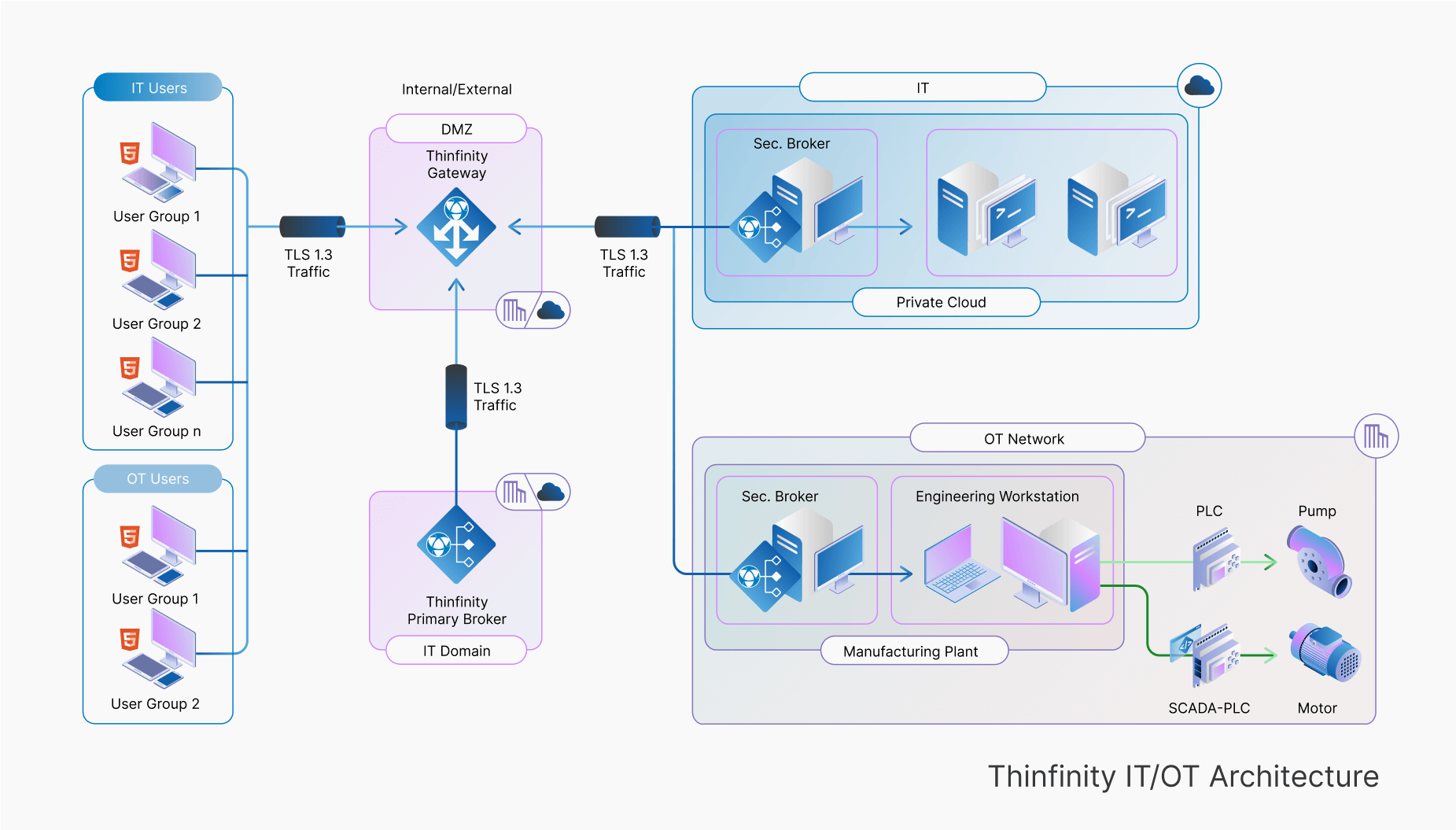
Thinfinity provides a secure remote access architecture that enables IT and OT users to securely access resources without compromising network segmentation or exposing critical assets. The architecture is structured as follows:

 
Thinfinity ZTNA framework secures IT/OT access via TLS 1.3, enforcing role-based control, Zero Trust, and secure broker authentication

User Groups and Access Control

  • IT Users: Engineers, support personnel, and system administrators requiring access to cloud or on-premises IT resources.
  • OT Users: Operators, technicians, and vendors needing access to industrial control systems, SCADA environments, and manufacturing plants.

Each user group is authenticated and authorized through Thinfinity’s ZTNA framework, ensuring strict access control based on roles and policies.

Thinfinity Gateway (DMZ Layer)

  • Located in the Demilitarized Zone (DMZ), the Thinfinity Gateway acts as the primary entry point for remote access.
  • It encrypts all communications using TLS 1.3 to prevent interception and man-in-the-middle attacks.
  • Internal and external traffic is processed through the Zero Trust model, ensuring that no direct connections are established between IT and OT networks.

Primary Broker (IT Domain)

  • The Thinfinity Primary Broker resides in the IT domain, handling authentication, policy enforcement, and session management.
  • It routes access requests to the appropriate IT or OT resources.
  • Ensures that users never connect directly to backend systems, reducing exposure to threats.

IT Network (Private Cloud & Secure Broker)

  • IT resources, such as virtual machines, databases, and enterprise applications, are accessed securely via the IT Secure Broker.
  • Remote IT users authenticate through the Thinfinity Gateway, and their session is established via the Secure Broker.

OT Network (Manufacturing & Engineering Workstations)

  • OT assets, including Programmable Logic Controllers (PLCs), SCADA systems, and industrial workstations, are accessible via the OT Secure Broker.
  • The OT Secure Broker ensures that only authorized personnel can modify or monitor industrial processes.
  • Engineering workstations provide an interface for remote configuration, monitoring, and troubleshooting of critical OT systems. 

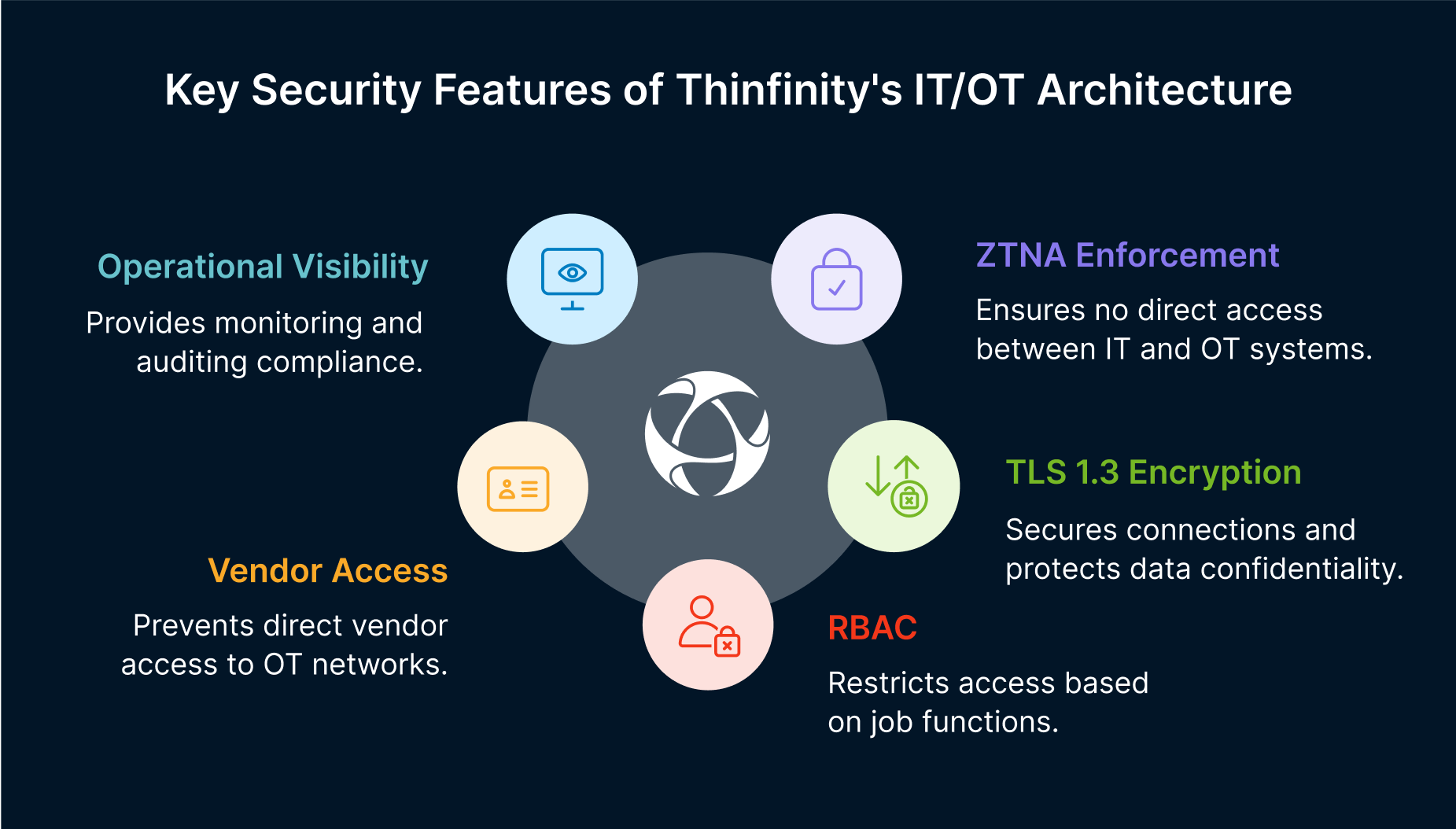
Key Security Features of Thinfinity’s IT/OT Architecture

1. Zero Trust Network Access (ZTNA) Enforcement

  • No direct network access between IT and OT systems.
  • Users are authenticated and authorized on a per-session basis.
  • Micro-segmentation prevents lateral movement between network segments.

2. TLS 1.3 Traffic Encryption

  • All remote connections are secured using end-to-end TLS 1.3 encryption.
  • Protects against man-in-the-middle attacks and ensures data confidentiality.

3. Role-Based Access Control (RBAC)

  • Fine-grained access policies restrict users to specific OT assets based on job function.
  • Reduces the risk of unauthorized modifications.

4. Secure Third-Party Vendor Access

  • Vendors do not gain direct access to the OT network.
  • Temporary session credentials prevent persistent unauthorized access.

5. Operational Visibility and Auditing

  • Real-time monitoring and audit logs track all user actions.
  • Ensures compliance with NIST, IEC 62443, and GDPR.
 
Main IT/OT security features include ZTNA enforcement, TLS 1.3 encryption, RBAC, secure vendor access, and real-time auditing

Advantages of Thinfinity for IT/OT Network Security

    • Seamless Remote Access without VPNs
      • Eliminates VPN vulnerabilities and reduces attack surface expansion.
    • Minimal Downtime for OT Systems
      • Remote access without disrupting industrial processes.
    • Cost-Efficient Alternative to Legacy Solutions
      • Reduces dependency on costly VPN infrastructure.
    • Flexible Deployment for Hybrid Environments
      • Works on-premises, hybrid, or multi-cloud across Azure, AWS, Google Cloud

How to Configure Thinfinity Secondary Brokers

Thinfinity supports Secondary Brokers to provide load balancing, high availability, and scalability for remote access in large IT/OT environments. Configuring Secondary Brokers involves:

  1. Deploying a Secondary Broker in the same or different location from the Primary Broker.
  2. Ensuring communication between the Primary and Secondary Brokers.
  3. Configuring access policies for high-availability distribution.
  4. Testing failover scenarios to ensure seamless operation.

For a detailed step-by-step guide, visit the Thinfinity Official Manual.


Conclusion: Future-Proofing Industrial Networks with Thinfinity

Industrial organizations can no longer afford to rely on legacy remote access solutions like VPNs and jump servers, which introduce security vulnerabilities, inefficiencies, and operational risks.
Thinfinity’s Zero Trust architecture provides a modern, scalable, and secure solution for IT/OT network integration. By enforcing strict access controls, encrypting all communications, and ensuring comprehensive monitoring, Thinfinity enables organizations to securely connect IT and OT networks without compromising performance or compliance


About Cybele Software Inc.
We help organizations extend the life and value of their software. Whether they are looking to improve and empower remote work or turn their business-critical legacy apps into modern SaaS, our software enables customers to focus on what’s most important: expanding and evolving their business.

About Version 2 Digital

Version 2 Digital is one of the most dynamic IT companies in Asia. The company distributes a wide range of IT products across various areas including cyber security, cloud, data protection, end points, infrastructures, system monitoring, storage, networking, business productivity and communication products.

Through an extensive network of channels, point of sales, resellers, and partnership companies, Version 2 offers quality products and services which are highly acclaimed in the market. Its customers cover a wide spectrum which include Global 1000 enterprises, regional listed companies, different vertical industries, public utilities, Government, a vast number of successful SMEs, and consumers in various Asian cities.

What is Security Patch Management?

It is now an undeniable truth: protecting systems, applications, and networks is essential today. A crucial element of cybersecurity, Security Patch Management is the systematic process of identifying, acquiring, testing, and applying software updates—or patches—to fix vulnerabilities within a system. 

Security patches are modifications to software systems that correct vulnerabilities potentially exploitable by hackers. They are released by software vendors to fix defects, improve functionality, or enhance security. 

By implementing robust patch management practices, organizations can more effectively address vulnerabilities, minimize exposure to cyber threats, safeguard sensitive data, and ensure operational continuity. 

Vulnerabilities and Security Patches 

vulnerability is a flaw or weakness in software, hardware, or an IT system that can be exploited to gain unauthorized access, disrupt operations, and cause significant damage. 

Vulnerabilities often result from coding errors, misconfigurations, or the absence of adequate security controls. A security patch is a fix or update provided by software vendors to address and mitigate these weaknesses. 

The speed at which a patch is released after a vulnerability is discovered has a direct impact on containing and neutralizing the risk of security breaches. 

Keeping systems updated with the latest patches is essential to reducing the likelihood of attacks and ensuring strong protection against potential threats. 

The global average cost of a data breach reached $4.88 million in 2024, marking a 10% increase compared to the previous year. 

This cost increase is linked to the expenses associated with managing disruptions and customer assistance following a breach. More than half of organizations are passing these costs onto their customers. 

However, the application of artificial intelligence (AI) and automation to security system management is opening new possibilities. 

Thanks to advanced technologies, organizations can now reduce the time needed to detect and contain a breach, often cutting costs by an average of $2.2 million

In this context, the development and adoption of security patches play a crucial role. The global Security Patch Management market was already valued at over $660 million in 2022, and this value has since increased further. Forecasts suggest it will continue growing until at least 2030, with an annual growth rate of 10.4%

This growth is driven by: 

  • The increasing adoption of third-party applications, 
  • The growing demand for secure software, 
  • Greater awareness of cybersecurity among users. 

The Importance of Security Patch Management: Key Benefits 

As of August 202452,000 new Common Vulnerabilities and Exposures (CVEs) were reported in cybersecurity, a significant increase from 2023’s 29,000 cases

Hackers exploit vulnerabilities in outdated systems to gain unauthorized access, steal information, or disrupt operations. 

Unpatched vulnerabilities are among the leading causes of data breaches. Prioritizing Security Patch Management as part of an overall cybersecurity strategy offers several key advantages

  • Reduced risk of cyberattacks: Regularly applying patches closes security gaps that attackers could exploit, significantly reducing risks from malware, ransomware, and other cyber threats. 
  • Regulatory compliance: Many industries have strict compliance requirements that mandate regular software updates. Failing to follow proper patching practices can lead to hefty fines and reputational damage.
  • Improved system performance: Beyond security, patches often enhance software functionality and efficiency, ensuring systems operate at optimal levels. 
  • Protection of sensitive data: Preventing costly data breaches helps organizations safeguard sensitive information, maintain privacy, and earn customer trust. 

The Role of Automation in Security Patch Management 

Manually managing patches across an organization’s IT infrastructure can be costly and complex, especially for large enterprises. This is where automation plays a crucial role. 

Automated patch management tools simplify the process by: 

  • Scanning for vulnerabilities and identifying outdated software, 
  • Efficiently deploying patches across multiple systems, 
  • Reducing human errors by ensuring uniform patch application across the entire IT infrastructure. 

With automation, IT teams can focus on more strategic initiatives while maintaining strong security defenses. 

To maximize these benefits, organizations should select tools that seamlessly integrate with existing systems and align IT governance with business objectives. 

Prioritizing Critical Patches 

Not all vulnerabilities pose the same level of risk. Some are more critical and require immediate attention. 

Prioritizing patches based on severity is fundamental to effective security patch management

Organizations can use the following strategies to determine which patches to apply first: 

  • Risk assessment: Analyzing the potential impact of a vulnerability on operations and data security. 
  • Vendor advisories: Software vendors often provide guidance on the urgency of patches. Organizations should always review these advisories and act accordingly. 
  • Threat intelligence: Leveraging threat intelligence tools to identify the most actively exploited vulnerabilities. 

By focusing on critical patches, organizations can mitigate the most significant risks while ensuring operational continuity

Balancing Security and Operational Continuity 

One of the biggest challenges in security patch management is balancing security with the need for uninterrupted operations. Organizations can achieve this balance by adopting the following practices: 

  • Scheduled maintenance windows: Planning patch deployments during low-activity periods to minimize disruptions for users and customers. 
  • Testing patches before deployment: Testing patches in a controlled environment to ensure they don’t introduce new issues or conflicts. 
  • Gradual rollouts: Deploying patches incrementally across different systems or departments to reduce the risk of widespread disruptions. 
  • Clear communication with stakeholders: Informing employees and customers about scheduled maintenance to manage expectations and prevent confusion. 

By carefully planning and executing patch management processes, organizations can maintain both security and operational efficiency

Challenges in Security Patch Management 

Despite advancements in technology providing more effective solutions, security patch management still faces several challenges. Some of the most common obstacles include: 

  • Complex IT environments: Modern organizations often manage diverse IT infrastructures, including on-premise systems, cloud platforms, and IoT devices. 
  • Limited resources: Budget and staffing constraints can hinder an organization’s ability to implement effective patch management, especially for small and medium-sized enterprises. 
  • Zero-day vulnerabilities: When vulnerabilities are unknown to developers or remain unpatched, organizations must rely on additional security measures, such as intrusion detection systems

Lack of awareness: Employees may unintentionally delay or ignore updates due to a lack of understanding about their importance. 

Best Practices for Security Patch Management 

To overcome these challenges and build a robust patch management framework, organizations should adopt the following best practices

  • Establish a clear patch management policy that defines how patches are identified, tested, and deployed, while also assigning roles, responsibilities, and timelines. 
  • Maintain a comprehensive asset inventory that includes all hardware, software, and devices to ensure no system is overlooked during patching. 
  • Invest in reliable patch management tools that automate patching processes, provide real-time vulnerability insights, and generate detailed reports. 
  • Regularly monitor and review the patch management process through frequent audits to identify areas for improvement. 

As cyber threats continue to evolve, the importance of Security Patch Management will only grow. 

Emerging technologies, such as AI and machine learning, will play a significant role in enhancing patch management processes, predicting vulnerabilities before they are exploited. 

The Strategic Importance of Security Patch Management 

Security Patch Management is a fundamental component of any organization’s cybersecurity strategy. 

By addressing vulnerabilities in a timely and systematic manner, organizations can reduce the risk of cyberattacks, protect sensitive data, and maintain regulatory compliance

To prioritize critical patches and balance security with operational continuity, an effective Security Patch Management system must be proactive and incorporate advanced automation tools

We have seen that challenges still exist. However, by adopting the best practices outlined above and staying informed on emerging trends, organizations can establish a strong security patch management framework

In a world where the cost of a data breach can be catastrophicinvesting in robust Security Patch Management processes is not just a good idea—it is an absolute necessity. 

FAQs 

1. What is Security Patch Management? Security Patch Management is the process of identifying, acquiring, testing, and applying software updates (patches) used to fix vulnerabilities and ensure system security. 

2. Why is applying security patches important?  Applying security patches reduces the risk of cyberattacks, protects sensitive data, ensures compliance with regulations, and improves the functionality and efficiency of systems. 

3. What are the main challenges in Security Patch Management?  Challenges include managing complex IT environments, limited resources, zero-day vulnerabilities, and a lack of awareness among employees about the importance of updates. 

4. How does automation support Security Patch Management?  Automation simplifies vulnerability scanning, patch application, and reduces human errors, allowing IT teams to focus on more strategic tasks.

About EasyVista  
EasyVista is a leading IT software provider delivering comprehensive IT solutions, including service management, remote support, IT monitoring, and self-healing technologies. We empower companies to embrace a customer-focused, proactive, and predictive approach to IT service, support, and operations. EasyVista is dedicated to understanding and exceeding customer expectations, ensuring seamless and superior IT experiences. Today, EasyVista supports over 3,000 companies worldwide in accelerating digital transformation, enhancing employee productivity, reducing operating costs, and boosting satisfaction for both employees and customers across various industries, including financial services, healthcare, education, and manufacturing.

About Version 2 Digital

Version 2 Digital is one of the most dynamic IT companies in Asia. The company distributes a wide range of IT products across various areas including cyber security, cloud, data protection, end points, infrastructures, system monitoring, storage, networking, business productivity and communication products.

Through an extensive network of channels, point of sales, resellers, and partnership companies, Version 2 offers quality products and services which are highly acclaimed in the market. Its customers cover a wide spectrum which include Global 1000 enterprises, regional listed companies, different vertical industries, public utilities, Government, a vast number of successful SMEs, and consumers in various Asian cities.

×

Hello!

Click one of our contacts below to chat on WhatsApp

×