Skip to content

假冒 VPN 應用程式正瞄準 Android 用戶

ESET 研究人員發現了一個針對 Android 用戶的惡意行為,該活動由 Bahamut APT 組織發起,並自 2022 年 1 月以來一直活躍,惡意應用程式通過僅提供 Android 用戶下載的虛假 SecureVPN 網站進行分發,儘管使用 SecureVPN 為名,但它與合法的多平台 SecureVPN 軟件服務沒有任何關聯。

Bahamut APT 組織通常以中東和南亞的實體和個人為目標,將網絡釣魚消息和虛假應用程式作為初始攻擊媒介。Bahamut 專門從事網絡間諜活動,ESET 認為其目標是竊取受害者的敏感信息。 此外,Bahamut 也被稱為僱傭軍團體,為廣泛的客戶提供黑客僱傭服務。

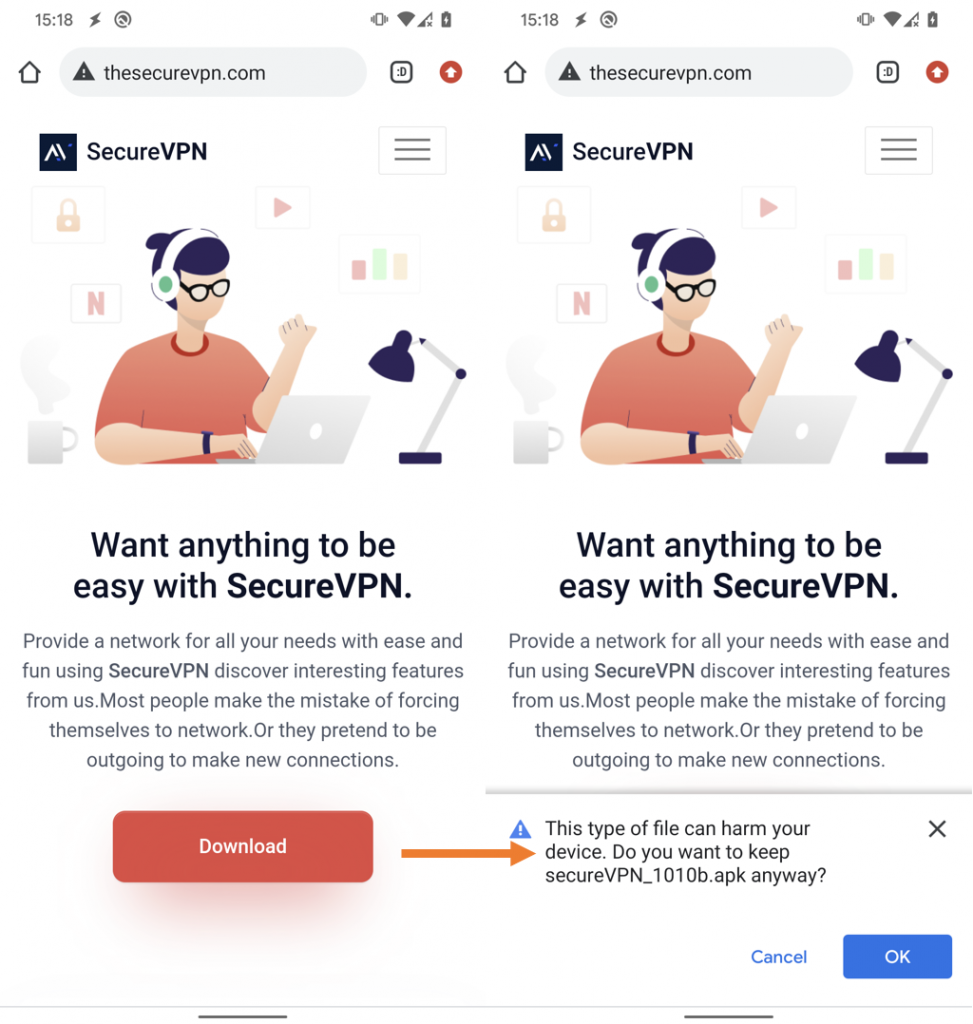
我們最初分析的假冒 SecureVPN 應用程式於 2022 年 3 月 17 日,從一個定位到新加坡的 IP 地址上傳到 VirusTotal,連同一個指向觸發我們 YARA 規則之一的假冒網站進行連接。他們使用的惡意 Android 應用程式是通過網站 thesecurevpn[.]com 提供的。

虛假的 SecureVPN 網站提供了一個木馬化的應用程式供用戶下載

一旦啟用了 Bahamut 間諜軟件,它可以由 Bahamut 操作員遙距控制,洩露各種敏感裝數據:

  • 聯絡人
  • 短信
  • 通話記錄
  • 已安裝應用程式
  • 裝置位置
  • 裝置帳戶
  • 裝置信息(互聯網連接類型、IMEI、IP、SIM 序列號)
  • 電話錄音

About Version 2

Version 2 Digital is one of the most dynamic IT companies in Asia. The company distributes a wide range of IT products across various areas including cyber security, cloud, data protection, end points, infrastructures, system monitoring, storage, networking, business productivity and communication products. Through an extensive network of channels, point of sales, resellers, and partnership companies, Version 2 offers quality products and services which are highly acclaimed in the market. Its customers cover a wide spectrum which include Global 1000 enterprises, regional listed companies, different vertical industries, public utilities, Government, a vast number of successful SMEs, and consumers in various Asian cities.

關於ESET
ESET成立於1992年,是一家面向企業與個人用戶的全球性的電腦安全軟件提供商,其獲獎產品 — NOD32防病毒軟件系統,能夠針對各種已知或未知病毒、間諜軟件 (spyware)、rootkits和其他惡意軟件為電腦系統提供實時保護。ESET NOD32佔用 系統資源最少,偵測速度最快,可以提供最有效的保護,並且比其他任何防病毒產品獲得了更多的Virus Bulletin 100獎項。ESET連續五年被評為“德勤高科技快速成長500 強”(Deloitte’s Technology Fast 500)公司,擁有廣泛的合作夥伴網絡,包括佳能、戴爾、微軟等國際知名公司,在布拉迪斯拉發(斯洛伐克)、布裏斯托爾(英國 )、布宜諾斯艾利斯(阿根廷)、布拉格(捷克)、聖地亞哥(美國)等地均設有辦事處,代理機構覆蓋全球超過100個國家。

假冒 VPN 應用程式正瞄準 Android 用戶

ESET 研究人員發現了一個針對 Android 用戶的惡意行為,該活動由 Bahamut APT 組織發起,並自 2022 年 1 月以來一直活躍,惡意應用程式通過僅提供 Android 用戶下載的虛假 SecureVPN 網站進行分發,儘管使用 SecureVPN 為名,但它與合法的多平台 SecureVPN 軟件服務沒有任何關聯。

Bahamut APT 組織通常以中東和南亞的實體和個人為目標,將網絡釣魚消息和虛假應用程式作為初始攻擊媒介。Bahamut 專門從事網絡間諜活動,ESET 認為其目標是竊取受害者的敏感信息。 此外,Bahamut 也被稱為僱傭軍團體,為廣泛的客戶提供黑客僱傭服務。

我們最初分析的假冒 SecureVPN 應用程式於 2022 年 3 月 17 日,從一個定位到新加坡的 IP 地址上傳到 VirusTotal,連同一個指向觸發我們 YARA 規則之一的假冒網站進行連接。他們使用的惡意 Android 應用程式是通過網站 thesecurevpn[.]com 提供的。

虛假的 SecureVPN 網站提供了一個木馬化的應用程式供用戶下載

一旦啟用了 Bahamut 間諜軟件,它可以由 Bahamut 操作員遙距控制,洩露各種敏感裝數據:

  • 聯絡人
  • 短信
  • 通話記錄
  • 已安裝應用程式
  • 裝置位置
  • 裝置帳戶
  • 裝置信息(互聯網連接類型、IMEI、IP、SIM 序列號)
  • 電話錄音

About Version 2

Version 2 Digital is one of the most dynamic IT companies in Asia. The company distributes a wide range of IT products across various areas including cyber security, cloud, data protection, end points, infrastructures, system monitoring, storage, networking, business productivity and communication products. Through an extensive network of channels, point of sales, resellers, and partnership companies, Version 2 offers quality products and services which are highly acclaimed in the market. Its customers cover a wide spectrum which include Global 1000 enterprises, regional listed companies, different vertical industries, public utilities, Government, a vast number of successful SMEs, and consumers in various Asian cities.

關於ESET
ESET成立於1992年,是一家面向企業與個人用戶的全球性的電腦安全軟件提供商,其獲獎產品 — NOD32防病毒軟件系統,能夠針對各種已知或未知病毒、間諜軟件 (spyware)、rootkits和其他惡意軟件為電腦系統提供實時保護。ESET NOD32佔用 系統資源最少,偵測速度最快,可以提供最有效的保護,並且比其他任何防病毒產品獲得了更多的Virus Bulletin 100獎項。ESET連續五年被評為“德勤高科技快速成長500 強”(Deloitte’s Technology Fast 500)公司,擁有廣泛的合作夥伴網絡,包括佳能、戴爾、微軟等國際知名公司,在布拉迪斯拉發(斯洛伐克)、布裏斯托爾(英國 )、布宜諾斯艾利斯(阿根廷)、布拉格(捷克)、聖地亞哥(美國)等地均設有辦事處,代理機構覆蓋全球超過100個國家。

Why Aren’t More SMEs Using Multi-Factor Authentication?

Cyberattacks against small and medium-sized enterprises (SMEs) are on the rise — from ransomware to Distributed Denial of Service (DDoS). Leveraged credentials, most often passwords, cause 61% of data breaches.

Nearly half of all cyberattacks target SMEs who are less equipped to recover from damages. 

Why don’t cybercriminals limit their nefarious activity to organizations with large bank accounts? They have strategically determined SMEs are less likely to invest in security best practices than large enterprises. 

Sadly, the consequences of these data breaches can be devastating. On average, 60% of SME breach victims file for bankruptcy within six months of an incident. The good news is SMEs can avoid nearly 100% of breaches by taking one simple action: implementing multi-factor authentication (MFA)

Why Aren’t More SMEs Using Multi-Factor Authentication?

person in a mask typing in code on a computer

According to a 2021 study, organizations that use MFA are 99.9% less likely to experience a breach than those that do not. 

Yet, despite having awareness of cybersecurity risks, an estimated 67% of business decision-makers don’t use MFA for any of their login points.

Why aren’t more SMEs using multi-factor authentication? Is the resistance to MFA one of misunderstanding, misinformation, or the perception of inconvenience? And how can it be overcome? Let’s explore MFA’s benefits, challenges, and common misconceptions around SMEs using multi-factor authentication — but first, a primer on MFA:  

What Is MFA? 

MFA is a method to protect an access transaction by utilizing multiple (often two) factors to verify a user’s identity. MFA, sometimes referred to as two-factor authentication (2FA), goes beyond vulnerable password authentication by requiring two or three forms of identity:

  • Something you are: biometric data like facial recognition, fingerprint, retinal imprint, or even speech and typing patterns.
  • Something you know: passwords or facts about your life or family history.
  • Something you have: a device in your possession, like a phone or a security key.

Though the technology has been around for decades, biometric data recognition was mostly relegated to sci-fi movies until recently. 

However, technologies like facial recognition and fingerprint scanning are now mainstream thanks to organizations embedding them into their products. A recent survey of 1,000 Americans found that 70% of them find biometrics easier to use than traditional passphrases. 

How Does MFA Work?

End users may see MFA as slightly inconvenient as it involves a few extra steps. But the process itself is relatively straightforward: 

  • The user logs in with their password (something they know).
  • The user is prompted to satisfy a second factor:
    • One-time passcode (TOTP) on their phone or tablet from an authentication app like Google Authenticator, or
    • One-time passcode (OTP) via email or SMS, or
    • Push notification from a smartphone or tablet app, or
    • Scan of fingerprint, face, or other biometric factor 

Once the user’s identity has been verified by the organization’s chosen secondary and/or tertiary factor, the user is granted admission to the network. 

Benefits and Challenges of Using MFA 

woman sipping from a coffee mug, petting her dog while working in front of her laptop

MFA Benefits

Implementing MFA has many benefits, but here are three: 

  • MFA keeps accounts secure even if passwords have been compromised.
  • MFA provides peace of mind for stressed-out cybersecurity teams. 
  • MFA lays the foundation for running a Zero Trust security framework, which maintains trust without maximum verification and introduces security vulnerabilities. 

In addition, MFA is one of the easiest security measures admins can take. 

MFA Challenges and Solutions

Now, let’s dig into why more SMEs aren’t using multi-factor authentication. Identity management is the only technology that requires users and admins to balance efficiency, convenience, and security all at once — a challenge, but a surmountable one. 

Here are the three challenges most often cited by SMEs resisting MFA:

  • MFA could be time-consuming and slow productivity.
  • MFA could negatively impact user experience (UX).
  • MFA could be expensive for small businesses to manage. 

When it comes to choosing between speed and security, speed often wins. Fortunately, new innovations in UX design are delivering a seamless user experience with no compromise. Implemented correctly, MFA can increase IT security without adding complexity or slowing productivity for the end user. 

business meeting in an office setting

Managed MFA solutions can support multiple factors depending on the applications, devices, and systems they protect. Integrated into a cloud directory platform like JumpCloud, managed MFA solutions reduce the complexity of protecting a single identity while securely connecting the user to multiple IT resources. Less complexity leads to higher user adoption rates and a greatly reduced attack surface.

Employees may continue to lose their smartphones on occasion, but this problem can be solved with an authentication app like JumpCloud Protect™. JumpCloud Protect will: (1) temporarily relax MFA requirements while the user sets up their new phone; or (2) shift MFA requirements to a non-smartphone-based method like a hardware-based key or fingerprint scanner.

Finally, MFA costs are scalable for SMEs, with simplified à la carte and bundled pricing plans that deliver what businesses of all sizes need, when they need it. (Note: Cloud MFA services are free with all bundled JumpCloud packages.)

The ROI of Multi-Factor Authentication for SMEs

With so much on the line for SMEs, whose data is frequently targeted by hackers, MFA adoption has never been more critical. MFA helps keep accounts secure even if passwords have been compromised. 

According to Aberdeen Research, small businesses of less than 500 employees with up to $50M in annual revenue experienced downtimes costs of up to $8,600 per hour in 2016. All things considered, a solid Zero Trust initiative like MFA is a drop in the bucket. 

Interested in learning more about JumpCloud and how to achieve more robust security practices? Open a JumpCloud Free account today. 

JumpCloud Free grants new admins 10 systems and 10 users free to help evaluate with access to the complete platform. Once you’ve created your organization, you also receive 10 days of Premium 24×7 in-app chat support to help you with any questions or issues.

About Version 2 Digital

Version 2 Digital is one of the most dynamic IT companies in Asia. The company distributes a wide range of IT products across various areas including cyber security, cloud, data protection, end points, infrastructures, system monitoring, storage, networking, business productivity and communication products.

Through an extensive network of channels, point of sales, resellers, and partnership companies, Version 2 offers quality products and services which are highly acclaimed in the market. Its customers cover a wide spectrum which include Global 1000 enterprises, regional listed companies, different vertical industries, public utilities, Government, a vast number of successful SMEs, and consumers in various Asian cities.

About JumpCloud
At JumpCloud, our mission is to build a world-class cloud directory. Not just the evolution of Active Directory to the cloud, but a reinvention of how modern IT teams get work done. The JumpCloud Directory Platform is a directory for your users, their IT resources, your fleet of devices, and the secure connections between them with full control, security, and visibility.

Principle of Least Privilege: Understand the Importance of this Concept

Granting administrator access to a user who does not even have time to explain why they need this permission is not an efficient way to solve a company’s problems but rather to harm its security. 

This is because sensitive data can fall into the wrong hands through a cyber invasion, in addition to the organization’s own collaborator posing a threat due to the possibility of human, accidental, or purposeful errors. 

In this context, it is recommended to apply the Principle of Least Privilege, which grants these users only the necessary permissions to perform their tasks. 

In this article, we explain in detail this concept and its importance, among other information on the subject. To facilitate your reading, we divided our text into topics, which are:

  • What is the Principle of Least Privilege?
  • Why is the Principle of Least Privilege Important?
  • 10 Benefits of the Least Access Principle
  • How to Implement the Principle of Least Privilege
  • Principle of Least Privilege: Example
  • Challenges of the Principle of Least Privilege
  • Need-to-Know Principle and Principle of Least Privilege: What Is the Relationship?
  • Zero Trust and the Principle of Least Privilege: What Is the Relationship?
  • How to Keep Your Data Protected Using Passwords
  • About senhasegura
  • Conclusion

Enjoy the read!

What is the Principle of Least Privilege?

Also known as Least Access Principle, the Principle of Least Privilege (POLP) refers to a concept of cybersecurity according to which users should receive only the necessary permissions to read, write, and execute files indispensable to their operations.

In practice, the Principle of Least Privilege integrates the security policy of companies and restricts access to applications, systems, and processes only to privileged users.

Depending on the system, it is possible to base these privileges on the roles of professionals within organizations. 

Why is the Principle of Least Privilege Important?

First, the Principle of Least Privilege is critical to reducing the attack surface, preventing the action of malicious users. This is extremely important, since privileged credentials are among the main targets of attackers.

That is, by limiting superuser and administrator access through the Least Access Principle, one can protect a company from intrusions. Moreover, it helps prevent the spread of malicious software, such as malware.

However, it is essential to be aware of the need to apply the Principle of Least Privilege to endpoints. This helps prevent hackers from using elevated privileges to increase their access and move laterally across the IT framework.

The need to keep companies in compliance with strict auditing standards also explains why the Principle of Least Privilege is important. 

10 Benefits of the Least Access Principle

The main benefits of the Least Privilege are:

  • Elevation of privileges when necessary
  • Restriction of access to applications
  • Restriction of access to system settings
  • Control of the data used
  • Smallest attack surface
  • Reduction of human failures
  • Malware containment
  • Enhanced data security
  • Protection against common attacks
  • Compliance with audit criteria

Here are more details on these benefits:

Elevation of Privileges When Necessary

It is necessary to apply the Least Access Principle (POLP) whenever one needs to elevate the privileges of an employee to a particular application for a specific time to operate. 

Restriction of Access to Applications

Another purpose of the Principle of Least Privilege is to prevent an administrator from changing the settings of equipment by installing applications and exposing the organization’s network to cyber threats.

Restriction of Access to System Settings

The  Principle of Least Privilege also has the function of reducing administrative privileges by restricting access to system settings. 

Thus, a user may have administrative privileges without being able, for example, to change firewall settings, since the control of the environment is intended for the administrator. 

Control of the Data Used

Through the Principle of Least Privilege, one can record and store detailed information about each access granted and obtain greater control of the company’s data. 

Smallest Attack Surface

If a malicious agent breaks into a user account with limited permissions, their attack will compromise only the resources accessed by that user. In contrast, if the hacked account is an administrator, the hack will impact the entire network.

This means that, in order to reduce the attack surface used by hackers to harm a business, it is recommended to keep the minimum number of administrator accounts.

Reduction of Human Failures

In addition to hacking, applying the Principle of Least Privilege in your organization helps prevent problems caused by human errors. After all, users with access to resources that go beyond what is necessary to perform their tasks can, unintentionally or even purposely, delete or reconfigure something.

Malware Containment

The  Principle of Least Privilege helps prevent your network from getting infected by malware. This is because an administrator with many accesses can spread malware to multiple systems, while it is possible to count its dissemination on networks where Least Privilege applies.

However, it is not enough to restrict users’ access, as the same must be done in relation to applications in order to prevent this type of attack on your network.

Enhanced Data Security

You may remember when Edward Snowden leaked millions of classified NSA (National Security Agency) files to the media due to his privileged access. The incident has caused many problems, which could be avoided if his permissions were limited to the scope of his work.

Applying the Least Access Principle is an efficient way to limit the number of users with access to sensitive data, reducing the possibility of internal leaks and strengthening digital security. 

Moreover, in the event of a violation, the restrictions imposed by the Principle of Least Privilege allow for easier tracking of the cause.

Protection Against Common Attacks

Applications with high privileges are often targeted by hackers, who insert malicious instructions into SQL statements to control critical systems. However, this type of attack can be avoided through the Principle of Least Privilege (POLP), which impacts the possibility of elevating permissions. 

Compliance with Audit Criteria

Applying the Least Access Principle allows organizations to operate in accordance with the most stringent audit requirements, making it possible to avoid threats and reduce the downtime and losses generated by a potential attack.

How to Implement the Principle of Least Privilege

Some practices are recommended when the goal is to apply the Principle of Least Privilege. Some of them are:

  • Conduct an audit of the accounts;
  • Establish the Least Privilege into new accounts;
  • Elevate privileges for a limited time;
  • Ensure that elevations of privileges are appropriate;
  • Track all user actions on the network; and
  • Conduct periodic audits.

Check out these items in more detail below:

Conduct an Audit of the Accounts;

The first step in implementing the Least Access Principle is to audit all existing privileges in accounts, programs, and processes, ensuring that users are only granted the necessary permissions to perform their activities.

Establish the Least Privilege Into New Accounts

Next, it is important to keep in mind that new accounts must be created in compliance with the Principle of Least Privilege, regardless of whether they are used by company managers or IT staff.

After all, if any of these users require a higher level of access afterward, it may be granted temporarily.

Elevate Privileges for a Limited Time

The privileges granted must be temporary whenever a user needs to raise the level of access for a specific project. In such cases, to ensure even greater security, it is possible to use single-use credentials.

Ensure that Elevations of Privileges Are Appropriate

Before applying the Principle of Least Privilege to accounts that already exist, you should assess which roles require elevated access and whether users actually rely on this elevation of privileges to perform their operations.

This assessment should be carried out periodically, including new tasks that may require privileged access. 

Track All User Actions On the Network

To apply the Principle of Least Privilege, it is also important to monitor and track all user actions on your network.

This monitoring will allow you to detect over-privileged users, track suspicious activity, and identify evidence of an intrusion before it causes incalculable damage.

Conduct Periodic Audits

To ensure that permissions are always at the appropriate level, periodic audits are required. 

Keep in mind that performing this type of maintenance is much easier than starting to implement the Principle of Least Privilege policy from the beginning, saving you time and ensuring more security for your company. 

Principle of Least Privilege: Example

Here are some cases where the use of POLP is indispensable:

  • Social Media

We advise the conscious and responsible use of social media through the application of the Principle of Least Privilege. In other words: to offer only the information necessary to make use of these media and not to share sensitive data with other user profiles.

In addition, it is important to configure privacy and security options in order to restrict users’ access to your publications.

  • Mobile Devices

Many applications request unnecessary permissions to perform their functions, such as telephone, location, and contacts, and can even be used to steal the banking details of the victims.

Therefore, it is also essential to apply the Principle of Least Privilege in this case in order to avoid damage caused by malicious apps.

  • Health System

A receptionist of a health insurance plan should not have access to the clinical and confidential data of patients. This is because, without the Principle of Least Privilege, if a malicious user invades your computer, they will have access to these files.

  • Manufacturing Companies

A manufacturing company should also grant its employees only the level of access needed to perform their tasks, rather than giving access to your entire ICS. This is because remote access to industrial resources and interconnectivity generate security vulnerabilities for the organization.

  • Retail

The retail sector usually has a high turnover of employees, which can be a problem if there is no control over the levels of access granted. For this reason, companies in the segment must apply the Principle of Least Privilege to ensure that only the right people have access to their data and resources.

  • Financial Services

Professionals working in financial services deal with millions of customer files daily. To reduce risks, it is appropriate to apply the least access principle (POLP) in that context. 

  • Outsourced Activities

Many corporations outsource services such as CRM systems, HR, and databases. When they need technical support, it is advisable to apply the Principle of Least Privilege, ensuring that outsourced professionals have access only to the system they need to repair, which reduces risks to the company.

Challenges of the Principle of Least Privilege

The main feature of the Least Access Principle is the possibility of granting users only the necessary permissions to perform their tasks, and the major challenges related are the minimum access and the access expiration. Check it out:

  • Minimum Access

Often, the administrator is not sure if the user really needs a high level of access before providing it and grants this permission anyway to reduce inconvenience to the user and not needing to contact technical support.

Nevertheless, it is advisable not to provide privileged access without being 100% sure it is necessary. If the access provided is not required, this is unlikely to be reported to technical support, increasing the attack surface. In contrast, if the user does not receive the access they need, they may request this permission. 

  • Access Expiration

Another challenge related to privileged access is that often a user’s roles are changed over time, without removing previous privileges. As a result, many employees accumulate unnecessary privileges to perform their activities.

To avoid this problem, it is recommended to set a deadline for the access expiration, which ensures that it expires if it is not renewed. 

Need-to-Know Principle and Principle of Least Privilege: What Is the Relationship?

Used by governments and large organizations to protect state and industrial secrets, the Need-to-Know Principle is a concept that advocates restricting information access only to people who need it to perform their tasks, regardless of the corporation’s level of security or the authorization of superiors.

When we talk about digital security, its application involves the use of mandatory access control (MAC) and discretionary access control (DAC) solutions.

The Principle of Least Privilege, in turn, refers to the need to direct just the accesses each user of a network or system needs to perform their functions. 

Zero Trust and the Principle of Least Privilege: What Is the Relationship?

Under the Zero Trust-based security concept, organizations should not rely on anything that is within or outside their boundaries. Therefore, any access requests must be checked and evaluated before being granted.

To limit which systems a user can access, this security model uses features such as auditing, credential protection, and multifactor authentication (MFA).

Moreover, it is recommended to apply the Principle of Least Privilege as a strategy to limit the level of access of users only to the necessary permissions.

How to Keep Your Data Protected Using Passwords

The cyber universe requires many security measures to mitigate risks, and POLP is one of the most effective. However, there are other ways to protect an organization’s resources and data, and one of them is to choose secure passwords. 

Here’s what you should take into account to set a password:

  • Use long and complex passwords. This prevents hackers from using techniques to guess them. However, just using complex passwords may not be enough to avoid the action of malicious attackers.
  • Many devices are configured with default passwords. Change them immediately.
  • Avoid reusing your passwords on different accounts. In addition, constantly check if you have ever been a victim of data leaks through senhasegura Hunter. In that case, change your passwords immediately.
  • Set up your passwords to be changed frequently. The ideal is at least every three months.
  • Do not write down, store in an easily accessible place, or share your passwords with others, thus avoiding unauthorized access.
  • Consider password management solutions, or even privileged access management (PAM), to manage the use of systems and devices.
  • Use multifactor authentication (MFA) mechanisms to add a layer of security to your accounts.
  • Set up means of retrieving access, such as including phone numbers or emails.
  • Passwords are one of the oldest security mechanisms in the computing world and are also one of the main attack vectors by hackers. And in the “new normal” era, with increasing threats resulting from the covid-19 pandemic, it is vital that users be alert and properly protect their digital identities. In this way, we can avoid cyberattacks that can cause considerable damage not only to people, but also to businesses. Remember: security starts with you!

About senhasegura

We, from senhasegura, are part of the MT4 Tecnologia group, created in 2001, to promote cybersecurity.

We are present in 54 countries, providing our clients with control over privileged actions and data. In this way, we avoid the action of malicious users and data leaks. 

We understand that digital sovereignty is a right of all and this goal can only be achieved with applied technology. 

Therefore, we follow the life cycle of privileged access management, before, during, and after access, by using machine automation. Among our commitments, the following stand out:

  • To ensure more efficiency and productivity for businesses, as we avoid interruptions due to expiration;
  • To perform automatic audits on the use of privileges;
  • To automatically audit privileged changes to detect abuses;
  • To ensure customer satisfaction;
  • To perform successful deployments;
  • To provide advanced PAM capabilities;
  • To reduce risks;
  • To also bring companies into compliance with audit criteria and standards such as PCI DSS, Sarbanes-Oxley, ISO 27001, and HIPAA.

Conclusion

By reading this article, you saw that:

  • The Principle of Least Privilege is a security policy, where each user of a system must receive only the necessary permissions to complete their activities;
  • This allows to reduce the attack surface and avoid the action of malicious attackers;
  • It also brings other benefits, such as avoiding the proliferation of malware and human failures, that may generate risks;
  • To implement the Least Access Principle in an organization, it is necessary to audit existing accounts, ensure that elevation of privileges is granted for a limited period, and track all actions of users on the network, among other good practices;
  • As examples of situations in which the Principle of Least Privilege should be applied, we highlight social networks and health systems, among others;
  • The main challenges related to the adoption of the Principle of Least Privilege refer to minimum access and access expiration;
  • The Principle of Least Privilege can be associated with the Need-to-Know Principle and the Zero Trust-based security model.
  • In addition to using the Principle of Least Privilege, keeping an organization’s data secure involves other measures, such as the adoption of strong and unique passwords.

Did you like our article on the Principle of Least Privilege? Then share it with someone who may be interested in the topic. 

ALSO READ IN SENHASEGURA’S BLOG

Why Identity and Access Management is Important for LGPD Compliance

Windows Print Spooler Failure: Why Should I Upgrade Immediately?

What is An Incident Response Plan (irp) and Why is It Important to Have One?

About Version 2 Digital

Version 2 Digital is one of the most dynamic IT companies in Asia. The company distributes a wide range of IT products across various areas including cyber security, cloud, data protection, end points, infrastructures, system monitoring, storage, networking, business productivity and communication products.

Through an extensive network of channels, point of sales, resellers, and partnership companies, Version 2 offers quality products and services which are highly acclaimed in the market. Its customers cover a wide spectrum which include Global 1000 enterprises, regional listed companies, different vertical industries, public utilities, Government, a vast number of successful SMEs, and consumers in various Asian cities.

About Segura®
Segura® strive to ensure the sovereignty of companies over actions and privileged information. To this end, we work against data theft through traceability of administrator actions on networks, servers, databases and a multitude of devices. In addition, we pursue compliance with auditing requirements and the most demanding standards, including PCI DSS, Sarbanes-Oxley, ISO 27001 and HIPAA.

How to Recover a FileVault Key

Jump to Tutorial

FileVault is a disk encryption feature built into macOS to protect your hard drive from unauthorized access. When enabled, your startup volume is locked when the Mac is sleeping or shut down, and the data is encoded so it can’t be read unless the login password is used. 

When enabling FileVault, macOS asks you a critical question on how you would like to unlock your disk. There are two options (Figure 1):

  1. Allow your iCloud account to unlock your disk
  2. Create a recovery key

If you choose the first option while enabling FileVault, you only need to access your iCloud account to unlock your Mac and the OS will not create a separate recovery key. If you choose the second option, macOS generates a recovery key that you are expected to store in a safe place. 

However, what happens if you lose the key? We’ll cover your options for potentially recovering a FileVault key in this tutorial.

screenshot of security and privacy
Figure 1

Note: If you lose both your Mac password and FileVault recovery key, you will not be able to log in to your device or access the data on your startup disk.

Not Sure if the Recovery Key Is Correct?

Maybe you have a recovery key, but are unsure if it’s the right one for this computer. Fortunately, if you are already/still logged in to your Mac, there is a way forward. You can validate the recovery key by taking these steps:

  • Launch the Terminal.app on your Mac: search for “terminal” using the Spotlight search option on your device or navigate through Applications > Utilities > Terminal.
  • Run the command sudo fdesetup validaterecovery and click return. Enter your admin password when requested.
  • You will be prompted to enter the current recovery key. Do exactly that and ensure you do not leave out the hyphens in the key. Because your entry is hidden and you cannot use the backspace if you type a mistake, we offer this pro tip: copy and paste into Terminal. Just be sure you don’t copy any leading or trailing spaces.

There are three possible outcomes: 

  1. true (Figure 2a) if your key is correct
  2. false (Figure 2b) if the key you entered follows the format of a recovery key but is incorrect for this computer
  3. Error: Not a valid recovery key (Figure 2c) if the key does not look like a recovery key at all (e.g., if you leave out the hyphens)
screenshot of a possible outcome
Figure 2a
screenshot of a possible outcome
Figure 2b
screenshot of a possible outcome
Figure 2c

Recovery Key Incorrect or Lost?

Unless your system is managed by a device management platform, if your FileVault recovery key is completely lost or the validation keeps returning false, unfortunately you cannot recover it. It is gone. 

The only thing you can do while you still have access to your computer is to create a new key. You can do this in two ways: 

  1. Via Terminal.app
  2. Via the FileVault tab under Security & Privacy

Whichever method you choose, note that you will not get the same recovery key that was lost. Instead, a new key will be generated.

1. Create a New Key Via Terminal

Launch the Terminal.app and run the following command: 

sudo fdesetup changerecovery -personal 

This method will allow you to generate a new key without having to turn off FileVault and re-enable it. Enter your user name and password when prompted to do so. If the change is successful, you will see a new recovery key (Figure 3). 

Otherwise, you may get an error that you cannot change your key. We recommend trying the second method discussed below if this method doesn’t work for you.

screenshot of a possible outcome
Figure 3

2. Create a New Key Via FileVault Tab

With this method, you need to turn off FileVault and turn it back on to generate a new recovery key. On your Mac, go to Apple menu > System Preferences > Security and Privacy and click on the FileVault tab. 

Then, click the lock icon on the left-hand side of the pane, provide the administrator password, and click Unlock. Afterwards, select Turn Off FileVault… (Figure 4). The decryption of your disk occurs in the background as you use your device and only while the device is awake and plugged into AC power. You can track the progress under the FileVault tab. 

When the decryption is complete, return to the FileVault tab and click Turn On FileVault.You will be prompted to choose between iCloud or recovery key. If you choose “Create a recovery key and do not use my iCloud account,” be absolutely sure to copy it and store it in a safe place, such as your Password Manager

Do not save it on the same startup disk you are encrypting.

screenshot of security and privacy
Figure 4

Retrieving Your Key On a JumpCloud-Managed macOS Device

If you use a JumpCloud-managed macOS device, yes it is possible to retrieve your recovery key and avoid the perils of FileVault! Your IT admin will need to take the following steps:

  1. Log in to the JumpCloud Admin Portal via https://console.jumpcloud.com/login/admin
  2. Go to DEVICE MANAGEMENT > Devices 
  3. Under Devices, select the relevant device
  4. Under Details, click the view key button

Boom, your admin can now see your recovery key. To learn more about retrieving a recovery key on a JumpCloud-managed device, check out the following support documentation:

Not using JumpCloud yet? Our open directory platform goes beyond allowing you to easily access recovery keys. It empowers you to manage access, user privileges, and the security settings of your entire fleet — no matter the OS. Use our platform for free for up to 10 users and 10 devices so you never have to worry about losing your FileVault recovery key again.

About Version 2 Digital

Version 2 Digital is one of the most dynamic IT companies in Asia. The company distributes a wide range of IT products across various areas including cyber security, cloud, data protection, end points, infrastructures, system monitoring, storage, networking, business productivity and communication products.

Through an extensive network of channels, point of sales, resellers, and partnership companies, Version 2 offers quality products and services which are highly acclaimed in the market. Its customers cover a wide spectrum which include Global 1000 enterprises, regional listed companies, different vertical industries, public utilities, Government, a vast number of successful SMEs, and consumers in various Asian cities.

About JumpCloud
At JumpCloud, our mission is to build a world-class cloud directory. Not just the evolution of Active Directory to the cloud, but a reinvention of how modern IT teams get work done. The JumpCloud Directory Platform is a directory for your users, their IT resources, your fleet of devices, and the secure connections between them with full control, security, and visibility.

×

Hello!

Click one of our contacts below to chat on WhatsApp

×