CVE and CVSS are some of the most commonly misunderstood features of patching. In this article, we will explore the differences and showcase how they can affect your patching technique. Although many IT managers are familiar with these terms CVE and CVSS, some IT professionals still don’t understand the difference between them. CVE and CVSS are synonymous with software vulnerabilities, patching and operating systems.
Audit company PP&C needed to protect its clients’ sensitive data. After implementing Safetica solution, PP&C is GDPR compliant, protects data and can monitor and improve company effectiveness.
Problem: Ensure LGPD compliance and data protection
PP&C provides audit, consulting and accounting services and as such need to offer the best possible security for its clients’ information as well as its own. The company also needed to comply with GDPR, and therefore started its search for a DLP system that was able to meet any needs that arise.
With Safetica, PP&C can now analyze all users’ computers, primarily their data manipulation, and understand their access behavior. The company can adapt the system with the necessary controls to implement the new Brazilian General Data Protection Law (LGPD), in addition to updating all standards and IT procedures.
Results
The company is compliant with LGPD. PP&C`s Channel Communications Control, which transfers customer data to electronic environments outside the company, will only work when the data is adequately protected. PP&C management gets weekly summary reports on users’ internet activities, use of applications,and printed documents. Monitoring files on the file server helps to better understand and improve the use of company assets.
Furthermore, PP&C management can be immediately notified if a security incident occurs.
Safetica’s solution met 100% of our demands to ensure data security, improving productivity and all this with low cost
said Fabio Bezerra, IT Manager in a PP&C Auditores Independentes.
About Version 2 Digital
Version 2 Digital is one of the most dynamic IT companies in Asia. The company distributes a wide range of IT products across various areas including cyber security, cloud, data protection, end points, infrastructures, system monitoring, storage, networking, business productivity and communication products.
Through an extensive network of channels, point of sales, resellers, and partnership companies, Version 2 offers quality products and services which are highly acclaimed in the market. Its customers cover a wide spectrum which include Global 1000 enterprises, regional listed companies, different vertical industries, public utilities, Government, a vast number of successful SMEs, and consumers in various Asian cities.
About Safetica Safetica is to provide small and mid-sized companies with the same quality data protection that corporations have – affordably, and without any additional IT administration or disruptions in operation.
It is always a luxury to show off a new plugin in Pandora FMS, and for that reason we decided to devote an article in style to this Zendesk plugin on our blog. We will discuss what it is and how it can help us. Step by step, and concisely, so that no one gets lost along the way.
New Zendesk plugin added to Pandora FMS
But first: What is Zendesk?
Zendesk is a platform that channels the different communication modes between customer and company through a ticketing system.
A consolidated CRM company, devoted specifically to customer service, which designs software to improve relationships with users. Known for growing and innovating while building bonds and putting down roots in the communities where it lives. Its software, such as Pandora FMS, is very advanced and flexible, being able to adapt to the needs of any growing business.
Zendesk plugin
The plugin we are talking about today allows you to create, update and delete Zendesk tickets from the terminal, or from Pandora FMS console. For that, it makes use of the API of the service, which allows this system to be integrated into other platforms. Using a series of parameters, which would be the configurable options of the ticket, you may customize them as if you were working from Zendesk itself.
Zendesk Ticket System
Zendesk has an integrated ticketing system, with which you may track support tickets, prioritize them and resolve them.
To the point: System configuration to use the plugin.
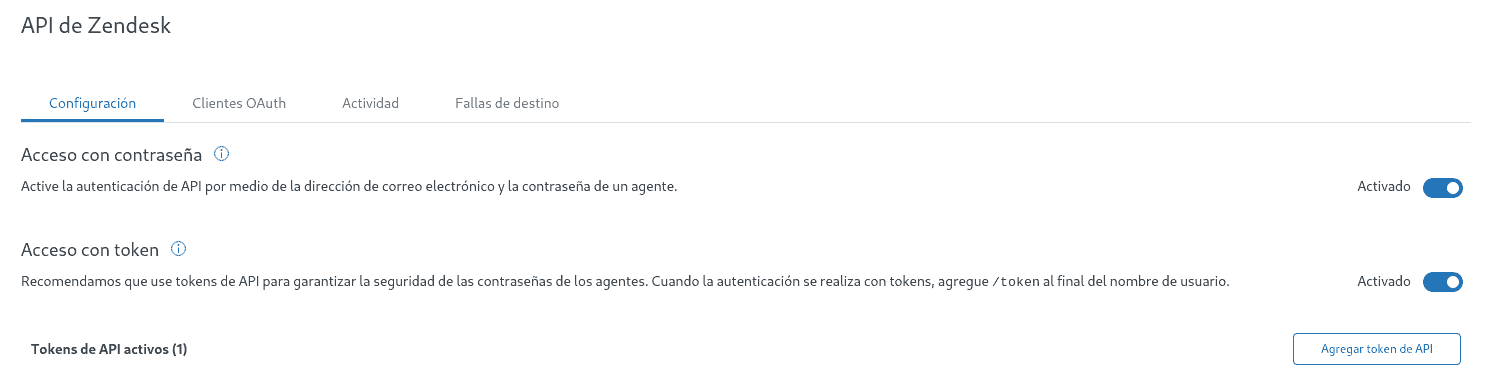
To make use of the plugin, enable access to the API, either using password or token.
Do it from the API section in the administrator menu.
Plugin parameters
The plugin makes use of a number of parameters when creating, updating or deleting tickets. With them you may configure the ticket according to your own criteria and needs. Just as you would do it from Zendesk’s own system.
Method
-m
With this option you will choose whether to create, update or delete the ticket. Use post to create it, put to update it, and delete to delete it.
IP or hostname
-i
With this alternative you may add the ip or name of your site. Sites usually have this format:
Your username. Usually the email with which you signed up in Zendesk. Use this option, combined with password or token, depending on how you have it enabled.
Password
-p
The password to authenticate with the API.
Token
-t
The token to authenticate to the API. If you use this option, you do not have to use the password option.
Ticket name
-tn
The name to be given to the ticket.
Ticket content
-tb
Ticket text. It should be enclosed in quotation marks.
Ticket ID
-id
Ticket ID. This option is for when you want to update or delete a ticket.
Ticket status
-ts
The status of the ticket, which can be new, open, hold, pending, solved or closed.
Priority
-tp
The priority of the ticket, which can be urgent, high, normal or low.
Type
-tt
The ticket type, which can be problem, incident, question or task.
Ticket creation
By running the plugin with the appropriate parameters you may create tickets:
python3 pandora_zendesk.py -m post -i <ip or site name> -us <user> -t <token> -tn <ticket name> -tb <ticket content> -tp <priority> -tt <type> -ts <ticket status>
Example
With the following command:
python3 pandora_zendesk.py -m post -i pandoraplugin -us alejandro.sanchez@pandorafms.com -t <token> -tn "Problem with X" -tb "Something is giving some problem" -tp urgent -tt task -ts new
Interact with the API and the ticket will be created in your system.
Ticket update
You may update the tickets. The parameters are the same as in creation, but you have to add also the id, which will be the id of the ticket to be updated.
python3 pandora_zendesk.py -m put -i <ip or site name> -us <user> -t <token> -id <id ticket> -tn <ticket name> -tb <ticket content> -tp <priority> -tt <type> -ts <ticket status>
Example:
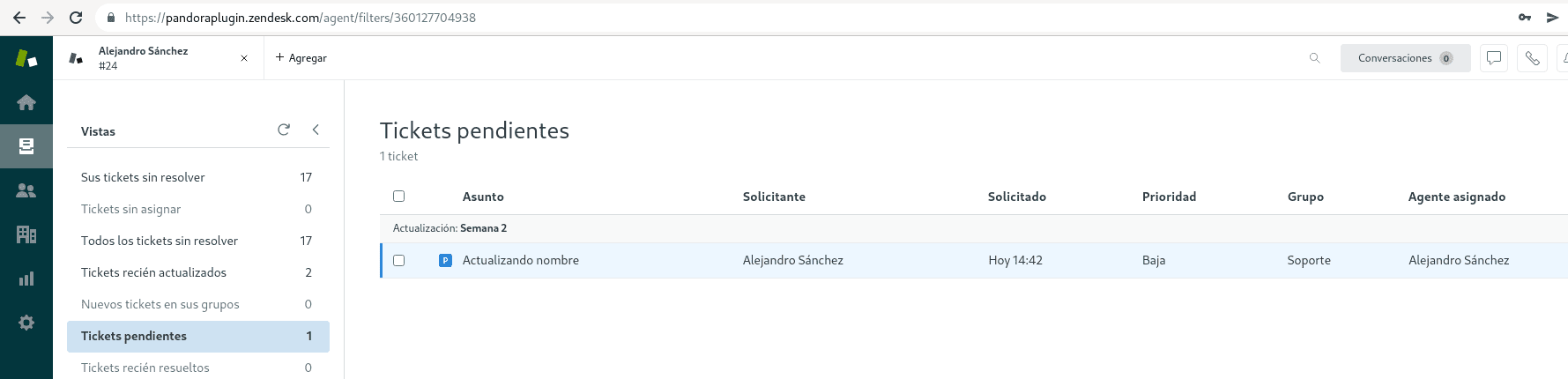
Let’s update the ticket we created in the example above, which has id #24
With the following command:
We see that the ticket has been updated and moved to pending tickets.
Ticket deletion
You may also delete a ticket by searching it by its ID with the following command:
You will be able to execute the plugin from the console, by means of an alert, which will make the use of the plugin easier.
To that end, go to the menu Commands in alerts:
Inside, create a new command that you will use to create alerts. To achieve this, run the plugin by entering its path and use a macro for each of the parameters used to create a ticket.
Add the description to each of these macros:
Once the command is saved, create an action to which assign this created command:
In each field below (the one of each macro where you have added a description when creating the command), add the value that you would have added to the parameter.
Once you have filled in all the fields of the necessary parameters, click Create.
Once done, go to List of alerts (don’t worry, once configured, you won’t have to repeat the process for each ticket you want to create), and create one.
Designate an agent and a module (it does not matter which one), and assign the action you just created. In the template, set the manual alert.
Once completed, click Add alert.
Now, to run the plugin, go to the view of the agent that you assigned to the alert and you will see it there. You may execute it by clicking the icon Force.
To establish different tickets, go to the action you created and change the values of the fields.
Just as we generated an alert for ticket creation, you may make another to update them and another to delete them to allow the use of the optimized plugin.
More integrations in ticketing services
Apart from Zendesk, there are more ticketing services that can be used from Pandora FMS by using a plugin. These are Redmine and Zammad, which have new plugins with which to create, update and delete tickets in these systems. And Jira and OTRS, which also have a plugin in the library that allows you to use these services easily from Pandora FMS.
Version 2 Digital is one of the most dynamic IT companies in Asia. The company distributes a wide range of IT products across various areas including cyber security, cloud, data protection, end points, infrastructures, system monitoring, storage, networking, business productivity and communication products.
Through an extensive network of channels, point of sales, resellers, and partnership companies, Version 2 offers quality products and services which are highly acclaimed in the market. Its customers cover a wide spectrum which include Global 1000 enterprises, regional listed companies, different vertical industries, public utilities, Government, a vast number of successful SMEs, and consumers in various Asian cities.
About PandoraFMS
Pandora FMS is a flexible monitoring system, capable of monitoring devices, infrastructures, applications, services and business processes.
Of course, one of the things that Pandora FMS can control is the hard disks of your computers.
With the significant increase in the number of malware and ransomware cases worldwide, ensuring the security of your company’s privileged credentials has become a fundamental practice to protect it against insider threats, data leaks, and immeasurable financial losses.
For this purpose, there are several ways to protect yourself, such as implementing Privileged Access Management (PAM) solutions. What many people do not know is that implementing any PAM solution in your corporation will not guarantee the protection of your company’s privileged credentials.
Your solution must have several functionalities that secure privileged credentials aligned to a good information security strategy.
To help with this task, we have chosen some essential functionalities that your PAM solution must have in order for you to guarantee the security of your company’s privileged credentials.
How Important is It to Keep Privileged Credentials Secure?
With the digital transformation boosted through the growing adoption of cloud-based models, connected devices, and development strategies, there has also been an explosion of privileged credentials associated with these devices. Gartner estimates the number of IoT and Industrial IoT devices to reach 24 billion this year.
No wonder they are called “keys to the kingdom”, as they allow access to valuable information from the organization and which are often targeted by cybercriminals.
According to Verizon in its Data Breach Investigations Report 2021, 61% of data leaks involved privileged credentials. What’s more, according to IBM’s Cost of a Data Breach 2020 report, the cost of a cyberattack involving privileged credentials is USD 4.77 million, 23.5% more than the average.
So, properly protecting privileged credentials is essential in the cybersecurity strategies of companies of all sizes and verticals. In addition, the information security teams must protect these “keys” from malicious attackers, granting access in a secure way and properly monitoring the actions performed in the environment through privileged access.
Privileged Access Management (PAM) is all about protecting those high-privileged accounts, credentials, and operations. Gartner itself elected PAM for two years in a row as the number one project in Security. And still according to Gartner, managing privileged access risks is virtually impossible without specialized PAM tools.
What Are the Main Types of Privileged Credentials?
Through privileged credentials, significant changes can be made to devices and applications installed on an infrastructure, which in many cases can affect business continuity.
The impact of using them maliciously can cause serious damage, from violations of compliance items, which can lead to heavy penalties, to security incidents – which result in reduced trust by the interested parties and lost revenue.
Discover the main types of privileged credentials that are most common in corporate environments.
Local Administrator Accounts
We are all very familiar with the local administrator account that is automatically created when installing a Windows computer. The account provides complete control over files, folders, services, and local user permissions management. Local administrators can install any software, modify or disable security settings, transfer data, and create any number of new local administrators.
Local accounts with administrator privileges are considered necessary to perform system updates, software and hardware upgrades. They are also useful for gaining local access to machines when the network goes down and when your organization has some technical issues.
Privileged User Accounts
In an IT environment, privileged user accounts are those that are given comparatively more privileges or permissions than a normal user account.
Any malicious activity carried out by a privileged account, either intentionally or by mistake, can be a threat to IT security. To address this, you need a systematic way to determine which users have privileged access and track their activities.
For example, Active Directory has built-in privileged groups for privileged accounts. These groups are: Admins, Domain Admins, Enterprise Admins, Schema Admins, DnsAdmins, and Group Policy Creator Owners.
Domain Administrator Accounts
A domain administrator is essentially a user who is authorized to make global policy changes that affect all computers and users connected to that Active Directory organization. They are allowed to go anywhere and do anything, with the limitation that they must remain within that specific account.
Service Accounts
Service accounts (or app accounts) are a digital identity used by an app or services to interact with other apps or the operating system. The service accounts can be a privileged identity in the context of the application.
The main features and functionalities of a service account are:
They are used by applications to access databases, run batch tasks or scripts, or provide access to other applications.
These privileged identities often have broad access to the underlying enterprise data storage that resides in applications and databases.
Passwords for these accounts are often embedded and stored in plain text files, a vulnerability that is replicated across multiple servers to provide greater fault tolerance for applications.
This vulnerability poses a significant risk to an organizational entity because applications often host the exact data that advanced persistent threats deem to be an item of interest.
Local service accounts can interact with a variety of operating system components, making it difficult to coordinate password changes. This challenge often means that passwords are rarely changed, which represents a significant security consideration within a company.
What Is the Credential Management Lifecycle?
The entire Privileged Access Management process must be considered by those responsible for Information Security in companies, from the discovery of assets, credentials, and digital certificates and access provisioning to the visibility of actions performed in the environment, going through the management of privileges and the access itself, when the privileged actions are actually performed.
Thus, it is possible to consider the Privileged Access Management process in a lifecycle, which we call the privileged access lifecycle.
Before
In order to have a broad and efficient privileged access management, it is necessary to pay special attention to the initial phase of managing privileged credentials.
This phase is responsible for provisioning and guaranteeing access to certified machines and privileged credentials through digital certificates, passwords, SSH keys. Therefore, it is really important.
During
This is the part where privileged access management actually takes place, making it possible to track all user activities in the privileged session in real-time, monitor, and analyze suspicious behaviors from users and machines, etc.
Having a solution that can define and limit the tasks that a privileged session will be allowed to perform is essential for your company’s information security to succeed.
After
After performing the two previous phases, your privileged access management solution must record every action taken in the privileged session. Through this audit, your company ensures that, during the sessions, there are no security breaches, can record all actions performed by users
About Version 2 Digital
Version 2 Digital is one of the most dynamic IT companies in Asia. The company distributes a wide range of IT products across various areas including cyber security, cloud, data protection, end points, infrastructures, system monitoring, storage, networking, business productivity and communication products.
Through an extensive network of channels, point of sales, resellers, and partnership companies, Version 2 offers quality products and services which are highly acclaimed in the market. Its customers cover a wide spectrum which include Global 1000 enterprises, regional listed companies, different vertical industries, public utilities, Government, a vast number of successful SMEs, and consumers in various Asian cities.
About Segura® Segura® strive to ensure the sovereignty of companies over actions and privileged information. To this end, we work against data theft through traceability of administrator actions on networks, servers, databases and a multitude of devices. In addition, we pursue compliance with auditing requirements and the most demanding standards, including PCI DSS, Sarbanes-Oxley, ISO 27001 and HIPAA.
For IT and security teams with limited staff and tight budgets, cloud-native software-as-a-service (SaaS) security products offer tremendous value. Some CIOs have even mandated that new security tools be delivered in the cloud where possible. Some vendors with older on-premises products have tried to sneak in their products by claiming they are now “in the cloud,” but the truth is that that is a façade.
Let’s call these products “faux” cloud security to contrast against products that are truly “cloud native.” Vendors of faux cloud products hope that with a little marketing smoke and mirrors, they can use some “cloudy” language and potential buyers will not know the difference. When we say faux cloud, technically speaking, we mean that the vendor is just allowing the customer to host their on-premises product in the customer’s public cloud account. This means the customer still must install, configure, deploy, maintain, update, and eventually decommission that product.
In other words, you as the customer must do all the work. The only “cloud” aspect of this arrangement is that you can do all the work on a server you are renting (that is, paying for) from AWS, Azure, Oracle, Dell, etc.
Faux Cloud Security in the Real–World
A real-world example of this software sleight-of-hand is Cisco’s Internet Security Engine (ISE). Cisco delivers ISE as a virtual appliance to handle network access control (NAC) – a critical component of any effective cyber security stack. As of ISE’s latest version, a customer can deploy the software in their own AWS or Azure accounts.
That is the long and short of it, however. The well-known challenges of setting up ISE – or any other network security appliance – remain. It is difficult to get your ISE server configured properly, ensuring it communicates with all your network equipment, even after having committed over 1,200 pages of ISE documentation to memory.
Cloud Native Reduces the Hassles
In contrast, a truly cloud-native solution allows the customer to sign up through a web page, configure as needed, and move on – the application just works out-of-the-box. Period. Now, that’s the easy part. As your organization consumes a cloud service, it does not have to concern itself with nagging issues and questions along the way common with on-premises software (e.g., How do we roll out patches and upgrades? Is there a security vulnerability in the operating system? Who is handling system backup?). You, as the end-user, have historically been responsible for these items with legacy on-premises software.
Portnox CLEAR NAC-as-a-service is cloud-native – “born in the cloud” as it were. To deploy CLEAR, a customer just needs to visit the sign-up page, enter their wireless controller information, configure the RADIUS settings on the network device, and CLEAR will begin enforcing policies. Portnox customers have done this in as fast as 30 minutes from start to finish. As is true of cloud-native solutions in other domains, customers can see value in minutes, not days, weeks, or even months. No complexity. No hassle.
Knowing the Difference Before You Commit
As a potential customer, how can you distinguish cloud-native from faux cloud security software?
There are a few telltale signs. The table below summarizes some of the most salient differences. When you evaluate a new vendor, be sure to ask questions such as who is paying for the infrastructure? Who is responsible for updates and upgrades?
Cloud Native
Faux Cloud
Infrastructure
Provided, paid, and managed by the vendor; mostly invisible to anyone utilizing the service
Provided, paid, and managed by you through your own AWS or Azure account
Implementation
Quick time to value; much of the work is invisible to you
Depends on the complexity of the app, but it is your responsibility to do the work or pay someone else to do it
Pricing
Subscription with lower up-front cost
Perpetual license with expensive up-front cost that are amortized over time.
(Note: many vendors are moving away from perpetual licensing for on-prem or faux cloud products, but as they do, their customers are getting the worst of both worlds – paying more annually while still being responsible for on-going maintenance of the product)
Total Cost of Ownership
The price of the product reflects the genuine cost of ownership
The price of the product is only one (and sometimes only a small) part of the total cost that is reflected in the staff time and public cloud expenses; in many instances, you may not even know what it is going to cost you until it is too late
Vendor Lock-In
Easy to switch to another vendor should your business needs change
Expensive license, deployment and maintenance costs make switching prohibitive, often for years
Access
Access anywhere via browser with internet connection
On-premises model often requires access via VPN
(Note: what happens when there is a problem with your solution and your VPN is configured to use your on-premises system? Sounds like someone is driving into the office!)
Scalability
Automatically scales with usage
Customer must increase capacity to keep up with usage
Updates
Vendor regularly updates the underlying components such as servers, databases, etc. This process will often be invisible to you.
You are responsible for ensuring that the entire tech stack – components, databases, servers, network – is updated with the latest patches
Upgrades
You seamlessly and transparently reap the benefit of new features, enhancements, and other improvements with zero effort
Any upgrade requires you to install, test, and then deploy the upgrade in production, often during nights and weekends in case something goes wrong
Accountability
The vendor takes ownership of the uptime and security, performance, and availability of the service
Apart from the infrastructure as a service, you are on the hook for the performance, health, security, and availability of the solution, lock stock and barrel
Cloud Native
Infrastructure Provided, paid, and managed by the vendor; mostly invisible to anyone utilizing the service
Implementation Quick time to value; much of the work is invisible to you
Pricing Subscription with lower up-front cost
Total Cost of Ownership The price of the product reflects the genuine cost of ownership
Vendor Lock-In Easy to switch to another vendor should your business needs change
Access Access anywhere via browser with internet connection
Scalability Automatically scales with usage
Updates Vendor regularly updates the underlying components such as servers, databases, etc. This process will often be invisible to you.
Upgrades You seamlessly and transparently reap the benefit of new features, enhancements, and other improvements with zero effort
Accountability The vendor takes ownership of the uptime and security, performance, and availability of the service
Faux Cloud
Infrastructure Provided, paid, and managed by you through your own AWS or Azure account
Implementation Depends on the complexity of the app, but it is your responsibility to do the work or pay someone else to do it
Pricing Perpetual license with expensive up-front cost that are amortized over time.
(Note: many vendors are moving away from perpetual licensing for on-prem or faux cloud products, but as they do, their customers are getting the worst of both worlds – paying more annually while still being responsible for on-going maintenance of the product)
Total Cost of Ownership The price of the product is only one (and sometimes only a small) part of the total cost that is reflected in the staff time and public cloud expenses; in many instances, you may not even know what it is going to cost you until it is too late
Vendor Lock-In Expensive license, deployment and maintenance costs make switching prohibitive, often for years
Access On-premises model often requires access via VPN
(Note: what happens when there is a problem with your solution and your VPN is configured to use your on-premises system? Sounds like someone is driving into the office!)
Scalability Customer must increase capacity to keep up with usage
Updates You are responsible for ensuring that the entire tech stack – components, databases, servers, network – is updated with the latest patches
Upgrades Any upgrade requires you to install, test, and then deploy the upgrade in production, often during nights and weekends in case something goes wrong
Accountability Apart from the infrastructure as a service, you are on the hook for the performance, health, security, and availability of the solution, lock stock and barrel
About Version 2 Digital
Version 2 Digital is one of the most dynamic IT companies in Asia. The company distributes a wide range of IT products across various areas including cyber security, cloud, data protection, end points, infrastructures, system monitoring, storage, networking, business productivity and communication products.
Through an extensive network of channels, point of sales, resellers, and partnership companies, Version 2 offers quality products and services which are highly acclaimed in the market. Its customers cover a wide spectrum which include Global 1000 enterprises, regional listed companies, different vertical industries, public utilities, Government, a vast number of successful SMEs, and consumers in various Asian cities.
About Portnox Portnox provides simple-to-deploy, operate and maintain network access control, security and visibility solutions. Portnox software can be deployed on-premises, as a cloud-delivered service, or in hybrid mode. It is agentless and vendor-agnostic, allowing organizations to maximize their existing network and cybersecurity investments. Hundreds of enterprises around the world rely on Portnox for network visibility, cybersecurity policy enforcement and regulatory compliance. The company has been recognized for its innovations by Info Security Products Guide, Cyber Security Excellence Awards, IoT Innovator Awards, Computing Security Awards, Best of Interop ITX and Cyber Defense Magazine. Portnox has offices in the U.S., Europe and Asia. For information visit http://www.portnox.com, and follow us on Twitter and LinkedIn.。