Skip to content

What is, how to install WSL2 and why is it great news for the IT industry?

What is and how to install WSL2 and why is it great news for IT?

Background

Before diving into what WSL2 is, how to install it, and how to use it – which we will – I would like to add some background information you might relate to if you were born in the 80s like me.

From a very young age I have felt attracted to computers, and in my childhood they were not as common as they are today, when almost everyone has one within reach.

I think my first encounter with a computer was when I was 11 or 12 years old, with an old computer that my father had in his office. I remember spending hours in front of the screen, although I’m not quite sure what I was doing, because at that time there was no internet.

That old computer had Windows 3.1; my first computer also meant my first Operating System was Windows, which I used in all its versions (and I will also spoil that I still use it). From then on I kept on using it, in fact, I didn’t know about anything else until I got to college and some friends told me about Linux (Mac was not an alternative for me).

Since I met Linux I fell in love with the penguin operating system, its philosophy and its fantastic terminal, so I started testing it on my home computer, with all the compatibility issues it involved at the time, when you spent half a day installing and two more looking for drivers. However it was a new experience and, although frustrating, totally rewarding when you achieved this sense of accomplishment. Of course, for me it was no more than an experiment for many years.

Half of my professional life revolved around Windows, from my first jobs as a microcomputer technician to managing servers and services based on Microsoft OS. I even studied at a Microsoft partner academy and got certified in Microsoft Windows Server 2012. It wasn’t until early 2013 that I had my first professional experience with Linux on an old web server that someone had to maintain. Indeed, that someone was me and I devoted many more hours than necessary to that lonely server.

Like many of you, I find myself in the following position: I love Linux and its ecosystem but it seems to me that Microsoft does a very good job on its OS and, for some reason, I always end up coming back to it. The ideal thing would be to have the best of both worlds. I’ve tried dual boot, virtualization, and cwin, but none felt like a full experience. I thought it was the best I could get even if it wasn’t ideal and just moved on, until Microsoft announced WSL.

What is WSL?

WSL stands for Windows Subsystem for Linux, which was nothing more than a compatibility layer for native Linux environments within Windows. Its first version was announced in 2016 and it was big news. I remember having the Ubuntu 16.04 terminal running natively on Windows and thinking “this is what I’ve been waiting for, everything I need without losing compatibility”.

Unfortunately WSL, although very useful, had several shortcomings: all the executions were interpreted, there was no access to all the hardware of the machine, the overall performance was quite poor, etc. I didn’t stop using it, but it wasn’t suitable for everyone. Still, it was the first step. In 2019 they announced WSL2, which would no longer be interpreted, it would have the entire native Linux kernel and would be running on Windows at full performance. WSL2 was recently released for all Windows 10 2004 version users. It seems that having everything I needed is now becoming a reality. It’s not perfect, that’s for sure, but it’s impressive how well it works.

Why WSL2 and not a Linux distro?

“It depends”, that’s the answer. Many of you, due to company policies, will not be able to change the OS of your computer or will be stuck with Windows for using the Office suite or Adobe tools, or even because you feel more comfortable on Windows rather than Linux.

In my case, I have the freedom to choose the operating system I use, my company does not enforce any restrictions as long as it stays updated and has an antivirus active. I have tried using Linux straight away and in the end I always have to go back to Windows or virtualize it and I prefer to virtualize Linux on Windows rather than the other way around.

In my day to day I have many different tasks, although I have a WSL2 terminal always open on one of my virtual desktops, I spend half of the day in meetings with different providers (webex on Linux is a nightmare). I use different VPNs and virtual client desktops, I edit videos for Pandora FMS YouTube channel, etc. And I do many of these things with tools that do not work quite well in Linux, so WSL2 has given me the almost perfect solution for my daily tasks.

(If you think you would be interested in reading an article about my workflow and all the tools I use, leave a message in the comment box).

Deploy WSL2

If you are here, it is because you relate to one of the cases here exposed. Installing WSL2 is very simple, but let’s go step by step.

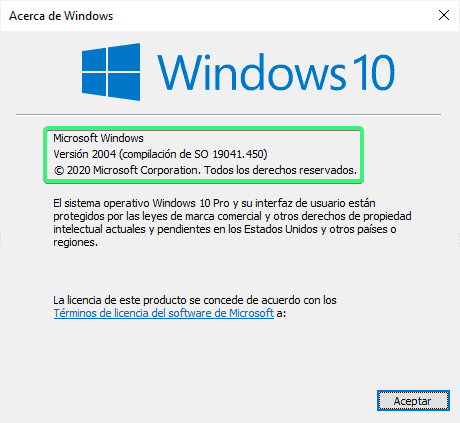
Remember that you must have Windows 10 version 2004 or higher to be able to use WSL2.

Checking it is as simple as pressing the start key, typing winver and pressing enter.
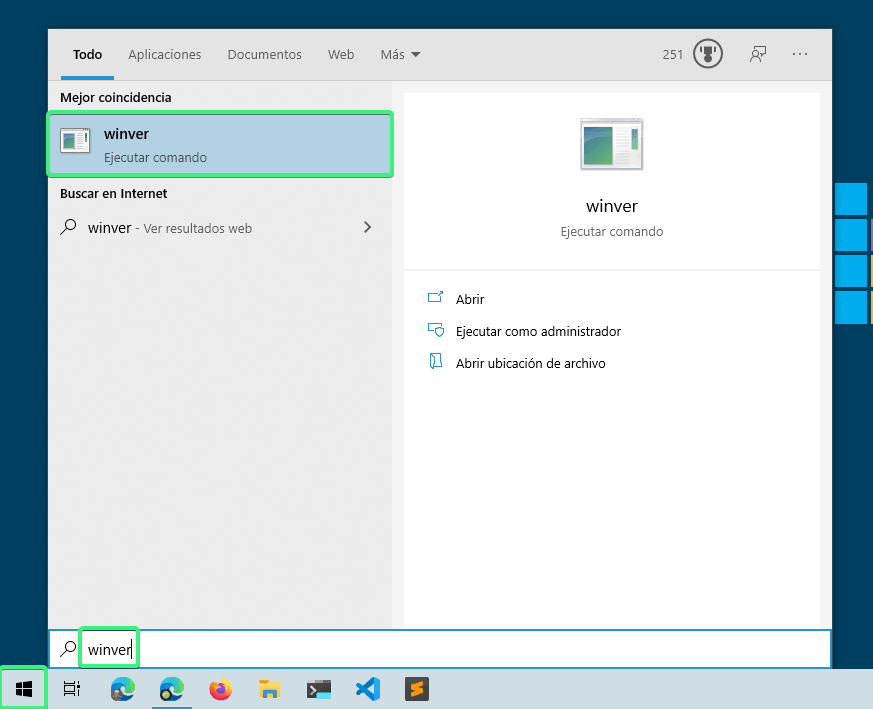
wsl2

It will show you a screen like this, where you will see Windows 10 version.
wsl2

If you comply with the correct Windows version, let’s get to work. If not, it is time to go update Windows.

Step 1: Enable WSL on your system.

The easiest way is to open a PowerShell terminal as administrator and run:

dism.exe /online /enable-feature /featurename:Microsoft-Windows-Subsystem-Linux /all /norestart

Don’t close the terminal or restart yet.

Step 2: Enable virtualization.

Execute the following command in the PowerShell terminal open as Admin.

dism.exe /online /enable-feature /featurename:VirtualMachinePlatform /all /norestart

Now restart the machine.


Step 3:
Activate WSL version 2 as default.

Open a PowerShell terminal again as administrator and execute:

wsl --set-default-version 2

You will see a message similar to: “WSL 2 requires an update to its kernel component. For information, please visit https://aka.ms/wsl2kernel. Go to the URL and download the package following the wizard steps.

wsl2

Step 4: Download the distro, preferably from Windows store. Type in wsl in the search engine so that the options come out (personally I use Arch, but it is not in the store so it is a bit more complicated to install). I recommend installing Ubuntu, the first to be released and in my opinion the one with the most covering support.

wsl2

Once downloaded, open it and the distro installation will start. It will ask for the username and password. For the Linux system you can set the one you prefer, it has nothing to do with the Windows user.

wsl2

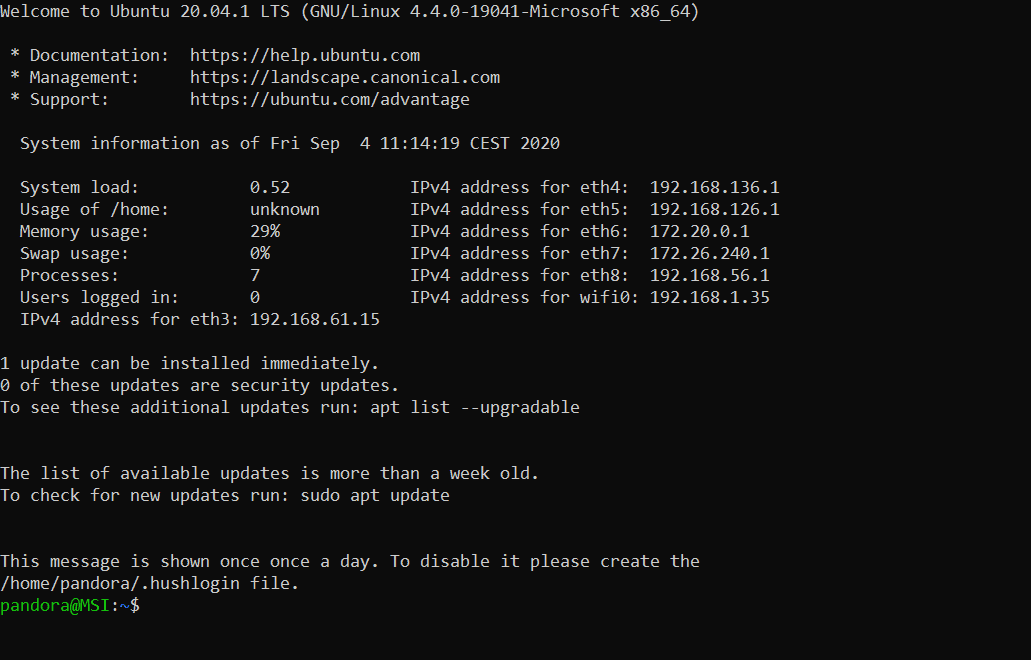
Once the installation is finished, you will see a screen similar to the following and the prompt ready to use Ubuntu bash.
wsl2

Step 5: Check the installation from a PowerShell terminal, executing:

wsl --list --verbose

Where it will list the distros installed and their versions. I already said that it used arch and yes I also have Windows running in WSL2 for Docker. In your case, it will show just the one that you have installed, in this case Ubuntu, and it would have to be version 2.

wsl2

Conclusions

With these simple steps you will have Ubuntu installed within Windows with its kernel at 100% and you can run all the tools you need, such as Docker natively directly in the Linux kernel (something that before with HyperV was not working for me and that WSL1 did not support).

Implementation is not perfect, it has many advantages but it also has some problems to figure out. Even so, I think it is the best current implementation to have a hybrid system where to enjoy the best of both worlds, so I recommend it 100%.

If you are interested in the subject, we can write an article listing the advantages, disadvantages and alternative solutions to certain problems that this technology currently poses. Let me know if you are interested in the comments.


About Version 2 Digital

Version 2 Digital is one of the most dynamic IT companies in Asia. The company distributes a wide range of IT products across various areas including cyber security, cloud, data protection, end points, infrastructures, system monitoring, storage, networking, business productivity and communication products.

Through an extensive network of channels, point of sales, resellers, and partnership companies, Version 2 offers quality products and services which are highly acclaimed in the market. Its customers cover a wide spectrum which include Global 1000 enterprises, regional listed companies, different vertical industries, public utilities, Government, a vast number of successful SMEs, and consumers in various Asian cities.

About PandoraFMS
Pandora FMS is a flexible monitoring system, capable of monitoring devices, infrastructures, applications, services and business processes.
Of course, one of the things that Pandora FMS can control is the hard disks of your computers.

What is Virtual Patching?

This article will give you an insight into virtual patching, what makes patching hard for businesses, the value of virtual patching and how to fix virtual patching issues. Let’s get started.

What is Virtual Patching?

Virtual patching is the process of developing and deploying a short-term strategy to reduce the risks of exploitation that are connected with the discovery of new security vulnerabilities. It removes the possibility of hackers finding and exploiting application or system security flaws. 

The main objective of virtual patching is to stop malicious actors from gaining access to a vulnerable application while implementing security solutions. 

It enables developers and security administrators to keep a system or application functional until a vulnerability solution is discovered, developed and tested. The patch is installed on a few host systems and can be replicated across the application environment. Nevertheless, virtual patching is not a permanent solution and does not always detect all system or software vulnerabilities. 

Value of Virtual Patching

Virtual patching is also known as vulnerability shielding, which protects against threats that exploit new and known vulnerabilities. Virtual patching works by enforcing layers of security guidelines and regulations that prevent and intercept exploits from following network routes to and from exposures. 

A multi-layered virtual patching method is ideal. This includes features for reviewing and blocking risky activities in business-critical traffic, detecting and preventing intrusions, stopping assaults on web-facing applications and deploying adaptably on cloud or physical platforms. 

Here is how virtual patching complements an organization’s existing security technology, vulnerability and patch management policies:

  • Prevents Unnecessary Downtime: Virtual patching offers organizations more flexibility in enforcing patch management practices on their timetable. This limits the possibility of income loss because of unnecessary or unplanned disruptions in corporate activities. 
  • Allows for Greater Flexibility: Virtual patching removes the need to distribute workarounds or emergency patches. It simplifies tasks such as knowing the specific places in the network that require patching or if there’s a need to apply patches to all systems.
  • You Will Get More Time: Virtual patching helps security teams to assess the vulnerability and test and install the necessary patches. In-house applications are at an advantage since they offer programmers and developers more time to resolve vulnerabilities in their code. 
  • It Offers an Additional Layer of Security: Virtual patching extends security controls to IT infrastructures for outdated systems and end-of-support operating systems such as Window Server 2008.
  • Improves Regulatory Compliance: Virtual patching help organizations in meeting timeliness requirements such as EU General Data Protection Regulation (GDPR) and the Payment Card Industry Security Standard (PCI DSS) (PCI).

When you study the different ways in which organizations can’t change the source code immediately, the benefits of virtual patching become clear. Based on the organization, the advantages include the following:

  • It lowers risk until a vendor-supplied patch is released or while a patch is tested and applied.
  • It enables businesses to keep typical patching cycles.
  • Because libraries and support code files are not changed, there is less chance of introducing conflicts.
  • It is a scalable approach because it is done on a few sites rather than on all hosts.
  • It reduces or eliminates the time and money spent on emergency patching.
  • It protects mission-critical systems that cannot be taken offline.

From the perspective of a web application security expert, virtual patching opens up another way for offering services to your clients. In recent years, if source code could not be modified based on the above reasons, there is nothing else a consultant could do to assist in solving the issues. A consultant can now offer to use virtual patches to solve problems that are outside the application code. 

Why is Virtual Patching Difficult for Businesses?

Some of the difficulties that organizations experience while implementing a virtual patch management system include the following:

  • The number of vulnerabilities that must be patched: This is true for organizations that must patch a growing number of vulnerabilities as their IT infrastructures are always upgraded.
  • Continuity of operations: While applying updates frequently is a desirable practice, many businesses find the patching process so long, expensive and disruptive that they choose to reschedule it or completely stop it in order to minimize operational disruption.
  • Systems that are no longer patchable: Patches may no longer be delivered to applications and systems that have reached the end of their life cycle, even if they are still needed to perform mission-critical tasks. Examples include embedded systems, such as IoT devices, POS terminals and industrial control systems that always contain software or components that cannot be patched.
  • Patch cycle frequency: This can make patching challenging to control especially when determining which vulnerabilities are urgent or important.
  • Visibility is limited: More extensive internet infrastructures require more complicated update processes. This could be exacerbated by a fragmented IT infrastructure, which is normally made up of several operating systems or application versions that are sometimes also geographically scattered.

What Happens to IT Infrastructures That Are Not Patched? 

When a vulnerability is discovered or reported, organizations need to be very quick and timely. It’s a golden chance for threat actors and cybercriminals. It takes 69 days for a typical firm to fix a critical vulnerability in its application. On average, it takes 60 days for businesses to realize they have been breached.

This window of vulnerability exposes unpatched systems to attacks. Threat actors began ransomware attacks against unpatched servers in January 2020, putting the networks of over 80,000 businesses at risk.

Conclusion

In today’s evolving environment, keeping up with security issues in complex software and web apps can be exhausting. In these circumstances, virtual patching is the best solution. It mitigates risk by patching web app vulnerabilities.

Virtual patches have different benefits over regular patching cycles, which consume a huge amount of time and money. Virtual patches can be installed within a few minutes at a low cost. Additionally, they should be incorporated in the security toolbox with other security technologies such as intrusion prevention systems, firewalls and better defense against developing threats.

Photo by Shubham Dhage on Unsplash

About Version 2 Digital

Version 2 Digital is one of the most dynamic IT companies in Asia. The company distributes a wide range of IT products across various areas including cyber security, cloud, data protection, end points, infrastructures, system monitoring, storage, networking, business productivity and communication products.

Through an extensive network of channels, point of sales, resellers, and partnership companies, Version 2 offers quality products and services which are highly acclaimed in the market. Its customers cover a wide spectrum which include Global 1000 enterprises, regional listed companies, different vertical industries, public utilities, Government, a vast number of successful SMEs, and consumers in various Asian cities.

About VRX
VRX is a consolidated vulnerability management platform that protects assets in real time. Its rich, integrated features efficiently pinpoint and remediate the largest risks to your cyber infrastructure. Resolve the most pressing threats with efficient automation features and precise contextual analysis.

Safetica NXT adds dynamic DLP features

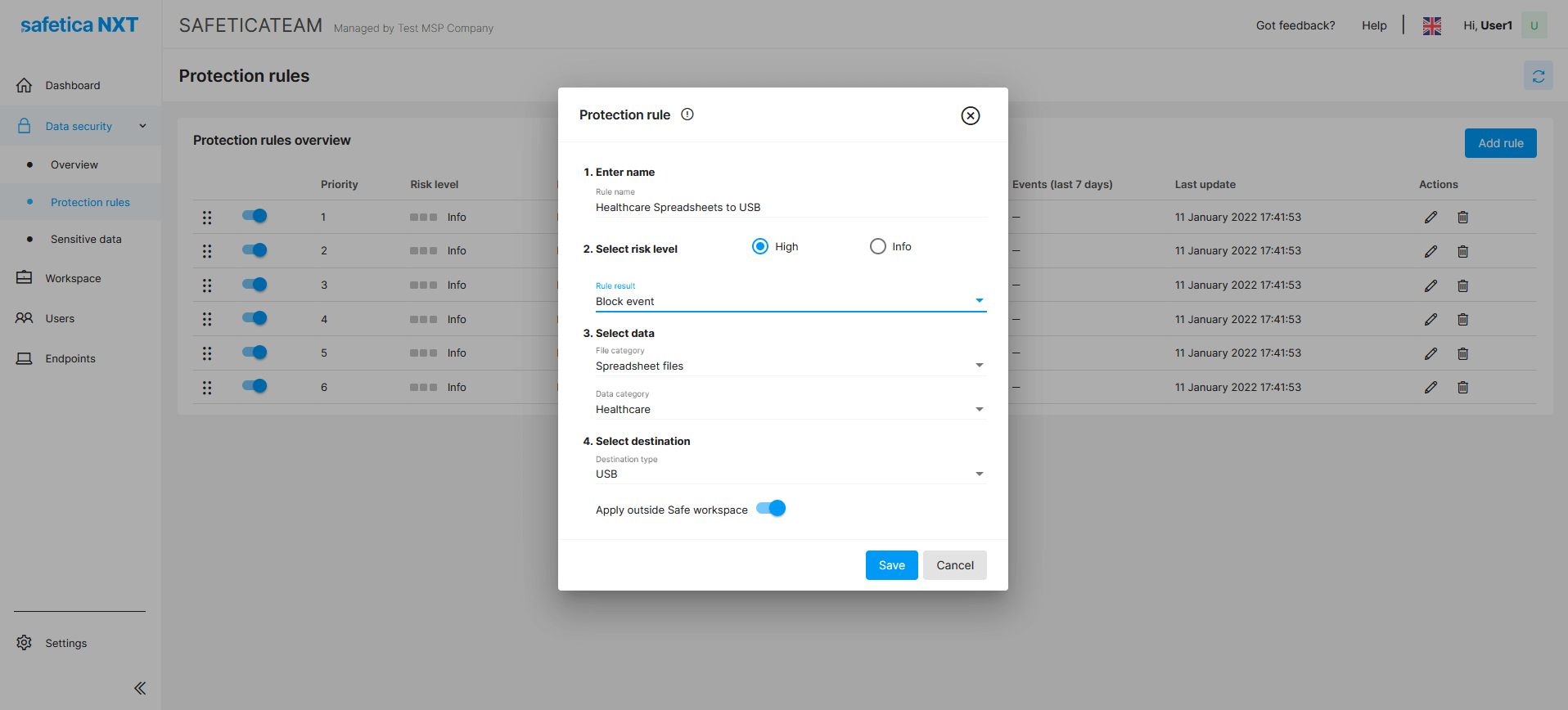
Safetica NXT, a cloud-based Insider Threat Prevention solution provided as a service, gets dynamic data protection. It also comes with a self-managed mode, which opens this next-gen cloud data security solution to “non-MSP” business partners and provides end-customers with full control over their environment and maximum privacy. 

Safetica NXT now enables you to enforce data protection policies and restrict employees from leaking your company’s sensitive data. The Insider Threat Prevention solution provided from the secured cloud as a managed service is becoming available also as a self-managed service with dynamic Data Loss Prevention (DLP) features. 

Protection mode with Dynamic DLP

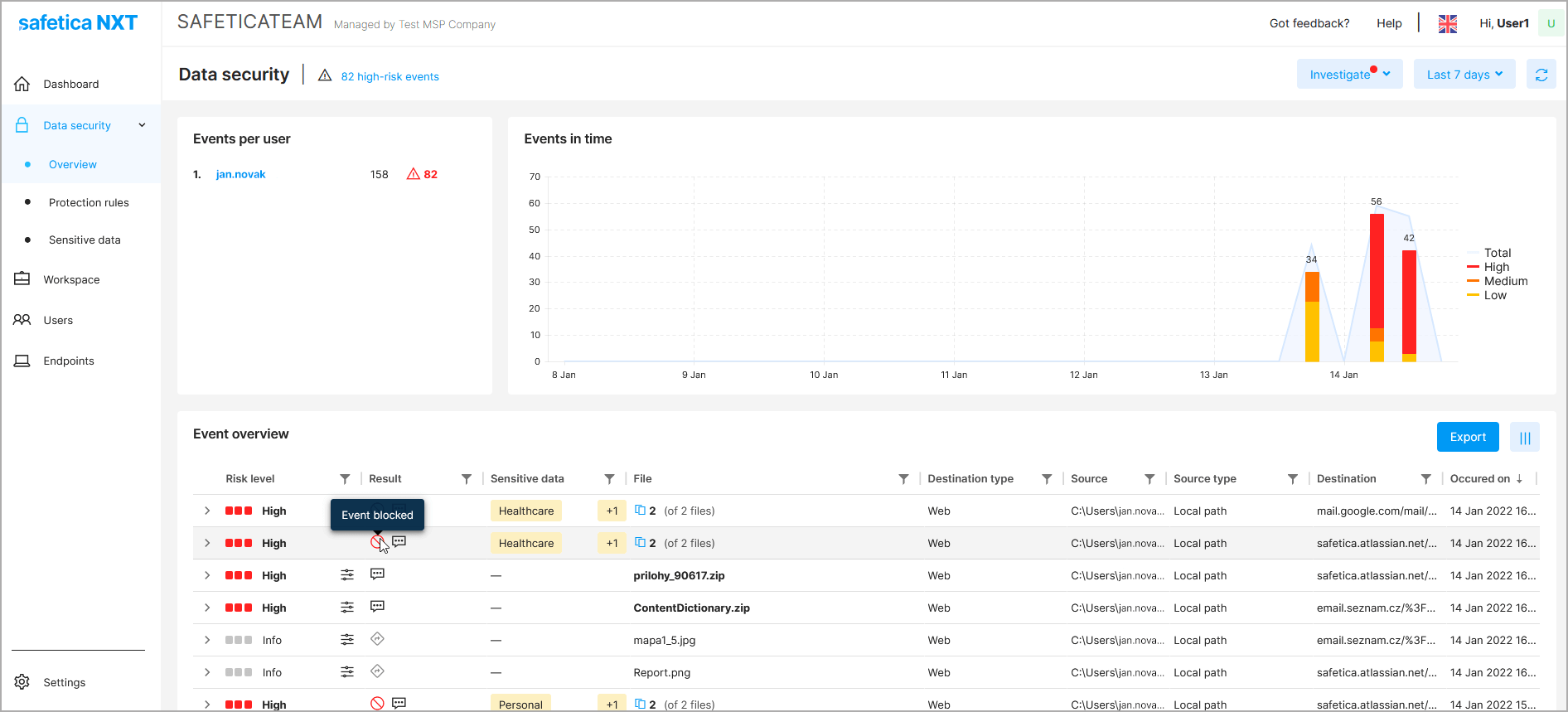
In Safetica NXT’s protection mode*, you can either silently log events, notify employees about the potential risk of an operation and leave it up to them to decide on the next steps, or block the operation to prevent sensitive data from leaving the endpoint device.

New DLP features leverage dynamic digital workspace detection and adaptive data protection. The definition of a company’s safe digital workspace, a vital part of the DLP protection, is being continuously adjusted according to users’ behavior to ensure high security and low-maintenance administration.

Still SaaS but also self-managed

Safetica NXT, with its multitenant architecture, continues to be a cloud-based service that offers core discovery and protection scenarios based on best data security practices.

MSP-managed service is now expanding to include a self-managed mode for customers who prefer maintaining control over their configuration, management, and reporting.

Safetica resellers will now be able to easily turn off the managed mode from the partner’s central management console. Resellers can use the managed mode for pre-configuration and customer guidance through the trial​ period. After switching to “self-managed”, the partner can still see all his customers in the central management console.

The customers still do not need any dedicated hardware infrastructure or additional IT/security staff to manage their data protection. But in self-managed mode, they can do the necessary management on their own and have maximum privacy guaranteed.

Safetica NXT remains a risk-driven SaaS with quick deployment, unmatched time to value, and low maintenance required, thanks to our focus on maximum automation and machine learning.

New features are coming to the market on the 25th of January 2022. Subscriptions are available through our Safetica channel partners. There’s still the same (monthly/yearly) pay-as-you-go billing model for self-managed customers as for those managed by MSPs. 

*DLP/protection rules are currently available only for Windows environments.

About Version 2 Digital

Version 2 Digital is one of the most dynamic IT companies in Asia. The company distributes a wide range of IT products across various areas including cyber security, cloud, data protection, end points, infrastructures, system monitoring, storage, networking, business productivity and communication products.

Through an extensive network of channels, point of sales, resellers, and partnership companies, Version 2 offers quality products and services which are highly acclaimed in the market. Its customers cover a wide spectrum which include Global 1000 enterprises, regional listed companies, different vertical industries, public utilities, Government, a vast number of successful SMEs, and consumers in various Asian cities.

About Safetica
Safetica is to provide small and mid-sized companies with the same quality data protection that corporations have – affordably, and without any additional IT administration or disruptions in operation.

Renaissance selected as Irish Distribution Partner for Awingu

Dublin, Ireland, 19th January 2022 – Similarly to other leaders across the globe, the Irish government recommend working from home to fight the spread of COVID-19. Many organisations have already shifted to a more permanent remote working approach, with a recent survey showing more than 90% of Irish executives have hired, or plan to hire people to develop their remote work policy. But with cyber-attacks continuing to rise, how can organisations ensure their remote assets are adequately protected?

Too often, many are still relying on the use of a VPN (Virtual Private Network), but these lack the granular controls needed to allocate users with specific rights and should never be relied upon as a single solution to enable remote working. To provide secure remote access, a flexible solution that can be scaled up or down when required is essential.

Awingu is a leading provider of secure remote access technology that has been recognised by Gartner as a ‘Cool Vendor in Unified Workspaces’. Organisations of all sizes can use Awingu as a cost-effective and simple workplace solution that, unlike other providers, does not require agents or software to be installed on end-user devices. Awingu runs entirely in the browser, where it combines existing applications into one online workspace without hassle, including SaaS and “legacy” Windows or Linux applications.  

"We believe that the Renaissance partnership with Awingu introduces a cost effective method to more Irish organisations working remotely, helping them to become more agile and effectively prepared for future cyber-attacks."
Michael Conway

Awingu firmly believes in a “Zero Trust” security context for businesses. Zero Trust is an all-encompassing strategy involving users, devices, applications, networks and more. The solution enables more secure hybrid working and BYOD (Bring Your Own Device) policies through providing encrypted connections, multi-factor authentication, context-awareness, a full usage audit and eliminating the need to store data locally on devices.

"It is really important for us to make Zero-Trust-grade security more accessible to more organisations. Extending our reach into Ireland through the help of Renaissance is an important step forward in our mission to enable all organisations to work securely regardless of their employees location."
Keith Joseph

About Version 2 Digital

Version 2 Digital is one of the most dynamic IT companies in Asia. The company distributes a wide range of IT products across various areas including cyber security, cloud, data protection, end points, infrastructures, system monitoring, storage, networking, business productivity and communication products.

Through an extensive network of channels, point of sales, resellers, and partnership companies, Version 2 offers quality products and services which are highly acclaimed in the market. Its customers cover a wide spectrum which include Global 1000 enterprises, regional listed companies, different vertical industries, public utilities, Government, a vast number of successful SMEs, and consumers in various Asian cities.

About Parallels 
Parallels® is a global leader in cross-platform solutions, enabling businesses and individuals to access and use the applications and files they need on any device or operating system. Parallels helps customers leverage the best technology available, whether it’s Windows, Linux, macOS, iOS, Android or the cloud.

High Availability: technology that guarantees productivity and credibility

Computer equipment is subject to failures that can bring great inconvenience and damage to companies. In this sense, high availability systems are essential for carrying out activities that rely on energy, location, operation, software, and hardware.

This technology ensures services are available 24/7 without interruptions or loss of information. For this reason, it is extremely important for large organizations, such as public agencies, critical infrastructure, and banks.

In this article, we dive deeper into the subject. Our text is divided into topics to make it easier for you to understand. These are:

  • What is High Availability?
  • What is a High Availability Cluster?
  • How Important is High Availability to Organizations?
  • Advantages of Infrastructure with High Availability Versus Infrastructure Without High Availability
  • High Availability, Redundancy, and Fault Tolerance: What is the Difference?
  • High Availability Products
  • Important Points for the Implementation and Maintenance of High Availability Systems

Enjoy it!

  • What is High Availability?

A high availability (HA) system consists of a technology that must be applied to the computer equipment of large companies and data centers in order to avoid the interruption of activities resulting from failures.

This is possible through an infrastructure designed for maximum uptime, known as 99.999 percent or the “five 9s”.

It works through the allocation of hardware and software, among other solutions, in a redundant way. In practice, this means they will work automatically if any of these items fail.

  • What is a High Availability Cluster?

The word cluster (or clustering) is the same as “agglomeration”, as explained in this article. It is a term used in the most diverse contexts.

In the case of computing, it refers to a technology applied to two or more computers. We call these equipment nodes, and the number of nodes that can compose a cluster is unlimited.

A high availability cluster can be of two types: to be used in hardware and applications. In hardware high availability, we have a connection that makes it possible to change a component if there is an outage.     

In application high availability, the purpose is to ensure that applications work. As such, the cluster avoids long downtime when a system goes down. This model is useful with:

  • Monitoring tools;
  • Replication of systems and computers to replace equipment that may present problems; and
  • Power generators.

In application high availability, a database is synchronized with the instances that make up the cluster, which divides operations among them, assuring that the system will continue to function normally even if an instance is stopped.

  • How Important is High Availability to Organizations?

Regardless of the company’s industry, most of its departments need Internet access to function. A few examples are:

  • Employees responsible for the sales sector use emails and social media to communicate with clients; 
  • Those who lead the teams also use online means to communicate with their subordinates;
  • The purchasing sector needs to be in constant contact with suppliers; and
  • People who take care of marketing also access several platforms to carry out their activities.

We can conclude that high availability systems are of utmost importance to prevent loss of productivity related to time lost with IT disaster recovery.

Likewise, they preserve the credibility of the company, which is also critical, as damage to a brand’s reputation can be a major barrier to its growth. Key benefits of high availability include:

  • Reduction of scheduled downtime;
  • Guarantee of service continuity;
  • High-level performance;
  • Secure data.

  • Advantages of Infrastructure with High Availability Versus Infrastructure Without High Availability

High availability hosting providers perform the same hosting services as traditional infrastructure. However, this is done in a way that eliminates the possibility of downtime by almost 100%. 

What must be taken into account is the cost of this downtime, which is often much higher than most people realize.

A company with affected infrastructure could have impacts on productivity, reduced to almost zero while that infrastructure is down, or still have an interruption that leads to bankruptcy.

That is because the loss of productivity is a secondary concern to the loss of reputation caused by downtime hassles. 

After all, clients prefer to hire the services of accessible and prepared organizations to serve them whenever they need it. In other words, investing in high availability hosting is of paramount importance to keep your company and brand available to your audience.

  • High Availability, Redundancy, and Fault Tolerance: What is the Difference?

A system that features redundancy is not necessarily a high availability solution. For this, it needs to have means to detect failures, the possibility to perform high availability tests, and correct failures related to unavailable components.

Redundancy is hardware-based, while high availability strategies use software most of the time.

When it comes to the difference between high availability and fault tolerance, you should know that the latter requires complete redundancy in hardware. It is also essential to have hardware that identifies failures to ensure the entire system works together.

The advantage of this technology is the ability to retain memory and data for your programs. On the other hand, the adaptation to complex systems can take a little longer. Another problem is that the entire network can crash due to similar software failures presented by redundant systems.

Fault-tolerant systems are effective in preventing equipment problems, but in addition to being expensive, they do not prevent software failures, unlike high availability solutions.

  • High Availability Products

If you have understood the importance of investing in high availability, we cover features that are critical to achieving the performance your business needs in this topic. Among the aspects that should be considered, we highlight:

  • Hardware resilience;
  • Environmental conditions;
  • Data quality; and
  • Durable software.

To have an efficient, high-availability system that addresses these points, it is essential to have resources such as servers, network interfaces, and hard drives that are resistant to problems such as power outages and hardware failures.

Also, you should strategically install multiple web application firewalls on your networks, which enable you to eliminate failures. Another extremely important resources are software stacks capable of resisting failures that may eventually occur.

  • Important Points for the Implementation and Maintenance of High Availability Systems

High availability systems are adaptable to the needs of the organization hiring this service. Nevertheless, certain practices are widely indicated. Some of them are:

  • Redundancy of systems and data through different machines;
  • Deployment of applications on more than one server, in order to avoid machine overloads;
  • Use of components to ensure maximum stability and availability;
  • Spare resources for any failures;
  • Tests capable of guaranteeing availability, performance, and security;
  • Effective data backup and recovery strategies;
  • Conducting tests that help prevent failures related to confidential information; and
  • Use of 100% redundant router, load balancer, firewall, reverse proxy, and monitoring systems.


In this article, we discussed what high availability is and its importance to organizations, as well as the difference between redundancy and fault tolerance. We also pointed out aspects that are essential for the implementation of this technology.

If our text was helpful to you, please share it with others who might benefit from this knowledge. On our blog, you can find more content on high availability and information security, check it out. 

About Version 2 Digital

Version 2 Digital is one of the most dynamic IT companies in Asia. The company distributes a wide range of IT products across various areas including cyber security, cloud, data protection, end points, infrastructures, system monitoring, storage, networking, business productivity and communication products.

Through an extensive network of channels, point of sales, resellers, and partnership companies, Version 2 offers quality products and services which are highly acclaimed in the market. Its customers cover a wide spectrum which include Global 1000 enterprises, regional listed companies, different vertical industries, public utilities, Government, a vast number of successful SMEs, and consumers in various Asian cities.

About Segura®
Segura® strive to ensure the sovereignty of companies over actions and privileged information. To this end, we work against data theft through traceability of administrator actions on networks, servers, databases and a multitude of devices. In addition, we pursue compliance with auditing requirements and the most demanding standards, including PCI DSS, Sarbanes-Oxley, ISO 27001 and HIPAA.

×

Hello!

Click one of our contacts below to chat on WhatsApp

×