Elevating IT Infrastructure: The Integration of MDM

Have you ever purchased a security system or saw one? If not, let’s paint a picture. Just imagine that you have purchased a state-of-the-art home security system. It has all the bells and whistles, cameras, motion sensors, smart locks, and whatnot. But now you face the challenge of integrating it with your existing household setup. You need it to work smoothly with your current security protocols, connect effortlessly to your home network, and make sure it doesn’t disrupt your daily routine.

Do you get the idea? Similarly, in the mobile-driven corporate world, simply acquiring a Mobile Device Management (MDM) solution is insufficient. The challenge lies in seamlessly integrating it into your existing IT infrastructure to maintain operational integrity and security.

Integration of MDM
Integrate MDM Solutions Into Your Existing IT Infrastructure
This blog discusses the strategic considerations for seamlessly integrating MDM solutions, which promise streamlined management and better security without causing disruptions.

Challenges of Managing IT Infrastructure Without MDM
When did you last try to juggle multiple responsibilities without a proper system? It could be organizing a family vacation, where you had to book flights, hotels, and activities while managing work deadlines and household chores. The stress and inefficiency can be overwhelming, right?

The same applies to businesses managing hundreds or thousands of mobile devices without a centralized solution.

1. Security and Compliance Risks
Security is a top priority for any industry. Without a centralized MDM solution, ensuring all devices are consistently updated with the latest security patches is like trying to herd cats. Each device has its schedule, and users often delay updates, either out of convenience or simply because of forgetfulness. This lack of uniformity leaves significant gaps in your security.

Inconsistent security updates can lead to major headaches. What if a new malware strain is spreading rapidly? IT teams must manually scramble to update each device without an MDM solution—a slow and error-prone process. In the meantime, the organization remains exposed to potential breaches, risking sensitive data and regulatory non-compliance. It’s like locking some doors in your house while leaving others wide open, hoping intruders won’t find the unlocked ones.

2. Operational Inefficiencies
Operational inefficiencies are another major issue. Manual device management has substantial operational overhead and resource consumption. IT staff spend countless hours on mundane tasks like setting up devices, pushing updates, and troubleshooting issues, which could be better spent on strategic initiatives. This wastes valuable resources and stifles innovation and growth.

3. User Experience and Support
A diverse device environment can be a support nightmare. Different devices and operating systems require specialized knowledge and tools, making it challenging to provide consistent support. Consistent access to corporate resources can be critical without a unified management solution. Some users might have access to their emails and files, while others struggle with intermittent connectivity and permission issues. This inconsistency hampers productivity and can lead to dissatisfaction among employees, as they feel unsupported and hindered in their work.

Strategic Considerations for Integrating MDM into IT Infrastructure
Careful planning and strategic considerations are essential when integrating an MDM solution into your IT infrastructure to ensure a smooth and effective deployment. Here, we look into some key aspects, such as compatibility and deployment models, providing insights to help you navigate the integration process.

1. Compatibility
Before implementing an MDM solution, verifying its compatibility with your current IT infrastructure is important. This includes assessing compatibility with servers, network configurations, and security protocols. This compatibility check helps:

Avoid Potential Conflicts: Ensuring the MDM solution works seamlessly with existing components and prevents disruptions during and after integration.
Facilitate Smooth Integration: Compatibility ensures the MDM software can be deployed efficiently, reducing the risk of integration issues that could lead to downtime or compromised security.
Maintain Security Standards: Verifying compatibility ensures the MDM solution aligns with your existing security measures, maintaining the integrity of your overall security posture.
2. Deployment Models
Selecting the appropriate deployment model for your MDM solution is vital. The choice will depend on your industry’s specific needs, resources, and strategic goals. Here are the three primary deployment models:

a) Cloud-based
Benefits

Quick Deployment: Cloud-based MDM solutions can be deployed rapidly, allowing for faster implementation.
Scalability: Cloud solutions offer the flexibility to scale up or down based on business needs, accommodating growth or changes in device management requirements.
Reduces Upfront Costs: Cloud models typically involve lower initial investments, as there is no need for extensive hardware purchases or infrastructure upgrades.
Challenges

Data Privacy Concerns: Storing data in the cloud raises potential privacy issues, especially for businesses dealing with sensitive information.
Dependency on Internet Connectivity: Cloud solutions rely on stable Internet connections, and any disruption in server connectivity can affect access and functionality.
Best Practices

Conduct Thorough Risk Assessments: Evaluate potential risks associated with data storage and access to the cloud.
Ensure Compliance with Data Protection Regulations: Verify that the cloud provider complies with relevant data protection laws and standards.
Establish Clear SLAs with the Cloud Provider: Define service level agreements that outline performance expectations, support, and security measures.
b) On-Premise
Security Considerations

Greater Control Over Data: On-premise solutions provide direct control over data storage and security measures, which is critical for businesses with stringent data protection requirements.
Customizable Security Measures: Businesses can customize security protocols and configurations to meet their specific needs.
Resource Requirements

Significant Investment: Implementing an on-premise solution requires substantial hardware, software, and ongoing maintenance investment.
Dedicated Resources: Ensure sufficient resources are allocated to manage and support the on-premise MDM infrastructure.
Best Practices

Regularly Update and Patch the MDM Software: Keep the MDM software updated to protect against vulnerabilities and ensure optimal performance.
Maintain Backup and Disaster Recovery Plans: Implement comprehensive backup and recovery strategies to safeguard data and ensure business continuity.
Allocate Dedicated Resources for Management and Support: Ensure skilled personnel can manage and support the MDM infrastructure.
c) Virtual Private Cloud (VPC)
Flexibility and Control
Combines Cloud and On-Premise Benefits: VPCs offer the scalability and flexibility of cloud solutions while providing control similar to on-premise deployments.
Customizable Environment: Businesses can configure the VPC to meet specific needs and security requirements.
Benefits of Integrating MDM into IT Infrastructure
Integrating MDM into your IT infrastructure offers numerous advantages that enhance security, efficiency, and user experience. Here are the key benefits:

1. Streamlined Device Enrollment and Configuration
MDM solutions simplify enrolling and configuring new devices, ensuring they meet corporate standards from the start. This reduces the time and effort required to set up devices and ensures consistency across the industry.

2. Strengthened Security
MDM provides centralized control over security policies, ensuring consistent updates and reducing vulnerabilities across all devices. Features like remote-wipe and encryption further safeguard corporate data, protecting against breaches and unauthorized access.

3. Increased Productivity
By consolidating management tasks into a single platform, MDM software reduces the complexity and overhead of device management. Automated processes streamline operations and free up IT resources, allowing them to focus on strategic initiatives that drive business growth.

4. Improved Regulatory Compliance
MDM solutions help businesses comply with industry regulations by enforcing security policies and maintaining audit trails. This ensures all devices adhere to compliance standards, reducing the risk of fines and legal issues.

5. Cost Savings
MDM solutions can lead to significant cost savings by automating device management and reducing the need for manual interventions. They also minimize the resources required for IT support and reduce downtime.

Seamlessly Integrate your Existing IT Infrastructure with Scalefusion
Scalefusion offers flexible deployment options to fit your business needs, whether you prefer cloud, on-premise, or VPC solutions. This versatility ensures you can seamlessly integrate Scalefusion’s MDM capabilities into your existing IT infrastructure without disrupting your current operations.


About Scalefusion
Scalefusion’s company DNA is built on the foundation of providing world-class customer service and making endpoint management simple and effortless for businesses globally. We prioritize the needs and feedback of our customers, making sure that they are at the forefront of all decision-making processes. We are dedicated to providing comprehensive customer support services, and place emphasis on customer-centric thinking throughout the organization.

About Version 2 Digital

Version 2 Digital is one of the most dynamic IT companies in Asia. The company distributes a wide range of IT products across various areas including cyber security, cloud, data protection, end points, infrastructures, system monitoring, storage, networking, business productivity and communication products.

Through an extensive network of channels, point of sales, resellers, and partnership companies, Version 2 offers quality products and services which are highly acclaimed in the market. Its customers cover a wide spectrum which include Global 1000 enterprises, regional listed companies, different vertical industries, public utilities, Government, a vast number of successful SMEs, and consumers in various Asian cities.

How Unified Endpoint Management Supports Zero Trust Architecture

“Never trust, always verify.” It’s more than just a catchy phrase, it’s the core principle behind the Zero Trust security model.

But where threats constantly evolve, how can businesses ensure they’re truly following this mandate? Are traditional security methods enough to keep up with the complexities of digital frameworks? How do you ensure that every device, user, and access point in your network is secure?

Unified endpoint management (UEM) in Zero trust security
Implementing Zero-Trust with UEM
From mobile phones and laptops to IoT devices, each endpoint represents a potential vulnerability. As businesses adopt the Zero Trust model, Unified Endpoint Management (UEM) appears to be a key solution. It’s not just about managing devices, it’s about continuously verifying them, controlling access, and monitoring activity to prevent unauthorized access at every turn.

Let’s find out how UEM enforces the principle of “never trust, always verify” across all endpoints, ensuring that your network remains secure in a world where trust is a luxury no one can afford.

Understanding Zero Trust Architecture
Digital threats are rapidly evolving in sophistication, so relying on outdated security models that trust users and devices by default simply won’t cut it. Zero Trust flips this concept on its head, demanding rigorous checks at every level of access and interaction.

So, what exactly does Zero Trust entail? It’s about ensuring that every access request—whether from inside or outside the network—undergoes continuous verification. There’s no inherent trust based on a user’s location or device, instead, every request is treated with suspicion until proven otherwise. This means that even if a device or user is inside the corporate network, they’re not automatically granted access to all resources. Instead, access is tightly controlled and continuously validated.

Key principles of Zero Trust include:

Least Privilege Access: Users and devices are given the minimum level of access necessary to perform their functions. This reduces the risk of unauthorized access and limits the potential damage in case of a breach.
Micro-Segmentation: The network is divided into smaller, isolated segments, so even if one segment is compromised, the threat is contained and doesn’t spread across the entire network.
Continuous Monitoring: Regularly checking the health and behavior of users and devices helps detect anomalies and real-time potential threats, ensuring that any suspicious activity is addressed immediately.
With people accessing corporate resources from different locations and devices, the traditional security perimeter has all but disappeared. This shift requires a new approach to security.

Unified Endpoint Management: Beyond Device Management
UEM is an all-in-one toolkit that goes beyond the basic device management we’re used to. It’s about harmonizing and securing every device, application, and data within your business. While traditional device management might have focused solely on deploying and maintaining hardware, UEM takes a broader approach, integrating multiple aspects of IT management into a single platform.

UEM is a comprehensive solution that manages and regulates a diverse range of devices and applications. It unifies the management of mobile devices, desktops, applications, VR devices, wearables, rugged devices, digital screens, and IoT devices, all within a single platform. It’s designed to streamline the oversight of various endpoints, from smartphones and tablets to laptops and IoT devices.

But UEM doesn’t stop there; it also encompasses application management, identity management, and data security, providing a holistic view of your entire IT ecosystem.

The evolution of UEM is a testament to its growing importance. It began as Mobile Device Management (MDM), focusing on mobile devices and their security. As the IT sector evolved, so did MDM, transforming into UEM to address the complexities of managing a wider range of endpoints, ensuring that every endpoint remains secure, compliant, and optimized, regardless of where or how it’s used.

UEM and Zero Trust: The Perfect Synergy
When it comes to integrating security and management, UEM and Zero Trust are the duo that complement each other seamlessly. Many CXOs now recognize that pairing UEM with Zero Trust is essential for safeguarding their companies. Here’s how UEM supports and enhances the Zero Trust model, making it a powerful ally:

1. Enforcing the Principle of Least Privilege
Zero Trust is all about ensuring that users and devices have only the minimum level of access based on their level of responsibility. UEM plays an important role by meticulously managing and controlling access across all devices. It ensures that permissions are granted based on role, necessity, and context, so users get just enough access to do their job. This granular control minimizes potential risks and enforces the Zero Trust principle of least privilege effectively.

2. Continuous Monitoring and Threat Detection
In the Zero Trust model, constant vigilance is key. UEM’s robust monitoring capabilities align perfectly with this need. It continuously tracks user behavior and device health, looking out for any anomalies that could indicate a threat. This real-time oversight ensures that any suspicious activity is detected and addressed promptly, keeping your network secure from emerging threats.

Scalefusion UEM further enhances this approach by enabling overall centralized visibility, allowing organizations to monitor all endpoints from a single platform. This centralization streamlines threat detection and response, making it easier to identify potential vulnerabilities and take swift action to mitigate risks.

3. Identity and Access Management (IAM) Integration
Effective security requires tight integration between identity management and access controls. UEM enhances Zero Trust by working seamlessly with IAM solutions. This integration ensures that access permissions are managed consistently and securely across all endpoints, enforcing Zero Trust principles by validating every access request against strict identity and access controls. Solutions like Scalefusion OneIdP play a key role here by focusing on conditional access management, ensuring that users are granted access based on real-time conditions and policies, further strengthening the security framework.

4. Multi-Factor Authentication (MFA)
MFA is a critical component of Zero Trust, adding an extra layer of security to user authentication. UEM solutions enable the implementation of MFA, requiring users to provide multiple forms of verification —such as something they know (a password), something they have (a smartphone or security token), and something they are (biometric data like a fingerprint or facial recognition). By integrating MFA with UEM, these solutions streamline the enforcement of MFA policies, ensuring compliance and security across all endpoints.

5. Single Sign-On (SSO)
SSO simplifies user access by allowing individuals to log in to multiple applications with a single set of credentials, streamlining the login process and maximizing productivity.

Enterprises increasingly recognize the value of SSO for enhancing multi-application usage and centralizing user activity monitoring, which facilitates tracking resource utilization and identifying behavioral patterns. UEM solutions support SSO capabilities, improving user experience while reducing the risk of password-related vulnerabilities. This approach aligns seamlessly with Zero Trust principles by ensuring that access is managed efficiently and securely.

6. Automated Response and Remediation
One of the key challenges in maintaining the Zero Trust environment is quickly responding to potential threats and vulnerabilities. UEM enhances Zero Trust by automating response and remediation processes. For instance, when a device exhibits suspicious behavior or fails to meet compliance standards, UEM can automatically take remediation actions, such as isolating the device, blocking access, or initiating a security scan. This automation supports Zero Trust’s requirement for continuous monitoring and quick responses, ensuring potential threats are managed effectively.

Future Outlook: The Role of Automation in UEM and Zero Trust
1. Automation in Zero Trust Enforcement
Enforcing Zero Trust policies manually is increasingly impractical, especially for large-scale enterprises with numerous endpoints. Automation helps streamline and enhance the enforcement of Zero Trust principles. It allows for real-time compliance checks, automatic threat detection, and seamless policy application. By taking over routine tasks and monitoring, automation ensures that security measures are consistently applied, reducing human error and accelerating response times to potential threats.

2. Emerging Trends
Several key trends are shaping the future of UEM and Zero Trust. The integration of Internet of Things (IoT) devices is one such trend, as these devices become more prevalent in business environments. UEM solutions are evolving to include advanced capabilities for managing and securing a wide range of connected devices, such as smart thermostats in offices and connected medical devices in healthcare, ensuring only authorized access and continuous monitoring for compliance and anomalies.

Another notable trend is the shift toward edge computing. As data processing moves closer to the source of data generation, securing these edge environments is important. UEM will increasingly focus on extending Zero Trust principles to decentralized endpoints, ensuring comprehensive protection even in the most distributed IT environment.

UEM as the Backbone of the Zero Trust Architecture
UEM supports Zero Trust by ensuring continuous verification of every device, enforcing strict access controls, and maintaining constant monitoring. From automating threat responses to integrating identity management, UEM enhances the effectiveness of Zero Trust principles. By managing and securing all endpoints, Scalefusion UEM helps create a strong fortress around your digital environment, making it harder for threats to breach and move within your network.

Now is the time to assess your current security posture. It’s worth exploring how UEM in Zero Trust security can be a critical component of your strategy. With the right approach, you can walk through modern threats and complexities and secure your digital environment.

Scalefusion UEM, integrated with IAM, can help achieve this synergy seamlessly. By combining robust endpoint management with identity and access controls, Scalefusion enables you to implement Zero Trust principles efficiently, ensuring that every endpoint is continuously secured and compliant.

About Scalefusion
Scalefusion’s company DNA is built on the foundation of providing world-class customer service and making endpoint management simple and effortless for businesses globally. We prioritize the needs and feedback of our customers, making sure that they are at the forefront of all decision-making processes. We are dedicated to providing comprehensive customer support services, and place emphasis on customer-centric thinking throughout the organization.

About Version 2 Digital

Version 2 Digital is one of the most dynamic IT companies in Asia. The company distributes a wide range of IT products across various areas including cyber security, cloud, data protection, end points, infrastructures, system monitoring, storage, networking, business productivity and communication products.

Through an extensive network of channels, point of sales, resellers, and partnership companies, Version 2 offers quality products and services which are highly acclaimed in the market. Its customers cover a wide spectrum which include Global 1000 enterprises, regional listed companies, different vertical industries, public utilities, Government, a vast number of successful SMEs, and consumers in various Asian cities.
How to Remotely Wipe a Mac Device with Scalefusion UEM

Ever had an employee leave unexpectedly, and you needed to secure their device immediately? Or maybe a MacBook went missing, and you’re left worrying about the sensitive data it holds? 

Situations like these are not just headaches—they’re security risks. For IT teams managing a fleet of macOS devices, ensuring that lost, stolen, or repurposed devices are wiped clean is essential to safeguard company information.

Remote wiping is a vital tool for maintaining control over your business assets. With the right solution, like Scalefusion UEM, you can remotely wipe Mac devices instantly, ensuring that sensitive data is erased without the need for physical access to the device. 

erase MacBook remotely
Remotely Wipe Mac Devices

In this blog, we’ll dive into the importance of remote wiping, walk you through the steps to remotely wipe a macOS device using Scalefusion Mac MDM, and explore common use cases where this feature proves invaluable for businesses.

Understanding Remote Wiping on Mac: Why Is It Important?

It’s possible for an employee to leave their MacBook in a rideshare, or an ex-employee to hold onto their device a little too long. What happens to the sensitive company data on that machine? That’s where remote wiping steps in, offering an instant, secure solution.

Data security is a top priority. Losing control of a device means risking exposure to confidential information. Remote wiping allows businesses to instantly erase data from any device, no matter where it is, preventing security breaches and data leaks. It’s all about staying in control of your assets.

Whether it’s preparing a device for the next employee, protecting data on lost or stolen equipment, or managing devices at the end of their lifecycle, remote wiping ensures that your data doesn’t fall into the wrong hands. With Scalefusion UEM, you can erase MacBook remotely with ease, allowing for a seamless transition between users while maintaining security. 

Read more: Troubleshooting a Mac Device

How to Remotely Wipe a macOS Device Using Scalefusion UEM

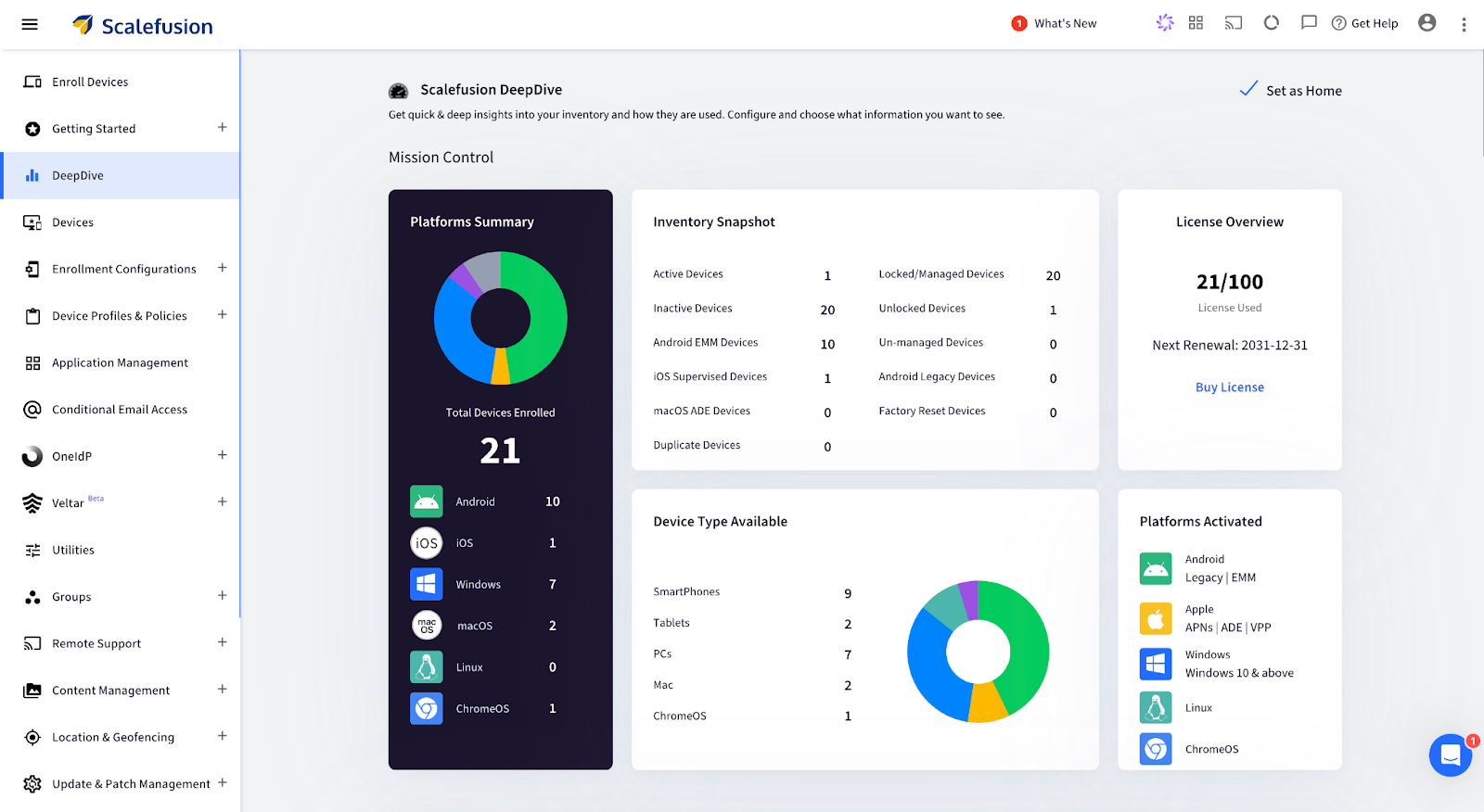
Step 1. Access the dashboardLog in to the Scalefusion Dashboard and navigate to the Devices section.

Scalefusion - erase MacBook remotely

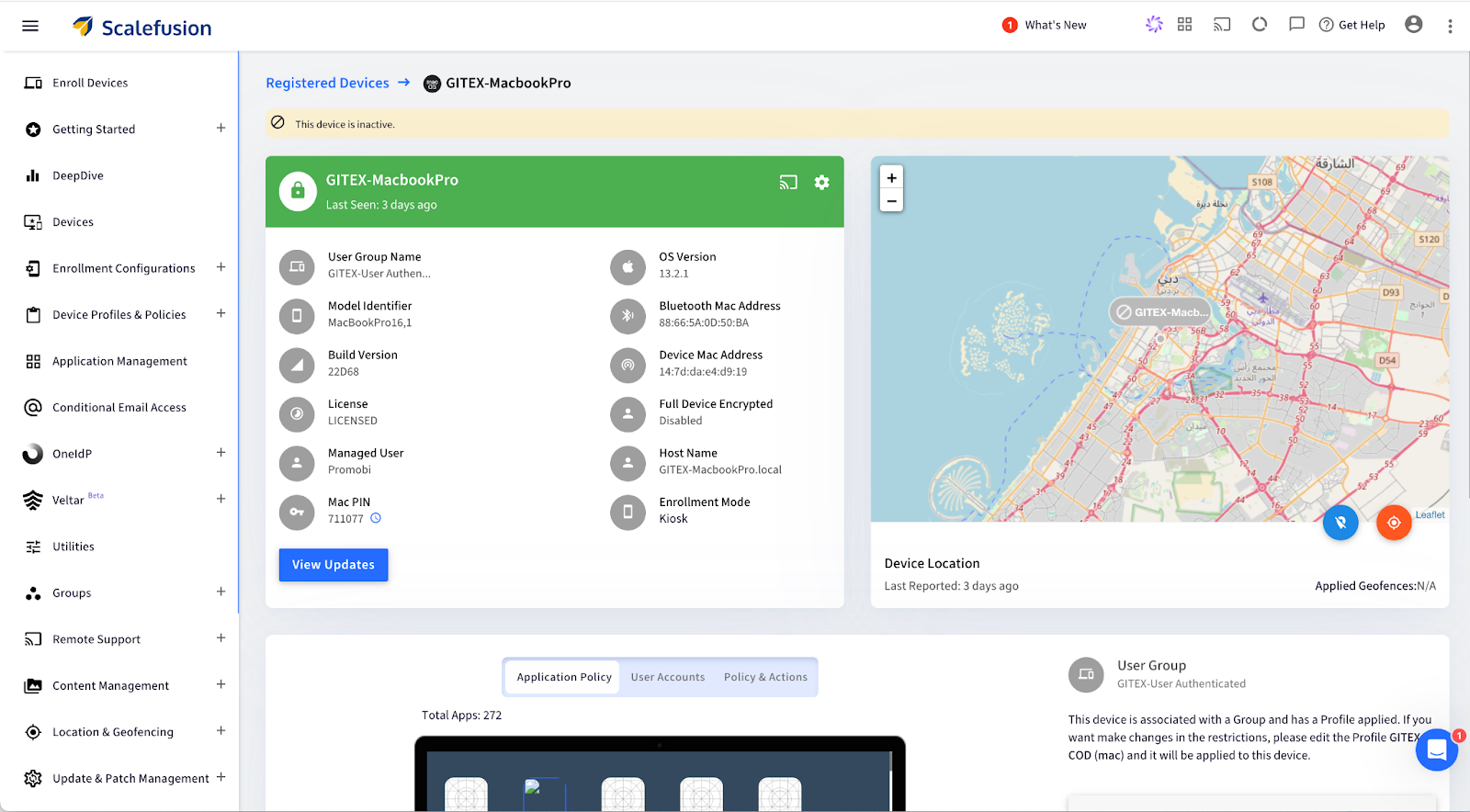
Step 2. Select the device: Click on the specific macOS device to view its details.

Scalefusion - Remotely wipe mac

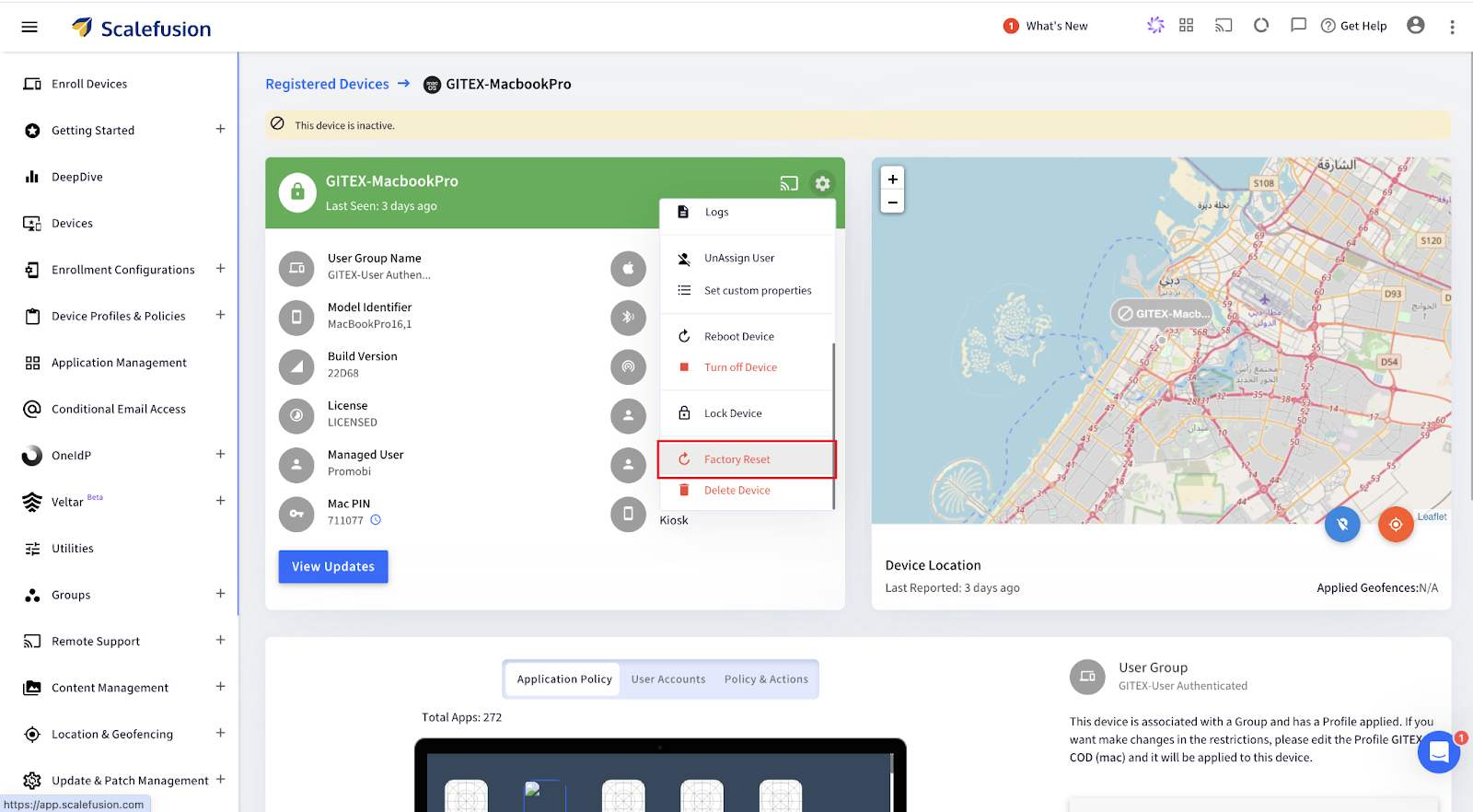
Step 3. Open Factory Reset Option: Click on the Settings icon, scroll down, and select Factory Reset from the menu options.

Scalefusion - wipe Mac remotely

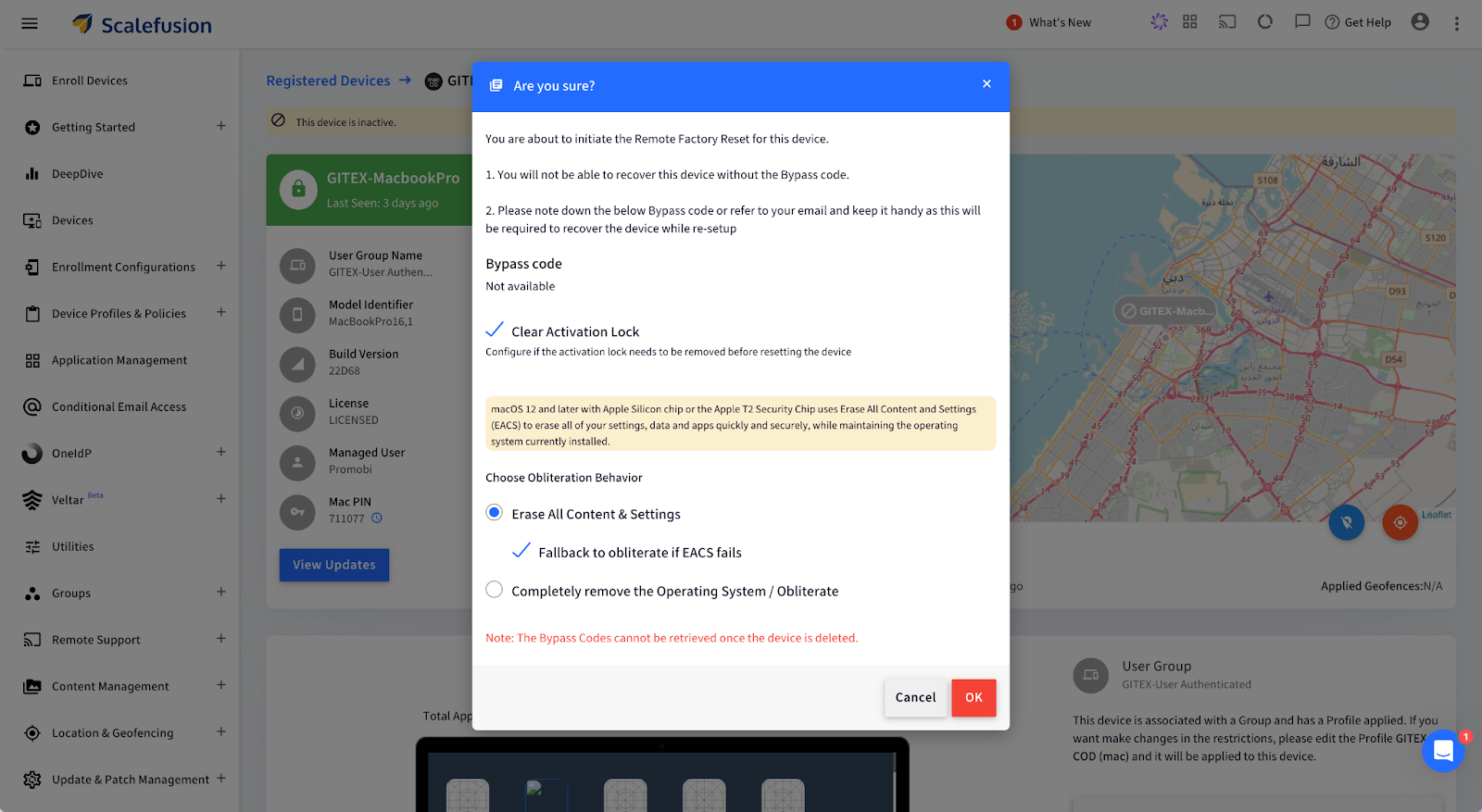
Step 4. For Apple Silicon/Intel (with T2 Security Chip):

  • Choose Obliteration Behavior: Select whether to erase all content, settings, and apps while retaining the operating system.
Scalefusion - Remotely wipe mac

Alternatively, for Intel Mac (without T2 Security Chip):

  • Configure a new Mac PIN: Enter a 6-digit PIN, then confirm by clicking OK. The PIN is also emailed to the admin.

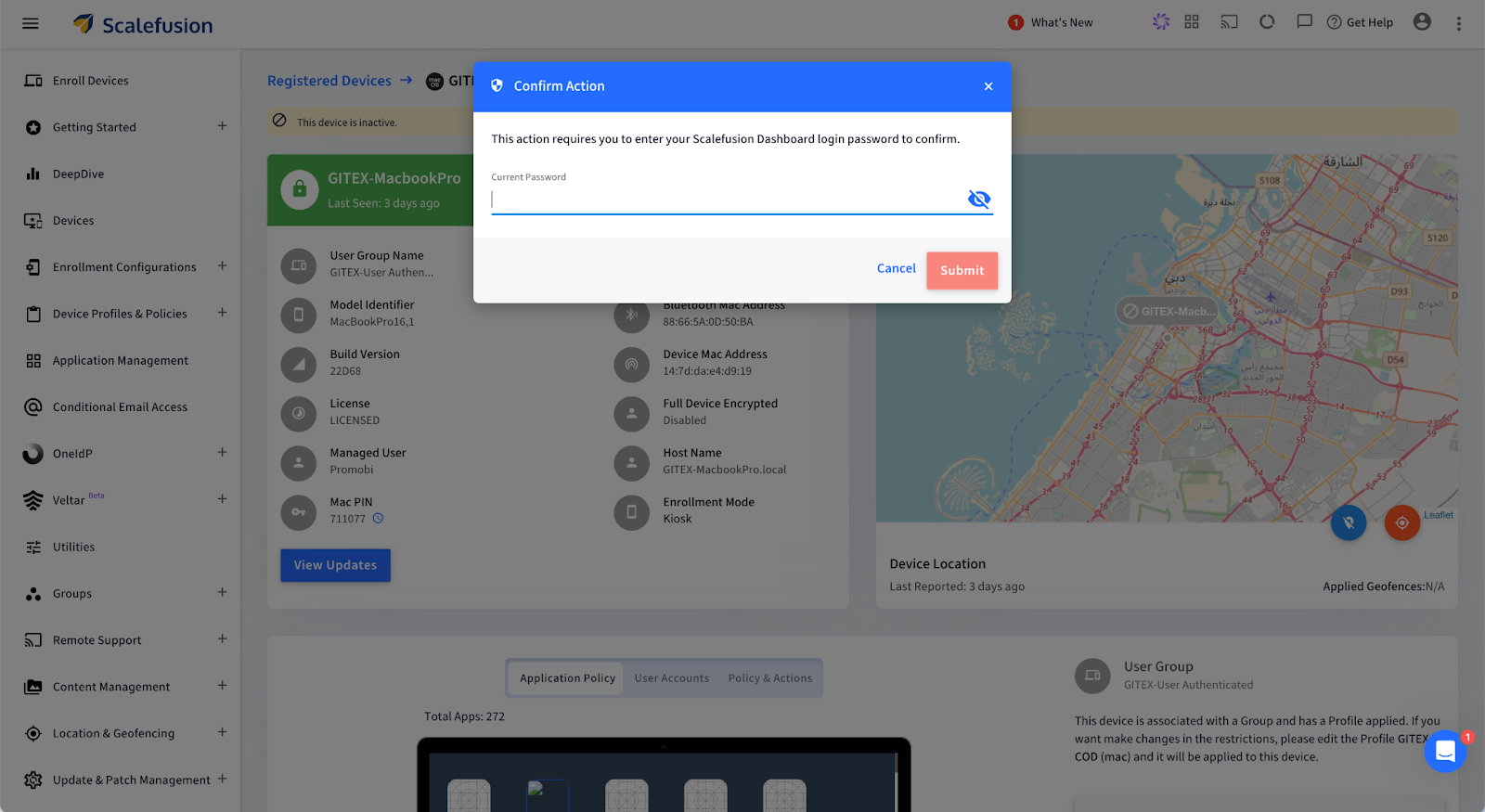
Step 5. Confirm and Submit: Enter your password and click Submit. A push notification will be sent to the device, confirming the factory reset.

Scalefusion - erase MacBook remotely

Your macOS device will now be wiped remotely and restored to factory settings.

What Happens After You Remote Wipe a Mac?

Once the remote wipe is complete, the Mac device is reset to its factory state, making it fully secure and ready for its next phase. But what does that look like at an enterprise level?

  1. Complete Data Erasure: Every piece of data, including user profiles, business applications, and sensitive information, is permanently deleted. This ensures that no traces of your company’s data remain, protecting you from potential data breaches or unauthorized access.
  2. Operating System Reset: The macOS is restored to its original, unconfigured state, essentially taking the device back to square one. This provides a clean slate, removing all previous settings, and ensuring no configurations are left that could pose a security risk.
  3. Ready for New User Setup: The device will display the macOS Setup Assistant, making it ready to be deployed for a new employee. This streamlines IT operations, enabling quick reassignment of devices without the hassle of manual resets.

Use Cases for Remote Wiping on Mac

Remote wiping proves invaluable in several business scenarios, helping IT teams maintain security and streamline device management. Here are some key use cases:

1. Employee Offboarding: When employees leave the company, ensuring their assigned Mac is cleared of any sensitive data is necessary. Remote wiping guarantees that no personal or business data remains on the device, allowing it to be securely redeployed to another team member without privacy risks or manual intervention.

2. Lost or Stolen Devices: Losing a company Mac can create a significant security threat, as it may contain confidential files, emails, or proprietary software. With Scalefusion’s remote wipe feature, IT admins can swiftly erase all data on the lost or stolen device, ensuring that sensitive information remains protected from unauthorized access.

3. Device Lifecycle Management: For businesses that frequently upgrade or redistribute devices, remote wiping helps maintain data security and device readiness. It ensures that each device is completely reset before being assigned to a new user, reducing risks associated with leftover data and simplifying the device management process.

Safeguard Your Mac Devices with Scalefusion UEM

Managing Mac devices in your business doesn’t have to be a headache. With Scalefusion UEM, you can handle everything from employee offboarding to lost devices with confidence. With just a few clicks, you can wipe your Mac remotely, ensuring that all sensitive data is securely erased and the device is ready for the next team member—all without breaking a sweat. 

No more fretting about sensitive information lingering on devices after someone leaves or when a Mac goes missing. Scalefusion’s remote wipe feature ensures that all data is gone in an instant.

About Scalefusion
Scalefusion’s company DNA is built on the foundation of providing world-class customer service and making endpoint management simple and effortless for businesses globally. We prioritize the needs and feedback of our customers, making sure that they are at the forefront of all decision-making processes. We are dedicated to providing comprehensive customer support services, and place emphasis on customer-centric thinking throughout the organization.

About Version 2 Digital

Version 2 Digital is one of the most dynamic IT companies in Asia. The company distributes a wide range of IT products across various areas including cyber security, cloud, data protection, end points, infrastructures, system monitoring, storage, networking, business productivity and communication products.

Through an extensive network of channels, point of sales, resellers, and partnership companies, Version 2 offers quality products and services which are highly acclaimed in the market. Its customers cover a wide spectrum which include Global 1000 enterprises, regional listed companies, different vertical industries, public utilities, Government, a vast number of successful SMEs, and consumers in various Asian cities.