Skip to content

Data Security in the Age of Remote Work: How to Keep Your Business Safe

How should you set up your security policies for your employees working from home? What are the potential culprits of a remote workforce? And is BYOD putting your organization at unnecessary risk of a data breach? Some love it, and some hate it, but there’s no use turning a blind eye to the massive surge in the number of employees working from home.

Ever since covid turned the world upside down in 2020, working remotely became the norm… and a new threat to data security. Covid-19 sent employees packing (to their home offices). Across the globe, workers have been working from home, but not every company has managed to keep up with the security policy department.

Based on the 2022 Verizon Data Breach Investigations Report, 82% of all data breaches involve the human element. You probably know all too well by now how hard it is to keep those humans in check (security-wise), even if they’re all in the same building. But making sure everyone is being safe when they’re out of sight? Are you sure your work-from-home guidelines for employees are up to date?

With 8 in 10 people working either in a fully remote or hybrid environment (and the numbers are expected to rise, based on a 2022 AT&T study), figuring out and maintaining a work-from-home policy is not just important; it’s critical to any organization’s security.

 These are the top things to keep in mind if your organization employs remote workers: 

What are the security risks of working from home?

First of all, let’s be clear about one thing: It’s called “work from home”, but unless you are specifically restricting your employees from working outside of their residence, they could be all over the place: from a cafe downtown to a beach on the other side of the world.

That requires smarter planning, stronger policies, and better communication with employees on your part.

Remote work poses a wide variety of cybersecurity risks due to all the potential scenarios and versions of remote work. Some potential considerations:

  • Without an IT department in the office next door, your remote worker may struggle with their limited IT skills.
  • What type of networks are your employees connecting to? Are they using public wifi?
  • Are you providing hardware for remote workers, or are they using their own devices?
  • Is your infrastructure cloud-based to allow for a more functional work-from-home solution?
  • What are your employees’ work habits? Could they be endangering your data with their behavior? 

The question is: How can you protect my organization from external cyber-attacks and the negligence of employees without making it difficult for your employees?

Because if it’s difficult, hard to understand, and tedious, your employees won’t adhere to your security policies.

The most important work-from-home security policies

Which security you set up for your organization will depend on your specific circumstances. But you don’t need to reinvent the wheel.

There are numerous regulations already in existence that your organization may or may not need to comply with that already specify the most important remote work policies.

You can also use ISO 27001, a major guideline for the establishment of an effective information security management system, to set up the best possible data security policy for your organization. Learn more about ISO 27001

Some areas that will always need to be addressed are:

Securing networks

It can be as simple as making sure that your employees’ home wifi router isn’t still on the default password and insisting they never use public wifi when connecting to your organization’s systems unless they use your organization’s VPN (a virtual private network).

A VPN will encrypt data being sent and received, preventing data leaks. It’s like a disguise for your employees’ online identity and your sensitive data.


Multi-factor authentication

Enforce a strong password policy and require changing passwords periodically, but don’t stop there. Have your employees use two-factor authentication to log onto your organization’s systems as an extra layer of protection.

This can be anything from utilizing single-use passwords to using biometrics.

Two-factor authentication can dramatically reduce the success of phishing and malware attacks since they often rely on stealing information such as passwords to infiltrate a system.

Have you heard of Zero Trust? The Zero Trust Approach is an evolving data loss protection model based on the need to authenticate and authorize any access to the network because trust is not assumed even if it has already been granted. It’s a great tool that can help you set up your authentication requirements.


Encryption

Encryption means that data from emails and documents is encoded, and only authorized parties can access and decipher it.

Sure, every device has an encryption option (but is it turned on?), but you can also implement data encryption software to protect your organization. Encryption is also used to protect sensitive data that is transferred between employee devices and company servers.

Using a VPN will encrypt data going to and from your remote worker through the internet.


Up-to-date software and security systems

Make sure all of your employees working from home have up-to-date firewalls, software, and security systems on all of their devices. You want all security patches to be activated as soon as they come out so that any vulnerabilities in the system are managed.

This can be harder to achieve in the BYOD (bring your own device) model. More on that is below.


Communication and support

Provide clear channels of communication. Educate your employees on how to report any suspicious online activity. Instruct them on how to spot a phishing attempt or security breach. Do your work-from-home employees know who to talk to in case a security issue comes up? Have someone within each team act as the go-to contact and provide guidelines for what types of issues should be reported.


Safe behavior

Talk to your employees about safe behavior – Are they working in an environment where people can easily see their screens? Do they know not to share sensitive information over messaging systems or on social media? Are they doing enough to prevent hardware theft?


Dedicated DLP Systems

Dedicated DLP (data loss prevention) systems such as Safetica’s solutions use a centralized and automated system to monitor and report on everything happening in an organization’s cybersecurity landscape – on-site or off. You will feel more secure knowing that no matter where your employees are, your organization’s sensitive data will remain safe.

Dedicated DLP vs Integrated DLP: Which one makes sense for your organization?

How to explain and enforce security guidelines

For in-house employees, you can use things like posters and LED visuals to spread security messages around the office. You’re also more likely to see questionable behavior or notice the need to distribute that new security brochure you spent too long putting together.

For work-from-home employees, out of sight and literally off-site equals fewer possibilities to have any physical effect on the people you work with. You’ll need to think out of the box and remember that it’s much easier to forget about policies (even if it’s by accident) when you aren’t in the office.

Learn more about educating your employees about data security.

school 

Simply put, in order to maintain awareness, you need to keep your policies easy to understand, easy to implement, and easy to remember. And for remote workers also easy to find in the first place.

Since practice makes perfect, everyone in the organization can benefit from a friendly reminder from time to time. Can you plan an email campaign to explain one security rule every two weeks simply? Have team leaders lead by example (that means higher management, too!), and make data security a topic in regular meetings.

To get the word out, get personal and KISS! Emails and passive messages are great as refreshers, but your employees to really hear you and not just scan the security checklist you send them; they need to hear it from the horse’s mouth.

All policies look great on paper (even the digital kind), but they make a much bigger impact during a live video presentation by the IT Director or even CEO – you are letting your work-from-home employees attend important meetings online, right? If it’s just George, the IT guy hounding them in yet another Slack message, he’ll barely be heard.

So keep it short and simple (KISS!), but make it count.  

Specifics of BYOD when working from home

If your remote employees use computers and other devices that your organization provides to them, you are able to make sure that all equipment and software comply with company standards and policies.

But what about BYOD? If employees use their own devices, your work-from-home guidelines for employees will need to:

  • Specify approved devices
  • Separate personal and company data
  • Plan for ongoing maintenance and updates of all devices
  • Set restrictions on what can and cannot be installed on the device
  • Consider potential legal issues/difficult data retrieval
  • Explain ownership expectations and procedures upon an employee’s termination

While BYOD has obvious advantages, such as reduced costs and potentially greater mobility, it also poses a greater security risk for your organization. 

  Let’s talk about data security

About Version 2 Digital

Version 2 Digital is one of the most dynamic IT companies in Asia. The company distributes a wide range of IT products across various areas including cyber security, cloud, data protection, end points, infrastructures, system monitoring, storage, networking, business productivity and communication products.

Through an extensive network of channels, point of sales, resellers, and partnership companies, Version 2 offers quality products and services which are highly acclaimed in the market. Its customers cover a wide spectrum which include Global 1000 enterprises, regional listed companies, different vertical industries, public utilities, Government, a vast number of successful SMEs, and consumers in various Asian cities.

About Safetica
Safetica is to provide small and mid-sized companies with the same quality data protection that corporations have – affordably, and without any additional IT administration or disruptions in operation.

March 2023: What’s New?

“What’s New?” is a series of blog posts covering recent changes to Comet in more detail. This article covers the latest changes in Comet Voyager over March 2023.

There were just three Comet software releases during March – two in the 23.3.x Voyager release series, plus one minor patch update 23.2.1 for our quarterly “Leda” release track.

We’ve landed a few large and exciting features this March:

S3 Object Lock

Comet 23.3.1 adds support for Object Lock on S3. This feature allows Comet to “lock” an object inside a S3-compatible bucket, preventing it from being deleted or modified for a fixed period of time.

This is a fantastic new capability for Comet and it is a key defense against ransomware. Comet generally requires the capability to add and delete files within your Storage location; deleting files is necessary for applying retention passes, updating index files, and coordinating locking across multiple devices. However, if malware is running on your PC and manages to intercept Comet’s storage credentials, the malware would also be able to delete files, causing much wider havoc.

Comet uses S3 “Compliance Mode” to lock individual objects within the storage location. This ensures that there is no way for the object to be deleted for the specified time, not using Comet’s storage credentials, nor even if your administrator S3 keys are leaked or exposed.

For a visual overview of the process, please see our usage guide and also the simplified explanation.

This feature is available for Amazon S3, Wasabi, IDrive (excluding Storage Template provisioning), and other S3-compatible providers including Minio-based providers. Please check with your S3-compatible provider’s documentation to see if Object Lock is available.

Object Lock is an opt-in feature, both in Comet and with cloud storage providers. It also relies on S3 bucket versioning. These properties generally must be set when the S3 bucket is created for the first time. It is not generally possible to enable Object Lock on an existing S3 bucket. To use Object Lock with an existing S3-based Storage Vault, you would have to create a new S3 bucket with Object Lock enabled; migrate the data; and update Comet’s Storage Vault settings to point to the updated bucket.

Comparison to Backblaze B2

Regular users of Comet may be aware of the existing “Hide files rather than deleting them” option for Backblaze B2. Backblaze B2 supports both a native API and also an S3-compatible layer over the native API. Comet Backup integrates with the native API, so the new S3 Object Lock feature is not available for use with Backblaze B2. However, the existing “Hide files instead of deleting them” option can be used to provide the same protection against ransomware.

Codesigning with Azure Key Vault

If you are customizing the branding of the Comet Backup desktop app, then we would recommend setting up codesigning certificates. Having a codesigning certificate means that installing Comet Backup proceeds more smoothly through Smartscreen and Antivirus popup warnings on Windows, and through Gatekeeper on macOS.

The Windows codesigning programme, “Authenticode”, is currently in a period of disruption as new rules are being put in place. Owing to the high number of events where developer codesigning certificate files were leaked or lost, new requirements are being enforced from June 1st 2023 that newly issued codesigning certificates must no longer be stored as plain files on disk, but instead must be stored in a Hardware Security Module (“HSM”) or equivalent isolated device. Comet has long supported Authenticode certificates using either certificate files (“PKCS #12”), or via plug-in HSM devices that are compatible with the “PKCS #11” standard.

There are two tiers of Authenticode available. The Extended Validation (“EV”) service performs a deeper level of business-level and legal checks of the target organization before issuing the certificate. The extra vetting comes with a higher purchase cost, but it also results in a higher level of initial reputation for the resulting codesigned .exe file. An EV certificate was always required to be stored on an HSM.

However, it’s common to install Comet Server on a cloud VM or VPS, where plugging in a USB dongle or smartcard hardware device is not physically possible. This difficulty also discouraged many MSPs from using the higher-quality Extended Validation service. With the impending phaseout of the file-based method for newly issued certificates, neither existing option is suitable, so another option had to be found.

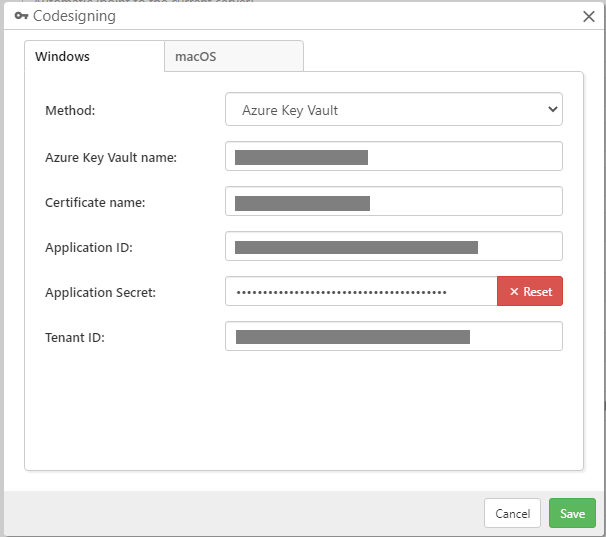
Comet 23.3.0 adds support for codesigning using Azure Key Vault. This is a cloud service from Microsoft to manage the secure provisioning of security keys and certificates, including for Authenticode codesigning. There are various services and pricing tiers available; in particular, it’s possible to purchase a managed cloud HSM, which meets the new June 1st 2023 Authenticode requirements.

At the time of writing, we would recommend GlobalSign or TrustZone for issuing new Authenticode certificates. There is no carry-over reputation with Authenticode, so replacement certificates can be issued from any provider. These particular providers were prepared early for the new requirements and have a secure vetting process to prove your use of an HSM, such as an Azure Key Vault managed HSM, before issuing your certificate. The private key never leaves the managed cloud HSM device, and Comet Server only uses an Azure application ID to remotely perform the signing steps.

Comet Server can perform Authenticode codesigning for Windows, regardless of whether Comet Server is installed on a Windows or Linux host OS. This is achieved by using a cross-platform signing toolchain. To support the new Azure Key Vault feature, we replaced our existing bundled codesigning toolchain from osslsigncode with a new jsign version. Comet ships these third-party utilities as a courtesy in compliance with their redistribution license.

For most existing users of codesigning with a PKCS#12 file-based certificate on disk, there will be no noticeable difference and Comet will continue to work without any configuration changes. However, some users may experience breaking changes:

  • The new jsign program takes different parameters for hardware devices using the PKCS#11 standard, which could not be automatically converted. Users of hardware devices may need to revisit their settings.
  • If Comet Server is installed on ARM64 Linux, the version of jsign distributed by Comet is not compatible with the musl C runtime generally used for static binary distribution. A glibc-based Linux distribution is now required to run the codesigning toolchain on ARM64 Linux. The issue does not apply to x86_64 Linux. We may be able to resolve this issue in a future version of Comet.

For more information, see the full Authenticode codesigning documentation.

New web interface features

Looking beyond these headline features, there have been many more improvements to Comet this month, particularly in the Comet Server web interface.

It’s now possible to select custom snapshots for deletion from the web restore dialog. This builds upon last month’s feature to add this in the Comet Backup desktop app. To use this feature, enable “Advanced Options” from the top-right user menu, and then click the new Actions button in the Restore wizard dialog.

You can now see an online device’s software version, OS platform, and IP address directly on the User Detail page in the Comet Server web interface. This was a minor feature request on our Feature Voting page. To view these new columns, click the “View” button to configure which columns are displayed. Your custom column selection is preserved for this browser throughout multiple page views, but your custom column selection will be reset when a new version of Comet Server is released.

If your Comet Server is configured to show software downloads to logged-out users, the login screen has expanded the number of download options from three (Windows, macOS, and Linux) to four with the new Synology download button. This fixes a minor inconsistency with the web interface as this fourth platform should be shown in the same context as the other three platforms.

There have been many cosmetic improvements to the Comet Server web interface too, including better spacing and padding when configuring an Office 365 Protected Item or a Windows System Backup Protected Item. We regularly make small improvements like this, but this month, we’ve also been working on a much more major cosmetic change for the Comet Server web interface. We will be able to share more information about that soon.

About Version 2 Digital

Version 2 Digital is one of the most dynamic IT companies in Asia. The company distributes a wide range of IT products across various areas including cyber security, cloud, data protection, end points, infrastructures, system monitoring, storage, networking, business productivity and communication products.

Through an extensive network of channels, point of sales, resellers, and partnership companies, Version 2 offers quality products and services which are highly acclaimed in the market. Its customers cover a wide spectrum which include Global 1000 enterprises, regional listed companies, different vertical industries, public utilities, Government, a vast number of successful SMEs, and consumers in various Asian cities.

About Comet
We are a team of dedicated professionals committed to developing reliable and secure backup solutions for MSP’s, Businesses and IT professionals. With over 10 years of experience in the industry, we understand the importance of having a reliable backup solution in place to protect your valuable data. That’s why we’ve developed a comprehensive suite of backup solutions that are easy to use, scalable and highly secure.

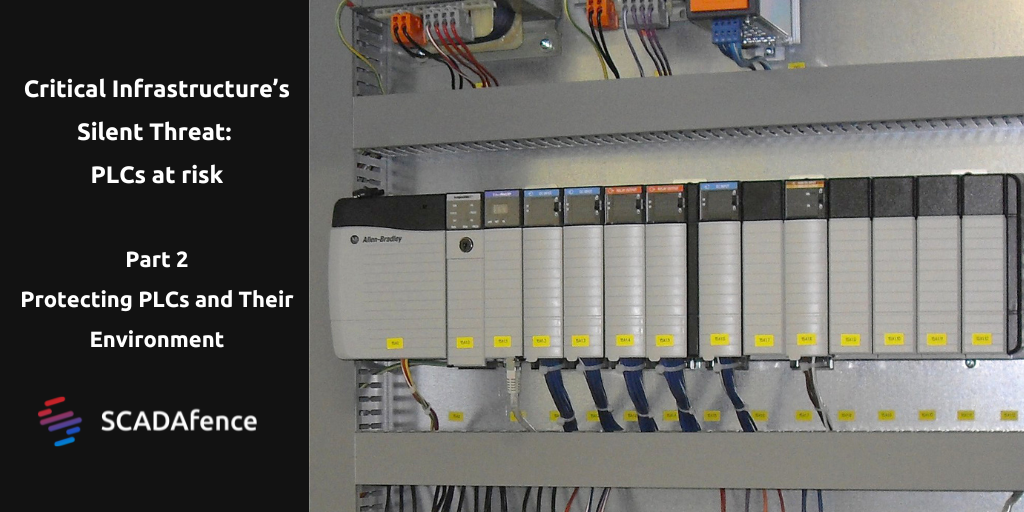
Critical Infrastructure’s Silent Threat: Part 3 – Protecting PLCs and Their Environment

Part 3: Protecting PLCs and Their Environment

For many years, PLCs have been insecure by design. Several years into customizing and applying best practices from IT gave rise to secure protocols, encrypted communications, network segmentation, and so on. However, PLCs programming is still done without security in mind.

PLC secure coding practices leverage natively available functionality in the PLC. Implementing these practices requires little to no extra hardware or software. They can be incorporated into the typical PLC operating and programming workflow. The implementation requires security expertise and solid knowledge of the PLCs that need to be safeguarded, their logic, and the underlying process.

Continue reading

Using Your Own Tools Against You: The Rise of Living-Off-the-Land (LOTL) Attacks

While some cyber-attacks announce their presence like a blaring siren, others fly quietly under the radar. This presents a significant challenge for network security teams, who are already battling increasingly frequent, sophisticated, and severe attacks.

One cunning technique that has gained considerable traction in recent years is Living-Off-The-Land (LOTL) attacks. Here, threat actors use an organization’s own tools and infrastructure to launch an attack, stealthily moving through the kill chain without the need for bespoke malware.

Alarmingly, these attacks are not only difficult to detect but also highly effective. For example, the Ponemon Institute found that fileless malware attacks (another term for a LOTL attack) are approximately ten times more likely to succeed than file-based attacks.

As LOTL attacks continue to skyrocket in popularity, organizations need to understand how they work and take proactive measures to prevent them. That’s what we’re going to be diving into today.

What Exactly is a Living off the Land (LOTL) Attack?

In a Living off the Land (LOTL) attack, attackers use pre-installed or legitimate tools on the victim’s system, which enables them to blend in with regular user activity and bypass security software.

Despite the term being coined in 2013, recent cybersecurity reports have noted a marked rise in LOTL attacks. But why have cybercriminals suddenly added LOTL attacks to their arsenal? The answer lies in how effectively these attacks bypass traditional security measures.

Instead of using new and sophisticated methods to attack a system, hackers can use tools already installed on a target system, such as PowerShell, Command Prompt, and other admin tools. Since these tools are legitimate and necessary for many everyday computer tasks, it can be difficult for security software to detect malicious activity when these tools are used in a LOTL attack. In other words, LOTL attacks don’t set off warning signals like many other attacks.

One thing that makes LOTL attacks unique is that they don’t leave any files behind. This is why they’re often called fileless malware. With no executable files or malware to detect, many cybersecurity tools simply won’t realize anything suspicious has occurred.

How Do LOTL Attacks Happen?

So, what does a LOTL attack actually look like? LOTL attacks share many of the same hallmarks as other cyberattacks; only they’re far more challenging to detect. Here is an overview of the process:

  1. Initial Access: A hacker gains access to a network through another technique, such as phishing or social engineering. This gives the hacker an initial foothold in the target network.
  2. Reconnaissance: Once inside the network, the hacker begins to gather information about the target systems and network architecture. The goal is to identify vulnerabilities that can be exploited to gain further access and control.
  3. Lateral Movement: The hacker uses the information gathered in the reconnaissance phase to move laterally within the network. The goal is to find and compromise additional systems to establish persistence and gain greater control over the network.
  4. Privilege Escalation: The hacker leverages the compromised systems to escalate privileges and gain access to sensitive data and critical systems.
  5. Malicious Activities: Once the hacker has established a strong foothold in the network, they can carry out a range of malicious activities, including data exfiltration, installing backdoors, creating new tasks on remote machines, identifying configuration settings, and more.
  6. Obfuscation: Throughout the attack, the hacker takes steps to obscure their activity and avoid detection. This can involve using tools like PowerShell or Command Prompt to run malicious code that is obfuscated to evade detection.

The Anatomy of LOTL Attacks

Hackers have a wide range of tools at their disposal to execute a LOTL attack. For example, attackers may use tools such as PowerShell, Windows Management Instrumentation (WMI), and Command Prompt to carry out malicious activities such as reconnaissance, data exfiltration, and lateral movement.

For example, an attacker might use the built-in Windows utility Netsh to create a reverse shell and gain access to a victim’s system. And many other techniques exist. For example, LOTL attacks can also use the Registry Console Tool (reg.exe) to maintain persistence, store settings for malware, and store executables in subkeys. Other commonly used tools in LOTL attacks include Windows Management Instrumentation (WMI), Service Control Manager Configuration Tool (sc.exe), Scheduled Tasks (AT.EXE Process), and Sysinternals such as PSExec.

Notably, LOTL attacks that leverage Remote Desktop Protocol (RDP) connections can be especially tricky for security teams to spot and stop because RDP is a critical service for system administrators.

Identifying which RDP connections are legitimate and which are not is like trying to find a needle in a haystack, especially when administrative credentials are involved. That’s why “known bads” and historical attack data just don’t cut it when it comes to stopping these types of attacks. Instead, a smarter, more comprehensive approach is needed that focuses on detecting anomalous activity in real-time.

LOTL Attacks In Action

Many high-profile cyber attacks in recent years have leveraged LOTL techniques and other tactics to devastating success. Here are some real-world examples:

  1. NotPetya: One of the most destructive cyberattacks in history. It spread rapidly across networks in Ukraine and worldwide, causing billions of dollars in damages. The attackers used legitimate tools like PowerShell and PsExec to execute their malicious code, making it difficult to detect.
  2. Olympic Destroyer: The attackers behind the 2018 Olympic Destroyer attack used a combination of spear-phishing and LOTL techniques to gain access to the Pyeongchang Winter Olympics’ network. They used legitimate administrative tools like PowerShell to carry out their attack, which disrupted the opening ceremony and caused widespread disruption.
  3. TrickBot: This banking Trojan is known for its LOTL capabilities. It uses legitimate Windows tools like PowerShell and Windows Management Instrumentation (WMI) to evade detection and remain persistent on infected machines. TrickBot has been used to steal sensitive information and initiate fraudulent transactions.
  4. Emotet: This malware has been used in various attacks targeting government organizations and private companies. It leverages LOTL techniques like using PowerShell to download and execute additional modules. Once installed, Emotet can steal credentials and spread to other machines on the network.

These are just a few examples of LOTL attacks seen in the wild. As these attacks become more sophisticated, organizations need to be aware of the risks and take steps to bolster their network security. That brings us to the next section – how to safeguard your network from LOTL attacks.

How to Protect Against LOTL Attacks

LOTL attacks may be difficult to detect, but that doesn’t mean network security teams are powerless to act. Companies can adopt several techniques and best practices to protect against Living-Off-The-Land attacks. Let’s look at some of the most effective methods.

Zero Trust and Least Privilege Access

Zero trust is a security model that assumes that every user, device, and application on a network is potentially malicious, and therefore, no one should be trusted by default. It does away with traditional perimeter-based security controls like firewalls and instead focuses on securing every asset on the network.

Zero trust can help prevent LOTL attacks in several ways. For example, imagine an attacker gains access to a user’s credentials through a phishing email. With those credentials, the attacker could log in to the victim’s account and move laterally through the network, looking for valuable data to exfiltrate. However, in a zero-trust environment, the attacker would not automatically be granted access to the network’s sensitive resources. Instead, they would need to pass multiple levels of authentication and authorization before being granted access.

In this scenario, the zero trust approach would require the attacker to authenticate themselves every time they attempt to access a resource, even if they had already authenticated once before. This multi-step authentication process makes it more challenging for attackers to gain access to the network and limits their ability to move laterally.

Furthermore, in a zero-trust environment, organizations can enforce granular access controls based on the principle of least privilege. This means that users and devices are only granted the minimum level of access necessary to complete their tasks. A least-privilege approach helps limit the attack surface, making it more difficult for attackers to access sensitive data or resources.

Some other effective ways of limiting LOTL attacks include:

  1. Self-learning AI technology: Using self-learning AI technology, like machine learning algorithms, can help companies detect and prevent LOTL attacks by continuously analyzing network traffic, identifying abnormal behavior, and automatically taking action to stop potential attacks.
  2. Network segmentation: Breaking down a network into smaller, more manageable segments can limit the spread of malware and prevent attackers from moving laterally within the network.
  3. Multi-factor authentication: Multi-factor authentication (MFA) adds an extra layer of security to user login credentials by requiring users to provide multiple forms of identification, such as a password and a fingerprint scan or facial recognition.
  4. Regular security assessments and testing: Regular security assessments and penetration testing can help identify vulnerabilities in a company’s network and applications, enabling proactive mitigation and prevention.

Final Thoughts

With LOTL attacks rising, organizations must proactively strengthen their network security and lock cyber criminals out. This is especially important because while LOTL attacks share many similarities with other cyberattacks, they are far more challenging to detect. As such, a smarter and more comprehensive approach is needed to detect anomalous activity in real-time to prevent these attacks.

About Version 2 Digital

Version 2 Digital is one of the most dynamic IT companies in Asia. The company distributes a wide range of IT products across various areas including cyber security, cloud, data protection, end points, infrastructures, system monitoring, storage, networking, business productivity and communication products.

Through an extensive network of channels, point of sales, resellers, and partnership companies, Version 2 offers quality products and services which are highly acclaimed in the market. Its customers cover a wide spectrum which include Global 1000 enterprises, regional listed companies, different vertical industries, public utilities, Government, a vast number of successful SMEs, and consumers in various Asian cities.

About Portnox
Portnox provides simple-to-deploy, operate and maintain network access control, security and visibility solutions. Portnox software can be deployed on-premises, as a cloud-delivered service, or in hybrid mode. It is agentless and vendor-agnostic, allowing organizations to maximize their existing network and cybersecurity investments. Hundreds of enterprises around the world rely on Portnox for network visibility, cybersecurity policy enforcement and regulatory compliance. The company has been recognized for its innovations by Info Security Products Guide, Cyber Security Excellence Awards, IoT Innovator Awards, Computing Security Awards, Best of Interop ITX and Cyber Defense Magazine. Portnox has offices in the U.S., Europe and Asia. For information visit http://www.portnox.com, and follow us on Twitter and LinkedIn.。

Everything You Need to Know About Certificate-Based Authentication

No ID? No Entry.

Certificate-based authentication is a way for a computer system to verify your identity using a digital certificate instead of a traditional username and password. Think of it like a driver’s license. When you go to a bar or a liquor store, you need to prove that you’re old enough to buy alcohol. The bouncer or cashier checks your ID to make sure it’s really you, and that you’re of legal age. In the same way, when you connect to a secure website or network, your computer presents a digital certificate to prove that you are who you say you are.

This certificate contains a unique code that identifies you and your computer, and it’s signed by a trusted authority like a certificate authority (CA). The CA vouches for your identity, and the website or network can trust that you are who you say you are. So, instead of typing in a username and password, you just present your digital certificate and the system verifies it. It’s a more secure way of authenticating because it’s harder to steal or guess a digital certificate compared to a password.


The Secret Handshake

Certificate-based authentication is like having a secret handshake that only you and the system you’re trying to access know. You can think of it as a VIP club, where only the cool kids with the special wristbands can get in. In this case, your digital certificate is your wristband, and the certificate authority is the bouncer at the door.

Now, let’s say you’re trying to sneak into the VIP club without a wristband. You might try to guess the password or use some other sneaky trick to get past the bouncer. But with certificate-based authentication, you can’t cheat your way in. Your digital certificate is unique to you and your computer, and it’s signed by a trusted authority. So, even if someone intercepts your certificate, they won’t be able to use it to gain access to the network.

It’s like having a secret superpower that only you possess. And because it’s harder to steal or guess a digital certificate, certificate-based authentication is like having a bulletproof vest for your network. It’s the most secure way to authenticate because it’s nearly impossible for hackers to break in without your digital certificate. So, if you want to protect your network from the bad guys, certificate-based authentication is the way to go!


What’s Stopping You?

Certificate-based authentication can be a bit more complicated to set up and manage than traditional username and password authentication. It requires companies to have their own certificate authority or to purchase certificates from a trusted third-party CA, which can be expensive. And depending on the size of the company, managing all those certificates can be a bit of a headache.

Plus, not all systems and applications support certificate-based authentication, so companies may need to make changes to their infrastructure to enable it. And even if they do make those changes, employees may need to be trained on how to use certificate-based authentication, which can take time and resources.

That being said, many companies are starting to see the benefits of certificate-based authentication, especially for highly sensitive systems and data. It’s a more secure method of authentication that can help prevent cyberattacks and data breaches. So, while it may not be the easiest option, it’s definitely worth considering for companies that take security seriously.


Roll it Out Faster

If companies want to speed up the adoption of certificate-based authentication, they need to make it easy and appealing for their employees.

Firstly, they can simplify the process of getting started with certificate-based authentication by providing user-friendly guides and tutorials. They should explain the benefits of certificate-based authentication in a way that’s easy to understand and make it clear how to use it.

Secondly, companies can incentivize employees to use certificate-based authentication by offering rewards such as bonuses, promotions, or recognition for those who make the switch. It’s like getting a gold star for doing well in school, but cooler because it’s for network security!

Thirdly, they can make it a company-wide policy to use certificate-based authentication for all employees. This helps establish a culture of security and demonstrates to employees the importance of protecting sensitive information.

Lastly, companies can invest in training programs and workshops to educate employees on the benefits of certificate-based authentication and how to use it effectively. They can make it fun and interactive, like a game show where employees can win prizes for correctly answering security questions.

By making certificate-based authentication easy, incentivizing its use, establishing it as a policy, and educating employees, companies can accelerate its adoption and improve their network security. It’s all about making security simple and accessible for everyone.

About Version 2 Digital

Version 2 Digital is one of the most dynamic IT companies in Asia. The company distributes a wide range of IT products across various areas including cyber security, cloud, data protection, end points, infrastructures, system monitoring, storage, networking, business productivity and communication products.

Through an extensive network of channels, point of sales, resellers, and partnership companies, Version 2 offers quality products and services which are highly acclaimed in the market. Its customers cover a wide spectrum which include Global 1000 enterprises, regional listed companies, different vertical industries, public utilities, Government, a vast number of successful SMEs, and consumers in various Asian cities.

About Portnox
Portnox provides simple-to-deploy, operate and maintain network access control, security and visibility solutions. Portnox software can be deployed on-premises, as a cloud-delivered service, or in hybrid mode. It is agentless and vendor-agnostic, allowing organizations to maximize their existing network and cybersecurity investments. Hundreds of enterprises around the world rely on Portnox for network visibility, cybersecurity policy enforcement and regulatory compliance. The company has been recognized for its innovations by Info Security Products Guide, Cyber Security Excellence Awards, IoT Innovator Awards, Computing Security Awards, Best of Interop ITX and Cyber Defense Magazine. Portnox has offices in the U.S., Europe and Asia. For information visit http://www.portnox.com, and follow us on Twitter and LinkedIn.。

×

Hello!

Click one of our contacts below to chat on WhatsApp

×