SonicWall disclosed a vulnerability that affects SonicOS management access and SSLVPN software on SonicWall Gen 5, Gen 6, in addition to Gen 7 devices running SonicOS version 7.0.1-5035 or earlier.
CVE-2024-40766 is rated critical with CVSS score of 9.3, and potentially allows for unauthorized resource access by an attacker. There is limited evidence that this vulnerability is being exploited in the wild.
What is the impact?
Successful exploitation of this vulnerability potentially results in unauthorized resource access and in some cases could lead to a DoS after causing vulnerable devices to crash.
Are updates or workarounds available?
SonicWall recommends restricting management access to trusted sources or disabling WAN management from the public Internet. Additionally, SonicWall has released updated firmware and is available for download from mysonicwall.com.
How to find potentially vulnerable systems with runZero
From the Asset Inventory, use the following query to locate systems running potentially vulnerable software:
hw:"SonicWall" type:"Firewall"
About Version 2 Digital
Version 2 Digital is one of the most dynamic IT companies in Asia. The company distributes a wide range of IT products across various areas including cyber security, cloud, data protection, end points, infrastructures, system monitoring, storage, networking, business productivity and communication products.
Through an extensive network of channels, point of sales, resellers, and partnership companies, Version 2 offers quality products and services which are highly acclaimed in the market. Its customers cover a wide spectrum which include Global 1000 enterprises, regional listed companies, different vertical industries, public utilities, Government, a vast number of successful SMEs, and consumers in various Asian cities.
About runZero runZero, a network discovery and asset inventory solution, was founded in 2018 by HD Moore, the creator of Metasploit. HD envisioned a modern active discovery solution that could find and identify everything on a network–without credentials. As a security researcher and penetration tester, he often employed benign ways to get information leaks and piece them together to build device profiles. Eventually, this work led him to leverage applied research and the discovery techniques developed for security and penetration testing to create runZero.
I’m thrilled to announce the release of Parallels Desktop 20 for Mac – the latest and greatest version of our product!
The biggest highlight is the new Parallels AI package, offering secure, downloadable pre-packaged virtual machines to quickly enhance AI developing skills in an offline environment.
Parallels Desktop 20 is also ready for macOS Sequoia and Windows 11 24H2 and introduces a new Management Portal as a part of the new Enterprise Edition. It offers numerous updates for Windows, macOS and Linux VMs.
PS. Read all the way to the end for a fun Easter egg!
Ready for macOS Sequoia 15
The new Parallels Desktop 20 for Mac supports the upcoming macOS Sequoia (when released), improves the application stability on this operating system, and allows Mac users to enjoy AI-powered Writing Tools with Windows apps (requires macOS Sequoia 15.1).
This version decreases the use of deprecated APIs for content capture (such as CGDisplayStream and CGWindowListCreateImage), which now trigger system alerts that indicate they might be able to collect detailed information about the user. Instead, it moves to the recommended macOS API to ensure security and compliance.
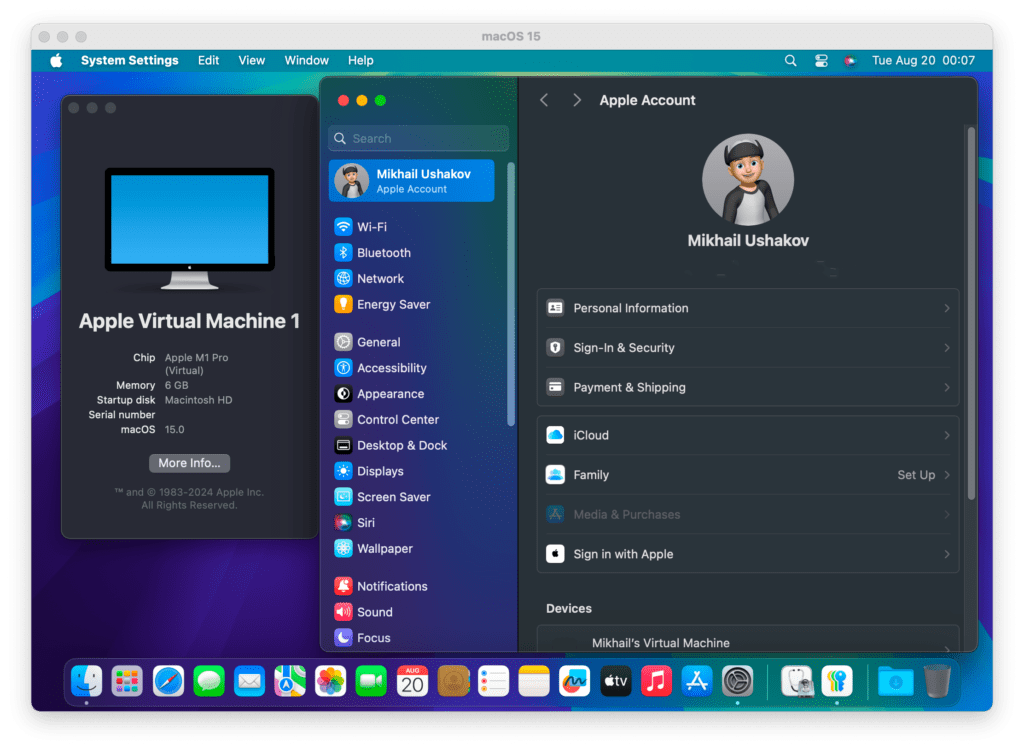
In addition, macOS Sequoia provides the ability to sign in to Apple ID in macOS virtual machines on Apple silicon!
This long-awaited improvement allows developers to fully leverage macOS virtual machines for building and testing software in an isolated environment.
Improving the stability and integration of this major Windows 11 update in a virtual environment has been a major goal since Windows 11 24H2 appeared in the Canary channel in early 2024.
These efforts include fixes for the NVMe driver, express Windows 11 installation on Intel-based Mac computers, mouse cursor positioning, and a fix for the dynamic resolution to sustain the ability to resize a Windows 11 VM window with automatic resolution adjustments.
From the Microsoft side, optimizations for the new major Windows 11 version 24H2 ensure users’ workflows remain uninterrupted while running legacy Windows apps (built for the Intel platform) and get up to 80% performance boost[1] for certain computational workloads thanks to the improved Prism emulator built into Windows 11 on Arm OS.
State of Windows apps on Apple silicon Macs
Contrary to popular belief, most Windows apps run just fine in Windows 11 on Arm – the version of Windows OS users run on a Mac with Apple silicon.
With the increased adoption of Apple silicon, Parallels Desktop became an essential tool for many professionals who need access to the Windows OS ecosystem – our customers happily run more than 200,000 Windows apps on their computers.
Parallels is proud to be the first Microsoft-authorized solution for running Arm versions of Windows 11 on Mac, helping to amplify the adoption of the Arm platform by software developers.
The latest release offers improved compatibility with ArcGIS Pro, LabVIEW, Ninja Trader, and other applications so you can now seamlessly install and run on a Mac with Apple silicon—all with the help of Parallels Desktop for Mac.
It’s also great to see software companies shift their strategy and start delivering product updates that run natively in Windows 11 on Arm which means more apps will soon become available for Apple silicon users. Recent examples include Malwarebytes ThreatDown, Opera browser, Adobe Illustrator, LibreOffice, and others.
Streamline your development workflow
The Parallels Desktop 20 release reflects our ongoing commitment to delivering the best environment for developers to build, automate, and test solutions on every major operating system (Windows, Linux, and macOS).
Let’s start with the Visual Studio Code extension for Parallels Desktop. This tool allows you to create and manage your Parallels Desktop virtual machines from a single user interface — and it’s becoming a popular choice, with over 50,000 downloads and counting.
This release introduces the ability to control virtual machines using natural language with Microsoft Copilot integrated into the Parallels Visual Studio Code extension.
DevOps and developers can use Parallels Desktop GitHub Actions to transform their CI/CD workflows, automating the deployment and management of virtual machines directly from their GitHub repository. Imagine triggering VM provisioning, testing, and configuration automatically as part of your GitHub Actions pipeline, eliminating manual steps, reducing errors, and accelerating your development process.
Enjoy the convenience of the Parallels Desktop DevOps Service to manage and orchestrate multiple Parallels Desktop hosts and virtual machines. Built to cater to the unique needs of DevOps teams, developers, and IT administrators, this service offers robust tools and automation capabilities that simplify the management of complex environments, enabling you to accelerate your software delivery process.
Perhaps the most exciting feature of this release is the introduction of the Parallels AI Package, now available in the extension catalog. These allow developers to start working and experimenting with AI at a low cost, with quick onboarding, and the ability to test on different configurations, including those without network access. Interested? Read more about AI VMs.
You can also join our Discord server to ask questions, share your experience, and get help from the community.
If you’re interested in macOS virtual machines…
For developers and DevOps who run macOS virtual machines on a Mac with Apple silicon, the new version delivers:
New! The ability to use snapshots to quickly save and restore the system state for an even more flexible development and testing process.
An improved Parallels Packer plugin for a faster macOS VM installation in express mode, automating the initial setup process using Apple Vision framework (OCR).
An enhanced Parallels executor for GitLab runner that now allows the use of macOS VMs on Apple silicon Mac computers.
Improvements for Linux fans
The Parallels Desktop team has listened to your feedback about the issues when running the newly released kernels inside Parallels Desktop virtual machines.
It’s well-known that the newest Linux kernels can sometimes be unstable and lead to compatibility challenges. However, we didn’t just acknowledge the issue — we took the first step to solve it.
Through careful analysis, the team discovered that nearly 50% of the reported issues were related to the Shared Folder driver operating within the kernel space.
Tackling this required adopting the high-level FUSE API, which should significantly reduce installation issues caused by kernel API changes in the near future.
This enhancement is designed to improve compatibility and ensure seamless support for future Linux distributions, reaffirming our commitment to providing you with a reliable and consistent virtualization experience.
This change also allowed us to improve performance for certain operations. You will feel the speed improvements when working with the volumes shared from Mac — now up to 4x faster than before[2].
Introducing Management Portal and Parallels Desktop Enterprise Edition — coming later this fall
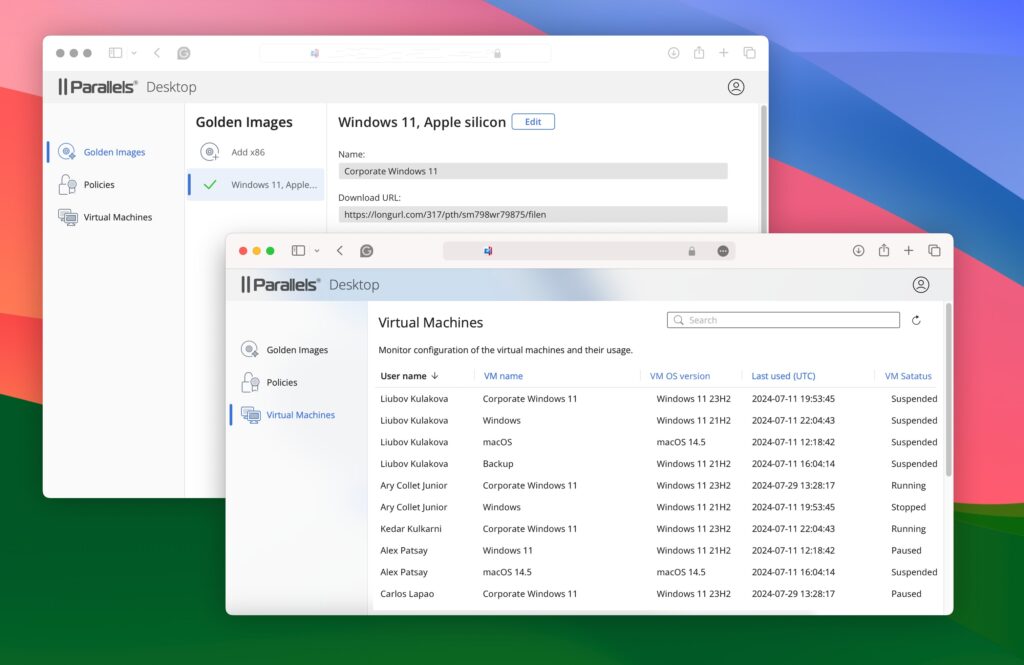
I’m excited to announce a significant update that transforms how IT administrators manage Parallels Desktop virtual machines across their organizations.
The changes are based on user feedback, particularly how IT administrators have expressed the need for more advanced tools to manage their Parallels Desktop environments.
Common requests included the ability to control virtual machines remotely from a single interface, centralized monitoring of VM performance across the entire organization, and a more convenient way to deploy the virtual machines to endpoint Macs.
The Parallels Desktop team has taken this feedback to heart and are thrilled to introduce the Management Portal, which addresses these needs head-on.
To complement the release of the Management Portal, the Parallels Desktop Enterprise Edition is now available—it’s our most advanced offering yet.
Created for organizations that need more control, visibility, and efficiency in managing their large-scale virtual environments, the new Edition unlocks access to the new Management Portal.
And that’s just the beginning. The Enterprise Edition is packed with enhancements that will empower your IT team to operate more effectively and efficiently than ever before.
Stay tuned for further updates! If you’re eager to be among the first to experience these new capabilities, reach out to our sales team today for more details and to arrange an exclusive demo: https://www.parallels.com/products/desktop/enterprise/.
Streamline the deployment process
In the world of IT management, seamless software deployment is crucial.
However, some IT admins using Parallels Desktop have recently faced a challenging roadblock when deploying the application through some Mobile Device Management (MDM) providers.
The issue stemmed from the bundle structure of the deployment package, which, while powerful, was not widely supported by many MDM providers, e.g., Microsoft Intune.
As a result, admins were forced to find workarounds, such as deploying the software via custom scripts. Additionally, our customers reported the package can’t be run on Mac computers with macOS Sequoia.
The latest release introduces support for converting the existing bundle package into a flat package format, which is compatible with most MDM providers.
This simple yet powerful change ensures that IT admins can now deploy Parallels Desktop without resorting to complex scripts.
The flat package format maintains all the essential capabilities of the original bundle, including the ability to pass a license, configure policies, and deploy VMs with precision.
For MDMs with file size limitations, admins can now link a cloud-stored VM in the package, streamlining large deployments. The option to include the VM file in the package remains available.
To further enhance the deployment experience, Parallels has added the ability to always deploy the latest version of the Parallels Desktop application without needing to bundle the DMG file with each package.
This ensures that IT admins can use the time they used to spend on building a new package on other crucial tasks.
These advancements mark a significant milestone in our ongoing commitment to improving the IT admin experience. With these new features, deploying Parallels Desktop across a network of Macs is simpler and more flexible than ever before.
Parallels Desktop 20: The latest in a long line of innovations
Many years ago, a small group of enthusiasts embarked on a journey to create a product that, year after year, captured the hearts of more and more users worldwide: be it a Windows lover, a student, a developer, or an IT admin – Parallels is proud to serve so many different people worldwide.
Fun fact: Parallels Desktop launched publicly in June 2006 with version 2.5, which makes this release not an anniversary by age but rather yet another round number release. Stay tuned for anniversary easter eggs in 2026 😊.
Years later, Parallels Desktop became the leading solution for running Windows, Linux, and even macOS in a virtual environment – the only solution authorized by Microsoft to run Windows 11 on a Mac with Apple silicon!
And this is only the beginning. Look for more enhancements in the near future, making deployment and management an even smoother process for IT admins worldwide. Stay tuned for what’s next!
New to Parallels Desktop for Mac? Get your14-day free trialof Parallels Desktop 20.0.0 now.
[1] – Performance measurements conducted by Parallels by comparing the score produced by the x86 version of the test Floating Point Math from the Passmark 10 CPU Mark suite in Windows 23H2 (10.0.22621.3593) versus Windows 24H2 (10.0.26120.670) on MacBook Pro (M2 Max, (8+4) CPU, 96GiB RAM) with the virtual machine (4 CPU, 32GiB RAM). Measured using Parallels Desktop public version 19.4.1. The performance may vary based on usage, system configuration, and other factors.
[2] – Performance measurements conducted by Parallels by measuring the time it takes to copy 3000 (three thousand) files in 315 directories from the primary macOS 13.3 (22E252) to the Ubuntu Linux virtual machine (4 CPU, 8GiB RAM, Ubuntu Server 22.04) on MacBook Air (M2, (4+4) CPU, 32GiB RAM). Measured with a prerelease version of Parallels Desktop 20 versus the released version of Parallels Desktop 19. The performance may vary based on usage, system configuration, and other factors.
About Version 2 Digital
Version 2 Digital is one of the most dynamic IT companies in Asia. The company distributes a wide range of IT products across various areas including cyber security, cloud, data protection, end points, infrastructures, system monitoring, storage, networking, business productivity and communication products.
Through an extensive network of channels, point of sales, resellers, and partnership companies, Version 2 offers quality products and services which are highly acclaimed in the market. Its customers cover a wide spectrum which include Global 1000 enterprises, regional listed companies, different vertical industries, public utilities, Government, a vast number of successful SMEs, and consumers in various Asian cities.
About Parallels Parallels® is a global leader in cross-platform solutions, enabling businesses and individuals to access and use the applications and files they need on any device or operating system. Parallels helps customers leverage the best technology available, whether it’s Windows, Linux, macOS, iOS, Android or the cloud.
Imagine this: Your new accounting employee receives a call from what seems to be your company’s financial service provider. The caller sounds professional and mentions a suspicious transaction in the company’s account.
Reassuring your employee that it’s a routine check, they ask for a one-time password (OTP) that has just been sent to secure the account. In a rush to safeguard the business, your employee shares the OTP—unaware they’ve fallen victim to a sophisticated scam involving an OTP bot.
Such real-life scenarios show how serious the threat of OTP bots has become in our digitalized environment. Understanding what OTP bots are and how to protect yourself from them is crucial to safeguarding your personal and business information. Let’s take a closer look at this emerging threat and explore ways to defend against it.
What is an OTP bot?
An OTP bot is a malicious automated software that cybercriminals use to steal one-time passwords (OTPs). OTPs are temporary verification codes sent to a user’s phone or email as part of two-factor authentication (2FA) or multi-factor authentication (MFA) processes. These codes provide extra security for online accounts, ensuring that even if someone knows your password, they still need the OTP to gain unauthorized access.
OTP bots exploit the trust and urgency associated with these security codes, tricking users into revealing their OTPs. Once the bot obtains the OTP, it can bypass security measures and access personal data and accounts.
How do OTP bots work?
OTP bots operate through a combination of social engineering and automated technology. Here’s how they typically work:
The attacker initiates contact with the victim, often posing as a legitimate entity such as a bank, service provider, or even a tech support representative. The goal is to trick a user by creating a sense of urgency and trust, convincing them that sharing their OTP is necessary.
Once the victim is convinced, the attacker uses an OTP bot to trigger a legitimate OTP request from the service provider. The attacker then attempts to log into the victim’s account using their credentials (often obtained through a previous phishing attack or data breach).
The bot waits for the victim to receive the verification code and then relays the request to the victim, often through a phone call or text message. The bot uses convincing language and scenarios to persuade the victim to share their OTP.
Once the bot receives the OTP from the victim, it immediately uses it to complete the login process, gaining unauthorized access to the victim’s account.
By automating this process, attackers can efficiently target multiple victims simultaneously, increasing their chances of success.
Process of OTP bot attacks
Understanding the step-by-step process of OTP-related attacks can help you recognize and avoid them. Let’s consider another example. You receive a call from someone claiming to be from a popular online retailer. They inform you that there is an issue with your recent order and they need to verify your identity to proceed with the correction.
They ask you to provide the verification code sent to your phone to confirm the changes. In reality, the caller is an attacker using an OTP bot. They have already initiated a password reset request on your retailer account, triggering the OTP.
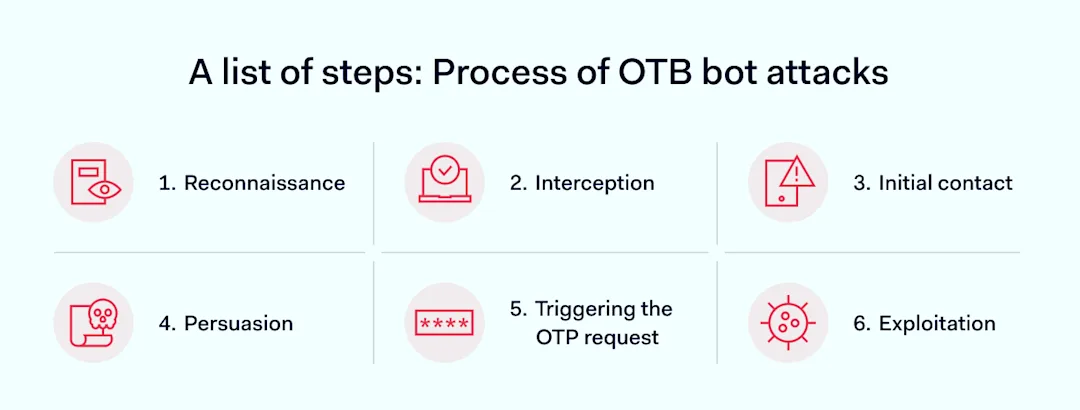
As soon as you share the OTP code, the attacker uses it to change your account password and gain access, potentially making unauthorized transactions with your stored payment information. Here’s how these attacks typically unfold in a particular order:
Reconnaissance: Malicious actors gather information about potential targets through phishing emails, social media, and other online sources. This information helps them craft convincing scenarios for the social engineering phase.
Initial contact: The attacker contacts the victim by phone, often using spoofed numbers or email addresses to appear legitimate. They create a sense of urgency or importance, prompting the victim to act quickly.
Requesting the OTP: Using stolen login credentials, the attacker tries to log into the victim’s account, triggering an OTP request from the service provider.
Interception: The attacker’s OTP bot waits for the victim to receive the OTP codes. The bot then contacts the victim, often through a phone call, claiming to need the OTP to resolve a supposed urgent issue.
Persuasion: The bot uses persuasive language and convincing scenarios to convince the victim to share the OTP. This might involve claims of fraud prevention, account recovery, or urgent security updates.
Exploitation: Once the OTP is obtained, the attacker uses it to complete the login process and gain unauthorized access to the victim’s account. This access can lead to unauthorized transactions, financial theft, data breaches, and other forms of cybercrime.
The impact of OTP bot attacks on organizations and networks
OTP bot attacks can have severe consequences for both individuals and organizations. Beyond what was mentioned earlier, here are some potential impacts:
Financial loss: Unauthorized access to accounts can result in significant financial losses, particularly for businesses handling large sums of money
Data breaches: Access to sensitive data can lead to data breaches, exposing personal and business data to misuse
Reputational damage: Victims of OTP-related attacks, especially businesses, can suffer reputational damage, while customers and clients may lose trust in the organization’s ability to protect their digital information
Operational disruption: Attacks can disrupt business operations, causing downtime and lost productivity
One notable example is the attack on Twitter in 2020, in which attackers used social engineering and OTP bots to gain access to high-profile accounts. They then used these accounts to promote a cryptocurrency scam, causing financial and reputational damage to the platform.
How to protect your business from OTP bots
Protecting your business from OTP threats involves a combination of technological solutions and best practices. Here are detailed strategies to safeguard your organization:
1. Implement multi-factor authentication (MFA)
Multi-factor authentication (MFA) is a critical safety measure that adds an extra layer of protection beyond passwords. Implement MFA to ensure that unauthorized access is prevented even if a password is compromised.
Consider MFA methods that don’t depend solely on text messages, such as app-based authenticators or hardware tokens, which are more secure alternatives. Additionally, integrate two-factor authentication (2FA) into your regular protocols, as it can significantly enhance your overall security posture.
2. Educate employees
Employee awareness is a key component in defending against all kinds of threats. Regularly train your employees about the risks of OTP bots and social engineering tactics. Ensure they recognize suspicious requests for OTPs or other sensitive information.
Develop clear security protocols for verifying the legitimacy of such requests, and encourage employees to report any unusual or suspicious activity immediately.
3. Monitor & analyze
Keep monitoring your systems for early detection of OTP threats. Use advanced analytics tools to track and analyze user behavior, looking for patterns indicating an ongoing or attempted attack.
Implement monitoring solutions that provide real-time insights and alerts about anomalous activities. By maintaining a vigilant watch over your network and systems, you can quickly identify and respond to potential breaches before they cause significant damage.
4. Secure communication channels
Ensuring the security of communication channels used for OTP delivery is crucial. Choose encrypted communication methods to send OTPs, such as app-based authenticators or secure email services.
By encrypting your OTPs and other sensitive communications, you can prevent attackers from intercepting and using them to gain access to your systems.
5. Regularly audit security
Regular security audits help identify and address vulnerabilities in your authentication processes and overall security infrastructure. During these audits, assess the effectiveness of your current security protocols, review access controls, and test your systems for potential weaknesses.
Regularly auditing your security practices ensures that your defenses remain robust and up-to-date.
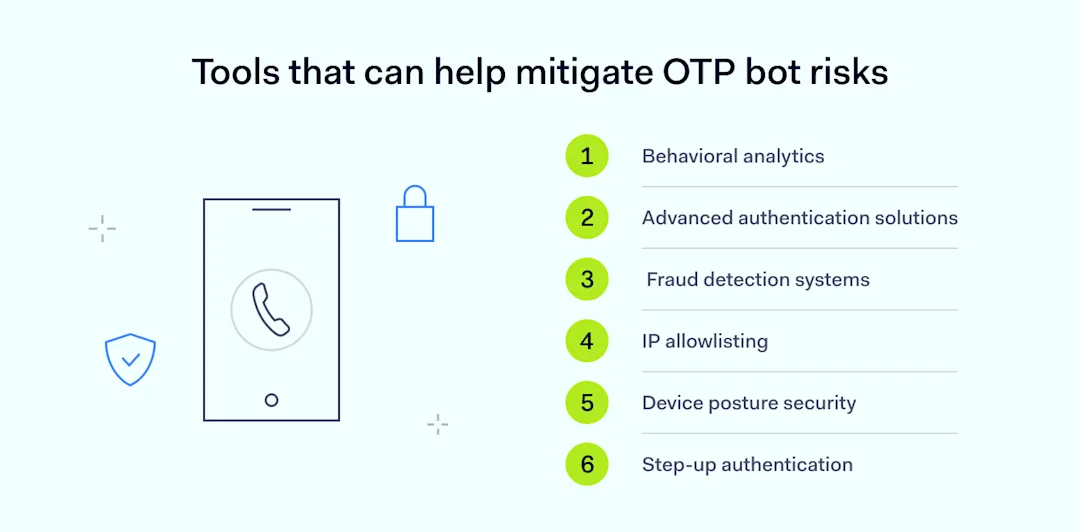
Tools that can help mitigate OTP bot risks
To keep your organizational walls secure, some useful tools and technologies can help detect and prevent OTP bot attacks:
Behavioral analytics
Behavioral analytics tools can be instrumental in identifying and mitigating OTP threats. Tools designed to analyze user behavior and detect anomalies—that may indicate a security threat—provide real-time alerts and detailed reports, enabling organizations to respond swiftly to potential attacks and prevent unauthorized access.
Advanced authentication solutions
Implementing advanced authentication solutions can significantly enhance security against attacks. Tools like Google Authenticator offer more secure methods for generating and verifying one-time passwords.
Such solutions reduce reliance on text messages, which are more vulnerable to interception by OTP bots. Using app-based authenticators or hardware tokens adds an extra layer of security, making it harder for attackers to infiltrate.
Fraud detection systems
Fraud detection systems can help detect and prevent fraudulent activities, such as an OTP bot attack. These systems use advanced algorithms and machine learning to analyze transaction patterns and identify suspicious behavior.
By integrating these systems into your security protocols, you can proactively detect and mitigate potential threats before they result in unauthorized transactions or data breaches.
IP allowlisting
Even if an attacker has access to your credentials, including a one-time password (OTP), they still won’t be able to connect to sensitive databases or tools without the correct IP address. With IP allowlisting, only pre-approved IP addresses are granted access to your network, adding a critical layer of security.
NordLayer supports this by enabling organizations to create virtual private gateways with fixed IP addresses, ensuring that unauthorized users are blocked, even if they possess valid login credentials.
Device posture security
Device posture security helps prevent unauthorized devices from accessing sensitive resources. With features like NordLayer’s Device Posture Security (DPS), organizations can ensure that only approved devices—whether personal or company-issued—are granted access. Even if an attacker has all the correct login credentials, access will be restricted if they’re not using a recognized, authorized device. This adds another layer of protection, ensuring that only compliant devices can interact with your network.
Step-up authentication
Step-up authentication involves implementing additional verification steps when high-risk activities are detected. For example, suppose a user logs in from a new location or attempts a high-value transaction. In that case, the system can require additional authentication methods, such as biometric verification or a hardware token. This approach ensures that only legitimate users can perform sensitive actions, reducing the risk of unauthorized transactions.
These tools and technologies can help businesses significantly reduce the risk of OTP threats and protect their data. Staying vigilant and implementing these security measures is essential to maintaining a robust defense against evolving threats.
Best practices for enhancing security against OTP bots
To enhance your security posture against OTP bots, consider the following practices:
Regular software updates. Update all software and systems regularly to fix security holes. Keeping everything up to date helps protect against known vulnerabilities.
Implement strong password policies. Enforce complex and unique passwords for different accounts. Use password managers to help you manage and generate secure passwords and regularly prompt password changes.
Train your employees. Conduct regular training sessions to inform employees about the latest phishing tactics, social engineering schemes, and specific threats, such as OTP bots. Establish protocols for verifying unusual requests for sensitive information.
Encrypt communication channels. Encrypted messaging services or app-based authenticators, including OTPs, are used to transmit sensitive information. Avoid SMS-based OTPs for critical transactions due to their vulnerability to interception.
Conduct regular security audits. Perform periodic security audits to identify vulnerabilities and weaknesses in your authentication processes. Work with third-party security experts to conduct comprehensive audits and provide improvement recommendations.
Develop a robust incident response plan. Create a well-defined incident response plan for managing and mitigating the impact of security breaches. Include steps for responding to OTP bot attacks, such as isolating affected systems and notifying stakeholders.
Implement access controls & the principle of least privilege. Ensure employees have access only to the resources necessary for their roles. Regularly review and adjust access permissions, and utilize role-based access control (RBAC) to manage user permissions.
Use threat intelligence & monitoring services. Integrate threat intelligence services for real-time information about emerging threats. Continuous monitoring tools and security information and event management (SIEM) systems should be used to detect suspicious activities early.
Stay informed about new threats. Stay updated on new threats, vulnerabilities, and best practices by participating in industry forums, attending conferences, and subscribing to security bulletins. Proactively adapt your security measures based on the latest developments.
Conclusion
While OTP bots pose a serious threat, staying vigilant and proactive puts you in the strongest position to prevent their constantly evolving tactics. OTP attacks will only grow more advanced if we fail to upgrade our defenses. Here are the core items to remember:
Conduct regular employee training to spotlight the latest social engineering techniques. Aware, informed staff are your first line of prevention.
Implement robust, at least two-factor authentication wherever possible. Removing reliance on single-factor OTPs starves bots of their favorite phishing fuel.
Consider additional verification for high-risk events like fund transfers. Extra authentication layers prevent bots’ most enticing break-in targets.
Cybersecurity is an ongoing process that needs effort and adaptation. While challenges will always exist, empowering your organization with strategic security practices makes you resilient against sophisticated online threats. Stay proactive and keep your digital defenses strong.
About Version 2 Digital
Version 2 Digital is one of the most dynamic IT companies in Asia. The company distributes a wide range of IT products across various areas including cyber security, cloud, data protection, end points, infrastructures, system monitoring, storage, networking, business productivity and communication products.
Through an extensive network of channels, point of sales, resellers, and partnership companies, Version 2 offers quality products and services which are highly acclaimed in the market. Its customers cover a wide spectrum which include Global 1000 enterprises, regional listed companies, different vertical industries, public utilities, Government, a vast number of successful SMEs, and consumers in various Asian cities.
About NordLayer NordLayer is an adaptive network access security solution for modern businesses – from the world’s most trusted cybersecurity brand, Nord Security.
The web has become a chaotic space where safety and trust have been compromised by cybercrime and data protection issues. Therefore, our team has a global mission to shape a more trusted and peaceful online future for people everywhere.
About NordLayer NordLayer is an adaptive network access security solution for modern businesses – from the world’s most trusted cybersecurity brand, Nord Security.
The web has become a chaotic space where safety and trust have been compromised by cybercrime and data protection issues. Therefore, our team has a global mission to shape a more trusted and peaceful online future for people everywhere.
As cybersecurity threats become more sophisticated, the idea that “NAC is necessary” takes on even greater significance. Network Access Control (NAC) has become a crucial defense in protecting organizational assets from a wide range of attacks. For Chief Information Security Officers (CISOs), understanding NAC’s complexities enables them to make informed decisions that strengthen their organizations’ security strategies. This blog will explore NAC’s essential role in modern cybersecurity, highlighting its integration within the broader Zero Trust framework and its impact on risk management, cost efficiency, and regulatory compliance.
The Rising Importance of Network Access Control in Modern Cybersecurity
The landscape of corporate networks has undergone a seismic shift, transforming from well-defined perimeters to sprawling ecosystems of interconnected devices. This evolution has introduced unprecedented complexity and vulnerabilities, necessitating a more sophisticated approach to network security. Cybercrime is predicted to inflict damages totaling $9.5 trillion USD globally in 2024. Network Access Control (NAC) has emerged as an indispensable mechanism for navigating this intricate environment, offering robust solutions to modern cybersecurity challenges.
The dynamic nature of today’s networked world, characterized by the ubiquity of Bring Your Own Device (BYOD) policies and the exponential growth of the Internet of Things (IoT), has significantly expanded the attack surface. Traditional security measures are no longer adequate to address the nuanced threats posed by this ever-growing array of devices. NAC provides a critical layer of defense by meticulously identifying, authenticating, and authorizing devices that seek to connect to the network, ensuring that only compliant and secure devices are granted access.
The increasing adoption of remote work further amplifies the importance of NAC. As employees access corporate resources from diverse locations and devices, maintaining rigorous control over network access becomes essential. NAC enables organizations to enforce security policies uniformly, irrespective of where or how users connect to the network. This capability is vital in mitigating risks associated with remote work environments, ensuring that security protocols are upheld even beyond the traditional office perimeter.
Additionally, NAC’s real-time visibility into device activity equips organizations with the insights needed to proactively manage security. By continuously monitoring the security posture of connected devices, NAC allows for immediate detection and response to anomalies, thereby curbing potential threats before they escalate.
In essence, Network Access Control is not merely a tool but a strategic imperative in the contemporary cybersecurity landscape. Its ability to adapt to the complexities of modern networks, coupled with its stringent enforcement of security policies, makes NAC a cornerstone of any robust cybersecurity strategy.
How NAC Integrates with a Zero Trust Security Framework
In the increasingly perilous digital landscape, the Zero Trust model has risen as the zenith of security paradigms. Central to this model is the philosophy of “never trust, always verify.” Network Access Control (NAC) is pivotal in manifesting this principle, embedding stringent access controls and continuous verification into the network architecture.
NAC’s sophisticated authentication mechanisms extend beyond mere user credentials, scrutinizing devices for compliance with organizational security policies. By evaluating parameters such as endpoint configuration, software patch levels, and real-time threat intelligence, NAC ensures that only devices meeting rigorous security standards can access the network. This granular level of scrutiny fortifies the Zero Trust ethos, significantly diminishing potential vectors for cyber intrusion.
Additionally, NAC seamlessly complements Zero Trust by facilitating micro-segmentation. This strategic division of the network into isolated segments restricts lateral movement, effectively quarantining threats and preventing them from propagating. By enforcing access controls on a segment-by-segment basis, NAC enables organizations to limit the scope of breaches and contain damage efficiently.
The dynamic adaptability of NAC further enhances the Zero Trust framework. As new vulnerabilities emerge, NAC’s real-time policy enforcement allows for swift recalibration of security measures. This agility ensures that security protocols remain robust against evolving threats, maintaining a proactive security posture.
Integrating NAC with Zero Trust also leverages contextual awareness, whereby access decisions are informed by real-time data and situational analysis. This context-aware access control ensures that network permissions are granted based on the current security posture and threat environment, providing an additional layer of defense. By synchronizing NAC’s capabilities with the overarching Zero Trust framework, organizations can achieve a resilient, adaptive security architecture that stands resilient against sophisticated cyber threats.
Minimizing Cybersecurity Risks with NAC Implementation
Implementing Network Access Control (NAC) is a powerful way to strengthen your organization’s security and reduce cybersecurity risks. NAC provides CISOs with granular control over network access, allowing only authenticated, authorized, and compliant devices to connect. Here are several key techniques NAC uses to minimize cybersecurity risk:
Enforcing access control: Only authorized devices can connect, preventing unauthorized access to the network.
Automatic remediation: If a device doesn’t meet compliance standards, NAC can automatically quarantine the device, apply security patches, or prompt users to fix issues before gaining access.
Real-time visibility and monitoring: NAC continuously monitors device behavior and network activity, using advanced analytics to detect suspicious patterns and potential breaches.
Custom security policy enforcement: NAC allows you to tailor access controls to specific needs without sacrificing operational efficiency, maintaining security even as threats evolve.
Optimized incident response: NAC enables faster response by correlating access data with threat intelligence, allowing security teams to act quickly and accurately.
By incorporating NAC into your cybersecurity strategy, your organization can adopt a proactive, resilient, and adaptable defense against today’s most sophisticated threats.
Optimizing Your Cybersecurity Budget with NAC
In today’s climate of stringent budget scrutiny, Network Access Control (NAC) stands out as a strategic linchpin for optimizing cybersecurity expenditures. Integrating NAC within your security framework not only fortifies defenses but also enhances the efficiency of existing security investments, offering a dual advantage of robust protection and cost-effective operations.
One of the most compelling financial benefits of NAC is its ability to centralize and streamline security management. By consolidating access control mechanisms, NAC reduces the administrative overhead associated with juggling multiple security tools. This centralization facilitates seamless coordination among different security solutions, enabling automation of routine tasks and freeing up cybersecurity personnel to focus on more strategic initiatives. The resultant operational efficiency translates into significant cost savings and more effective use of human resources.
Furthermore, NAC’s proactive approach to threat prevention diminishes the financial impact of security breaches. By enforcing rigorous access controls and continuously monitoring network activity, NAC helps avert incidents that could lead to substantial monetary losses, whether through direct damage, regulatory fines, or the reputational fallout from compromised data. The return on investment (ROI) with NAC is substantial, extending beyond immediate financial metrics to encompass broader organizational resilience and stability.
NAC also contributes to optimized resource allocation by offering actionable insights through real-time visibility into device behavior and network traffic. These insights empower security teams to prioritize and address vulnerabilities with precision, reducing the need for broad, and often costly, blanket security measures. In essence, NAC enables a more targeted, efficient, and economical approach to cybersecurity, ensuring that your budget is deployed where it is most needed and effective.
By integrating NAC, organizations can achieve a harmonious balance of enhanced security and fiscal prudence, positioning themselves to meet evolving threats with agility and confidence.
NAC’s robust access policies are instrumental in aligning with regulatory frameworks such as GDPR, HIPAA, and others. By systematically controlling who can access sensitive data and under what conditions, NAC establishes a verifiable chain of custody over your digital assets. This meticulous oversight is crucial for maintaining compliance and providing irrefutable evidence during audits.
Furthermore, NAC offers unparalleled transparency into network activities, documenting every access attempt and flagging any deviations from established security policies. This level of granularity is essential for compliance reporting, facilitating a seamless audit process, and showcasing your commitment to upholding regulatory standards.
Automated compliance checks are another significant advantage of NAC. These tools continuously monitor and enforce adherence to security protocols, ensuring that your organization remains compliant even as regulatory landscapes evolve. This proactive stance not only mitigates the risk of compliance violations but also positions your organization as a trustworthy custodian of sensitive information.
In addition to satisfying regulatory requirements, NAC’s comprehensive logging and reporting capabilities enhance your organization’s overall security posture. Detailed logs of access attempts and remediation actions offer valuable insights, enabling you to fine-tune security measures and bolster defenses against future threats.
Ultimately, incorporating NAC into your cybersecurity strategy provides a dual benefit: fortifying your defense mechanisms and ensuring unwavering compliance. This strategic integration empowers you to navigate the complexities of regulatory landscapes with confidence and precision, safeguarding your organization against both cyber threats and regulatory penalties.
Conclusion
Network Access Control (NAC) is essential for any CISO seeking to strengthen their organization’s cybersecurity posture. With its ability to enforce stringent access controls, provide real-time visibility, and integrate seamlessly with a Zero Trust framework, NAC addresses the complexities of modern cyber threats head-on. From minimizing risks to optimizing budgets and ensuring compliance, NAC offers a proactive and adaptable solution that empowers organizations to stay ahead of evolving threats and maintain a resilient defense. Understanding and implementing NAC is no longer optional—it’s a strategic necessity for robust cybersecurity.
About Version 2 Digital
Version 2 Digital is one of the most dynamic IT companies in Asia. The company distributes a wide range of IT products across various areas including cyber security, cloud, data protection, end points, infrastructures, system monitoring, storage, networking, business productivity and communication products.
Through an extensive network of channels, point of sales, resellers, and partnership companies, Version 2 offers quality products and services which are highly acclaimed in the market. Its customers cover a wide spectrum which include Global 1000 enterprises, regional listed companies, different vertical industries, public utilities, Government, a vast number of successful SMEs, and consumers in various Asian cities.
About Portnox Portnox provides simple-to-deploy, operate and maintain network access control, security and visibility solutions. Portnox software can be deployed on-premises, as a cloud-delivered service, or in hybrid mode. It is agentless and vendor-agnostic, allowing organizations to maximize their existing network and cybersecurity investments. Hundreds of enterprises around the world rely on Portnox for network visibility, cybersecurity policy enforcement and regulatory compliance. The company has been recognized for its innovations by Info Security Products Guide, Cyber Security Excellence Awards, IoT Innovator Awards, Computing Security Awards, Best of Interop ITX and Cyber Defense Magazine. Portnox has offices in the U.S., Europe and Asia. For information visit http://www.portnox.com, and follow us on Twitter and LinkedIn.。
MINNEAPOLIS, SEPTEMBER 17, 2024 – Perforce Software, the DevOps company for global teams requiring speed, quality, security and compliance at scale along the development lifecycle, today launched its annual survey exploring open source software (OSS) usage in organizations worldwide. The survey’s findings will be the foundation for the 2025 State of Open Source Report, which offers a comprehensive assessment of the current landscape of OSS technologies and trends. This year’s survey was developed through a joint effort led by OpenLogic by Perforce in collaboration with the Eclipse Foundation and the Open Source Initiative (OSI).
“We are delighted to partner once again with both the Eclipse Foundation and Open Source Initiative,” said Tzvika Shahaf, VP of Product Management at Perforce. “This year, we have added a new section on Big Data infrastructure, since data technologies was identified as one of the biggest areas of investment in the 2024 report. We hope to gain a better understanding of how enterprises are managing their Big Data stacks and the challenges they face.”
The survey, which will close on November 1, asks questions related to the day-to-day use and management of OSS, as well as governance and maturity. Response data will be compiled into a detailed report, with sections focused on different technology categories (i.e. operating systems, databases, programming languages) and topics such as security and compliance.
The Eclipse Foundation is proud to participate in the 2025 State of Open Source survey and report. We view it as essential to our work of championing open source development and innovation,” said Thabang Mashologu, VP of Community and Outreach at the Eclipse Foundation. “The State of Open Source Report always provides invaluable insights that enable us to better support our community of open source contributors and organizations that rely on OSS for their business-critical applications.”
Since it was first published in 2019, the State of Open Source Report has been cited in numerous industry reports, as well as shared at top open source conferences around the world.
“This is our fourth year being involved in the State of Open Source Report, and there is never any shortage of surprises in the data,” said Stefano Maffulli, Executive Director, Open Source Initiative. “Now, however, the aim of the survey is not to determine whether or not organizations are using open source — we know they are — but to find out how they are handling complexities related to AI, licensing, and of course, security.”
About the Eclipse Foundation The Eclipse Foundation provides our global community of individuals and organizations with a business-friendly environment for open source software collaboration and innovation. We host the Eclipse IDE, Adoptium, Software Defined Vehicle, Jakarta EE, and over 425 open source projects, including runtimes, tools, specifications, and frameworks for cloud and edge applications, IoT, AI, automotive, systems engineering, open processor designs, and many others. Headquartered in Brussels, Belgium, the Eclipse Foundation is an international non-profit association supported by over 350 members. To learn more, follow us on social media @EclipseFdn, LinkedIn or visit eclipse.org.
About the Open Source Initiative The Open Source Initiative (OSI) is the steward of the Open Source Definition, setting the foundation for the global open source ecosystem. Founded in 1998, OSI protects and promotes open source software, development and communities, championing software freedom in society through education, collaboration and infrastructure. The OSI is a 501(c)3 non-profit, and anyone interested in supporting the defense of Open Source Definitions can join today at https://join.opensource.org.
About Version 2 Digital
Version 2 Digital is one of the most dynamic IT companies in Asia. The company distributes a wide range of IT products across various areas including cyber security, cloud, data protection, end points, infrastructures, system monitoring, storage, networking, business productivity and communication products.
Through an extensive network of channels, point of sales, resellers, and partnership companies, Version 2 offers quality products and services which are highly acclaimed in the market. Its customers cover a wide spectrum which include Global 1000 enterprises, regional listed companies, different vertical industries, public utilities, Government, a vast number of successful SMEs, and consumers in various Asian cities.
About Perforce The best run DevOps teams in the world choose Perforce. Perforce products are purpose-built to develop, build and maintain high-stakes applications. Companies can finally manage complexity, achieve speed without compromise, improve security and compliance, and run their DevOps toolchains with full integrity. With a global footprint spanning more than 80 countries and including over 75% of the Fortune 100, Perforce is trusted by the world’s leading brands to deliver solutions to even the toughest challenges. Accelerate technology delivery, with no shortcuts.