Skip to content

EasyVista Named Among Top Vendors in Research in Action’s Vendor Selection Matrix™


IT AND ENTERPRISE SERVICE MANAGEMENT SOLUTIONS FOR CENTRAL EUROPEAN ENTERPRISES 2024/2025

Top scores for customer satisfaction and value position the EV Platform as a leading choice for enterprises. 

Continue reading

How UEM Boosts IAM: A First-class Strategy for Operational Efficiency

ProMobi Technologies today announced that Scalefusion- its leading unified endpoint management solution (UEM), has now launched support for ChromeOS device management. This addition reinforces Scalefusion’s commitment to offering a versatile multi-OS management platform that caters to the diverse needs of modern businesses. 

With the integration of ChromeOS, Scalefusion enables IT administrators to streamline the management of ChromeOS devices alongside Windows, macOS, Android, and Linux, simplifying the complexities of multi-OS environments.

ChromeOS has seen significant adoption across industries, from education to enterprise, thanks to its balance of affordability, speed, and security. Recognizing this growing trend, Scalefusion’s new ChromeOS device management provides organizations with the ability to provision, secure, and monitor ChromeOS devices seamlessly through the same intuitive platform used for their existing device ecosystems.

Scalefusion’s ChromeOS management empowers businesses to streamline device management by integrating ChromeOS into their existing device strategy. With Scalefusion’s unified platform, IT administrators can boost productivity by providing a consistent, unified experience for users across all platforms. Whether organizations are deploying Chromebooks in educational settings or managing ChromeOS devices for remote workforces, Scalefusion makes it simple to provision, secure, and monitor these devices—all from a single dashboard. With the addition of ChromeFlex, businesses can repurpose existing PCs and Macs by converting them to ChromeOS devices, further extending the life of their hardware while maintaining seamless management through Scalefusion’s unified platform.

Sriram Kakarala, Chief Product Officer at Scalefusion, highlighted the importance of this new addition: “With the rise of ChromeOS in diverse sectors, we saw a clear opportunity to enhance the Scalefusion platform. By adding ChromeOS support, we are delivering on our promise to simplify device management for our customers, regardless of which operating systems they choose to deploy.”

Scalefusion’s integration aims to provide organizations with a straightforward approach to managing their multi-OS device ecosystems. Request a free trial of this release by setting up a demo of Scalefusion for ChromeOS here.

About Scalefusion

ProMobi Technologies provides a leading Unified Endpoint Management solution under the brand Scalefusion. Scalefusion UEM allows organizations to secure and manage endpoints, including smartphones, tablets, laptops, rugged devices, POS and digital signage, and apps and content. It supports the management of Android, iOS, macOS, Windows, Linux, and ChromeOS devices and ensures streamlined device management operations with Scalefusion Remote Troubleshooting.

More than 8000 companies worldwide are unlocking their true potential using Scalefusion, which is used across various industries, such as Transportation & Logistics, Retail, Education, Healthcare, Manufacturing, Construction & Real Estate, Hospitality, Software & Telecom, Financial Services, and others.

About Version 2 Digital

Version 2 Digital is one of the most dynamic IT companies in Asia. The company distributes a wide range of IT products across various areas including cyber security, cloud, data protection, end points, infrastructures, system monitoring, storage, networking, business productivity and communication products.

Through an extensive network of channels, point of sales, resellers, and partnership companies, Version 2 offers quality products and services which are highly acclaimed in the market. Its customers cover a wide spectrum which include Global 1000 enterprises, regional listed companies, different vertical industries, public utilities, Government, a vast number of successful SMEs, and consumers in various Asian cities.

About Scalefusion
Scalefusion’s company DNA is built on the foundation of providing world-class customer service and making endpoint management simple and effortless for businesses globally. We prioritize the needs and feedback of our customers, making sure that they are at the forefront of all decision-making processes. We are dedicated to providing comprehensive customer support services, and place emphasis on customer-centric thinking throughout the organization.

The Crucial Role of MSPs in Safeguarding Clients Against Evolving Threats: Lessons from the WarmCookie Malware Incident

Key Takeaways: 

  • Evolving Threat Landscape: Cybercriminals increasingly use sophisticated techniques, such as fake browser updates, to distribute malware like WarmCookie, posing significant risks to organizations with insufficient security awareness.
  • MSPs as Frontline Defenders: Managed Service Providers (MSPs) are responsible for staying current with the latest threats to protect their clients from emerging cyber risks, such as phishing websites and malicious downloads.
  • Awareness Is Key: Both MSPs and their clients must maintain high levels of awareness about new vulnerabilities and threats, with MSPs playing a critical role in educating and guiding their customers.

Introduction: A New Breed of Cyber Threat – The WarmCookie Malware

A recent campaign, called FakeUpdate,  of fake browser update pop-ups spreading the WarmCookie malware highlights the ever-evolving tactics cybercriminals use to breach organizational defenses. This attack, targeting users with fraudulent update alerts, emphasizes the critical role MSPs play in safeguarding their clients from these sophisticated threats.

The WarmCookie Malware and Its Impact

In the new FakeUpdate campaign, as reported by Gen Threat Labs, the WarmCookie leverages deceptive browser update notifications, luring unsuspecting users into downloading malicious software. Users, believing they are securing their systems with an update, unknowingly open the door to data theft, unauthorized access, and further compromise of their IT infrastructure.

This type of malware presents a particularly dangerous threat to organizations lacking cybersecurity vigilance. Employees may unwittingly engage with phishing sites or download harmful software disguised as legitimate updates, triggering a chain reaction of security breaches. For small and medium-sized businesses (SMBs), where resources for IT security might be limited, the consequences can be devastating, resulting in data loss, financial damage, or even business closure.

MSPs: Guardians of Cybersecurity for SMBs

MSPs act as the first line of defense for SMBs. They manage IT services and infrastructure, but their role goes beyond mere technical support. They are responsible for securing their clients’ digital environments against a broad spectrum of threats, ranging from ransomware and phishing to malware like WarmCookie.

Cybercriminals are continually updating their tactics, and the WarmCookie case serves as a reminder that staying informed about the latest vulnerabilities is vital. For MSPs, this involves:

  1. Threat Awareness: MSPs need to continuously monitor cybersecurity trends and threat reports, such as those provided by the Cybersecurity and Infrastructure Security Agency (CISA), to identify emerging risks. By knowing about threats like WarmCookie, they can implement defenses proactively.
  2. Client Education: Many attacks exploit user behavior—such as clicking on a fake browser update. MSPs should implement awareness training programs that teach clients to recognize phishing and fraudulent download attempts, significantly reducing their exposure to risk.
  3. Proactive Defense Measures: MSPs must deploy solutions like intrusion detection systems (IDS) and regularly update their clients’ software and security patches to reduce the likelihood of such threats being effective.

A Pattern of Growing Threats: Fake Updates and Malware

The WarmCookie case isn’t isolated. In the past, similar tactics have been used, including:

  • 2019 Chrome Update Scam: A widespread campaign used fake Chrome updates to install banking malware on victims’ devices, leading to significant financial theft.
  • Firefox Phishing Attack (2021): Attackers distributed ransomware using fake Firefox update alerts, locking down victims’ systems until a ransom was paid.

These incidents underscore a worrying trend: Cybercriminals exploit users’ trust in browser updates to compromise systems. In this environment, MSPs must act as constant guardians, equipped to recognize and mitigate these threats before they cause harm.

Practical Tips for MSPs and SMBs

For MSPs:

  1. Automate Software Updates: Use centralized management tools to ensure that all client software, including browsers, is up-to-date with the latest patches. This will reduce the chance that users will fall for fake update scams.
  2. Monitor and Detect Phishing Sites: Leverage tools that scan and block access to known phishing domains and suspicious IP addresses.
  3. Run Simulated Phishing Attacks: Regularly test client readiness with simulated phishing attempts to identify potential vulnerabilities in human behavior.

For SMBs:

  1. Enable Multi-Factor Authentication (MFA): Adding a layer of protection beyond passwords can significantly reduce the risk of unauthorized access, even if malware like WarmCookie is introduced.
  2. Conduct Regular Security Training: Ensure employees know how to spot phishing attempts, fake update alerts, and other scams.
  3. Back-Up Critical Data: Regular, secure backups will allow SMBs to recover quickly from malware attacks or data loss incidents.

Guardz: Empowering MSPs with AI-Native Detection and Response

As October marks Cybersecurity Awareness Month, it is an ideal time for organizations to revisit their security strategies. MSPs, in particular, must take this opportunity to bolster their defenses and awareness against the latest threats.

At Guardz, we recognize the challenges that MSPs face in protecting SMBs from rapidly evolving threats like infostealers. That’s why our AI-powered unified detection and response platform equips MSPs with cutting-edge tools to proactively detect, isolate, and mitigate threats before they can cause damage. With Guardz, MSPs can offer their clients enhanced security without compromising on efficiency or affordability.

About Version 2 Digital

Version 2 Digital is one of the most dynamic IT companies in Asia. The company distributes a wide range of IT products across various areas including cyber security, cloud, data protection, end points, infrastructures, system monitoring, storage, networking, business productivity and communication products.

Through an extensive network of channels, point of sales, resellers, and partnership companies, Version 2 offers quality products and services which are highly acclaimed in the market. Its customers cover a wide spectrum which include Global 1000 enterprises, regional listed companies, different vertical industries, public utilities, Government, a vast number of successful SMEs, and consumers in various Asian cities.

About Guardz
Guardz is on a mission to create a safer digital world by empowering Managed Service Providers (MSPs). Their goal is to proactively secure and insure Small and Medium Enterprises (SMEs) against ever-evolving threats while simultaneously creating new revenue streams, all on one unified platform.

JumpCloud 有哪些功能? 它為公司企業帶來了什麼價值?

許多企業正在將 IT 環境遷移到雲端。目前,電子郵件、生產力軟件和檔案儲存的遷移已經相對容易,而現在很多公司企業正在尋找一種雲端目錄服務,來集中管理現代 IT 資源的身份驗證和授權。JumpCloud 是許多公司企業考慮的選項之一。

不過,目錄服務屬於基礎設施的核心部分,因此 IT 管理員在選擇是否實施此類解決方案時,會認真權衡優缺點。許多人會問:「JumpCloud 的價值何在?」 如果您也有這個疑問,讓我們來探討 JumpCloud 帶給公司企業的無形和有形價值。

首先,什麼是 JumpCloud?

在深入討論 JumpCloud 的價值之前,我們應先了解它的功能。作為一個雲端目錄服務,JumpCloud 安全管理並連接用戶與 IT 資源,包含以下方面:

系統:支援 Mac、Windows 和 Linux

伺服器:本地及雲端伺服器

應用程式:基於 LDAP 和 SAML

生產力套件:G Suite 和 Office 365

檔案儲存:實體和虛擬

網絡:透過 RADIUS 連接有線及無線網路

JumpCloud 採用多協議、獨立於供應商的方式,讓 IT 管理員能夠提供終端用戶所需的 IT 資源,同時保持對系統的控制權。那麼,這種能力如何為公司企業創造價值呢?

JumpCloud 的無形價值

在討論 JumpCloud 的價值時,我們可以先從它所帶來的無形收益開始,例如提高靈活性、增強控制力、安全性及提升效率。以下是這些無形價值的詳細說明。

提升靈活性

JumpCloud 的一大優勢在於,它讓公司企業在選擇技術方案時擁有更多靈活性。這意味著管理員和用戶可以根據需求,選擇最適合的 IT 工具,而不僅僅是那些與身份提供者兼容的工具。JumpCloud 支援多種協議(如 LDAP、SAML 2.0、RADIUS、RESTful API 等)以及多種作業系統(Windows、Mac、Linux)。

舉一個具體例子。JumpCloud 允許系統管理員將目錄服務與 chatops 和智能自動化等工具進行整合,這些技術可以顯著提高自動化和工作效率。JumpCloud 的客戶 Grab 使用 Workato 將雲端目錄服務與 Slack 和 HRIS 系統進行整合,使自動化提升了十倍,節省了約 3,000 工時。如果沒有 JumpCloud 的靈活性,Grab 將浪費大量時間。靈活的身份管理若能策略性應用,將能產生強大的效益。

增強控制力

將所有 IT 資源集中在一個身份管理平台上,賦予了系統管理員對用戶使用資源的精確控制權限。當 IT 管理員能夠全面掌控時,會帶來一系列好處。首先,當技術問題出現時,能更快速地協助用戶解決問題。

其次,透過提供用戶最合適的工具,消除了影子 IT(即未經 IT 批准的工具)。因此,系統管理員不再只是推測某個離職員工是否仍能存取系統,而是可以確定他們已經無法進入。EdgeConneX 尤其對 JumpCloud 的精確控制讚譽有加,他們表示:

「員工離職管理變得更加簡便且安全,我們不再需要逐一檢查他們曾經擁有存取權限的每個系統或資源。現在只需前往一個地方 —— JumpCloud 管理控制台,刪除該帳戶,就會自動取消 WiFi、電腦登錄、應用程式和伺服器的存取權限,讓員工離職過程更加快捷。從審計角度來看,JumpCloud 大大降低了我們的風險。」

強化安全性

全面的身份管理系統讓您能夠集中管理 IT 環境中的安全措施,並有效地增強各層級的防護:

身份:通過使用複雜的密碼、多重驗證(MFA)和 SSH 金鑰認證(在適用的情況下)來強化用戶的身份安全。

系統:IT 管理員可以利用系統層級的 MFA 和政策管理來加強系統安全性。

數據:JumpCloud 提供全磁碟加密(FDE)政策,讓 IT 管理員只需幾個按鍵即可為 Windows 和 Mac 設備加密硬碟,提升資料安全。

網絡:RADIUS-as-a-Service 讓您可以透過多種方式提升網絡安全性。為每位員工提供專屬的憑證來連接 WiFi,從而取代共用的 SSID 和密碼。還可以使用 RADIUS 回應屬性,例如 VLAN 標籤,將單一實體網絡進行分段,確保銷售團隊無法存取生產伺服器,工程師無法查看財務文件。

提升效率

將用戶、系統、伺服器、應用程式、檔案儲存和網絡統一到一個平台上,能夠顯著提升整體生產力。IT 管理員不需要在不同的系統之間切換來管理用戶,因為 JumpCloud 提供了直觀的使用者介面、API 和 PowerShell 模組,能夠大幅減少入職和用戶管理的時間。

員工只需記住一組密碼,不再因為忘記密碼而被鎖住。當他們需要重置密碼時,也可以自行操作,無需 IT 部門的介入。此外,他們只需登入一次 JumpCloud 用戶入口,即可立即存取所有應用程式,避免浪費大量時間逐一登入不同系統。

雲端目錄服務的有形價值

除了無形價值外,JumpCloud 也在財務方面帶來顯著效益。以下是幾個主要的財務考量點。如果您想深入了解這些細節,可以向我們索取 ROI 計算器。

取代 Active Directory 及其附加元件

JumpCloud 是 Microsoft® Active Directory® 的完整雲端替代方案,淘汰 AD 能夠為企業節省大量時間和資金。Active Directory 是在本地環境中建立的,而當今的 IT 資源多數已轉向雲端,且種類繁多。使用 AD 需要額外的附加元件,每個元件都有成本。企業通常需要使用超過 8 種工具來管理混雜 IT 環境中的用戶存取權限。

相比之下,JumpCloud 是一個完整的目錄服務,提供單一登入(SSO)、MFA、密碼管理、設備管理等多種功能,這些功能都包含在單一價格中。不僅更具成本效益,IT 管理員也能更高效地在一個平台上完成所有操作。

消除基礎設施

本地目錄服務(如 Active Directory)的另一個挑戰在於它需要大量本地基礎設施,這增加了成本和操作複雜度。身份驗證服務無法中斷運作,必須保持 100% 的可用性,而達到這一要求需要投入大量的硬件資源和人力。

企業自行管理這些服務時,既昂貴又繁瑣,需要確保沒有單點故障。而 JumpCloud 目錄服務完全基於雲端,因此您不再需要購買和維護以下組件:

  • 實體伺服器
  • 負載均衡器
  • SQL 伺服器 —— 實時同步
  • ADFS 和網頁代理
  • Dirsync
  • RADIUS 和 LDAP 基礎設施
  • 系統安全監控
  • 電力成本
  • 冗餘和恢復成本
  • 升級和維護成本

雲端身分識別提供者的唯一成本是使用費和管理用戶存取的時間,讓企業能夠大幅節省。

減少 IT 人員需求

由於 JumpCloud 簡化了 IT 環境,IT 團隊所需的人員數量相對較少。以 Cabify 為例,他們只需 7 名 IT 員工就能支持 11 個國家共 1500 名用戶。IT 管理員的平均時薪為 41.51 美元,因此隨著公司規模增長,保持相同數量的 IT 員工可以帶來顯著的成本節省。

JumpCloud 帶來的價值非常明顯,這不僅能降低成本、增強安全性,還能提升靈活性、控制力和效率,幫助您的企業在各方面取得成功。

關於 JumpCloud

JumpCloud® 提供一個統一的開放式目錄平台,使 IT 團隊和 MSP 能夠輕鬆、安全地管理公司企業中的身份、裝置和存取權限。通過 JumpCloud,用戶能夠從任何地方安全工作,並在單一平台上管理其 Windows、Apple、Linux 和 Android 裝置。

About Version 2

Version 2 Digital is one of the most dynamic IT companies in Asia. The company distributes a wide range of IT products across various areas including cyber security, cloud, data protection, end points, infrastructures, system monitoring, storage, networking, business productivity and communication products. Through an extensive network of channels, point of sales, resellers, and partnership companies, Version 2 offers quality products and services which are highly acclaimed in the market. Its customers cover a wide spectrum which include Global 1000 enterprises, regional listed companies, different vertical industries, public utilities, Government, a vast number of successful SMEs, and consumers in various Asian cities.

Parallels Desktop 20.1.0: AI integration, Enterprise strength

Just about a month ago, the Parallels team unveiled Parallels Desktop 20, a major leap forward for our product.

Now, I’m excited to introduce our latest update — Parallels Desktop 20.1.0.

This update brings new features, enhancements, and critical fixes that we know you’ve been eagerly awaiting.

Elevating productivity with Writing Tools for Windows Apps

A few weeks ago, Apple released macOS 15, which brought with it one of the most anticipated features — Apple Intelligence.

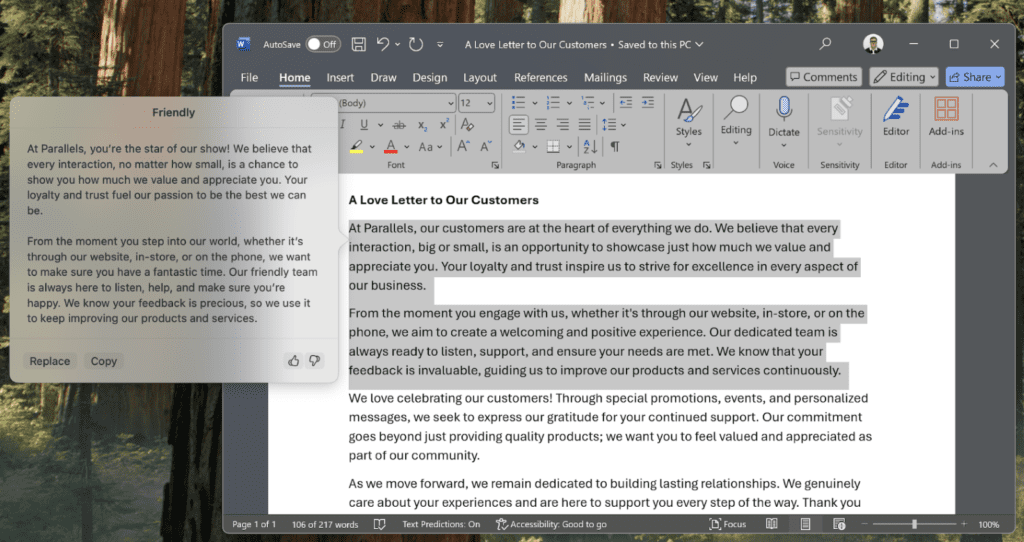
I know many of you rely on Windows office applications for your daily tasks, so we’re thrilled to introduce an exciting new integration that works hand-in-hand with Apple Intelligence: Writing Tools for Windows Apps.

What does this feature do?

It’s simple.

Select any portion of text within a Windows application and either use the Command + Shift + W shortcut or go to the Edit menu in your macOS menu bar and select Writing Tools.

With Writing Tools in Windows Apps, you can:

  • Summarize long passages of text
  • Generate key insights for reports, emails, or presentations in a snap
  • Refine your writing by offering contextual improvements

And the best part?

You can use this feature in any mode — whether it’s windowed, full-screen, or Coherence mode, giving you the freedom to stay focused and productive regardless of how you prefer to work.
Introducing Windows Server 2025 support

I’m also proud to announce that Windows Server 2025 will be fully supported in Parallels Desktop as soon as it’s released.

This marks the first time a server OS is supported in Parallels Desktop for Apple silicon Macs — an incredible milestone.

While Windows Server 2025 is still in preview, you can start experimenting with it if you already have an ARM-based image.

Go ahead and put it to the test!

Behind the scenes: We’ve smoothed out the rough edges

Of course, every great piece of software has its hiccups, and the team works hard to address issues quickly.

The release of version 20 surfaced a significant issue on Apple silicon Macs where some macOS applications (like Safari and Preview) set as default in Windows 11 were not functioning correctly within certain apps, such as Microsoft Outlook (classic) and Microsoft Excel.

Links and attachments weren’t opening as expected in Safari or Preview, but with 20.1.0, this issue is now resolved.

Our brilliant Engineering team has also fixed a key issue that was preventing Rosetta emulation from working properly in Linux virtual machines on Apple silicon Macs running macOS Sequoia.

With the 20.1.0 update, your Linux machines are back to running seamlessly, just the way you expect.

Pro Tip: easily switch between Microsoft Word documents with Coherence view mode

Did you know that if you run your Windows virtual machine in Coherence view mode and have multiple documents open in Microsoft Word, you can swipe up with three fingers to easily switch between them!

It’s a seamless way to boost your productivity.

New to Parallels Desktop for Mac? Get your 14-day free trial of Parallels Desktop now.  

About Parallels 
Parallels® is a global leader in cross-platform solutions, enabling businesses and individuals to access and use the applications and files they need on any device or operating system. Parallels helps customers leverage the best technology available, whether it’s Windows, Linux, macOS, iOS, Android or the cloud.

About Version 2 Digital

Version 2 Digital is one of the most dynamic IT companies in Asia. The company distributes a wide range of IT products across various areas including cyber security, cloud, data protection, end points, infrastructures, system monitoring, storage, networking, business productivity and communication products.

Through an extensive network of channels, point of sales, resellers, and partnership companies, Version 2 offers quality products and services which are highly acclaimed in the market. Its customers cover a wide spectrum which include Global 1000 enterprises, regional listed companies, different vertical industries, public utilities, Government, a vast number of successful SMEs, and consumers in various Asian cities.

×

Hello!

Click one of our contacts below to chat on WhatsApp

×