Skip to content

runZero 3.6: Introducing organizational hierarchies

What’s new with runZero 3.6?

Organizational hierarchies

Organizational hierarchies help streamline user and permission management. When creating and editing organizations, you can define an organizational hierarchy that allows for inherited user permissions.
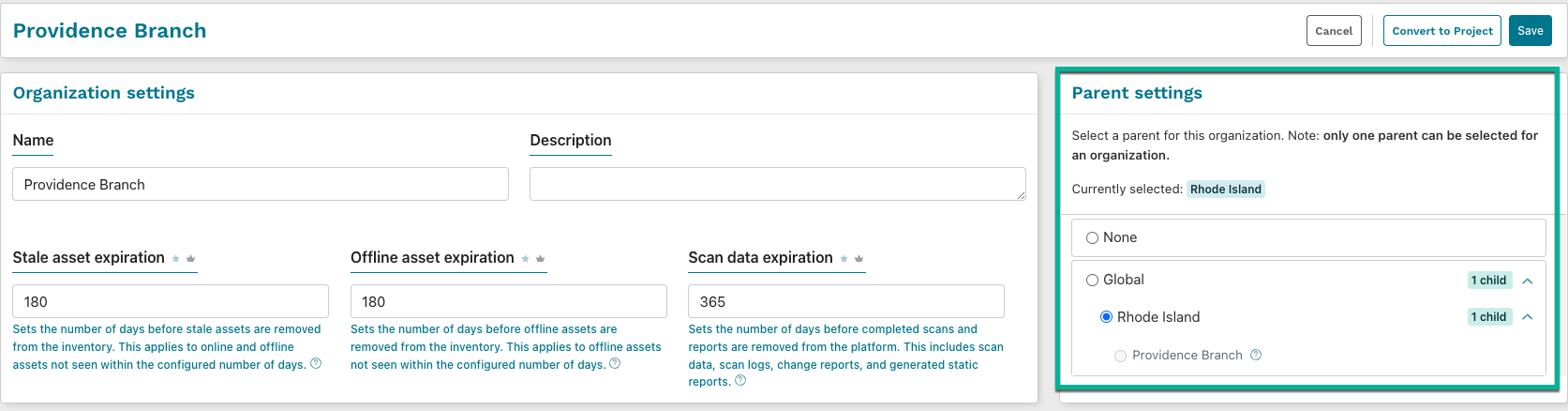
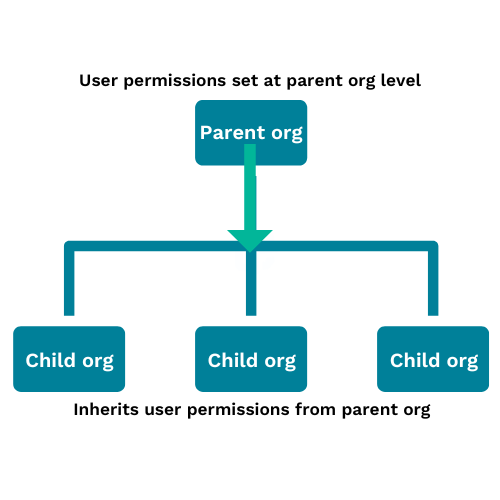
The users assigned to the selected parent organization will maintain the highest assigned permission in the child organization unless specified in their user permissions. For instance, if a user is a viewer in the parent organization, but an administrator in the child organization, they will maintain their admin status in the child organization when the parent-child relationship is created.

Organization hierarchies can be three levels deep, and user permissions in a child organization can be upgraded, not downgraded, from the currently set permissions in the parent organization.

CrowdStrike integration improvements

The CrowdStrike integration now populates asset software information from Falcon Discover. Additionally, IP addresses imported by CrowdStrike are now considered primary addresses and will be used for correlation, and the CrowdStrike credential verification is now seperated by service.

Operating system CPE assignment

The operating system Common Platform Enumeration (CPE) field is a string describing detected operating system software aligned to the CPE naming scheme. This field is queried using the syntax os.cpe23:<text>. In cases where runZero was able to fingerprint the operating system but the NIST database does not contain an official matching entry, an unofficial CPE will be generated and include r0_unofficial in the other field of the CPE.

New protocols and fingerprints

The runZero scanner now reports legacy RDP authentication, decodes additional ISAKMP/IKEv2 fields, and improves the fingerprinting of AirPlay devices.

Additional fingerprints were added for products by 2N, Aastra, Alien Technology, AMI, Arista, Asterisk, Avaya, Canon, Cisco, D-Link, Dell, Eaton, Echelon, Fortnet, FreePBX, GAI-Tronics, Grandstream, Hillrom, Honeywell, HP, HPE, Intel, Jenkins, Lantronix, Lenovo, LG, Logic Controls, Logitech, Meinberg, Mitel, Moxa, Netgear, NetApp, Quantum, Palo Alto Networks, Panasonic, Poly, QNAP, Samsung, Sierra Wireless, SoundCom, Spectralink, STARFACE, Tektronix, Thomson, Ubiquiti, VTech, Wahsega, Yealink, ZTE, Zultys, and Zyxel.

New Rapid Response queries

A new query was added to quickly identify OpenSSH 9.1 Servers affected by a memory double-free vulnerability.

See runZero 3.6 in action

Watch the video to see a preview of some of the newest features in runZero, including organizational hierarchies, research updates, software inventory from CrowdStrike, and OS CPE information.

Release notes

The runZero 3.6 release includes a rollup of all the 3.5.x updates, which includes all of the following features, improvements, and updates.

New features

  • Organizational hierarchies are available allowing for permissions to be inherited by child organizations based on an established parent.
  • runZero now identifies the CPE associated with fingerprinted assets and assigns an unofficial CPE where an official match is not found in the NIST database.

Product improvements

  • A new query was added for OpenSSH 9.1 servers affected by a memory double-free vulnerability.
  • Improved SNMP fingerprint coverage capabilities and added new attributes for SNMP protocol version (at the asset level) and authentication details (at the service level).
  • Improved handling of invalid multi-valued subjectAlternativeNames on x.509 certificates.
  • The scanner now supports identifying RDP authentication methods, including legacy and NLA, supported by target hosts.
  • The scanner now supports the ability to decode ISAKMP/IKEv2 replies
  • A new canned query for OpenSSH 9.1 servers which contain a memory double-free vulnerability has been added.
  • Performance of the Active Directory (LDAP), Azure AD, and Google Workspace integrations has been improved.
  • SNMP protocol versions are now tracked at the asset level.
  • SNMP services will now keep track of how they authenticated and using what protocols.
  • Hostname extraction from malformed subjectAlternativeNames on TLS certificates has been improved.
  • Site scopes with subnets ending in /32 (for IPv4) and /128 (for IPv6) are no longer parsed to single IPs and will appear as CIDR entries in the subnets list.
  • Improved error validation UX around email addresses when setting up an email alert channel.
  • Services, Screenshots, and Software inventory pages now include associated site subnet tags.
  • runZero now identifies the CPE associated with fingerprinted assets and assigns an unofficial CPE where an official match is not found in the NIST database

Integration improvements

  • Improved fingerprinting of operating systems imported via the LDAP and VMware integrations.
  • Stability and performance of VMware asset correlation has been improved.
  • VMware assets are now merged across sites.
  • The Intune integration has been improved to better handle Intune API rate limiting.
  • IP addresses reported by CrowdStrike are now considered primary addresses, and will be used for asset correlation.
  • CrowdStrike credentials verification is now separated by service

Bug fixes

  • A bug that could prevent automatic metric calculations from completing has been resolved.
  • A bug that could prevent stale assets from being automatically removed on subsequent task runs has been resolved.
  • Several minor bug fixes and UX improvements have been made to the redesigned task page.
  • A bug that prevented OS fingerprinting and information extraction over RDP has been resolved.
  • A bug preventing users from copying or editing connector and analysis tasks has been resolved.
  • A bug causing new recurring tasks to display an incorrect first run date has been resolved.
  • A bug causing the dashboard asset trends graph tooltips to appear away from the graph has been resolved.
  • A bug causing task page inspection cards to automatically collapse has been resolved.
  • A bug that could result in build-up of frequently recurring tasks has been resolved.
  • A bug that could cause extremely large tasks to remain queued for processing indefinitely has been resolved.
  • A bug that could prevent export of service attribute reports has been resolved.
  • A bug preventing license requirement indicators from being visible on some pages has been resolved.
  • A bug preventing saving of credentials due to bad org-access settings has been resolved.
  • A bug preventing recalculation of the next scheduled run time for a scan has been resolved.
  • A bug that could cause inaccurate asset counts in the Organization Overview report has been resolved.
  • A bug that could cause site import to fail when missing optional fields has been resolved.
  • A bug that could prevent the VMWare connector task page from loading has been resolved.
  • A bug that could cause duplicate MSDefender attributes on an asset has been resolved.
  • A bug where firewalls (and similar devices) responding to many non-asset IP addresses during scanning would lead to unexpected assets in inventory has been resolved.
  • A bug preventing the active scans dashboard widget from navigating to the associated task on click has been resolved.
  • A bug preventing site subnet tags from appearing in the dashboard Asset tags widget has been resolved.
  • A bug that could cause CrowdStrike tasks to fail when missing software permissions has been resolved.
  • A bug that could prevent bogus services from certain firewalls from being completely filtered has been resolved
  • A bug that could lead to a browser crash in the latest release of Chromium based browsers on MacOS has been circumvented.
 

About Version 2 Digital

Version 2 Digital is one of the most dynamic IT companies in Asia. The company distributes a wide range of IT products across various areas including cyber security, cloud, data protection, end points, infrastructures, system monitoring, storage, networking, business productivity and communication products.

Through an extensive network of channels, point of sales, resellers, and partnership companies, Version 2 offers quality products and services which are highly acclaimed in the market. Its customers cover a wide spectrum which include Global 1000 enterprises, regional listed companies, different vertical industries, public utilities, Government, a vast number of successful SMEs, and consumers in various Asian cities.

About runZero
runZero, a network discovery and asset inventory solution, was founded in 2018 by HD Moore, the creator of Metasploit. HD envisioned a modern active discovery solution that could find and identify everything on a network–without credentials. As a security researcher and penetration tester, he often employed benign ways to get information leaks and piece them together to build device profiles. Eventually, this work led him to leverage applied research and the discovery techniques developed for security and penetration testing to create runZero.

How to streamline user permissions with organizational hierarchies

A common challenge for many businesses is efficiently managing user permissions as new solutions are deployed and adopted. How do you ensure that the right people have the right permissions to access the data they need for their jobs? Missteps on provisioning permissions can lead to unauthorized access to data, creating major headaches for IT and security teams. One way around this challenge is to start with solid user and permission management practices that help you assign access to your users, such as role-based access control (RBAC). RBAC is a security approach that authorizes and restricts users’ access based on their roles within an organization. While RBAC is an effective way to manage user access control at scale, you can add extra layers of protection to ensure that the right roles are being assigned. A good example of this would be using hierarchies to propagate the inheritance of permissions. Let’s take a look at how you can use runZero organizations for data segmentation and hierarchies to streamline user permission management.

The role of organizations

Organizations are a powerful feature that allow you to create separate entities for your assets and control what users can do with the organizational data. In runZero, you can use organizations to group and manage asset data, Explorers, tasks, sites, and scan configurations. The flexibility of organizations allows you to segment your data by company, department, customers, or however you like. For example, you might want to set up different organizations for each environment you have – such as development and production – because you want to segment the data. Or if you’re a service provider, you may have an organization for each one of your customers. In some cases, your business may want to set up multiple organizations to manage asset data as well as streamline permissions management. Imagine having to review and assign organizational access for each user. That’s time-consuming and prone to user error. So how can you ensure consistent provisioning of user permissions throughout your organizations?

Introducing organizational hierarchies

runZero 3.6 introduces organizational hierarchies, which enables you to create parent-child relationships between organizations. This approach is based on a top-down permissions distribution model, where the child organizations inherit the permissions configured within the parent organization. The parent organization sets the minimum permission level a user has to that organization and any children. Child organizations with lower permissions than the parent organization will inherit the effective higher permission. For example, if the parent organization has a user’s permissions set to annotator, then the child organizations can be upgraded to user or administrator, but downgraded permissions won’t have any effect. Imagine you have a parent organization called Mom Org that has a child organization called Baby Org. Within Mom Org, a user named Chris has been assigned an administrator role. As a result, Chris can access the Baby Org organization as an administrator. Let’s take a look at how you can set up organizational hierarchies in runZero.

How to set up organizational hierarchies in runZero

To set up an organizational hierarchy, you can either create a new organization or modify an existing one. You can always edit your organizations and assign a new parent (or no parent at all). Here’s how you can assign a parent organization:
  1. Create a new organization or edit an existing organization.
  2. Make sure to provide a name and description for the organization. This information captures context about the organization and the type of data it contains.
  3. Make sure to set any expiration dates for stale assets, offline assets, and scan data. This determines how long these data types are stored by runZero.
  4. Under parent settings:
    • If you want to add the organization under a parent organization, choose an organization to assign as the parent. You can choose a child organization to be a parent as well – runZero supports up to three levels of nesting.
    • If you don’t want to assign a parent to the organization, choose None. You can add child organizations later, if needed.
  5. Save your organization.
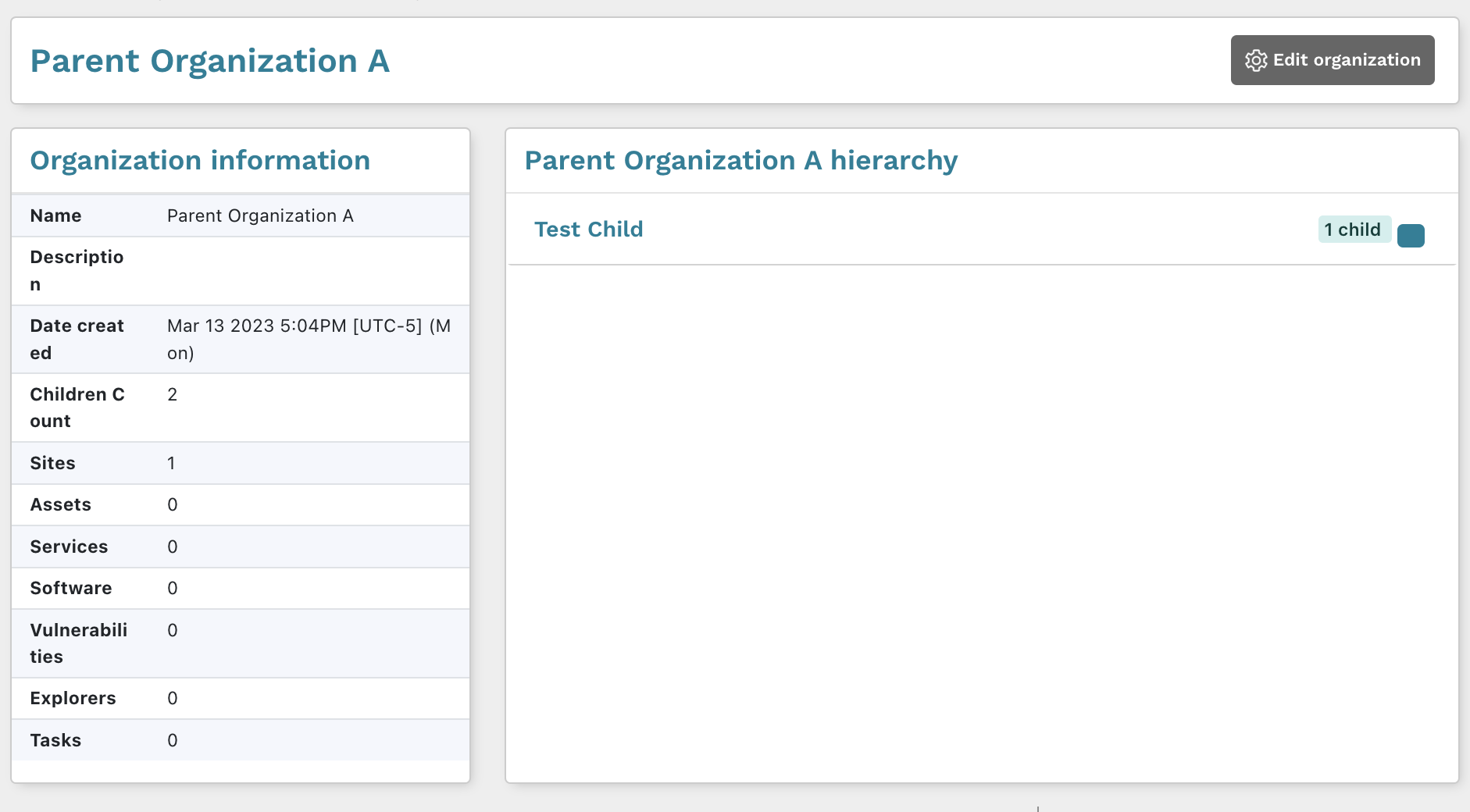
After you save your changes, the new hierarchical permissions will take effect. From the Organizations page, you can see how many children each organization has. Additionally, you can view the details page for a specific organization to see the parent hierarchy.
How to view user permissions

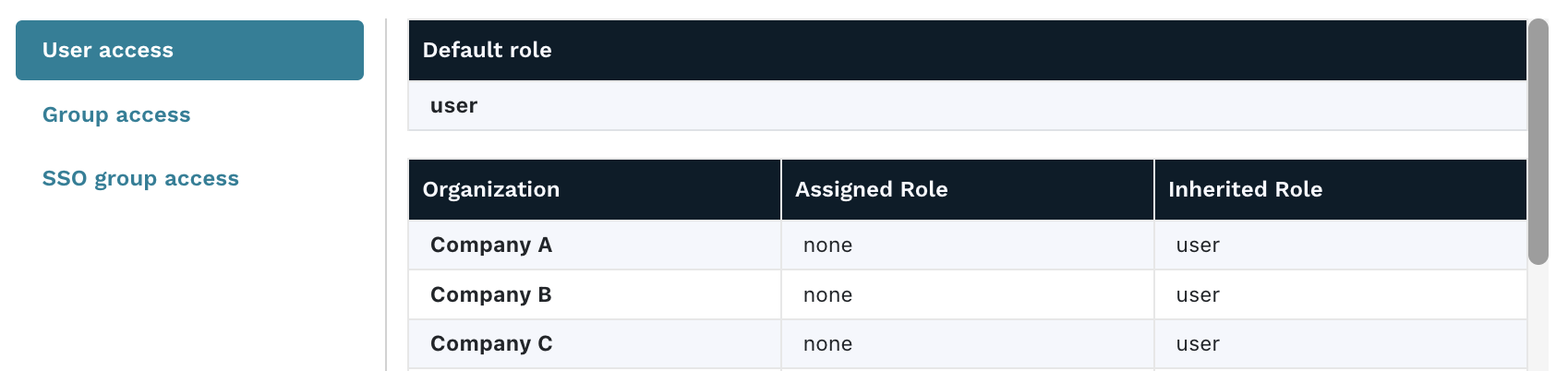
To see what a user’s permissions look like, you can view a user’s details to see their role for each organization.
  1. Go to your Users page and click the name of the user whose permissions you want to view.
  2. The user details page shows a table that contains all of the organizations that the user has access to and the role that they are assigned.
If the role is listed in the Assigned role column, then it was explicitly configured for the user. If the role is listed in the Inherited role column, then the permissions were set by the default role or parent organization. The higher level of the two columns will be the effective access that the user has to that organization.

Simplify the complexities of user access management with organizational hierarchies

As your business continues to grow and scale, so does the need for control over complexity. To protect and secure your data, you need to have the right systems and measures in place for effective user access management. Once you have solid RBAC practices in place, you can add extra layers of protection, such as organizational hierarchies, to ensure that the right roles are being propagated to users. Ready to get a stronger handle on user and permission management in runZero? Try out organizational hierarchies today.

About Version 2 Digital

Version 2 Digital is one of the most dynamic IT companies in Asia. The company distributes a wide range of IT products across various areas including cyber security, cloud, data protection, end points, infrastructures, system monitoring, storage, networking, business productivity and communication products.

Through an extensive network of channels, point of sales, resellers, and partnership companies, Version 2 offers quality products and services which are highly acclaimed in the market. Its customers cover a wide spectrum which include Global 1000 enterprises, regional listed companies, different vertical industries, public utilities, Government, a vast number of successful SMEs, and consumers in various Asian cities.

About runZero
runZero, a network discovery and asset inventory solution, was founded in 2018 by HD Moore, the creator of Metasploit. HD envisioned a modern active discovery solution that could find and identify everything on a network–without credentials. As a security researcher and penetration tester, he often employed benign ways to get information leaks and piece them together to build device profiles. Eventually, this work led him to leverage applied research and the discovery techniques developed for security and penetration testing to create runZero.

常見的 WhatsApp 詐騙方式及自保方法

使用社交媒體或通訊可能會帶來許多風險,例如在 Whatsapp 上遇到詐騙。這些詐騙可能會導致您失去個人資訊、金錢或者網絡安全。在這篇文章中,我們將介紹一些常見的 Whatsapp 詐騙和如何避免成為受害者。

1. 恐嚇式詐騙
恐嚇式詐騙是一種騙取金錢的詐騙,詐騙者會聲稱擁有您的私人資訊或裸照,並威脅公開這些資訊,除非您支付贖金。為了避免這種詐騙,請勿將任何私人資訊或裸照傳送給陌生人,並將您的私隱設定為僅限好友或家人可見。

2. 獎金詐騙
獎金詐騙是一種騙取個人資訊的詐騙,詐騙者會聲稱您已獲得一個大獎金,但需要您提供個人資訊或支付手續費才能領取獎金。為了避免這種詐騙,請不要相信任何您沒有參加的獎項或比賽,並避免向陌生人提供個人資訊。

3. 購物詐騙
購物詐騙是一種騙取金錢的詐騙,詐騙者會聲稱他們可以提供高品質、低價格的產品或服務,但實際上他們只會收取您的金錢但不履行承諾。為了避免這種詐騙,請避免在 Whatsapp 上向陌生人購買產品或服務,而應該選擇可信賴的網上商店進行購物。

4. 假冒身份詐騙
假冒身份詐騙是一種騙取個人資訊的詐騙,詐騙者會冒充一個權威機構或公司,要求您提供個人資訊或登錄帳戶。為了避免這種詐騙,請先驗證該機構或公司是否真實存在,可以通過他們的官方網站或聯繫他們的客戶支援部門。同時,不要在 Whatsapp 上向任何人透露您的帳戶資訊或密碼。

5. 鏈結詐騙
鏈結詐騙是一種通過向您發送有害鏈結來騙取個人資訊或網絡安全的詐騙。這些鏈結可能會帶有惡意軟件或病毒,一旦您點擊了這些鏈接,詐騙者就能夠在您的設備上偷取您的個人資訊。為了避免這種詐騙,請不要點擊任何來自陌生人或未知來源的鏈接,同時,請使用最新的防病毒軟件保護您的設備。

總結
在使用 Whatsapp 時,請注意上述常見的詐騙,避免成為受害者。同時,請保護您的私隱和網絡安全,不要將任何私人資訊傳送給陌生人,並使用最新的防病毒軟件保護您的設備。如果您收到任何可疑信息,請勿點擊鏈結或提供個人資訊。

About Version 2

Version 2 Digital is one of the most dynamic IT companies in Asia. The company distributes a wide range of IT products across various areas including cyber security, cloud, data protection, end points, infrastructures, system monitoring, storage, networking, business productivity and communication products. Through an extensive network of channels, point of sales, resellers, and partnership companies, Version 2 offers quality products and services which are highly acclaimed in the market. Its customers cover a wide spectrum which include Global 1000 enterprises, regional listed companies, different vertical industries, public utilities, Government, a vast number of successful SMEs, and consumers in various Asian cities.

關於ESET
ESET成立於1992年,是一家面向企業與個人用戶的全球性的電腦安全軟件提供商,其獲獎產品 — NOD32防病毒軟件系統,能夠針對各種已知或未知病毒、間諜軟件 (spyware)、rootkits和其他惡意軟件為電腦系統提供實時保護。ESET NOD32佔用 系統資源最少,偵測速度最快,可以提供最有效的保護,並且比其他任何防病毒產品獲得了更多的Virus Bulletin 100獎項。ESET連續五年被評為“德勤高科技快速成長500 強”(Deloitte’s Technology Fast 500)公司,擁有廣泛的合作夥伴網絡,包括佳能、戴爾、微軟等國際知名公司,在布拉迪斯拉發(斯洛伐克)、布裏斯托爾(英國 )、布宜諾斯艾利斯(阿根廷)、布拉格(捷克)、聖地亞哥(美國)等地均設有辦事處,代理機構覆蓋全球超過100個國家。

×

Hello!

Click one of our contacts below to chat on WhatsApp

×