
Skip to content

NORDTECH – OUR FIRST TECH MEETUP IN BERLIN

Last week, we launched our first-ever tech meetup in Berlin – NordTech, where we invited locals to meet our experts live and get some insights into PHP, cybersecurity, and software development practices at Nord Security. As we value innovation and shaping future tech, we’re always keen on sharing our ideas and findings with others. Learn more about what our experts and the Berlin tech community discussed during the event:

 
Blog image 2022 10 06


Tests are not useless!

With Pavlo Mikhailidi

Fuelled by a recent encounter with an anti-tester, our Senior PHP Developer, Pavlo, set out to prove that testing is a necessary practice for all developers—not just QA. He explained that good testing saves time and headaches and can even double as documentation. Increasingly complex codebase requires proper care, and modifying one part can break several others. In these cases, testing is your go-to remedy.

He went on to cover the attributes of good testing, shared below, and to debate the trade-offs between bad testing and no testing. Finally, Pavlo passed along some recommended resources for upping your testing game: Unit Testing Principles, Practices, and Patterns, Test-driven Development by Example, and The Art of Unit Testing.

Here are the attributes of a good test that he shared:

  • It protects against regression

  • It’s resistant to refactoring

  • You get fast feedback

  • The test is maintainable

Watch the full recording of Pavlo’s presentation here.

Scrum sucks

With Oleksii Ustenko

Our Senior Android Developer, Oleksii, explored how Scrum is often misunderstood and misused. All-in-all, he actually likes Scrum but understands why people might grumble about the rigidness of the structure. What’s important to remember is that Scrum should be people-centric at its core: humans working together to create value for other humans. And each ceremony exists to drive that goal forward. Like many things in life, Scrum works best when motivated individuals have the trust, support, and understanding they need to get the job done. And Scrum, understandably, goes wrong when management or bureaucratic processes steal ownership away from teams.

He concludes that Scrum is not the silver bullet some of us want it to be. If something isn’t working, each person involved is responsible for speaking up and proactively suggesting improvements—respectfully. Scrum worked well for the use it was invented for, but every team is different. Take the time to understand the context behind why certain ceremonies exist, learn from past mistakes, and find the process that fits your team best.

Watch the full recording of Oleksii’s presentation here.

Securing your API using Cryptography

With Dovydas Bespalovas

In this security deep-dive, Dovydas, our Guild Tech Lead, laid out the basics with different types of cryptography algorithms and functions: Hashing, Encryption, Digital signatures, Key derivation function, and Key exchange. He then explained the evolution of Secure Sockets Layer (SSL) to Transport Layer Security (TLS) and how it’s used and certified. Going one step further, Dovydas got into the differences between ‘Authorization’ and ‘Authentication’ and shared a step-by-step example of how both information security processes can be put into practice. After that, he concluded that such necessary security measures come with extra work and extra complexity.

Watch the full recording of Dovydas’ presentation here.

PHP meetup


Future tech events in Berlin

If you’re interested in learning more, join our future NordTech events live in Berlin or watch them online. Follow us on meetup.com to stay up to date with upcoming knowledge sharing, networking, and other future events at Nord Security.

About Version 2 Digital

Version 2 Digital is one of the most dynamic IT companies in Asia. The company distributes a wide range of IT products across various areas including cyber security, cloud, data protection, end points, infrastructures, system monitoring, storage, networking, business productivity and communication products.

Through an extensive network of channels, point of sales, resellers, and partnership companies, Version 2 offers quality products and services which are highly acclaimed in the market. Its customers cover a wide spectrum which include Global 1000 enterprises, regional listed companies, different vertical industries, public utilities, Government, a vast number of successful SMEs, and consumers in various Asian cities.

About Nord Security
The web has become a chaotic space where safety and trust have been compromised by cybercrime and data protection issues. Therefore, our team has a global mission to shape a more trusted and peaceful online future for people everywhere.

How to test application with ZAP – Part Two

In the previous article – part one of this topic, I covered the basics of HTTPs requests you should know how to create/modify using OWASP’s ZAP. Also, I have covered how to set up a test environment with two virtual machines run by VMware Workstation. If you somehow ended up here and didn’t read the first part – How to test application with ZAP – Part One, please read it first and set up the environment!

I will start by explaining what ZAP is and what you can do by using it. 

What is ZAP?

ZAP stands for Zed Attack Proxy. This tool was developed by the OWASP community and is actively maintained by them. It is a free, open-source, so-called web app scanner. In general, it is a well-known application security testing (DAST) tool. The official site where you can download this tool can be found at this link. You can also find some tutorials on their site that will help you learn more about using this tool.

ZAP can be installed and used in Windows, Linux, or Mac OS. It can be also run in a Docker container.

This tool is used mainly for finding vulnerabilities in web applications, pentesting, etc. In this article, we will mainly use this tool for creating/modifying requests and sending them to the basic web application we will set up in Ubuntu. 

ZAP can scan and find vulnerabilities related to:

  • SQL injection
  • Broken Authentication
  • Sensitive data exposure
  • Broken Access control
  • Security misconfiguration
  • Cross-Site Scripting (XSS)
  • Insecure Deserialization
  • Components with known vulnerabilities
  • Headers with low-level security

Key features ZAP contains:

  • Active Scan
  • Passive Scan
  • OWASP ZAP Fuzzer
  • OWASP ZAP API
  • WebSocket Testing
  • JAX Spidering
  • Scan Policy Management
  • ZAP Marketplace

*Before installing ZAP, check if your system already has Java 8+ installed because that is the only requirement. I have already provided ZAP official site where you can download it, but you can also do it via terminal with the following command: sudo apt install -y zaproxy. Please run this command to install ZAP in your new Kali machine so we have it prepared for the third part of the series.

How are we going to test the application using ZAP in a real test environment?

As I mentioned, you first need to set up the test environment described in the previous part of this series. Then we will deploy the web application we create via Docker inside an Ubuntu machine. We will create the test application in Angular 13. And after that, we will make the connection between Kali and Ubuntu. From Kali, we will use ZAP to make requests and try to hit the running web application in Ubuntu.

How to create an Angular web application

I created an Angular application in Windows. First, you will need to download a code editor. For this guide, I used Visual Studio Code. You can find download it from its official site. Then you would need to install Node.js from their official site. Download the LTS version and install it.

From now on, we will use the Visual Studio Code terminal to issue the commands.

Using the terminal, we will first install Angular CLI with the following command:

npm install -g @angular/cli

Then you can check the version of the installed CLI:

ng version

You can also check if node js is installed properly by using this command:

npm -v

Now we will use Angular CLI to create a new app with this command:

ng new <application name>

Good, now we have the app, and we want to test if the installation was successful by running the application with this command – ng serve; You should see the application running on your localhost – port 4200 (http://localhost:4200). If that port is not used.

We want to prepare our application for deployment, so we need to configure a few additional things. First, we want to create a Dockerfile so we can deploy the app with Docker.

To do so, we are going to the application’s main folder and adding a new file, which we are naming “Dockerfile.”

Paste this code in the Dockerfile:

FROM node:16.14.0 as node
WORKDIR /app
COPY package.json /app/
RUN npm install
COPY ./ /app/
RUN npm run build --prod

FROM nginx:latest
COPY ./nginx.conf /etc/nginx/conf.d/default.conf
RUN rm -rf /usr/share/nginx/html/* 
# NOTE: Change this path according to your project's output folder, check in angular.json outputPath
COPY --from=node /app/dist/ /usr/share/nginx/html
EXPOSE 80

We will use Nginx to host the angular build inside the container. We will need to create another file in the main folder and name it “nginx.conf”. Copy this code to the file:

server {
  listen 80;
  sendfile on;
  default_type application/octet-stream;
  gzip on;
  gzip_http_version 1.1;
  gzip_disable      "MSIE [1-6]\.";
  gzip_min_length   256;
  gzip_vary         on;
  gzip_proxied      expired no-cache no-store private auth;
  gzip_types        text/plain text/css application/json application/javascript application/x-javascript text/xml application/xml application/xml+rss text/javascript;
  gzip_comp_level   9;
  root /usr/share/nginx/html;
  location / {
    try_files $uri $uri/ /index.html =404;
  }
}

Now you need to build the application, so the dist folder gets created. You can do that with the command – ng build.

When you have created the application, you can copy it to your Ubuntu VM. I used GitHub and just cloned the repo to my Ubuntu Server.

How to deploy the Angular application

First, run both VMs in VMware – Ubuntu and Kali, so you can be ready for the next steps. 

To deploy the application, we will use Docker. For me, it is one of the easiest ways for deployment. 

First, we will need to download and install Docker. We will download Docker, where we want to deploy the Angular application, which would be on our Ubuntu machine. 

The easiest way to install Docker in Ubuntu would be to do it through Kali machine, which you used to SSH inside the Ubuntu Server; I did this because Ubuntu Server is quite frugal, and Kali lets me paste the commands easily, has coloring for the commands, etc. 

In Kali terminal type command:

ssh user_name@ubuntu_ip_adress , in my case it would be:

ssh jenny@192.168.221.129

Now you will be asked for the password of the Ubuntu VM. Type it in – or use key authentication if that’s easier for you – you should now be inside your Ubuntu machine. We are now going to install Docker and create our container on the Ubuntu Server.

We will download Docker to Ubuntu with the following commands:

curl -fsSL https://download.docker.com/linux/ubuntu/gpg | sudo gpg --dearmor -o /etc/apt/keyrings/docker.gpg
echo \
"deb [arch=$(dpkg --print-architecture) signed-by=/etc/apt/keyrings/docker.gpg] https://download.docker.com/linux/ubuntu \
$(lsb_release -cs) stable" | sudo tee /etc/apt/sources.list.d/docker.list > /dev/null
sudo apt update
sudo apt-get install docker-ce docker-ce-cli containerd.io docker-compose-plugin

Now we have installed Docker. We can check that by running a basic command to list all containers. In our case, because we didn’t create and run any container yet, we will have an empty list. Command is:

sudo docker ps

Now we are finally at the step of deploying our web application via Docker.

We want to change the directory (cd <folder_name>) to the web application project folder and run the following commands while inside that directory:

sudo docker build -t testzap:v1.0.0 -f ./Dockerfile .
sudo docker run -p 80:80 -d testzap:v1.0.0

Then test using 

sudo docker ps

We can check the list of running containers with this command: 

sudo docker container ls

Great, our application now runs on port 80.

Setup ZAP to use in the browser

We will use Kali as an attacker machine, so we will send requests from it to our victim/target machine – Ubuntu.

You probably already installed ZAP, but if you didn’t, check out the What is ZAP section. 

Run ZAP. This window will pop up:

We can select no, and if we want to save the session, we can do it at a later time.

If you choose to save the session, it will be saved to the disk in an HSQLDB database. The database gets a default location and name. You can access the db later. If you don’t persist a session, the files are deleted once you exit ZAP.

Then you will see the list of Add-ons. Click on Update all.

I like to use the Brave browser, so you can also check it out and download it on this site

How to use ZAP in Brave?

We will need to install a proxy extension called proxyswitchyomega. Search it in Brave and install it.

It is a good practice to create separate profiles in the browser, which we are going to use only for our security testing. 

We would also like to configure proxyswitchyomega. We are going to click on it in the browser and go to the Settings section Profiles –> Proxy and change localhost in field proxyserver/servers. And here, we can also rename the server (ZAP) and click on Apply.

Great, ZAP in Browser is set up. 

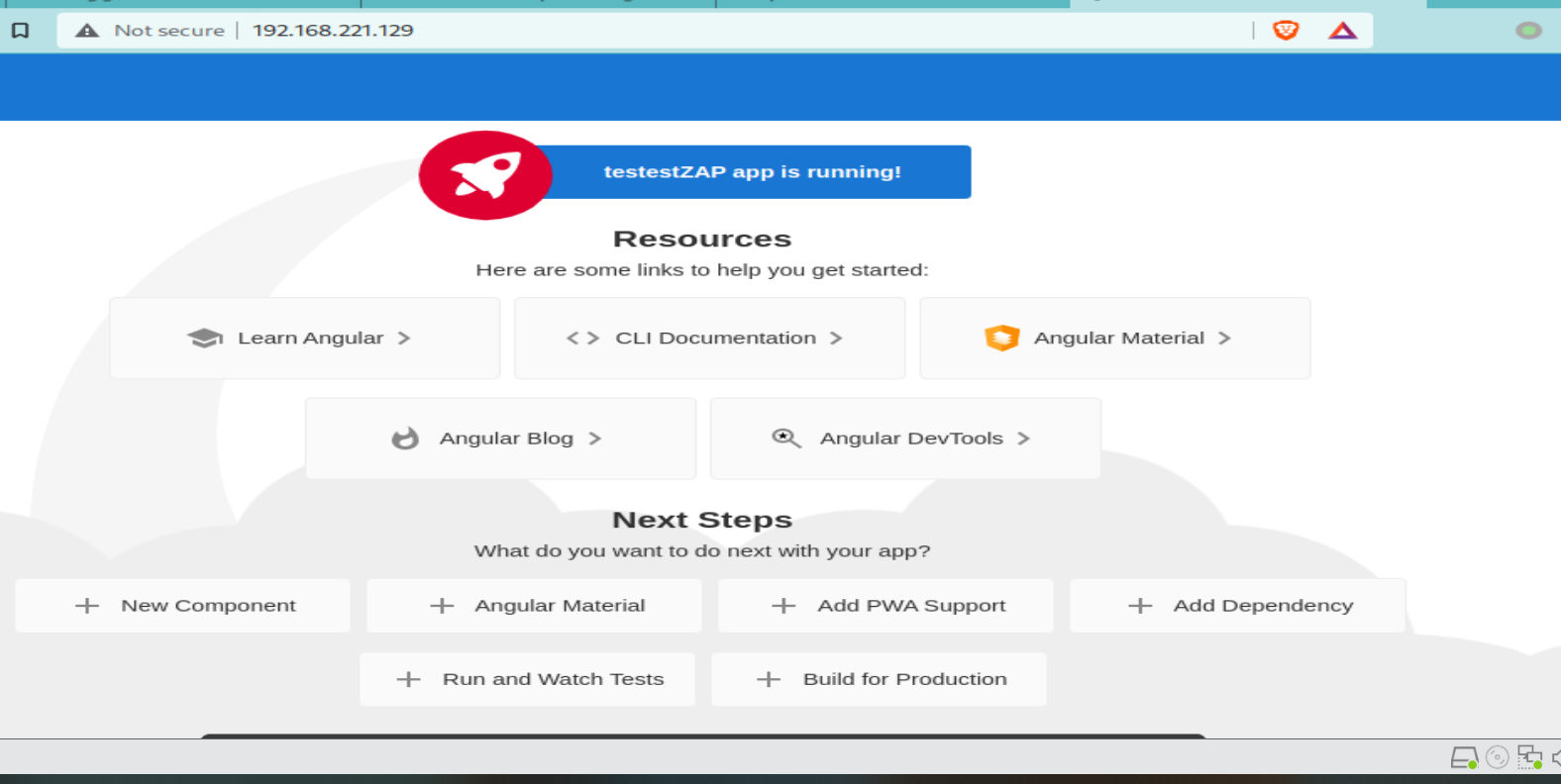
Go to the browser, click on the ProxySwitchyOmega button, and click on ZAP (or how you named your proxy). Then navigate to the http://<Ubuntu_IP>:80, and our new application will appear. In my case, its 192.168.221.129:80.
Also, within the ZAP interface, inside the tree on the left-hand side under sites, you will see that the URL of the application will appear. In my case, under sites, ZAP is showing the domain name (http://**-server); this is because I have previously set that up on Kali. The IP address resolved to that name is the one from above – 192.168.221.129 – which is my Angular app. 
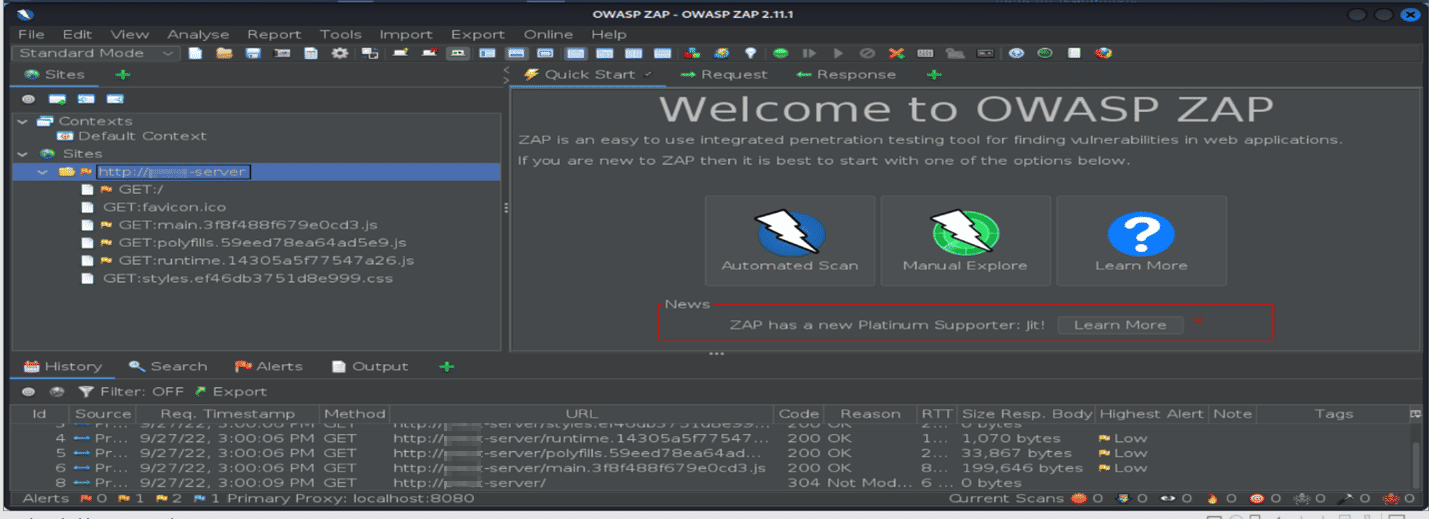
Finally, we can now start investigating our application via ZAP!

In the next chapter, I will show you how to investigate the application!

Conclusion

In this second part of the testing with ZAP series, I tried to explain what the ZAP tool is used for, how to create an Angular web app, deploy it using Docker and send the request with ZAP.

You are now fully equipped to start with security testing. You can also use other security tools with this test environment setup if you wish (for example, Burp Suite).

Interesting links related to the ZAP topic:

#ZAP #Angular14 #Brave #Docker #Kali #Ubuntu

Cover photo by Markus Winkler

About Version 2 Digital

Version 2 Digital is one of the most dynamic IT companies in Asia. The company distributes a wide range of IT products across various areas including cyber security, cloud, data protection, end points, infrastructures, system monitoring, storage, networking, business productivity and communication products.

Through an extensive network of channels, point of sales, resellers, and partnership companies, Version 2 offers quality products and services which are highly acclaimed in the market. Its customers cover a wide spectrum which include Global 1000 enterprises, regional listed companies, different vertical industries, public utilities, Government, a vast number of successful SMEs, and consumers in various Asian cities.

About VRX
VRX is a consolidated vulnerability management platform that protects assets in real time. Its rich, integrated features efficiently pinpoint and remediate the largest risks to your cyber infrastructure. Resolve the most pressing threats with efficient automation features and precise contextual analysis.

6 Common Cyberattacks That Threaten SMEs

October is Cybersecurity Awareness Month, and this year’s theme is See Yourself in Cyber, which focuses on the individual’s role in cybersecurity. This month, the JumpCloud blog will focus on helping you empower everyone in your organization to do their part regarding cybersecurity. Tune in throughout the month for more cybersecurity content written specifically for IT professionals and MSPs.

When we think of cyberattacks, we tend to envision the biggest and most disastrous ones — ones that involve well-known companies, expose tons of important data, and cause some serious fallout and public mistrust. While these attacks are real and dangerous, they’re not the only ones out there. 

The reality is that cyber attacks affect businesses of all sizes and in all industries. Sometimes, our focus on the big ones can eclipse the less flashy ones that are just as dangerous to small and medium-sized enterprises (SMEs). In fact, a 2021 survey found that over 42% of small business respondents had experienced a cyber attack within the last year.

Mounting a viable defense starts with understanding what you’re up against — and even understanding the basics of common threats and defense measures can go a long way. The following are six of the most common attack vectors that can hit SMEs. 

1. Ransomware 

Because the largest ransomware attacks tend to dominate news cycles, many people don’t realize that ransomware attacks on SMEs are common as well. In fact, 50-70% of ransomware attacks are aimed at small businesses.

What Ransomware Looks Like for SMEs

Ransomware generally follows the same basic principles in attacks of all sizes: adversaries seize and lock a company’s data or assets and promise to return them upon payment of a ransom. For large enterprises, these ransoms can reach into the millions. For SMEs, they are often smaller — ransoms as low as $10,000 are common. While this may sound like a silver lining for SMEs, there’s a darker motive at play: adversaries know SMEs will pay them.  

For established enterprises with decades of built-up resources, six-figure ransoms and the downtime associated with an attack are painful, but not often a death sentence. For SMEs with tighter resources, this isn’t always the case — the downtime and loss of data access alone can be crippling for a tightly-run SME. To adversaries, this means SMEs will fight to get their data back — so they demand a “reasonable” ransom and can expect with near-certainty that the SME will pay it. According to research, more than half of them do. 

The Ramifications

The ramifications of a data breach to your employees, customers, partners, and reputation are grave: a Ponemon study found that 65% of consumers whose data was breached lost trust in the company that experienced the breach. 

What’s more, paying the ransom doesn’t guarantee that your data hasn’t been compromised or shared when under the adversary’s control. Of the 59% of SMEs who said they had paid a ransom in a survey, only 23% got all their data back.

In fact, paying up can endanger your organization further: it tells hackers that you are willing and able to pay ransoms to reclaim your data. And now that they’re familiar with your defenses and architecture, they’ll have an easier time attacking you again. Unfortunately, repeat attacks are highly likely — either from the same criminal organization, or from another organization that the attackers sold your information to. 

2. Supply-Chain Attacks 

Most of us are familiar with supply chain attacks, where an infection starts with a large corporation and spreads as it comes into contact with other businesses through the supply chain. And while we’re likely to hear about supply-chain attacks on large businesses, news sources don’t always report on their trickle-down effects on smaller businesses in the supply chain.

How Supply-Chain Attacks Affect SMEs

In supply-chain attacks, SMEs aren’t usually direct targets, but rather casualties resulting from a larger breach. Thus, large supply-chain attacks have ramifications on many of the target organization’s partners, customers, or vendors. In REvil’s attack on Kaseya’s VSA software, for example, many of those impacted were SMEs that used the product. In another example, the famous SolarWinds breach was originally believed to have affected a few dozen organizations. It actually impacted over 250.

3. Phishing and Its Variants

Some of the most basic and low-effort tactics remain common — and effective — infiltration methods. Phishing remains one of the top three threats SMEs face, even despite increasing organizational awareness around it. 

The reason phishing is still so common is two-fold: 

  1. It is effective for adversaries. From the cybercriminal’s point of view, phishing is relatively easy to deploy, and it often yields lucrative results. It takes few resources and minimal skill to launch phishing attacks, and yet they continue to dupe employees into sharing credentials, network access, and other sensitive (and, for cybercriminals, profitable) information and assets. 
  1. It preys on human error. Unlike many other attack vectors that leverage vulnerabilities in systems, phishing uses social engineering to take advantage of human nature (and human error) to gain initial entry. It only takes one mistake to allow an attack to take hold — and the average organization has a 37.9% phishing test fail rate.

Targeted Phishing in SMEs

Cybercriminals have refined tactics to mount more targeted and precise attacks with different types of phishing. Spear-phishing, for example, involves background research to convincingly target individuals rather than bulk-sending a list to a group of recipients. This personalization and specific targeting makes spear-phishing attempts harder to spot — like the popular scam that involves posing as the target’s boss in a text or email. These messages often use conversational language and use the names of the target and the boss, which can make them quite convincing. 

Some adversaries take this type of attack a step further with whaling, which uses spear-phishing tactics to target company executives. Because executives have extensive access to systems and data, whaling is particularly popular — especially with SMEs, where scarce resources could hamper their ability to adequately train leaders on security and phishing awareness and best practices. 

4. Software Vulnerability Exploits 

Leveraging software vulnerabilities is a common way to gain access into an organization’s systems. Often, exploited vulnerabilities are known and even have patches available. In fact, many of the top exploited vulnerabilities were found years ago — for example, a Microsoft Office vulnerability found in 2017 continues to plague businesses that haven’t kept up with their patches. In a Ponemon survey, 60% of respondents who had experienced a breach said it could have occurred through a known vulnerability that had a patch available, but the organization hadn’t applied it. 

Why SMEs Are Vulnerable

Routine patching is a critical basic cyber hygiene activity, and it is highly effective at blocking this type of attack. However, large-scale organizations are more likely to have formal patch management solutions in place than SMEs, which can make SMEs an easier target. In a 2022 JumpCloud survey, only about half of SME respondents said they were confident that their organization’s patch management strategy was sufficient to protect against known vulnerabilities. 

5. Account Takeover

As businesses move to the cloud and dispersed infrastructure becomes the norm, identity has increasingly come to define the new perimeter. Because identity permeates every element of the infrastructure, it has become a common infiltration point. In fact, the number of password-stealing attacks on SMEs around the world increased by almost 25% from 2021 to 2022, and nearly 80% of attacks leverage identity to compromise credentials. 

How ATO Attacks Work

In account takeover (ATO) attacks, adversaries gain access to the network by taking over a user’s account. Account access can be gained through various means, including password-stealing ware, social engineering, and using (often, by purchasing) the credentials of already-breached accounts. Once the adversary has taken over the account, they can access resources and move around the network under the guise of a legitimate user. This makes account takeovers difficult to detect. 

6. Advanced Persistent Threats

SMEs that work with large enterprises may be more susceptible to advanced persistent threats (APTs), which are sophisticated attacks carried out stealthily over an extended period of time. APTs typically consist of infiltration, lateral movement toward targeted data or assets, and exfiltration. APTs can start from any ingress point, and can enter through methods as simple as a phishing attack or stolen password.

For example, an adversary could gain the credentials of an employee with base-level permissions through a phishing scam, then take over the account to analyze the network and gather permissions, access and store the target data, and finally exfiltrate it to sell for profit.

APTs are harder to detect in sprawled IT environments, which are common in SMEs that have grown quickly. IT sprawl limits the ability to fully carry telemetry data from one element to another, which makes infiltration and lateral movement hard to detect. 

Shoring Up SME Security 

Because cybersecurity attacks on SME attacks don’t always make headlines, SMEs often underestimate their vulnerability and underinvest in security. However, adversaries have something to gain from just about any business; SMEs face many of the same threats that enterprises do. 

The attacks above are some of the most common, but SMEs face a multitude of threats via many different vectors. And while it’s impossible for anyone to achieve 100% immunity from threats, it’s possible for SMEs to develop a strong, reliable security program that deflects most attacks. 

About Version 2 Digital

Version 2 Digital is one of the most dynamic IT companies in Asia. The company distributes a wide range of IT products across various areas including cyber security, cloud, data protection, end points, infrastructures, system monitoring, storage, networking, business productivity and communication products.

Through an extensive network of channels, point of sales, resellers, and partnership companies, Version 2 offers quality products and services which are highly acclaimed in the market. Its customers cover a wide spectrum which include Global 1000 enterprises, regional listed companies, different vertical industries, public utilities, Government, a vast number of successful SMEs, and consumers in various Asian cities.

About JumpCloud
At JumpCloud, our mission is to build a world-class cloud directory. Not just the evolution of Active Directory to the cloud, but a reinvention of how modern IT teams get work done. The JumpCloud Directory Platform is a directory for your users, their IT resources, your fleet of devices, and the secure connections between them with full control, security, and visibility.

ESET不再支援Windows XP

ESET於2022年9月28日不再支援 Windows XP。

詳情請參閱 https://support-eol.eset.com/en/termination_home.html.

About Version 2

Version 2 Digital is one of the most dynamic IT companies in Asia. The company distributes a wide range of IT products across various areas including cyber security, cloud, data protection, end points, infrastructures, system monitoring, storage, networking, business productivity and communication products. Through an extensive network of channels, point of sales, resellers, and partnership companies, Version 2 offers quality products and services which are highly acclaimed in the market. Its customers cover a wide spectrum which include Global 1000 enterprises, regional listed companies, different vertical industries, public utilities, Government, a vast number of successful SMEs, and consumers in various Asian cities.

關於ESET
ESET成立於1992年,是一家面向企業與個人用戶的全球性的電腦安全軟件提供商,其獲獎產品 — NOD32防病毒軟件系統,能夠針對各種已知或未知病毒、間諜軟件 (spyware)、rootkits和其他惡意軟件為電腦系統提供實時保護。ESET NOD32佔用 系統資源最少,偵測速度最快,可以提供最有效的保護,並且比其他任何防病毒產品獲得了更多的Virus Bulletin 100獎項。ESET連續五年被評為“德勤高科技快速成長500 強”(Deloitte’s Technology Fast 500)公司,擁有廣泛的合作夥伴網絡,包括佳能、戴爾、微軟等國際知名公司,在布拉迪斯拉發(斯洛伐克)、布裏斯托爾(英國 )、布宜諾斯艾利斯(阿根廷)、布拉格(捷克)、聖地亞哥(美國)等地均設有辦事處,代理機構覆蓋全球超過100個國家。

×

Hello!

Click one of our contacts below to chat on WhatsApp

×



