Skip to content

How Does PAM Help Protect Remote Access?

With the imposition of social distancing caused by the Covid-19 pandemic, most companies began to migrate to remote work, adopting solutions such as cloud computing.

According to Forrester, more than 50% of IT leaders have revealed the need to adapt to this reality, while Gartner pointed to an even higher percentage of 70%.

In practice, cloud environments have several benefits, such as agility, scalability, and better disaster recovery strategies.

Nevertheless, ensuring digital security in remote access requires the adoption of protection models based on Zero Trust, as well as investment and implementation of the principle of least privilege through Privileged Access Management (PAM).

By reading the next topics, you will learn more about PAM tools and our senhasegura Domum solution. Keep reading it!

PAM: What is It and Why is It Important?

Privileged Access Management (PAM) is a digital security solution that allows one to control access, avoiding damage caused by external attacks and insider threats.

Considered by experts as one of the most important cybersecurity technologies on the market, this tool makes it possible to apply the principle of least privilege in IT environments, providing users only the necessary access to perform their activities.

senhasegura Domum: Zero Trust Access, No VPN Required for Users and Third Parties

Mass migration to remote work and third-party access to devices and systems require a specific solution to ensure information security.

For this reason, we created senhasegura Domum for secure remote access based on Zero Trust. This solution eliminates the need for VPN and additional licenses and is easy to use, which contributes to reducing costs with implementation and training.

Domum allows one to define devices, setting a duration time or stipulating specific days and times for access. It also makes it possible to limit the connection by geographic region.

Moreover, it guarantees privileged access without the need to create a login and password in the solution, only for authorized devices.

Finally, Domum is the best alternative for companies that need to adapt to audit criteria. This tool allows:

  • Monitoring of actions performed in real-time;
  • Session recording;
  • Threat and user behavior analysis;
  • Blocking or closing the remote session in case of suspicious behavior.

Invest in our senhasegura Domum solution and avoid damages caused by invasions and data leaks. Contact us and learn more. 

About Version 2 Digital

Version 2 Digital is one of the most dynamic IT companies in Asia. The company distributes a wide range of IT products across various areas including cyber security, cloud, data protection, end points, infrastructures, system monitoring, storage, networking, business productivity and communication products.

Through an extensive network of channels, point of sales, resellers, and partnership companies, Version 2 offers quality products and services which are highly acclaimed in the market. Its customers cover a wide spectrum which include Global 1000 enterprises, regional listed companies, different vertical industries, public utilities, Government, a vast number of successful SMEs, and consumers in various Asian cities.

About Segura®
Segura® strive to ensure the sovereignty of companies over actions and privileged information. To this end, we work against data theft through traceability of administrator actions on networks, servers, databases and a multitude of devices. In addition, we pursue compliance with auditing requirements and the most demanding standards, including PCI DSS, Sarbanes-Oxley, ISO 27001 and HIPAA.

Pandora FMS Named An Emerging Favorite In Capterra Shortlist For Server Monitoring Software and APM

The work is hard and there are high expectations, but we don’t give up! The fight goes on and every day we are happier with what we achieve and what we mean to our users.

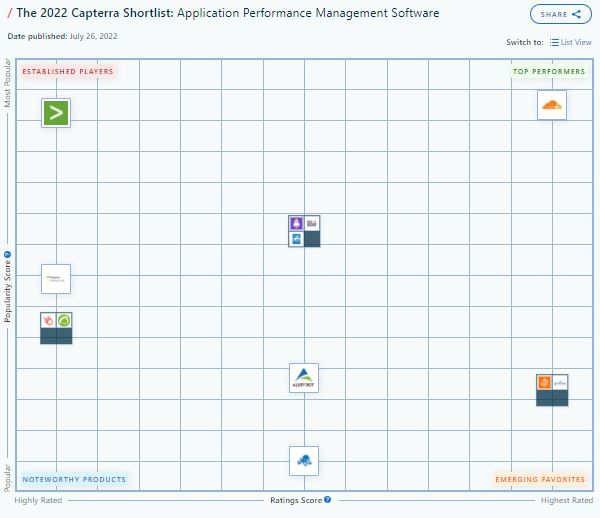
Therefore, Pandora FMS is proud to announce its mention as an  Emerging Favorite  in 2022 Shortlist for Server Monitoring Software and APM by   Capterra, a free online service that helps organizations find the right software.

Pandora FMS is always among the favorites. Capterra knows this

Capterra Shorlist

*As many of you may already know, Capterra Shortlist is an independent assessment that evaluates user reviews and online search activity to generate a list of market leaders in the software space that offer the most popular solutions. (Have a look at the Capterra Shortlist methodology here.)

As it could not be otherwise, our CEO and colleague Sancho Lerena has wanted to make some comments on this achievement:

“The first thing I would like to say is thank you. Sometimes it seems that one does not give enough thanks and there is much to thank, both to our coworkers and users, and even the Capterra platform itself. 

Especially because there are so many contributions and because it is absolutely always a huge honor to receive this kind of mention.” 

Here is a sample of our recognition in table format:

APM

About Version 2 Digital

Version 2 Digital is one of the most dynamic IT companies in Asia. The company distributes a wide range of IT products across various areas including cyber security, cloud, data protection, end points, infrastructures, system monitoring, storage, networking, business productivity and communication products.

Through an extensive network of channels, point of sales, resellers, and partnership companies, Version 2 offers quality products and services which are highly acclaimed in the market. Its customers cover a wide spectrum which include Global 1000 enterprises, regional listed companies, different vertical industries, public utilities, Government, a vast number of successful SMEs, and consumers in various Asian cities.

About PandoraFMS
Pandora FMS is a flexible monitoring system, capable of monitoring devices, infrastructures, applications, services and business processes.
Of course, one of the things that Pandora FMS can control is the hard disks of your computers.

More Than the Restore: Why Ransomware Recovery Is Hard

Many discussions about ransomware recovery focus on getting critical data back where it belongs. While this is absolutely necessary, it’s not always sufficient to allow full resumption of business-as-usual—the actual goal of disaster recovery.

In this session, we’ll discuss the key lessons we’ve learned as a SaaS data protection company about the holistic requirements for resuming normal operations after a large-scale attack or disaster, including restoration, remediation, retraining, and retrospection.

Backups are critical. We all know this is true—not just in an obvious “water is wet” way, but in a more serious “if you don’t drink enough water, you will die” way. At the same time, having a reliable backup system to capture your data and the ability to restore the right data in the right place at the right time is only part of what modern enterprises need.

Restoring data is not the same thing as recovering operations. Restoration is the first step along that path, but not the only one. You can sum this argument up with a single phrase: “restoring data is necessary but not sufficient by itself.”

Before you restore…
Re-read the first sentence above. Before we can proceed with talking about what else a full restoration will take besides just clicking the “restore” icon, I’m going to assume that you have a complete, valid, tested backup of your most important data. (And if you don’t, click to learn how Keepit can get you there!)

What you get when you restore
OK, now you’re all set, right? You’ve got a known-good backup, and you’ve tested your restore procedures. You’re comfortable with the software, you’ve ensured that everyone who needs to conduct restores has the correct permissions, and so on. If not, you probably at least know what areas of improvement you need to focus on (and quickly)!

The next step in the process is understanding exactly what you get when you execute a restore, assuming that it goes perfectly. This will obviously vary quite a bit depending on what you’re backing up in the first place. For example, there are certain Zendesk and Azure Active Directory objects that can be restored in place (that is, the restored object can overwrite the old one), but other objects will only be restored as new objects. Knowing exactly what a restore will give you, where it will go, and what, if any, manual steps might be required post-restore are all key parts of understanding the overall journey.

Now for the fun part
One crucial mistake we sometimes make when talking about restore planning is failing to think about, and plan for, what happens after the restore.

Resuming operations after a cyberattack involves many considerations that you may not have thought about during your restore planning, including the time required to install or reinstall patches and updates on users’ computers, the need to maintain an effective communications channel for your staff while your primary systems are being restored, and non-computer-related issues like making sure that you know where physical assets and people may have moved to during your outage.

There may be other unique considerations that apply to you, too. For example, in 2021, a large auto company suffered a cyberattack that prevented their dealers from ordering cars or parts—so once the company restored their systems, they had a lot of manual and unplanned work to clean up and reconcile their pending orders, update dealers with information on where their parts were, and so on.

None of that cleanup work could take place until the restore was complete and all the data they needed was present.

How to get started
The exact mechanics of how you go from “restore successful” to “we’re back in business” will vary according to many factors, including how large and/or complicated your organization is, how mature your operational processes are, how many additional regulatory requirements you have to deal with, and the nature of the problem from which you’re recovering.

There’s a huge continuum that covers the space from the simple (restoring a single critical file for one user) to the very complex (recovering operations after a large-scale disaster like a wildfire or hurricane).

Investigating, documenting, and practicing what your business needs to quickly get back to normal after the restore succeeds is perhaps the most important single thing you can do to protect your data and your business.

About Version 2 Digital

Version 2 Digital is one of the most dynamic IT companies in Asia. The company distributes a wide range of IT products across various areas including cyber security, cloud, data protection, end points, infrastructures, system monitoring, storage, networking, business productivity and communication products.

Through an extensive network of channels, point of sales, resellers, and partnership companies, Version 2 offers quality products and services which are highly acclaimed in the market. Its customers cover a wide spectrum which include Global 1000 enterprises, regional listed companies, different vertical industries, public utilities, Government, a vast number of successful SMEs, and consumers in various Asian cities.

About Keepit
At Keepit, we believe in a digital future where all software is delivered as a service. Keepit’s mission is to protect data in the cloud Keepit is a software company specializing in Cloud-to-Cloud data backup and recovery. Deriving from +20 year experience in building best-in-class data protection and hosting services, Keepit is pioneering the way to secure and protect cloud data at scale.

What I’ve learned working at runZero as a UX/UI designer

When I joined the company a little over a year ago, I knew almost nothing about networking. For example, I couldn’t tell you the difference between an authenticated and unauthenticated scan. Most of my networking knowledge came from working with my own home network. I could identify my modem, knew how to connect it to the router, and then set up my network from there. I understood that I had a designated IP address, and that I could connect to the Internet through an Ethernet cable or through my WiFi. I also knew that the Internet and mobile data came from the giant lines and towers outside. Joining runZero unlocked a huge opportunity for me to expand my perspective and learn more about networks.

I know every company says that they have great people, but I feel like runZero has an exceptional team that really prioritizes collaboration and knowledge sharing. runZero cultivates a culture of learning, making it easy for me to pick up so much information about networking and network discovery. The things I’ve learned are practical, which means I can use in my everyday life. For example, one time, I scanned a local nail salon’s network (with their permission, of course), and I discovered a PAX point-of-sale (POS) device. Thanks to runZero I knew about a worrisome incident involving PAX POS devices. I was able to explain the issue to the owners and helped them understand how using PAX devices could affect their business. I’ve also gotten into the habit of scanning new devices that I come across or acquire, like a new phone or printer. I love that I am able to practically use the knowledge I learn at runZero in my everyday life.

Something I really appreciate about runZero is the investment in our people. runZero sent a bunch of us to DEFCON recently, which provided a great opportunity for us to immerse ourselves in the security world. Without my recent experience in the industry, I would have been a fish out of water. While I spent a lot of time attending talks, I was also reeled into other things, like learning to solder and participating in CTFs (capture the flag). Working through CTF challenges was an exciting way to drive personal growth and bond with my colleagues. Attending security conferences in the future will be invaluable for my professional growth, as well as writing blog posts like this one! Professional development is crucial for my role because it helps me better understand the industry, and as a result, design and deliver better user interfaces and experiences for our customers.

My journey at runZero has taken me deep into the world of networking and network discovery. I’ve enjoyed both applying and sharing what I have learned, as well as continuing to grow. And now I can tell you the difference between authenticated and unauthenticated scanning! The tech world is constantly evolving, and so am I.

About Version 2 Digital

Version 2 Digital is one of the most dynamic IT companies in Asia. The company distributes a wide range of IT products across various areas including cyber security, cloud, data protection, end points, infrastructures, system monitoring, storage, networking, business productivity and communication products.

Through an extensive network of channels, point of sales, resellers, and partnership companies, Version 2 offers quality products and services which are highly acclaimed in the market. Its customers cover a wide spectrum which include Global 1000 enterprises, regional listed companies, different vertical industries, public utilities, Government, a vast number of successful SMEs, and consumers in various Asian cities.

About runZero
runZero, a network discovery and asset inventory solution, was founded in 2018 by HD Moore, the creator of Metasploit. HD envisioned a modern active discovery solution that could find and identify everything on a network–without credentials. As a security researcher and penetration tester, he often employed benign ways to get information leaks and piece them together to build device profiles. Eventually, this work led him to leverage applied research and the discovery techniques developed for security and penetration testing to create runZero.

CISAnalysis – September 8, 2022

Another day, another dozen vulnerabilities added to the ’log (as they say on TikTok). Imagine showing up to the office with this box of doughnuts: the classic powdered sugar zero-day in Chrome, jelly filled remote code execution in Oracle, and an overwhelming amount of old-fashioned glazed that’ll make your head spin.

What do we mean by old-fashioned glazed? Hardware. Usually the CVEs we see added to the KEV are located in software, SaaS tools, web browsers, or Windows. It is abnormal to see so many vulnerabilities in hardware, and in particular, routers.

Of the dozen vulnerabilities, 50% of them are in routers. D-Link, a networking equipment manufacturer based in Taiwan, has four vulnerabilities alone, all affecting products that are end-of-life. One of them, CVE-2011-4723, involves storing cleartext passwords! Sorry Charlie Sheen but that is not “winning” (a vulnerability this old deserves an old reference).

CISA only adds vulnerabilities to the KEV catalog if there is clear remediation guidance. In this case, the action is clear: disconnect the product if still in use.

#cisa #cisanalysis #d-link #vulnerabilities #rce

About Version 2 Digital

Version 2 Digital is one of the most dynamic IT companies in Asia. The company distributes a wide range of IT products across various areas including cyber security, cloud, data protection, end points, infrastructures, system monitoring, storage, networking, business productivity and communication products.

Through an extensive network of channels, point of sales, resellers, and partnership companies, Version 2 offers quality products and services which are highly acclaimed in the market. Its customers cover a wide spectrum which include Global 1000 enterprises, regional listed companies, different vertical industries, public utilities, Government, a vast number of successful SMEs, and consumers in various Asian cities.

About VRX
VRX is a consolidated vulnerability management platform that protects assets in real time. Its rich, integrated features efficiently pinpoint and remediate the largest risks to your cyber infrastructure. Resolve the most pressing threats with efficient automation features and precise contextual analysis.

×

Hello!

Click one of our contacts below to chat on WhatsApp

×