Skip to content

How to capture screenshots and take screen recordings on your Mac

The saying “a picture is worth a thousand words,” may need to be updated to say that a screen capture or screen shot says a thousand words, because so many professionals rely on their Macs to capture an image or video of their screens to share. 

If you are a Mac user who’s looking for the quickest, most straightforward way to take screen captures and screenshots on Mac, I’ve got you covered.  

Ready to capture screens and snap screenshots on your Mac? Get started with Parallels Desktop with a 14-day free trial.   

5 ways to take a screenshot on Mac 

There are five ways you can capture screenshots using your Mac.  

Unlocking your Mac’s full potential goes beyond knowing how to open a browser and finding your favorite apps.   

Learning how to capture and share what’s on your screen effectively can streamline your workflow, improve collaboration, and help you share your creativity.   

Let’s look at several methods for capturing screenshots on your Mac like a pro.   

1. Capture a portion of your screen   

The simplest and most commonly used way to capture a screenshot is to use the Command-Shift-4 keyboard shortcut.  

This method is like the snipping tool you may be familiar with from using PCs.   

Here is how to take a screenshot of a portion of your screen on Mac:    

Press Command-Shift-4 to change the pointer to a crosshair.  

Select the area of the screen you want to capture by dragging the cursor.  

After releasing the mouse button, the screenshot appears as a PNG image on your desktop.   

You can use it as a supporting image in a blog or social media site or send it as an email attachment.   
2. Capture your entire screen 

This shortcut captures your entire screen, making it useful when you want to show what’s happening on your screen or share an error with IT support.   

Other tabs and chat boxes will be visible in the screenshot, so be sure to close out anything that you don’t intend to share.  

Here’s how to take a screenshot of your entire screen on Mac:  

Press Command-Shift-3 to take a screenshot of the entire screen.  

The screenshot will appear as a PNG image on your desktop.  

You can then upload it to a messaging platform like Slack or Teams or add it to an email.   
3. Take a screenshot of a single active window 

Highlight a dynamic feature, like the menu bar with an item selected.   

Active screenshots are great for creating tutorials, documenting interactions with software or websites, or similar dynamic processes.   

Here’s how to copy a screenshot of an active page on Mac:  

  • Press Command-Shift-4 to change a pointer to a crosshair.  
  • Tap on the spacebar on your keyboard. The cursor will change to the camera icon.  
  • Select the active application window you want to capture by moving your cursor and highlighting the active window.   
  • Click the mouse button on the window you want to capture. The screenshot will appear as a PNG image on your desktop.  

Alternatively, you can paste the screenshot by navigating to the location you want to share the image (Slack, Teams, etc.) and press Command-V.  
4. Customize your screenshot or record your screen  

This shortcut lets you capture a customized screenshot by selecting the size or window to screenshot. It also gives you easy access to the recording button.   

Here’s how to customize your screen or record on your screen on Mac:    

  • Press Command-Shift-5. A clip box with a white-gloved hand will appear on your screen   
  • Drag the corners of the box to select the sections you want to screenshot.   
  • Use the options at the bottom to adjust your screenshot. Select the entire screen, choose a different window, or use the recording button to take a video of all or a portion of your screen.   

The screenshot or recording file will appear on your desktop.    
5. Take a screenshot of your Touch Bar (if available) 

In some cases, you may need to take a screenshot of the items in your Touch Bar.   

While this is a less common application, it can be helpful if you are working with IT support or writing a detailed tutorial.   

Here’s how to take a screenshot of the Touch Bar on a Mac:  

  • Open System Preferences and select Keyboard. 
  • Click on “Customize Control Strip” and drag the Screenshot button to your Touch Bar. 

Use this button to take screenshots as needed. 

How to screen capture an active window on a Mac 

Using the screenshot menu 

You can screen capture an active window by performing the following steps: 

  • Open the Mac screenshot menu by pressing Shift + Command + 5
  • A small bar will appear at the bottom left of the screen with three icons. Choose whether to screen capture a specific window, a highlighted section, or an entire screen. 
  • Click the “capture” button when you’ve selected the area you want. 
  • Choose where you’d like to save the screen capture, the length of time you want to record, and more in the Options menu. 

Without using the screenshot menu 

If you’d like to take a screen capture in an active window without using the screenshot menu, follow these steps: 

  • Click Shift + Command + 4. 
  • Click and drag the crosshair cursor to create a highlighted section. When you let go of the mouse, you’ll have the screen capture on your Mac’s desktop. 

How to take a screen recording on a Mac 

There are several ways to take a screen recording on your Mac. 

Using the Screenshot toolbar 

  • Press Shift + Command + 5 to record the entire screen, a portion that you select, or a still image.  
  • Click “Record Entire Screen” or “Record Selected Portion” option. 
  • When you’re ready, click “Record” or press Command + Control + ESC to stop recording.  

Using the QuickTime player 

You can also take a screen recording using the QuickTime player.  

  • Start by opening the QuickTime player.  
  • Select File > New Screen Recording. This will bring up the screen recording toolbar.  
  • Use the options menu to choose what to record, including the area you want to record or the entire screen. You’ll have to select the area prior to clicking the record button. 
  • You can also choose to use your own voice over with the built-in microphone or if you want mouse clicks to show in the recording.  
  • Choose where to save the recording at this point as well.  
  • To begin, click the record button. To stop the recording, click the stop button or press Command + Control + Esc.  

How to use the snipping tool for a Mac Screen capture 

To use the built-in snipping tool on a Mac, you can use the following keyboard shortcuts or the Screenshot app. 

Keyboard shortcuts 

  • Command + Shift + 3 = capture the entire screen and save to the desktop 
  • Command + Shift + 4 = capture only a selection portion of the screen 
  • Command + Shift + 4 + Space = capture a window.  

Press the Control key combined with any of the above screenshot shortcuts to save the screen capture to the clipboard.  

Using the Screenshot app 

To use the Screenshot app to access the Snipping tool on Mac, open the app and select whether to capture or record.  

Click on Options to set a length of time to record and where to save the file.  

Click capture or record to start and stop to finish.  

Editing screen captures on a Mac 

To edit the screen captures you take on a Mac, right click on the screenshot or capture and choose to open it with Preview.  

From there, you can crop, mark up, resize, or otherwise annotate the screenshot. 

What happens if the screen capture area tool or screenshot app isn’t working on macOS?   

Sometimes the keyboard shortcuts may not work on your Mac.  

You press the buttons or make the right clicks, but nothing happens.   

There are a few reasons why this might happen — and it’s usually related to your settings.   

Parallels Desktop users, for example, may find that updating their MacOS makes tools that worked previously stop working.   

In this case, you’ll need to give Parallels Desktop permission to record the screen.  

If you are a Mac user, the issue might be your system settings. Start by navigating to the Apple menu, then select:     

System setting > Keyboard > Keyboard shortcuts > Screenshots  

Make sure all the items on the list are checked off. Try the shortcuts above again, and you’ll likely find they work.   

How do you take a screenshot on a Mac without pressing buttons?   

What if you don’t have a keyboard or your keyboard isn’t working?  

Good news—you can still take a screenshot using just your mouse!   

Here’s how:   

  • Select the Finder icon in your Dock (that’s the little blue and gray face).   
  • Choose “Applications,” then find the “Utilities” folder.   
  • Within the Utilities folder, you’ll see a camera icon labeled “Screenshot.” Double click.   
  • The tool will open, allowing you to use the same options as Command-Shift-5, including adjusting your screenshot, taking a recording, and other actions.    

Another option is to add a screenshot tool to your Touch Bar:   

  • Navigate to System Preferences > Keyboard > Customize Control Strip.   
  • Drag and drop the screenshot button to the Touch Bar.   

How to save your screenshots and screen captures directly to your clipboard on Mac  

Want to save your screenshots to your clipboard to copy and paste elsewhere? You can save your screenshots directly to your clipboard instead of saving them as files on your desktop.  

This is useful if you want to paste the screenshot into another application, such as an email, document, or image editor.  

Here’s how to do it:  

  • To capture your entire screen and save it to your clipboard, press Control + Shift + Command + 3.  
  • For a selected portion, press Control + Shift + Command + 4, then select the desired area.   
  • For a specific window, press Control + Shift + Command + 4, then press the Spacebar, then click the window.   

Then you can paste the screenshot into your document or image editor using Command + V. 

Why would you need to capture your screen or take a screenshot on a Mac? 

Taking a screenshot on a Mac is easier than ordering takeout, thanks to the different shortcuts offered.   

With just a few taps, you can take a screen capture to share with coworkers, add to a blog post, or save a favorite image or photo.  

You can use screenshots, screen captures, or screen recordings to help troubleshoot technical issues, or create tutorials, demos, and how-to guides. 

Screen captures facilitate connection and engagement. Your audience sees what you see.  

Technical teams, such as developers collaborating on code or app testing, can provide instant feedback and address gaps in performance or functionality. 

Sending a screen capture reduces time and frustration attempting to both describe and understand a problem for a team member and the IT department.  

Demonstrating workflows, features, and user interfaces in a recording are more effective and appealing for both internal and external users, because they can understand how things are done by seeing it happen.  

Streamline your day by mastering the Mac screenshot or screen capture 

The screenshot and screen capture option on Macs are a simple but essential process. Knowing how to quickly snag a screen capture helps improve collaboration at work, trouble technical issues, or share moments of creativity. Or just to save a hilarious picture or meme for later!  

Knowing these shortcuts and screenshot tricks will help you work faster and more efficiently.   

Ready to capture screens and snap screenshots on your Mac? Get started with Parallels Desktop with a 14-day free trial.   
 

About Parallels 
Parallels® is a global leader in cross-platform solutions, enabling businesses and individuals to access and use the applications and files they need on any device or operating system. Parallels helps customers leverage the best technology available, whether it’s Windows, Linux, macOS, iOS, Android or the cloud.

About Version 2 Digital

Version 2 Digital is one of the most dynamic IT companies in Asia. The company distributes a wide range of IT products across various areas including cyber security, cloud, data protection, end points, infrastructures, system monitoring, storage, networking, business productivity and communication products.

Through an extensive network of channels, point of sales, resellers, and partnership companies, Version 2 offers quality products and services which are highly acclaimed in the market. Its customers cover a wide spectrum which include Global 1000 enterprises, regional listed companies, different vertical industries, public utilities, Government, a vast number of successful SMEs, and consumers in various Asian cities.

Parallels RAS 20.2 正式登場!

Parallels RAS 20.2 正式登場!立即更新,體驗專為管理員與終端使用者度身訂做的全新功能與改良升級,進一步提升靈活性、便利性及整體效能。

以下是 20.2 版本的幾項重點功能:

  • VMware 數據存儲靈活性提升:VMware 使用者現可為虛擬機複製選擇不同數據存儲,強化高可用性與自動化效率。
  • 全面支援 Windows Server 2025:所有基礎架構組件已兼容 Windows Server 2025,Microsoft Hyper-V 2025 支援即將推出。
  • 工作區使用體驗升級:新增 Z-order 功能,讓遙距應用程式與本地應用程式自然層疊,帶來更流暢的使用者體驗。
  • Azure 虛擬桌面代理修復便捷化:IT 管理員可集中修復並重新部署不可用的 Azure 虛擬桌面代理,加速故障恢復。
  • Azure 虛擬桌面代理維護排程:管理員可設定兩個維護時段,避免更新影響業務高峰期。
  • Linux 進階攝影機重定向:Parallels Client for Linux 現支援進階攝影機與音訊重定向,提升遙距視訊會議品質。
  • Android 與 iOS / iPadOS 攝影機支援:遙距會話中可使用流動設備攝影機,提升倉庫管理等工作流程效率。
  • RADIUS MFA 自動化增強:支援超過五個自動化選項,簡化選擇流程並提升易用性。
  • 輕量級身份提供者整合:Parallels RAS 現可無縫銜接第三方身份提供者(如 Azure、Okta),無需額外配置 RAS 註冊伺服器。


欲深入了解 Parallels RAS 20.2 的所有新功能與改進,歡迎登入 Parallels Portal 或聯絡我們!

關於 Parallels

Parallels 是全球領先的跨平台解決方案品牌,為公司企業和個人用戶提供簡單的方式,讓他們在任何設備或操作系統上使用和存取所需的應用程式和檔案。無論是 Windows、Mac、ChromeOS、iOS、Android 還是雲端服務,Parallels 都能幫助客戶充分利用最佳技術。Parallels 解決了複雜的工程與使用者體驗問題,讓企業和個人用戶能夠隨時隨地簡單且具成本效益地使用應用程式。

About Version 2

Version 2 Digital is one of the most dynamic IT companies in Asia. The company distributes a wide range of IT products across various areas including cyber security, cloud, data protection, end points, infrastructures, system monitoring, storage, networking, business productivity and communication products. Through an extensive network of channels, point of sales, resellers, and partnership companies, Version 2 offers quality products and services which are highly acclaimed in the market. Its customers cover a wide spectrum which include Global 1000 enterprises, regional listed companies, different vertical industries, public utilities, Government, a vast number of successful SMEs, and consumers in various Asian cities.

Goodbye Windows 10, Hello Windows 11: Windows End of Life


Microsoft has made it official—Windows 10 support ends on October 14, 2025.  

Here’s what that means for you.  

  • No more free monthly updates or bug fixes: Your OS will no longer receive critical patches to address vulnerabilities.  
  • No more feature updates: You’ll miss out on tech advancements that streamline workflows and keep you competitive.  
  • Security risks: Without ongoing support, systems running Windows 10 will face increased exposure to cyber threats. 

IT professionals and their organizations face a critical decision.  

Should they stick with an outdated system or embrace the future with Windows 11? 

Making the transition from Windows 10 to Windows 11 isn’t just about meeting deadlines or purchasing the latest upgrade. 

It’s about seizing an opportunity to enhance security, productivity, and compatibility in a rapidly evolving workplace. 

Using insights from Parallels Desktop usage data, I uncovered how businesses are adapting to the change, why Windows 11 matters, and the steps you need to take to prepare.  

Start your Parallels Desktop Pro free 14-day trial today and stay one step ahead of the game. 

The shift from Windows 10 to Windows 11 is happening in virtual machines 

Our data is clear—Windows 11 adoption is rising.  

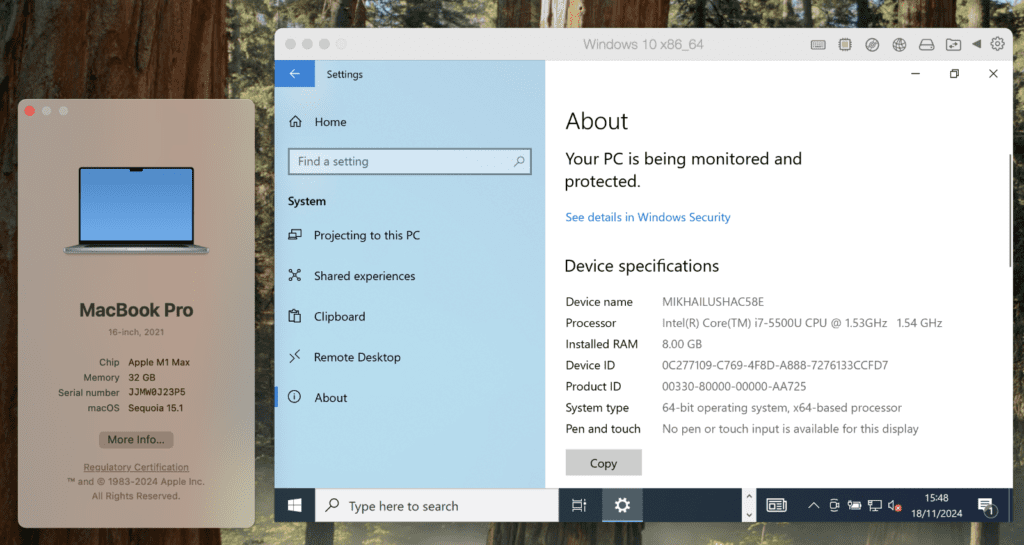
Over the last two years, Windows 11 usage in Parallels Desktop virtual machines has grown dramatically from 74% to 91%, while Windows 10 has steeply declined from 26% to just 9%.  

However, not all businesses are making the shift.  

Why?  

One word: hardware.  

Businesses are struggling to migrate to Windows 11 of the more advanced hardware requirements of Windows 11.  

Legacy PCs or older PCs generally don’t meet the requirements for Windows 11. 

Unlike Windows 10, Windows 11 features like the Trusted Platform Module (TPM) 2.0, enhanced security protocols, and high-performance capabilities necessitate the latest processors and chipsets.  

These are more common in newer PCs that many organizations have yet to adopt.  

This is where virtualization shines (at least if you have Macs available). 

With virtualization tools like Parallels Desktop, running Windows 11 on older or Intel-based Macs becomes seamless.  

If you are an IT admin or otherwise responsible for your organization’s fleet, you can swap out legacy PCs for Intel or silicon Macs equipped with Parallels Desktop.  

Parallels Desktop allows Mac users to run Windows 11 efficiently, without hardware limitations.  

Parallels Desktop gives businesses a quick, cost-effective path to modernization without needing to buy new PCs.  

If new devices are in the budget, businesses have the flexibility to consider purchasing Macs plus Parallels Desktop can get the best of both worlds. 

For IT leaders who need to manage multiple licenses or a fleet of Macs at their organization, Parallels Desktop Business Edition or Parallels Desktop Enterprise Edition are the solutions you need. 

See what hardware you need to run Windows 11 vs Windows 10 on Intel Macs or Macs with Apple silicon with Parallels Desktop.  

Apple silicon Macs and Windows 11—A perfect pair 

The transition is even more striking among businesses using Apple silicon Macs. 

  • 97% of Apple silicon Mac users running Parallels Desktop run Windows 11 VMs versus 54% running Windows 10 VMs. * 
  • Meanwhile, Intel-based Mac users demonstrate slower adoption, with 55% of them using Windows 11 VMs. 

Why the difference? 

The performance and efficiency of Apple silicon, coupled with Windows 11’s advanced features, are creating a powerful synergy that forward-thinking businesses can’t afford to ignore. 

Why upgrading to Windows 11 matters  

Switching from Windows 10 to Windows 11 isn’t just about avoiding disruption. It’s a strategic move designed to help organizations thrive in an evolving tech landscape.  

Here’s what’s at stake when you make the leap.  

1. Enhanced security 

Cyberattacks and ransomware threats have doubled in recent years, and Windows 11’s zero-trust security model directly addresses these challenges.  

For example, when the Log4Shell outbreak hit, over 50% of affected installations were already end-of-support on Day 0. These systems, previously overlooked for upgrades, became critical overnight.   

By using TPM 2.0 and encryption features, the OS keeps your data safer than ever—a necessity for businesses of all sizes. 

Aleksandr Sursiakov, Senior Director of Product Management, shared his thoughts, “Software and hardware upgrades are often deprioritized to optimize expenses, but EoL and EoS deadlines pose serious cybersecurity risks. Once EoL passes, vulnerabilities may be exposed and exploited immediately without patches. Organizations should plan transitions 6 to12 months in advance, as upgrades and procurement take time and should be phased to prevent disruptions. If upgrades aren’t feasible, sandboxing mitigation strategies like virtualization, remote access, or browser isolation can help. Some vendors also offer costly extended support for those unable to meet deadlines.”   

2. Improved productivity 

Streamlined interfaces and advanced features available in Windows 11 empower teams to work smarter, not harder.  

Features like Snap Layouts, Widgets, and Microsoft Teams integrations support multitasking and collaboration to simplify the workflows that drive productivity. 

3. Future-proofed compatibility 

Software vendors are prioritizing Windows 11 since staying on older systems like Windows 10 could lead to compatibility issues.  

As the Windows 10 support deadline grows near, software updates, driver support, and even security patches will become less frequent.  

By upgrading to Windows 11, businesses ensure that they will continue to benefit from improved security and receive the latest updates, support, and compatibility with third-party applications.  

How to prepare for the transition from Windows 10 to Windows 11 

Transitioning from Windows 10 to Windows 11 on a Mac doesn’t have to be a struggle if you have a Parallels Desktop license.  

Follow these steps to ensure an easy migration for your Macs and teams. 

1. Back up your data  

Before making changes, back up your files. Use an external drive or trusted cloud storage solution to safeguard your data.  

2. Install and set up Parallels Desktop 

Want to run Windows 11? No problem if you have a Mac and a Parallels Desktop license. 

With Parallels Desktop installed, you can quickly set up Windows 11—whether you’re working on a Mac with Intel or Apple silicon.  

3. Installs Window 11 

Once you have Parallels Desktop installed, you must install Windows 11 in a virtual machine on your Mac.  

The time to make the move to Windows 11 is now  

The shift from Windows 10 to Windows 11 marks a key inflection point for both individuals and businesses, and the Parallels Desktop data sends a clear message about the future of work and the software that powers it.  

With the support deadline for Windows 10 quickly approaching, now is the time to act and prioritize solutions that ensure your organization is ready for the change.  

The data is evident—those leading the charge toward Windows 11 adoption are already reaping the benefits of heightened security, improved collaboration, and long-term compatibility.  

Stepping into the future early secures your spot in an evolving workplace driven by innovation.  

Businesses that adopt Windows 11 early are positioning themselves for success in 2025 and beyond 

Looking for an affordable, quick way to run Windows 11 on virtual machines on MacBooks?  

With Parallels Desktop, you can leave expensive hardware upgrades behind while keeping pace with industry-leading trends.  

Start your Parallels Desktop Pro free 14-day trial today and stay one step ahead of the game. 

If you’re interested in an IT-managed solution, please reach out to our sales team for a conversation about Parallels Desktop Enterprise Edition

*Note that Parallels Desktop users can run more than one Windows VM on the same MacBook, so the total percentage may exceed 100%. 


About Parallels 
Parallels® is a global leader in cross-platform solutions, enabling businesses and individuals to access and use the applications and files they need on any device or operating system. Parallels helps customers leverage the best technology available, whether it’s Windows, Linux, macOS, iOS, Android or the cloud.

About Version 2 Digital

Version 2 Digital is one of the most dynamic IT companies in Asia. The company distributes a wide range of IT products across various areas including cyber security, cloud, data protection, end points, infrastructures, system monitoring, storage, networking, business productivity and communication products.

Through an extensive network of channels, point of sales, resellers, and partnership companies, Version 2 offers quality products and services which are highly acclaimed in the market. Its customers cover a wide spectrum which include Global 1000 enterprises, regional listed companies, different vertical industries, public utilities, Government, a vast number of successful SMEs, and consumers in various Asian cities.

Parallels Desktop 20.2: another exciting update in the Parallels Desktop 20 series

I’m excited to unveil Parallels Desktop 20.2.0, the third major release in the Parallels Desktop 20 series—all delivered in just four months!

At Parallels, we’re committed to bringing you powerful, user-focused features designed to bring some value to your everyday work and play.

In this update, we’re introducing innovations for every type of user, whether you run Windows apps on your Mac, manage large-scale IT deployments, or dive deep into development and testing.

Let’s take a closer look at what’s new!

New improvements for Pro users (developers, testers, and tech enthusiasts)

A milestone: introducing the early technology preview of x86 emulation

I’m proud to share a significant milestone — starting with Parallels Desktop 20.2.0 you can use x86 emulation on Apple silicon Macs.

This functionality allows you to run some Intel-based (x86_64) virtual machines (VMs) on Apple silicon Macs via our proprietary emulation engine.

Since we first introduced Parallels Desktop 16.5 with support for Apple silicon Macs, the ability to run x86_64 virtual machines has been a limitation.

And today, after months of hard work, we’re releasing this early technology preview for tech enthusiasts who want to explore its potential.

What does this functionality allow you to do?

We listened to your feedback — it’s important to us!

Many users have reached out to us and requested the ability to run, develop, and test 32-bit Windows apps in a native environment.

Some of you also asked for the ability to run x86_64 Linux virtual machines as an alternative solution to running Linux virtual machines through Rosetta.

That is why you now can:

  • Run existing x86_64 Windows 10, Windows 11*, Windows Server 2019/2022, and some Linux distributives with UEFI BIOS via Parallels Emulator.
  • Create new Windows 10 21H2 and Windows Server 2022 virtual machines.

* Running x86_64 Windows 11 24H2 virtual machines through x86 emulation isn’t supported currently due to the absence of SSE (Streaming SIMD Extensions) 4.2 support.

Are there any limitations?

Since the functionality is in the early technology preview stage, it has some significant limitations:

  • Performance is slow—really slow. Windows boot time is about 2-7 minutes, depending on your hardware. Windows operating system responsiveness is also low.
  • Only 64-bit operating systems are supported. But you can run 32-bit apps. Since there are millions of apps in the world, we couldn’t test all of them. I invite you to give it a try and share your feedback with us.
  • There is no support for USB devices which means you won’t be able to connect external devices to your VM.
  • Parallels hypervisor can’t be used. All VMs will be booted via the Apple hypervisor. Nested virtualization is not supported either.

You can find more details about the functionality and its limitations in this article.

Please note that we’ve hidden the option to start a virtual machine in our UI to avoid false expectations for the majority of users who don’t actually need it.

I know it’s not a complete solution yet, but I wanted to give you a first look and invite you to share your feedback with us on our Forum or through Support.

It’s important for us to better understand your workflow and what we can do to enhance the feature for your needs.

Automatically sync time and time zone for macOS VMs on Apple silicon

We’re making it easier to manage macOS virtual machines on Apple silicon Macs with the introduction of automatic time and time zone sync.

Why is this important?

Previously, when creating a new macOS VM on Apple silicon, users had to manually set the time and time zone, adding extra steps to the setup process.

Starting with Parallels Desktop 20.2, this sync happens automatically once you install Parallels Tools.

Significant improvements for IT admins and managers

Hybrid licensing and SSO support for Parallels Desktop Enterprise Edition

We made a promise—and we kept it.

Parallels Desktop Enterprise Edition with the new Management Portal that was recently released, and with it we’re making license management smarter and more flexible.

Organizations that utilize a corporate identity provider (e.g., Microsoft Entra ID, Okta, etc.) can use it to automate license management of Parallels Desktop licenses and enable single sign-on (SSO) capabilities.

IT admins no longer need to manually disable unused licenses.

If an end-user is inactive and doesn’t log in for a month, the license seat is automatically revoked from this user and made available for another user.

The same happens when a user leaves the organization.

The activation process is super simple. Your end users just need to enter their corporate email and voila—the product is activated.

You can also link groups in your identity provider to sublicenses in Parallels My Account to get more visibility over the license keys.

But that’s not everything I wanted to share.

With this update, IT admins and managers have greater flexibility in managing the license keys.

They can allow one group of users to sign in through SSO while enabling other groups to activate Parallels Desktop using a license key.

More details can be found in the Parallels Desktop Enterprise Edition Guide.

Simplified deployment: Introducing support for Configuration profiles

How is this support helpful for new deployments?

As of now, you can easily deploy the Parallels Desktop application from the MDM App Catalogs and deliver information about the Parallels Desktop activation experience with the help of configuration profiles.

Configuration profiles can be created right from the iMazing Profile Editor app.

Simply choose how end users will activate—with a license key or via SSO.

Once the profile is created, push it to the end users’ Macs and Parallels Desktop will apply this configuration the next time they start up.

Delivering Parallels Desktop settings can be done through the Parallels Desktop Management Portal (available in Parallels Desktop Enterprise Edition).

The option to deploy the Parallels Desktop application, virtual machines, licensing information, and the settings using the deployment package is still available.

How can it be helpful for existing installations?

In response to the request from IT administrators, the Parallels Team has implemented support for managing the activation experience on managed Macs.

Once the configuration profile is deployed to the target Macs, if an end user tries to activate the Mac using a different key, Parallels Desktop will automatically reactivate with the key defined in the configuration profile.

It will also prompt the user to sign in with SSO based on the selected activation method. As a result, IT admins can ensure the end users get the proper experience and don’t face any challenges with activating Parallels Desktop, even if the product is uninstalled and reinstalled later.

I’m excited to share that Parallels Desktop is the first end-point virtualization solution that offers this kind of functionality.

Improvements for Windows app users

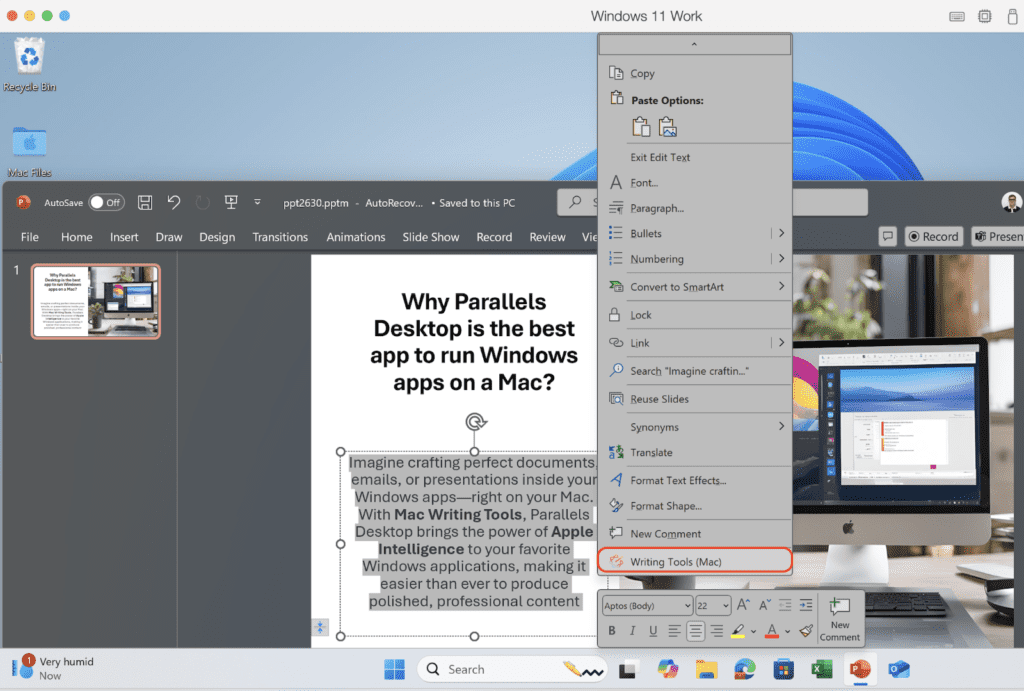
Writing Tools for Windows apps: Enhanced usability

We’ve made it even easier to use Writing Tools powered by Apple Intelligence with your favorite Windows apps. Now you can access them directly from the context menu in:

  • Microsoft Word

This integration makes polishing your text smoother than ever, whether you’re editing emails, documents, or presentations.

The 20.2.0 update also includes a range of fixes to enhance the overall stability and reliability of Parallels Desktop.

We’ve addressed key issues reported by users to ensure a smoother and more seamless experience. Learn more here.


About Parallels 
Parallels® is a global leader in cross-platform solutions, enabling businesses and individuals to access and use the applications and files they need on any device or operating system. Parallels helps customers leverage the best technology available, whether it’s Windows, Linux, macOS, iOS, Android or the cloud.

About Version 2 Digital

Version 2 Digital is one of the most dynamic IT companies in Asia. The company distributes a wide range of IT products across various areas including cyber security, cloud, data protection, end points, infrastructures, system monitoring, storage, networking, business productivity and communication products.

Through an extensive network of channels, point of sales, resellers, and partnership companies, Version 2 offers quality products and services which are highly acclaimed in the market. Its customers cover a wide spectrum which include Global 1000 enterprises, regional listed companies, different vertical industries, public utilities, Government, a vast number of successful SMEs, and consumers in various Asian cities.

Parallels® RAS 榮獲 TrustRadius 「Buyer’s Choice」獎項


Parallels 非常榮幸宣布,Parallels® RAS(遙距應用伺服器)榮獲備受推崇的 TrustRadius「Buyer’s Choice」獎項!這項殊榮不僅肯定了 Parallels 致力於提供卓越解決方案的努力,也突顯了 Parallels® RAS 對全球各行各業的深遠影響。

從強大的功能到卓越的性價比,這個獎項展現了 Parallels® RAS 如何在業界脫穎而出。同時,它更具意義的地方在於,這是基於用戶的真實反饋,也就是每天使用並信賴 Parallels 產品的客戶心聲。TrustRadius 是全球備受尊敬的 B2B 技術評價平台,以透明和真實為宗旨,僅發布經過驗證的客戶評價。能夠獲得這項認可,充分說明用戶對 Parallels® RAS 的價值與效能充滿信心,這種信心正是 Parallels 持續創新與提升的動力來源。

卓越功能:可靠且靈活的解決方案

Parallels® RAS 一直因其卓越功能而備受讚譽,這也是 Parallels 贏得 TrustRadius「Buyer’s Choice」獎項的關鍵因素之一。

根據調查,Parallels 的客戶中有 75% 評價 Parallels®RAS 提供了業界頂尖的功能。

Parallels 的解決方案支援用戶安全、無縫地遙距存取應用程式、桌面及數據,確保企業能在任何設備上隨時隨地高效運作。隨著遙距與混合辦公模式成為主流,Parallels®RAS 幫助 IT 團隊以最低的管理成本支援分布式辦公室,提升企業生產力。幾項令 Parallels®RAS 脫穎而出的核心功能包括集中化 IT 管理、簡化部署流程以及高水準的安全性。此外,Parallels 的解決方案還能無縫整合 Microsoft Azure、Azure Virtual Desktop 和 Amazon EC2 等雲端服務,特別適合擁有混合雲或多雲端架構的企業。

憑藉這些功能,Parallels®RAS 成為虛擬應用與桌面交付技術的領導者,能夠滿足各類企業的需求。

卓越性價比:為客戶創造最大價值

Parallels®RAS 獲得「Buyer’s Choice」獎項的重要原因之一是 Parallels 提供了無與倫比的性價比。

客戶一致認為,Parallels®RAS 不僅功能強大,價格也非常具競爭力,避免了傳統解決方案中常見的高昂授權與維護成本。Parallels 的定價結構讓無論是中小型企業還是大型企業,都能以合理的預算受益於先進的遙距存取技術。同時,Parallels 還提供高度可擴展的解決方案,滿足不同行業的特定需求。

West Derby School 的 IT 經理 Chris Little 在 TrustRadius 平台分享道:「我們用 Parallels®RAS 替代了過時的 Microsoft 遙距桌面方案,這讓我們能以最安全的方式向教師提供遙距桌面服務,無論他們使用何種設備。」

Parallels®RAS 的成功歸功於其簡單明確的並行授權模式,結合高品質的產品,幫助眾多企業在遙距工作浪潮中保持競爭力。

用卓越服務與客戶建立信任

TrustRadius 的「最佳關係」獎項特別關注客戶對產品整體體驗的反饋,包括再次購買的意願、產品性能是否符合預期,以及銷售與支援團隊的互動質量。

這些反饋表明,Parallels®RAS 不僅是一個解決方案,更是一個全面的支援系統 —— 從最初的產品選擇到部署及後續使用,Parallels 都全程伴隨客戶。Parallels 始終將與客戶的緊密合作放在首位,致力於了解並超越客戶的期望。同時,Parallels 的專業團隊提供快速、有效的支援,幫助客戶輕鬆解決各種挑戰。

此次獲得 TrustRadius 「Buyer’s Choice」獎項,進一步肯定了 Parallels 在客戶關係與產品創新方面的持續努力。

未來,Parallels 團隊將繼續秉持創新、實惠和以客戶為中心的理念,提供更卓越的解決方案,幫助全球企業在不斷變化的工作環境中實現突破性發展。

關於 Parallels

Parallels 是全球領先的跨平台解決方案品牌,為公司企業和個人用戶提供簡單的方式,讓他們在任何設備或操作系統上使用和存取所需的應用程式和檔案。無論是 Windows、Mac、ChromeOS、iOS、Android 還是雲端服務,Parallels 都能幫助客戶充分利用最佳技術。Parallels 解決了複雜的工程與使用者體驗問題,讓企業和個人用戶能夠隨時隨地簡單且具成本效益地使用應用程式。

About Version 2

Version 2 Digital is one of the most dynamic IT companies in Asia. The company distributes a wide range of IT products across various areas including cyber security, cloud, data protection, end points, infrastructures, system monitoring, storage, networking, business productivity and communication products. Through an extensive network of channels, point of sales, resellers, and partnership companies, Version 2 offers quality products and services which are highly acclaimed in the market. Its customers cover a wide spectrum which include Global 1000 enterprises, regional listed companies, different vertical industries, public utilities, Government, a vast number of successful SMEs, and consumers in various Asian cities.

×

Hello!

Click one of our contacts below to chat on WhatsApp

×