Summary: Cyber risk mitigation isn’t just IT’s job. Learn practical strategies to reduce threats, protect data, and keep your business resilient and secure.
Think cyber risk management is just a problem for the IT department? Think again.
Let’s rewind to the fall of 2023. MGM Resorts, a global hospitality giant, was brought to its knees. It wasn’t a super-sophisticated technical exploit that breached their defenses. It was a 10-minute phone call. A threat actor, pretending to be an employee, simply tricked the IT help desk into giving them access.
The fallout was biblical. Slot machines went dark. Digital room keys stopped working. Reservation systems crashed. The company lost millions of dollars a day, and the reputational damage was immense. This wasn’t a hypothetical scenario from a security conference; it was a real-world disaster that underscores a critical truth: waiting for cyber-attacks to happen isn’t a strategy, it’s a surrender.
Proactive cyber risk mitigation is no longer a “nice-to-have.” It’s a fundamental part of staying in business. Companies that adopt effective cyber risk mitigation strategies reduce the chance of similar disasters happening to them.
So, what are cyber risks?
Before you can build your defenses, you need to know what you’re up against. “Cyber risk” is a broad term. That’s why understanding the most common cyber threats is the first step to identifying risks and protecting your organization.
Data breaches: This is when cybercriminals get their hands on data they shouldn’t have—customer lists, employee PII, secret sauce recipes, you name it. It often happens because of a weak link, like an unpatched server or a single employee falling for a phishing scam.
Ransomware: Imagine walking into your office one morning to find every file on every computer locked with a message demanding a hefty bitcoin payment to get them back. That’s ransomware. It doesn’t just steal your data; it paralyzes your entire operation until you pay up (or, hopefully, restore from a clean backup).
Phishing: This is the art of deception. It’s the “your bank” email with a link to “verify your account.” These scams are designed to trick your people into willingly handing over the keys. This is where robust employee training becomes a critical defense.
Insider threats are some of the trickiest cybersecurity risks to handle. They could be a disgruntled employee intentionally stealing data on their way out the door or “Well-Meaning Bob” in accounting, who accidentally emails a sensitive spreadsheet to the wrong person. Because they already have legitimate access, their actions are much harder to spot.
Ignoring these cyber threats can lead to some truly business-ending consequences:
The financial bleeding: This isn’t just about the cost of an incident response plan. It’s the regulatory fines (which can be massive), the legal fees from lawsuits, and the sheer cost of lost business while your systems are down.
The trust implosion: You’ve spent years, maybe decades, building a reputation with your customers. A single breach can shatter that trust overnight. Why would customers give you their data if they don’t believe you can protect it?
The regulatory hammer: A breach doesn’t just trigger fines, but it forces your entire organization into audit mode. You’ll need to investigate, document, report, and possibly overhaul security practices to satisfy regulators. For companies under GDPR, HIPAA, or similar frameworks, that means intense scrutiny, tight deadlines, and long-term oversight that diverts focus from business as usual.
Okay, so what is cyber risk mitigation?
Let’s clear up a common misconception. Cyber risk mitigation strategies don’t mean becoming invincible. No organization, not even the NSA, can stop 100% of cyber-attacks. It’s not about building an impenetrable fortress.
A better analogy is modern home security. Effective risk management strategies in cybersecurity are about:
Reducing the likelihood: Making your house a less attractive target. You install strong locks (access controls), trim the bushes so burglars can’t hide, and have good lighting. In the digital world, this is patching vulnerabilities, implementing multi-factor authentication, and training your people.
Minimizing the impact: Accepting that someone might still get in, and being ready for it. You have an alarm system that goes off (intrusion detection systems), security cameras to see what they did, and insurance to cover the losses. This is your incident response plan, your backups, and your ability to recover quickly.
Cyber risk mitigation is the ongoing process of shrinking your attack surface while building your resilience. Effective cyber risk mitigation efforts are a blend of people, processes, and technology, all working together.
The case for being proactive
Waiting for an attack to happen before you get serious about security is like trying to buy fire insurance while your house is engulfed in flames. It’s too late, and the damage is done. A proactive approach to reducing cybersecurity risks is not just smarter; it’s essential for survival.
It’s just cheaper. Regular vulnerability assessments and patching flaws during routine maintenance are among the smartest cyber risk mitigation strategies. They cost a tiny fraction of what it costs to clean up after a full-blown ransomware attack—the difference between a $100 oil change and a $5,000 engine replacement.
It keeps the business running. Every minute your systems are down is a minute you’re not serving customers, processing orders, or generating revenue.
It keeps you out of regulatory hot water. Auditors and regulators want to see evidence of a living, breathing security program, not a dusty policy binder on a shelf.
It becomes a competitive advantage. In a world full of data breaches, being the company that can prove it takes security seriously is a powerful differentiator.
How to reduce cybersecurity risks: key strategies
Cybersecurity risk management can feel like you’re playing a frantic game of whack-a-mole, and the moles have Ph. D.s in hacking. It’s overwhelming. But building effective cyber risk mitigation strategies doesn’t mean you must become a cybersecurity expert overnight.
It’s about having a clear playbook. Let’s break down the essential strategies into practical, no-nonsense steps that show you exactly how to mitigate cyber risk.
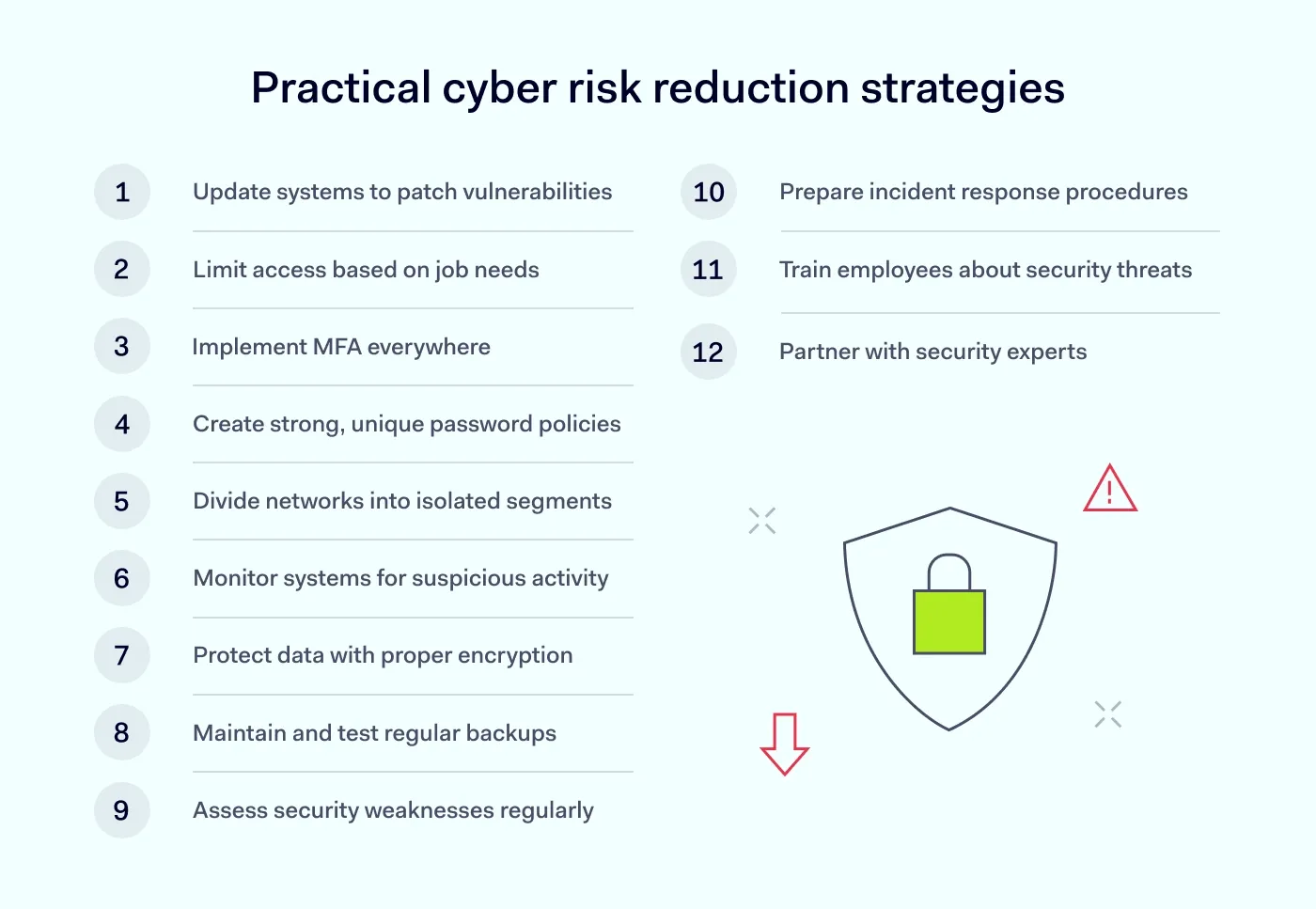
1. Patch, patch, patch!
Keeping your software and systems up-to-date is the cybersecurity equivalent of brushing your teeth. It’s a simple, daily habit that prevents a world of expensive, painful digital root canals down the line.
When companies discover a security flaw in their software, they release a patch to fix it. Cybercriminals love unpatched systems; it’s like leaving your front door unlocked.
Automate your patching process wherever possible. Use tools that automatically apply security updates to operating systems (like Windows) and common applications (like Adobe and Chrome).
2. Establish strong access controls: The velvet rope policy
Think of your network as an exclusive nightclub. Access controls are your bouncers. They enforce the principle of least privilege, which is a fancy way of saying: people only get access to what they absolutely need to do their job, and nothing more.
If an attacker compromises an account, these solutions limit the damage that threat actors can do. They might get into the marketing department’s files, but they can’t access the crown jewels in finance or engineering.
Use network access control solutions and restrict access based on roles.
3. Embrace multi-factor authentication (MFA)
If you do only one thing from this list, make it this one. Passwords alone are dead. They are stolen, guessed, and phished by the millions every day.
MFA requires a second piece of proof (besides the password) to log in. This is usually a code from a phone app, a text message, or a fingerprint.
Even if a threat actor steals an employee’s password, they can’t log in without that second factor. It single-handedly stops the vast majority of account takeover cyber-attacks. Mandate it for everything: email, VPN, cloud computing platforms, everything.
4. Use smart password policies
People are predictable. We reuse passwords, make them too simple, and write them down.
Enforce strong password requirements (length and complexity). Even better, deploy a business password manager. It generates, stores, and fills in unique, complex passwords for every site. This actually makes life easier for your employees while making you dramatically more secure.
5. Build digital bulkheads: Network segmentation
This is like the watertight compartments on a ship. If one section floods, it doesn’t sink the whole vessel. By dividing your network into smaller, isolated segments using network segmentation solutions, you contain the “blast radius” of an attack.
How it works: you put your guest Wi-Fi on a completely separate network from your corporate one. You isolate the servers that handle credit card payments from the general office network.
If a cybercriminal gets into one segment, they can’t easily move laterally across your network to steal more valuable data.
6. 24/7 digital security guard: Continuous monitoring
You wouldn’t leave your office unlocked and unattended overnight, so why do it with your network? Continuous monitoring tools catch subtle cyber threats before they turn into disasters. They are your eyes and ears, constantly watching for suspicious activity.
These systems, including intrusion detection systems (IDS), watch for signs of trouble, like a user logging in from two countries at once, a massive data download at 3 a.m., or traffic going to a known malicious server.
Actionable step: centralize your logs. Having all your security event data in one place improves network visibility and allows you to connect the dots and spot an attack before it becomes a full-blown breach.
7. Use encrypted connections
Sending unencrypted data over the internet is like mailing your company secrets on a postcard. Anyone who intercepts it can read it.
Ensure all connections are encrypted using technologies like a corporate VPN or, even better, a modern ZTNA (Zero Trust Network Access) solution. This wraps your data in a layer of gibberish that only the intended recipient can decode. This is non-negotiable for remote work and cloud computing.
8. Back up your data (and test it!)
Backups are your parachute. When a ransomware attack hits and your files are held hostage, a good backup is the only thing that will save you.
Use the 3-2-1 rule: it’s simple and it works.
3 copies of your data.
2 different types of storage media.
1 copy stored offline or off-site, safe from any network attack.
A backup you haven’t tested is just a rumor. Regularly practice restoring your data to make sure your parachute actually opens when you need it.
9. Understand your risks: Perform regular risk assessments
You can’t effectively mitigate cyber risk if you don’t know where your weaknesses are. A regular cybersecurity risk assessment is like an annual health check-up for your company’s security posture.
This process helps you identify risks by conducting vulnerability assessments to find technical flaws and evaluating threats to your business. It gives you a prioritized to-do list so you can fix the most dangerous problems first.
10. Don’t panic in a crisis: Develop an incident response plan
When an attack happens (and one day, it might), the worst thing you can do is panic. An incident response plan is one of your most crucial cyber risk mitigation strategies.
A clear, step-by-step document that outlines exactly who does what during a security breach. Who do you call? How do you isolate the affected systems? How do you communicate with customers?
Run regular “fire drills” (tabletop exercises) to make sure everyone knows their role. It’s better to feel awkward in a practice session than to be clueless during a real 3 a.m. crisis.
11. Build your human firewall: Invest in employee training
Your employees can be your greatest security asset or your biggest liability. The difference is employee training.
Don’t just force them through a boring annual PowerPoint. Use engaging, continuous training with real-world examples and simulated phishing attacks.
Create a culture of security where every employee feels empowered and responsible for protecting the company. Teach them to be suspicious, to question weird requests, and to report anything that feels “off.” Regular employee training strengthens your overall cyber risk mitigation efforts.
12. Don’t go it alone: Work with security partners
Managing risk in the modern threat landscape is a full-time job. Don’t be afraid to bring in the experts.
Partnering with a third-party security provider gives you access to specialized tools and expertise you likely don’t have in-house. They can help you implement everything from ZTNA and advanced intrusion detection systems to credential management and incident response.
Risk-reduction technologies that matter most
Let’s talk tech now. The market is flooded with tools, each promising to be the silver bullet for all your cybersecurity risks. But building effective cyber risk mitigation strategies isn’t about buying the shiniest new toy. It’s about assembling a smart, layered toolkit in which each piece has a specific job.
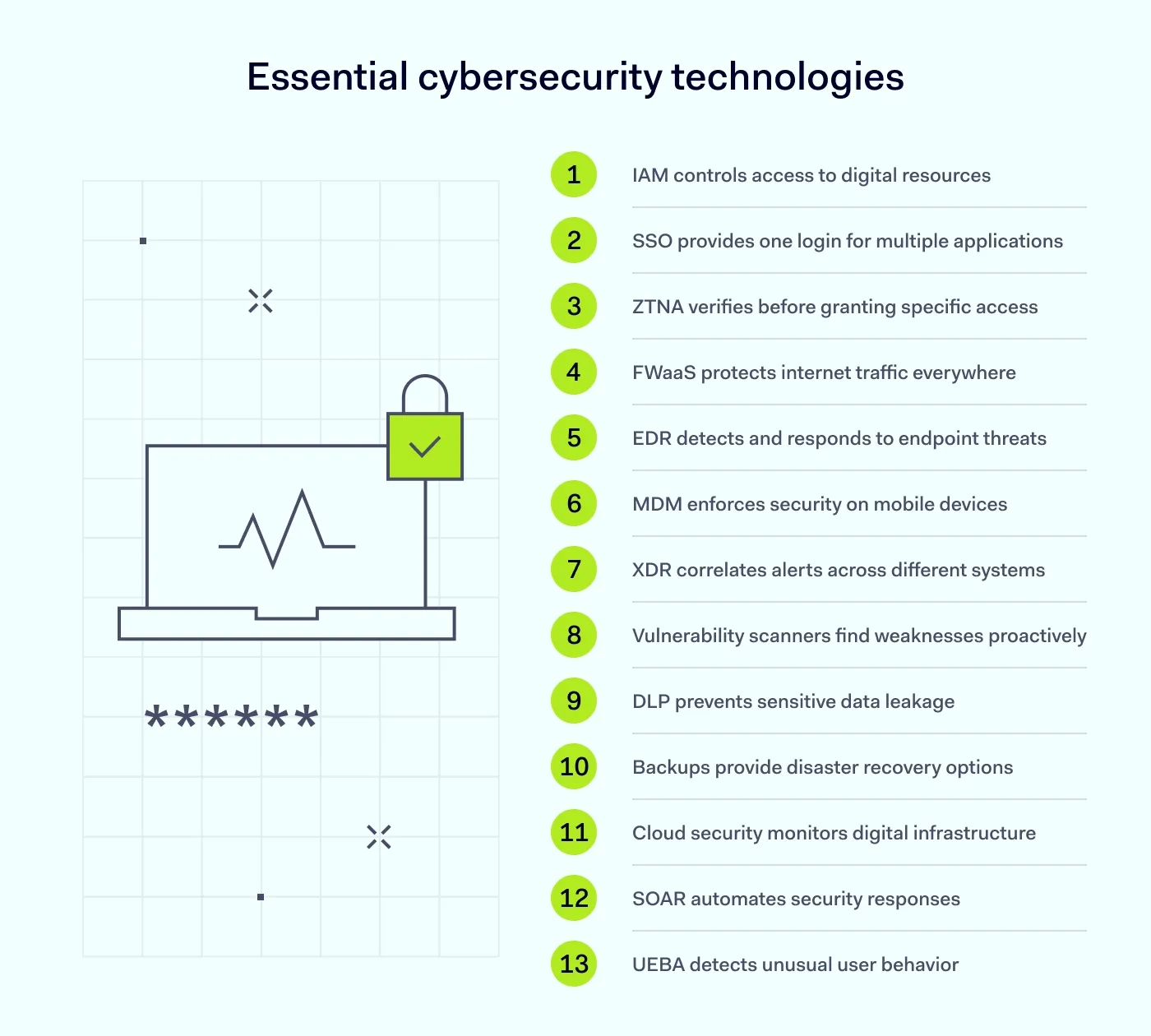
Identity and Access Management (IAM)
At its core, IAM answers two simple questions: “Who are you?” (authentication) and “What are you allowed to do?” (authorization). Think of it as the world’s most diligent bouncer for your entire digital world.
IAM systems are the central command for all user access controls. They manage who gets a key and which doors that key can open.
Many cyber-attacks don’t start with a threat actor brute-forcing their way in; they start with stolen credentials. If a bad actor has a valid username and password, they can just walk right in the front door.
Single Sign-On (SSO): Instead of juggling 50 different passwords, your employee logs in once to a central portal, which then securely grants them access to all the apps they need. It’s convenient, but more importantly, it means IT has one place to manage—and revoke—access instantly.
MFA: This is non-negotiable. This simple step single-handedly stops the vast majority of account takeover attempts. Implementing multi-factor authentication is one of the most effective ways to mitigate cyber risk.
User provisioning: If your company has an identity provider, configure user provisioning across work tools and critical systems. It streamlines onboarding and makes offboarding safer by quickly revoking access for former employees.
Secure networking (VPN, ZTNA, FWaaS)
The traditional network security model trusted anything inside the perimeter. Once you were inside the network (often via a VPN), you could access almost anything. In today’s world of remote work and cloud computing, that model is a recipe for disaster.
These technologies secure the connections between your users, your apps, and the internet, no matter where they are.
The old guard (VPN): A Virtual Private Network creates an encrypted tunnel from a user’s device to the company network. It’s like an exclusive, private highway. The problem is that the highway leads to the entire city, not just the one building you need to visit.
The new sheriff in town (ZTNA): Zero Trust Network Access is a game-changer. It operates on the principle of “never trust, always verify.” Instead of giving a user access to the whole network, ZTNA grants access to a specific application only after verifying their identity. It’s like having a bouncer at the door of every single room in your office, checking IDs every time.
Firewall-as-a-Service (FWaaS): A cloud-based security guard for all your internet traffic. It’s perfect for distributed teams because it protects everyone, whether they’re at home, in a coffee shop, or at the office, without needing a physical box in every location.
Endpoint protection and management
Your endpoints—laptops, servers, and mobile phones—are where the action happens. They’re also where most cyber threats first land. Basic antivirus isn’t enough anymore.
You need tools designed to protect the devices your team uses every day. This is a critical part of any cybersecurity risk management plan.
Endpoint Detection and Response (EDR): Think of antivirus as a security guard who checks IDs at the door. If malware does get in, EDR helps you understand how it happened and what it did.
Mobile Device Management (MDM): In the age of “Bring Your Own Device,” MDM is your rule-enforcer. It ensures that any phone or tablet accessing company data meets your security standards (e.g., has a passcode, is encrypted) and allows you to wipe the device remotely if it’s lost or stolen.
They are essential for defending your devices against today’s sophisticated cyber threats.
Threat detection and response: The security command center (XDR, IDS/IPS)
You can’t stop every single threat at the gate. Some will slip through. Your success in managing risk depends on how fast you can spot them and shut them down.
These are your “eyes and ears” on the network, looking for the tell-tale signs of an attack in progress.
Intrusion Detection/Prevention Systems (IDS/IPS): An IDS is like a silent alarm—it sees something suspicious on the network and tells you about it. An IPS goes one step further; it’s the alarm that also automatically drops the security shutters to block the threat.
Extended Detection and Response (XDR): This is the evolution. XDR is like a central intelligence hub. It pulls in alerts from your endpoints (EDR), your network (IDS/IPS), your cloud environments, and your email security, then uses AI to connect the dots. Instead of seeing five separate, low-level alerts, your team sees one correlated incident: “This attacker phished Bob, stole his credentials, and is now trying to access the finance server.” This context is crucial for a fast and effective incident response plan.
Vulnerability and risk management
Your systems have flaws. Every piece of software does. The goal of vulnerability assessments is to find those weak spots and fix them before a cybercriminal does. This is proactive cyber risk mitigation at its best.
What it is: The process of systematically scanning your systems to identify risks and security weaknesses, prioritizing them based on severity, and tracking them until they’re fixed.
How it works: Instead of waiting for the annual cybersecurity risk assessment, automated scanners continuously check your assets for known vulnerabilities (like outdated software or misconfigurations). This gives you a real-time to-do list, allowing you to patch the most critical holes first. It turns firefighting into a manageable, ongoing process.
Data Loss Prevention and backup (DLP): Protecting your most sensitive data
Some data is more valuable than others. DLP and robust backups are all about making sure your most sensitive information doesn’t walk out the door and that you can recover if the worst happens.
DLP tools act like a smart guard for your data itself. They identify, monitor, and protect sensitive info wherever it lives and travels.
A scenario: An employee is about to accidentally email a spreadsheet containing thousands of customer credit card numbers to an external address. A good DLP solution will pop up with a warning: “This file appears to contain sensitive data. Are you sure you want to send it?” In many cases, it will block the action entirely.
Backups are your “undo” button for a catastrophe like ransomware. Modern backups should be “immutable”—meaning once they’re written, they can’t be altered or deleted by anyone, including ransomware.
Cloud and SaaS security
Moving to the cloud doesn’t mean you can outsource your security responsibility. Misconfigurations in cloud computing environments (like AWS, Azure, Google Cloud) are a leading cause of major data breaches.
Cloud and SaaS security tools are specifically designed to monitor your cloud infrastructure and Software-as-a-Service (SaaS) apps (like Microsoft 365 or Salesforce) for security gaps. They act like an automated security audit, constantly checking for things like publicly exposed storage buckets, excessive user permissions, or services that aren’t compliant with regulations.
Security Automation and Orchestration (SOAR)
SOAR automates the repetitive, time-consuming tasks so the human experts can focus on actual threat hunting and investigation.
It is a platform that connects all your other security tools and automates response workflows. Example in action:
An alert for a potentially malicious file comes in from your EDR.
The SOAR platform automatically takes the file hash and runs it against multiple threat intelligence databases.
It finds a match—it’s a known piece of malware!
It automatically creates a high-priority ticket in your ticketing system, enriches it with all the data it found, and quarantines the affected endpoint. This all happens in seconds, before a human analyst has even finished their coffee. These cyber risk mitigation strategies are all about speed and efficiency.
User education and behavior analytics (UEBA)
Finally, and most importantly, remember that technology alone is not a complete solution. Your people are your first and last line of defense. Knowing how to mitigate cyber risk starts with them.
It’s a two-pronged approach combining proactive training with smart technology that learns user behavior:
Employee training: This isn’t about a boring annual slideshow. Effective training involves regular, engaging content and realistic phishing simulations to teach employees how to spot and report threats. It’s about building a culture of security.
User and Entity Behavior Analytics (UEBA): This is the tech that backs up the training. UEBA tools create a baseline of “normal” activity for every user. If a user suddenly starts accessing unusual files, logging in at odd hours, or downloading huge amounts of data, the system flags it as anomalous behavior, giving you an early warning of a potential inside threat or compromised account.
Putting it into practice with Nord Security
Alright, that was a lot of theory. So, how do you actually execute cyber risk mitigation strategies without hiring a dozen new people? This is where the right platform makes the difference.
Nord Security’s suite of network security solutions is designed to tackle these exact problems. NordLayer implements the strict Zero Trust access we talked about, ensuring users only get to the apps they need. NordPass tackles the company-wide password problem head-on, while NordStellar provides threat intelligence to help you detect potential attacks early.
They’re built to work together, giving you a cohesive security layer instead of a messy patchwork of tools. It’s about making robust cyber risk mitigation genuinely manageable. Contact sales to see how Nord Security can help your organization.