Cybersecurity is no longer a siloed concern relegated to IT departments; it’s a fundamental component of business strategy. Chief information security officers (CISOs) face mounting pressures to not only protect their organizations but also to integrate cybersecurity into the broader business framework.
This is the focus of our recent webinar, “The CISO balancing act: How to tackle rising cybersecurity pressures in 2024,” where industry experts share insights and strategies. Read further for a summary highlighting the key takeaways.
As the digital landscape expands, so do the complexities of managing cybersecurity. We’re seeing a mix of longstanding challenges and new, emerging threats that are putting unprecedented pressure on security professionals worldwide.
Our on-demand webinar provides strategic and operational insights based on extensive research and interviews with over 30 top security professionals from organizations around the globe. Whether you’re a CISO, a security analyst, or a business leader, these compiled insights will help you navigate the obstacles ahead.
Join Mark Renouf, former BBC journalist and contributor, as he engages with industry experts Tim Rhodes, managing director at Apprize360, and Kim Larsen, CISO at Keepit, to discuss key takeaways from the study, such as:
One of the most pressing challenges identified in the webinar is the need for a robust data governance framework. This is highlighted as a top priority by nearly all the CISOs and IT leaders interviewed.
Key points:
Hand in hand with data governance is the need for an effective data classification strategy. This is emphasized as a critical step before any governance framework can be successfully implemented.
Key points:
Another major theme is the crucial role of board involvement in cybersecurity strategy. Despite its importance, many organizations still lack adequate board engagement in this area.
Key points:
CISOs are increasingly focusing on creating defensible security strategies rooted in zero trust principles. This involves continuous threat modeling and analysis, ensuring that security measures can withstand scrutiny and adapt to evolving threats.
Key points:
Effective cybersecurity often depends on strong vendor partnerships. CISOs are looking for vendors who can provide not just products but comprehensive solutions and strategic advice.
Key points:
The webinar highlights the varying levels of experience and maturity among CISOs, which can significantly impact an organization’s cybersecurity effectiveness.
Key points:
As we navigate the complexities of cybersecurity in 2024, the role of the CISO is more critical than ever. Effective data governance, board involvement, strategic vendor partnerships, and continuous improvement in security strategies are vital. Organizations that prioritize these areas will be better equipped to handle the rising pressures and evolving threats in the cybersecurity landscape.
By integrating these insights into their operations, businesses can enhance their cybersecurity posture, ensuring not only protection but also resilience and strategic advantage in the digital age.

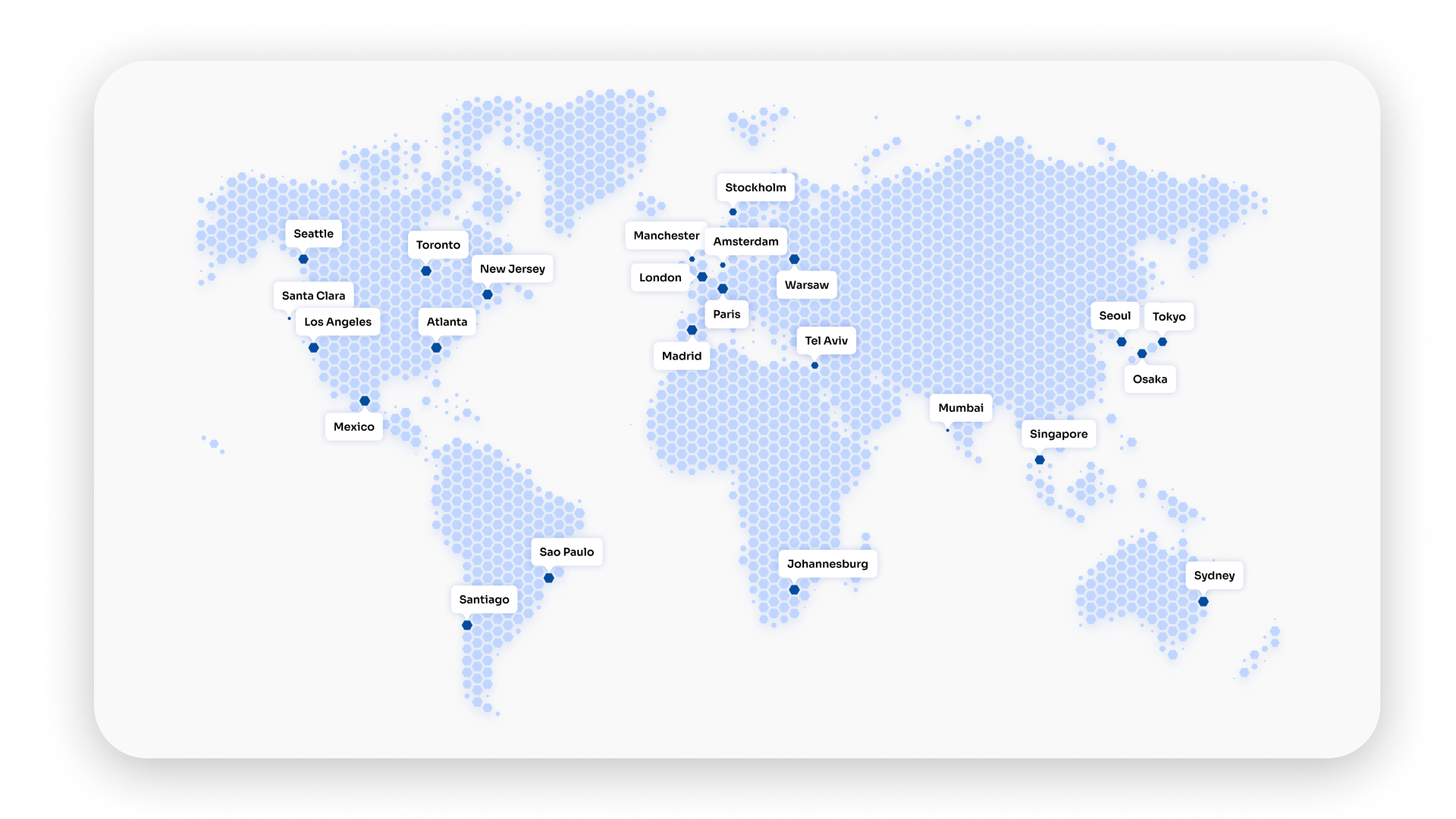
SafeDNS uses an efficient Anycast network for its DNS resolvers to deliver responsive and reliable user responses across the globe. With the ever-growing size of the Internet and increasing need for rapid and secure data exchange, DNS resolvers such as SafeDNS are key elements in preserving integrity and speed of connections to access the global network. SafeDNS also addresses challenges related to DNS attacks and DNS cache manipulation, ensuring robust protection and efficient operation.
Here’s how SafeDNS safeguards its DNS servers and ensures a high level of performance and security:
Highest Efficiency Possible. The efficiency of SafeDNS fundamentally depends on its Anycast network. An anycast network is a routing technique which uses a type of network address where the requests for the network are distributed among a number of nodes. Under this architecture, incoming requests are automatically routed to the nearest or best-connected node.
Anycast clients’ requests are distributed among different location nodes in various ways. The distribution depends on multiple conditions such as client location, client provider, upstream provider of a given node, and more. This significantly lowers the possibility of a DDoS attack on a single node, enabling the system to redistribute the load and minimize the risk of being overloaded.
Every node has its own proprietary Guardian service which protects against spam of DNS queries. Guardian communicates with DNS proxy on nodes and parses IP addresses to check whether they belong to SafeDNS clients.
The number of requests coming from each IP address is tracked and checked against botnets and other types of spammy categories. Depending on that, IP addresses get corresponding scores.
When the score surpasses a certain level, the IP address is blocked on all nodes in the network. In the situation of a DNS DDoS attack, if an IP address is detected and blocked on a certain node, then the further use of the device with the same IP address is impossible.
The average time of Guardian to illegitimate DNS traffic is one minute, which allows for illegitimate threats neutralization and stability and security of the whole DNS infrastructure.
As one of the top 10 DNS resolvers globally, SafeDNS utilizes TIER IV nodes distributed worldwide. These nodes are strategically placed to provide optimal coverage and performance. The use of TIER IV nodes, which represent the highest standard in data center and server infrastructure, ensures that SafeDNS can offer unparalleled reliability and uptime. These nodes are part of a carefully designed network configuration that enhances the security and efficiency of DNS operations.
According to a recent study, SafeDNS not only ensures fast and reliable DNS resolution but also maintains a sustainable web filtering infrastructure. This commitment to stability and security makes SafeDNS a preferred choice for users worldwide seeking dependable DNS resolution services.
SafeDNS utilizes global monitoring networks and sensors to detect early signs of DDoS attacks. These early warning systems enable swift response and mitigation, ensuring that threats are addressed before they can cause significant damage.
Cloud technologies enable SafeDNS to automatically scale resources, such as computing power and bandwidth, to handle sudden DNS traffic spikes. This scalability ensures that the DNS infrastructure remains resilient and responsive, even during periods of high demand.
By limiting bandwidth for specific types of DNS traffic or users, SafeDNS can prevent network overload. This targeted approach ensures that legitimate DNS traffic flows smoothly while malicious or excessive traffic is curtailed.
SafeDNS constructs its DNS infrastructure with redundancy and failover capabilities, which means that in case of an attack or hardware failure, the DNS traffic can be swiftly redirected to other nodes or data centers. This redundancy ensures that the network continues to operate smoothly, minimizing any disruptions for users.
To strengthen its defenses, SafeDNS teams up with top DDoS protection providers like Akamai, Cloudflare, and Arbor Networks. These partnerships add extra layers of security and expertise, making SafeDNS even more capable of defending against sophisticated and large-scale attacks.
Overall, SafeDNS is a solid choice for DNS resolution services, thanks to the robust security measures and efficient Anycast network. With advanced threat detection and mitigation strategies in place, you can trust SafeDNS to deliver high performance and strong protection against potential cyber threats.


)
After a long stint away from social media, it’s time to sit down and plug yourself back into the grid. You log into Facebook, nothing interesting there. Instagram – same stuff, different day. How about X/Twitter? What social faux pas has your favorite political figure committed today? You enter your username, a familiar password, and wait for your feed to pop up. Instead, you’re greeted by this message: “The password you entered did not match our records.”
In today’s fast-paced digital landscape, it’s not uncommon to forget a password or two. It happens to the best of us. But forgetting your X/Twitter password or getting it compromised can be particularly frustrating and disconcerting, especially given the platform’s history of data breaches.
So, whether you’ve forgotten your password or your login details are compromised, or maybe you want to keep on top of your security – this guide is here to get you through changing or resetting your X/Twitter password as painlessly as possible.
Luckily, if you already know your password and merely want to change it to keep up with your account security, changing your password is an easy and swift process.
Log into X/Twitter.
Click “More” at the bottom of the dashboard on the left.
Now select “Settings and privacy.”
Click “Your account” and select “Change your password.”
Type your “Current password.”
Now enter your new passwords twice and click “Save” to confirm the change
When creating a new password, you should be aware of the X/Twitter password requirements, which are designed to help you create a complex and unique password. The X/Twitter password requirements ask for a password to be at least 10 characters long with a mix of lower- and upper-case letters, numbers, as well as symbols. Additionally, users are asked not to use common dictionary words or phrases, which are predictable and easy to compromise.
Resetting your X/Twitter password is a simple process, whether you’re using the desktop site or the mobile app on iOS or Android devices. However, you should be aware that the following instructions can only work if you’ve supplied an extra level of authentication when setting up the X/Twitter account. Here are a few different ways that you can reset your X/Twitter password:
To reset your X/Twitter password via email, you need to:
Go to the X/Twitter login page or open the app on your mobile device.
Click the “Forgot password?” link.
Enter your email address, and click “Search.”
Select “Send email” to receive a password reset link in your inbox.
Check your email and click on the link provided in the password reset email from X/Twitter.
Enter a new password, confirm it, and click “Submit” to complete the process.
To reset your X/Twitter password via SMS text message, you need to:
Ensure that your phone number is linked to your X/Twitter account.
Go to the X/Twitter login page or open the app on your mobile device.
Click the “Forgot password?” link.
Enter the phone number, associated with your X/Twitter account, and click “Search.”
Select “Send SMS” to receive a password reset code via text message.
Enter the code received in the SMS text message and click “Submit.”
Enter a new password, confirm it, and click “Submit” to complete the process.
If you don’t have access to your email or phone number, follow these steps:
Go to X/Twitter’s Help Center.
Select “I need help resetting my password.”
Complete the form with the required information. Provide all additional information about your account.
X/Twitter support will review your request and may contact you for further information before resetting your password.
Securing your X/Twitter account is crucial to protect your personal information and avoid unauthorized access. The following tips are designed to help you fortify the security of your X/Twitter account.
1. Enable password reset protection.
Enable the password reset protection feature on your X/Twitter account and add an extra layer of security when resetting your password. To enable this functionality, you need to:
Click on your profile icon and select “Settings and privacy.”
Choose “Account” and then click on “Security settings.”
Toggle on the “Password reset protection” option.
Save the changes.
With this feature enabled, you’ll be required to provide additional information when attempting a password reset, making it more difficult for hackers to gain access to your account.
2. Set up two-factor authentication (2FA).
Two-factor authentication is a powerful security measure that requires you to provide a second form of identification when logging in, such as a code sent to your mobile device. This makes it much harder for someone to access your account, even if they know your password. To set up 2FA on X/Twitter:
Click on your profile icon and select “Settings and privacy.”
Choose “Account” and then click on “Security settings.”
Click “Two-factor authentication” and choose your preferred method (text message, authentication app, or security key).
Follow the on-screen instructions to complete the setup process.
By implementing 2FA, you’ll enjoy greater peace of mind knowing your account has an additional layer of protection.
3. Watch out for fake emails and phishing attempts.
Cybercriminals often use phishing emails to trick unsuspecting users into providing sensitive information. These emails often look like they’re from X/Twitter. The sophistication of social engineering scams in recent years has skyrocketed. To avoid falling for such scams:
Verify the sender’s email address before opening any email that claims to be from X/Twitter.
Keep an eye out for inconsistencies in the email’s design, grammar, or links.
Never click on suspicious links or download attachments from unknown sources.
Never provide sensitive information via email, even if the message appears to be legitimate.
4. Switch to passkeys.
If you’re really serious about securing your X/Twitter account, it’s time to rethink your reliance on passwords. Instead, consider a safer alternative: passkeys. They represent a novel authentication approach that allows users to securely access their accounts and devices through passwordless methods such as biometrics, leveraging unique characteristics of individuals, including fingerprints, voice patterns, or even iris scans. In January 2024, X introduced passkey support for iOS devices, providing users with a more secure login option. So, if you own an iPhone or iPad, switch to passkeys and boost your online security today.
By following these tips and remaining vigilant, you’ll significantly improve the security of your X/Twitter account and enjoy a safer online experience.
In today’s digital era, the security of your passwords is a top priority and that is where NordPass can offer a lot of help. With NordPass, you can forget the hassle of remembering multiple passwords and enjoy a smoother browsing experience without compromising your security.
NordPass uses the XChaCha20 encryption technology to deliver unmatched security for your passwords. This advanced encryption ensures that your passwords and other sensitive information remain secure at all times.
In addition to helping you secure and use passwords more effectively, NordPass also lets you bid farewell to passwords altogether for even greater security and convenience. This is made possible thanks to NordPass’s support for passkeys. With them, you can quickly and safely log in to your online accounts without passwords. Instead, you can use, for example, a fingerprint scanner or other biometric tools to get instant access.
NordPass also enhances your online experience through its autosave and autofill features. When setting up a new account or updating your password, NordPass seamlessly saves the information in your encrypted vault.
The Autofill function guarantees you’ll never have to manually type out your login details again. Once you’ve saved your login credentials in NordPass, the app will automatically populate the necessary fields when you return to the site. This not only saves time but also mitigates the risk of typing blunders that could result in losing access to your account.
These days, a password manager is an essential tool for anyone who wishes to remain secure online. Secure your digital life by making NordPass an integral security tool in your toolbox. Try it now, and discover how smooth and secure life online can be with NordPass.
Click one of our contacts below to chat on WhatsApp