Skip to content

Is this download safe? Cybersecurity tips for businesses

Summary: Businesses face rising cyber threats from unsafe downloads, making real-time malware protection essential. Implementing strategies like file scanning and training can safeguard sensitive data.

Cyber-attacks are on the rise, and one of the most common ways businesses fall victim is through unsafe downloads. Whether it’s an email attachment or a downloadable file from a website, harmful software can sneak in and compromise sensitive information.

The antivirus market is expanding rapidly due to increased demand for robust cybersecurity solutions, driven by rising threats such as ransomware and phishing. More businesses see the importance of effective antivirus measures in mitigating risks.

For organizations, ensuring every download is safe is a critical part of cybersecurity.

Key takeaways

  • Unsafe downloads are a common entry point for malware and other threats.
  • Businesses face greater risks than individuals due to valuable data and sensitive information.
  • Simple security measures like scanning files and using antivirus software can prevent threats.
  • Solutions like NordLayer provide real-time malware protection for safer downloads.

Why download safety is critical for businesses

Businesses are prime targets for cybercriminals because they store vast amounts of sensitive data, including customer information and financial records. A single unsafe download can introduce malicious software, leading to severe consequences such as data breaches, operational disruptions, and significant financial losses.

Cybersecurity reports indicate that phishing emails and malicious downloads are among the leading causes of cyber incidents. Unsuspecting users often fall victim to harmful software hidden in email attachments or compromised websites, accidentally opening the door to threats such as ransomware and spyware.

Understanding the risks of malware

The risks associated with malware are profound. Firstly, data breaches can occur, resulting in unauthorized access and theft of private information, including customer records and financial data. This not only disrupts business operations but also exposes companies to legal and compliance issues with data protection regulations.

Moreover, operational disruptions can appear, particularly from ransomware attacks that encrypt critical files and systems, making them inaccessible until a ransom is paid or a solution is found. Such downtime can lead to lost sales, missed opportunities, and lasting damage to the business’s reputation.

Finally, the financial loss from malware attacks can be substantial. This includes direct ransom payments, recovery efforts by cybersecurity experts, potential lawsuits, regulatory fines for non-compliance, and long-term revenue losses due to reputational damage.

Businesses must prioritize download safety to safeguard their sensitive data, maintain operational continuity, and protect their financial well-being.


Common threats hiding in file downloads

Understanding the various threats hiding in file downloads is crucial for maintaining robust cybersecurity.

Malicious email attachments

One of the most frequent ways businesses download malicious software is via email. Cybercriminals often send emails containing infected files, such as fake invoices or reports, hoping uninformed users will open them. An email virus can quickly spread across a company’s network, causing widespread damage.

Office documents with hidden malware in macros

Files like Word or Excel documents may carry hidden viruses through macros—small programs that automate tasks. When an unaware user enables macros, malware executes and infects the system. These types of attacks are popular because they appear as legitimate business documents.

Compressed files containing viruses

Bad actors often hide infected software inside compressed files (.zip or .rar). Users may download and extract these files, unknowingly activating harmful executable files that can compromise the business network.

That’s why businesses must implement strategies to prevent malicious software downloads effectively.

How to prevent malicious software downloads

Taking proactive measures to prevent malicious downloads is vital for securing your business environment.

1. Verify the source before downloading files

Always check the source before downloading files. Only download from trusted websites and official vendors. Be cautious with attached files, especially from unknown senders. If something seems suspicious, avoid clicking on it. For instance, legitimate companies often use secure URLs (https://) and clear sender addresses.

2. Scan files before downloading

Using a virus scanner to scan files before downloading can prevent potentially harmful infections. Tools like the NordVPN File Checker allow businesses to check downloadable files for hidden threats quickly. Additionally, NordLayer’s real-time malware protection ensures that any malicious software is automatically blocked during the download process.

3. Train employees on how to avoid suspicious files

Human error is a major cause of security breaches. Conduct regular training sessions to help employees recognize phishing emails, suspicious email attachments, and unsafe websites. Show them how to identify potentially dangerous downloads and what to do if they encounter them.

4. Use proper antivirus software and keep it updated

Install reputable anti-malware software on all business devices and ensure it is always up to date. Antivirus software is essential for detecting and blocking various threats from downloaded files. Most Americans (88%) consider antivirus software an effective measure against cyber-attacks, showing how important it for keeping businesses safe.

How to stop malware before it starts

5. Enable browser security features

Activate built-in browser security settings to block harmful websites and downloads. Many browsers offer phishing protection and automatic scanning of digital files. Regularly review and adjust these settings to ensure maximum protection, as cybercriminals continually evolve their tactics.

6. Restrict download permissions

Limit downloading capabilities to authorized users. This reduces the risk of employees downloading harmful software from unsafe sources. Implement role-based access controls (RBAC) to ensure only those who need to download files can do so.

7. Monitor and audit download activity

Use security tools to track and review download activity. Monitoring downloads helps identify potentially dangerous behavior and prevent security breaches. Regular audits can provide insights into download patterns, allowing businesses to adapt their security measures accordingly.

With these preventative strategies, organizations can significantly reduce their exposure to malware threats and create a safer digital space for their employees. Adding robust firewall solutions can help businesses further improve their security.

How NordLayer can help

The toggle-ready network security platform NordLayer offers advanced security solutions to protect businesses from unsafe downloads and other cyber threats. With real-time malware protection, NordLayer automatically scans downloaded files—including types like .exe, .pdf, .apk, and .dll—and blocks potentially dangerous software.

Additionally, NordLayer’s comprehensive threat prevention features include:

By combining all of the above, NordLayer effectively helps businesses protect their sensitive information and ensure safe operations for their teams.

Stay safe, stay secure—because in cybersecurity, prevention is always better than a cure.


About NordLayer
NordLayer is an adaptive network access security solution for modern businesses – from the world’s most trusted cybersecurity brand, Nord Security.

The web has become a chaotic space where safety and trust have been compromised by cybercrime and data protection issues. Therefore, our team has a global mission to shape a more trusted and peaceful online future for people everywhere.

About Version 2 Digital

Version 2 Digital is one of the most dynamic IT companies in Asia. The company distributes a wide range of IT products across various areas including cyber security, cloud, data protection, end points, infrastructures, system monitoring, storage, networking, business productivity and communication products.

Through an extensive network of channels, point of sales, resellers, and partnership companies, Version 2 offers quality products and services which are highly acclaimed in the market. Its customers cover a wide spectrum which include Global 1000 enterprises, regional listed companies, different vertical industries, public utilities, Government, a vast number of successful SMEs, and consumers in various Asian cities.

What Is the Difference Between Phishing and Spamming?

Have you ever received an email that looked like it was from your bank, PayPal, or a well-known company, but something seemed off about it? Maybe it had a sense of urgency, asking you to click on a link and update your account information immediately.

If so, you were the target of a phishing attempt with the aim of accessing your sensitive personal and financial information. However, another type of nuisance email you might receive is spam, which is not the same as phishing. 

Although spam may be annoying, to say the least, it does not feature the same degree of danger as phishing, which is exactly what you’ll learn about today. 

Specifically, we’ll cover the difference between phishing and spam so you can easily identify them and stay protected against the numerous cyber threats you’ll undoubtedly be faced with. 

So, what’s the difference between phishing and span? Keep reading to find out how to distinguish between them. 

Let’s start by defining what phishing is.  

Key Takeaways

  • Phishing involves targeted, deceptive tactics to steal sensitive information, while spam focuses on bulk, often commercial messages.
  • Employee training, including phishing simulations, is critical for fostering awareness and reducing human vulnerabilities.
  • Multi-layered email security, including advanced threat detection and authentication protocols, is essential to prevent attacks.
  • Collaborating with Managed Service Providers (MSPs) provides expertise, proactive threat monitoring, and tailored security solutions.
  • Incident response planning, from role definition to post-attack analysis, ensures rapid containment and recovery after a breach.
  • Strong authentication practices, such as multi-factor authentication and password management, fortify access points against unauthorized entry.

What Is Phishing?

Phishing is a sophisticated form of cybercrime in which attackers employ deceptive tactics to manipulate individuals into divulging sensitive information, such as login credentials, credit card details, or other personal data. It is also the most common form of cyber attack that both individuals and businesses face. 

These attacks typically involve fraudulent emails, messages, or websites designed to closely mimic legitimate entities and exploit trust.

Phishing schemes rely heavily on social engineering techniques, leveraging psychological manipulation to evoke emotions like fear, urgency, or greed. Attackers often pressure victims to act impulsively by presenting dire consequences, such as account suspension or enticing rewards, making critical thinking a secondary response.

One hallmark of phishing is impersonation. Attackers frequently masquerade as trusted organizations, such as banks, government agencies, or well-known online platforms. 

They increase their credibility by crafting messages that appear authentic using spoofed email addresses, professional branding, and familiar layouts.

Phishing emails commonly include malicious links that redirect victims to counterfeit websites. There, they are prompted to enter sensitive information. These sites are meticulously designed to mimic genuine login pages, deceiving even vigilant users. 

Furthermore, phishing attempts may carry attachments laced with malware, enabling attackers to infiltrate devices, steal data, and compromise security systems.

Let’s see what a classic phishing email might look like. 

Example of a Phishing Email

Consider a scenario where you receive an email that seems to originate from your bank. The subject line reads, “Urgent: Your Account Has Been Suspended.” 

The email claims that suspicious activity has been detected on your account and urges you to verify your information immediately to prevent your account from being locked.

The message contains a link to what appears to be your bank’s login page. However, a closer examination of the URL reveals subtle discrepancies, such as a slight variation in the domain name or spelling, all clear indicators of a phishing attempt.

If you click the link and enter your login credentials, your sensitive information will be transmitted directly to the attackers. With access to your account, they could engage in identity theft, execute unauthorized transactions, or compromise other accounts tied to your email address.

This example underscores the importance of scrutinizing email content, verifying URLs, and remaining cautious about unsolicited requests for personal information, especially when accompanied by urgency or threats.

Now that we know what phishing is, let’s define spam. 

What is Spam?

Spam refers to unsolicited and irrelevant emails sent in bulk to a large group of recipients. Unlike phishing, which uses tailored and targeted messages to deceive specific individuals, spam adopts a broad, indiscriminate approach, aiming to engage a small fraction of recipients.

Spammers typically rely on automated tools to gather email addresses from various sources, such as websites, forums, or leaked databases. These addresses are then used to distribute mass emails that often promote products, services, or scams, without consideration for the recipients’ interests or consent.

Although spam emails are primarily annoying and clutter your inbox, they can still present security risks. 

Some spam messages may include malicious links or attachments, which, when interacted with, can infect your device with malware or direct you to fraudulent websites. This overlap highlights the importance of vigilance in handling unsolicited emails to safeguard your personal and digital security.

Let’s see what a typical spam email might look like. 

Example of a Spam Email

Imagine opening your inbox to find an email with the subject line: “Get Rich Quick with This Amazing Opportunity!” The message, sent from an unrecognized email address, promises the chance to earn thousands of dollars per week from home, requiring no prior experience.

The email provides only vague details about the supposed opportunity while urging immediate action, warning that spots are limited. It may include links directing you to a website that claims to offer more information or requires you to sign up.

This is a textbook example of spam. The sender is not genuinely interested in your success but instead attempts to entangle you in a dubious scheme or sell questionable products. Interacting with such emails wastes your time and money and exposes you to potential security threats, such as phishing or malware.

With both phishing and spam explained, let’s determine what makes them different. 

Key Differences Between Phishing and Spam

While both phishing and spam can be unwelcome nuisances in your inbox, several key differences between the two are important to understand. These differences include intent, targeting, personalization, and consequences. 

Here’s what sets phishing apart from spam: 

Intent

The core difference between phishing and spam lies in their intent. Phishing emails are crafted maliciously to deceive recipients into revealing sensitive information, such as login credentials, financial details, or personal data. 

The end goal is often identity theft, unauthorized access to accounts, or fraudulent transactions. Attackers exploit the stolen information for personal gain or to execute further attacks, often causing significant harm to individuals or organizations.

By contrast, spam is largely commercial. Spammers distribute bulk emails to promote products, services, or scams to drive traffic or generate sales. 

While spam can sometimes include malicious links or attachments, its primary goal is not to steal sensitive information directly. Instead, it serves as a mass-marketing tool that may occasionally carry risks.

Targeting

Phishing attacks often employ a targeted approach. Cybercriminals may research to tailor emails to specific individuals or organizations, a tactic known as spear phishing. 

These emails appear more relevant and credible, increasing the likelihood of deception. For instance, an attacker might impersonate a trusted colleague or service provider with information specific to the recipient.

Spam, in contrast, lacks specificity. Spammers send generic emails indiscriminately to a large pool of recipients. This broad, untargeted approach relies on sheer volume, hoping a small percentage of recipients will engage with the content.

Personalization

Phishing emails frequently include personalized details, such as the recipient’s name, job title, or recent activities, gleaned from sources like social media, professional profiles, or data breaches. 

This personalization enhances their credibility and makes the recipient more likely to trust and act on the email.

Spam emails, on the other hand, are impersonal and often generic. They commonly use broad salutations like “Dear Customer” or “Hello,” with content irrelevant to the recipient’s specific interests or circumstances. This lack of personalization is a clear indicator of spam.

Consequences

Falling victim to a phishing attack can have serious consequences. Disclosing sensitive information can lead to identity theft, unauthorized account access, or fraudulent financial transactions. 

Victims often face financial loss, reputational damage, and a lengthy recovery process, including reporting fraud and securing compromised accounts. These dire consequences apply to individuals and businesses alike. 

For example, phishing attacks cost organizations in the US an average of $9.36 million annually, illustrating the severe monetary impacts that these attacks can have. 

On the other hand, while typically less dangerous, spam emails can still pose risks if they contain malicious links or infected attachments. 

Clicking these links or downloading attachments can compromise your device’s security, lead to malware infections, or direct you to fraudulent websites. Although less severe than phishing, the potential harm from engaging with spam should not be underestimated.

How Do Phishing Attacks Work?

Phishing attacks are a sophisticated blend of deception, psychological manipulation, and technical strategies designed to extract sensitive information or gain unauthorized access. Understanding the detailed processes behind these attacks reveals their complexity and underscores the importance of vigilance.

Here’s a detailed explanation of how phishing attacks work: 

Deception: Impersonating Trusted Entities

Deception forms the backbone of phishing schemes. Attackers often impersonate trusted entities, using these organizations’ perceived authority and credibility to lower the victim’s guard. 

This impersonation is executed with remarkable precision, involving multiple elements to create an illusion of legitimacy. These could involve fake email addresses and domains, professional branding, and false contexts. 

Spoofed Email Addresses and Domains

Attackers frequently use spoofed email addresses that closely resemble official ones, often with minor variations that are hard to detect. 

For instance, an email might appear to originate from “security@paypai.com” instead of “security@paypal.com.” These slight deviations in domain names are designed to deceive the recipient into believing the email is genuine.

Use of Professional Branding

Phishing emails often mimic the design and branding of legitimate companies. Logos, color schemes, and even the formatting of official correspondence are replicated to enhance authenticity. Attackers may also include privacy disclaimers or links to genuine customer service pages to further bolster their ruse.

False Contexts and Pretexts

Phishers craft convincing scenarios to justify their communication. For example, an email might claim to be a security alert from your bank requesting immediate verification of your account details due to “unusual activity.” These fabricated narratives are carefully chosen to exploit common concerns and prompt action without scrutiny.

Psychological Manipulation: Exploiting Urgency and Fear

Phishing attacks rely heavily on psychological tactics to manipulate victims. By exploiting emotions such as fear, urgency, or greed, attackers aim to cloud judgment and push recipients into hasty decisions.

Urgency as a Manipulative Tool

One of the most common tactics is creating a false sense of urgency. Messages often convey impending consequences if immediate action is not taken. Examples include warnings about account suspension, fraudulent transactions, or expiring subscriptions. This tactic pressures victims to respond quickly, bypassing their usual caution.

Fear-Inducing Scenarios

Attackers also weaponize fear to coerce compliance. For instance, a phishing email might suggest unauthorized access to your account and urge you to reset your password immediately. The fear of losing control over sensitive accounts often compels recipients to act without verifying the message’s authenticity.

Enticements and Rewards

While deception and psychological manipulation set the stage, phishing attacks’ technical components enable attackers to harvest sensitive information or compromise systems. Malicious links and attachments are two primary tools used to achieve these objectives.

Technical Tactics: Malicious Links and Attachments

While deception and psychological manipulation set the stage, the technical components of phishing attacks enable attackers to harvest sensitive information or compromise systems. Malicious links and attachments are two primary tools used to achieve these objectives.

Malicious Links

Phishing emails often include links that appear to lead to legitimate websites but are, in reality, fraudulent. 

These links are meticulously crafted to resemble authentic URLs, incorporating minor alterations that are easy to overlook. For example, a link may display “www.bank.co” instead of “www.bank.com.”

Once clicked, these links typically redirect victims to phishing websites, often convincing replicas of legitimate login pages. These sites capture any information entered, such as usernames, passwords, or credit card details, and relay it to the attackers in real time.

URL Masking Techniques

Attackers employ various techniques to obscure the true destination of their links. These include shortening URLs using services like bit.ly, embedding malicious links within legitimate-looking text, or dynamically redirecting users through multiple domains to confuse detection efforts.

Malicious Attachments

Attachments in phishing emails are another common method of delivery for malicious payloads. These files, often disguised as invoices, receipts, or official documents, are embedded with harmful code. 

Upon opening, they execute scripts or macros that:

  • Install malware, such as keyloggers, spyware, or ransomware.
  • Provide attackers with remote access to the victim’s device.
  • Extract sensitive information stored on the system or network.

Attachments may come in various formats, including PDFs, Word documents, Excel spreadsheets, or ZIP files. Each format is chosen based on its ability to bypass common security measures and its perceived legitimacy.

Advanced Tactics: Spear Phishing and Smishing

Phishing attacks are not limited to generic, mass-distributed emails. Advanced tactics like spear phishing and smishing add layers of sophistication, making them more effective and harder to detect.

Here’s what spear phishing and smishing involve:

Spear Phishing: Precision Targeting

Spear phishing takes phishing to a more personalized level, targeting specific individuals or organizations. Attackers often research their targets extensively, gathering details such as names, job titles, or recent activities from public sources like social media or company websites.

For instance, a spear-phishing email aimed at a company executive might reference an upcoming project or meeting, lending credibility to the request. 

By tailoring the message to the recipient’s context, attackers increase the likelihood of success. This technique is especially dangerous in corporate environments, where compromised accounts can lead to large-scale breaches.

Smishing: Exploiting Mobile Vulnerabilities

Smishing, or SMS phishing, takes phishing tactics to text messages, leveraging the trust users often place in their mobile devices. These attacks are crafted to appear as legitimate communications, mimicking alerts from banks or well-known service providers.

The messages frequently include links to phishing sites or instructions to call fraudulent customer service numbers designed to trick recipients into revealing sensitive information.

Mobile platforms, with their smaller screens and limited ability to display full URLs, make it easier for attackers to mask malicious content and deceive users. This combination of trust and technical limitations makes smishing a particularly effective and insidious form of phishing.

Multi-Step Attacks: Combining Methods

Phishing campaigns often involve multiple stages to maximize their effectiveness. For instance, an attacker may send a generic phishing email to collect basic credentials. 

Once these are obtained, they might escalate the attack by deploying spear-phishing emails to compromise additional accounts or gain access to more sensitive data.

Another common escalation involves distributing malware through a phishing email and later using the infected device to launch more targeted attacks against the organization’s network. This layered approach makes phishing one of the most versatile and dangerous cyberattack methods.

Start learning how unified detection and response can protect organizations from phishing and other cyber attacks today. 

How Can Businesses Protect Against Phishing and Spam?

Implementing strong defenses against phishing and spam requires a multi-faceted approach integrating technology, processes, and human awareness. Below, we explore strategies to safeguard your organization against phishing and spam, including employee education, multi-layer email security, partnering with MSPs, and strong authentication practices.

Here’s how to protect your business from phishing and spam: 

Employee Education

Effective email security begins with well-informed employees who can identify and respond to potential threats. Phishing attacks frequently target human vulnerabilities, making comprehensive training programs essential.

Here’s how to keep employees up to date:

Regular Training Programs

Conduct periodic training sessions to educate employees about the latest phishing tactics, including email spoofing, suspicious links, and fraudulent attachments. These sessions should also emphasize identifying social engineering attempts, such as creating urgency or fear to manipulate recipients into revealing sensitive information.

Simulated Phishing Campaigns

Use simulated phishing exercises to test employees’ awareness and response. By mimicking real-world phishing scenarios, these exercises help identify gaps in knowledge and improve overall readiness without exposing the organization to real risk.

Security Reporting Culture

Encourage a culture where employees feel comfortable reporting potential threats without fear of repercussions. Create clear protocols for escalating suspicious emails to the IT team or designated security personnel for further investigation.

Multi-Layered Email Security

Relying solely on employee vigilance is insufficient; advanced email security solutions must be implemented to detect and block threats before they reach inboxes. Advanced threat detection, URL scanning, and authentication protocols are essential.

Here’s how to bolster your email security:

Advanced Threat Detection and Filtering

Deploy email security platforms equipped with AI and machine learning to analyze email content, detect anomalies, and identify phishing patterns. These systems can block malicious messages in real time, reducing the burden on employees.

URL and Attachment Scanning

Integrate solutions that scan email links and attachments for malicious content. Real-time sandboxing environments can test potentially harmful files or URLs in isolation, ensuring their safety before delivery.

Email Authentication Protocols

Enforce protocols like SPF (Sender Policy Framework), DKIM (DomainKeys Identified Mail), and DMARC (Domain-based Message Authentication, Reporting, and Conformance). These tools verify the legitimacy of email senders, reduce spoofing risks, and provide visibility into unauthorized domain use.

MSP Partnerships

Managed service providers (MSPs) specializing in cybersecurity offer invaluable expertise, tools, and services tailored to defend against phishing and spam attacks. They can provide comprehensive security, threat monitoring, and tailored security audits.

Here’s how an MSP can help keep your valuable data and finances safe:

Comprehensive Security Services

Select an MSP that provides end-to-end email security, including advanced filtering, threat detection, and incident response capabilities. Ensure their scalable solutions adapt to your organization’s growth and changing needs.

Proactive Threat Monitoring

MSPs offer 24/7 monitoring, allowing for rapid identification and neutralization of threats. Their constant vigilance minimizes the potential for breaches to escalate into larger incidents.

Tailored Security Audits and Training

Partnering with an MSP ensures your organization benefits from regular security audits and updated training programs. These services keep your defenses aligned with the evolving threat landscape.

If you’re an MSP who needs to provide clients with unified detection and response, book a demo with Guardz today

Incident Response Planning

Even with robust defenses, phishing and spam attacks may occasionally succeed. A well-structured incident response plan can limit damage and expedite recovery. This plan includes defining roles, planning for incident containment and recovery, and conducting post-incident analysis.

Here’s how to engage in incident response planning:

Defining Roles and Responsibilities

Establish an incident response team with clearly defined roles to ensure a coordinated effort during an attack. Responsibilities should include isolating affected systems, preserving evidence, and notifying stakeholders.

Incident Containment and Recovery

Plan for rapid containment measures, such as quarantining compromised accounts or systems. Develop a recovery strategy that includes restoring data from secure backups and verifying the integrity of systems before resuming operations.

Post-Incident Analysis

Conduct thorough reviews of each incident to identify vulnerabilities and areas for improvement. Use findings to refine response protocols, enhance employee training, and adjust security measures.

Strong Authentication Practices

Authentication protocols such as MFA and password management policies are essential for preventing unauthorized access via compromised credentials.

Here are the best authentication practices to employ: 

Multi-Factor Authentication (MFA)

Implement MFA across all organizational accounts. MFA significantly reduces the likelihood of successful phishing attacks by requiring an additional verification factor beyond passwords.

Password Management Policies

Enforce strong password policies that require complex, unique credentials. Use password managers to generate and securely store passwords, minimizing reliance on human memory.

System Updates and Patch Management

Regularly updating software and systems ensures that vulnerabilities exploited by attackers are addressed promptly. Automated updates and vulnerability scanning are two main parts of the equation.

Here’s what you need to know about system updates and phishing: 

Automated Updates

To reduce the risk of oversight, enable automated updates for operating systems, email clients, and security software where possible.

Vulnerability Scanning

Conduct periodic vulnerability assessments to identify outdated systems or unpatched software within your network. Address these issues promptly to prevent exploitation.

By combining employee education, advanced email security tools, strategic partnerships, and robust response plans, businesses can create a multi-layered defense against phishing and spam. 

This approach ensures both proactive prevention and swift action in the event of an attack, safeguarding sensitive data and maintaining operational integrity.

Final Thoughts: Protecting Yourself from Phishing and Spam

Protecting businesses from phishing and spam requires a comprehensive and multi-layered approach, combining technical defenses, employee awareness, and robust response strategies. 

With its targeted and malicious intent, phishing poses severe risks to organizations, including data breaches, financial loss, and reputational damage. While less targeted, spam can still lead to security vulnerabilities if not managed effectively.

To guard against these threats, businesses should invest in employee education, implement advanced email security measures, and enforce strong authentication practices. 

Partnering with managed service providers (MSPs) for expert insights and taking advantage of unified cybersecurity platforms ensures a proactive defense against emerging threats for SMBs. 

If you have a small or medium-sized business, employing an MSP that utilizes Guardz cybersecurity solutions with advanced phishing protection is an excellent option. 

By integrating these practices, businesses can reduce the likelihood of successful attacks, maintain operational integrity, and build a resilient cybersecurity posture.

With vigilance, continuous improvement, and cutting-edge tools, organizations can mitigate the risks of phishing and spam, protecting their data, systems, and reputation in an increasingly interconnected digital landscape.

Join countless MSPs using Guardz to protect their clients from online threats. 


About Guardz
Guardz is on a mission to create a safer digital world by empowering Managed Service Providers (MSPs). Their goal is to proactively secure and insure Small and Medium Enterprises (SMEs) against ever-evolving threats while simultaneously creating new revenue streams, all on one unified platform.

About Version 2 Digital

Version 2 Digital is one of the most dynamic IT companies in Asia. The company distributes a wide range of IT products across various areas including cyber security, cloud, data protection, end points, infrastructures, system monitoring, storage, networking, business productivity and communication products.

Through an extensive network of channels, point of sales, resellers, and partnership companies, Version 2 offers quality products and services which are highly acclaimed in the market. Its customers cover a wide spectrum which include Global 1000 enterprises, regional listed companies, different vertical industries, public utilities, Government, a vast number of successful SMEs, and consumers in various Asian cities.

Building a True Zero Trust Architecture with Thinfinity® Workspace

building-zero-trust-architecture-thinfinity-workspace


Introduction

Why is Zero Trust the Future of Enterprise Security

As cyber threats evolve, traditional security models like VPNs and firewalls fail to protect distributed workforces and hybrid IT environments. Zero Trust Architecture (ZTA) is the new security paradigm, ensuring that no user or device is trusted by default, requiring continuous verification.

However, many organizations struggle with Zero Trust implementation, mistakenly assuming it’s just a product purchase rather than a strategic security transformation.

Thinfinity Workspace provides a comprehensive Zero Trust Network Access (ZTNA) solution, enabling secure remote accessgranular policy enforcement, and seamless identity management—without the complexity of legacy VPNs. 

In this guide, you’ll learn:

 The biggest challenges in Zero Trust adoption (and how to fix them)

 How Thinfinity Workspace enforces Zero Trust principles

 The cost benefits of ZTNA vs. legacy VPN solutions

 A step-by-step Zero Trust implementation roadmap


Key Challenges in Zero Trust Implementation (and How to Solve Them with ZTNA)

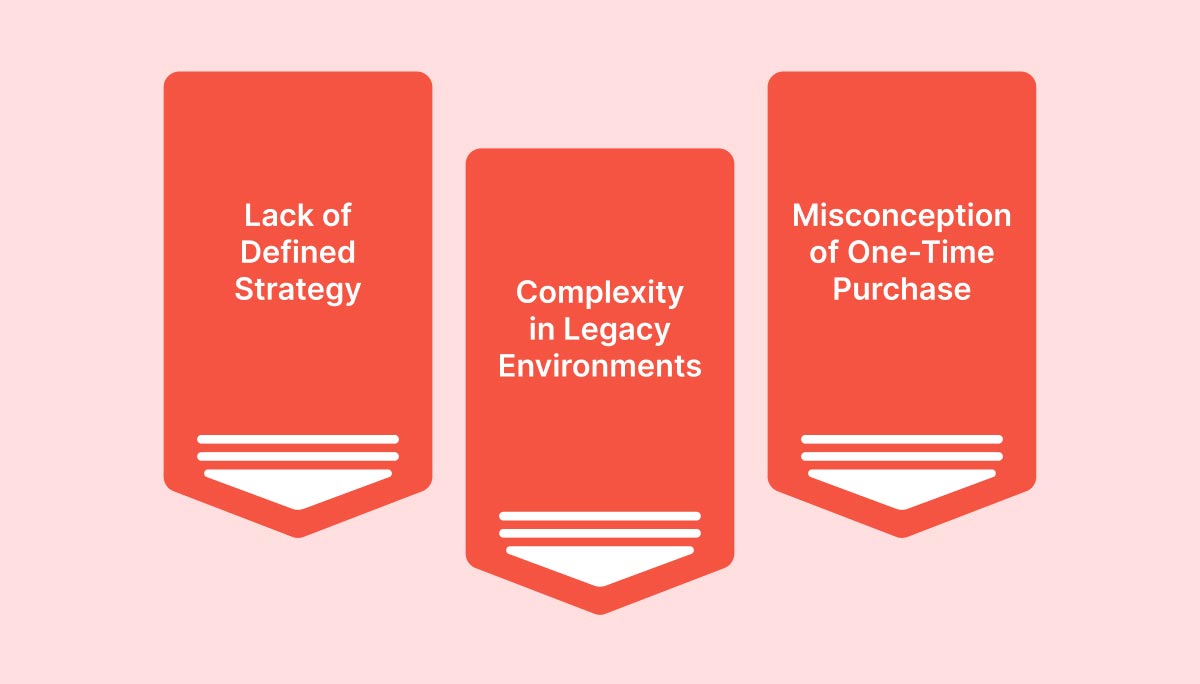
Zero Trust challenges: lack of strategy, legacy complexity, and misconceptions. Thinfinity ZTNA ensures security & seamless access.

1. Lack of a Defined Zero Trust Strategy

  • Problem: Organizations deploy security products without aligning them to business needs.

 ZTNA Solution: Thinfinity Workspace enables a policy-driven security framework, integrating Multi-Factor Authentication (MFA), Single Sign-On (SSO), and Role-Based Access Control (RBAC) to enforce identity-first security.

2. Complexity in Retrofitting Zero Trust into Legacy Environments

  • Problem: Many enterprises struggle with applying Zero Trust in existing hybrid or multi-cloud environments.

 ZTNA Solution: Thinfinity’s clientless access and agentless security model ensure seamless integration across Windows, Linux, and cloud-hosted applications—reducing complexity.

3. Misconception That Zero Trust is a One-Time Purchase

  • Problem: Many believe Zero Trust is a product, not a strategy.

 ZTNA Solution: Thinfinity Workspace supports continuous adaptive authentication, real-time session monitoring, and dynamic risk-based access, reinforcing that Zero Trust is an ongoing security process.

How Thinfinity Workspace Enforces Zero Trust Security

Identity-First Security: Continuous User & Device Verification

  • Granular RBAC Policies: Users access only the apps & data they need.
  • Adaptive Authentication: Enforces MFA, biometric authentication, and conditional access based on location, device, and behavior.
  • User Analytics & Logging: Real-time monitoring ensures proactive threat detection.

Application-Centric Security: Eliminating Overprivileged Access

  • Microsegmentation: Limits user access to specific apps, preventing lateral movement.
  • Catalog-Based Access Control: Ensures users can only interact with approved applications.
  • End-to-End Encryption (AES-256): Ensures secure communication.

Policy-Driven Enforcement: Adaptive Security for Hybrid Workforces

  • Network Segmentation: Users never gain broad network access, unlike VPNs.
  • Zero Trust Session Management: Prevents session hijacking & credential theft.
  • Cloud-Native Deployment: Works across Oracle Cloud, Ionos Cloud, AWS, Azure, Google Cloud, and on-prem.

Zero Trust vs. VPN: Why Thinfinity Workspace is the Superior Choice

FeatureThinfinityTraditional VPNLegacy RDP
Granular App AccessYesNoNo
MFA & Identity ControlYesNoNo
MicrosegmentationYesNoNo
Zero Trust Policy EngineYesNoNo
Cloud & Hybrid SupportYesNoNo
End-to-End EncryptionYesYesNo

Key Takeaway: VPNs expose the entire network to a single compromised device, while Thinfinity ZTNA grants access ONLY to verified apps & users.


Cost Analysis: Zero Trust Network Access (ZTNA) vs. VPN

Cost FactorZTNA (Thinfinity)Legacy VPN
Infrastructure CostsLower (Cloud-Native)High (Hardware Dependent)
IT MaintenanceMinimalHigh (Manual Configurations)
Security Risk ExposureLow (Granular Access)High (Broad Network Access)
Compliance & AuditingBuilt-In ControlsLimited

Why This Matters: Thinfinity’s ZTNA reduces infrastructure costs, eliminates VPN maintenance overhead, and improves security compliance.


Implementation Roadmap: Deploying Thinfinity ZTNA in Your Organization

Step 1: Define Your Zero Trust Security Policies

 Identify high-risk applications & users
 Establish granular access policies
 Implement adaptive authentication

Step 2: Deploy Thinfinity Workspace

 Set up identity-based authentication (MFA, SSO, RBAC)
 Configure application microsegmentation
 Enable session recording & auditing

Step 3: Continuous Monitoring & Optimization

 Use real-time analytics for threat detection
 Adjust Zero Trust policies dynamically
 Automate security updates & compliance reports

About Cybele Software Inc.
We help organizations extend the life and value of their software. Whether they are looking to improve and empower remote work or turn their business-critical legacy apps into modern SaaS, our software enables customers to focus on what’s most important: expanding and evolving their business.

About Version 2 Digital

Version 2 Digital is one of the most dynamic IT companies in Asia. The company distributes a wide range of IT products across various areas including cyber security, cloud, data protection, end points, infrastructures, system monitoring, storage, networking, business productivity and communication products.

Through an extensive network of channels, point of sales, resellers, and partnership companies, Version 2 offers quality products and services which are highly acclaimed in the market. Its customers cover a wide spectrum which include Global 1000 enterprises, regional listed companies, different vertical industries, public utilities, Government, a vast number of successful SMEs, and consumers in various Asian cities.

What is Self-Service Technology in IT Support? Overview and Benefits

Self-Service Technology: Transforming IT Support

Context

Self-service technology empowers users to access IT services on their own, without the help of IT staff. In other words, it significantly boosts efficiency in handling routine issues while also dramatically cutting costs.

For organizations managing increasingly complex IT environments with limited resources, self service is essential. And when scalability is a priority, it becomes absolutely vital.

But what does self-service technology in IT support look like in action? How does it benefit organizations? What are the most common use cases? In this article, we’ll dive into these questions and explore the full potential of self service in IT.

The Evolution of Self-Service: From Help Desks to Automated Solutions 

Traditionally, IT support was reactive: teams stepped in only after an issue surfaced. But with the rise of self-service technology, we’re seeing a shift to a proactive, user-centered model that transforms support from a reactive function into a dynamic, on-demand resource. 

This evolution has been remarkable. From basic help desks, we’ve advanced to sophisticated portals with self-ticketing systems and knowledge bases offering real-time, increasingly automated, and intelligent solutions. 

Now, support can be available around the clock, every day of the week, without interruptions. 

Key Components of Self-Service Technology 

User-Centric Design: Portals and Knowledge Bases 

An effective self-service platform must be designed with the user in mind. But what does this mean in practical terms? It means offering intuitive interfaces that guide users through troubleshooting steps and provide access to relevant FAQs and an extensive knowledge base. 

For recurring IT issues, having a well-designed self-service platform can dramatically reduce resolution times. 

Solutions like EasyVista’s IT Self-Service make this achievable  without writing a single line of code. To learn more, see here. 

The Role of AI: Chatbots, Virtual Agents, and Automated Workflows 

Artificial Intelligence (AI) plays a central role in self-service technology. AI-powered chatbots and virtual agents can already handle basic IT requests, providing immediate 24/7 support that minimizes wait times and keeps employees productive 

Automated workflows further enhance efficiency by routing complex issues directly to rappropriate IT technicians only when necessary.  

We are only beginning to tap into the potential of AI in self-service IT support, with vast opportunities on the horizon. 

Self-Ticketing Systems and Troubleshooting Tools 

Self-service technology shines through features like self-ticketing systems, which let users submit requests or report incidents directly through a portal. 

These systems often come equipped with troubleshooting tools that guide users through diagnostic steps, helping them resolve issues on their own. The goal is always the same: to reduce pressure on IT teams, allowing them to tackle more critical issues without distraction. 

The key to success here is user-centered design that makes the self-service process simple and effective.  

Real Benefits of Self-Service Technology in IT Support 

Reducing IT Overload: Lightening the Load for IT Teams 

One of the greatest benefits of self-service technology is its ability to reduce the workload for IT teams.  By handling routine requests, self-service frees up technicians to focus on more complex challenges, ultimately improving productivity and lowering costs, which brings us to the next point. 

Cost Reduction: Optimizing Operations Through Automation 

The efficiency of self-service directly translates into cost savings. By automating routine requests, self-service technology allows organizations to significantly reduce operational costs. Processes that once required IT personnel can now be efficiently managed through automated portals where users can operate independently. 

Enhancing Customer Experience: Faster, On-Demand Solutions 

Most importantly, self-service technology elevates the customer experience. Users today expect fast, seamless solutions that don’t always require human intervention. Self-service meets this demand, delivering on speed and convenience while ensuring IT resources remain available for high-priority needs. 

In short, self-service technology brings tangible benefits across the board—from streamlined operations to happier users and significant cost savings. 

Self-Service Technology in Action: Use Cases and Examples 

Automating Common IT Requests and Incidents 

Routine IT requests like password resets or access to specific resources, can be fully automated through solutions like EasyVista’s IT Self-Service Portal. 

By integrating automated workflows, this platform enables businesses to resolve such requests quickly and proactively, drastically reducing response times and minimizing disruptions, allowing businesses to tackle frequent issues proactively. Learn more here. 

Empowering End Users in IT Troubleshooting 

A well-designed self-service portal like EasyVista’s enables end users to solve straightforward IT issues independently without resorting to direct technical support. With  access to guides and resources, users can troubleshoot software configurations or minor issues on their own . The portal also allows them to track their requests in real time, providing transparency and reducing wait times for responses—all through an intuitive interface. 

Leveraging Knowledge Bases for Continuous Support 

The  integrated knowledge base in EasyVista’s Self-Service Portal offers continuous support by providing users with articles, FAQs, and tutorials to resolve common IT issues. This empowers users to become more self sufficient while enhancing their technical skills, creating a win-win situation for both users and IT teams.

Implementing Self-Service Technology: Key Considerations 

User Adoption: Overcoming Resistance and Driving Engagement 

The real challenge in implementing self-service technology is ensuring: user adoption. 

How do we address this? Through intuitive portal design and ongoing updates based on userfeedback to continually enhance the user experience. 

Designing an Effective Knowledge Base: What to Include 

An effective knowledge base  must continually evolve, with resources like tutorials (including videos), troubleshooting guides, and FAQs that meet users’ needs. 

Once again, there is no universal recipe: everything depends on the needs of the company and those of its target customers. Tailoring this content ensures that users can quickly access the most relevant information. 

Balancing Automation with Human Intervention 

 While self-service is highly effective for routine tasks, complex issues often require human intervention. Balancing automation with hands-on support ensures that critical requests receive the dedicated attention they need, reinforcing the value of both digital and human elements. 

From Present to Future: The Future of Self-Service Technology in IT Support 

Next-Generation Self-Service: AI, Machine Learning, and Predictive Support 

The future of self-service is closely tied to technologies like AI and machine learning. 

AI’s role in self-service technology is evolving rapidly, going beyond simple automation to incorporate intelligent, data-driven solutions. AI-powered chatbots and virtual agents now leverage natural language processing (NLP) to understand and respond to user queries with greater accuracy. 

These intelligent systems are  increasingly capable of handling complex queries and improving through each interaction to improve future responses. 

The ultimate goal? To create systems that not only respond to issues but can anticipate and resolve problems before they escalate . 

Self-Service as a Strategic Resource: Beyond IT Support to Business Support 

Self-service technology is no longer limited to IT. Organizations are beginning to recognize its potential as a strategic resource capable of improving processes across  business functions. 

EasyVista’s Enterprise Service Management (ESM) solutions centralize and optimize the management of all business services, not just IT. 

With ESM integration, organizations can extend the benefits of self-service to departments like Human Resources, Finance, and Operations, improving efficiency and operational transparency across multiple fronts.  With ESM integration, companies can automate cross-departmental workflows, breaking down silos and enhancing internal collaboration to improve service for all employees. 

Learn more about how Enterprise Service Management can revolutionize business support. 

Conclusion 

Self-service technology is transforming how organizations manage IT support, making it more efficient, automated, and user centric. 

By adopting intuitive self-service platforms, organizations can empower users to handle routine issues independently, reducing pressure on IT teams, and significantly lowering operational costs. 

Ultimately, it’s about enhancing the user experience and building loyalty through better, faster support.  

FAQ 

What are the main benefits of self-service technology in IT support? 
Self-service technology offers several advantages: it reduces the workload on IT teams, automates routine requests, lowers operational.  
By enabling users to resolve common issues through intuitive portals and knowledge bases, self-service technology streamlines IT processes. Automation of repetitive tasks further allows IT teams to focus on complex, strategic issues. 

What is the future of self-service technology in IT support? 
The future of self service lies in advanced technologies like Artificial Intelligence and Machine Learning, with a key goal: to proactively predict and resolve issues before they arise, enabling truly predictive support.

About EasyVista  
EasyVista is a leading IT software provider delivering comprehensive IT solutions, including service management, remote support, IT monitoring, and self-healing technologies. We empower companies to embrace a customer-focused, proactive, and predictive approach to IT service, support, and operations. EasyVista is dedicated to understanding and exceeding customer expectations, ensuring seamless and superior IT experiences. Today, EasyVista supports over 3,000 companies worldwide in accelerating digital transformation, enhancing employee productivity, reducing operating costs, and boosting satisfaction for both employees and customers across various industries, including financial services, healthcare, education, and manufacturing.

About Version 2 Digital

Version 2 Digital is one of the most dynamic IT companies in Asia. The company distributes a wide range of IT products across various areas including cyber security, cloud, data protection, end points, infrastructures, system monitoring, storage, networking, business productivity and communication products.

Through an extensive network of channels, point of sales, resellers, and partnership companies, Version 2 offers quality products and services which are highly acclaimed in the market. Its customers cover a wide spectrum which include Global 1000 enterprises, regional listed companies, different vertical industries, public utilities, Government, a vast number of successful SMEs, and consumers in various Asian cities.

真實案例警示:為何 Android 不應自動連接 Wi-Fi?

智能手機的世界充滿自動化功能,因此可靠的 Android 安全防護不可或缺。

大多數智能手機用戶可能知道,連接到任何可用的隨機 Wi-Fi 熱點並非明智之舉。但有時,Android 裝置可能會在您未加留意的情況下,自動連接到惡意 Wi-Fi 網絡。

試想一下:您在心儀的餐廳點完餐,正打算在美食上桌前滑滑手機。然而,您可能沒意識到,此時已有人正在暗中監控您裝置上的一切活動,包括您瀏覽的網站、使用的應用程式,以及輸入的帳號密碼等敏感資訊。

此類攻擊確實可能發生。例如,ESET 惡意軟件研究員 Lukáš Štefanko 就曾展示,若將他執行 Evil M5 韌體的 Cheap Yellow Display(CYD)工具用於不法目的會發生什麼。幸運的是,他以道德黑客(滲透測試人員)的身分發布影片,揭示要獲取智能手機傾向於自動重連的 Wi-Fi 網絡資訊是何其容易。利用這些資訊,攻擊者便可建立偽冒的 Wi-Fi 存取點(即「邪惡雙子星」網絡),藉此竊取受害者裝置內的敏感資料。

讓我們一同深入探討這類攻擊手法,並從中汲取重要的安全教訓。


便利性潛藏的危險

開發人員在設計軟件時,總會優先考量易用性、使用者舒適度與整體體驗。因此,智能手機內建自動重連至先前用過且信任的網絡功能,可謂理所當然。

然而,網絡犯罪分子最愛利用使用者掉以輕心、沉浸於無所不在的自動化便利時發動攻擊。Lukáš Štefanko 所演示的攻擊正是利用此弱點 —— 利用 Android 智能手機會持續且公開地向附近裝置透露其曾連接過、且想要自動重連的 Wi-Fi 網絡這個特性。

幸好,需要攻擊者親身到場的攻擊並不普遍,但這不代表絕無可能發生。例如,澳洲聯邦警察( AFP)於 2024 年 6 月,就一宗發生於多個國內航班和機場、疑似「邪惡雙子星」的攻擊事件,起訴了一名公民。據稱,從其查獲的裝置中搜出了數十筆被盜的個人憑證。

此外,這類攻擊也可能涉及國家級行動。例如,在最近一場審判中,檢察官便描述了一個位於英國的間諜團夥陰謀。該團夥除其他活動外,亦曾在德國活動,其成員疑使用國際移動用戶識別碼捕捉器(IMSI Catcher)來攔截來自某軍事基地(當時有烏克蘭士兵正在受訓)的手機通訊。


其他潛在威脅

由此可見,連接或自動重連至公開 Wi-Fi 網絡都可能將您置於風險之中。潛在的威脅清單不僅限於流氓熱點:

中間人攻擊(MITM)— 在此類攻擊中,網絡犯罪分子會攔截裝置與 Wi-Fi 網絡間的通訊,從而讀取未加密的敏感資訊,如密碼、信用卡號和個人訊息。

漏洞利用 — 網絡犯罪分子可利用安全性較低的公共網絡漏洞,或目標行動裝置自身的漏洞(尤其在裝置軟件未及時更新的情況下),向連線裝置散播惡意軟件。這些惡意軟件可用於竊取資料、監控使用者活動,甚至完全控制使用者裝置。

封包嗅探 — 公共 Wi-Fi 網絡通常缺乏足夠的加密保護,讓黑客得以輕易竊聽使用者的網上活動。


如何確保安全

顯然,最基本的 Wi-Fi 安全守則便是停用 Wi-Fi 自動連接功能,並且切勿使用免費的公共 Wi-Fi 網絡。若情況不允許,可參考以下建議:

使用虛擬私人網絡(VPN) — VPN 能在使用者的裝置和網際網絡之間建立一條安全加密的通道。

避免在公共 Wi-Fi 上處理敏感資料 — 避免使用要求輸入敏感資訊的網站和應用程式,例如進行網絡銀行交易或網上購物。

保持軟件更新 — 確保您的作業系統和應用程式都維持在最新版本。定期更新通常包含重要的安全修補程式,能防禦已知的安全漏洞。


ESET Mobile Security :您的堅實後盾

在網絡安全領域,ESET 的能力遠超基本的防毒軟件,這同樣適用於智能手機和流動裝置。ESET Mobile Security 採用 ESET 的「預防優先」策略,旨在攻擊釀成任何損害前即時攔截。此目標的實現,有賴於保護網絡犯罪分子入侵裝置的常見途徑,同時確保安全方案本身簡單易用。

憑藉其針對釣魚網站、簡訊詐騙等多層次的防護機制,ESET Mobile Security 已充分準備應對來自惡意網站的攻擊。例如,其反釣魚功能(透過連結掃描器強化)能保護使用者免受惡意網站侵害;而付款保護則為敏感的支付及金融 App 增添一道安全防線。


安心擁抱科技

多數人都同意,人們天生喜愛便利。事實上,整個科技產業的發展,正是由使用者不斷追求更快捷、簡易、人性化的日常解決方案所驅動。享受科技帶來的便利固然是好事,但切勿忽略潛在的風險。

幸運的是,只要具備基本的網絡安全意識,並在您的 Android 智能手機上安裝值得信賴的安全解決方案,您大致上就能安枕無憂。Wi-Fi 網絡攻擊已是眾所周知的威脅,而像 ESET 這類信譽卓著、擁有逾 30 年經驗的網絡安全公司,能為您的數碼生活保駕護航。

關於ESET
ESET成立於1992年,是一家面向企業與個人用戶的全球性的電腦安全軟件提供商,其獲獎產品 — NOD32防病毒軟件系統,能夠針對各種已知或未知病毒、間諜軟件 (spyware)、rootkits和其他惡意軟件為電腦系統提供實時保護。ESET NOD32佔用 系統資源最少,偵測速度最快,可以提供最有效的保護,並且比其他任何防病毒產品獲得了更多的Virus Bulletin 100獎項。ESET連續五年被評為“德勤高科技快速成長500 強”(Deloitte’s Technology Fast 500)公司,擁有廣泛的合作夥伴網絡,包括佳能、戴爾、微軟等國際知名公司,在布拉迪斯拉發(斯洛伐克)、布裏斯托爾(英國 )、布宜諾斯艾利斯(阿根廷)、布拉格(捷克)、聖地亞哥(美國)等地均設有辦事處,代理機構覆蓋全球超過100個國家。

關於 Version 2 Digital
Version 2 Digital is one of the most dynamic IT companies in Asia. The company distributes a wide range of IT products across various areas including cyber security, cloud, data protection, end points, infrastructures, system monitoring, storage, networking, business productivity and communication products. Through an extensive network of channels, point of sales, resellers, and partnership companies, Version 2 offers quality products and services which are highly acclaimed in the market. Its customers cover a wide spectrum which include Global 1000 enterprises, regional listed companies, different vertical industries, public utilities, Government, a vast number of successful SMEs, and consumers in various Asian cities.

×

Hello!

Click one of our contacts below to chat on WhatsApp

×