





Cloud adoption continues at a rapid pace. Security is becoming a critical priority as companies move assets and data to locations like Google Cloud Platform (GCP).
Cloud platforms host customer databases, powering worldwide eCommerce empires. They allow workers in different countries to communicate, share files, and collaborate on complex projects. And they reduce hardware overheads, driving down costs.
Whatever role they play, cloud services need robust protection. This blog will look at how to secure assets on GCP. While Google’s tools offer some protection, there are plenty of things companies can do to supplement those tools. Let’s look in more detail and offer some best practices to boost your Google Cloud security.
What is GCP?
Google Cloud Platform is a collection of cloud-based services based on the powerful Google Compute Engine. GCP allows users to host apps, store data, implement machine learning processes, and manage app development. It also integrates with other Google services, including Gmail and Docs.
GCP can host a few SaaS apps or scale up to IaaS and PaaS implementations. It is a go-to platform for hosting Kubernetes cubes and cloud storage containers, with a strong record for resource availability. However, clients must implement their own security controls to protect resources hosted by GCP.
GCP security seeks to protect assets hosted on the Google Cloud Platform. The scope of security policies varies depending on each user’s cloud architecture. For example, if you use a single SaaS service, security mainly relates to access control to that individual app. But if you use a PaaS solution, security must apply across the infrastructure stack.
What challenges does Google Cloud Platform face?
GCP users face a range of security challenges. Here are some critical issues you will likely face when following GCP security best practices.
1. Ensuring visibility
The flexibility of GCP makes it popular with cloud architects. But flexibility comes with a price: confused and complex visibility. Cloud assets can come online and disappear within hours. Security teams may not know when app configurations change. Keeping track of cloud-based assets can become extremely difficult.
Tracking threats and applying security controls is impossible without strong visibility. You cannot secure apps that change constantly. Environments with poorly controlled user privileges can spiral out of control, creating huge surfaces for data thieves to exploit.
2. Managing privileges
Over-provisioned users pose a critical threat to cloud environments. If attackers gain the credentials of over-provisioned users, they can access confidential data, change app settings, and compromise cloud performance. Watertight access control is essential.
Security teams must create logical privileges for roles and individuals. Every GCP-hosted app requires a separate privileges policy. And admins must classify data, keeping sensitive information locked away from most users.
3. Application sprawl
Without clear policies on provisioning apps, GCP environments easily fall victim to application sprawl. It is extremely easy to spin up virtual machines or add new apps on the Google platform. The resource hierarchy can change in an instant.
Balancing flexibility and security is a central challenge. Companies need clear hierarchies that reflect their organizational needs. But users need the freedom to reshape cloud environments to fit different circumstances.
4. Identity management at the cloud edge
Managing access to on-premises networks is simple. Authentication occurs at a well-defined edge. But this isn’t the case with GCP. Users can access a cloud resource anywhere. They can use multiple devices and log on via insecure public networks. This makes robust IAM essential.
Security teams require ways to authenticate every connection request. This is particularly difficult in multi-cloud settings. As a result, companies often implement Single Sign On (SSO) to bring all cloud assets together.
5. Cloud misconfigurations
Poorly configured GCP apps present an open door for attackers. For instance, researchers have expressed concerns about attacks originating from misconfigured virtual machines.
Users can also misconfigure the internal IAM tools that Google provides. Administrators may fail to apply domain restricted sharing to GCP containers. Or they might fail to engage logging services to detect threats and weaknesses.
Another common issue is misconfigured VPC firewalls. These firewalls surround cloud data with additional protection. But admins can set overly broad IP address ranges, permitting too much access to sensitive data.
6. Uncontrolled outbound access
Users must secure access to networks. But they also need to manage data flows from cloud assets. Data Loss Prevention (DLP) tools can track files and data and block unauthorized exfiltration. But restrictions on outbound access are not always applied properly.
7. Unpatched GCP assets
Unpatched VMs present a constant security risk. Attackers can exploit privileged access to connected resources or launch horizontal attacks if cloud environments are improperly segmented.
GCP users are responsible for patch management. However, they are not always aware of their duties under the shared responsibility model. Legacy threat scanning tools can also miss unpatched cloud assets. Cloud-native, automated update management tools can fill the gap if security teams choose to use them.
Why is GCP security Important?
There are three core reasons to follow GCP security best practices:
The GCP hosts vast amounts of confidential information. Data encryption, robust authorization and authentication processes are critical to prevent malicious access to this data.
Assets on GCP are available 24/7 for companies to access. This maximizes uptime and availability. But it broadens the threat surface, requiring robust security counter-measures.
Data security regulations apply to critical assets. Users of GCP must protect information covered by GDPR, HIPAA, or PCI-DSS.
These three issues demand a comprehensive security response. Companies must classify and secure data. They must manage access and apply encryption. And they need to apply regulatory frameworks through auditing and security planning.
Cloud-based security features in GCP
Google has included a wide range of security features in GCP. Best practices include leveraging these features where possible while supplementing them with external tools. Important internal security features include:
Virtual Private Cloud (VPC) – Allows users to create segmented VMs or VM groups, with stateful firewalls and network security controls.
Data encryption – All data in transit through the GCP is encrypted. Data at rest is also encrypted and unreadable to outsiders.
Cloud Key Management – Centralized customer-managed keys tools allow administrators to distribute and change keys. This can integrate with hardware keys for secure remote access.
Logging – Google provides access to continuous activity logs. Users can visualize security easily with real-time data.
Data Loss Prevention (DLP) – Targets sensitive data and prevents outward transmission to unauthorized actors.
Binary Authorization – Secures Kubernetes clusters by creating trusted workloads.
Web App and API Protection (WAAP) – Monitors API activity for common cyberattacks. Allows users to assess integrations with GCP environments, making new app implementations safer.
Identity and Access Management (IAM) – Enable users to control access to GCP environments. Provides a way to authorize actions within apps and groups. Unifies GCP workloads into one pane of glass.
Cloud Asset Inventory – Allows admins to quickly inventory connected apps and track any changes as they occur.
External security systems work alongside these internal tools. For example, network penetration testing by third-party software can verify the effectiveness of GCP security. SSO and external IAM cover hybrid networks with multiple cloud deployments. VPNs encrypt data outside GCP, guarding user credentials.
Google Cloud Platform (GCP) security best practices
Companies need to create and implement a data security strategy for their GCP deployments.


This strategy should leverage the internal tools listed above while taking into account specific business needs. Best practices for GCP security include:
1. Implement Google Cloud IAM
Identity is the new battleground in cloud security. Attackers constantly seek high-value user credentials and access to confidential customer or corporate data. That’s why implementing Google’s native IAM systems should be a core priority.
Google IAM allows you to:
Set privileges for GCP resources – The most important role of IAM. Admins can set permissions for roles or individuals and determine which apps or workloads are available to each cloud identity. Privileges can be extremely detailed to protect sensitive data. Or they can be more general for low-value assets.
Enforce safe email policies. Only allow access to cloud platform services from corporate email accounts. Prevent access by personal accounts.
Strengthen admin accounts with security key enforcement. Security keys are even more robust than MFA factors. They apply to high-privilege users such as senior developers or administrators.
Prevent user access to service accounts used by VMs and automated processes. Reduce the number of user-managed service account keys to an absolute minimum.
A strong IAM system locks down user and service accounts. Insecure connections will be denied or limited. Access to resources will only be possible to authorized users based on need.
However, don’t stop with Google’s internal IAM. Some critical IAM cloud functions require outside assistance.
For example, when you use the GCP, you can allowlist IP addresses to block dangerous devices or networks. There is no realistic native way on Google Cloud to allowlist IP addresses. But you can use external allowlisting solutions like NordLayer to harden your overall cloud security setup.
2. Visualize your cloud environment
Google allows companies a lot of control over how they segment cloud environments. But to create a secure architecture, assets and data must be visible and well-understood.
Use GCP’s internal tools to discover connected apps and create a map of the assets you need to protect. Try to trace the connections between resources. If you understand data flows and user requirements, you can create efficient groups to apply security controls.
Connect roles to cloud assets and target privileges to guard resources. For example, accountants or sales teams may require access to cloud SQL instances, but other employees do not. Always map roles to assets to avoid over-privileging users.
3. Protect assets via Virtual Private Clouds (VPCs)
VPCs are guarded by internal firewalls but can communicate securely via VPC peering. IAM tools enable precise controls over VPC access, and you can create private clouds for projects or departments.
This segments the cloud environment, preventing horizontal movement for malicious actors. For instance, you can set robust barriers around cloud storage containers handling financial information – a valuable aspect of compliance strategies.
4. Use Customer Supplied Encryption Keys (CSEK)
Google Cloud Platform users can rely on keys supplied by Google. But they can also provide their own encryption keys. This is potentially a more secure option.
With CSEK, keys are only known to your employees. Nobody within Google can access them. You have total responsibility to manage and change them when needed.
By default, data handled by the Compute Engine is protected by 256-bit AES encryption. Customer-supplied keys supplement this protection. They also give you more control over assigning keys and managing access.
5. Enable MFA for Google Cloud resources
Multi-factor authentication adds an extra layer of identity protection when logging onto cloud assets.
MFA is not a default setting, so admins will need to remember to engage it via the IAM console. Google Cloud users can add third-party identity providers if required. This allows users to connect via external apps, making remote access more secure.
MFA options on GCP include various cloud identity factors. This includes one-time passwords, email codes, or secure links sent to user devices. You can use separate authentication hardware for high-security connections or rely on less secure SMS-based authentication for a smoother but less secure access process.
6. Centralize logging processes
Google Cloud’s best practices include achieving total awareness of user activity and app configurations. Google provides a suite of logging tools that collect and present information for security teams to monitor.
Users can implement Cloud Logging to collect data from Google Cloud projects. Each project has its own log bucket to contain data, and users can analyze this information via the Logs Explorer tool. You can also enable flow logs to gather information from Kubernetes clusters or VM groups.
If possible, integrate Cloud Logging with your enterprise-wide SIEM systems. Google lets you export log data to many popular SIEM solutions. This makes it easier to track network security via a single pane of glass. Specialist SIEM solutions also tend to provide more functionality than Google’s internal monitoring tools.
7. Use security foundations blueprints
Security managers do not need to work in the dark when implementing GCP best practices. Securing novel cloud settings such as GCP can be challenging without prior experience. That’s why Google offers a series of security foundation blueprints.
Blueprints provide guidance and recommended security practices. Subjects covered include critical tasks like key management, network segmentation, logging, and authentication. The information is presented in a general format but includes plenty of suggestions that will apply to most GCP implementations.
8. Automate security to boost efficiency
Administrators can automate many security functions on Google Cloud. Automation reduces the risk of human error and liberates time to spend on critical security tasks.
The Security Command Center collects threat intelligence and can automatically transfer alerts to third-party SIEM systems. Users can also create automated compliance policies to check that GCP assets are properly configured.
Admins can automate password security, demanding regular resets and enforcing strong passwords. And automated app updates help stay on top of virtual machine patches. Most tasks on Google Cloud have automation settings. Leverage them where possible as part of Cloud Security Posture Management (CSPM).
How NordLayer secures access to Google Cloud
Google Cloud Platform is an easy-to-use, flexible, and feature-rich cloud hosting platform. And many companies use Google Cloud as a location to store or exchange confidential data. This is efficient and cost-effective, but relying on GCP comes with security risks.
Following the GCP security best practices outlined above will help achieve data security. Users can encrypt information, set internal IAM policies for apps and containers, and create firewalls around virtual machines.
However, a robust GCP security posture requires a mix of Google’s internal security functions and external solutions. NordLayer provides the ideal solution when securing Google cloud deployments.
NordLayer allows admins to integrate GCP security into their general IAM setup. Users can ensure secure access to apps via MFA and use Single Sign On to access all cloud assets quickly. They can strengthen access control with IP address allowlisting, which admits authenticated users and blocks unknown or insecure IP addresses. NordLayer applies network segmentation to separate GCP assets and encrypts data in transit to hide it from outsiders.
Add another layer to your GCP security posture with NordLayer. Our tools allow you to combine external and internal security controls. The result will be a GCP security setup that covers every vulnerability. Contact the NordLayer team today to find out more.
These days, cybercrime is rampant. It’s no longer a matter of “if” you’re going to suffer an attack but “when” it will happen. All companies want to be ready for any crisis. And this is where a business continuity plan comes into play.
But what is a business continuity plan exactly? Why is it important? What should one include? Today, we’re exploring all these questions in-depth.
What is a business continuity plan?
A business continuity plan (BCP) is a document that sets guidelines for how an organization will continue its operations in the event of a disruption, whether it’s a fire, flood, other natural disaster or a cybersecurity incident. A BCP aims to help organizations resume operations without significant downtime.
Unfortunately, according to a 2020 Mercer survey, 51% of businesses across the globe don’t have a business continuity plan in place.
What’s the difference between business continuity and disaster recovery plans?
We often confuse the terms business continuity plan and disaster recovery plan. The two overlap and often work together, but the disaster recovery plan focuses on containing, examining, and restoring operations after a cyber incident. On the other hand, BCP is a broader concept that considers the whole organization. A business continuity plan helps organizations stay prepared for dealing with a potential crisis and usually encompasses a disaster recovery plan.
Importance of business continuity planning
The number of news headlines announcing data breaches has numbed us to the fact that cybercrime is very real and frequent and poses an existential risk to companies of all sizes and industries.
Consider that in 2021, approximately 37% of global organizations fell victim to a ransomware attack. Then consider that business interruption and restoration costs account for 50% of cyberattack-related losses. Finally, take into account that most cyberattacks are financially motivated and the global cost of cybercrime topped $6 trillion last year. The picture is quite clear — cybercrime is a lucrative venture for bad actors and potentially disastrous for those on the receiving end.
To thrive in these unpredictable times, organizations go beyond conventional security measures. Many companies develop a business continuity plan parallel to secure infrastructure and consider the plan a critical part of the security ecosystem. The Purpose of a business continuity plan is to significantly reduce the downtime in an emergency and, in turn, reduce the potential reputational damage and — of course — revenue losses.
Business continuity plan template
Password security for your business
Store, manage and share passwords.
30-day money-back guarantee
Business Continuity Plan Example
[Company Name]
[Date]
I. Introduction
Purpose of the Plan
Scope of the Plan
Budget
Timeline
The initial stage of developing a business continuity plan starts with a statement of the plan’s purpose, which explains the main objective of the plan, such as ensuring the organization’s ability to continue its operations during and after a disruptive event.
The Scope of the Plan outlines the areas or functions that the plan will cover, including business processes, personnel, equipment, and technology.
The Budget specifies the estimated financial resources required to implement and maintain the BCP. It includes costs related to technology, personnel, equipment, training, and other necessary expenses.
The Timeline provides a detailed schedule for developing, implementing, testing, and updating the BCP.
II. Risk Assessment
Identification of Risks
Prioritization of Risks
Mitigation Strategies
The Risk Assessment section of a Business Continuity Plan (BCP) is an essential part of the plan that identifies potential risks that could disrupt an organization’s critical functions.
The Identification of Risks involves identifying potential threats to the organization, such cybersecurity breaches, supply chain disruptions, power outages, and other potential risks. This step is critical to understand the risks and their potential impact on the organization.
Once the risks have been identified, the Prioritization of Risks follows, which helps determine which risks require the most attention and resources.
The final step in the Risk Assessment section is developing Mitigation Strategies to minimize the impact of identified risks. Mitigation strategies may include preventative measures, such as system redundancies, data backups, cybersecurity measures, as well as response and recovery measures, such as emergency protocols and employee training.
III. Emergency Response
Emergency Response Team
Communication Plan
Emergency Procedures
This section of the plan focuses on immediate actions that should be taken to ensure the safety and well-being of employees and minimize the impact of the event on the organization’s operations.
The Emergency Response Team is responsible for managing the response to an emergency or disaster situation. This team should be composed of individuals who are trained in emergency response procedures and can act quickly and decisively during an emergency. The team should also include a designated leader who is responsible for coordinating the emergency response efforts.
The Communication Plan outlines how information will be disseminated during an emergency situation. It includes contact information for employees, stakeholders, and emergency response personnel, as well as protocols for communicating with these individuals.
The Emergency Procedures detail the steps that should be taken during an emergency or disaster situation. The emergency procedures should be developed based on the potential risks identified in the Risk Assessment section and should be tested regularly to ensure that they are effective.
IV. Business Impact Analysis
The Business Impact Analysis (BIA) section of a Business Continuity Plan (BCP) is a critical step in identifying the potential impact of a disruption to an organization’s critical operations.
The Business Impact Analysis is typically conducted by a team of individuals who understand the organization’s critical functions and can assess the potential impact of a disruption to those functions. The team may include representatives from various departments, including finance, operations, IT, and human resources.
V. Recovery and Restoration
Procedures for recovery and restoration of critical processes
Prioritization of recovery efforts
Establishment of recovery time objectives
The Recovery and Restoration section of a Business Continuity Plan (BCP) outlines the procedures for recovering and restoring critical processes and functions following a disruption.
The Procedures for recovery and restoration of critical processes describe the steps required to restore critical processes and functions following a disruption. This may include steps such as relocating to alternate facilities, restoring data and systems, and re-establishing key business relationships.
The Prioritization section of the plan identifies the order in which critical processes will be restored, based on their importance to the organization’s operations and overall mission.
Recovery time objectives (RTOs) define the maximum amount of time that critical processes and functions can be unavailable following a disruption. Establishing RTOs ensures that recovery efforts are focused on restoring critical functions within a specific timeframe.
VI. Plan Activation
Plan Activation Procedures
The Plan Activation section is critical in ensuring that an organization can quickly and effectively activate the plan and respond to a potential emergency.
The Plan Activation Procedures describe the steps required to activate the BCP in response to a disruption. The procedures should be clear and concise, with specific instructions for each step to ensure a prompt and effective response.
VII. Testing and Maintenance
Testing Procedures
Maintenance Procedures
Review and Update Procedures
This section of the plan is critical to ensure that an organization can effectively respond to disruptions and quickly resume its essential functions.
Testing procedures may include scenarios such as natural disasters, cyber-attacks, and other potential risks. The testing procedures should include clear objectives, testing scenarios, roles and responsibilities, and evaluation criteria to assess the effectiveness of the plan.
The Maintenance Procedures detail the steps necessary to keep the BCP up-to-date and relevant.
The Review and Update Procedures describe how the BCP will be reviewed and updated regularly to ensure its continued effectiveness. This may involve conducting a review of the plan on a regular basis or after significant changes to the organization’s operations or threats.
What should a business continuity plan checklist include?
Organizations looking to develop a BCP have more than a few things to think through and consider. Variables such as the size of the organization, its IT infrastructure, personnel, and resources all play a significant role in developing a continuity plan. Remember, each crisis is different, and each organization will have a view on handling it according to all the variables in play. However, all business continuity plans will include a few elements in one way or another.
Clearly defined areas of responsibility
A BCP should define specific roles and responsibilities for cases of emergency. Detail who is responsible for what tasks and clarify what course of action a person in a specific position should take. Clearly defined roles and responsibilities in an emergency event allow you to act quickly and decisively and minimize potential damage.
Crisis communication plan
In an emergency, communication is vital. It is the determining factor when it comes to crisis handling. For communication to be effective, it is critical to establish clear communication pipelines. Furthermore, it is crucial to understand that alternative communication channels should not be overlooked and outlined in a business continuity plan.
Recovery teams
A recovery team is a collective of different professionals who ensure that business operations are restored as soon as possible after the organization confronts a crisis.
Alternative site of operations
Today, when we think of an incident in a business environment, we usually think of something related to cybersecurity. However, as discussed earlier, a BCP covers many possible disasters. In a natural disaster, determine potential alternate sites where the company could continue to operate.
Backup power and data backups
Whether a cyber event or a real-life physical event, ensuring that you have access to power is crucial if you wish to continue operations. In a BCP, you can often come across lists of alternative power sources such as generators, where such tools are located, and who should oversee them. The same applies to data. Regularly scheduled data backups can significantly reduce potential losses incurred by a crisis event.
Recovery guidelines
If a crisis is significant, a comprehensive business continuity plan usually includes detailed guidelines on how the recovery process will be carried out.
Business continuity planning steps
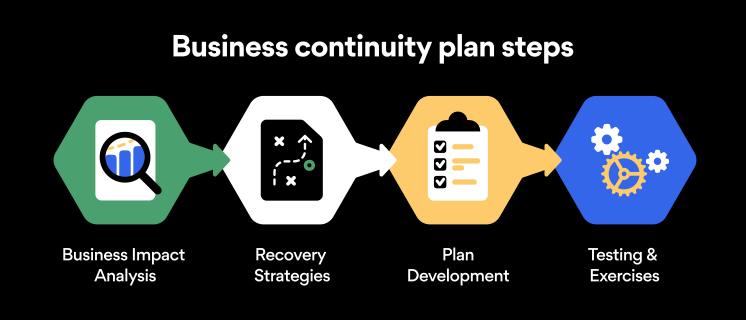
Here are some general guidelines that an organization looking to develop a BCP should consider:
Analysis
A business continuity plan should include an in-depth analysis of everything that could negatively affect the overall organizational infrastructure and operations. Assessing different levels of risk should also be a part of the analysis phase.
Design and development
Once you have a clear overview of potential risks your company could face, start developing a plan. Create a draft and reassess it to see if it takes into account even the smallest of details.
Implementation
Implement BCP within the organization by providing training sessions for the staff to get familiar with the plan. Getting everyone on the same page regarding crisis management is critical.
Testing
Rigorously test the plan. Play out a variety of scenarios in training sessions to learn the overall effectiveness of the continuity plan. By doing so, everyone on the team will be closely familiar with the business continuity plan’s guidelines.
Maintenance and updating
Because the threat landscape constantly changes and evolves, you should regularly reassess your BCP and take steps to update it. By making your continuity plan in tune with the times, you will be able to stay a step ahead of a crisis.
Level up your company’s security with NordPass Business
A comprehensive business continuity plan is vital for the entire organization’s security posture. However, in a perfect world, you wouldn’t have to use it. This is where NordPass Business can help.
Remember, weak, reused, or compromised passwords are often cited as one of the top contributing factors in data breaches. It’s not surprising, considering that an average user has around 100 passwords. Password fatigue is real and significantly affects how people treat their credentials. NordPass Business counters these issues.
With NordPass Business, your team will have a single secure place to store all work-related passwords, credit cards, and other sensitive information. Accessing all the data stored in NordPass is quick and easy, which allows your employees not to be distracted by the task of finding the correct passwords for the correct account.
In cyber incidents, NordPass Business ensures that company credentials remain secure at all times. Everything stored in the NordPass vault is secured with advanced encryption algorithms, which would take hundreds of years to brute force.
If you are interested in learning more about NordPass Business and how it can fortify corporate security, do not hesitate to book a demo with our representative.
