Skip to content

runZero 3.3: Unmatched visibility into your Google ecosystem

What’s new with runZero 3.3?

  • Extended visibility into Google Workspace
  • Queries for Google Workspace users and groups
  • Fingerprinting for Google assets
  • Identification of OpenSSL services
  • Improvements to the runZero Console

Extended visibility into Google Workspace

runZero 3.3 furthers the visibility into your Google ecosystem through a new integration with Google Workspace. runZero Professional+ users will be able to sync Google Workspace asset details from mobile devices, endpoints, and managed Chrome systems, while runZero Enterprise users will also be able to sync Users and Groups. Once the integrations are configured, users can view, search, analyze, export, and alert on attributes from both Google Workspace and Google Cloud Platform.

One of the key reasons to leverage the runZero integrations is to get better insight into the scope of your environment and completeness of coverage since MDM and IAM platforms can’t provide any insights into devices that haven’t been onboarded. To identify assets on your network that aren’t onboarded to Google Workspace, use the query source:runZero AND NOT source:googleworkspace. Conversely, use this query to find assets from Google Cloud Platform or Google Workspace that have not been scanned by runZero yet: (source:gcp OR source:googleworkspace) AND NOT source:runzero. These queries can help you keep pace with unmanaged and disconnected assets.

The integration also pulls in many Google Workspace attributes to give you comprehensive asset visibility. This could include attributes like when a device was last synced, whether a device has a password enabled or is encrypted, or whether it supports the use of a work profile. The Recent Users list in the asset details can also provide insight into device ownership and usage. You can filter for a specific user by using the @googleworkspace.mobile.email attribute for mobile devices or the @googleworkspace.chromeos.recentUsers attribute for ChromeOS devices. To find mobile devices that aren’t locked with a password try the query @googleworkspace.mobile.devicePasswordStatus:="Off", or use @googleworkspace.mobile.encryptionStatus:="Not Encrypted" to find ones without encryption enabled. The wildcard operator also lets you find results with a range of OS versions, such as using @googleworkspace.endpoint.osVersion:="MacOS 12.% to find Google Workspace assets running macOS Monterey.

runZero offers unmatched active network scanning, while also integrating with an ever-growing list of data sources so that you have a complete asset inventory at your fingertips. To get started, set up a connection to Google Workspace or Google Cloud Platform.
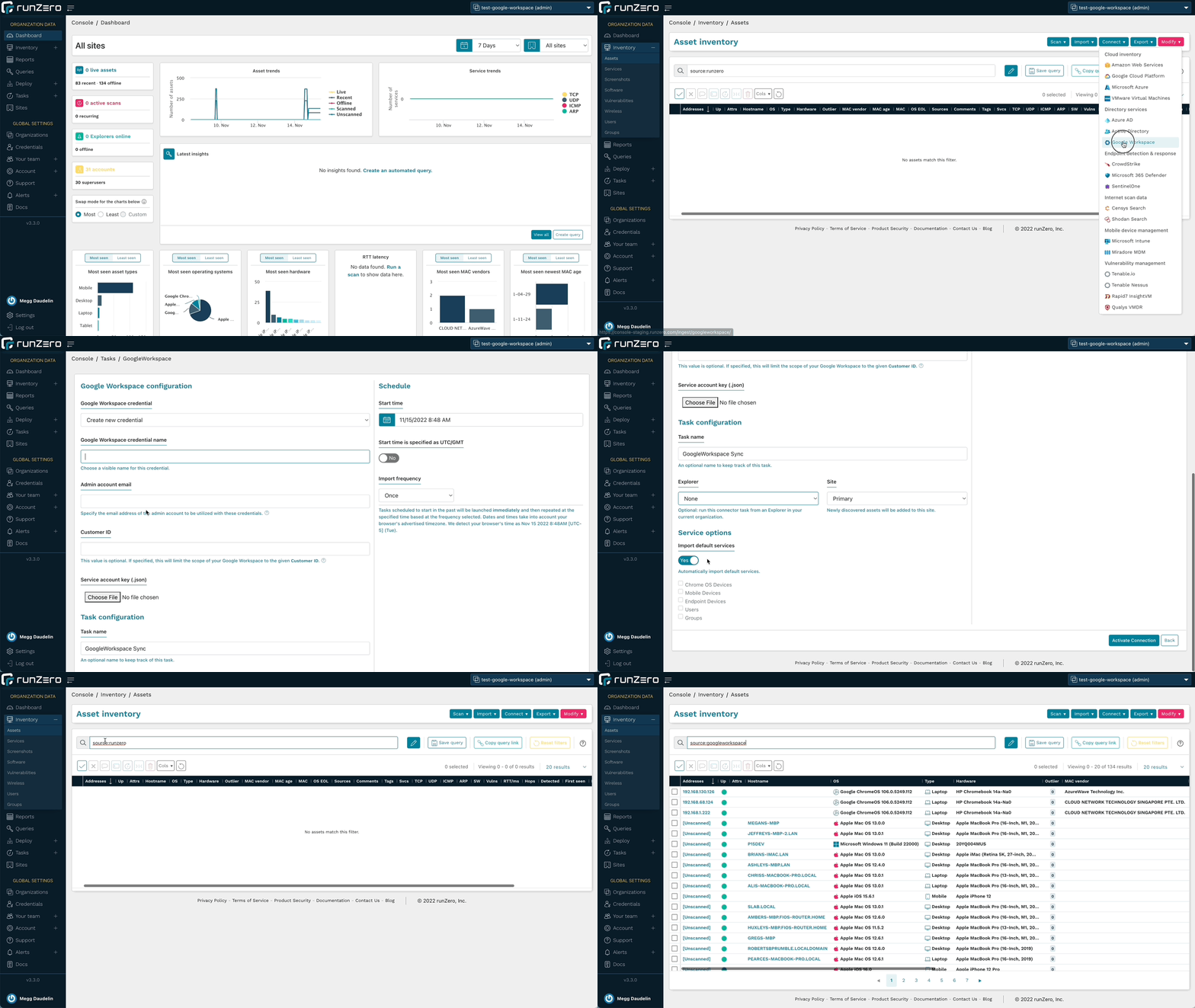
Google Workspace integration

Queries for Google Workspace users and groups

runZero Enterprise users can leverage the new queries tailored for the Google Workspace integration to quickly find and alert on accounts that match particular parameters, in addition to being able to run searches in the Users and Groups inventories. Identify administrator accounts, suspended accounts, and accounts without MFA to improve IAM efforts and better protect your environment. These queries are included in the Query Library and can also be used to create alerts.

Run queries about Google Workspace users or create an alert rule to find assets of interest.
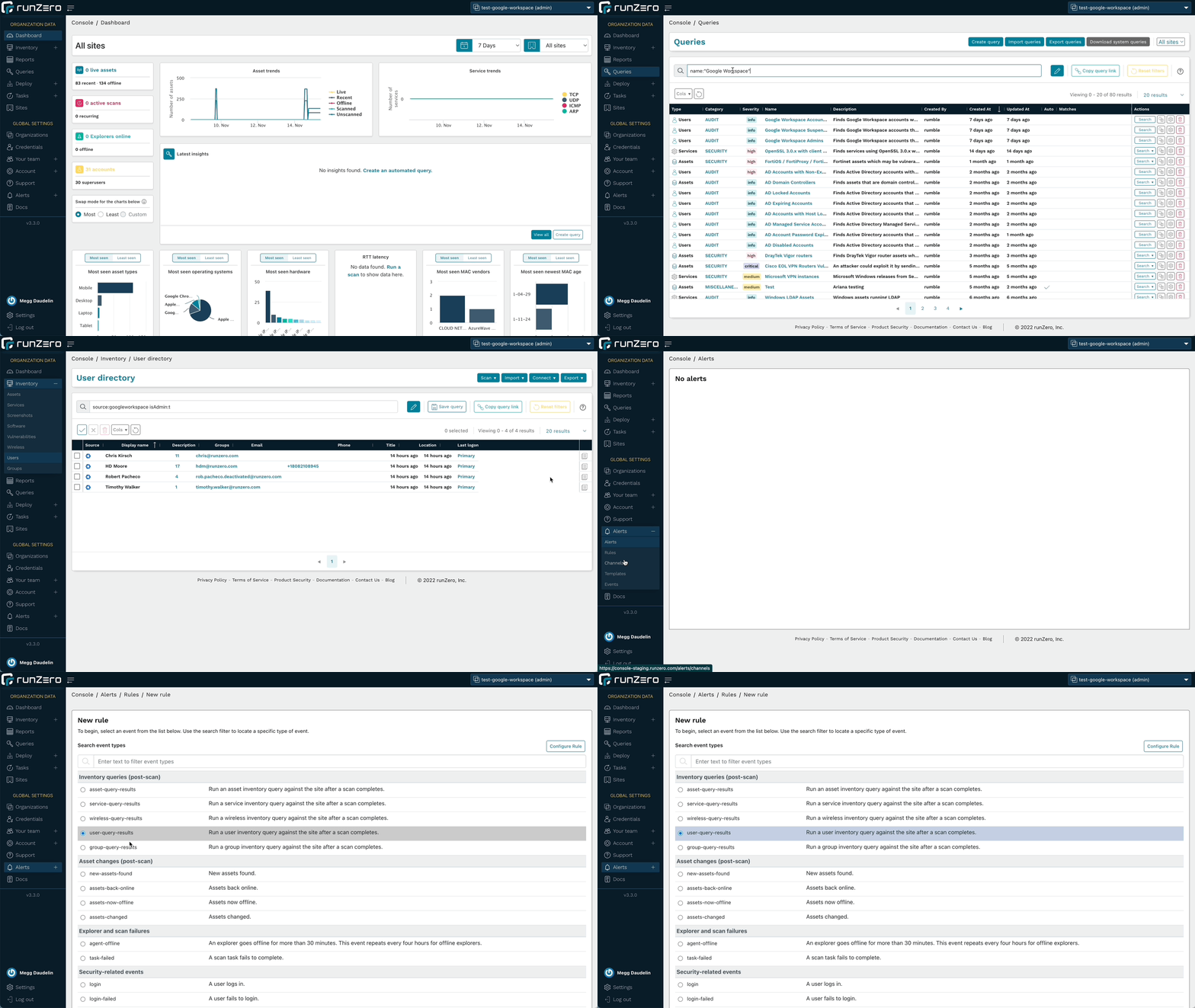
Query and Alert on Google Workspace Results

Fingerprinting for Google assets

runZero includes fingerprints for the metadata returned by the Google integrations, including Google Cloud Platform and Google Workspace. This will help provide the most accurate operating system and hardware data about the assets in your inventory.

In addition to Google fingerprints, runZero has also improved fingerprinting coverage of Microsoft 365 Defender assets and SNMP devices. Additional support was added or improved for products by Apache, Aruba, Avaya, Axon, Cisco, CyberPower, Debian, Eaton, Epson, Fortinet, Fujifilm, Geist, Hikvision, Lexmark, Oracle, Sato, Sony, Vivi, and VMware.

Identification of OpenSSL services

In preparation for the OpenSSL vulnerability announcement, runZero released remote, unauthenticated fingerprinting for OpenSSL 3 services, allowing our users to get ahead of the mitigation process prior to the vulnerability details becoming public. This capability has since expanded to detect even more TLS implementations and track the TLS stacks in use on each asset. runZero users can find OpenSSL endpoints using the query product:openssl, in the assets, services, and software inventories.

The server-side exposure only applies to services that process client certificates. runZero already performs checks for this, even though it is not a common configuration. To identify services running OpenSSL 3.0.x variants that may be vulnerable to exploitation, use the following query in the service inventory search: _service.product:"OpenSSL:OpenSSL:3" AND tls.requiresClientCertificate:"true".

Improvements to the runZero Console

The 3.3 release includes several changes to the user interface to improve the performance of the runZero console. The tables on the Explorers, Sites, Organizations, and Your team pages now perform and load faster. This will let users query and sort the results in tables more efficiently, getting to the answers they need faster.

The release also extends the availability of the All Organizations view. All users now have a view that will show them the results from all of the organizations that they have access to. The available permissions in that view reflect their per-organization permissions so that they can manage resources just like they would when viewing a single organization.

Release notes

The runZero 3.3 release includes a rollup of all the 3.2.x updates, which includes all of the following features, improvements, and updates.

New features

  • runZero Professional and Enterprise customers can now sync assets from Google Workspace.
  • runZero Enterprise customers can now sync users and groups from Google Workspace.
  • The “All Organizations” view is now available to restricted users with a filtered scope.
  • User interface tables were revamped for Organizations, Sites, Explorers, and Teams.
  • Live validation is no longer required for Qualys VMDR and InsightVM credentials.
  • Fingerprint updates.

Product improvements

  • The subnet utilization report now supports filtering by site.
  • CSV export of assets now includes the same hostname information as the inventory view.
  • Up-to-date ARM64 builds of the standalone scanner are now available.
  • The account API endpoint for creating organizations now accepts the argument types documented.
  • Merging two assets now correctly updates the date of the newest MAC address for the resulting asset.
  • Disabling all scan probes now disables the SNMP probe.
  • Service Provider information is now displayed with a default domain before SSO settings are configured.
  • Explorers are now ordered alphabetically on the scan configuration and connector configuration pages.
  • runZero users logging in via SSO are now presented with the terms and conditions acceptance dialogue.
  • A new tls.stack attribute that tracks the TLS software provider and version has been added for assets and services.
  • A new canned query for OpenSSL 3.0.x with client certificate authentication has been added.
  • The scanner now reports OpenSSL versions via TLS fingerprinting.
  • The scanner now reports Tanium agent instances on the network.
  • The scanner now reports additional detail for SSLv3 services.
  • The search keywords has_os_eol and has_os_eol_extended are now supported on the Assets and Vulnerabilities inventory pages.
  • The “last seen” link to the most recent scan details has been restored on the asset details page.

Performance improvements

  • Improved performance when scanning from macOS hosts that have certain EDR solutions installed.
  • Improved performance of Intune integration when importing a large number of users and devices.
  • Scan task processing speed has been improved for SaaS and self-hosted customers.
  • The baseline memory usage of Explorers has been reduced.
  • Error handling of misconfigured fingerprints has been improved to reduce Explorer and scanner crashes.

Fingerprinting changes

  • Improved fingerprinting coverage of Microsoft 365 Defender for Endpoints assets.
  • Improved fingerprinting coverage of SNMP devices.
  • Tanium agent detection now sets the edr.name attribute.
  • Added fingerprinting of OpenSSL, GnuTLS, and Windows TLS stacks, including version when possible.
  • Apple ecosystem OS fingerprint updates.
  • Additional support added-or-improved for products by Apache, Aruba, Avaya, Axon, Cisco, CyberPower, Debian, Eaton, Epson, Fortinet, Fujifilm, Geist, Hikvision, Lexmark, Oracle, Sato, Sony, Vivi, and VMware.

Integration improvements

  • The AWS integration now includes an option to delete AWS-only assets that were not seen in the most recent import.
  • The Qualys integration now includes an option to import unscanned assets and is disabled by default.
  • Processing speed for large Qualys imports has been improved.
  • GCP credentials can now be configured to import assets from multiple projects.
  • The error message indicating that an AWS integration credential has insufficient permissions has been improved.

Bug fixes

  • A bug that could prevent the use of third-party credentials when using TLS thumbprints or the insecure connection option with a public URL has been resolved.
  • A bug which sometimes prevented GCP imports from completing has been fixed.
  • A bug in how Service Inventory searches were launched from the Asset details page had been resolved.
  • A bug that could prevent TLS probes from completing has been resolved.
  • A bug that could prevent updating site metrics has been resolved.
  • A bug that could prevent the Intune integration from completing long-running tasks has been resolved.
  • A bug that could prevent the GCP integration from returning all assets has been resolved.
  • A bug that could result in a recurring integration running again before the previous task finished has been resolved.
  • A bug that could prevent importing assets from Microsoft Intune has been resolved.
  • A bug that could prevent importing assets from Microsoft 365 Defender has been resolved.
  • A bug that could prevent importing assets from Microsoft 365 Defender has been resolved.
  • A bug that could cause broken asset links has been resolved.
  • A bug that could cause missing service data for services with conflicting virtual hosts has been resolved.
  • A bug that could cause inaccurate user counts for imported directory groups has been resolved.
  • A bug that affected tooltip display has been resolved.
  • A bug that prevented “open in new tab” navigation using middle/right click has been resolved.
  • A bug that could prevent Azure AD imports has been resolved.

About Version 2 Digital

Version 2 Digital is one of the most dynamic IT companies in Asia. The company distributes a wide range of IT products across various areas including cyber security, cloud, data protection, end points, infrastructures, system monitoring, storage, networking, business productivity and communication products.

Through an extensive network of channels, point of sales, resellers, and partnership companies, Version 2 offers quality products and services which are highly acclaimed in the market. Its customers cover a wide spectrum which include Global 1000 enterprises, regional listed companies, different vertical industries, public utilities, Government, a vast number of successful SMEs, and consumers in various Asian cities.

About runZero
runZero, a network discovery and asset inventory solution, was founded in 2018 by HD Moore, the creator of Metasploit. HD envisioned a modern active discovery solution that could find and identify everything on a network–without credentials. As a security researcher and penetration tester, he often employed benign ways to get information leaks and piece them together to build device profiles. Eventually, this work led him to leverage applied research and the discovery techniques developed for security and penetration testing to create runZero.

How free migration tools end up costing you more

Discover how the true cost of migrations can often be hidden.

Everyone likes a freebie, there’s no denying it. But the truth is, when something’s free, it usually comes at a price.

Free software is a good example of this. Usually it’s just a “taster”, something to whet your appetite or grab your attention, and further down the line you end up paying for a more robust version.

Free migration software is like this; a good foundation to start, but if you want all the bells and whistles to do it properly, then it’s worth paying a little extra.

Free Migration Tools

Migrations are incredibly complex, and the results can make or break a business. It’s not the kind of thing you want to put into the hands of the cheapest option available.

There are basically three serious options when it comes to free migration tools; Microsoft FastTrack, Google Workspace Migrate and third-party open-source software

Open-source software

There are plenty of free open-source software migration tools out there, and most of them are fit for purpose if you’re only moving small amounts of data that have no real importance. But when it comes to a large-scale data migration that’s part of the growth and development of your business, you will want to set your sights a little higher.

As you might expect, open-sourced migration software has limitations. The software takes longer to set up, will usually only migrate certain things (like files and folders, but not emails), and, most importantly, has a higher fail rate, meaning there’s more chance of your migration turning into a catastrophe.

As the software is open-sourced, there will be no guarantee of security because it will come without accreditation. For something as important as your company’s data, you should only ever use software that meets international standards of security, like CloudM.

Microsoft

FastTrack is a migration service provided by Microsoft and it’s available to all Microsoft 365 subscribers for free.

While FastTrack is suitable for simple file migrations, but it was not designed for anything more complicated.

When you are handling a big migration project, you want to be kept abreast of its progress.There is no update on the project until it’s complete, so there is no way of telling how long is left, how much data has been moved, and which files are still pending.

If you have additional requirements, special instances that need specific attention, or simply want someone to help fix unforeseen issues, then unfortunately there’s not much help available.

If any issues come up, there is no telephone or video support, only an email address to use, so a response is usually slow, by which time the issue might have done serious damage.

FastTrack is only available for customer tenants with 150 or more licenses and is also limited to a certain number of users, so for larger projects, you need more than one migration to move your data.

So to sum up Microsoft’s free migration tool, it might be worth it if you’re a small business with basic data to transfer. Anything larger or complicated should be left to bespoke migration software.

Google

For full migrations, Google will only transfer from one Google domain to another. That means if you’re on Microsoft or some other platform, you can’t use their tool.

Google does have GWMMO (Google Workspace Migration for Microsoft Outlook), but some categories of Email, Calendar, and Contacts are not supported to import in Gmail, while Journal entries, Outlook Notes, tasks, and RSS feeds aren’t imported at all through this method.

Google Migration is not always the speediest: you are allocated one server for your project and you’re migrated on that one server.

In fact, for more complicated migrations, Google often turns to third-party software themselves – like CloudM. So if your migration project needs to happen quickly, securely and effectively, you can cut out the middleman and come to us directly.

What can go wrong?

Unfortunately, a lot could go wrong during a data migration, which is why you should never go for the cheapest option. As we mentioned, migrations are complex, and the bigger the job, the more issues can potentially arise.

Losing data, leaving user information behind and data corruption are just a few of the common problems seen during a large migration.

These issues can have serious, real-world consequences. From reputation damage to hefty fines for data protection breaches, a problematic migration can be a nightmare for a company.

Any kind of problem is going to mean more work for your IT team – because here’s the thing with free migration software – if things do go wrong, who do you talk to about it? Who is accountable for lost or corrupted data? What number do you call to speak to someone? Who do you email about the issue?

Invariably, the answer is no one. And that’s where the true cost of free migration tools appears.

Migrate Reporting Status UI Graphics

Why you should use us

CloudM has a 99.8% success rate when it comes to data migrations, with over 68 million users migrated in 107 countries.

We offer a host of advantages over a free migration service, including speed, security, accountability, and perhaps most important of all, peace of mind.

Migrations can be stressful, and if you choose free software, you’ll increase that stress exponentially. You’ll have no regular updates, no sign of how successful your migration has been so far, and no idea of how long is left.

With us, you’ll have a personalized account manager, someone to oversee your project and keep you up to date with developments. You’ll be in full control of your data, you’ll know exactly what has been transferred and when, how far the project has come, and any issues that have arisen. Plus, with 24/7 product support available you know an expert is never far away.

We also provide Delta Migrations, allowing your business to carry on as normal during the project, so you have zero downtime. A Delta Migration works by migrating all your historical data – say everything up until the past three months – and then once that’s done, we do the last three months over a weekend when no one is working.

Working with us rather than a restrictive service or open-source software with no experts on hand gives you more options and greater agility in your migration. We can course correct if something comes up, and of course, handle everything for you instead of making you do all the work as free software would.

If done incorrectly, problems during a migration can lead to downtime, data loss and, in worse-case scenarios, legal troubles.

It simply isn’t worth the risk to use free, open-source software for something as important as your data. Let the professionals handle it.

You’re not just paying for the software, you’re paying for peace of mind. You’re paying for data security and accountability if anything goes wrong. You’re paying for a successful migration, and at the end of the day, that’s all that matters.

About Version 2 Digital

Version 2 Digital is one of the most dynamic IT companies in Asia. The company distributes a wide range of IT products across various areas including cyber security, cloud, data protection, end points, infrastructures, system monitoring, storage, networking, business productivity and communication products.

Through an extensive network of channels, point of sales, resellers, and partnership companies, Version 2 offers quality products and services which are highly acclaimed in the market. Its customers cover a wide spectrum which include Global 1000 enterprises, regional listed companies, different vertical industries, public utilities, Government, a vast number of successful SMEs, and consumers in various Asian cities.

About CloudM
CloudM is an award-winning SaaS company whose humble beginnings in Manchester have grown into a global business in just a few short years.

Our team of tech-driven innovators have designed a SaaS data management platform for you to get the most from your digital workspace. Whether it’s Microsoft 365, Google Workspace or other SaaS applications, CloudM drives your business through a simple, easy-to-use interface, helping you to work smarter, not harder.

By automating time-consuming tasks like IT admin, onboarding & offboarding, archiving and migrations, the CloudM platform takes care of the day-to-day, allowing you to focus on the big picture.

With over 35,000 customers including the likes of Spotify, Netflix and Uber, our all-in-one platform is putting office life on auto-pilot, saving you time, stress and money.

Things to Consider When Defending Against a Rogue API

Application programming interfaces (APIs) are a crucial aspect of most businesses. Its responsibility involves the transfer of information between systems within an organization or to external companies. Unfortunately, a rogue API can expose sensitive data and the organization’s internal infrastructure to misuse.

A security breach could result in the leaking of sensitive customer data such as PHI or financial data. This article will give an overview of the vulnerabilities of APIs that hackers take advantage of and how best to secure them.

What is a Rogue API?

A rogue API is an API which lacks approval or authorization by a company to provide access to its data. Instead, they get created by third-party developers who access the company’s data through a back door.

Rogue developers often do not use the same security protocols abide by the same data privacy laws as the company. Several effects of these Rogue API activities include:

  • The collection of sensitive data from a business without permission, such as customer information, financial data, or proprietary information
  • The deletion or modification of stored data on a system.
  • The corruption of important files or rendering them inaccessible.
  • Using a rogue API allows the bypass security controls on a site.
  • A damaged reputation due to financial losses.

The Importance of API Security

Access to APIs occur through public networks from any location. This makes them easily accessible to attackers and simple to reverse-engineer.

APIs functions are central to microservices architectures. They help to build client-side applications that focus on customers, employees, partners, and more. The client-side application, like a web or a mobile application, interacts with the server side via the API. Invariably, they become a natural target for cybercriminals and are very sensitive to Denial of Service (DoS) attacks.

Consequently, implementing and maintaining API security (although an exhaustive process) becomes a critical necessity. Moreover, API security practices should cover access control policies and the identification and remediation of attacks on APIs. The best way to protect data is to ensure that only approved APIs access a company’s sensitive data.

Effective Strategies to Reduce Rogue API Vulnerabilities

Here are some steps organizations can take to protect against a rogue API:

  • Use a network security solution that detects and blocks API threats.
  • Grant access to sensitive data only to those who need it.
  • Conduct constant API activity monitoring for suspicious or unauthorized activity.
  • Promptly blocking suspicious IP addresses.
  • Keep all data secure by using trusted third-party services.

Best API Security Practices Against Rogue API

Get Educated on all Security Risks

Developers need in-depth knowledge of cyber criminals’ latest techniques to penetrate a system. One strategy is to get information from trusted online sources like newsletters, malware security blogs, and security news portals.

By being up-to-date with the latest hacking trends, developers can configure their APIs and ensure they thwart the latest attacks.

Authenticate & Authorize

Businesses need to carefully control access to their API resources. First, they must carefully and comprehensively identify all related devices and users. An effective strategy involves the use of a client-side application. It has to include a token in the API call so that the service can validate the client easily.

Furthermore, standard web tokens can be used to authenticate API traffic and to define access control rules. Businesses can also use grant types to determine which users, groups, and roles need access to specific API resources. For example, a user that only needs to read a blog or post a comment should only receive permission that reflects this.

Encrypt Your Data

All data requires appropriate encryption so that only authorized users can modify and decrypt the data.

It helps to protect sensitive data and enhance the security of communication between client apps and servers. The beauty is that encrypted data prevents unauthorized entities from reading them even with gained access.

Validate the Data

Most businesses rely only on the cleansing and validation of API data from external partners. Therefore, companies must implement data cleaning and validation routines to prevent standard injection flaws and attacks.

The use of debugging tools helps to examine the API’s data flow as well as track errors and anomalies.

Identify API Vulnerabilities

One important API security best practice is to perform a risk assessment. However, you must first know the faucets of your network remain vulnerable to risk .

Overall vulnerability can be difficult pinpoint because software organizations constantly use thousands of APIs simultaneously. To succeed with API security, establish measures that eliminate vulnerabilities to mitigate risk and meet security policies.

Furthermore, the discovery of vulnerabilities requires businesses to conduct rigorous testing. A great place to begin is at the initial phase of development. After that, it becomes easy to rectify them quickly.

Limit the Sharing of Confidential Information

Sharing only necessary information is a great management best practice, which is why a client application comes in handy. It filters relevant information from the entire data record present in API responses.

A developer should remember to remove sensitive information like passwords and keys before making the API publicly available. This prevents attackers from gaining access to sensitive data or entry to the application and the core of the API.

However, releasing only relevant information is a form of lazy programming. Other consequences include slowing response times and providing hackers with more information about the API access resources.

Final Thoughts on Rogue API Defense

API gateways focus on managing and controlling API traffic. Utilizing a strong API gateway minimizes security. Additionally, a solid API gateway would let organizations validate traffic and analyze and control how the API gets utilized.

About Version 2 Digital

Version 2 Digital is one of the most dynamic IT companies in Asia. The company distributes a wide range of IT products across various areas including cyber security, cloud, data protection, end points, infrastructures, system monitoring, storage, networking, business productivity and communication products.

Through an extensive network of channels, point of sales, resellers, and partnership companies, Version 2 offers quality products and services which are highly acclaimed in the market. Its customers cover a wide spectrum which include Global 1000 enterprises, regional listed companies, different vertical industries, public utilities, Government, a vast number of successful SMEs, and consumers in various Asian cities.

About Portnox
Portnox provides simple-to-deploy, operate and maintain network access control, security and visibility solutions. Portnox software can be deployed on-premises, as a cloud-delivered service, or in hybrid mode. It is agentless and vendor-agnostic, allowing organizations to maximize their existing network and cybersecurity investments. Hundreds of enterprises around the world rely on Portnox for network visibility, cybersecurity policy enforcement and regulatory compliance. The company has been recognized for its innovations by Info Security Products Guide, Cyber Security Excellence Awards, IoT Innovator Awards, Computing Security Awards, Best of Interop ITX and Cyber Defense Magazine. Portnox has offices in the U.S., Europe and Asia. For information visit http://www.portnox.com, and follow us on Twitter and LinkedIn.。

The Impacts of the Ransomware Crisis on IT Teams

It’s no secret that IT teams are on the front lines of a rapidly evolving cyber-threat landscape. The ransomware crisis is raging, with attacks escalating in frequency, magnitude, and sophistication. This has impacted IT teams in multiple ways, including increased pressure to keep pace with the latest threats, complicating existing data protection efforts, and hindering the IT team’s ability to adequately meet the end-users’ needs.

Recent research by the cyber risk management company, Axion, showed that only 30% of organizations have plans to respond to the ransomware crisis. Organizations need to take a proactive approach to the ransomware crisis in which the IT team can work together with business, security, and executive teams to develop a response plan to the ransomware crisis.

What is Ransomware?

Ransomware is a kind of malicious software (“malware”) that enters a computer system and encrypts specific files, making them inaccessible to the computer user, and demands a ransom payment to be made in a set amount of time to regain access to their files. Should a payment not be made, the ransomware can delete files on the computer and write an encrypted copy of those files to a different place, rendering them inaccessible without decryption.

The ransomware crisis serves as a major IT security concern as it threatens users’ privacy, data integrity, and business continuity.

How the Ransomware Crisis Impacts IT Teams

The ransomware crisis has various negative impacts on IT teams, including:

Decreased Productivity
During a ransomware incident, IT teams are busy working on recovery, cleanup, and investigation to deal with the ransomware attack. This increases stress levels and may harm business operations across the entire organization.

Damaged Reputation
The reputation of the IT team is also affected during the Ransomware crisis. IT teams may face negative feedback from customers, partners, and vendors because the business cannot perform tasks such as completing daily transactions and service requests.

Data Loss
IT teams that are unprepared for an attack may lose critical information and data that they can’t afford to lose. The cost of losing highly sensitive data could result in reputational damage, compliance failures, and lost business.

Overworked IT Teams
Ransomware attacks can throw IT teams into an unexpected high-pressure situation, causing high levels of stress and fatigue that compromises their health and well-being.

Security Vulnerabilities
Ransomware attacks open up security vulnerabilities in your system, which hackers can use for other attacks. The longer the system remains infected, the more potential harm hackers could do through already-opened vulnerabilities.

Cost of Investigation
IT teams face the cost of conducting a detailed investigation. This can include searching for the source of attacks, determining the extent of damage, and identifying gaps in security systems leading to such attacks.

Loss of Confidence in IT
The longer it takes to restore business operations, the more likely your internal and external audience will lose confidence in your IT team. This can damage future business and an organization’s goodwill among its public and customers.

Loss of Competitive Edge
One of the most severe impacts on IT teams during the ransomware crisis is the declining competitive edge due to the loss of mission-critical assets, intellectual property, and trade secrets. This could affect an organization’s long-term business outlook, growth strategy, and financial performance.

Preventing a Ransomware Attack

The key to preventing a ransomware attack is to have a comprehensive cybersecurity plan. It is essential to have the following measures in place to avoid such crises.

System & Data Backups
Always conduct system backups to help IT teams restore files or systems in case of ransomware attacks. It is essential to back up data regularly so critical information can be retrieved in case it gets encrypted during an attack.

Patch Management
It is essential to ensure that all systems are regularly updated with the latest security patches for optimal threat protection. Also, ensure that all security updates are immediately applied across all systems in your network.

Network Security Tools
IT teams should use several tools to help detect suspicious activities and prevent ransomware attacks through a network before they can cause harm or damage. Security tools such as antivirus, host-based intrusion detection systems, vulnerability management tools, and a web gateway can help detect suspicious IP addresses and activities before any harm is caused.

Security Audits
While conducting regular security audits is not always easy, this process can help identify potential gaps in your network, which you can close before they cause harm to your business. Security audits can also help identify measures that need to be taken to prevent such attacks.

Security Awareness Training
Security awareness programs can help identify security issues that could lead to a ransomware attack. The training sessions will help your employees learn how to identify suspicious activities in their work environment and how to report any such issues or suspicious activity as soon as it is discovered. Training can also help create awareness about ransomware attacks among your employees so that they can take the right actions when faced with such incidents.

Conduct Regular Risk Assessments
Risk assessments help identify potential risks which can lead to a ransomware attack. Conducting regular risk assessments would help identify steps that need to be taken to prevent such attacks from occurring.

The Future Outlook of the Ransomware Crisis

The Ransomware crisis has an undeniably negative impact on IT teams, which can significantly hinder the long-term performance of an organization a. The longer the system remains infected, the more damage it could cause through the already exploited vulnerabilities. Staying informed about security threats is essential so that IT teams can take timely action against such threats and prevent further losses from occurring.

About Version 2 Digital

Version 2 Digital is one of the most dynamic IT companies in Asia. The company distributes a wide range of IT products across various areas including cyber security, cloud, data protection, end points, infrastructures, system monitoring, storage, networking, business productivity and communication products.

Through an extensive network of channels, point of sales, resellers, and partnership companies, Version 2 offers quality products and services which are highly acclaimed in the market. Its customers cover a wide spectrum which include Global 1000 enterprises, regional listed companies, different vertical industries, public utilities, Government, a vast number of successful SMEs, and consumers in various Asian cities.

About Portnox
Portnox provides simple-to-deploy, operate and maintain network access control, security and visibility solutions. Portnox software can be deployed on-premises, as a cloud-delivered service, or in hybrid mode. It is agentless and vendor-agnostic, allowing organizations to maximize their existing network and cybersecurity investments. Hundreds of enterprises around the world rely on Portnox for network visibility, cybersecurity policy enforcement and regulatory compliance. The company has been recognized for its innovations by Info Security Products Guide, Cyber Security Excellence Awards, IoT Innovator Awards, Computing Security Awards, Best of Interop ITX and Cyber Defense Magazine. Portnox has offices in the U.S., Europe and Asia. For information visit http://www.portnox.com, and follow us on Twitter and LinkedIn.。

Code security and safety tips when writing guidelines

Better safe than sorry! That is my motto and the motto of any person practicing web application security!

Preventing cyber-attacks starts at the very beginning of the development of the application by writing secure code.

Following secure coding standards helps developers to prevent common vulnerabilities in the code. Secure coding standards are a set of best practices and guidelines.

It is essential to have secure code standard implementation from the beginning because it will reduce future costs resulting from an exploit or the leak of sensitive data.

In this article, I wrote some practical tips you can use when creating your security code guideline for a simple web application. 

When creating the guideline, it is best to check out as much eligible documentation on the internet about the secure code topic. The complexity of the guideline will, of course, depend on your web application’s complexity and requirements.

You can check out these links: OWASP guidelines and/or OWASP Security Knowledge FrameworkSEI CERTMicrosoft-Writing Secured Code, and many more. 

I would divide this topic into two parts. One would be about choosing a framework and programming language for your application, and the second would be error handling, logging, and monitoring.  

As for the second part, you can check out the Error handling article I wrote. And I will not cover logging and monitoring topics because I plan to cover them in my future articles. After all, they are essential topics that would need special attention.


Selecting a framework for the application

There are two cases when you would need to choose the framework and programming language: when starting development of the application and when rewriting the application.

When starting to plan the application development and choosing the framework, this decision is often based on the experience of the team who will work on the product. 

The final decision is often to use some old framework because of developers’ lack of knowledge and time to learn a new one. Also, when choosing an old framework, its vulnerabilities are not checked. 

I will not focus on that case because the management team probably made a decision. I will focus on developers’ decisions, and I will mention that you should choose the framework that is the latest one or one of the latest. That would be the best practice because you will not need to migrate when you have a lot of source code already written. You will have the support of the new framework because it will not be deprecated (that is good because the framework will be tested for the latest vulnerabilities, and new updates with patches will be available). You will be in sync with the technologies!

If you have some older web applications, you can scan them with SCA tools and find all older versions if they have security vulnerabilities. You can check out one article which compares Software Composition Analysis Tools in 2022. This approach will help you with the migrations. You can create a grid of all insecure versions of SCA (Software Composition Analysis) found and suggest the newer versions without vulnerabilities. SCA tools should also be used to scan the repository weekly and in your pipeline on every build.

All frameworks have integrated security features, and it is important to check them out to see if they cover all the security features you want in your product. And keep in mind that by using fewer types of technologies, frameworks, languages, libraries, components, etc., you are reducing the maintenance of systems and the attack surface, which is always good. 


List of security steps


Handling of data

  • Validate input: type, size, format, source.

  • Verification is performed on the server side. If the input is invalid, reject it and give the user an error message with a description of what you expect.

  • If you must accept special characters, you must escape them.

  • If an input triggers some CRUD operations such as add, delete, update, verify this is not a CSRF attack by checking the token, captcha, or some other re-authentication

  • If the input is presented to the user, input needs to be output encoded.

  • If the input is part of the query in the DB, use parametrized queries. So, use parameterized queries (place input in them) with stored procedures to prevent DB injection attacks.

  • If you need redirection to a different site in the app, create a list of pre-approved links and check the link when redirecting


HTTP verbs

Most web applications only use GET, POST, OPTIONS, and HEAD. All unused are unrequired and should be disabled to reduce the attack surface.

For more info on how to disable dangerous HTTP methods, you can check out this link.


Identity


You should never create your own system for identity. Always buy a pre-made system unless you have unique business requirements that force you to create your own—in which case, use a well-established protocol such as OAuth. If it is a system within a network, you can use the most common network identity system, Active Directory. Many other identity systems on the market can also perform this functionality, such as some public cloud providers.


Session management


If your chosen programming framework has session management features, use them. Do not write your own from scratch.  

  • Session IDs should be at least 128 characters long.

  • Use unpredictable IDs.

  • Use the built-in session management implementation in your framework,

  • The session ID should have an expiration date and/or time.

  • The session ID should only be passed over encrypted channels.

  • The session should be destroyed after a user logs out.

  • Web applications must never accept a session ID they have never generated. 

I already covered all the best practices in session management series parts one and two. Check them out!


Memory safe code


If you are using a programming language that is not memory safe:

  • Migrate to the new memory-safe language. The Rust programming language is an example of a memory-safe alternative to C and C++. Examples of memory-safe languages include Java, .Net (VB and C#), and Ruby on Rails.

  • Perform bounds and type-checking on every input every single time.

  • If your language has a framework overlay available or dependency you can add that can test bounds for you, use it.

  • Create unit tests for your bounds checking to make a regressive testing system run on every new code check-in.

  • Perform a code review and verify every input has proper testing.

  • If available, add compilation options to detect these types of issues.


Authentication

You shouldn’t write your own authentication system from scratch. A lone software developer on a project team should always use existing tried-and-true systems. That system can be eighter pre-existing internet identity online service from a third party to verify your users or a free library or software system to become part of your system to perform the identity functionality for you.


Authorization


Role Based Access Control, or RBAC for short is the most popular methodology for determining access. It means “determine someone’s access based on the role assigned in your system.”


There are three other widely accepted access control models:

  • Discretionary Access Control (DAC)

  • Mandatory Access Control (MAC)

  • Permission Based Access Control (PBAC)


Based on the requirement of the system, you would choose the access control model.


Conclusion

I hope I have given you some direction on creating your own secure coding standard. There are plenty of tips on best practices on the internet regarding secure coding, so you should gather as much as possible before developing your own model. 

You should take initiative to create your secure coding standard and if it was not required to explain to others why it is important to have one.

Cover photo by Matthew Waring

About Version 2 Digital

Version 2 Digital is one of the most dynamic IT companies in Asia. The company distributes a wide range of IT products across various areas including cyber security, cloud, data protection, end points, infrastructures, system monitoring, storage, networking, business productivity and communication products.

Through an extensive network of channels, point of sales, resellers, and partnership companies, Version 2 offers quality products and services which are highly acclaimed in the market. Its customers cover a wide spectrum which include Global 1000 enterprises, regional listed companies, different vertical industries, public utilities, Government, a vast number of successful SMEs, and consumers in various Asian cities.

About VRX
VRX is a consolidated vulnerability management platform that protects assets in real time. Its rich, integrated features efficiently pinpoint and remediate the largest risks to your cyber infrastructure. Resolve the most pressing threats with efficient automation features and precise contextual analysis.

×

Hello!

Click one of our contacts below to chat on WhatsApp

×