Skip to content

How to choose the best DNS filtering solution for your business

Summary: Discover key factors for selecting a DNS filtering solution that enhances network security, boosts productivity, and ensures compliance for your business.

Now, businesses face many online threats that can jeopardize network security, reduce employee productivity, and compromise regulatory compliance. Domain Name System (DNS) filtering is a powerful tool for protecting against these threats by blocking access to harmful websites—those that may host malware, phishing attempts, or inappropriate content.

Beyond protecting your network, DNS filtering tools improve workplace productivity by limiting access to non-work-related websites. They also help ensure compliance by restricting access to certain types of content.

However, with many DNS filtering providers available, selecting the right one can be overwhelming. This guide will walk you through the key factors to consider when choosing the best DNS filtering solution for your organization.

How DNS filtering solutions work

DNS filtering is like a gatekeeper for internet usage, preventing access to malicious or inappropriate websites before they can harm your network. By intercepting DNS queries—requests users make when accessing a website—the filtering system determines whether the requested domain is safe based on predefined security policies.

Typically, DNS servers function like an internet “phonebook,” translating domain names into IP addresses to connect your browser and the required website.

With a DNS filtering solution in place, however, each query undergoes additional checks. If the requested site is flagged on a blocklist or is identified as a security risk, the DNS resolver blocks the request, preventing the page from loading and neutralizing potential cyber threats.

Benefits of implementing a DNS filtering solution

Deploying a DNS filtering solution offers a range of benefits that go beyond basic Internet browsing controls:

Internet threat prevention

Each organization should control employee online traffic. By blocking access to sketchy sites full of malware, phishing, or ransomware, DNS filtering solutions shield your network from all kinds of cyber-attacks before they even have a chance to strike.

Keeping productivity on point

Let’s face it—distractions are everywhere. DNS filtering tools help minimize those distractions by blocking non-work-related sites so your team can stay focused and get more done.

Improved network performance

No more bandwidth hogs. A DNS filtering solution ensures your network runs smoothly and efficiently by limiting heavy streaming or large file downloads.

Security compliance

Worried about regulations? DNS filtering helps you meet industry standards by controlling access to restricted content and protecting your business from potential legal and reputational risks.

Keeping remote workers safe

With more people working remotely, DNS filtering solutions block online threats and secure sensitive data, no matter where your employees log in.

Filtering for safer Internet access

Whether it’s a school, home, or workplace, DNS filtering blocks inappropriate or harmful content, creating web filtering for schools or employees.


5 considerations for choosing the best DNS filtering solution

When it comes to selecting a DNS filtering provider, it’s essential to weigh your options carefully. With so many choices out there, understanding the key factors can help you find the right fit for your organization. Here are some critical considerations to keep in mind:

#1 Technical architecture

The backbone of a solid DNS filtering solution is its technical architecture. You’ve got two main options: cloud-based or on-premise. Cloud-based solutions are super scalable. They make it easier to grow with your business’s security needs. They are also easier to deploy, need less maintenance, and usually come with real-time updates.

On-premise solutions give you more control over your data. This can be a big help if you have strict privacy rules. However, they might require higher initial costs, more time, and greater expertise to maintain.

Another thing to keep in mind is DNS resolution speed—how fast it can process requests and load websites. A provider with a global network will keep things running smoothly with less lag when accessing sites.

#2 Advanced threat detection

In today’s world, you need more than just the basics. Look for a DNS filtering solution that’s equipped with advanced threat detection. Such a solution must monitor network activity in real-time, spotting and blocking threats like malware and phishing before they can mess with your network. As cyber threats keep evolving, having a tool that adapts is a must.

#3 Integration with existing systems

Whatever DNS filtering solution you pick should be compatible with your current system. Make sure it works well with your existing security infrastructure, like your firewall or Security Information and Event Management (SIEM) tools. Some providers even offer API access for easy integration with third-party tools or custom solutions. A smooth integration means less hassle for your IT team and a more seamless security experience.

#4 Granular policy management

DNS filtering is designed to restrict access to specific content, but when it comes to defining exclusive rules for network access, we enter a different technological area. Therefore, when selecting DNS filtering solutions, it’s best to look for comprehensive products beyond content restriction and address network access use cases.

Fine-tuning access with your DND filtering solution helps boost productivity and security, keeping everyone where they need to be.

#5 Real-time analytics and reporting

Keeping tabs on what’s happening in your network is essential. Make sure your DNS filtering provider offers real-time analytics and reporting so you can spot potential threats, check network activity, and stay compliant. Detailed DNS query logs and custom reports are especially useful for digging into incidents or proving you’re following industry regulations.

Tips for selecting the best DNS filtering solution

  • Check out content control features: Look for customizable filtering options that let you block malware, phishing attempts, adult content, gambling sites, and more. Keeping distractions and risks at bay is key for productivity and compliance.
  • Make sure it has solid security features: Don’t settle for basic protection. Your DNS filtering solution has strong encryption, advanced threat detection, and malware protection. These features add extra layers of security, especially when your data is in transit.
  • Go for user-friendly setup and centralized management: Setting up DNS filtering shouldn’t be a headache. Look for something simple to install with centralized management so your IT team can control everything from one spot, enforce policies, and quickly handle any issues.
  • Look for customization options: Every business is different, so you’ll want a solution that lets you fine-tune filtering rules to fit your specific needs. Flexibility is key to keeping security tight without slowing down business activities.

Conclusion

Choosing a DNS filtering solution for your business is critical. It impacts everything from your cybersecurity to productivity and compliance. Take the time to evaluate things like the technical architecture, how the provider handles threats, and how well the solution integrates with your current systems. Opt for providers that offer robust security, real-time reporting, and detailed control over access to make sure you’re getting the best DNS filtering solution possible.

With the right DNS filtering in place, you can protect your network, control online interactions, and create a safer, more productive work environment for your team.

How NordLayer can help

NordLayer offers easy-to-use DNS filtering capabilities to protect your network. With features like DNS filtering by category, Web Protection, and Download Protection, keeping your team safe is simple. Setup is quick, even for non-tech users, and managing security for your whole team is straightforward.

  • DNS filtering by category allows IT admins to block content from over 50 categories. This helps keep your network secure and your team focused.
  • Web Protection automatically blocks access to websites that are flagged as potentially malicious.
  • Download Protection scans every new file download and removes harmful files before they can infect your devices.

These features can work together to prevent risks like malware infections and phishing. But that’s not all. All NordLayer customers get encrypted connections and masked IP addresses. This ensures your internet access is secure, no matter where you are.

Want to learn more? Contact NordLayer’s sales team to see how we can help protect your network.

 

About NordLayer
NordLayer is an adaptive network access security solution for modern businesses – from the world’s most trusted cybersecurity brand, Nord Security.

The web has become a chaotic space where safety and trust have been compromised by cybercrime and data protection issues. Therefore, our team has a global mission to shape a more trusted and peaceful online future for people everywhere.

About Version 2 Digital

Version 2 Digital is one of the most dynamic IT companies in Asia. The company distributes a wide range of IT products across various areas including cyber security, cloud, data protection, end points, infrastructures, system monitoring, storage, networking, business productivity and communication products.

Through an extensive network of channels, point of sales, resellers, and partnership companies, Version 2 offers quality products and services which are highly acclaimed in the market. Its customers cover a wide spectrum which include Global 1000 enterprises, regional listed companies, different vertical industries, public utilities, Government, a vast number of successful SMEs, and consumers in various Asian cities.

How to reset or change your Epic Games password


How to reset your Epic Games password

Forgot your Epic Games password and got locked out of your account? No problem! There’s an easy way to reset the password and regain access. Here’s what you need to do:

  1. Head to the login page on the Epic Games Store website or app.

  2. Click on “Forgot password?”

  3. Enter the email tied to your account to get a security code.

  4. Check your email for the code, then enter it on the site.

  5. Set up a new password that meets Epic Games’ security requirements, and click “Reset Password.”

  6. Use the new password to sign in again.


How to change your Epic Games password

If you suspect that your Epic Games password isn’t strong enough or simply want to change it (as recommended every 6 months to ensure account security), you can quickly do so by following a few steps on the Epic Games Store platform. Here’s how:

  1. Log in to your Epic Games account.

  2. Go to the “Account Info” page and find the “Password and Security” section.

  3. Enter your current password in the “Current Password” field.

  4. Create a new password, then confirm it by retyping it in the second box.

  5. Click “Save Changes.”


Best practices for creating a strong password

As mentioned earlier, a good habit is to change your passwords every 6 months, even if they’re strong. Why? Because regular updates make it harder for attackers to break in and access your accounts. So, if it’s been a while since you last updated your Epic Games password, now’s a great time to do it.

When creating a strong new password for Epic Games—or any other account—aim for at least 16 characters, mixing uppercase and lowercase letters, numbers, and symbols. Avoid using anything familiar, like phrases or personal information. The more random it is, the better.

And if creating and remembering such secure passwords sounds challenging, NordPass can help. It can generate strong passwords for you on the spot and store them securely in an encrypted vault that only you can access. With NordPass, you can log in quickly and securely to your Epic Games account without sacrificing security. Try it and see the difference it will bring to your online experience.


Frequently asked questions


What are the Epic Games password requirements?

Epic Games keeps its password requirements fairly simple: your password only needs to be at least 8 characters long, with at least one number and one letter, and no spaces. To better secure your account, though, we recommend that you go for a 16-character password that includes numbers, symbols, and a mix of uppercase and lowercase letters, all arranged randomly.


How often should I change my Epic Games password for security purposes?

It’s a good idea to change your Epic Games Store password, just like any other password, every 6 months to keep things secure. This makes it much harder for hackers to break in. And if creating complex passwords feels like a hassle, tools like NordPass’ Password Generator can handle it for you instantly.


How do I enable two-factor authentication (2FA) to protect my Epic Games account?

To set up two-factor authentication on your Epic Games account, all you need to do is just log in, go to the “Password & Security” section, and pick your 2FA method—an authenticator app, SMS, or email. This adds an extra layer of security by requiring a code from your chosen method each time you log in.


What should I do if someone else has changed my Epic Games password without my permission?

If you think or know for sure that someone has changed your Epic Games password without your consent, act quickly and follow these 3 steps to secure your account:

  1. Reset your password using the Epic Games password reset page or the account recovery page.

  2. Set a strong password for the email address linked to your Epic Games account.

  3. Enable 2FA on your Epic Games account to add an extra layer of security.

About NordPass
NordPass is developed by Nord Security, a company leading the global market of cybersecurity products.

The web has become a chaotic space where safety and trust have been compromised by cybercrime and data protection issues. Therefore, our team has a global mission to shape a more trusted and peaceful online future for people everywhere.

About Version 2 Digital

Version 2 Digital is one of the most dynamic IT companies in Asia. The company distributes a wide range of IT products across various areas including cyber security, cloud, data protection, end points, infrastructures, system monitoring, storage, networking, business productivity and communication products.

Through an extensive network of channels, point of sales, resellers, and partnership companies, Version 2 offers quality products and services which are highly acclaimed in the market. Its customers cover a wide spectrum which include Global 1000 enterprises, regional listed companies, different vertical industries, public utilities, Government, a vast number of successful SMEs, and consumers in various Asian cities.

2025 PCI 4.01: What MSPs Need to Know

With the introduction of PCI DSS 4.0.1, MSPs and IT professionals are at the forefront of ensuring compliance. The stakes are high—non-compliance can lead to breaches, financial penalties, and ultimately loss of trust. This article will break down what you need to know and how you can get ahead of these changes. 


Understanding the 2025 PCI 4.01 Update

In a move to strengthen payment card data security and align with global standards, the PCI Security Standards Council introduced PCI DSS 4.0.1. This update is not a complete overhaul but rather a refinement of PCI DSS 4.0, addressing feedback from stakeholders and clarifying several requirements that may have caused confusion.

Key clarifications include:

  • Client-Side Security Requirements: The new update clarifies that while merchants are responsible for scripts running on their own pages, those running on PSP/TPSP iframes fall under the vendor’s responsibility. This ensures a clear division of duties, minimizing the risk of oversight.
  • HTTP Headers and Scripts: Requirement 11.6.1 highlights the emphasis on systems impacting security, focusing on risks rather than broad protection for any HTTP header and script incidents.


The High Stakes of Non-Compliance

Failing to meet the guidelines within the stipulated timelines—by March 31, 2025—leaves your clients exposed to non-compliance risks, such as data breaches and hefty fines. It’s not just about ticking boxes; it’s about safeguarding sensitive data and maintaining client trust.

The most pressing challenge is ensuring that your clients understand their responsibilities and the potential repercussions of non-compliance. This includes navigating the complexities around script management and the new DMARC requirements, a critical measure to authenticate emails and prevent phishing attacks.


How MSPs Can Navigate the Compliance Landscape

1. Educate and Empower Your Clients

Start by educating your clients on the implications of PCI DSS 4.0.1. Break down the requirements into actionable steps and ensure they understand their responsibilities, particularly in managing scripts and HTTP headers. By providing them with knowledge, you strengthen their defenses against potential threats.

2. Leverage JumpCloud for Streamlined Compliance

JumpCloud offers a seamless way to align with many PCI DSS requirements. Its features, such as Zero Trust security, provide a strong baseline for compliance, making adherence to PCI standards less burdensome.

With JumpCloud, you can control which traffic accesses your clients’ sensitive data environments. You can set rules to deny all access unless users are part of a specific group, meeting PCI Requirement 1.3.

3. Proactively Monitor and Adapt

Begin by auditing your client environments now. Monitor their adherence to the updated requirements and offer solutions to address potential gaps. Being proactive positions you as a trusted advisor rather than a reactive technician.


PCI DSS 4.01 Is an Opportunity for Leadership

The 2025 PCI 4.01 update is not just a regulatory hurdle—it’s a chance for MSPs to demonstrate leadership. By guiding your clients through compliance changes, you’re not only safeguarding their businesses but also positioning yourself as a key player in their success.

Familiarize yourself with JumpCloud’s offerings and see how it can seamlessly integrate with your compliance strategies. Your role as an MSP is more critical than ever, and the right tools can elevate your impact. Learn more about JumpCloud for MSPs and check out our MSP Quickstart Compliance Guide for additional compliance resources with valuable insights and actionable tips.

About JumpCloud
At JumpCloud, our mission is to build a world-class cloud directory. Not just the evolution of Active Directory to the cloud, but a reinvention of how modern IT teams get work done. The JumpCloud Directory Platform is a directory for your users, their IT resources, your fleet of devices, and the secure connections between them with full control, security, and visibility.

About Version 2 Digital

Version 2 Digital is one of the most dynamic IT companies in Asia. The company distributes a wide range of IT products across various areas including cyber security, cloud, data protection, end points, infrastructures, system monitoring, storage, networking, business productivity and communication products.

Through an extensive network of channels, point of sales, resellers, and partnership companies, Version 2 offers quality products and services which are highly acclaimed in the market. Its customers cover a wide spectrum which include Global 1000 enterprises, regional listed companies, different vertical industries, public utilities, Government, a vast number of successful SMEs, and consumers in various Asian cities.

ESET announces new security integrations with major vendors for enhanced business protection

  • ESET announces new integrations of its ESET PROTECT Platform with IBM QRadar SIEM and Microsoft Sentinel SIEM and SOAR solutions. 
  • The new integrations with these major vendors ensure enhanced business protection and more efficient security workflows.
  • Additionally, the integrations address common pain points of cybersecurity operations in threat data administration and visibility, streamlining security management.

BRATISLAVADecember 2, 2024 — ESET, a global leader in cybersecurity solutions, today announced the integration of its ESET PROTECT Platform with major vendors in the form of IBM QRadar SIEM and Microsoft Sentinel, providing ESET customers with enhanced capabilities and advanced threat response management.

As nuanced as cybersecurity is, it is a necessity that requires organizations to cover their unique needs comprehensively, often beyond the capabilities of a single security vendor. Developing security maturity by employing multiple solutions, aggregating, and correlating vast amounts of data across several vendors, can be a daunting task. As such, there is a demand for seamless integration among solutions to simplify workflows, reduce manual effort, and enhance efficiency, all while fulfilling numerous compliance requirements.

To this end, ESET is continuing its integrations journey with IBM QRadar SIEM. The integration between the ESET PROTECT Platform and IBM QRadar SIEM leverages ESET’s AI-native cybersecurity platform with QRadar’s security information and event management (SIEM) capabilities. This enables threat data from ESET to be ingested by QRadar SIEM, providing visibility, and actionable insights to enhance enterprise security. In one stroke, this addresses challenges in monitoring endpoint activities and identifying threats across multiple perimeters in an organization.

ESET understands that such integrations can reduce complexity, while promoting better cyber hygiene, thus, significantly increasing the level of an organization’s security, and upgrading its threat hunting and incident response capabilities. This should help security analysts make fast, but satisfactory, security decisions, raising the quality and efficiency of their processes.

To that end, ESET is also integrating with Microsoft Sentinel, enabling organizations to ingest ESET threat detection data into MS Sentinel for advanced monitoring, analytics, and incident response. The data connector, developed by ESET, uses REST API to automate the retrieval of detection logs, providing continuous security insights in a centralized platform. This integration reduces manual intervention by automating data transfer, correlating endpoint data with cloud security, and streamlining incident management, which can often be quite complicated.

“As customers consolidate their cybersecurity stacks, and demand seamless integrations, ESET delivers exactly what they need. Our AI-native ESET PROTECT Platform, with its powerful detection engine, seamlessly integrates with major SIEM players, Microsoft Sentinel, and IBM QRadar SIEM, to provide extensive visibility into their environments. These integrations offer actionable rapid detection, shifting the focus from slow remediation and complexity to early prevention and enhanced security efficiency. Ultimately, this ensures our customers achieve a more streamlined, effective, and proactive cybersecurity posture,” said Pavol Balaj, Chief Business Officer at ESET.

Learn more about ESET’s integration capabilities and cooperation options at our dedicated website here.

To discover more about how ESET solutions fulfill multiple compliance requirements please visit our page here.

About ESET
For 30 years, ESET® has been developing industry-leading IT security software and services for businesses and consumers worldwide. With solutions ranging from endpoint security to encryption and two-factor authentication, ESET’s high-performing, easy-to-use products give individuals and businesses the peace of mind to enjoy the full potential of their technology. ESET unobtrusively protects and monitors 24/7, updating defenses in real time to keep users safe and businesses running without interruption. Evolving threats require an evolving IT security company. Backed by R&D facilities worldwide, ESET became the first IT security company to earn 100 Virus Bulletin VB100 awards, identifying every single “in-the-wild” malware without interruption since 2003.

About Version 2 Digital

Version 2 Digital is one of the most dynamic IT companies in Asia. The company distributes a wide range of IT products across various areas including cyber security, cloud, data protection, end points, infrastructures, system monitoring, storage, networking, business productivity and communication products.

Through an extensive network of channels, point of sales, resellers, and partnership companies, Version 2 offers quality products and services which are highly acclaimed in the market. Its customers cover a wide spectrum which include Global 1000 enterprises, regional listed companies, different vertical industries, public utilities, Government, a vast number of successful SMEs, and consumers in various Asian cities.

Passwordless Authentication for Virtual Desktops & Applications: A Complete Guide with Thinfinity Workspace 8

Introduction to Passwordless Authentication

Passwordless authentication is rapidly becoming essential, replacing traditional passwords with stronger, user-friendly methods like biometrics and cryptographic keys. This guide explores passwordless authentication, its advantages for virtual environments, and how Thinfinity Workspace 8 supports its secure, seamless implementation.

By understanding and adopting passwordless authentication, organizations can enhance security, reduce operational costs, and improve user experiences across virtual desktops, applications, and web apps.

Table of Contents

  1. Why Passwordless Authentication is Essential
  2. Key Technologies in Passwordless Authentication
  3. How Thinfinity Workspace 8 Supports Passwordless Access
  4. Benefits of Passwordless Authentication for Businesses
  5. Industry Use Cases of Passwordless Authentication
  6. Best Practices for Implementation
  7. Addressing Common Passwordless Challenges
  8. Future Trends in Passwordless Authentication
  9. Frequently Asked Questions (FAQs)

1. Why Passwordless Authentication is Essential

The Risks of Passwords in Digital Security: Passwords have long been the primary access control, but they are prone to issues like phishing, brute-force attacks, and credential stuffing. According to Gartner, passwords are the most common source of breaches, making it essential for companies to find safer alternatives.
The Evolution Towards Passwordless: Passwordless authentication addresses these security challenges by eliminating passwords from the login process altogether, relying instead on secure, user-friendly methods such as biometrics and hardware keys. Gartner projects that by 2027, more than 75% of workforce transactions will be passwordless, showcasing a significant shift toward more secure authentication methods

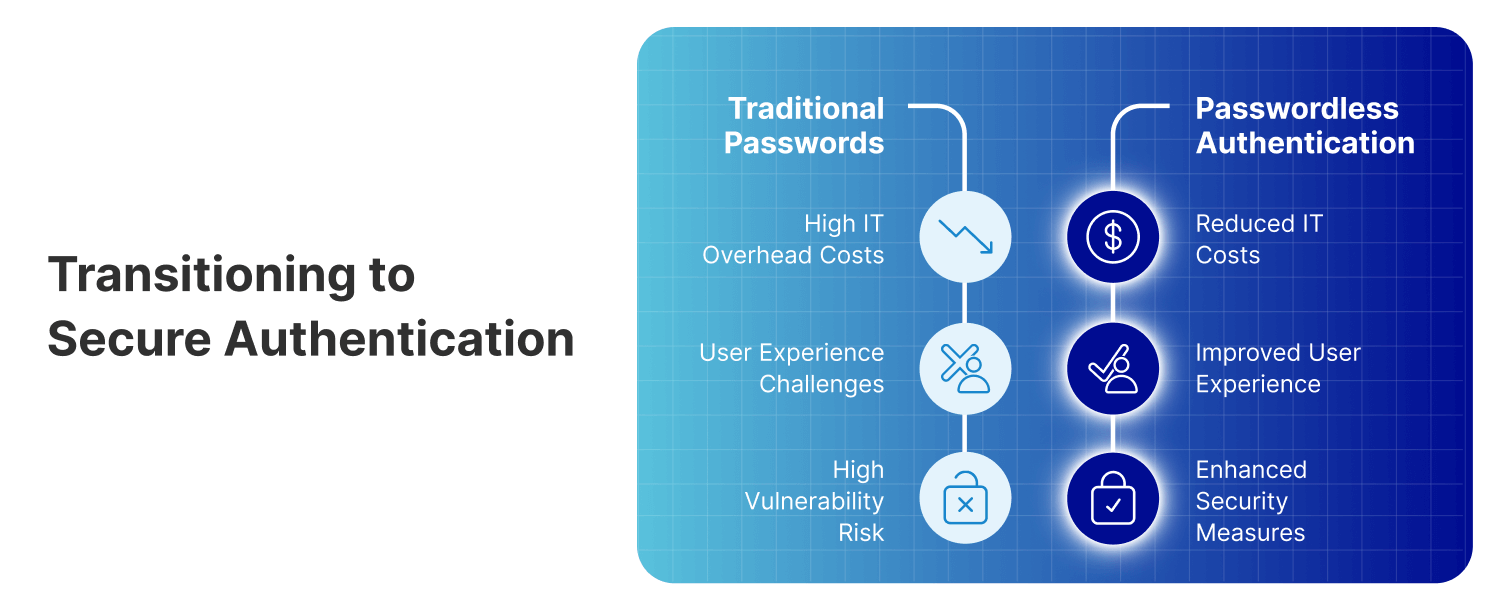
Comparison of traditional passwords vs passwordless authentication, showing benefits like reduced IT costs and security.

2. Key Technologies in Passwordless Authentication

Passwordless authentication utilizes several advanced technologies to secure access, each designed to provide high-assurance, user-friendly options.

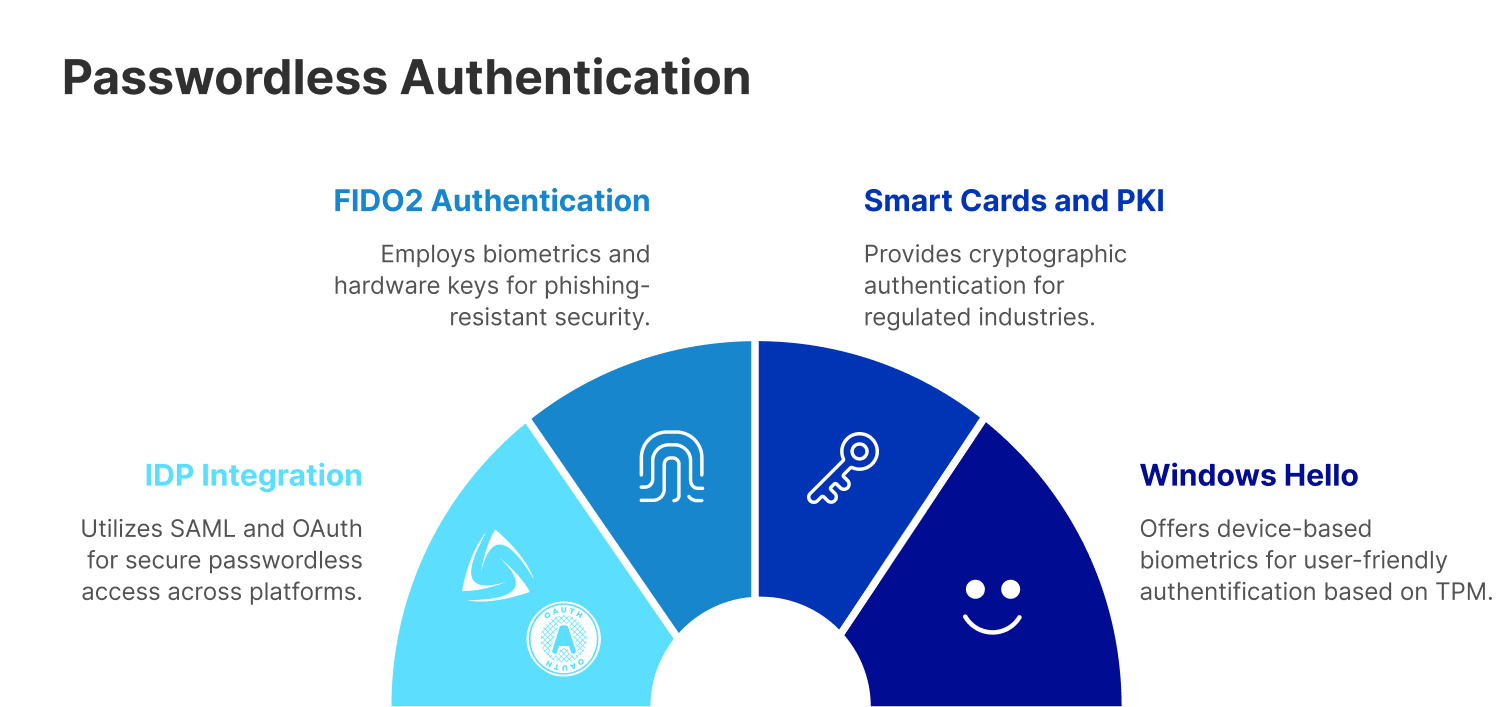
Identity Provider (IDP) Integration with SAML and OAuth

Most modern identity and access management systems use SAML (Security Assertion Markup Language) and OAuth 2.0 to facilitate secure, Single Sign-On (SSO) experiences. With Thinfinity Workspace 8, users can leverage popular IDPs, such as Microsoft Entra, Okta, Ping Identity, and Google Workspace, for unified access across applications without passwords.

FIDO2 Authentication

FIDO2 is an advanced, phishing-resistant standard developed by the FIDO Alliance, enabling secure, passwordless authentication via public-key cryptography. Thinfinity Workspace 8’s integration with FIDO2 ensures secure access to virtual desktops, applications, and web apps using biometrics, such as fingerprints and facial recognition, or hardware security keys.

Smart Cards and PKI (Public Key Infrastructure)

Smart cards and PKI certificates offer secure, cryptographic authentication for users, often required in highly regulated industries. Thinfinity Workspace 8’s support for smart cards and PKI-based certificates provides a robust authentication method for accessing sensitive applications, meeting compliance needs for finance, healthcare, and government organizations.

Windows Hello and Device-Based Biometrics (TPM)

Thinfinity Workspace 8 also integrates with Windows Hello, allowing users to authenticate through face recognition, fingerprint scans, or PINs. These biometrics are stored on the device’s Trusted Platform Module (TPM), making it a strong choice for Windows-based environments that prioritize both security and user convenience.

3. How Thinfinity Workspace 8 Supports Passwordless Access

Passwordless Authentication options: FIDO2, Smart Cards and PKI, Windows Hello, and IDP Integration, each with unique security benefits

Thinfinity Workspace 8 is a secure platform built to support the future of authentication. By enabling seamless passwordless access through FIDO2, smart cards, SAML/OAuth-based IDP integration, and Windows Hello, Thinfinity ensures that users can securely access their virtual desktops, applications, and web apps without the need for passwords.
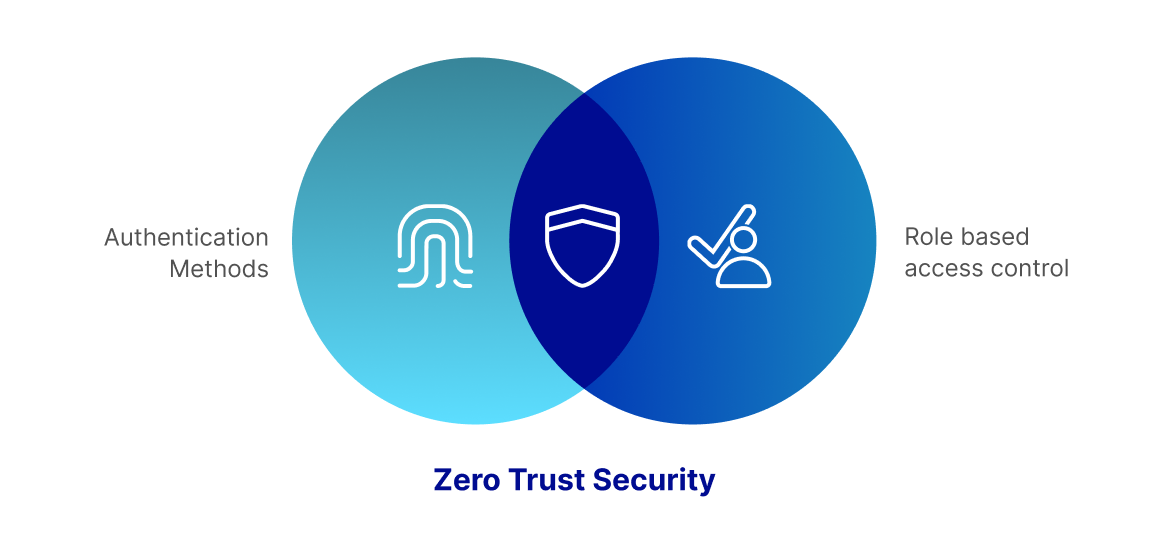
Thinfinity’s passwordless methods align with zero-trust principles, which emphasize continuous verification and least-privilege access to safeguard organizational assets. By supporting diverse authentication methods, Thinfinity Workspace 8 caters to enterprise security needs, user preferences, and regulatory compliance.

Venn diagram illustrating Zero Trust Security as the intersection of Authentication Methods and Role-Based Access Control (RBAC)

4. Benefits of Passwordless Authentication for Businesses

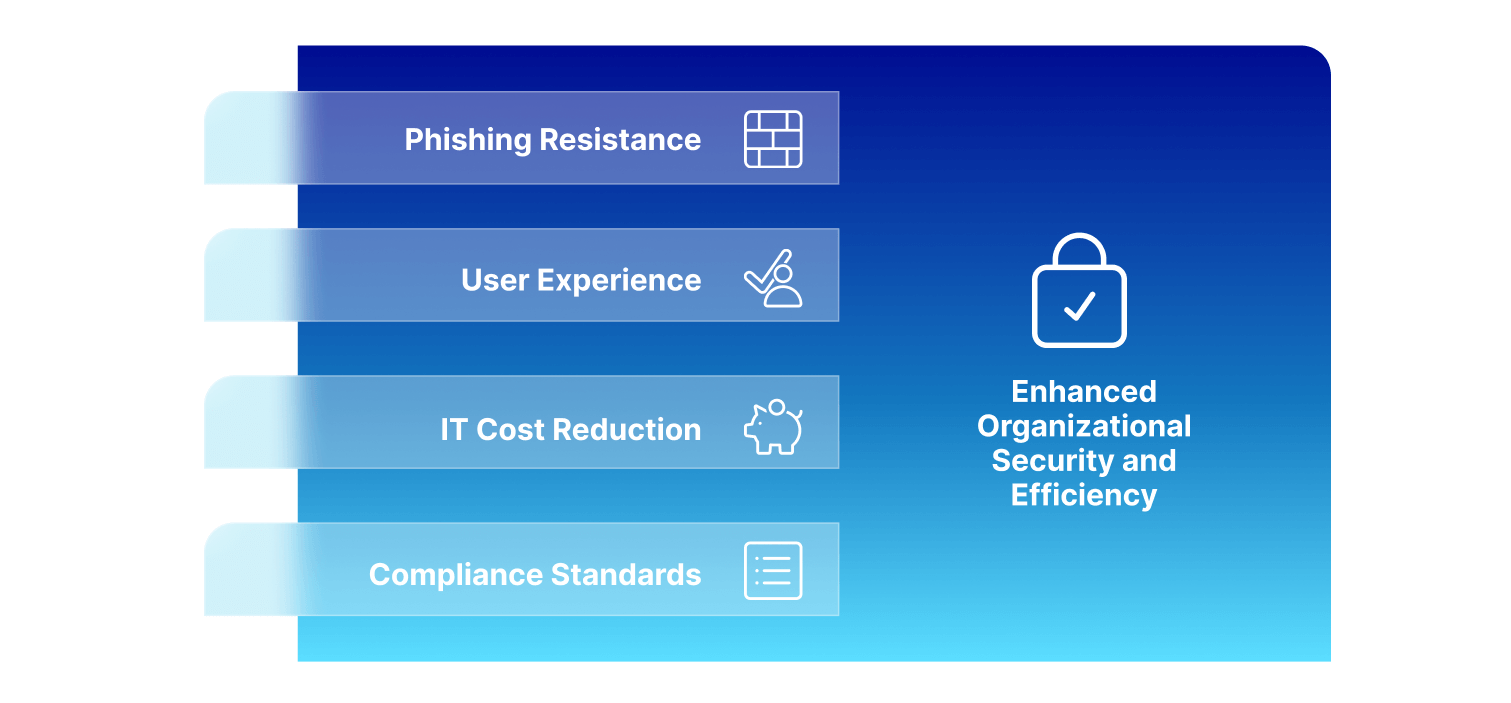
1. Strong Phishing Resistance

Passwordless authentication methods such as FIDO2 and PKI certificates are inherently resistant to phishing and other social engineering attacks. By removing passwords from the equation, organizations reduce their vulnerability to credential-based breaches, protecting user data and enhancing trust.

2. Improved User Experience and Efficiency

Passwordless access enables quick, frictionless authentication, allowing users to access their work with ease. By integrating biometrics and hardware keys, Thinfinity Workspace 8 eliminates the need for complex passwords, reducing login times and enhancing productivity.

3. Reduced IT Costs and Overhead

Password resets account for a significant portion of helpdesk requests. By adopting passwordless authentication, organizations can significantly reduce these support requests, lower IT costs, and free up resources for more strategic initiatives.

4. Compliance with Industry Standards

Passwordless methods supported by Thinfinity Workspace 8, like FIDO2 and PKI certificates, meet compliance standards for multi-factor authentication (MFA) in regulated sectors, providing a secure, compliant solution for accessing sensitive data and applications.

Benefits of passwordless authentication: Phishing resistance, improved user experience, IT cost reduction, compliance, enhancing security and efficiency.

5. Industry Use Cases of Passwordless Authentication

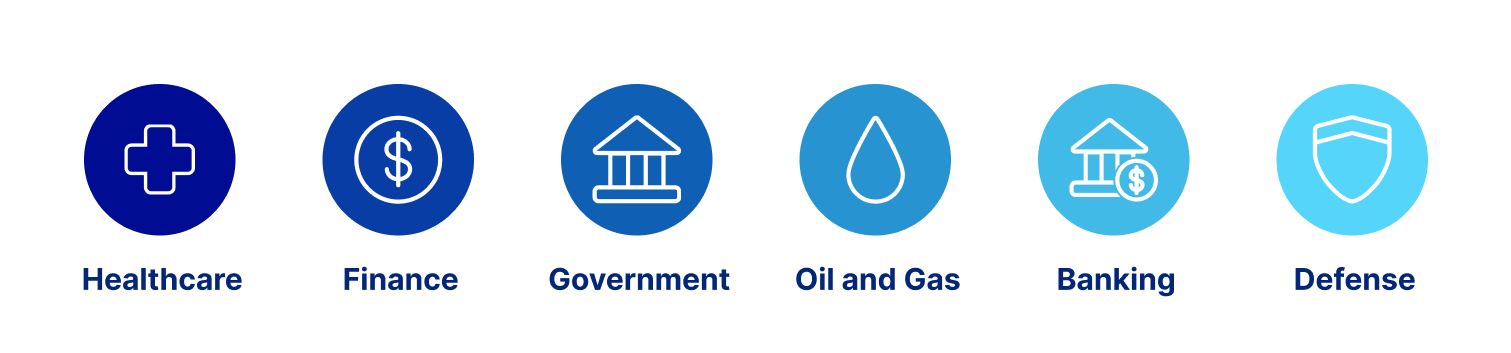
Passwordless authentication is increasingly essential across industries where secure, compliant access is a priority. Thinfinity Workspace 8’s advanced capabilities make it an ideal solution for sectors with stringent security and regulatory requirements.

Healthcare

In healthcare, where every second counts, passwordless authentication allows for fast, secure access to sensitive patient information. Thinfinity Workspace 8’s support for biometric authentication and smart cards ensures that healthcare providers can access records instantly without compromising data security. By adhering to data privacy regulations like HIPAA, Thinfinity helps healthcare institutions maintain compliance while protecting patient data from unauthorized access.

Finance

Financial institutions are prime targets for cyber threats, given the sensitive customer data and financial assets they manage. Passwordless authentication reduces the risk of credential theft, ensuring secure, compliant access to financial applications. Thinfinity Workspace 8’s integration with FIDO2 and smart cards provides phishing-resistant, high-assurance authentication for finance professionals, meeting rigorous compliance standards such as PCI DSS and protecting sensitive information from unauthorized access.

Government

Government agencies often handle classified information and are therefore subject to stringent security and compliance requirements. Thinfinity Workspace 8 supports PKI certificates and smart card authentication, making it an ideal solution for government organizations. With passwordless methods, government employees can securely access classified information while complying with regulatory standards, ensuring that sensitive data remains protected from unauthorized access.

Oil and Gas

The oil and gas industry faces unique security challenges, including the need to secure remote and distributed assets. With Thinfinity Workspace 8, oil and gas companies can implement passwordless authentication to control access to critical infrastructure and data, protecting operational systems from unauthorized access. Biometric and smart card authentication methods reduce security risks, especially in high-stakes environments like oil rigs or remote data centers, where physical security is often limited. Thinfinity also supports compliance with industry-specific regulations, such as NERC CIP, ensuring that digital assets are safeguarded against both physical and cyber threats.

Banking

In the banking sector, where financial transactions and customer data must be rigorously protected, passwordless authentication minimizes the risk of credential-based attacks, such as phishing and credential stuffing. Thinfinity Workspace 8’s FIDO2 and smart card support enables banks to offer customers and employees secure, frictionless access to banking applications. Passwordless methods also help meet compliance requirements, such as GDPR and FFIEC regulations, while enhancing user experience. By implementing passwordless authentication, banks can secure sensitive financial information, build customer trust, and streamline the login experience for employees and clients.

Defense

The defense industry is a high-security sector that requires robust measures to protect classified information and critical systems. Thinfinity Workspace 8’s PKI and smart card integrations allow defense organizations to implement passwordless, multi-factor authentication for secure access to sensitive data. Biometric authentication further enhances security, ensuring that only authorized personnel can access classified information and mission-critical systems. Compliance with standards such as CMMC and ITAR is essential in defense, and Thinfinity’s passwordless capabilities help defense organizations meet these strict requirements while safeguarding national security assets.

Main industries for passwordless authentication: Healthcare, Finance, Government, Oil and Gas, Banking, Defense

6. Best Practices for Implementing Passwordless Authentication

Successful implementation of passwordless authentication requires careful planning and a focus on user experience:

  • User Training and Onboarding: Provide comprehensive training to help users understand and adopt passwordless methods. Self-service onboarding through SSO integrations with popular IDPs can further ease the transition.
  • Credential Management and Recovery: Implement strong credential management policies, including clear guidelines for credential recovery and secure self-service options.
  • Compliance and Security Monitoring: Leverage Thinfinity’s logging and monitoring features to track login attempts, access patterns, and unauthorized attempts. Monitoring ensures compliance and helps proactively address potential security issues.

7. Addressing Common Passwordless Challenges

Despite its benefits, passwordless authentication presents challenges that organizations should consider:

  • Device and Technology Compatibility: Ensure that the devices used by employees support passwordless methods like biometrics or hardware tokens.
  • User Resistance: Passwordless authentication is a paradigm shift. Offering training and emphasizing the benefits of streamlined, secure access can help drive adoption.
  • Recovery Options for Lost Credentials: Have policies in place for managing lost credentials, such as hardware tokens, to avoid disruption in access.

8. Future Trends in Passwordless Authentication

Passwordless authentication is evolving quickly, with several exciting trends on the horizon:

  • Expansion of FIDO2 and Biometrics: FIDO2 and device-based biometrics are becoming the standard for passwordless access, providing highly secure, user-friendly options.
  • Cross-Device Authentication: Solutions that allow users to authenticate across multiple devices, such as Apple’s and Google’s passkey support, are on the rise, creating a more seamless authentication experience.
  • Zero-Trust Security Alignment: Passwordless authentication is central to zero-trust security frameworks, focusing on continuous verification rather than static credentials.

As passwordless technology matures, organizations that implement it now will be better positioned to adopt these advancements with minimal disruption.

9. Frequently Asked Questions (FAQs)

What is passwordless authentication?

Passwordless authentication removes the need for traditional passwords, using secure methods such as biometrics, cryptographic keys, and hardware tokens instead.

Why is passwordless authentication more secure than traditional passwords?

Passwordless methods reduce risks like phishing and brute-force attacks by using non-reusable, phishing-resistant credentials that are difficult to replicate or steal.

How does Thinfinity Workspace 8 support passwordless authentication?

Thinfinity Workspace 8 supports FIDO2, smart cards, SAML/OAuth-based IDP integration, and Windows Hello, providing robust, secure options for virtual desktops, applications, and web apps.

Can passwordless authentication help with compliance?

Yes, passwordless methods such as PKI and FIDO2 meet compliance standards for MFA, making them suitable for regulated industries like finance, healthcare, and government.

Conclusion

Passwordless authentication is redefining digital security, providing organizations with a secure, efficient, and user-friendly alternative to traditional passwords. Thinfinity Workspace 8 is a powerful tool in this transition, offering robust support for FIDO2, smart cards, and biometric methods to secure virtual desktops, applications, and web apps.
For organizations looking to reduce operational costs, enhance user experiences, and stay ahead in cybersecurity, adopting passwordless authentication with Thinfinity Workspace 8 is a strategic step forward. Embrace the future of authentication with Thinfinity, and secure your organization’s digital landscape with a passwordless approach.

About Cybele Software Inc.
We help organizations extend the life and value of their software. Whether they are looking to improve and empower remote work or turn their business-critical legacy apps into modern SaaS, our software enables customers to focus on what’s most important: expanding and evolving their business.

About Version 2 Digital

Version 2 Digital is one of the most dynamic IT companies in Asia. The company distributes a wide range of IT products across various areas including cyber security, cloud, data protection, end points, infrastructures, system monitoring, storage, networking, business productivity and communication products.

Through an extensive network of channels, point of sales, resellers, and partnership companies, Version 2 offers quality products and services which are highly acclaimed in the market. Its customers cover a wide spectrum which include Global 1000 enterprises, regional listed companies, different vertical industries, public utilities, Government, a vast number of successful SMEs, and consumers in various Asian cities.

×

Hello!

Click one of our contacts below to chat on WhatsApp

×