


Skip to content

3CX VoIP Call Detail Records In Graylog

Even with the rise of high-speed networks and sophisticated monitoring tools, VoIP Call Data Records (CDR) remain an essential resource for troubleshooting and optimizing bandwidth usage. These records provide a granular view of call quality, latency, jitter, and packet loss—critical factors that directly impact voice performance. While real-time monitoring solutions can detect immediate issues, CDRs offer historical insights that help IT teams pinpoint recurring problems, track trends, and ensure networks are properly provisioned. Whether diagnosing call degradation, planning capacity upgrades, or investigating security anomalies, CDR are still one of the most reliable tools for keeping VoIP systems running smoothly.

In this blog, we cover the 3CX VoIP PBX and the call data records that are sent to Graylog.

Configuring 3CX for CDR Logging

To do this in the 3CX call server, you configure a 3CX CDR service as a client, as an active socket, to an IP address on a specific port. What happens inside there is that the logs will be shipped in a comma-delimited format, with the fields you see in their field list.

3CX Logging Configuration

The field list contains a lot of records. You can choose to eliminate or add the ones you want, but make sure you keep the order the same, because when you start parsing the data, the order is crucial.

Field Definitions

If you go to the 3CX website under the CDR records section, you’ll find the definition of all the different types of fields, which will help you understand what the data contains.

Creating a 3CX CDR Input in Graylog

In Graylog, create a 3CX CDR input, which is simply a plain text TCP connection to port 3000.

Grok Pattern for Parsing

Here is a grok pattern called: 3CX_CDR. This pattern follows the order of the fields that appear inside the PBX system. Note, this pattern is tied to the image below for the order of the fields. Modifying the fields in 3CX will require changes to this pattern.

%{NUMBER:history_id},(?<call_id>[^,]*),%{TIME:duration},%{TIMESTAMP_ISO8601:time_start},%{TIMESTAMP_ISO8601:time_answered},%{TIMESTAMP_ISO8601:time_end},%{WORD:reason_terminated},(?<from_no>[^,]*),(?<to_no>[^,]*),(?<from_dn>[^,]*),(?<to_dn>[^,]*),(?<dial_no>[^,]*),(?<reason_changed>[^,]*),(?<final_number>[^,]*),(?<final_dn>[^,]*),(?<bill_code>[^,]*),(?<bill_rate>[^,]*),(?<bill_cost>[^,]*),(?<bill_name>[^,]*),(?<chain>[^,]*),(?<from_type>[^,]*),(?<to_type>[^,]*),(?<final_type>[^,]*),(?<from_dispname>[^,]*),(?<to_dispname>[^,]*),(?<final_dispname>[^,]*),(?<missed_queue_calls>[^,]*)

Fields available in order within the PBX System based on this grok pattern: 3CX Call Data Fields

The Parsing Rule:

rule "Parse 3CX CDR GROK"
When
   true
       //Route 3CX CDR to Stream old:
then
    let grokp = grok(
        pattern:"%{3CX_CDR}",
        value:to_string($message.message),
        only_named_captures: true
        );
        
    set_fields(grokp);
    set_field("grok_parse",true);
end

It’s important that you don’t reorder these fields unless you also go into Graylog and reorder your grok pattern accordingly. Inside the rule, I’ve referenced the pattern so that when the data comes in, it automatically parses out the records.

Additional Parsing of the Timestamp.

rule "Parse - 3cx - End Call TimeStamp Breakout"
When
    $message.grok_parse == true
then
    let grokp = grok(
        pattern:"%{TIMESTAMP_ISO8601}",
        value:to_string($message.time_end),
        only_named_captures: false
        );
        
    set_fields(fields:grokp,prefix:"TimeEnd_");
    set_field("grok_parse_timeend_timestamp",true);
    remove_field("TimeEnd_TIMESTAMP_ISO8601");
    remove_field("TimeEnd_MINUTE");
    remove_field("TimeEnd_SECOND");
end
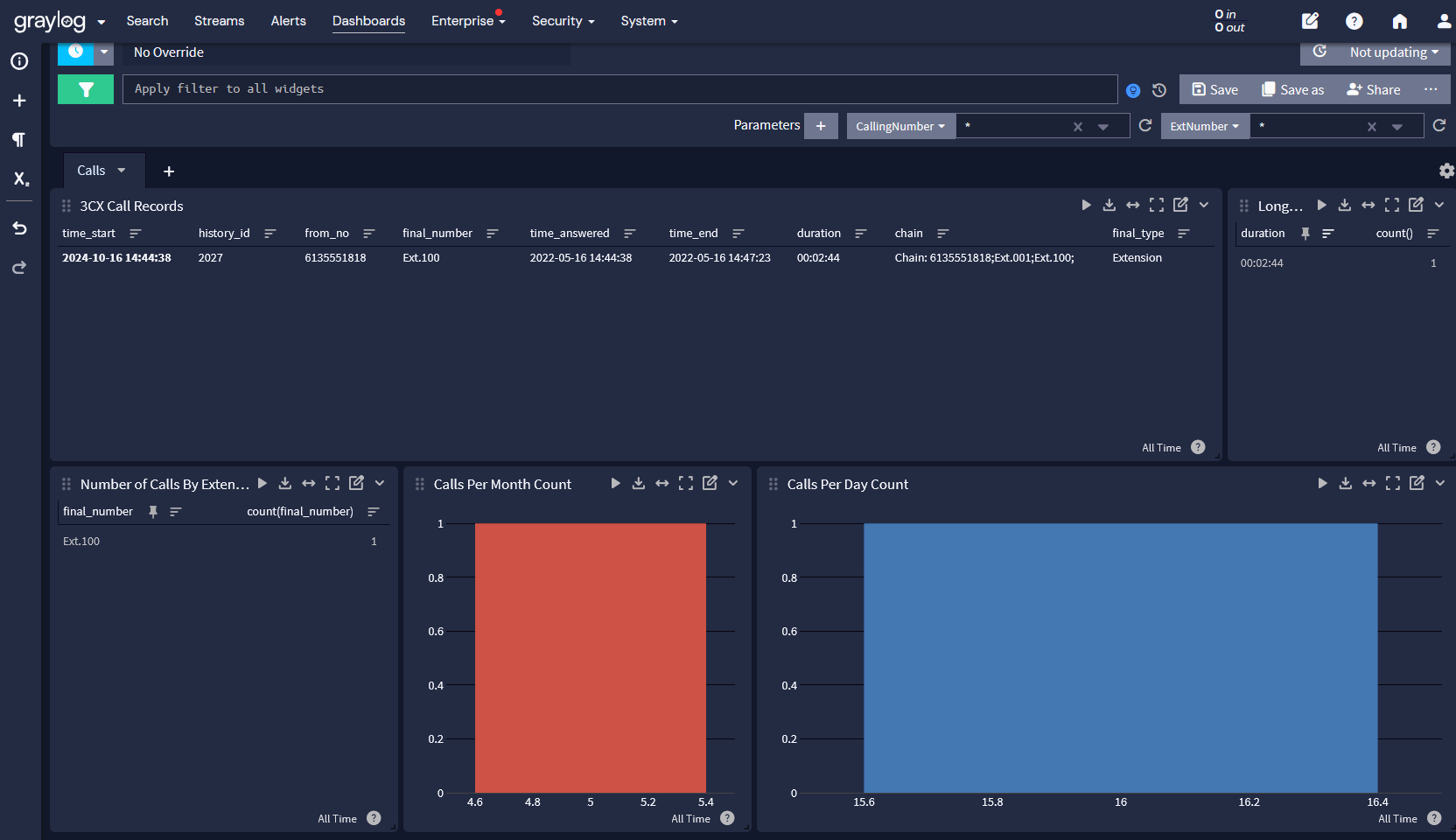
Graylog for Telecom

VoIP Call Data Records (CDRs) may not be the flashiest tool in a network administrator’s arsenal, but they remain one of the most reliable. From diagnosing call quality issues to optimizing bandwidth on your network and uncovering security threats, CDR provide the historical insights needed to keep VoIP systems running smoothly. While real-time monitoring has its place, a solid understanding of CDR data ensures that recurring problems don’t go unnoticed and that networks are properly scaled for future demand. In short, if you’re not leveraging CDR in your VoIP troubleshooting process, you’re missing a critical piece of the puzzle. Try Graylog and and get those VoIP logs and watch this Video!

See the next blog on the 3CX attack detected by Graylog here called “Detecting the 3CX Supply Chain Attack with Graylog and Sigma Rules

About Graylog  
At Graylog, our vision is a secure digital world where organizations of all sizes can effectively guard against cyber threats. We’re committed to turning this vision into reality by providing Threat Detection & Response that sets the standard for excellence. Our cloud-native architecture delivers SIEM, API Security, and Enterprise Log Management solutions that are not just efficient and effective—whether hosted by us, on-premises, or in your cloud—but also deliver a fantastic Analyst Experience at the lowest total cost of ownership. We aim to equip security analysts with the best tools for the job, empowering every organization to stand resilient in the ever-evolving cybersecurity landscape.

About Version 2 Digital

Version 2 Digital is one of the most dynamic IT companies in Asia. The company distributes a wide range of IT products across various areas including cyber security, cloud, data protection, end points, infrastructures, system monitoring, storage, networking, business productivity and communication products.

Through an extensive network of channels, point of sales, resellers, and partnership companies, Version 2 offers quality products and services which are highly acclaimed in the market. Its customers cover a wide spectrum which include Global 1000 enterprises, regional listed companies, different vertical industries, public utilities, Government, a vast number of successful SMEs, and consumers in various Asian cities.

Can a PDF have a virus? Practical solutions for cyber-safe businesses

Summary: PDFs can carry malware through scripts, embedded files, and exploits. Learn how to identify threats and protect your business.

Imagine getting an urgent email from a supplier with an attached invoice in PDF format. Without hesitation, you open it—only to realize later that your system has been compromised. This scenario is more common than you might think. According to cybersecurity reports, PDFs are becoming increasingly popular for distributing malware. Attackers exploit the trust users have in these documents to deliver malware, steal sensitive information, and gain unauthorized access to systems.

But how do PDF viruses work, and how can you protect your business from them? In this guide, we’ll explore how malicious PDF files operate, how they infect devices, and what cybersecurity measures can keep your business safe.

Key takeaways

  • PDF files can contain malicious code that exploits vulnerabilities to spread malware.
  • Cybercriminals use PDF documents to deliver malware, execute code, and steal sensitive information.
  • Some malicious PDF files contain JavaScript exploits, embedded executables, or phishing links.
  • Email attachments and downloading PDFs from untrusted sources are significant security risks.
  • Businesses should implement robust cybersecurity measures, including antivirus software and real-time malware protection.

What types of malware can PDFs have?

While PDFs are commonly used for business documents, reports, and invoices, they can also carry harmful software. Below are some ways an infected PDF file can pose a risk to your system

JavaScript code exploits

Some PDF viruses use JavaScript code. This programming language allows interactive features like forms or digital signatures. However, cybercriminals can exploit this functionality to run hidden scripts when the document is opened. These scripts can:

  • Download and install malware on the system
  • Steal sensitive information, such as login credentials
  • Redirect users to phishing websites designed to capture personal data

Embedded executable files and malicious software

PDF documents can contain embedded files, including executable programs (.exe), scripts, or other payloads. If a user clicks on an embedded file, it can install harmful software on the device. Common examples include:

  • Ransomware that encrypts files and demands payment
  • Keyloggers that capture keystrokes to steal passwords
  • Trojans that provide remote access to the system

PDF viruses that execute code

Certain malicious PDF files exploit vulnerabilities in PDF readers to run code without the user’s knowledge. This method allows attackers to:

  • Distribute malware across networks
  • Modify system files
  • Gain unauthorized access to company resources

Common PDF attack scenarios

Since PDF files are widely trusted and frequently shared in business settings, bad actors take advantage of that to trick users into opening infected files. Below are some of the most common attack scenarios businesses should be aware of:

  • Email attachments: Cybercriminals often distribute compromised PDF files through phishing emails, impersonating trusted senders
  • Fake invoices and reports: Fraudsters send malicious PDFs disguised as legitimate business documents
  • Downloadable PDFs on websites: Attackers upload infected files to compromised websites, luring victims into downloading PDF files

These methods allow malicious actors to distribute malware quickly without raising suspicion. Once a harmful PDF is opened, it can exploit vulnerabilities, run code, and steal sensitive data. Understanding how these attacks work is the first step in preventing them.

Now, let’s examine how an infected PDF file infiltrates your system.

How PDF viruses infect your device

A compromised PDF file can spread malware in various ways:

  1. Exploiting software vulnerabilities: If a PDF reader isn’t updated, attackers can use known security flaws to execute malicious code.
  2. Encouraging users to enable permissions: Some PDFs request additional permissions that, when granted, allow malicious actions.
  3. Triggering automatic scripts: JavaScript-based attacks can initiate downloads or connect to malicious servers.
  4. Embedding infected links: Clicking on a link inside a PDF may redirect users to phishing pages designed to steal credentials.

Other hidden threats in PDF attachments

While malicious PDFs are often associated with direct malware infections, they can also serve as gateways for other cybersecurity threats. Bad actors are always improving their tactics. They embed hidden dangers within seemingly harmless documents to compromise devices and steal sensitive data.


Understanding these risks is essential for businesses looking to protect their cyberspace.

Malicious links and phishing attempts

Many malicious PDFs contain links that appear legitimate but direct users to harmful websites. These sites may:

  • Trick users into entering login credentials.
  • Install malware upon page load.
  • Request fake security updates to compromise devices.

Hidden form fields and data harvesting

Attackers can embed hidden form fields within PDF documents to collect sensitive data. Unsuspecting users might unknowingly submit information such as:

  • Banking details
  • Company login credentials
  • Personal identification numbers

Additional threats to watch for

Beyond traditional malware and phishing tactics, additional threats that can compromise your security are:

  • Obfuscated code: Malicious PDFs can use encrypted or hidden code to bypass security detection
  • Redirect chains: Clicking a link in a PDF might trigger multiple redirects (a bunch of hidden websites) before landing on the final malicious page

These hidden threats illustrate how PDFs can be manipulated for cyber-attacks beyond traditional malware infections. By recognizing these dangers, businesses can take proactive steps to secure their systems. Next, let’s explore how to identify the signs of a malicious PDF before it compromises your security.

Signs of a malicious PDF

Be cautious if you notice any of the following:

  • Unexpected prompts requesting permissions
  • PDF attachments from unknown senders
  • Unusual file sizes or strange formatting
  • Warning messages from your PDF reader or antivirus software
  • Links that don’t match their displayed URLs

PDF security best practices

Protecting your business from malicious PDFs means taking a proactive approach. Implementing best practices can significantly reduce the risk of malware infections and data breaches.

To protect your business from PDF malware, follow these security measures:

  1. Use real-time malware protection. Deploy security solutions that scan PDF attachments before opening. Many modern antivirus software solutions include real-time scanning features that help block suspicious PDFs immediately.
  2. Keep software up to date. Regularly update your PDF reader, operating system, and antivirus software to patch vulnerabilities. Cybercriminals exploit outdated software with known security flaws, so keeping all applications current is essential. Enabling automatic updates for your antivirus software ensures you have the latest threat definitions and security patches.
  3. Disable JavaScript in your PDF reader. This reduces the risk of script-based attacks. Disabling JavaScript in your PDF viewer limits the chances of unauthorized code running on your system and strengthens overall security.
  4. Avoid opening suspicious email attachments. Verify senders before downloading PDFs. Attackers frequently disguise malicious PDFs as legitimate business documents, such as invoices or contracts. If you happen to receive an unexpected attachment, please confirm its legitimacy through a separate communication channel before opening it.
  5. Enable email security filters. Use advanced email protection to detect and block malicious PDFs. Many email security solutions offer automated scanning and filtering of incoming messages, preventing phishing emails and malware-laden attachments from reaching your inbox. Configuring these filters to work alongside your antivirus software strengthens your business’s defense against cyber threats.
  6. Train employees on cybersecurity awareness. Educate your team about recognizing phishing emails and malicious PDF files. Regular cybersecurity training sessions help employees identify suspicious attachments, avoid clicking on malicious links, and follow best practices for handling digital documents. Encouraging a security-conscious workplace culture is one of the most effective ways to prevent cyberattacks.

By following these best practices, businesses can create a safer digital environment and minimize the risk of falling victim to PDF-based cyber threats. However, staying vigilant and employing additional security solutions is just as critical.

How NordLayer can help

Cybercriminals constantly evolve their tactics, making it crucial to implement proactive security measures. NordLayer’s toggle-ready network security platform offers real-time malware protection to scan and block malicious downloads before they reach your systems.

With NordLayer’s advanced security features, businesses can:

  • Detect and prevent malicious software in PDF attachments
  • Block suspicious links and phishing attempts
  • Secure sensitive information against cyber threats

Protect your company from PDF malware and ensure a safer digital workspace today.

About NordLayer
NordLayer is an adaptive network access security solution for modern businesses – from the world’s most trusted cybersecurity brand, Nord Security.

The web has become a chaotic space where safety and trust have been compromised by cybercrime and data protection issues. Therefore, our team has a global mission to shape a more trusted and peaceful online future for people everywhere.

About Version 2 Digital

Version 2 Digital is one of the most dynamic IT companies in Asia. The company distributes a wide range of IT products across various areas including cyber security, cloud, data protection, end points, infrastructures, system monitoring, storage, networking, business productivity and communication products.

Through an extensive network of channels, point of sales, resellers, and partnership companies, Version 2 offers quality products and services which are highly acclaimed in the market. Its customers cover a wide spectrum which include Global 1000 enterprises, regional listed companies, different vertical industries, public utilities, Government, a vast number of successful SMEs, and consumers in various Asian cities.

×

Hello!

Click one of our contacts below to chat on WhatsApp

×
