Skip to content

Data behemoths: How large users and unique structures impact data migrations

The biggest obstacles to a swift data migration hide in plain sight. Large users and unique data structures can cause trouble for the migration process if you haven’t factored them into your strategy.

Here, we explore why large users and unique data structures influence migrations, and what you can do to mitigate the risks and keep business running smoothly.

Why do large users impact the data migration process?

Large users have high item count, big file size, or a combination of the two. How these item counts and file sizes interact with destination API restrictions and quota limits is what makes them hard to migrate.

During a migration, data is moved from the source to the destination platform. It’s encrypted in transit and at rest to ensure the data is secure throughout the process. The larger the file, the longer it takes to migrate. And API restrictions limit the size of the file you can download.

Quota limits applied by cloud providers can slow down your migration

Cloud providers also limit how many items can be migrated. This could mean two users with the same amount of data could migrate at different speeds – if one has a higher file count than the other. User A – with 10GB spread across 50 items – migrates faster than user B – who has 10GB and 100 items.  

Both Google Cloud Platform and Microsoft Azure have quota limits for how much data can be migrated at a time, and restrictions on how many API calls you can make.  A user with many small files can take longer to migrate than a user with fewer, larger files. 

It may be necessary to upgrade your tech

Your resource limitations, such as the number and specification of servers, also influence data migration project timelines. Those working to a hard deadline might choose to invest in more or better servers – but this isn’t always an option. 

What are unique data structures and how do they impact migration timelines?

When it comes to unique data structures, you’re looking for file types (MIME types) such as folders, movies, and high-resolution images. Large files that hold up migrations. 

A large user with a unique data structure could consist of a high number of images and movie files in high resolution. This combines big data size and item count, making for a very different migration compared to a company with lots of smaller data files like text documents and emails. 

Some companies have a low number of huge files, which also creates complexity. This causes bottlenecks when you have the resources to migrate items quickly, but your target environment has an upload limit. You could max out Google’s 750GB a day upload limit with a few files, in a few hours.

How to deal with large users

You can’t avoid large users – sooner or later you need to get them across to your target system. But what can you do to control their impact on the data migration process? 

  1. Quantify them. How many large users do you have, and how much data do they have? Migration tools can give you an accurate view of item count.
  2. Encourage large users to tidy up their files ahead of migration. Delete obsolete data to avoid hampering the migration process with old files.
  3. Plan your migration with large users in mind. Can you structure your data migration process so that recent files are migrated first? This way, you can get into the target destination quickly and migrate legacy data later.
  4. Opt not to migrate permissions on files. Migrate files minus the permissions if your priority is getting data into the target destination, fast.

Use CloudM’s environment and readiness scans to identify potential roadblocks

Modern migration tools can also help you deal with large users. Take CloudM environment scan, which gives you an item count, shared folder count, and other data points you can use to scope out the migration and estimate a timeline. 

Secondly, the CloudM readiness scan checks over source and destination compatibility and connection, flagging limitations and revealing environmental complexities. You can use this scan as a last-minute safety check when you’re ready to migrate. For hard deadlines – such as mergers and acquisitions – using a migration service ensures a frictionless, managed process.

CloudM can help you tame the biggest data behemoth

The right tools can help you avoid disruption and maintain business continuity throughout the data migration process. For those keen to tackle the migration themselves, CloudM’s consulting services give you tailored training and advice. 

For a fully managed project, our white-glove migration services ensure the process is handled with care and expertise. We’ve worked with large users, complex data structures, and huge data volumes. We can get you from source to target destination swiftly.

With CloudM Backup, you can backup the following Calendar data:

  • Events and meetings: We back up and restore meeting which include meeting links, including Zoom links. We do not back up events without meeting links.

Yes, you can back up recurring meetings with CloudM Backup.

We do not back up Tasks at the moment.

In Google Calendar, attachments are a link to a Drive item. We will back up the item if the user’s Drive is also being backed up and restore the meeting with the link included. The Drive file itself can be backed up separately if required.

These will be backed up as event attendees. Handling of edge cases, such as when a user tries to restore an event and the resource has since become occupied, will be handled by your Workspace administrator.

The default frequency for backing up Calendar is 8 hours.

Please check our knowledge base for detailed information on how to restore a

backup of Google Calendar.

About CloudM
CloudM is an award-winning SaaS company whose humble beginnings in Manchester have grown into a global business in just a few short years.

Our team of tech-driven innovators have designed a SaaS data management platform for you to get the most from your digital workspace. Whether it’s Microsoft 365, Google Workspace or other SaaS applications, CloudM drives your business through a simple, easy-to-use interface, helping you to work smarter, not harder.

By automating time-consuming tasks like IT admin, onboarding & offboarding, archiving and migrations, the CloudM platform takes care of the day-to-day, allowing you to focus on the big picture.

With over 35,000 customers including the likes of Spotify, Netflix and Uber, our all-in-one platform is putting office life on auto-pilot, saving you time, stress and money.

About Version 2 Digital

Version 2 Digital is one of the most dynamic IT companies in Asia. The company distributes a wide range of IT products across various areas including cyber security, cloud, data protection, end points, infrastructures, system monitoring, storage, networking, business productivity and communication products.

Through an extensive network of channels, point of sales, resellers, and partnership companies, Version 2 offers quality products and services which are highly acclaimed in the market. Its customers cover a wide spectrum which include Global 1000 enterprises, regional listed companies, different vertical industries, public utilities, Government, a vast number of successful SMEs, and consumers in various Asian cities.

Why Macs need an endpoint security solution

Many people feel tingled while buying a new Mac or using it for the first time. Its sleek design and seamless performance make it feel invincible. Macs can even be considered superhero devices, but even superheroes have their weaknesses, right? And your Mac? Well, it’s no exception. 

Yes, Macs have a reputation for being secure—almost like the Fort Knox of computers. But before you pat yourself on the back for choosing “the safer option”, let me throw a curveball: They’re not bulletproof. In fact, that “Macs don’t get hacked” myth is as outdated as a floppy disk. 

Mac Endpoint Security

Think about it—cybercriminals aren’t sitting around ignoring one of the most popular ecosystems in the world. They’re targeting it. And with the rise of sophisticated malware and security threats, Macs are no longer immune. This is where endpoint security steps in.

So, why does your beloved Mac need Mac endpoint security? Let’s break it down.

The Mac myth: Where it all started

For years, Apple marketed its devices as more secure than the rest. The narrative was simple: “Get a Mac, forget about viruses.” To be fair, this wasn’t entirely wrong back in the day. MacOS had built-in defenses like Gatekeeper, XProtect, and Sandboxing, making them less susceptible to threats than Windows.

But here’s the kicker—cybercriminals evolve. And with the increasing popularity of Macs, they’ve become a lucrative target. In fact, Macs might have a lower malware infection rate than Windows but according to a report, malware made up 11% of all threat detections on Macs in 2023.[1] While it’s still a smaller fraction compared to the threats faced by Windows environments, it’s not something to shrug off.

You can’t rely solely on built-in tools. It’s like using a lock on your door but leaving your windows wide open.

Threats targeting Macs

Macs, once considered impervious to most security threats, are now increasingly targeted by a distinct set of sophisticated attacks. Here are some of the most prevalent threats:

  • Ransomware: The belief that ransomware won’t affect Macs is a misconception. Incidents like the KeRanger attack demonstrate that Macs are firmly on the radar of cybercriminals.
  • Adware and spyware: The presence of unexpected pop-ups or unfamiliar applications often indicates adware infiltrating your system. These malicious programs are designed to collect your data discreetly and are becoming alarmingly common.
  • Phishing attacks: Macs are not immune to phishing campaigns. Cybercriminals deploy fraudulent emails and websites that are equally effective in compromising macOS users.
  • Zero-day exploits: Perhaps the most concerning, these attacks target vulnerabilities that are unknown even to Apple, exploiting them before they can be patched.

Why built-in Mac security isn’t enough

Apple’s native security features, while effective to a degree, fall short in addressing the advanced threats. Here’s a closer look:

  • Gatekeeper: This feature acts as a gatekeeper for apps, blocking known malicious software. However, it struggles with newer, unidentified malware, leaving gaps in protection.
  • XProtect: Apple’s built-in malware scanner is a solid tool, but its effectiveness depends on timely updates. Unfortunately, these updates can lag behind rapidly evolving threats.
  • Sandboxing: While this isolates apps in controlled environments, it doesn’t shield users from phishing attempts or browser-based attacks, which often bypass these restrictions entirely.

The reality is that these tools are foundational but not comprehensive. Against the backdrop of rising threats, relying solely on built-in features is akin to patching a leaking dam with duct tape—it might hold for now, but it’s not a long-term solution.

Why an Endpoint security solution is a must-have for macOS

macOS endpoint security solutions provide protection that goes far beyond the core features of macOS, serving as a comprehensive shield against modern threats. Here’s why they are indispensable:

  • Real-time protection: Unlike built-in tools that rely on periodic updates, endpoint security solutions monitor your Mac constantly, detecting and neutralizing threats as they arise.
  • Advanced threat detection: Using artificial intelligence and machine learning, these solutions identify suspicious patterns, catching malware even before it is formally recognized.
  • Data encryption: For sensitive or confidential files, endpoint security ensures data is encrypted, safeguarding it against unauthorized access or breaches.
  • Remote management: Ideal for businesses, endpoint security allows IT admins to oversee and secure multiple Macs from a centralized dashboard, ensuring consistent protection across all devices.

So,  what is endpoint security for Mac? It’s the ultimate defense layer that ensures your device remains secure, efficient, and protected in an increasingly dangerous digital environment.

Features to look for in an Endpoint security solution

If you’ve decided it’s time to fortify your Mac’s defenses, these are the key features to prioritize:

  • Comprehensive malware protection: Opt for solutions that address both known and emerging threats, including zero-day vulnerabilities.
  • Firewall integration: A robust firewall adds an extra layer of protection, preventing unauthorized access and securing your network.
  • Phishing prevention: An essential feature to shield against deceptive emails and websites that could compromise your data.
  • Device control: Control over connected peripherals and external storage ensures tighter security and minimizes risks.
  • User-friendly interface: A straightforward, intuitive design ensures that even non-technical users can navigate and manage the solution effectively.

Busting the “too expensive” myth

It’s a common question: “Macs are already pricey; why add the cost of endpoint security?”

Here’s the reality: the potential cost of not having endpoint security is far greater. Imagine losing access to critical work files, experiencing downtime, or having your personal information exposed and sold on the dark web. Recovering from a breach can involve significant financial loss, reputational damage, and countless hours of stress.

Investing in a reliable Mac endpoint protection solution is about safeguarding not just your device but your peace of mind. When compared to the potential fallout of a successful attack, the cost is a small price to pay for comprehensive protection.

Veltar: The essential protection your Mac deserves

Your Mac is a masterpiece of technology, but it’s not invincible. Cybercriminals are getting smarter, threats are growing, and the stakes are higher than ever.

Endpoint security is not just a fancy add-on, it ensures your Mac stays safe while maintaining its performance and user experience.

Whether you’re a casual user, a creative professional, or running a business, the question isn’t whether your Mac needs endpoint security—it’s which solution you should choose.

Scalefusion’s Veltar combines protection with seamless usability, offering features such as application control and storage device access control. These features are designed to provide comprehensive security for your Mac without compromising its performance, ensuring that your device remains protected and optimized for every task.

Stay smart. Stay secure. And let your Mac keep doing what it does best—without interruptions.

Reference: 

  1. TechRadar

About Scalefusion
Scalefusion’s company DNA is built on the foundation of providing world-class customer service and making endpoint management simple and effortless for businesses globally. We prioritize the needs and feedback of our customers, making sure that they are at the forefront of all decision-making processes. We are dedicated to providing comprehensive customer support services, and place emphasis on customer-centric thinking throughout the organization.

About Version 2 Digital

Version 2 Digital is one of the most dynamic IT companies in Asia. The company distributes a wide range of IT products across various areas including cyber security, cloud, data protection, end points, infrastructures, system monitoring, storage, networking, business productivity and communication products.

Through an extensive network of channels, point of sales, resellers, and partnership companies, Version 2 offers quality products and services which are highly acclaimed in the market. Its customers cover a wide spectrum which include Global 1000 enterprises, regional listed companies, different vertical industries, public utilities, Government, a vast number of successful SMEs, and consumers in various Asian cities.

Inside-Out Attack Surface Management: Identify the risk before hackers bridge the gap

In this article, we walk through common scenarios that attribution-based attack surface management tools miss and demonstrate how you can use runZero’s new Inside-Out Attack Surface Management (IOASM) capabilities to close these gaps. IOASM helps you defend against opportunistic attacks by leveraging precise device fingerprinting to uncover exposures that are impossible to find through attribution alone.


The attribution challenge

Attackers are continuously scanning and prodding internet-facing systems, looking for easy wins. Although many campaigns start by knocking on your front door — testing assets clearly associated with your domain and IP space — attackers are just as likely to stumble upon an exposed system, compromise it, and only later realize it belongs to you. Opportunistic attacks drive an entire sub-category of the cyber-crime economy: initial access brokers. These criminal groups gain a foothold into your organization and then sell that access to other groups that steal data and attempt to extort money.

External attack surface management (EASM) tools (including runZero!) can reduce your risk by quickly flagging exposures before they can be exploited. You provide these tools with a list of domain names, IP addresses, autonomous system numbers (ASNs), and other identifiers, and the EASM attribution process will iterate on these “seeds” to identify internet-exposed assets. This process works great for well-known organizational resources, but often misses exposures where attribution is impossible using IP addresses and domain names alone.


Flipping the script with Inside-Out Attack Surface Management

This is where Inside-Out Attack Surface Management (IOASM) changes the game. While attribution-based EASM tools often struggle to identify exposures beyond their predefined “seeds,” IOASM flips the script by leveraging detailed knowledge of your internal assets to quickly and accurately identify external exposures, no matter where they are.

Instead of starting with known IPs or domains, the runZero Platform builds device fingerprints from attributes it gathers through external and internal active and passive discovery, as well as integrations with systems like cloud provider APIs and vulnerability scanners. This fingerprinting process captures details such as TLS certificates, SSH host keys, and SNMP metadata, in addition to other system-specific attributes, which tend to remain consistent even when a device changes IP addresses, network segments, or is redeployed from an image. By beginning with an internal baseline of these fingerprints, runZero can pinpoint each device’s unique identity deep within the environment, and then correlate those same devices against information collected externally.

If an asset that was once detected in an isolated subnet suddenly appears on the internet — or if a device spins up in a public cloud and shares the same cryptographic fingerprint as one on-prem — runZero recognizes that it’s the same underlying system. This is why inside-out discovery is so effective: rather than relying on traditional attribution methods like IP ranges or domain registries, runZero focuses on inherent device characteristics.

Once a device’s fingerprint is known, any reappearance gets flagged — be it behind corporate firewalls or exposed on a public IP. This allows security teams to see connections and gaps that external-only scans would miss. Through this inside-out lens, organizations can uncover at-risk assets faster and more accurately, significantly reducing blind spots that attackers often exploit.

To demonstrate, the scenarios outlined below highlight why attribution-based external attack surface management tools struggle with certain types of exposures and how IOASM can help you find the blind spots.


Common scenarios missed by attribution-based EASM

1. The Legacy VPN

A global manufacturer migrated from per-site VPN gateways to zero-trust network access (ZTNA) using endpoint agents. After the migration was complete, the per-site VPN gateways were decommissioned. Unfortunately, the VPN gateway at a small branch office was never turned off. Months later, this gateway was compromised through a zero-day vulnerability in the SSL VPN function, allowing attackers to gain access to the corporate network. Worse, cached credentials dumped from the compromised gateway enabled further ingress into the network.

Why was this missed?

After migrating to ZTNA, the DNS records for the VPN gateways were removed. For small offices, the VPN gateways were connected through business broadband connections, and those IPs were not recorded in the organization’s inventory or part of their EASM configuration.

How did runZero help?

A comprehensive internal discovery scan identified the legacy VPN gateway, leveraging runZero’s advanced device fingerprinting to ensure no assets were overlooked. The runZero Platform’s ability to perform regular, automated scans ensures that similar devices are identified promptly, even if they are misconfigured or hidden in unexpected network segments. Once the gateway was flagged, an alert was configured to notify the security team if any similar devices appeared on the network in the future.

2. The Mobile Broadband Leak

A large financial organization issued laptops to their senior staff, each equipped with built-in mobile broadband cards (cellular modems). The intent was to ensure their team could stay connected even during transit, without relying on public WiFi. These Windows laptops were continuously connected to the mobile network and roamed between cellular providers, even while simultaneously connected to the corporate network through WiFi and wired Ethernet. Depending on which cellular provider was in use, these laptops would sometimes receive public IPv4 and IPv6 addresses, yet the firewall was not configured to block inbound connections. As a result, some portion of the senior staff’s laptops were directly exposed to the internet on semi-random IP addresses. This, in turn, exposed the Remote Desktop and the SMB (CIFS) services to internet attacks. Fortunately, one of these systems was identified in the public Shodan search portal based on the organization’s unique Active Directory domain, and the issue was resolved by deploying a group policy for Windows Firewall that always treated the mobile broadband connection as a public network.

Why was this missed?

Mobile broadband connections can vary dramatically by provider and location. Some providers place customers into private IP space, while others assign public IPs. In some cases private IPv4 addresses are assigned in addition to public IPv6 addresses. Attribution-based exposure management tools struggle to find these connections.

How did runZero help?

An internal scan identified the public IP addresses of these Windows laptops using a combination of unauthenticated NetBIOS (UDP) and DCEPRC (Oxid2Resolver), leveraging runZero’s advanced asset fingerprinting capabilities to detect and categorize devices accurately. The runZero Platform’s ability to conduct both internal and external scans ensured that no public IP addresses associated with these devices were overlooked, even as they roamed between cellular providers. A direct scan of these public IPs confirmed that the mobile broadband connections were exposing these machines directly to the internet, including the Remote Desktop and SMB services.

Additionally, runZero’s automated inventory and exposure tracking ensured that any newly exposed IP addresses were promptly identified. An alert rule was configured to notify the security team whenever a Windows machine on the internal network was detected with a public IP address, enabling real-time monitoring of at-risk devices. This proactive visibility not only mitigated the immediate risk but also provided actionable insights for implementing policies to prevent future exposures, such as refining firewall rules and deploying group policies for Windows Firewall.

3. The “Smart” IP Camera

A national construction firm needed to install a camera in the lobby of their headquarters. They chose an IP camera made by Hikvision, one of the most prolific manufacturers and a type of device that is commonly sold under different brand names. This camera was “smart”; it could detect people and faces and send an alert when particular behavior was observed, such as someone loitering in the lobby after hours. Unfortunately, this camera was too smart; the default configuration caused it to open a hole in the firewall using the UPnP protocol and automatically port-forward several services from the internet to the camera. These services included the video service (RTSP), the web server used for device administration, and a few proprietary Hikvision services.

Shortly after installation, the camera was compromised using an off-the-shelf exploit that enabled remote, unauthenticated command execution through the web service. The attacker gained complete access to the camera and leveraged the Linux operating system shell to explore the company’s internal network. The UPnP-enabled network gateway was an issue on its own, but the automatic port forwarding behavior of the camera escalated the situation into a full-blown crisis.

Why was it missed?

This is an example where EASM can help, but only if the issue was identified and mitigated quickly. EASM tools can be noisy, and investigating the results of new exposures can often take days or weeks to track down the appropriate owner.

How did runZero help?

An internal network scan combined with IOASM capabilities immediately flagged this system as being externally exposed and accurately matched the internal asset to its corresponding external exposure. runZero’s advanced fingerprinting techniques ensured that the match was precise, even for devices with dynamic configurations or those hidden behind network complexities. By leveraging a combination of passive and active discovery, the platform provided comprehensive visibility into both internal and external networks.

Once the exposure was identified, an alert rule was created to notify the security team of similar vulnerabilities in the future. Additionally, runZero’s integration capabilities allowed the organization to correlate this exposure with existing threat intelligence feeds, enabling the team to assess whether the exposed device had been targeted or exploited. This integration also streamlined remediation efforts by generating actionable insights, such as misconfiguration details and recommended mitigation steps.

4. The Developer Tunnel

A global retailer was developing a new version of their online storefront. This work was being coordinated across multiple groups worldwide, including several external contractors. A standard test environment was configured in the cloud, but deployments were taking too long. As a result, the development team began using “tunnel” software, such as Cloudflare Tunnel and ngrok.io, to share their work-in-progress from their developer machines with the wider group.

An attacker stumbled over one of these tunnels and identified a development console in the application that exposed all environment variables. These environment variables contained a wide range of credentials, including access keys to the production cloud account. Fortunately, rather than backdooring the application or stealing data, the attacker instead launched mining bots for cryptocurrency. The organization noticed the resulting cost spike, traced the leaked credential to the developer workstation, and implemented a policy prohibiting the use of tunnels going forward.

Why was it missed?

The internet-side of the tunnel can pop out almost anywhere, including common providers like Cloudflare and ngrok, as well as on virtual machines hosted by cloud providers like Digital Ocean and Linode. These endpoints have no known relationship to the organization’s domain or registered IP ranges, making them difficult to detect with attribution-based tools.

How did runZero help?

This is another example of how IOASM was able to match the internal fingerprint of the web server to an externally exposed service on a tunnel provider. By leveraging advanced fingerprinting, runZero ensured the match was precise, even for services hosted in dynamic or ephemeral environments like those created by tunnel software. This capability provided visibility into hidden or misconfigured exposures that traditional attribution-based methods would likely miss.

After identifying the exposure, an alert rule was configured to notify the security team of any similar issues in the future. Additionally, runZero’s ability to integrate with SIEMs and other security tools allowed the team to automate follow-up actions, such as blocking traffic to unapproved tunnel providers or initiating incident response workflows. The runZero Platform’s continuous monitoring ensures that new tunnels or services appearing in the environment are flagged immediately, reducing detection and response times.


Minimal noise and no real false positives

An important point to note is that IOASM uses detailed fingerprints and a set of layered heuristics to determine if a match between an internal and external asset represents an exposure. This process isn’t perfect, but even in cases where a match doesn’t indicate a true exposure, it still highlights a risk. For example, if the same TLS certificate is found on an internal storage device and also observed on the internet, it could either mean this is the same device or that the device is using a hardcoded TLS key. runZero’s heuristics automatically report duplicated and widely shared keys.

In addition to reporting shared keys, runZero also assigns varying severity levels based on the confidence of the match. For instance, if an internal web server is using a TLS certificate observed on the internet, and that certificate is signed by a valid authority, this is likely either the internal side of an internet-facing web server cluster or a case where the public TLS certificate is also used on internal systems. runZero will report this as a low-risk exposure. Conversely, if the match involves a Remote Desktop service or a SSH host key that is not widely shared, this is almost certainly a critical issue requiring immediate action, and the exposure is reported as high risk.


From theoretical to operational

While it’s easy for us to describe how runZero can detect these threats, it’s even better to show you how to do it in your own instance. The good news is that Inside-Out exposure detection is enabled by default for all runZero customers.

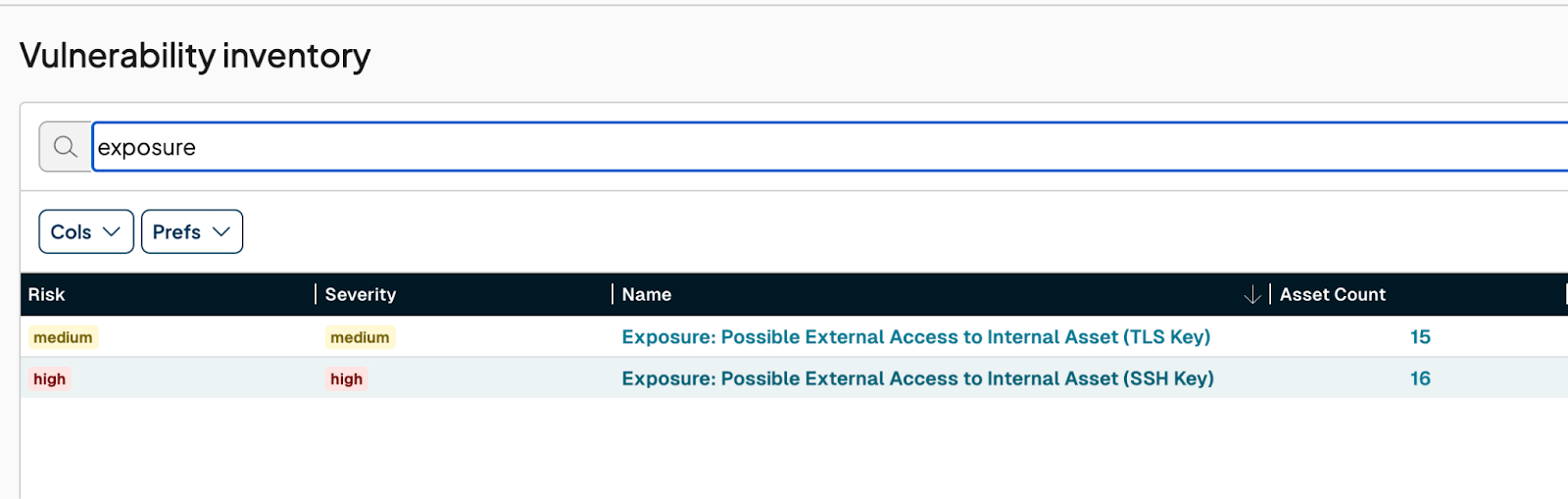
To get started, navigate to the Inventory -> Vulnerabilities section and search for the word “Exposure”. Any internal assets that runZero was able to identify externally, regardless of IP address or location, will be flagged with a vulnerability record based on the type of exposure.

The three exposure detection methods available today are:

  • TLS Certificate
  • SSH Hostkey
  • MAC Address

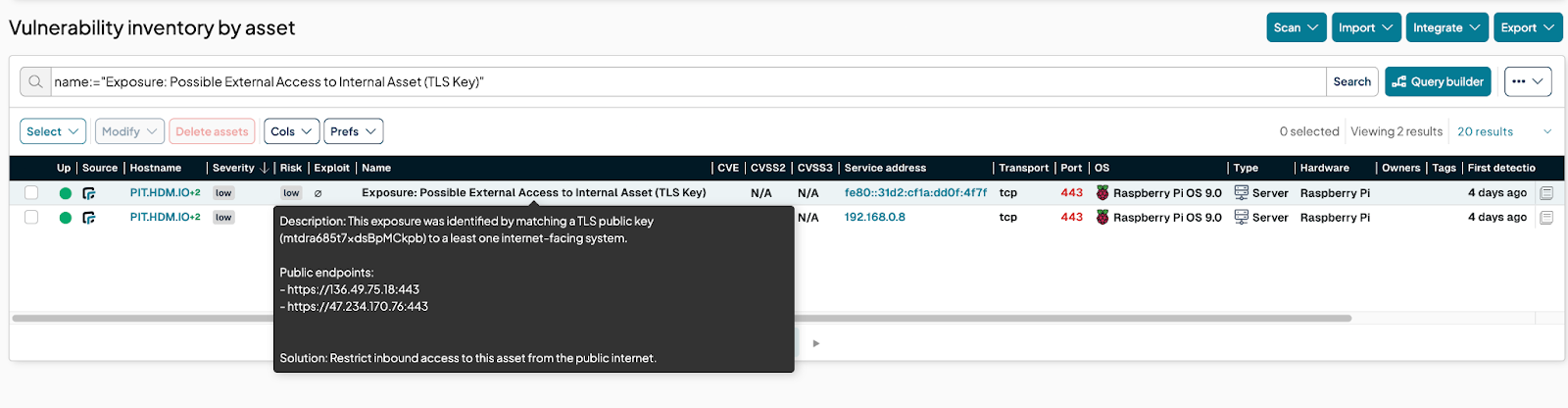
Here’s an example of an exposure that was identified by matching a TLS public key:

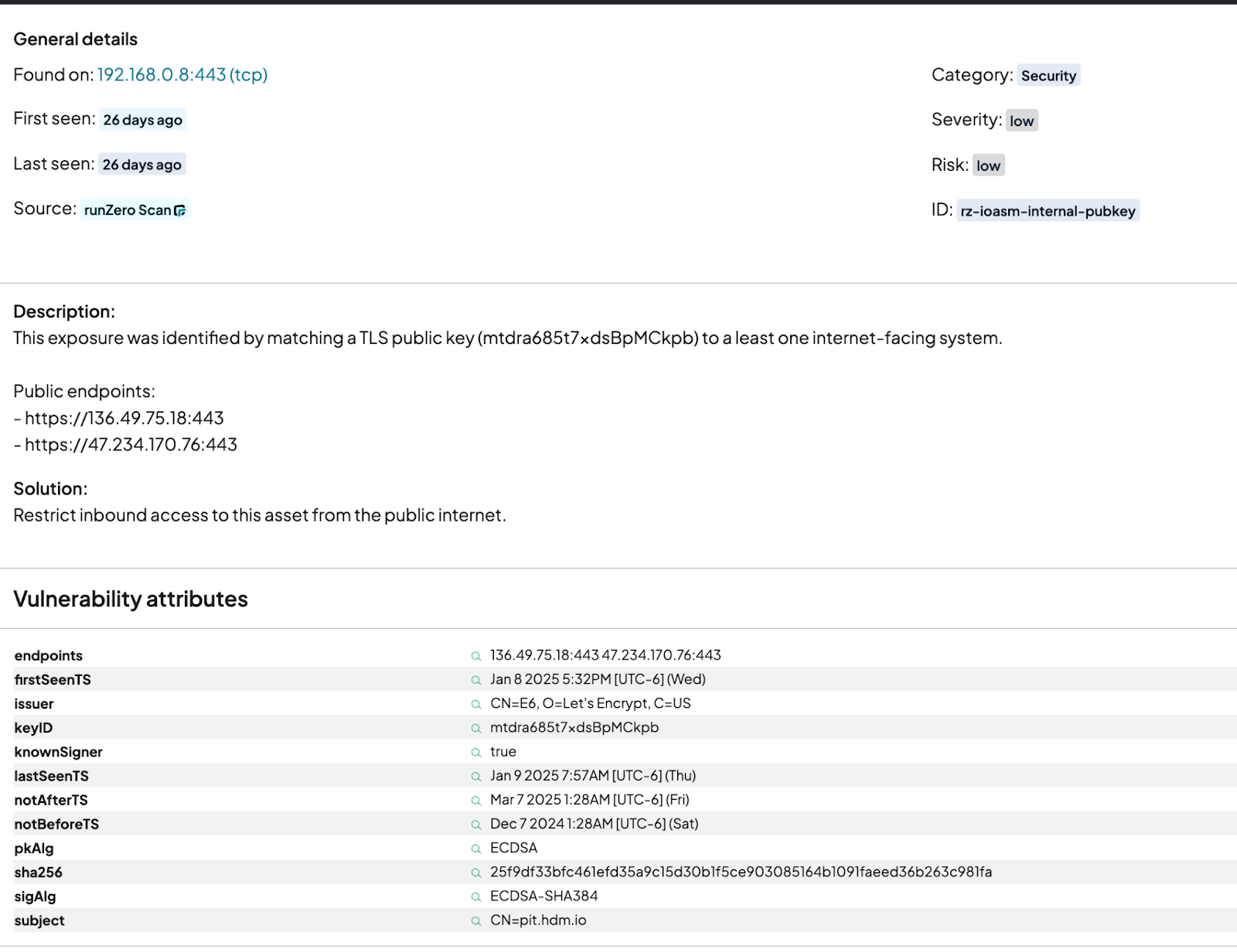
Clicking on the name of the vulnerability will open the details page. This page also provides a list of the public endpoints where this internal system was observed:


About runZero
runZero, a network discovery and asset inventory solution, was founded in 2018 by HD Moore, the creator of Metasploit. HD envisioned a modern active discovery solution that could find and identify everything on a network–without credentials. As a security researcher and penetration tester, he often employed benign ways to get information leaks and piece them together to build device profiles. Eventually, this work led him to leverage applied research and the discovery techniques developed for security and penetration testing to create runZero.

About Version 2 Digital

Version 2 Digital is one of the most dynamic IT companies in Asia. The company distributes a wide range of IT products across various areas including cyber security, cloud, data protection, end points, infrastructures, system monitoring, storage, networking, business productivity and communication products.

Through an extensive network of channels, point of sales, resellers, and partnership companies, Version 2 offers quality products and services which are highly acclaimed in the market. Its customers cover a wide spectrum which include Global 1000 enterprises, regional listed companies, different vertical industries, public utilities, Government, a vast number of successful SMEs, and consumers in various Asian cities.

Our team’s hot takes on cybersecurity in 2025

2025 is here—what should we expect?

As the new year kicks off, it’s only natural to start thinking about what’s ahead and make predictions. And so, we reached out to a few top experts on the NordPass team to find out what they think is coming in cybersecurity in 2025. The answers we got were not only varied and engaging but also unexpected and, at times, controversial. Here’s what they had to say:

Prediction #1—Jonas Karklys, CEO of NordPass

“Cybersecurity tools like password managers will help people reduce digital anxiety.”

“With AI adoption booming, fake news spreading like wildfire, and cyber threats becoming more sophisticated by the day, it’s no surprise that people feel overwhelmed and vulnerable online. The good news? Cybersecurity tools, like NordPass, are already providing significant support, making it much easier to manage accounts, protect sensitive data, and stay in control of who has access to their information.

As these solutions continue to evolve to tackle the latest challenges head-on, like AI-powered phishing or 5G network vulnerabilities, they’ll empower people to face the digital world with more confidence and truly take charge of their online lives. The digital world should be a place where everyone can be themselves and realize their potential—not a place where they’re constantly worried about what’s around every corner. Let’s make that happen.”

Prediction #2—Marvin Petzolt, Lead Security Architect at NordPass

“AI will make scams much more realistic.”

“In recent years, chatbots have become more and more lifelike, and now, the new models are even adding emotions to their responses. Because of this, I predict that, in 2025, we’ll see a rise in AI-powered phishing and scam attacks. AI makes it incredibly easy to pull information from social media that criminals can use to create super convincing scams on a much larger scale.

Picture this: you get a phone call, and the voice on the other end sounds just like someone you know—maybe a relative or an old friend. They say they urgently need help: emergency funds, rent money, or money for medical bills. These kinds of scams will start happening more often, and without the right security measures, some people could easily be fooled on a level we’ve never seen before.

That’s why it’s going to be more important than ever to be cautious about what we share online—keeping it private and to a minimum.”

Prediction #3—Karolis Arbaciauskas, Head of Product & Business Development at NordPass

“Passwords will endure and grow in volume.”

“While passwordless authentication methods, like passkeys, are starting to gain momentum, it’ll take some time for them to catch on across consumer and shadow IT sectors. So, my prediction for 2025 is that passwords will still play a major role in authentication.

Before the COVID-19 pandemic, most people had around 70 passwords. But with remote work becoming the norm and more people using collaboration and streaming services, that number went up to about 170 by 2024. Looking ahead to 2025, with more AI-driven tools requiring authentication, we’re likely to hit an average of 190 passwords per user. Unfortunately, it also means that weak, reused, or stolen passwords will still make up around 70–80% of cyberattacks—but even that could rise in 2025. The fact remains that this growing number of passwords highlights the need for better password management for all of us.”

Prediction #4—Jolanta Balciene, Head of Product Marketing at NordPass

“Cybersecurity will be seen even more as a business differentiator.”

“No matter which cybersecurity market report you look at—whether it’s from Gartner, IBM, or McKinsey—you’ll see that this sector is growing at a very high speed. Due to the increasing number of cyber threats, more companies are now investing in cybersecurity products and services to protect their IT infrastructures and their customers’ data. And so, I believe that in 2025, cybersecurity will stand out even more as a key business asset.

What I mean by that is that organizations all around the world will not only invest more in cybersecurity tools to defend themselves against threats like AI-powered phishing, ransomware, and malware, but they will also position cybersecurity itself as a key value proposition. As a result, customers will more actively seek out companies that have known certifications and cybersecurity measures in place—simply to make sure they are interacting with brands that prioritize their security.”

Prediction #5—Ieva Soblickaite, CPO at NordPass

“Political tensions may impact how cybersecurity is managed.”

“The relationship between cybersecurity and the global political climate has definitely gotten more complicated over the last few years. Many governments are struggling to match the pace of technological growth, often falling behind when it comes to implementing laws that protect digital infrastructure—which can leave critical systems exposed.

At the same time, the rise of controversial political powers is raising concerns about things like digital surveillance, censorship, and information manipulation. There’s a fear they might try to control internet access, limit free speech, and use cyber tools to go after their opposition.

On top of that, rising geopolitical tensions and military conflicts are making things worse, with some governments using cyberattacks as part of their military strategy. As a result, we’re now seeing more sophisticated attacks aimed at critical infrastructures and democratic organizations, which shows that cybersecurity isn’t just a technical challenge anymore, but a major issue in global diplomacy.

So, in 2025, I’m afraid we’ll likely see these problems grow. We’ll face more risks to critical systems, more manipulation of information, and more cyberattacks targeting democratic institutions. And while we do have some data privacy regulations in place right now, those could change at any time. Therefore, it’s in each of us to take steps to protect our data and minimize the risk of it being used against us.”

Prediction #6—Ignas Valancius, Head of Engineering at NordPass

“The time to crack passwords will be even shorter.”

“I’m sure AI has come up in a lot of predictions, and mine won’t be any different, so here goes: in 2025, the time it takes to guess, social engineer, or brute force passwords is going to drop dramatically, due to AI tools in the hands of cybercriminals.

Based on our own “Top 200 Most Common Passwords” research, we know that simple passwords like “123456” or “qwerty” can be cracked in under a second. The more complex the password, the longer it takes, but with the increasing computing power behind AI, hackers will be able to try many more combinations in less time. So even more complex passwords will be cracked faster. I’m not saying that super long, random 18-character passwords are at immediate risk, but shorter ones? They could be in danger.

And let’s not forget that the more people use AI, the more it learns about them. This is to say that many people already share sensitive data with “free” AI tools to get things done, but here’s the catch—nothing’s really “free.” That data gets used for training, tracking, and, even worse, creating detailed profiles for more targeted attacks. So, as we move forward, it’s crucial to keep our passwords long and strong, and tread carefully as we interact with AI tools.”

Prediction #7—Jonas Karklys, CEO of NordPass

“Passkeys will get more recognition.”

“In 2024, we saw passkeys get massive support from major players like Google, Amazon, PayPal, and Facebook, who backed them as the next step beyond traditional passwords. Looking at the adoption rate, I believe that in 2025, even more companies will jump on the passwordless bandwagon, making it easier for their users to adopt passkeys across their online accounts.

The reasons are simple: passkeys offer better security, helping to prevent many common incidents, and they’re much easier to use than typing out long, complex passwords. Today, it’s all about security and convenience, and if there’s a solution that provides both, it’s a winner. One thing’s for certain—NordPass will be there not only to continue supporting passkeys but also to help other organizations adopt passwordless technology through our services like Authopia.”

Summary

The NordPass team’s predictions for 2025 highlight both the challenges and opportunities of cybersecurity, showing just how crucial it will be for both individuals and businesses. While we’d all love to see the threats disappear, it’s certain they’ll only become more complex. That means it’s up to us to step up our game and protect our digital valuables.

If you’re looking for a way to do that, we encourage you to try NordPass and see how it can level up your cybersecurity and overall online experience. With the free 14-day trial, you can get a good sense of how it’ll keep your data safe in 2025 and beyond. The choice is yours!

About NordPass
NordPass is developed by Nord Security, a company leading the global market of cybersecurity products.

The web has become a chaotic space where safety and trust have been compromised by cybercrime and data protection issues. Therefore, our team has a global mission to shape a more trusted and peaceful online future for people everywhere.

About Version 2 Digital

Version 2 Digital is one of the most dynamic IT companies in Asia. The company distributes a wide range of IT products across various areas including cyber security, cloud, data protection, end points, infrastructures, system monitoring, storage, networking, business productivity and communication products.

Through an extensive network of channels, point of sales, resellers, and partnership companies, Version 2 offers quality products and services which are highly acclaimed in the market. Its customers cover a wide spectrum which include Global 1000 enterprises, regional listed companies, different vertical industries, public utilities, Government, a vast number of successful SMEs, and consumers in various Asian cities.

Common types of data breaches and tips on how to prevent them

Types of data breaches and their prevention

A data breach means that attackers have successfully compromised your company’s cyberdefenses and gotten their hands on some corporate data. A serious data breach could ruin your business’ reputation, let alone cost a fortune to recover from. Knowing the common ways that cybercriminals breach data security will help you keep your company’s defenses resilient to attacks.

What is a data breach?

A data breach is any event in which someone accesses confidential information without permission. But what is a data breach in the cybersecurity context? It’s an unauthorized access, theft, or exposure of sensitive digital information, often stored in computer systems, networks, or cloud services.

During the third quarter of 2024 alone, data breaches exposed more than 422 million user accounts worldwide, while the cost of a data breach in 2024 reached a global average of USD 4.88 million.

You might think a data breach always has some malicious intent behind it. However, a data breach can sometimes happen due an accidental data leak or human error.

The most common types of data breaches

A data breach may easily become your company’s most expensive problem. Check out our comprehensive list of the most common types of data breaches and their causes so that you can direct your security effort toward preventing these threats.

Malware

Malware is any harmful software (program or file) that cybercriminals develop to steal data, cause damage to computers and systems, or deprive legitimate users of their access to the system or information. The number of malware attacks globally has been rising steadily since 2021, with 6.06 billion cases reported in 2023.

Though numerous types of malware can bring about a data breach, they spread in similar ways. Typically, you may catch a malware infection when you do the following:

  • Download an infected file or app.
  • Click on a malicious link or ad.
  • Install software from unreliable sources.
  • Use legitimate software that has vulnerabilities that attackers may exploit. This includes postponing software updates designed to patch up security flaws.
  • Fall for a phishing attack or scam.

Let’s explore the most common and damaging types of malware.

Ransomware

Ransomware encrypts or locks data on your device and demands a ransom for the decryption key, effectively locking you out of your own system. In businesses, a ransomware infection can escalate into a corporate data breach if attackers steal sensitive information before encrypting it, threatening to expose or sell the data if you don’t pay up.

Spyware

Once spyware infects your device, it gathers information you store on it, including personal and corporate data, and sends it to the attackers. Typically operating in the background, spyware can track your browsing habits, capture keystrokes, and monitor online activities without your knowledge.

Viruses

Viruses are malicious software programs that attach themselves to legitimate files or applications, spreading and causing harm either when you execute the malicious file or executing automatically by exploiting operating system or software vulnerabilities.

Worms

Worms are self-replicating malware that spreads independently without needing a host file or program, often exploiting network vulnerabilities to infect other systems automatically.

Adware

Adware is a type of software that delivers intrusive advertisements to users. Typically, it collects data or redirects users to specific websites, often malicious.

Trojan horses

Trojan horses are a particularly sneaky type of malware that downloads onto your computer disguised as legitimate software. They are capable of stealing data and installing additional malware.

Rootkits

A rootkit is a collection of malicious software that hackers hide on your computer to reach areas otherwise inaccessible to them and to take control of your system. Rootkits operate at a deep system level, often hiding within core operating system files, making them invisible to standard security tools and able to bypass typical removal methods.

Keyloggers

Keyloggers are malicious software or hardware that secretly keep track and record your every keystroke. This way, they can capture sensitive data like passwords, messages, and credit card details.

Social engineering

Social engineering is the psychological manipulation of people to make them compromise data security. Criminals often create fake emails, ads, or websites designed to look legitimate, tricking you into revealing personal information, clicking a malicious link, or downloading harmful attachments, which may all result in a corporate data breach.

Phishing attacks

Phishing attacks are one of the most common social engineering methods that come in different forms:

  • Spear phishing. In spear phishing, attackers use personalized information to target a specific person, group, or organization. They aim to coerce you into sharing sensitive information, downloading malware, or sending them money.
  • Email spoofing. Cybercriminals send fake emails that appear to come from a trusted source to trick you into revealing sensitive information.
  • Whaling attacks direct their effort towards high-profile companies and individuals, such as executives, to gain access to confidential corporate or client data.

SQL injection

In SQL injection, attackers inject malicious SQL code into an entry field on a website or application, tricking the database into revealing unauthorized information. This way, they are able to access, modify, or delete data, potentially compromising the security and privacy of the entire database.

Password attacks

A password attack is just what it sounds like — a hacker’s attempt to steal your password by using one or several methods described below.

Credential stuffing

Credential stuffing is the use of automated tools to try stolen username and password combinations from previous data breaches in website login forms with the goal of gaining unauthorized access to user accounts.

Password cracking

Password cracking is about trying to access a password-protected system by systematically guessing or decrypting passwords. To crack a password, attackers may use methods like brute force, dictionary attacks, or rainbow tables.

Brute-force attacks

In a brute-force attack, cybercriminals attempt all possible combinations of characters until they successfully guess the correct password. It’s an effective yet time-consuming password-cracking method.

Rainbow table attacks

Rainbow table attacks use precomputed tables of hashed password values to quickly match and reveal plaintext passwords, significantly reducing the time needed to crack them. By comparing stored password hashes against these tables, attackers can bypass the need for repetitive hashing attempts. This method is especially effective against weak or commonly used passwords.

Insider threats

Insider threats are risks posed by individuals within an organization who, intentionally or not, compromise sensitive information, security, or operations.

Data leakage

Data leakage is an exposure of confidential or protected data. An individual within an organization could intentionally or unintentionally share sensitive information with unauthorized individuals or through unsecured channels. Apart from human error, data may also leak due to software vulnerabilities or poor data security measures.

Data exfiltration

Data exfiltration is deliberate, unauthorized transfer of data from within an organization to an external destination or third party.

Advanced threats

Advanced threats are sophisticated, targeted cyberattacks designed to evade traditional security defenses and infiltrate networks undetected. These threats often employ stealthy techniques, persistence, and customized malware.

Cyber espionage

Cyber espionage is a form of digital spying. It involves the use of cyber tactics to covertly gather confidential information from governments, corporations, or individuals, often for strategic or competitive advantage. Nation-states, state-sponsored groups, and highly skilled threat actors opt for cyber espionage to target intellectual property or classified information.

Advanced persistent threats (APTs)

Advanced persistent threats are targeted, covert cyberattacks in which intruders gain unauthorized access to a network and remain undetected over an extended period. Typically, nation-states and organized crime groups conduct these highly sophisticated attacks.

Zero-day exploits

In zero-day exploits, attackers take advantage of unknown security vulnerability in computer software, hardware, or firmware. The software vendor and security community don’t yet know about these vulnerabilities, leaving no time (“zero days”) for developers to patch them, which, in turn, allows attackers to infiltrate systems before defenses can be implemented.

Supply chain attacks

In supply chain attacks, cybercriminals infiltrate an organization by compromising its external partners or third-party vendors that have access to the organization’s systems or data. For example, by targeting trusted suppliers, attackers can introduce malicious code or vulnerabilities to a target’s system or network.


Network and session attacks

Network and session attacks target active network connections and communication sessions to intercept, alter, or hijack data.

Man-in-the-middle attacks

A man-in-the-middle attack happens when a cybercriminal secretly intercepts and potentially alters the communication between two parties who think they’re communicating directly, or between a user and an application. It’s like someone eavesdropping on a private conversation, possibly even changing the information before it reaches the other person.

Session hijacking

Session hijacking involves taking over an active internet session between a user and a web application. This allows the attacker to act as the legitimate user and, as a result, gain unauthorized access to sensitive information and actions within the session.

ARP spoofing

ARP spoofing is a technique where an attacker sends falsified (spoofed) address resolution protocol (ARP) messages onto a local area network to link their device’s MAC address with the IP address of a legitimate host. This allows the attacker to intercept, modify, or stop data intended for that IP address.

DNS attacks

DNS attacks exploit vulnerabilities in the domain name system (DNS) to compromise the availability, stability, or integrity of DNS service. By disrupting or manipulating DNS, attackers can redirect users to malicious websites, intercept sensitive data, inject malware, or enable further attacks. Common types include DNS spoofing, DNS amplification attacks, DNS tunneling, and pharming.

  • DNS spoofing is an attack where malicious actors manipulate DNS records or responses to redirect users to malicious websites without their knowledge.
  • A DNS amplification attack is a type of distributed denial-of-service (DDoS) attack that exploits vulnerable DNS servers by sending small, spoofed requests that elicit large responses. These amplified responses overwhelm the target server with massive amounts of data, causing network disruption or service outages.
  • DNS tunneling routes DNS requests to an attacker’s server, creating a covert channel for command-and-control communication and data exfiltration, often blending with legitimate traffic to evade detection.
  • Pharming redirects users from legitimate websites to fraudulent ones by altering DNS settings, poisoning DNS caches, or exploiting vulnerabilities. Once on a fake site, unsuspecting users often enter sensitive information, believing they’re using a legitimate service.

Botnets

Botnets are networks of internet-connected devices infected with malware and controlled by attackers without the owners’ knowledge. Hackers use various tactics to compromise devices, turning them into “bots” to perform coordinated malicious activities like launching DDoS attacks, distributing malware, spamming, or stealing sensitive data.

Rogue access points

Rogue access points are unauthorized wireless access points installed on a secure network without explicit authorization from the network administrator, either by a well-meaning employee or a malicious attacker. These physical devices, typically wireless routers or similar hardware, create unauthorized wireless entry points into the network or establish unauthorized Wi-Fi networks that may bring about a data breach.

Wi-Fi eavesdropping

Wi-Fi eavesdropping is a cyberattack where criminals intercept unencrypted data transmitted over wireless networks. They do so to intercept sensitive data such as login credentials, financial details, or private communications, especially on unsecured or public Wi-Fi networks.

Physical and device-based threats

Malicious actors don’t always target the software — they often aim to compromise devices themselves to access sensitive data stored within.

SIM swapping

SIM swapping is a type of account takeover fraud where attackers trick or bribe mobile carriers into transferring your phone number to a SIM card under their control. This way they can bypass two-factor authentication, intercept calls and texts, and gain access to sensitive accounts or personal information.

Mobile device breaches

Attackers may exploit software vulnerabilities in mobile devices to access them remotely by leveraging weaknesses in operating systems, apps, or third-party software. Poor device security, such as failing to enable multi-factor authentication, significantly helps attackers by making it easier to bypass authentication mechanisms and maintain unauthorized access.

Physical theft

Malicious actors may steal laptops, smartphones, and other portable devices that they later break into, which can result in a data breach.

Tailgating

Tailgating is simply following after an authorized employee into restricted areas without proper verification.

Shoulder surfing

Shoulder surfing is a technique where an attacker observes someone’s screen or keyboard from a close distance to steal sensitive information, like passwords or PINs. They typically do so in public places, such as cafes or airports. You should always take care to protect your screen from prying eyes.

Dumpster diving

Dumpster diving simply means going through someone’s trash in hopes of finding discarded documents or items that contain valuable information, such as bank statements or personal details.

Web application attacks

Another way for attackers to get access to an organization’s IT ecosystem is to try exploiting the vulnerabilities and weaknesses in web applications.

Cross-site scripting (XSS)

Hackers sometimes inject malicious scripts into trusted websites — this is called cross-site scripting (XSS). By using XSS, attackers are able to execute the script in their victim’s browser and steal cookies, session tokens, or sensitive data from their victim’s computer.

Cross-site request forgery (CSRF)

In cross-site request forgery, an attacker tricks you into executing unauthorized actions on a website where you are authenticated, often through a malicious link or script. This allows attackers to change account settings, transfer funds, or carry out other unintended operations without your knowledge.

Formjacking

Formjacking occurs when cybercriminals inject malicious JavaScript code into a website, taking over the functionality of its form pages to collect sensitive user information. Attackers intercept data such as credit card details entered by users in real time, often without the website or its visitors realizing the breach.

Drive-by downloads

A drive-by download is an unintentional download of malicious code to your computer. These downloads can happen when you visit compromised or malicious websites. Attackers exploit vulnerabilities in browsers, plugins, or operating systems to install malware, which can steal data or create backdoors for future attacks.

Exploit kits

Exploit kits are toolkits that attackers use to scan for and exploit vulnerabilities in software or systems so they can distribute malware or ransomware. These kits automate the process of identifying weaknesses, making it easier for cybercriminals to launch large-scale attacks against unpatched or outdated systems.

Buffer overflow attacks

In a buffer overflow attack, cybercriminals exploit buffer overflow, a software coding error, by sending more data to a memory buffer than it can handle, which causes excess data to overwrite adjacent memory. This allows attackers to execute malicious code, steal data, and gain unauthorized access to corporate systems.

Preventative measures and best practices

The onslaught of ways that attackers may breach your organization’s data security may seem overwhelming. However, a steady and proactive approach to security practices can strengthen your defenses against potential data breaches.

Network security

To take your corporate network security — and data protection — to the next level, you should implement a multi-layered approach that includes the use of firewalls, IDS, VPNs, and threat management solutions.

Firewalls create a barrier between trusted internal networks and untrusted external networks, blocking unauthorized traffic and filtering malicious data. If someone manages to bypass the firewalls, an IDS (intrusion detection system) can detect unusual activity and provide real-time alerts, enabling you to mitigate the threat promptly.

A VPN (virtual private network) secures data in transit, ensuring that remote workers and branch offices connect to the corporate network through encrypted channels to prevent eavesdropping and unauthorized access.

To top off your network security effort, start using a threat exposure management platform like NordStellar. It’s an advanced solution that automatically cross-references credentials found on the deep and dark web with your employee, customer, and partner accounts. If NordStellar’s Data Breach Monitoring solution finds any leaked credentials, it notifies you instantly, giving you the chance to take action to secure your accounts and resources.

Encryption

To protect sensitive corporate information, you should prioritize encryption by adopting data encryption in transit and at rest, as well as SSL/TLS protocols.

We advise encrypting your stored data on servers, databases, and devices to prevent a potential security breach, even if someone steals or compromises your data. You should also use encryption to secure data in transit between systems to prevent attackers from intercepting it during transmission over the internet or private networks.

Make sure to implement SSL/TLS protocols to secure web communications. This will create encrypted connections between users and websites and protect sensitive information like login credentials and payment details from potential breaches.

Access controls

Curbing data breaches also involves controlling who can access sensitive information and systems. Role-based access control is an effective approach that allows you to assign permissions based on an employee’s job responsibilities. It’s safest to only let individuals have access to the tools and data necessary for their role.

Equally important is the principle of least privilege, which means granting users the minimum level of access required to perform their tasks. By restricting permissions to only what’s essential, you can significantly reduce the attack surface, making it harder for cybercriminals to exploit compromised data.

Data minimization

It’s recommended to practice data minimization in any business. By collecting only the information necessary for your business operations, you avoid excess data — unnecessary or redundant information stored in your systems — that could become an attractive target for hackers.

A lean and secure data management system also includes regular purging of outdated or redundant data to reduce storage demands and limit the impact of a potential security breach.

Physical security

Ensure physical infrastructure is secure by securing server rooms with controlled access measures like keycards or biometric locks. Complement this with surveillance systems to monitor critical areas. A surveillance system may deter intrusions and provide evidence in case of a security breach.

Regular software updates

Protect your systems by regularly updating software, operating systems, and applications to patch vulnerabilities that attackers could exploit. Enable automatic updates where possible to ensure your systems always run the latest, most secure versions.

Strong password policies

Enforce strong password policies by requiring your employees to use complex, unique passwords and regular updates to protect against identity theft and security breaches. Encourage your employees to use password managers to securely store and manage their credentials.

Implementing multi-factor authentication

Multi-factor authentication (MFA) adds an extra layer of security and protection against identity theft because users must verify their identity through multiple methods before they can gain access to their accounts or company resources. MFA makes it harder for attackers to exploit compromised passwords alone.

Data backup and recovery plans

Make sure you regularly back up your data and have a set recovery plan if a data breach occurs. Storing your critical information securely is especially important in case of a cyberattack, hardware failure, or system disruption.

Regular security audits

Conduct regular security audits to identify vulnerabilities, assess the effectiveness of your cybersecurity measures, and ensure compliance with industry standards. These audits will help you stay proactive in addressing potential threats before they become serious issues.

Employee training and awareness

The more your employees know about data breaches and security practices, the better you are equipped to both protect your business from security breaches and respond to them in a timely manner. Regular employee training is a must to avoid data breaches due to human error.

About NordStellar

NordStellar is a threat exposure management platform that enables enterprises to detect and respond to network threats before they escalate. As a platform and API provider, NordStellar can provide insight into threat actors’ activities and their handling of compromised data. Designed by Nord Security, the company renowned for its globally acclaimed digital privacy tool NordVPN.

About Version 2 Digital

Version 2 Digital is one of the most dynamic IT companies in Asia. The company distributes a wide range of IT products across various areas including cyber security, cloud, data protection, end points, infrastructures, system monitoring, storage, networking, business productivity and communication products.

Through an extensive network of channels, point of sales, resellers, and partnership companies, Version 2 offers quality products and services which are highly acclaimed in the market. Its customers cover a wide spectrum which include Global 1000 enterprises, regional listed companies, different vertical industries, public utilities, Government, a vast number of successful SMEs, and consumers in various Asian cities.

×

Hello!

Click one of our contacts below to chat on WhatsApp

×