




Storware Backup and Recovery offers a comprehensive solution for protecting your OpenStack environment.

Here’s a step-by-step guide to get you started with backups and recovery:
Prerequisites:
- OpenStack environment using KVM hypervisor and VMs with QCOW2 or RAW files.
- Storware Backup and Recovery software.
Deployment:
1. Install Storware Backup and Recovery Node: The Storware node can be installed on a separate machine. Ensure it has access to OpenStack APIs and hypervisor SSH.
2. OpenStack API Integration: Configure Storware to communicate with OpenStack APIs like Nova and Glance for metadata collection and VM restore processes.
Backup Configuration:
1. OpenStack UI Plugin (Optional): Install the Storware OpenStack UI plugin to manage backups directly from the OpenStack dashboard. This simplifies backup creation, scheduling, and restores.
2. Backup Schedules: Define backup schedules for your VMs. Storware supports both full and incremental backups.
3. Backup Options:
- Libvirt strategy
- Disk attachment strategy
- Ceph RBD storage backend
All three strategies support full and incremental backups.
Libvirt strategy works with KVM hypervisors and VMs using QCOW2 or RAW files. It directly accesses the hypervisor over SSH to take crash-consistent snapshots. Optionally, application consistency can be achieved through pre/post snapshot command execution. Data is then exported over SSH.
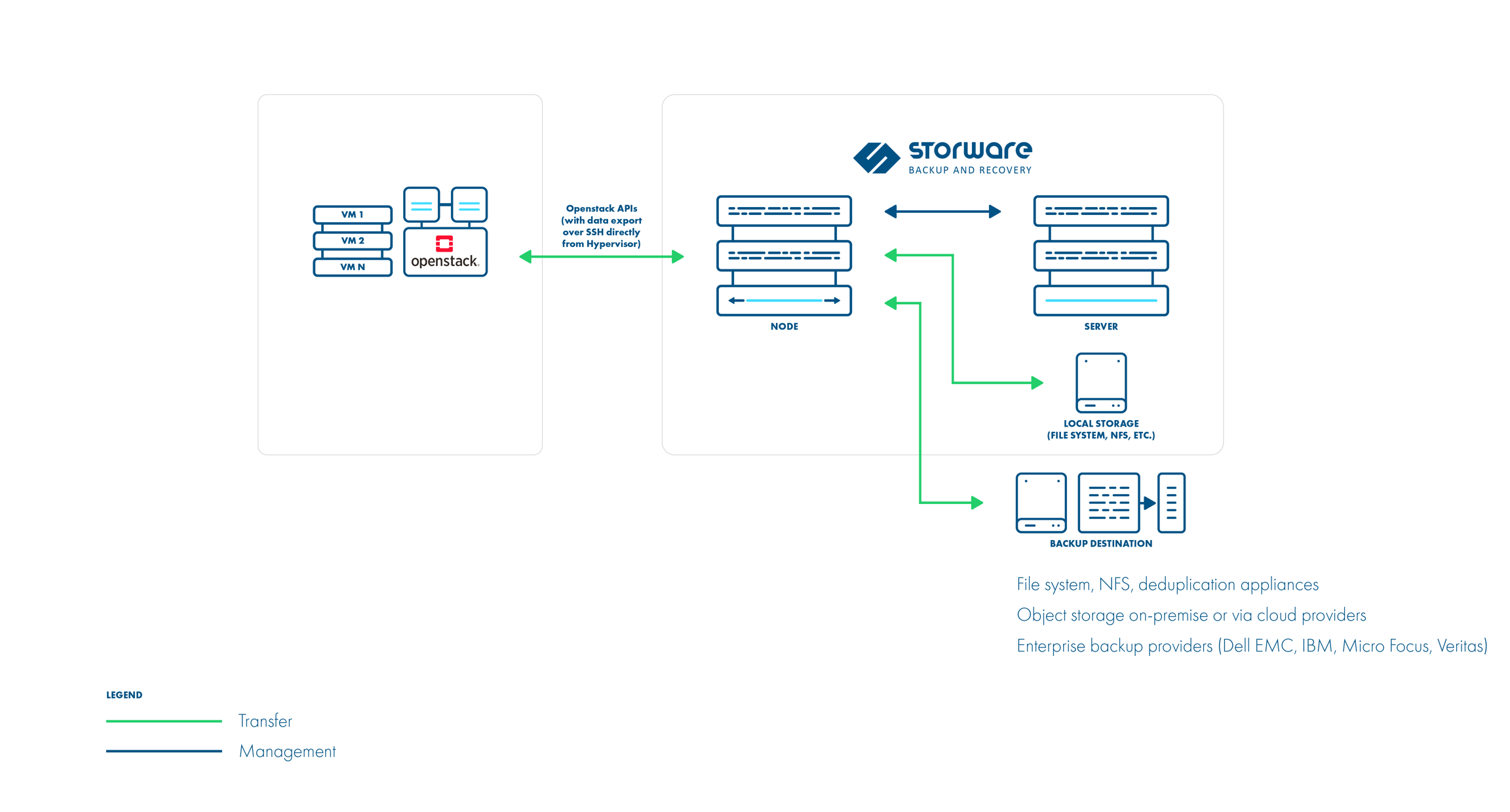
Disk attachment strategy is used for OpenStack environments that use Cinder with changed block tracking. It uses a proxy VM to attach disks to the OpenStack instances. Snapshots are captured using the Cinder API. Incremental backups are supported. Data is read from the attached disks on the proxy VM.

Ceph RBD storage backend
Storware Backup & Recovery also supports deployments with Ceph RBD as a storage backend. Storware Backup & Recovery communicates directly with Ceph monitors using RBD export/RBD-NBD when used with the Libvirt strategy or – when used with the Disk-attachment method – only during incremental backups (snapshot difference).
Libvirt strategy

Disk attachment strategy

Retention Policies: Set retention policies to manage how long backups are stored.
Backup Process:
1. Storware interacts with OpenStack APIs to gather VM metadata.
2. Crash-consistent snapshots are taken directly on the hypervisor using tools like virsh or RBD snapshots.
3. (Optional) Pre-snapshot scripts run for application consistency.
4. VM data is exported using the chosen method (SSH or RBD).
5. Metadata is exported from OpenStack APIs.
6. Incremental backups leverage the previous snapshot for faster backups.
Recovery Process:
1. Select the desired VM backup from the Storware interface.
2. Choose the recovery point (specific backup version).
3. Storware recreates VM files and volumes based on the backup data.
4. The VM is defined on the hypervisor.
5. Disks are attached (either directly or using Cinder).
6. (Optional) Post-restore scripts can be run for application-specific recovery steps.
Additional Notes:
- Storware supports both full VM restores and individual file/folder recovery.
- The OpenStack UI plugin provides a user-friendly interface for managing backups within the OpenStack environment.
- Refer to Storware documentation for detailed configuration steps and advanced options -> https://storware.gitbook.io/backup-and-recovery
By following these steps and consulting the Storware documentation, you can leverage Storware Backup and Recovery to safeguard your OpenStack VMs and ensure a quick recovery process in case of data loss or system failures.
