Skip to content

ESET 研究人員:揭開 AceCryptor 行動的神秘面紗

在數碼世界中,每天都有無數的威脅潛伏著,加密勒索軟件就是其中之一。最近,ESET 研究人員發現了一個名為 AceCryptor 的新型勒索軟件家族,使用高度進化的技術,對全球範圍的企業進行攻擊。AceCryptor 行動的細節近日公開,讓我們更加深入了解這個勒索軟件的運作方式和威脅程度。

AceCryptor 是一個新興的勒索軟件家族,它於最近被發現,並在短時間內迅速蔓延開來。這個勒索軟件利用釣魚郵件和惡意的附件進行傳播,一旦受害者點擊了這些附件,AceCryptor 便會開始其破壞性的行動。值得注意的是,AceCryptor 在攻擊期間不會直接與控制伺服器通信,這增加了對其活動追蹤和防禦的難度。此外,AceCryptor 還具有高度進化的功能和特性,它使用了一種稱為「Process Doppelgänging」的技術,可以繞過傳統的防護機制,如防病毒軟件,配合多種加密演算法,包括 RSA 和 AES,以確保其勒索行動的安全性和可靠性。

2021 年和 2022 年 AceCryptor 檢測數量(7 天移動平均值)

在成功感染一台受害者的系統後,AceCryptor 會開始加密文件並索取贖金。研究人員發現,這個勒索軟件家族與 BitPaymer 和 Dridex 等其他勒索軟件存在著一些相似之處,這可能意味著背後有著相同的黑客組織或黑市交易。

然而,好消息是,ESET 對 AceCryptor 的研究和分析已經為業界提供了更多的資訊 ,並有助於改進防護措施。研究人員開發出了一個名為 AceCryptor Decryptor 的工具,可以解密 AceCryptor 勒索的文件,並使受害者能夠恢復其資料而無需支付贖金。

對於保護公司企業和個人免受 AceCryptor 威脅的建議包括:

  • 保持軟件和系統更新:定期更新操作系統、防病毒軟件和其他軟件以修補已知漏洞,並減少受到攻擊的風險。
  • 對附件和連結保持警覺:謹慎開啟附件或點擊來自未知來源或可疑的郵件連結,避免中招感染。
  • 備份重要資料:定期備份所有重要文件到離線媒體或雲端儲存中,以防止勒索軟件攻擊導致資料丟失。
  • 使用強大且唯一的密碼:選擇長度較長且組合複雜的密碼,並確保不同帳戶使用不同的密碼。
  • 教育員工和用戶:提供相關的安全訓練和教育,使他們了解釣魚郵件和其他社交工程攻擊的特徵,並學習避免中招。

AceCryptor 行動的揭露為我們提供了對這種新型勒索軟件的深入了解,並提供了對抗和預防的方法。然而,我們仍然需要保持警覺,持續關注和研究數碼威脅的發展,以確保我們的數碼世界更加安全。

About Version 2

Version 2 Digital is one of the most dynamic IT companies in Asia. The company distributes a wide range of IT products across various areas including cyber security, cloud, data protection, end points, infrastructures, system monitoring, storage, networking, business productivity and communication products. Through an extensive network of channels, point of sales, resellers, and partnership companies, Version 2 offers quality products and services which are highly acclaimed in the market. Its customers cover a wide spectrum which include Global 1000 enterprises, regional listed companies, different vertical industries, public utilities, Government, a vast number of successful SMEs, and consumers in various Asian cities.

關於ESET
ESET成立於1992年,是一家面向企業與個人用戶的全球性的電腦安全軟件提供商,其獲獎產品 — NOD32防病毒軟件系統,能夠針對各種已知或未知病毒、間諜軟件 (spyware)、rootkits和其他惡意軟件為電腦系統提供實時保護。ESET NOD32佔用 系統資源最少,偵測速度最快,可以提供最有效的保護,並且比其他任何防病毒產品獲得了更多的Virus Bulletin 100獎項。ESET連續五年被評為“德勤高科技快速成長500 強”(Deloitte’s Technology Fast 500)公司,擁有廣泛的合作夥伴網絡,包括佳能、戴爾、微軟等國際知名公司,在布拉迪斯拉發(斯洛伐克)、布裏斯托爾(英國 )、布宜諾斯艾利斯(阿根廷)、布拉格(捷克)、聖地亞哥(美國)等地均設有辦事處,代理機構覆蓋全球超過100個國家。

ESET 研究人員:揭開 AceCryptor 行動的神秘面紗

在數碼世界中,每天都有無數的威脅潛伏著,加密勒索軟件就是其中之一。最近,ESET 研究人員發現了一個名為 AceCryptor 的新型勒索軟件家族,使用高度進化的技術,對全球範圍的企業進行攻擊。AceCryptor 行動的細節近日公開,讓我們更加深入了解這個勒索軟件的運作方式和威脅程度。

AceCryptor 是一個新興的勒索軟件家族,它於最近被發現,並在短時間內迅速蔓延開來。這個勒索軟件利用釣魚郵件和惡意的附件進行傳播,一旦受害者點擊了這些附件,AceCryptor 便會開始其破壞性的行動。值得注意的是,AceCryptor 在攻擊期間不會直接與控制伺服器通信,這增加了對其活動追蹤和防禦的難度。此外,AceCryptor 還具有高度進化的功能和特性,它使用了一種稱為「Process Doppelgänging」的技術,可以繞過傳統的防護機制,如防病毒軟件,配合多種加密演算法,包括 RSA 和 AES,以確保其勒索行動的安全性和可靠性。

2021 年和 2022 年 AceCryptor 檢測數量(7 天移動平均值)

在成功感染一台受害者的系統後,AceCryptor 會開始加密文件並索取贖金。研究人員發現,這個勒索軟件家族與 BitPaymer 和 Dridex 等其他勒索軟件存在著一些相似之處,這可能意味著背後有著相同的黑客組織或黑市交易。

然而,好消息是,ESET 對 AceCryptor 的研究和分析已經為業界提供了更多的資訊 ,並有助於改進防護措施。研究人員開發出了一個名為 AceCryptor Decryptor 的工具,可以解密 AceCryptor 勒索的文件,並使受害者能夠恢復其資料而無需支付贖金。

對於保護公司企業和個人免受 AceCryptor 威脅的建議包括:

  • 保持軟件和系統更新:定期更新操作系統、防病毒軟件和其他軟件以修補已知漏洞,並減少受到攻擊的風險。
  • 對附件和連結保持警覺:謹慎開啟附件或點擊來自未知來源或可疑的郵件連結,避免中招感染。
  • 備份重要資料:定期備份所有重要文件到離線媒體或雲端儲存中,以防止勒索軟件攻擊導致資料丟失。
  • 使用強大且唯一的密碼:選擇長度較長且組合複雜的密碼,並確保不同帳戶使用不同的密碼。
  • 教育員工和用戶:提供相關的安全訓練和教育,使他們了解釣魚郵件和其他社交工程攻擊的特徵,並學習避免中招。

AceCryptor 行動的揭露為我們提供了對這種新型勒索軟件的深入了解,並提供了對抗和預防的方法。然而,我們仍然需要保持警覺,持續關注和研究數碼威脅的發展,以確保我們的數碼世界更加安全。

About Version 2

Version 2 Digital is one of the most dynamic IT companies in Asia. The company distributes a wide range of IT products across various areas including cyber security, cloud, data protection, end points, infrastructures, system monitoring, storage, networking, business productivity and communication products. Through an extensive network of channels, point of sales, resellers, and partnership companies, Version 2 offers quality products and services which are highly acclaimed in the market. Its customers cover a wide spectrum which include Global 1000 enterprises, regional listed companies, different vertical industries, public utilities, Government, a vast number of successful SMEs, and consumers in various Asian cities.

關於ESET
ESET成立於1992年,是一家面向企業與個人用戶的全球性的電腦安全軟件提供商,其獲獎產品 — NOD32防病毒軟件系統,能夠針對各種已知或未知病毒、間諜軟件 (spyware)、rootkits和其他惡意軟件為電腦系統提供實時保護。ESET NOD32佔用 系統資源最少,偵測速度最快,可以提供最有效的保護,並且比其他任何防病毒產品獲得了更多的Virus Bulletin 100獎項。ESET連續五年被評為“德勤高科技快速成長500 強”(Deloitte’s Technology Fast 500)公司,擁有廣泛的合作夥伴網絡,包括佳能、戴爾、微軟等國際知名公司,在布拉迪斯拉發(斯洛伐克)、布裏斯托爾(英國 )、布宜諾斯艾利斯(阿根廷)、布拉格(捷克)、聖地亞哥(美國)等地均設有辦事處,代理機構覆蓋全球超過100個國家。

Single Sign-On: What it is and how it works

Nowadays, single sign-on (SSO) authentication is required more than ever. Many websites offer users the option to sign up with Google, Apple, or any other service. Chances are you have logged in to something via single sign-on today or at least this week. But do you know what it is, how it works, and why it’s used? Take a deep dive into the world of single sign-on and all things related to it.

What is SSO?

Single sign-on is a session and user authentication service that allows the user to use a single set of login credentials – namely, a username and password – to access multiple websites or applications. Put plainly, SSO allows users to sign up and access a variety of online accounts with a single username and password, thus making things a lot easier for the everyday user. SSO’s primary use is as an identification system that permits websites and apps to use the data of other trusted sites to verify a user upon login or sign-up.

Essentially, SSO puts an end to the days of remembering and entering multiple passwords. An added bonus is that SSO gets users out of the vicious password reset loops.

Additionally, SSO can be great for business, as it improves productivity, security control, and management. With a single security token (a username and password), IT professionals can enable or disable a user’s access to multiple systems, which in some cases mitigates cybersecurity risks.

So, how does the magical service work?

How does SSO work?

Single sign-on is a component of a centralized electronic identity known as federated identity management (FIM). FIM, or Identity Federation, is a system that enables users to use the same verification method to access multiple applications and other resources on the web. FIM is responsible for a few essential processes:

  • Authentication

  • Authorization

  • User attributes exchange

  • User management

When we talk about SSO, it is important to understand that it is primarily related to the authentication part of the FIM system. It’s concerned with establishing the user’s identity and then sharing that information with each platform that requires that data.
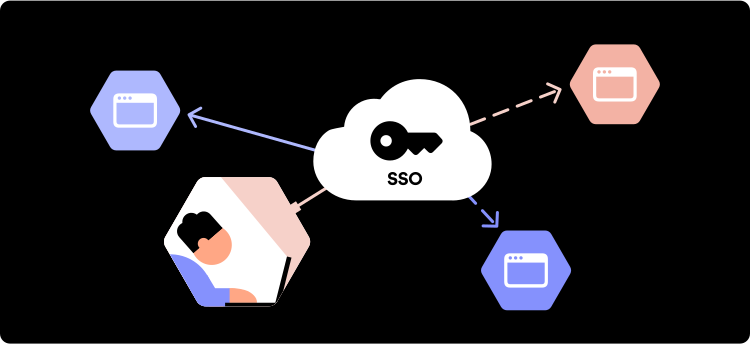
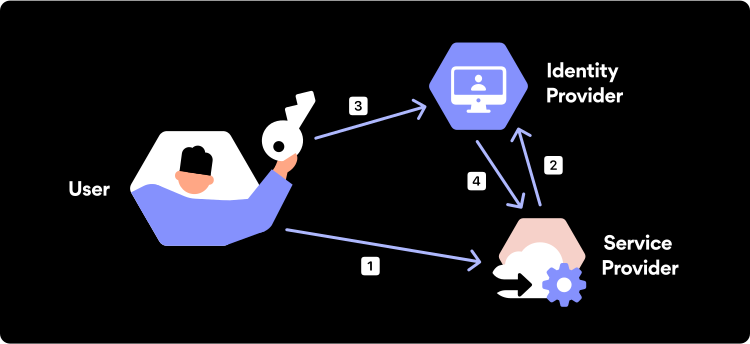
Fancy jargon aside, here are the basic operational processes of single sign-on:

  • You enter a website.

  • You click “Sign In with Apple” or any other service.

  • The site opens Apple’s account login page.

  • If you’re already logged in, then it gives the site your data.

  • You are logged in to your Apple account.

  • Apple’s site verifies that you are authorized to access the site.

  • If you’re authorized, the site creates a session for you and logs you in.

In technical terms, when the user first signs in via an SSO service, the service creates an authentication cookie that remembers that the user is verified. An authentication cookie is a piece of code stored in the user’s browser or the SSO service’s servers. Next time the user logs in to that same app or website using SSO, the service then transfers the user’s authentication cookie to that platform, and the user is allowed to access it. It’s important to highlight that an SSO service doesn’t identify the exact user since it does not store user identities.

What is an SSO Token?

An SSO token is a digital unit that contains data about a particular user such as their email address. The token is used to transfer user information from one system to another during the single sign-on process. For the recipient to verify that the token comes from a trusted source, it has to be signed digitally.

The SSO service creates a token whenever a user signs in to it. The token works like a temporary ID card which helps identify an already verified user. This means that when the user tries to access a given app, the SSO service will need to pass the user’s authentication token to that app so they can be allowed in.

Password security for your business

Store, manage and share passwords.

30-day money-back guarantee

Single-Sign-On Costs

Because many of the SSO solutions currently available on the market are cloud-based, most of them are offered in a monthly subscription model. The price of a cloud-driven SSO solution designed for small and mid-sized businesses can range from $1 to $10 per user per month.

However, those that want to get an SSO solution designed for a big enterprise will need to either pay more each month or make an entry fee. Enterprise-grade solutions are usually more wide-ranging and require vendors to customize them to each of their client’s needs and requirements. Hence, the price difference.

Is single sign-on secure?

Yes. An SSO protocol is secure when implemented and managed properly and used alongside other cybersecurity tools.

The main benefit introduced by single-sign on with regard to cybersecurity is that, because it allows using a single set of credentials for multiple services, there are fewer login details to be lost or stolen. As long as the server is secure and an organization’s access control policies are established, a malicious user or an attacker will have little to no chance to do any damage.

However, this benefit could also pose a certain kind of risk. Since SSO provides instant access to multiple accounts via a single endpoint, if a hacker gains access to an authenticated SSO account, they will also gain access to all the linked applications, websites, platforms, and other online environments.

This issue can be easily mitigated by implementing an additional layer of security known as Multi-Factor Authentication. Combining SSO with MFA allows service providers to verify users’ identity while giving them easy access to applications or online platforms.

The benefits of SSO

Reduced password fatigue

With SSO in place, users only have to remember one password, making life a lot easier. Password fatigue is real and dangerous. SSO encourages users to come up with a single strong password rather than using a simple one for each account separately. It also helps users escape the vicious cycle of password reset loops.

Increased employee and IT productivity

When deployed in a business setting, SSO can be a real time saver. According to a recent report, people waste 16.3 billion hours a year trying to remember, type, or reset passwords. In a business environment, every minute counts. Thanks to SSO, users don’t need to hop between multiple login URLs or reset passwords and can focus on the tasks at hand.

Enhanced user experience

One of the most valuable benefits of SSO is an improved user experience. Because repeated logins are not required, users can enjoy a digital experience with less hassle. This means that users will be less hesitant to use the service. For any commercial web-based service, SSO is an essential part of their user experience.

Centralized control of user access

SSO offers organizations centralized control over who has access to their systems. In a business setting, you can use SSO to grant new employees specific levels of access to different systems. You can also provide employees with a single set of credentials (username and passwords) to access all company systems.

Top single sign-on solutions

Microsoft Azure AD

Microsoft Azure AD includes Active Directory Federation Services (AD FS) as an option to support SSO. Azure AD also offers reporting, security analytics, and multi-factor authentication services. It’s perfectly suited for any company that uses the Microsoft Azure cloud platform, no matter its size.

Okta Identity Cloud

Okta is well-established in the world of SSO solutions. They are open-source SSO leaders because of their flexibility and ease of use. Okta offers customizable open identity management in real time according to business needs, as well as two-factor authentication and a password reset functionality. Okta can serve the needs of multiple industries, from education and nonprofits to financial services and the government.

OneLogin Unified Access Management Platform

OneLogin is an open-source SSO provider that is often used for employee access to the company’s cloud-based applications. OneLogin is suited for a variety of IT administrator needs since it is designed to enforce IT policy in real time. It can also be updated according to specific needs if any changes occur, such as an employee leaving.

Idaptive Application Services

Idaptive is primarily suited for small to medium-sized businesses. Idaptive is capable of providing support to many users at once, thanks to their new cloud architecture. The company also offers adaptive MFA, enterprise mobility management (EMM), and user behavior analytics (UBA) all in a single solution.

Ping Intelligent Identity Platform

Ping offers services to large enterprises. The solution can serve anywhere between a few hundred to a few million users. Ping provides both on-premises and cloud options for deploying their solution. Additionally, the service comes with multi-factor authentication.

Does NordPass provide SSO?

Yes, NordPass does provide a single sign-on authentication! It can be set up via NordPass Admin Panel for users who want to log in to the NordPass app with their Microsoft Azure, Google Workspace, or Okta credentials.

This means that if you turn on Microsoft Azure Active Directory (AD), Google Single Sign-On, or Okta Single Sign-On, and invite new members who use one of these SSOs, they will be allowed to login in using their Azure AD, Google, or Okta SSO credentials — it’s as simple as that.

About Version 2 Digital

Version 2 Digital is one of the most dynamic IT companies in Asia. The company distributes a wide range of IT products across various areas including cyber security, cloud, data protection, end points, infrastructures, system monitoring, storage, networking, business productivity and communication products.

Through an extensive network of channels, point of sales, resellers, and partnership companies, Version 2 offers quality products and services which are highly acclaimed in the market. Its customers cover a wide spectrum which include Global 1000 enterprises, regional listed companies, different vertical industries, public utilities, Government, a vast number of successful SMEs, and consumers in various Asian cities.

About NordPass
NordPass is developed by Nord Security, a company leading the global market of cybersecurity products.

The web has become a chaotic space where safety and trust have been compromised by cybercrime and data protection issues. Therefore, our team has a global mission to shape a more trusted and peaceful online future for people everywhere.

Storage Beyond Passwords: Securely Save Files in NordPass

Ever been in that awful situation where you’re going through old emails or disorganized folders trying to find that one crucial document? The insurance form, an e-copy of your ID, or even a video detailing how to get into your new office? Wouldn’t it be a game-changer if you had all your important files right next to your passwords, credit card information, or secure notes?

Good news! Today, we are excited to introduce File Attachments — a new and improved way to manage important files with NordPass.

Best for large file attachments

Here’s a quick rundown of how it works. As a NordPass Premium user, you now have the ability to attach files to your saved items in NordPass. It’s not just about enhancing organization. This feature also provides an unmatched level of security. Forget the hassle of disorganized unsafe file storage. Any attached files or documents will be as secure as your passwords thanks to our encrypted storage.

But we didn’t stop at mere functionality. NordPass Premium now provides a whopping 3GB of encrypted storage per account, a giant leap forward. That’s not just more — it’s three times more than any other password manager out there! We’re offering you unrivaled storage and advanced security — and that’s certainly what we call more bang for your buck!

NordPass — The best password manager for large file attachments.

– Attila Tomaschek

CNET

No strings attached (except your files)

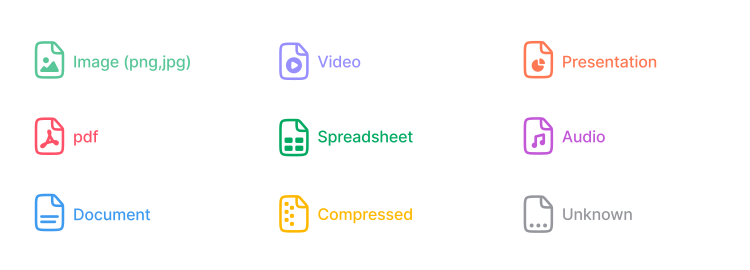
With NordPass Premium’s File Attachments, you have the freedom to store documents of any type to one of your existing items. Whether it’s a simple JPEG, PDF, MP4, or DOC file — NordPass supports them all.

Supported file types

The new feature allows for files up to 50MB in size and up to 50 attachments per single item. The only limit is your 3GB storage per user — and that’s a whole lot of space for your files.

While we aim at maximizing convenience, your security is always our top priority. To ensure maximum protection, we currently do not support attaching files to shared items or sharing items with files attached.

You can learn more about how to attach files to your NordPass items in our handy help center article.

Streamline your digital life with NordPass

In the digital age, we often juggle tons of files, documents, and data, and that can lead to a disorganized and chaotic personal digital space. With our new File Attachments feature, we look to help you take back control and streamline your digital life by allowing you to save documents in a quick and efficient way

With NordPass Premium, you can now attach important files to all your saved items. Store any file in one secure place with 3GB encrypted storage.

Instant access

When you’re in a hurry, having quick access to your important documents can make all the difference. That’s where File Attachments shine. Need to view a copy of your ID or an important receipt? No problem! With File Attachments, all your vital images or documents are just a few clicks away.

Effortless downloads

It’s not just about attaching and storing your files along with your passwords. It’s also about being able to retrieve them whenever necessary. Suppose you’ve stored financial documents that you need to share with your spouse. With File Attachments, you can quickly and effortlessly download these files directly from NordPass.

Unprecedented control

The File Attachments feature isn’t just about adding another functionality to NordPass. It’s about giving you greater control over your digital life. You get to decide what files to attach, what items those files are attached to, and when to download or delete them. You can also organize your vault in a way that best suits your personal or professional needs.

A single secure place for files and passwords

Take your password manager experience to the next level with NordPass Premium. Don’t just manage your passwords, manage your life. No more scrambling for documents, no more disorganized files, and certainly no more compromised security.

Your life. Your files. One secure place. Start your NordPass Premium journey today and make the most of our File Attachments feature.

About Version 2 Digital

Version 2 Digital is one of the most dynamic IT companies in Asia. The company distributes a wide range of IT products across various areas including cyber security, cloud, data protection, end points, infrastructures, system monitoring, storage, networking, business productivity and communication products.

Through an extensive network of channels, point of sales, resellers, and partnership companies, Version 2 offers quality products and services which are highly acclaimed in the market. Its customers cover a wide spectrum which include Global 1000 enterprises, regional listed companies, different vertical industries, public utilities, Government, a vast number of successful SMEs, and consumers in various Asian cities.

About NordPass
NordPass is developed by Nord Security, a company leading the global market of cybersecurity products.

The web has become a chaotic space where safety and trust have been compromised by cybercrime and data protection issues. Therefore, our team has a global mission to shape a more trusted and peaceful online future for people everywhere.

×

Hello!

Click one of our contacts below to chat on WhatsApp

×