Lexmark assigned a CVSS score of 9.0 (“critical” severity rating) to this vulnerability (tracked as CVE-2023-23560), which allows server-side request forgery (SSRF) via the Web Services feature listening on port 65002 of affected printers. A successful attacker can exploit this vuln in a chain to gain code execution as root on vulnerable devices. Lexmark’s advisory states that, as of last week, they are not aware of anyone currently exploiting this vulnerability, but proof-of-concept exploit code is publicly available.
Are updates available?
All firmware versions (release numbers 081.233 and prior) for affected printer models contain this vulnerability (CVE-2023-23560). Lexmark has made firmware updates available for each affected device, via release numbers 081.234 and later (see Lexmark’s advisory for specific release version details per affected printer).
If updating firmware isn’t a near-term option for admins/owners of affected printers, Lexmark does offer a straightforward mitigation:
Disabling the Web-Services service on the printer (TCP port 65002) blocks the ability to exploit this vulnerability. The port can be blocked by following process: “Settings”->“Network/Ports”- > “TCP/IP”- > “TCP/IP Port Access” then uncheck “TCP 65002 (WSD Print Service )” and save.
How do I find potentially vulnerable Lexmark printer assets with runZero?
Please note that the following query relies on you having already performed a scan with our latest Explorer/scanner release (v3.4.22), which now includes the scanning of port 65002. Alternatively, you can perform a new scan using an older Explorer/scanner, just add port 65002 to the Included TCP ports list under the Advanced tab of your task settings prior to running the scan.
From the Asset Inventory, use the following pre-built query to locate Lexmark printer assets which may need remediation:
type:printer AND vendor:Lexmark AND tcp_port:65002
As always, any prebuilt queries are available from our Queries Library. Check out the library for other useful inventory queries.
About Version 2 Digital
Version 2 Digital is one of the most dynamic IT companies in Asia. The company distributes a wide range of IT products across various areas including cyber security, cloud, data protection, end points, infrastructures, system monitoring, storage, networking, business productivity and communication products.
Through an extensive network of channels, point of sales, resellers, and partnership companies, Version 2 offers quality products and services which are highly acclaimed in the market. Its customers cover a wide spectrum which include Global 1000 enterprises, regional listed companies, different vertical industries, public utilities, Government, a vast number of successful SMEs, and consumers in various Asian cities.
About runZero runZero, a network discovery and asset inventory solution, was founded in 2018 by HD Moore, the creator of Metasploit. HD envisioned a modern active discovery solution that could find and identify everything on a network–without credentials. As a security researcher and penetration tester, he often employed benign ways to get information leaks and piece them together to build device profiles. Eventually, this work led him to leverage applied research and the discovery techniques developed for security and penetration testing to create runZero.
Lexmark assigned a CVSS score of 9.0 (“critical” severity rating) to this vulnerability (tracked as CVE-2023-23560), which allows server-side request forgery (SSRF) via the Web Services feature listening on port 65002 of affected printers. A successful attacker can exploit this vuln in a chain to gain code execution as root on vulnerable devices. Lexmark’s advisory states that, as of last week, they are not aware of anyone currently exploiting this vulnerability, but proof-of-concept exploit code is publicly available.
Are updates available?
All firmware versions (release numbers 081.233 and prior) for affected printer models contain this vulnerability (CVE-2023-23560). Lexmark has made firmware updates available for each affected device, via release numbers 081.234 and later (see Lexmark’s advisory for specific release version details per affected printer).
If updating firmware isn’t a near-term option for admins/owners of affected printers, Lexmark does offer a straightforward mitigation:
Disabling the Web-Services service on the printer (TCP port 65002) blocks the ability to exploit this vulnerability. The port can be blocked by following process: “Settings”->“Network/Ports”- > “TCP/IP”- > “TCP/IP Port Access” then uncheck “TCP 65002 (WSD Print Service )” and save.
How do I find potentially vulnerable Lexmark printer assets with runZero?
Please note that the following query relies on you having already performed a scan with our latest Explorer/scanner release (v3.4.22), which now includes the scanning of port 65002. Alternatively, you can perform a new scan using an older Explorer/scanner, just add port 65002 to the Included TCP ports list under the Advanced tab of your task settings prior to running the scan.
From the Asset Inventory, use the following pre-built query to locate Lexmark printer assets which may need remediation:
type:printer AND vendor:Lexmark AND tcp_port:65002
As always, any prebuilt queries are available from our Queries Library. Check out the library for other useful inventory queries.
Partnership Will Drive Increased Adoption of Portnox’s Cutting-Edge NAC Solution Purpose-Built for Large Distributed Organizations in the Region
LONDON — Portnox, which supplies network access control (NAC), visibility and device risk management to organizations of all sizes, today announced that it has partnered with Distology for the sole distribution and resell of its cloud-delivered NAC-as-a-Service solution in the United Kingdom and Ireland.
We chose to partner with Distology because of their successful history of IT security solution distribution in the UK and Irish markets, said Portnox CEO, Ofer Amitai. Were confident this collaboration will yield tremendous growth for both parties, as Portnox has a unique value proposition and Distology has the market enablement expertise to effectively evangelize our network security offering.
We have a long-established relationship with Portnox and it speaks volumes that the team have decided to choose Distology as their sole UK&I distributor. The technology Portnox brings to the market is incredibly exciting and complements our existing vendor stack effortlessly, said Stephen Rowlands, Head of Sales for Distology. Were especially looking forward to representing and promoting Portnox Clear to our growing partner base, as this brand-new cloud-based technology has potential to completely disrupt the market and we foresee masses of growth potential in this innovative product.
Portnox introduced its cloud-delivered NAC-as-a-Service solution to the UK & Irish markets less than two years go. As the first to bring NAC to the cloud, Portnox has quickly gained a foothold in the region, particularly among large distributed enterprises in the retail, construction and utilities industries.
The adoption of our NAC-as-a-Service product in the UK has been very strong to date, said VP of Products, Tomer Shemer. This is a testament to the fact that the UK is one of the markets leading the trend of cloud security adoption. We expect to see continued growth in the coming years in this area of Europe.
Portnox is set to exhibit at this week’s RSA 2020 Conference (booth #4234) in San Francisco, February 24-28. Additionally, Portnox (booth #G108) and Distology (booth #C40) will both be exhibiting at InfoSec Europe 2020, Europes largest event for information and cyber security, in London, June 2-4.
About Version 2 Digital
Version 2 Digital is one of the most dynamic IT companies in Asia. The company distributes a wide range of IT products across various areas including cyber security, cloud, data protection, end points, infrastructures, system monitoring, storage, networking, business productivity and communication products.
Through an extensive network of channels, point of sales, resellers, and partnership companies, Version 2 offers quality products and services which are highly acclaimed in the market. Its customers cover a wide spectrum which include Global 1000 enterprises, regional listed companies, different vertical industries, public utilities, Government, a vast number of successful SMEs, and consumers in various Asian cities.
About Portnox Portnox provides simple-to-deploy, operate and maintain network access control, security and visibility solutions. Portnox software can be deployed on-premises, as a cloud-delivered service, or in hybrid mode. It is agentless and vendor-agnostic, allowing organizations to maximize their existing network and cybersecurity investments. Hundreds of enterprises around the world rely on Portnox for network visibility, cybersecurity policy enforcement and regulatory compliance. The company has been recognized for its innovations by Info Security Products Guide, Cyber Security Excellence Awards, IoT Innovator Awards, Computing Security Awards, Best of Interop ITX and Cyber Defense Magazine. Portnox has offices in the U.S., Europe and Asia. For information visit http://www.portnox.com, and follow us on Twitter and LinkedIn.。
About Distology Distology is a Market Enabler and offers true value for the distribution of disruptive IT Security solutions. The vendors we work with represent innovative and exciting technology that continues to excite and inspire their reseller network. Our ethos is based on trust, relationships, energy and drive and offers end to end support in the full sales cycle providing vendor quality technical and commercial resource.
Happy New Year, NordPassers. We’re starting the year with a few important updates. Here’s what to expect in this release:
B2B TOTP. It might sound like random letters pieced together, but this means that NordPass Business users can now use TOTP functionality on Android devices. How exciting is that?
AUTOFILL ISSUE REPORTING BETA. Is autofill not working as expected on your favorite browser? You can now tell us what’s wrong. Look for the Feedback (Beta) when filling in passwords.
NordPass 3.50
This time we worked on nitty gritty details to make your password management experience even smoother. Here’s what to expect with this release:
MORE BROWSERS WITH BETTER AUTOFILL. We added native autofill support to Tor, Via, Phoenix, Maxthon; meaning that if you use any of these browsers it will now be easier for NordPass to recognize input fields and fill your passwords.
MINOR DESIGN CHANGES TO AUTOFILL SETTINGS.
BUG FIXES.
NordPass 3.49
We’re happy to present you with a new release. Here’s what we’ve got this time:
UI IMPROVEMENTS. New users will see an updated onboarding design, while the veterans will notice slight changes to the new password history feature.
BUG FIXES.
NordPass 3.48
No big announcements from us this time. However, we hope you’ll still enjoy an updated NordPass version with fewer bugs.
NordPass 3.47
We’re happy to present you with a new release. Here’s what we’ve got this time:
RATE NORDPASS IN-APP. Are you enjoying NordPass so far? Look for a pop-up to rate NordPass and help others choose their password manager.
AUTOFILL IN VIVALDI BROWSER. You will now fill your passwords and other information easier when using the Vivaldi browser.
IMPROVED AUTOFILL FOR OTHER LANGUAGES. If your browser is set to your local language, autofill will now pick it up quicker and help you save your passwords.
NordPass 3.46
No major updates this time, just a new and improved app release with fewer bugs for you to bump into – enjoy!
NordPass 3.45
Building good things takes time. So since the last release, we have focused on catching and eliminating pesky bugs.
NordPass 3.44
It’s a big day today. Premium users, get ready. From now on, you’ll be able to monitor breaches.
Your Breach Scanner can now scan breaches while you sleep. Set up an email you’d like us to monitor and will check breaches for you. If we find your email, we’ll notify you so you can take immediate action and protect your data. Look for this new functionality by going to the Breach Scanner.
P.S. We also fixed some bugs to improve your overall experience.
NordPass 3.43
No big announcements from us this time. However, we hope you’ll still enjoy an updated NordPass version with fewer bugs.
NordPass 3.42
This time we’ve waved bye-bye to some pesky bugs and have also spruced up the place a touch – enjoy!
NordPass 3.41
We’re happy to present you with a new release. Here’s what we’ve got this time:
PROFILE PHOTO. You can now add your favorite photo instead as your profile icon. With a customized profile icon, it’s easier to recognize your profile when sharing items or switching accounts.
NATIVE AUTOFILL ON BRAVE. This means your autofill and autosave experience has just leveled up. It will now be easier for us to recognize password fields and fill in your information.
BUG FIXES.
NordPass 3.40
Building good things takes time. So since the last release, we focused on catching and eliminating pesky bugs.
NordPass 3.39
No big announcements from us this time. However, we hope you’ll still enjoy an updated NordPass version with fewer bugs.
NordPass 3.38
This time we’ve waved bye-bye to some pesky bugs and have also spruced up the place a touch – enjoy!
NordPass 3.37
Building good things takes time. So since the last release, we have mainly focused on catching and eliminating pesky bugs.
NordPass 3.36
A new week and a new NordPass release. Here’s what we’ve got:
NEW SETTING: CLEAR COPY ITEM DATA. When you copy your password or other item data, it’s typically saved in the clipboard. To avoid pasting it somewhere you didn’t intend; you can now choose the clipboard to clear after a set time.
LITHUANIAN LANGUAGE. For our Lithuanian friends out there, you can now use NordPass in your mother tongue. Simply head to Settings to change the language.
BUG FIXES.
NordPass 3.35
We’re happy to present you with a new release. Here’s what we’ve got:
SWITCH ACCOUNT. A long-awaited feature is here! If you have a few NordPass accounts, like personal and business, switching between them will now be a breeze. Just click on your profile account and look for a “Switch Account” button.
CARD PIN. From now on, you can also add your PIN when saving your card details. Don’t worry; it won’t be autofilled. It’s for your reference only.
BUG FIXES.
NordPass 3.34
Happy pancake day, people! Though if it were up to NordPass, every day would be a pancake day. In the meantime, while you are enjoying your pancakes, donuts, or pastries, we are presenting you with a new NordPass release with fewer bugs.
NordPass 3.33
Our bug busters have been working hard since the last time you heard from us. That’s why today we can proudly present another NordPass release with even fewer bugs. We hope you’ll like it.
NordPass 3.32
Did you know that January has one of the most depressing days? It’s called Blue Monday, they say. Good that it’s over. But if you are still feeling a little bit blue, here’s what you can do to survive this winter:
Enjoy the outdoors, go for a walk or take up a new sport;
Connect with a long-lost friend or family member;
Run the Data Breach Scanner and update your vulnerable passwords. Once you do, select “Resolved” for the updated passwords and they won’t appear next time you run the scan.
NordPass 3.31
Like last year, in 2022, we’ll strive to become a better, smoother-running, and more user-friendly app. So why not start with this week? We present you with a new NordPass version with fewer bugs and Autofill issues.
NordPass 3.30
We hope you are not sick and tired of Christmas songs, even if you’ve heard them a million times before. And we hope that you are not stressed buying last-minute presents or thinking about a Christmas menu. But if you’re, it will all be ok.
After all, ‘It’s the most beautiful time of the year.’ Merry Christmas!
P.S. And here’s a new NordPass release to bring you a little cheer.
NordPass 3.29
Did you know that if your password is ‘ginger,’ it would take a hacker less than 1s to guess it? If you use NordPass, we know you can do better than that. Create strong and unique passwords with your NordPass mobile app, and don’t let any Grinch steal your Christmas (or your accounts) this year.
NordPass 3.28
It’s 5 weeks until Christmas! Yes, it’s time to buy presents for your loved ones. But do you sometimes slip and buy gifts for yourself instead? Because we do. Don’t tell this to anyone.
So if you slip this year, don’t worry too much about it. You can save up to 75% of NordPass Premium plans and give the so-needed peace of mind for you and your family guilt-free.
We’re making the NordPass app for Android better, smoother, slicker – one release at a time. How exactly? Read all the highlights in our release notes and make sure to never miss a new version – we want you to get all the best stuff.
NordPass 3.27
–Beep beep– app update incoming:
Native autofill on Chrome. Simply put, Nordpass is now better at recognizing login fields. It means smoother and faster autofill!
Data Breach Scanner update. If you use a leaked password for several accounts, the app will notify you about accounts put at risk. Remember to update them!
Title suggestions. Running out of ideas for naming items in your vault? No worries – NordPass will suggest using the website name for the title.
Usual bug-fixing business.
NordPass 3.26
Trick or treat? Who are we kidding? It’s always just treated here at NordPass. So here’s our Halloween treat to you – a brand new NordPass release. Don’t worry, nothing to be scared of—just a smoother running version of your password manager.
NordPass 3.25
Getting your data stolen isn’t nice. But if that happens to you, it’s important to identify the stolen information and act quickly. That’s why from this release, you can use the Breach Scanner to find out the type of data that was leaked and see it in plain text.
We also wanted to improve our communication with you. So from now, if you open the app and see a red dot next to a bell icon, just know that it’s some important information from us to you.
NordPass 3.24
Seasons change. Leaves turn yellow and brown. It might be sad, but don’t feel too down. Just remember, your passwords are safe and sound.
And if you don’t like amateur rhymes, that’s fine. With this release, you’ll have less bugs in your life.
NordPass 3.22
Good things are meant to be shared, right? That’s why now, when you invite a friend to try NordPass, we’ll award both of you with a free month of Premium (max 3 months). You can invite as many friends as you wish. Just head to the app, select “Invite a friend,” and send the invite.
NordPass 3.21
What do you have in the box this time NordPass? Well, let me see…
Email or username suggestion. That’s right, now when creating a new item, you only need to enter a few letters in the username field, and NordPass will suggest filling it with one of your already used ones.
Autofill fixes.
Bug fixes, bug fixes, and more bug fixes.
NordPass 3.20
It’s the end of the summer, eh? You must be sad. Or happy? Maybe because you’ve just got NordPass at the end of summer sale. Or perhaps you live down under, and it’s actually not the end of the summer but the end of winter. Either way, we hope you’ll enjoy a new NordPass version with fewer bugs and more love.
NordPass 3.19
Random fact of the day: Did you know that there’s a bunch of ladies working at NordPass? Yes, we don’t follow any stereotypes here. So in this release, we want to thank all the women who tirelessly and continuously work to make NordPass a better password manager.
NordPass 3.18
Hola! Last week we presented you NordPass in Italian. Can you guess what we have in store this week? Yes, that’s right. NordPass is now available in Spanish! Head to Settings to update your language preferences.
And, of course, we continue to work on any pesky bugs you or we identify. Bye, bugs!
NordPass 3.17
Buongiorno! What a year this was for Italy. First the Eurovision, then Euro Cup, and now, coincidence or not, NordPass. Yes, you are right, you can now use NordPass in Italian, and it doesn’t matter if you are enjoying the sun in Rome or simply practicing your Italian skills. You can change your language preference in Settings.
And of course, what release is without bug fixes? We crushed them too.
NordPass 3.16
Hey NordPass user, do you like scrolling? Not when I’m looking for a password, you will say. Yeah, we thought so. That’s why we introduced a quick scroller. Now when scrolling through your items, you’ll see that they are grouped. Go on, find your passwords with ease.
P.S We have also resolved those pesky bugs. Bye-bye, bugs.
NordPass 3.15
Searching for bugs… Loading… Loading… Bugs found… BUGS FIXED!
*Works only if you install the update first to put those BUG FIXES in place. Stay safe and happy!
NordPass 3.14
Sharing is caring, right? Well, now you can select multiple items and share them all at once. Easy peasy. Just always make sure you trust the people you share your credentials with.
NordPass 3.13
You know that moment when you create a super-strong password with NordPass Generator and forget to save it? Yeah, we’ve been there too. That’s why you’ll now see a little clock icon in your Generator. Tap on it to see previously generated passwords.
And, of course, we won’t release a new NordPass version without getting rid of as many bugs as possible.
NordPass 3.12
You want strong and unique passwords, simple – you generate them with the Password Generator. But what if you want a strong password you need to remember? Yes, we thought about this too.
So in this release, you’ll see some changes to your Password Generator. Now you can generate passwords made out of words, spaces, hyphens, and much more. How cool is that?
NordPass 3.11
We’re coming back with a bunch of updates to help you make your accounts even more secure.
PASSWORD HEALTH INTEGRATION. You can now see how healthy your password is by opening the item — no need to go to Password Health. If your password could be stronger, you’ll see “weak, old, or reused” next to it.
P.S. There’s more. We’ve fixed a ton of autofill bugs for a smoother login experience.
NordPass 3.10
Are your passwords healthy or vulnerable? If you haven’t checked it yet, now is a good time. We’ve just revamped the Password Health tool, and it’s looking better than ever. It’s so much easier to use too. Check it out.
Anything else? Of course! Our team is continuously working on improving the Autofill feature so that you’d have a smooth one-click-to-login experience.
NordPass 3.9
If you haven’t tried the Breach Scanner yet, now you have a reason. We completely revamped the design. Oh boy, it looks even more pleasing to the eye.
What are you waiting for? Go and make sure your accounts are secure.
NordPass 3.8
Bonjour. Comment ça va? Yes, our French-speaking friends, this release is for you! NordPass is now available in French. Head to Settings and change the language.
In other news:
LIMITED RIGHTS CHANGES. From now on, once you receive an item with Limited Rights, it’s for you only. No further shares allowed.
B2B GROUPS. NordPass Business users say hello to Groups. Now it will be easier to share passwords with a group of people all at once. Think, your Marketing or Finance department.
NordPass 3.7
Sometimes what we do is either too difficult to explain or too difficult to see. Yes, you guessed it. This week we put all our effort into finding and getting rid of bugs. We hope we’ll have something more exciting for you next week.
NordPass 3.6
Sprichst du Deutsch? Then we have good news for you. You can now enjoy NordPass in German. Just go to your settings and change the language.
But that’s not it. We have some exciting news for anyone who speaks french too. Stay tuned. 😉
NordPass 3.5
This release theme? Fixes, fixes, and more fixes. Quality over quantity. So what did we actually do?
Found and got rid of your beloved dark theme bugs.
Improved Autofill by killing nasty bugs.
Other teeny-tiny bug fixes.
NordPass 3.4
No breaking news this time. We know. We’ll do better! Just business as usual and a ton of bug fixes for a smoother app experience.
NordPass 3.3
Guten Tag, – says NordPass. Yes, that’s correct. If your phone’s default language is German, you can now enjoy NordPass in your preferred language. Anything else? Of course! More bug fixes.
NordPass 3.2
Well, hello there. It’s NordPass calling with a shiny brand new release. Here’s what we’ve got:
CHANGES IN 2FA SETUP. Now two-factor authentication will be set up for your Nord Account and applied to all Nord products you might use.
AUTOFILL AND AUTOSAVE ISSUES FIXED, so you could continue saving and filling passwords quicker than you can blink.
DARK MODE BUGS FIXED. Minor bugs were found since we released the dark mode. Nothing to worry about; they are now gone.
NordPass 3.1
Still recovering from the last release? If you haven’t heard (or seen it yet), you can now enjoy NordPass dark mode!
Unfortunately, we are not superheroes, so we can’t drop any big news today. Plus, it wouldn’t be fun this way. So this time, we worked on some maintenance tasks to keep your app running smoothly:
COPY CHANGES to help you navigate through the app.
AUTOSAVE ISSUES FIXED to help you save those passwords in a click.
BUG FIXES. Because no release is complete without them, right?
NordPass 3.0
Where’s the drumroll, please? You ready? You’d better sit down for this one. I’m serious; sit down. OK, you’re finally sitting.
I’m just scared you’ll fall and hurt yourself once you hear this, that’s all. Oh, I know. It’s so annoying when someone is creating tension but not telling you what this is all about, right?
Ready, set, new release! What can you expect to see in the new and shiny NordPass 2.17?
AUTOFILL FIXES. Slowly but surely, we are conquering the net and one website at a time, making signing in easier than ever. Magic x2!
ADD CREDIT CARD WITH NFC. Yes, you heard it. You can now scan your credit cards and keep them in NordPass by simply touching your card against your phone. Magic!
NordPass 2.16
8 letters, 2 words, one meaning.
9 letters, 3 words, one feeling.
We felt kind of nervous to say it out loud… But again, they say – don’t talk, just act. So we’re bringing you yet another collection of chocolate-flavoured, hand-picked BUG FIXES to express how much WE LOVE YOU. Please update to enjoy even smoother app experience.
NordPass 2.15
Once upon a time, a password manager named NordPass lived. They wanted to become the best password manager there ever was, and did it one release at a time.
AUTOFILL ISSUES FIXED. Salvador Dali said not to fear perfection as we’ll never reach it, but we’ll still give it a good go.
QUICK ACTIONS ADDED. Just click on the app and quickly access Password Generator, search your items, or add a new password.
TOOLS AND MENU REWORK. Now you can enjoy a much cleaner and Menu, Settings, and Tools tab.
NordPass 2.14
AbraCadabra boom! No, it’s not magic. It’s just your passwords and credit cards information filling in quicker and smoother than ever before. Bye-bye, annoying bugs who tried to stop you.
What else can you expect in this release? Some copy changes to make the app easier to navigate, and we are super excited to share with you some news – Dark theme is coming soon.
NordPass 2.13
New Year, new NordPass release. Here’s what you’ll see in the latest version:
AUTOFILL IMPROVEMENTS. The sky’s the limit for this one.
BETTER LOOKING ITEMS. Items with no accounts have just become more stylish, or in other words, more colorful.
AUTOSAVE IMPROVEMENTS, so you could save your passwords in a blink of an eye.
EASY-TO-UNDERSTAND PASSWORD FORMATTING. We hear you; telling apart 0 from O when creating passwords isn’t easy, but it will be from now on.
NordPass 2.12
Yeah, Christmas will be different this year. But we’ve still got something to spread a little cheer.
In this release, you will see:
ITEM ACTION FIXES, which we noticed when scrolling through an item’s action list.
COPY CHANGES to make your app easier to navigate.
AUTOFILL FIXES, so you could smoothly log in to even more websites and apps.
MULTISELECT AND SORTING. You can now select multiple items and move them to a specified folder or Trash and sort them by Title or Date Last Used.
NordPass 2.11
NordPass has turned 1 year old, can you believe it? We can honestly say that this year, we are the most grateful for YOU, our dear NordPass user. You, who believed in us and drove us to release one update after another.
So here’s one more. Full of even more design edits, bug fixes, and love:
MINOR DESIGN AND COPY CHANGES because who doesn’t like a good-looking app. AUTOFILL BUG FIXES, so you could log in to your favorite websites and apps quicker than you can count to three.
NordPass 2.10
ADD/EDIT ITEM FIXES. Next time you add a new item, or edit an existing one, pay attention to the new design. Sleek, isn’t it?
IN-APP SHARED ITEM NOTIFICATION. Someone shared an item with you? You’ll get a notification in your app instantaneously. Forget emails.
BUG FIXES. No bugs allowed in our app.
NordPass 2.9
NORDPASS BUSINESS AVAILABLE ON ANDROID. Business people beware, it’s your time to shine. Fill in passwords on mobile browsers and apps (like a boss!), sign in to your accounts with a fingerprint (like a boss!), and never ever have those dreadful phone calls with Brian from IT because you forgot your computer password after a long long holiday (Ouch!).
NordPass 2.8
SECURE NOTES FORMATING – FIXED. It looks like we’ve accidentally deleted text formating options on a previous app update. Sorry about that! Formating is back and now ready for your bold, italic or quoted notes more than ever before.
DESIGN IMPROVEMENTS. A little treat for eagle-eye users – please welcome those charming menu icons and precise text formatting.
AUTOFILL IMPROVEMENTS. No app update was or will be released without this one.
BREACH REPORT. Now this one may feel like a fun lottery, except the fact that it’s probably better not to ‘win’ anything. By clicking a ‘Scan’ button, you can find out if any of your accounts were ever caught in data breaches. Fingers crossed, they’re not.
AUTOFILL IMPROVEMENTS. Even more websites are ready to autofill your passwords.
DESIGN IMPROVEMENTS only eagle eyes will spot. We all know who lies in the details, right?
NordPass 2.6
PASSWORD HEALTH CHECKER. If you hear someone coughing and no one is at home – that might be a password in your vault. Take a chance to use this new fancy tool for making your precious passwords stronger and happier (and accounts safer) without leaving the house.
AUTOFILL IMPROVEMENTS. You probably might start thinking that we are making up this one each time, just to add something to the release notes. The truth is that with each update, we are getting closer to perfection.
NordPass 2.5
NORDVPN. Nobody likes snoopers – especially online ones. Luckily, VPN helps. Look for getting NordVPN in Menu – surf the Internet privately, no matter where your path may lead you.
AUTOFILL IMPROVEMENTS. Every time you tap NordPass icon to autofill, there’s an actual person who copies and pastes your login details. Wait, do they see your passwords?! No, of course not – they are trained to work wearing blindfolds. We hired more people to this department, so “auto”fill is now way better.
NordPass 2.4
They say – small changes make a big difference. Behold – the update with a bunch of app upgrades is here. Let’s see what we’ve got here:
VISUAL IMPROVEMENTS. Mirror mirror on the wall, who is prettiest of them all? Well, our designer’s brush made some magic tweaks, so the answer is clear now – it’s those tiny cute little app icons. Lookin’ good!
APP LOADING FASTER. Need for speed? You’re welcome! Fasten your seatbelt and put the pedal to the metal – the project “Make the app faster” was completed successfully.”
BUG FIXES. Dear sneaky bugs, thanks for visiting, farewell, let’s never meet again.”
NordPass 2.3
AUTOSAVE. We’ve invited web browsers and mobile apps to the summer password-training camp. Result: those who attended will now suggest saving your credentials to the vault. Whenever you type them manually.”
OTHER IMPROVEMENTS. We also did some tinkering under the hood to make your password-managing experience even smoother.”
NordPass 2.2
PERSONAL INFO. Ready to fill online forms even quicker? Keep your name, email, phone number and address in the vault to fill delivery info or other online forms. Faster than ever.
AUTOFILL IMPROVEMENTS. Brought to life by popular demand, the project “Make autofill better” was completed successfully. The result: the app automatically fills your credentials on even more apps and websites.
NordPass 2.1
ADD ITEM TO FOLDERS. Instantly – when creating or editing an item. Just select a folder, and you’re good to go.
VISUAL IMPROVEMENTS. Mirror mirror on the wall, who is the prettiest of them all? FYI, our designer’s brush made some small visual improvements in the vault. Lookin’ good!
AUTOFILL IMPROVEMENTS. You report – we improve. Win-win!
NordPass 2.0
APP DESIGN IMPROVEMENTS. Here you go. A piece of nicely, freshly baked update – straight from the oven. Enjoy these deliciously sweet visual improvements and improved password-managing experience. Bon Appéti
NordPass 1.9
NORD ACCOUNT. Meet new and simplified way to sign up and log into NordPass.
STRONGER MASTER PASSWORDS. Added some guidance for leveling-up your Master Password. For even better vault protection.
UPDATED SHARED ITEM VIEW. An easier way to find out who has access to shared items.
AUTOFILL IMPROVEMENTS. More websites will be pleased to autofill your credit card details. Faster online checkouts FTW.
NordPass 1.8
SWIPE DOWN TO SYNC ITEMS. The best thing since sliced bread – refresh the vault by swiping down to sync your items across devices.
INTERFACE CHANGES. No more going ‘home’ to find the item you need. Browse vault categories to browse items.
You say ‘AUTOFILL’, we say ‘IMPROVEMENTS’. Nothing else to add but even smoother app experience.
ADD LOGIN – AT FLOATING BUTTON. All you need is milk and cookie – for adding new logins. One more addition for native browser lovers!
NordPass 1.7
SETTINGS – SAVED. The app was sometimes forgetful about your settings. It went through some memory training, and things are now much better – no more forgotten preferences.
PASSWORD GENERATOR IMPROVEMENTS. Strong passwords everywhere – generate some while creating new logins.
TEXT FORMATTING. Jazz up your notes – make them bold, make them italic – make them FUN.
AUTOFILL IMPROVEMENTS. Autofill is now multilingual – fill in credentials to even more websites and apps.
Also, fewer app crashes.
NordPass 1.6
This update is oddly satisfying. Meet and greet:
FOLDERS. All that sorting, managing, organizing, arranging, categorizing, and many more synonyms to describe one thing – that pleasure putting your items in order. Or in folders – just as you like it.
COPY SELECTED TEXT. You can now select only a part of the text in your note. Finally! Smoother copying – faster pasting.
TEXT UPDATES. The magic of great copy in the app is invisible – you might not notice it, but it helps to do the job.
NordPass 1.5
Let’s run the password-managing world with this update:
AUTOFILL improvements. More supported browsers, more flawless autofilling and saved time.
PASSWORD GENERATOR. We’ve heard you, and now we proudly announce: password generator is ready at your command. Let’s begin the new ge-ne-ra-tion for stronger passwords.
Our designers and copywriters felt inspired by their muses, so they added some nice brush flicks at the app. Hopefully, we’re getting closer to becoming a piece of art someday.
NordPass 1.4
Are you ready? Here’s what’s new with NordPass:
NATIVE AUTOFILL feels like heaven. Those cosmic odysseys of saving new passwords to the vault are so intuitive, fast, and smooth like never before. Relax and enjoy the journey.
Look, mom, no hands! Meet FACE UNLOCK – an amazing addition to accessing your vault with biometrics. Put that p-p-p-poker face on and unlock NordPass on the go.
Some minor bugs were caught and added to our trophy collection.
NordPass 1.3
Hey you! What’s new with NordPass:
Vault SCREENSHOTS. You may now screenshot not only your crush’s stories on social media but also your vault. Of course, you can also disable them for even better protection of your vault. Handy, right?
ITEM IMPORT from mobile browsers. No fancy words needed – it’s simply an awesome feature itself.
Some minor catches at the bug-hunting department. Bang!
NordPass 1.2
We woke up like this. What’s new with NordPass:
Tap tap tap. All flawless, shiny and new interface for tablet fanboys and cheer girls. Enjoy scrolling your vault miles away on a bigger screen.
Scan scan scan. Texts, books, magazines, credit cards, road signs, billboards – whatever your heart desires. It’s a kind of magic.
Fix fix fix. Minor fixes under the hood – nothing too fancy, just making sure to be the coolest guy on the block.
NordPass 1.1
NordPass has leveled up!
IN:
ITEM SHARING. Sharing is always about caring. From now on you will be able to share your items in the vault via phone. Safe and easy, of course.
IN-APP PURCHASES. Forget password stress without getting off the couch – you can now upgrade to NordPass Premium with a few taps on your screen.
OUT: various small bugs. Goodbye fellows, it was nice to meet you but we doubt we ever miss you.
About Version 2 Digital
Version 2 Digital is one of the most dynamic IT companies in Asia. The company distributes a wide range of IT products across various areas including cyber security, cloud, data protection, end points, infrastructures, system monitoring, storage, networking, business productivity and communication products.
Through an extensive network of channels, point of sales, resellers, and partnership companies, Version 2 offers quality products and services which are highly acclaimed in the market. Its customers cover a wide spectrum which include Global 1000 enterprises, regional listed companies, different vertical industries, public utilities, Government, a vast number of successful SMEs, and consumers in various Asian cities.
These days, cybercrime is rampant. It’s no longer a matter of “if” you’re going to suffer an attack but “when” it will happen. All companies want to be ready for any crisis. And this is where a business continuity plan comes into play.
But what is a business continuity plan exactly? Why is it important? What should one include? Today, we’re exploring all these questions in-depth.
What is a business continuity plan?
A business continuity plan (BCP) is a document that sets guidelines for how an organization will continue its operations in the event of a disruption, whether it’s a fire, flood, other natural disaster or a cybersecurity incident. A BCP aims to help organizations resume operations without significant downtime.
Unfortunately, according to a 2020 Mercer survey, 51% of businesses across the globe don’t have a business continuity plan in place.
What’s the difference between business continuity and disaster recovery plans?
We often confuse the terms business continuity plan and disaster recovery plan. The two overlap and often work together, but the disaster recovery plan focuses on containing, examining, and restoring operations after a cyber incident. On the other hand, BCP is a broader concept that considers the whole organization. A business continuity plan helps organizations stay prepared for dealing with a potential crisis and usually encompasses a disaster recovery plan.
Importance of business continuity planning
The number of news headlines announcing data breaches has numbed us to the fact that cybercrime is very real and frequent and poses an existential risk to companies of all sizes and industries.
Consider that in 2021, approximately 37% of global organizations fell victim to a ransomware attack. Then consider that business interruption and restoration costs account for 50% of cyberattack-related losses. Finally, take into account that most cyberattacks are financially motivated and the global cost of cybercrime topped $6 trillion last year. The picture is quite clear — cybercrime is a lucrative venture for bad actors and potentially disastrous for those on the receiving end.
To thrive in these unpredictable times, organizations go beyond conventional security measures. Many companies develop a business continuity plan parallel to secure infrastructure and consider the plan a critical part of the security ecosystem. The Purpose of a business continuity plan is to significantly reduce the downtime in an emergency and, in turn, reduce the potential reputational damage and — of course — revenue losses.
The initial stage of developing a business continuity plan starts with a statement of the plan’s purpose, which explains the main objective of the plan, such as ensuring the organization’s ability to continue its operations during and after a disruptive event.
The Scope of the Plan outlines the areas or functions that the plan will cover, including business processes, personnel, equipment, and technology.
The Budget specifies the estimated financial resources required to implement and maintain the BCP. It includes costs related to technology, personnel, equipment, training, and other necessary expenses.
The Timeline provides a detailed schedule for developing, implementing, testing, and updating the BCP.
II. Risk Assessment
Identification of Risks
Prioritization of Risks
Mitigation Strategies
The Risk Assessment section of a Business Continuity Plan (BCP) is an essential part of the plan that identifies potential risks that could disrupt an organization’s critical functions.
The Identification of Risks involves identifying potential threats to the organization, such cybersecurity breaches, supply chain disruptions, power outages, and other potential risks. This step is critical to understand the risks and their potential impact on the organization.
Once the risks have been identified, the Prioritization of Risks follows, which helps determine which risks require the most attention and resources.
The final step in the Risk Assessment section is developing Mitigation Strategies to minimize the impact of identified risks. Mitigation strategies may include preventative measures, such as system redundancies, data backups, cybersecurity measures, as well as response and recovery measures, such as emergency protocols and employee training.
III. Emergency Response
Emergency Response Team
Communication Plan
Emergency Procedures
This section of the plan focuses on immediate actions that should be taken to ensure the safety and well-being of employees and minimize the impact of the event on the organization’s operations.
The Emergency Response Team is responsible for managing the response to an emergency or disaster situation. This team should be composed of individuals who are trained in emergency response procedures and can act quickly and decisively during an emergency. The team should also include a designated leader who is responsible for coordinating the emergency response efforts.
The Communication Plan outlines how information will be disseminated during an emergency situation. It includes contact information for employees, stakeholders, and emergency response personnel, as well as protocols for communicating with these individuals.
The Emergency Procedures detail the steps that should be taken during an emergency or disaster situation. The emergency procedures should be developed based on the potential risks identified in the Risk Assessment section and should be tested regularly to ensure that they are effective.
IV. Business Impact Analysis
The Business Impact Analysis (BIA) section of a Business Continuity Plan (BCP) is a critical step in identifying the potential impact of a disruption to an organization’s critical operations.
The Business Impact Analysis is typically conducted by a team of individuals who understand the organization’s critical functions and can assess the potential impact of a disruption to those functions. The team may include representatives from various departments, including finance, operations, IT, and human resources.
V. Recovery and Restoration
Procedures for recovery and restoration of critical processes
Prioritization of recovery efforts
Establishment of recovery time objectives
The Recovery and Restoration section of a Business Continuity Plan (BCP) outlines the procedures for recovering and restoring critical processes and functions following a disruption.
The Procedures for recovery and restoration of critical processes describe the steps required to restore critical processes and functions following a disruption. This may include steps such as relocating to alternate facilities, restoring data and systems, and re-establishing key business relationships.
The Prioritization section of the plan identifies the order in which critical processes will be restored, based on their importance to the organization’s operations and overall mission.
Recovery time objectives (RTOs) define the maximum amount of time that critical processes and functions can be unavailable following a disruption. Establishing RTOs ensures that recovery efforts are focused on restoring critical functions within a specific timeframe.
VI. Plan Activation
Plan Activation Procedures
The Plan Activation section is critical in ensuring that an organization can quickly and effectively activate the plan and respond to a potential emergency.
The Plan Activation Procedures describe the steps required to activate the BCP in response to a disruption. The procedures should be clear and concise, with specific instructions for each step to ensure a prompt and effective response.
VII. Testing and Maintenance
Testing Procedures
Maintenance Procedures
Review and Update Procedures
This section of the plan is critical to ensure that an organization can effectively respond to disruptions and quickly resume its essential functions.
Testing procedures may include scenarios such as natural disasters, cyber-attacks, and other potential risks. The testing procedures should include clear objectives, testing scenarios, roles and responsibilities, and evaluation criteria to assess the effectiveness of the plan.
The Maintenance Procedures detail the steps necessary to keep the BCP up-to-date and relevant.
The Review and Update Procedures describe how the BCP will be reviewed and updated regularly to ensure its continued effectiveness. This may involve conducting a review of the plan on a regular basis or after significant changes to the organization’s operations or threats.
What should a business continuity plan checklist include?
Organizations looking to develop a BCP have more than a few things to think through and consider. Variables such as the size of the organization, its IT infrastructure, personnel, and resources all play a significant role in developing a continuity plan. Remember, each crisis is different, and each organization will have a view on handling it according to all the variables in play. However, all business continuity plans will include a few elements in one way or another.
Clearly defined areas of responsibility
A BCP should define specific roles and responsibilities for cases of emergency. Detail who is responsible for what tasks and clarify what course of action a person in a specific position should take. Clearly defined roles and responsibilities in an emergency event allow you to act quickly and decisively and minimize potential damage.
Crisis communication plan
In an emergency, communication is vital. It is the determining factor when it comes to crisis handling. For communication to be effective, it is critical to establish clear communication pipelines. Furthermore, it is crucial to understand that alternative communication channels should not be overlooked and outlined in a business continuity plan.
Recovery teams
A recovery team is a collective of different professionals who ensure that business operations are restored as soon as possible after the organization confronts a crisis.
Alternative site of operations
Today, when we think of an incident in a business environment, we usually think of something related to cybersecurity. However, as discussed earlier, a BCP covers many possible disasters. In a natural disaster, determine potential alternate sites where the company could continue to operate.
Backup power and data backups
Whether a cyber event or a real-life physical event, ensuring that you have access to power is crucial if you wish to continue operations. In a BCP, you can often come across lists of alternative power sources such as generators, where such tools are located, and who should oversee them. The same applies to data. Regularly scheduled data backups can significantly reduce potential losses incurred by a crisis event.
Recovery guidelines
If a crisis is significant, a comprehensive business continuity plan usually includes detailed guidelines on how the recovery process will be carried out.
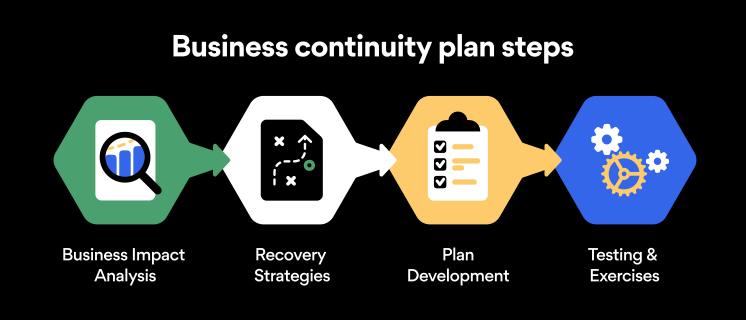
Business continuity planning steps
Here are some general guidelines that an organization looking to develop a BCP should consider:
Analysis
A business continuity plan should include an in-depth analysis of everything that could negatively affect the overall organizational infrastructure and operations. Assessing different levels of risk should also be a part of the analysis phase.
Design and development
Once you have a clear overview of potential risks your company could face, start developing a plan. Create a draft and reassess it to see if it takes into account even the smallest of details.
Implementation
Implement BCP within the organization by providing training sessions for the staff to get familiar with the plan. Getting everyone on the same page regarding crisis management is critical.
Testing
Rigorously test the plan. Play out a variety of scenarios in training sessions to learn the overall effectiveness of the continuity plan. By doing so, everyone on the team will be closely familiar with the business continuity plan’s guidelines.
Maintenance and updating
Because the threat landscape constantly changes and evolves, you should regularly reassess your BCP and take steps to update it. By making your continuity plan in tune with the times, you will be able to stay a step ahead of a crisis.
Level up your company’s security with NordPass Business
A comprehensive business continuity plan is vital for the entire organization’s security posture. However, in a perfect world, you wouldn’t have to use it. This is where NordPass Business can help.
Remember, weak, reused, or compromised passwords are often cited as one of the top contributing factors in data breaches. It’s not surprising, considering that an average user has around 100 passwords. Password fatigue is real and significantly affects how people treat their credentials. NordPass Business counters these issues.
With NordPass Business, your team will have a single secure place to store all work-related passwords, credit cards, and other sensitive information. Accessing all the data stored in NordPass is quick and easy, which allows your employees not to be distracted by the task of finding the correct passwords for the correct account.
In cyber incidents, NordPass Business ensures that company credentials remain secure at all times. Everything stored in the NordPass vault is secured with advanced encryption algorithms, which would take hundreds of years to brute force.
If you are interested in learning more about NordPass Business and how it can fortify corporate security, do not hesitate to book a demo with our representative.
About Version 2 Digital
Version 2 Digital is one of the most dynamic IT companies in Asia. The company distributes a wide range of IT products across various areas including cyber security, cloud, data protection, end points, infrastructures, system monitoring, storage, networking, business productivity and communication products.
Through an extensive network of channels, point of sales, resellers, and partnership companies, Version 2 offers quality products and services which are highly acclaimed in the market. Its customers cover a wide spectrum which include Global 1000 enterprises, regional listed companies, different vertical industries, public utilities, Government, a vast number of successful SMEs, and consumers in various Asian cities.
About NordPass NordPass is developed by Nord Security, a company leading the global market of cybersecurity products.
The web has become a chaotic space where safety and trust have been compromised by cybercrime and data protection issues. Therefore, our team has a global mission to shape a more trusted and peaceful online future for people everywhere.
Imagine: there’s a new security threat. How do you find out if your organization is affected? You might research the CVE to gauge the severity and impact of the vulnerability. You might perform a vuln scan — if there’s a vuln check available. At some point, you’ll eventually end up with a list of devices that you need to update.
What are your next steps?
The cost of not tracking asset ownership
In an ideal world, your asset inventory would be the first place you would look for information. However, the reality is: most organizations have their asset inventory data distributed across multiple solutions and maintained by different teams. So instead of being able to focus on mitigating issues, your security team spends an inordinate amount of time doing detective work. And for security practitioners, time is of the essence.
Asset inventory is the first step to getting context around a device: the hardware, OS, software, etc. But what about who owns it? More and more, knowing who is responsible for an asset is as important as knowing what an asset is. Without clear asset ownership tracking, you waste a lot of time going from team to team, person to person, trying to find out who is responsible for an asset.
Let’s take a look at three reasons why a lack of asset ownership can adversely impact your business.
Reason #1: Forgotten assets can be costly
One of the biggest obstacles to tracking asset ownership is humans. Humans are dynamic, often upgrading to new equipment, changing roles, or even leaving organizations entirely. As a result, assets are often left abandoned, unmanaged, and unowned. Documenting asset ownership manually, like in a spreadsheet, means that the data becomes outdated very quickly. Effective asset ownership tracking requires regular updates and attention. Without a major investment of time and resources to maintain asset ownership tracking, stale data will continue to plague your organization. For example, consider infrastructure that no longer has an owner, but is still racking up recurring expenses. These forgotten assets can be costly over time.
Reason #2: Lack of asset ownership can lead to service outages
Your business relies on having systems that are working efficiently. Systems need to be updated, upgraded, and maintained regularly to ensure that everything runs smoothly and outages do not occur. However, what would happen if a specific system needed a configuration update to continue to operate? How would you know who to go to?
Oftentimes, it’s a goose chase. You start with one person (or team) and hope they can point you in the right direction. While you’re chasing down the appropriate person to help you, access to the systems you need may be shuttered or months may have passed by. These consequences can be detrimental to business – especially if these systems directly impact revenue.
Nearly a decade has come and gone between these major vulnerabilities, and yet, building comprehensive asset inventory and tracking asset ownership continues to be a challenge. One of the biggest challenges faced by security teams is that they often need to rely on asset owners to take action to update and secure their devices. However, tracking down the right asset owner can be a bit of a journey through a myriad of data sources – from CMDBs to VMs to EDRs to device logs to spreadsheets. The amount of time that security teams spend hunting for information is a hindrance to fast response and remediation times.
Tracking asset ownership with runZero
runZero 3.5 introduces the ability to track asset owners in your inventory. Asset owners can be anyone in your organization who can help you remediate issues. For most organizations, assets will likely have multiple owners, such as an individual, team, and business unit. For example, a laptop might have an assigned device user, business owner, IT owner, and security owner. Each of these assignments will help you zero in on the right person who can take action on the device, based on the situation. Let’s take a look at how runZero can help you track different types of owners within your organization.
What are ownership types?
In runZero, ownership types help you classify and assign ownership to assets. There is a default ownership type, called Asset Owner, which automatically pulls owner data from integrations you have configured. Otherwise, you can add up to nine custom ownership types based on what your organization needs. For example, you might want to have ownership types for the security owner, IT owner, and business owner.
Name – The name of the asset ownership type, such as IT owner.
Reference – You can set the reference to user, group, or none. If set, you will be able to easily search within the user or group inventories for owners that match the display name.
Visibility – You can set the visibility to hidden or visible. This setting controls the ability to view the asset owner from the asset inventory and asset details page.
After you have created your ownership types, you’re ready to start assigning owners within your asset inventory. Let’s take a look at how you can do this in runZero.
How to assign ownership to assets in runZero
There are a couple of ways to assign asset owners: manually or automatically through rules and the API. However, the most efficient way to apply ownership is through rules, which allows you to set up specific conditions and automate the assignment of asset ownership after each scan. For example, let’s say you want to assign an IT owner for all firewalls. Here’s how you can do it with rules:
From the Rules page, create a rule using the asset-query-results event type. Based on this event type, the query will run against the asset inventory after a scan completes.
Give the rule a descriptive name, like Automate IT ownership for firewalls.
Configure the rule with the following conditions:
Run the following query after a scan completes: type:firewall and the number of matches is greater than 0.
If there is a match on the query, take the following action: modify the asset and set the ownership of the matching assets. This value for the owner can be any name. For our example, we will assign the IT owner to someone on the team named Tim.
Make sure the rule is enabled. If it is not, it will not run.
Save the rule.
Each time a scan completes, this rule will check for matching conditions and perform the configured actions.
Viewing ownership data for an asset
Now that you’ve set up ownership types and automated ownership assignment, let’s take a look at how you can view this data in runZero. You can view ownership information from two areas of the console: the asset inventory and the asset details page.
There’s a new column in the asset inventory called Owners, which will list the owners for the asset. If there are multiple owners, there will be a plus (+) sign to indicate that there are more for you to view. The owner name that gets displayed in the inventory table depends on the order you have them ranked on the ownership types page. The highest ranked ownership type will take precedence. In our example, we have our IT owner ranked first, so we will see our IT owners displayed in the inventory table. Other owners will be viewable by hovering over the plus (+) sign. From the asset inventory page, you can select some assets then use the Manage asset ownership button to manually update the owner for those devices.
From the asset details page, there is a new ownership section that lists all the visible owners assigned to that asset. If the ownership type has a reference set (to user or group), you’ll be able to click on the magnifying glass next to the owner name to search within those inventories for matching results. From the asset details page, you can go to Manage > Asset ownership to manually update the owner for that specific device.
Searching the inventory for assets based on owners
Now that you have asset ownership data in your inventory, you can search for assets that match specific ownership criteria. To enable searching based on ownership attributes, the following new keyword terms have been added:
owner – Filter by asset owner name, such as Tim.
has_owner – Filter assets by whether or not they have an owner. Use t or f as your input.
owner_count – Use a comparison operator (>, >=, <, <=, =)to filter assets by count.
ownership_type – Filter by ownership type, such as IT owner.
Here are a few useful queries (based on some common use cases):
has_owner:f – Searches for assets that don’t have an owner assigned.
ownership_type:"IT owner" – Searches for assets by ownership type.
owner_count:>1 – Searches for assets that have more than one owner.
For example, if you need to gauge the number of unowned (and likely unmanaged) assets in your inventory, the query has_owner:f would help identify assets that don’t have an owner. Inversely, you can use has_owner:t to see all the ones that do have an owner. Between these two results, you can discern how well you’ve got your asset ownership data covered. To see how well your organization is tracking asset owners, you can also check out the asset ownership goal from the dashboard.
Zero in on unowned assets on your network
Imagine: there’s a new security threat. Thankfully, you have an asset inventory that includes asset ownership data. With a solid program and solution in place to track asset owners, you’ve eliminated unnecessary time spent chasing down people. You can focus on remediation.
If you’re a runZero Enterprise customer, you can check out the ownership capabilities by going to the new Ownership page in your console. You’ll notice a new menu item for it under Global Settings. Otherwise, if you’re new to runZero, sign up for a free trial to test out this new feature for 21 days.
Partnership Will Drive Increased Adoption of Portnox’s Cutting-Edge NAC Solution Purpose-Built for Large Distributed Organizations in the Region
LONDON — Portnox, which supplies network access control (NAC), visibility and device risk management to organizations of all sizes, today announced that it has partnered with Distology for the sole distribution and resell of its cloud-delivered NAC-as-a-Service solution in the United Kingdom and Ireland.
We chose to partner with Distology because of their successful history of IT security solution distribution in the UK and Irish markets, said Portnox CEO, Ofer Amitai. Were confident this collaboration will yield tremendous growth for both parties, as Portnox has a unique value proposition and Distology has the market enablement expertise to effectively evangelize our network security offering.
We have a long-established relationship with Portnox and it speaks volumes that the team have decided to choose Distology as their sole UK&I distributor. The technology Portnox brings to the market is incredibly exciting and complements our existing vendor stack effortlessly, said Stephen Rowlands, Head of Sales for Distology. Were especially looking forward to representing and promoting Portnox Clear to our growing partner base, as this brand-new cloud-based technology has potential to completely disrupt the market and we foresee masses of growth potential in this innovative product.
Portnox introduced its cloud-delivered NAC-as-a-Service solution to the UK & Irish markets less than two years go. As the first to bring NAC to the cloud, Portnox has quickly gained a foothold in the region, particularly among large distributed enterprises in the retail, construction and utilities industries.
The adoption of our NAC-as-a-Service product in the UK has been very strong to date, said VP of Products, Tomer Shemer. This is a testament to the fact that the UK is one of the markets leading the trend of cloud security adoption. We expect to see continued growth in the coming years in this area of Europe.
Portnox is set to exhibit at this week’s RSA 2020 Conference (booth #4234) in San Francisco, February 24-28. Additionally, Portnox (booth #G108) and Distology (booth #C40) will both be exhibiting at InfoSec Europe 2020, Europes largest event for information and cyber security, in London, June 2-4.
About Version 2 Digital
Version 2 Digital is one of the most dynamic IT companies in Asia. The company distributes a wide range of IT products across various areas including cyber security, cloud, data protection, end points, infrastructures, system monitoring, storage, networking, business productivity and communication products.
Through an extensive network of channels, point of sales, resellers, and partnership companies, Version 2 offers quality products and services which are highly acclaimed in the market. Its customers cover a wide spectrum which include Global 1000 enterprises, regional listed companies, different vertical industries, public utilities, Government, a vast number of successful SMEs, and consumers in various Asian cities.
About Portnox Portnox provides simple-to-deploy, operate and maintain network access control, security and visibility solutions. Portnox software can be deployed on-premises, as a cloud-delivered service, or in hybrid mode. It is agentless and vendor-agnostic, allowing organizations to maximize their existing network and cybersecurity investments. Hundreds of enterprises around the world rely on Portnox for network visibility, cybersecurity policy enforcement and regulatory compliance. The company has been recognized for its innovations by Info Security Products Guide, Cyber Security Excellence Awards, IoT Innovator Awards, Computing Security Awards, Best of Interop ITX and Cyber Defense Magazine. Portnox has offices in the U.S., Europe and Asia. For information visit http://www.portnox.com, and follow us on Twitter and LinkedIn.。
About Distology Distology is a Market Enabler and offers true value for the distribution of disruptive IT Security solutions. The vendors we work with represent innovative and exciting technology that continues to excite and inspire their reseller network. Our ethos is based on trust, relationships, energy and drive and offers end to end support in the full sales cycle providing vendor quality technical and commercial resource.
Can any employee access company resources from anywhere and at any time? It depends on the company’s infrastructure. Recently established businesses have more chances to provide access wherever their teams are. However, companies with legacy architectures need to readapt to have the same time and place flexibility.
Every company infrastructure setup is unique. Therefore, it may require a different approach to solving the same challenges — like how users can access office-based data, applications, or devices while not being present on that particular site.
The most common solution is to choose VPN for security purposes and enablement of distributed teams. However, the VPN selection depends on its type and existing company network arrangement.
If your target is to enable employees to securely connect to different offices and branches of the organization despite being elsewhere, Site-to-Site VPN is the option to explore.
Site-to-Site solution using NordLayer
Site-to-Site allows users to reach office-bind resources on HQ, your assigned office, or another company branch while not actually being on-site. It is a type of VPN that establishes an encrypted connection to a requested resource on the company network.
NordLayer’s cloud-based feature elevates typical industry Site-to-Site capabilities by connecting not just different corporate sites and resources but by enabling both on-site present and remote users to connect to any company resource on the network.
Therefore, connection to a single physical location via a virtual private gateway using VPN translates into user connection to all devices and resources assigned to a company router or firewall.
How does NordLayer’s Site-to-Site feature work?
The cloud-based feature can be enabled by connecting NordLayer’s virtual private gateway to the company’s router or firewall.
Moreover, cloud-based Site-to-Site makes it possible to configure a dedicated VPN server to connect to cloud service providers like Amazon AWS, Google Cloud, or Azure.
Users with VPN access – whether present in the branch office, HQ, or remote – can connect to the company network and access the added internal resources and the on-site devices connected to the router/firewall, even though they don’t support a VPN connection.
Remote user connection:
Connection from a company branch:
Connection from HQ:
NordLayer’s Site-to-Site feature requires virtual private gateways and physical location configuration. Once it’s ready, a VPN connects users to the local company network and allows them to access company resources like applications, data, computers, or printers.
The same logic applies to users accessing the company’s cloud service provider resources. VPN established connection and router/firewall configuration to support IKEv2 Site-to-Site functionality with a static public IP address can provide access to resources for employees despite their location.
Shortly, suppose an employee for a job needs to access your organization’s customer information stored in a database located in HQ, the email server that stands in an office branch on another continent and needs to print it out while working from home. In that case, it’s all available via NordLayer’s Site-to-Site VPN functionality.
How NordLayer’s Site-to-Site is different?
Traditional WAN companies have an architecture based on an all-to-one setup when business units – remote locations and resources of the corporate – are connected to one main point.
Such organizations exploit extensive legacy Site-to-Site architectures that employees use to connect to the network’s main point, allowing them to access company-enclosed resources from different locations. This type of network architecture delivers interconnectivity yet lacks remote flexibility and has downsides affecting network performance, efficiency, and scalability.
As a solution to legacy Site-to-Site, NordLayer is developed to provide flexible and simple problem-solving to the general downsides of using legacy networking. When focusing on the feature functionality, the distinction between legacy setup and cloud-based remote network access solution comes from overcoming the limitations of traditional Site-to-Site solutions.
Cloud-based NordLayer solution handles legacy infrastructure challenges of increasing remote connections with quick integration to the existing architecture. It reverts performance–efficiency–scalability limitations to company advantage:
Decreased deployment time and expenses. NordLayer solution is fully hardware-free and compatible with hardware-based or hybrid existing infrastructures. Functionalities can be deployed within minutes and don’t require complex costs and long delivery times, focusing on time-to-value for the organization.
Maintained security and productivity levels. NordLayer Site-to-Site distributes encrypted user traffic to company resources based on the request nature without affecting connection quality instead of bulk processing all users to a primary point of connection and allocating to requested resources afterward.
User traffic distribution. The feature decreases the heavy traffic load directing users to the internet resources, internal data centers, servers, or applications in a more streamlined manner. Therefore, the increased remote user traffic peaks don’t impact performance quality as with a traditional Site-to-Site setup.
Efficiency and scalability. Naturally, user traffic distribution significantly reduces on-site equipment use managing the ad-hoc demand to upgrade. On the contrary, cloud-based Site-to-Site functionality enables the company to scale on demand without resource-intensive planning.
The feature brings another level to team performance in business operations using Site-to-Site. NordLayer’s cloud-based feature ‘helps cut hardware-ing and distance corners’, bringing efficiency to secure data sharing and authorized access of on-site devices within the organizations, even if physically impossible.
Benefits of Site-to-Site VPN
Primarily, Site-to-Site VPN allows for establishing non-office-only based connections. The VPN enables secure data transfers and trusted user activity between the on-premise network and the public network established over the internet.
Implementing NordLayer on top of your existing infrastructure, Site-to-Site unlocks effective and robust cybersecurity measures for various organizational aspects.
Increased network security
Sensitive data and confidential information is the target of most cyber attacks. Thus, encrypted data transfers between organization members utilizing Site-to-Site, whether in the office or remote, help safeguard against data breaches.
Streamlined business operations
Team performance is heavily related to the availability and capacity of the company network. Therefore, Site-to-Site feature maintains a good speed and stable data traffic flow to provide users with quality connectivity and constant access to resources that influence business continuity.
Flexible and scalable protection
Hardware-free Site-to-Site configuration is a beneficial add-on to the existing company network, even the largely hardware-based ones. Thus, the reaction-to-action time to solve ad-hoc challenges is multiple times shorter and easier. It requires minimal resources and provides a solution based on business needs within minutes.
Entering NordLayer’s Site-to-Site
NordLayer solution provides a modern approach-based Site-to-Site VPN. The feature allows present and remote employees to access data and devices in multiple corporate environments.
Using our remote network access solution to enable Site-to-Site VPN for the organization, IT admins have to follow simple actions to configure the feature. First, they need to create VPN gateways via the Control Panel as entry points into the network and assign teams or role-based employees to access the gateway so they can enter the company network. Site-to-Site has to be configured for every company unit for the seamless cooperation of teams.
With fewer systems to manage, unlimited scalability, flexibility, and easy setup, companies can ensure smooth and productive connections for their users and maintain high-security levels of the business.
About Version 2 Digital
Version 2 Digital is one of the most dynamic IT companies in Asia. The company distributes a wide range of IT products across various areas including cyber security, cloud, data protection, end points, infrastructures, system monitoring, storage, networking, business productivity and communication products.
Through an extensive network of channels, point of sales, resellers, and partnership companies, Version 2 offers quality products and services which are highly acclaimed in the market. Its customers cover a wide spectrum which include Global 1000 enterprises, regional listed companies, different vertical industries, public utilities, Government, a vast number of successful SMEs, and consumers in various Asian cities.
These days, cybercrime is rampant. It’s no longer a matter of “if” you’re going to suffer an attack but “when” it will happen. All companies want to be ready for any crisis. And this is where a business continuity plan comes into play.
But what is a business continuity plan exactly? Why is it important? What should one include? Today, we’re exploring all these questions in-depth.
What is a business continuity plan?
A business continuity plan (BCP) is a document that sets guidelines for how an organization will continue its operations in the event of a disruption, whether it’s a fire, flood, other natural disaster or a cybersecurity incident. A BCP aims to help organizations resume operations without significant downtime.
Unfortunately, according to a 2020 Mercer survey, 51% of businesses across the globe don’t have a business continuity plan in place.
What’s the difference between business continuity and disaster recovery plans?
We often confuse the terms business continuity plan and disaster recovery plan. The two overlap and often work together, but the disaster recovery plan focuses on containing, examining, and restoring operations after a cyber incident. On the other hand, BCP is a broader concept that considers the whole organization. A business continuity plan helps organizations stay prepared for dealing with a potential crisis and usually encompasses a disaster recovery plan.
Importance of business continuity planning
The number of news headlines announcing data breaches has numbed us to the fact that cybercrime is very real and frequent and poses an existential risk to companies of all sizes and industries.
Consider that in 2021, approximately 37% of global organizations fell victim to a ransomware attack. Then consider that business interruption and restoration costs account for 50% of cyberattack-related losses. Finally, take into account that most cyberattacks are financially motivated and the global cost of cybercrime topped $6 trillion last year. The picture is quite clear — cybercrime is a lucrative venture for bad actors and potentially disastrous for those on the receiving end.
To thrive in these unpredictable times, organizations go beyond conventional security measures. Many companies develop a business continuity plan parallel to secure infrastructure and consider the plan a critical part of the security ecosystem. The Purpose of a business continuity plan is to significantly reduce the downtime in an emergency and, in turn, reduce the potential reputational damage and — of course — revenue losses.
The initial stage of developing a business continuity plan starts with a statement of the plan’s purpose, which explains the main objective of the plan, such as ensuring the organization’s ability to continue its operations during and after a disruptive event.
The Scope of the Plan outlines the areas or functions that the plan will cover, including business processes, personnel, equipment, and technology.
The Budget specifies the estimated financial resources required to implement and maintain the BCP. It includes costs related to technology, personnel, equipment, training, and other necessary expenses.
The Timeline provides a detailed schedule for developing, implementing, testing, and updating the BCP.
II. Risk Assessment
Identification of Risks
Prioritization of Risks
Mitigation Strategies
The Risk Assessment section of a Business Continuity Plan (BCP) is an essential part of the plan that identifies potential risks that could disrupt an organization’s critical functions.
The Identification of Risks involves identifying potential threats to the organization, such cybersecurity breaches, supply chain disruptions, power outages, and other potential risks. This step is critical to understand the risks and their potential impact on the organization.
Once the risks have been identified, the Prioritization of Risks follows, which helps determine which risks require the most attention and resources.
The final step in the Risk Assessment section is developing Mitigation Strategies to minimize the impact of identified risks. Mitigation strategies may include preventative measures, such as system redundancies, data backups, cybersecurity measures, as well as response and recovery measures, such as emergency protocols and employee training.
III. Emergency Response
Emergency Response Team
Communication Plan
Emergency Procedures
This section of the plan focuses on immediate actions that should be taken to ensure the safety and well-being of employees and minimize the impact of the event on the organization’s operations.
The Emergency Response Team is responsible for managing the response to an emergency or disaster situation. This team should be composed of individuals who are trained in emergency response procedures and can act quickly and decisively during an emergency. The team should also include a designated leader who is responsible for coordinating the emergency response efforts.
The Communication Plan outlines how information will be disseminated during an emergency situation. It includes contact information for employees, stakeholders, and emergency response personnel, as well as protocols for communicating with these individuals.
The Emergency Procedures detail the steps that should be taken during an emergency or disaster situation. The emergency procedures should be developed based on the potential risks identified in the Risk Assessment section and should be tested regularly to ensure that they are effective.
IV. Business Impact Analysis
The Business Impact Analysis (BIA) section of a Business Continuity Plan (BCP) is a critical step in identifying the potential impact of a disruption to an organization’s critical operations.
The Business Impact Analysis is typically conducted by a team of individuals who understand the organization’s critical functions and can assess the potential impact of a disruption to those functions. The team may include representatives from various departments, including finance, operations, IT, and human resources.
V. Recovery and Restoration
Procedures for recovery and restoration of critical processes
Prioritization of recovery efforts
Establishment of recovery time objectives
The Recovery and Restoration section of a Business Continuity Plan (BCP) outlines the procedures for recovering and restoring critical processes and functions following a disruption.
The Procedures for recovery and restoration of critical processes describe the steps required to restore critical processes and functions following a disruption. This may include steps such as relocating to alternate facilities, restoring data and systems, and re-establishing key business relationships.
The Prioritization section of the plan identifies the order in which critical processes will be restored, based on their importance to the organization’s operations and overall mission.
Recovery time objectives (RTOs) define the maximum amount of time that critical processes and functions can be unavailable following a disruption. Establishing RTOs ensures that recovery efforts are focused on restoring critical functions within a specific timeframe.
VI. Plan Activation
Plan Activation Procedures
The Plan Activation section is critical in ensuring that an organization can quickly and effectively activate the plan and respond to a potential emergency.
The Plan Activation Procedures describe the steps required to activate the BCP in response to a disruption. The procedures should be clear and concise, with specific instructions for each step to ensure a prompt and effective response.
VII. Testing and Maintenance
Testing Procedures
Maintenance Procedures
Review and Update Procedures
This section of the plan is critical to ensure that an organization can effectively respond to disruptions and quickly resume its essential functions.
Testing procedures may include scenarios such as natural disasters, cyber-attacks, and other potential risks. The testing procedures should include clear objectives, testing scenarios, roles and responsibilities, and evaluation criteria to assess the effectiveness of the plan.
The Maintenance Procedures detail the steps necessary to keep the BCP up-to-date and relevant.
The Review and Update Procedures describe how the BCP will be reviewed and updated regularly to ensure its continued effectiveness. This may involve conducting a review of the plan on a regular basis or after significant changes to the organization’s operations or threats.
What should a business continuity plan checklist include?
Organizations looking to develop a BCP have more than a few things to think through and consider. Variables such as the size of the organization, its IT infrastructure, personnel, and resources all play a significant role in developing a continuity plan. Remember, each crisis is different, and each organization will have a view on handling it according to all the variables in play. However, all business continuity plans will include a few elements in one way or another.
Clearly defined areas of responsibility
A BCP should define specific roles and responsibilities for cases of emergency. Detail who is responsible for what tasks and clarify what course of action a person in a specific position should take. Clearly defined roles and responsibilities in an emergency event allow you to act quickly and decisively and minimize potential damage.
Crisis communication plan
In an emergency, communication is vital. It is the determining factor when it comes to crisis handling. For communication to be effective, it is critical to establish clear communication pipelines. Furthermore, it is crucial to understand that alternative communication channels should not be overlooked and outlined in a business continuity plan.
Recovery teams
A recovery team is a collective of different professionals who ensure that business operations are restored as soon as possible after the organization confronts a crisis.
Alternative site of operations
Today, when we think of an incident in a business environment, we usually think of something related to cybersecurity. However, as discussed earlier, a BCP covers many possible disasters. In a natural disaster, determine potential alternate sites where the company could continue to operate.
Backup power and data backups
Whether a cyber event or a real-life physical event, ensuring that you have access to power is crucial if you wish to continue operations. In a BCP, you can often come across lists of alternative power sources such as generators, where such tools are located, and who should oversee them. The same applies to data. Regularly scheduled data backups can significantly reduce potential losses incurred by a crisis event.
Recovery guidelines
If a crisis is significant, a comprehensive business continuity plan usually includes detailed guidelines on how the recovery process will be carried out.
Business continuity planning steps
Here are some general guidelines that an organization looking to develop a BCP should consider:
Analysis
A business continuity plan should include an in-depth analysis of everything that could negatively affect the overall organizational infrastructure and operations. Assessing different levels of risk should also be a part of the analysis phase.
Design and development
Once you have a clear overview of potential risks your company could face, start developing a plan. Create a draft and reassess it to see if it takes into account even the smallest of details.
Implementation
Implement BCP within the organization by providing training sessions for the staff to get familiar with the plan. Getting everyone on the same page regarding crisis management is critical.
Testing
Rigorously test the plan. Play out a variety of scenarios in training sessions to learn the overall effectiveness of the continuity plan. By doing so, everyone on the team will be closely familiar with the business continuity plan’s guidelines.
Maintenance and updating
Because the threat landscape constantly changes and evolves, you should regularly reassess your BCP and take steps to update it. By making your continuity plan in tune with the times, you will be able to stay a step ahead of a crisis.
Level up your company’s security with NordPass Business
A comprehensive business continuity plan is vital for the entire organization’s security posture. However, in a perfect world, you wouldn’t have to use it. This is where NordPass Business can help.
Remember, weak, reused, or compromised passwords are often cited as one of the top contributing factors in data breaches. It’s not surprising, considering that an average user has around 100 passwords. Password fatigue is real and significantly affects how people treat their credentials. NordPass Business counters these issues.
With NordPass Business, your team will have a single secure place to store all work-related passwords, credit cards, and other sensitive information. Accessing all the data stored in NordPass is quick and easy, which allows your employees not to be distracted by the task of finding the correct passwords for the correct account.
In cyber incidents, NordPass Business ensures that company credentials remain secure at all times. Everything stored in the NordPass vault is secured with advanced encryption algorithms, which would take hundreds of years to brute force.
If you are interested in learning more about NordPass Business and how it can fortify corporate security, do not hesitate to book a demo with our representative.
About Version 2 Digital
Version 2 Digital is one of the most dynamic IT companies in Asia. The company distributes a wide range of IT products across various areas including cyber security, cloud, data protection, end points, infrastructures, system monitoring, storage, networking, business productivity and communication products.
Through an extensive network of channels, point of sales, resellers, and partnership companies, Version 2 offers quality products and services which are highly acclaimed in the market. Its customers cover a wide spectrum which include Global 1000 enterprises, regional listed companies, different vertical industries, public utilities, Government, a vast number of successful SMEs, and consumers in various Asian cities.
About NordPass NordPass is developed by Nord Security, a company leading the global market of cybersecurity products.
The web has become a chaotic space where safety and trust have been compromised by cybercrime and data protection issues. Therefore, our team has a global mission to shape a more trusted and peaceful online future for people everywhere.