





In the modern economy, around 75% of workloads have migrated to the cloud. Millions of workers use the cloud daily to send messages, develop code, and manage customer relationships. Cloud computing is convenient, flexible, and cost-effective. But relying on the cloud brings security risks.
Unsecured apps are vulnerable to external attacks, data loss, and infrastructure damage. One unprotected app can cause an enterprise-wide data breach. Fortunately, there are many ways to strengthen cloud security and make application usage safe.
This blog will explore cloud app security and the threats users face. You should find everything you need to know when securing critical cloud assets.
What Is cloud application security?
Cloud application security is a set of tools, policies, and procedures that protect information passing across a cloud environment. The aim is to:
Create a secure environment and protect data on all cloud apps
Manage cyber threats
Prevent unauthorized access to cloud resources
Ensure the availability of critical assets
Cloud application security covers popular platforms like Amazon AWS, Google, and Microsoft Azure. It also extends to individual SaaS apps hosted on cloud platforms. Collaboration tools like Slack or Zoom require specific security solutions. The same applies to cloud-hosted business tools like Salesforce or data storage services.
Do you need cloud application security?
Yes. Legacy network security tools cannot properly protect cloud assets. VPNs and firewalls can protect locally-hosted data and applications. But cloud apps are hosted by third parties. Users can access them from virtually anywhere via a huge range of devices.
Attack surfaces have become more complex as cloud apps have proliferated. Cloud endpoints cannot be secured by locally-managed hardware or encrypted network connections. Older tech plays a role, but new application security approaches are essential.
Cloud application security threats
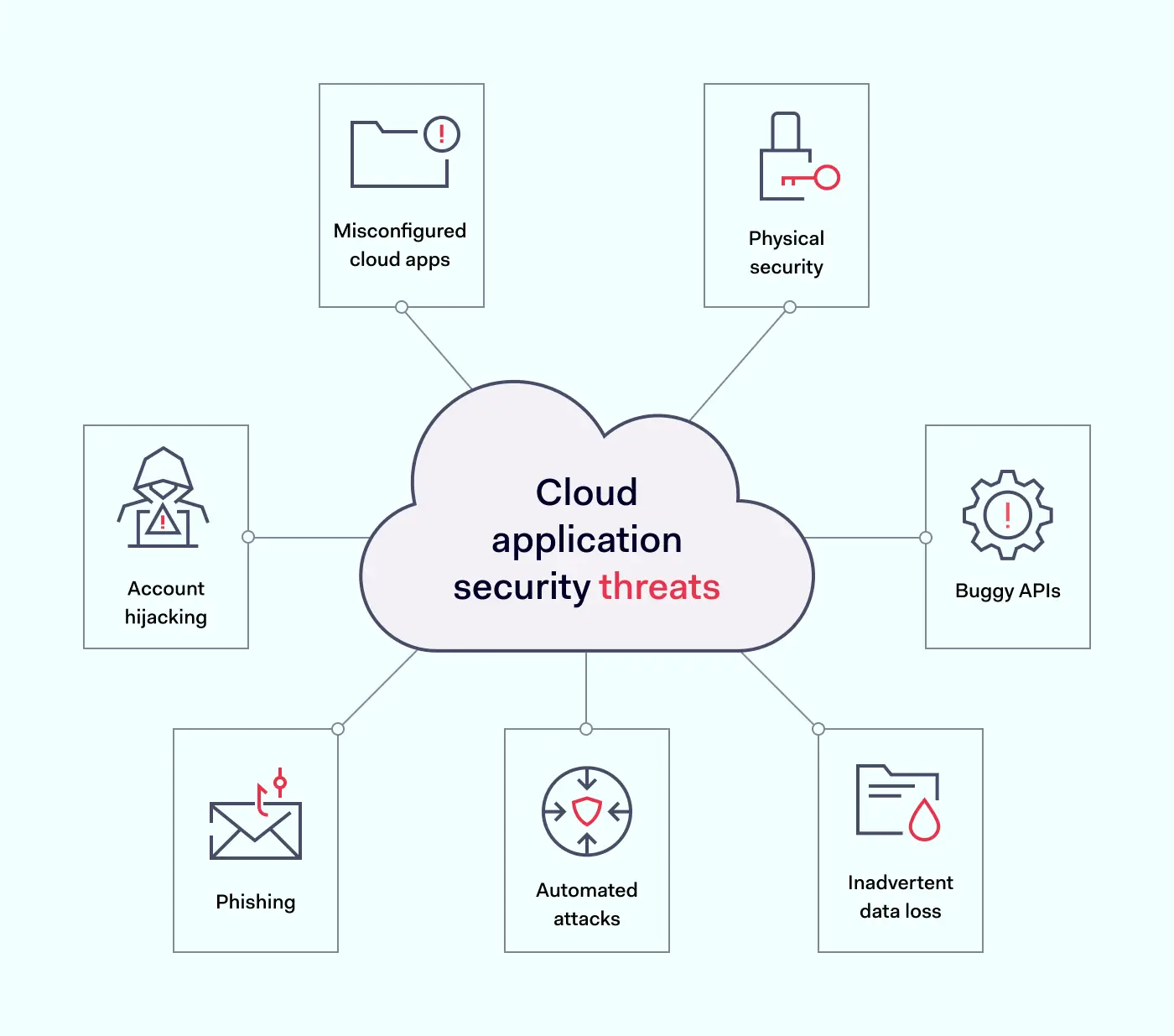
The first step in securing a cloud environment is understanding critical security threats. Here are some of the most important cloud application security risks to factor into security planning.
Misconfigured cloud apps – Gartner reports that as many as 99% of cloud security issues are due to client error. Cloud deployments are complex, and teams must manage a range of application configurations. Every SaaS app requires access controls and processes to guard against shadow IT. Getting app configurations right is essential.
Account hijacking – Malicious attackers can hijack user accounts and infiltrate cloud-hosted apps. Account hijacking tends to result from poor password hygiene and credential exposure. Security teams must enforce strong password policies. Password managers make life easier for workers. Encryption keeps credentials private and secure.
Phishing – Phishers persuade employees to provide access credentials. They may also entice users to click links that harvest private data. Security teams must train all staff and enforce responsible behavior.
Automated attacks – Attackers may find vulnerabilities via scanning agents. Botnets target poorly secured cloud apps, taking down cloud resources via denial-of-service attacks.
Buggy APIs – APIs connect cloud applications and users. They need to be secure at all times. The problem with APIs is that they are both feature and data-rich. One compromised feature could expose data inside the app for outsiders to harvest.
Physical security – Cloud applications rest on physical hardware somewhere in the world. Cloud providers must protect hardware against theft and take measures to handle fire, extreme weather, and other sources of damage.
Inadvertent data loss – Staff can accidentally delete data, change it irreversibly, or lose encryption keys. This places intact data out of reach. A comprehensive data backup strategy is essential.


Cloud application security best practices
Failure to deal with cloud security vulnerabilities can have serious consequences. Let’s explore some app security best practices to lock down critical assets.
1. Understand the threat surface
Robust cloud application security rests upon strong visibility. Total awareness of cloud workloads and device connections puts you in a good position to apply controls.
Create and maintain inventories of connected cloud apps. This inventory will form the basis for security measures later on. Trim the inventory regularly to remove any unneeded cloud apps. Try to keep the threat surface as small as possible.
2. Deploy identity and access management (IAM)
Every cloud application is vulnerable to credential theft. Enterprises must establish complete control over who accesses cloud apps. They must also define and manage user privileges.
Cloud-native IAM tools manage access by authenticating log-in requests. They compare login credentials with secure directories and ensure that only authentic users gain access. Multi-Factor Authentication (MFA) adds another set of time-limited and unique credentials.
After admitting users, IAM systems authorize their privileges. Privileges allow users to carry out core workloads and restrict access to other applications.
Developers can access the tools they need. Sales teams can access CRM databases and marketing assets. Every role is limited, but workers are free to carry out their duties.
Additionally, IAM applies Single Sign On. SSO creates a single point of entry to cloud resources. One cloud-based application provides access to all apps. There is no need to secure multiple cloud endpoints.
More advanced IAM tools actively check for unsafe credential storage. They alert security teams if staff store credentials digitally or share information insecurely. All these features enhance the safety of cloud applications.
3. Create a cloud application security strategy
Companies need cloud application security. This strategy should specify how to access cloud apps safely and how user identities are verified. Users should know what they need to do and what threat mitigation controls are in place.
Looking beyond security policies, security teams should have a clear plan to secure data on all cloud applications. This can be visualized on three levels to cover vulnerabilities:
Platforms. Cloud infrastructure underlying can include exposed data files. If companies develop cloud infrastructure in-house, security staff must focus on correctly configuring platforms. Encrypting all data is advisable.
Databases. Secure cloud databases with appropriate encryption and access controls. Assess the right authorization levels for every role. Workers should only have access to relevant data. All other information should be out of reach.
Applications. Secure the attack surface by extending IAM to all applications. Check API configurations, and use any threat detection systems provided by app developers. Set up automated notifications about unusual access requests or network traffic patterns.
4. Use automated security testing
Testing is a critical aspect of cloud app security. It may be too late to detect and mitigate vulnerabilities when cloud apps go live. Instead, companies should switch from standard DevOps to DevSecOps (Development Security Operations).
DevSecOps includes automated testing systems that assess code during the development phase. Testing during the CI/CD process uncovers weaknesses before hackers have a chance to exploit them.
Testing should extend to open-source code libraries used to build cloud applications. It should also cover data containers and user-provisioned cloud deployments. Every part of the cloud environment is vulnerable.
Testing does not end after app provisioning. Enterprises must continuously test IAM systems to ensure the integrity of IAM processes. They should also test encryption tools. Keys may be exposed or out of date, creating inherent weaknesses.
Automation is vital. You can automate development and post-deployment testing to reduce security workloads and ensure regular results.
5. Focus on password hygiene
Companies need to drive home the importance of password hygiene. Access controls and encryption mean little if employees expose passwords to outsiders.
Stolen or hacked credentials are a major security weakness. Staff must use strong passwords and change them regularly.
SSO helps make this task more manageable as workers handle fewer credentials. Cloud-native password managers also automate password strengthening and password replacement.
6. Employ comprehensive encryption strategies
Exposed data is an easy target for hackers inside cloud perimeters. That’s why encryption is a critical component of cloud app security.
Encryption scrambles data, making it unreadable to anyone without specific encryption keys. There are three main ways to encrypt data on the cloud:
Encrypting data at rest secures information stored by enterprises. This could include HR information or financial records. Companies can encrypt files, databases, and even cloud platforms. With more layers covered, hackers will struggle to access confidential data.
Encrypting data in transit makes collaboration safer. Data constantly moves throughout cloud environments. Information passes from on-premises networks and remote devices to the cloud. Encrypting data as it moves protects against interception attacks.
Encrypting data in use makes using applications safer. Employees may retain workloads in an open state for long periods. This leaves data vulnerable to interception and extraction. The use of encryption and tools like DRM makes in-use data less accessible.
7. Active threat detection
Monitor cloud applications in real-time to detect threats and protect data. User behavior patterns can provide clues about ongoing attacks. Access requests for sensitive files can generate automated alerts.
Security teams can use activity monitoring data to fine-tune privileges management. Monitoring data is also a valuable compliance tool, providing evidence of continuous security management.
8. Regularly patch software and apply system updates
Cloud applications require timely and frequent updates to keep pace with evolving threats. Codebase changes and new services constantly present new vulnerabilities and exploits for hackers to target. Automated scheduled updates neutralize weak spots as they emerge.
9. Proactive privacy and compliance policies
Data privacy is a central part of compliance strategies. Enterprises operating in the cloud face major regulatory challenges, including GDPR, PCI-DSS, or HIPAA compliance. Secure cloud apps to meet relevant compliance standards.
Security teams should build app security audits into their schedule. Check that apps and security controls meet regulatory guidelines. Include the development environment used to provision cloud applications and open-source libraries used by DevOps teams.
Use regulatory requirements as a framework to build effective controls. For instance, PCI-DSS compliance demands data encryption for financial records. HIPAA demands tight identity management and encryption of sensitive information.


Compliance strategies aren’t static. Enterprises should take a proactive approach when securing sensitive data, using regulatory frameworks as guides.
How businesses could secure their cloud applications
Legacy tools like VPNs have security limitations when guarding the cloud. Instead, using security tools that function alongside cloud application APIs is advisable.
IAM and SSO systems are essential components of cloud security strategies alongside data encryption and threat monitoring. Fortunately, you can source solutions that bring together core app security functions.
The two major options here are proxy or API-integrated Cloud Access Security Brokers (CASBs):
Proxy CASBs route traffic through a separate proxy between user devices and cloud apps. Proxies usually employ HTTP and can intervene with traffic passing through cloud endpoints. The CASB applies encryption and tracks anomalies such as suspicious login requests.
API-based CASBs do not require an extra layer of routing. These CASBs are built into cloud apps instead. This has many potential benefits, as well as some drawbacks.
Benefits of API-based CASBs include:
Improved speed – There is no need to route traffic via a proxy. This boosts speeds and improves the user experience. Routing large amounts of traffic through a proxy may lead to performance issues as demands grow.
Firewall interaction – API CASBs supplement existing network firewalls. They add cloud security features that protect data and monitor activity. Proxy CASBs damage performance by adding another security barrier alongside firewalls.
Easy upgrades – Users must update CASBs as applications evolve. App developers often add or exchange protocols and authentication systems. But developers do not routinely alert CASB developers about needed upgrades. API-based tools are easier to patch as apps change. Over time, cloud apps will leave proxy CASBs behind.
Better security – Proxy-based CASBs break TLS sessions to access the HTTP stream. They then reconstruct TLS protection to complete cloud access. Users trust their CASB to restore TLS sessions safely and reliably. This weak point can compromise the security of cloud deployments.
Major cloud computing providers like Google and Amazon recommend API-embedded CASBs where possible. This makes perfect sense in a fast-changing cloud application environment.
However, API-based CASBs may not work with all SaaS deployments. CASBs are often compatible with most but not all APIs. This can add complexity to cloud security architecture. Proxy CASBs can operate across different APIs, resulting in simple solutions.
Enterprises also need to be aware of problems surrounding CASBs. For instance, cloud infrastructure providers rarely inform CASB developers about platform alterations that cause security issues. Cloud platforms can change quickly. CASB vendors need to keep up with changes and plug any security holes.
This issue affects proxy CASBs more than API-based versions. API-based brokers integrate closely with apps. App developers tend to flag any API changes for CASB developers. As a result, patches appear in a more timely manner. Users can expect stronger security.
The shared security responsibility model
Before implementing cloud application security best practices, bring the shared responsibility model into the picture.
In cloud environments, cloud providers and users share responsibility for security. Responsibility levels depend upon your cloud computing setup and your choice of a cloud service provider.
Generally speaking, cloud providers like AWS or Microsoft Azure assume responsibility for protecting:
The infrastructure stack (including hosts and data centers)
Software required to host cloud applications and data
Networking infrastructure connecting cloud apps
Clients must handle everything else. Responsibilities vary according to whether you choose IaaaS, PaaS, or SaaS deployments.
IaaS – Infrastructure-as-a-service users have the widest responsibilities. Users must protect apps and data, as well as infrastructure. This includes middleware and can include the cloud operating system.
PaaS – Platform-as-a-service users must protect any infrastructure they maintain, including apps and data hosted by their service provider. Any proprietary apps hosted by third parties remain your responsibility.
SaaS – Software-as-a-service users are responsible for data stored or processed by cloud applications. The main security risks relating to SaaS applications are access management and encrypting sensitive data.

Shared responsibility model in practice
Getting the balance right when applying the shared responsibility model is all-important. A good starting point is assessing every cloud application.
It is critical to define the responsibilities of users and providers for each application. Be clear about internal security controls and what your provider offers. Write a clear description of who is responsible for securing each asset and how to ensure data security.
Regardless of the cloud model in use, users are always responsible for:
Securing on-premises and remote access endpoints
Protecting data flowing through cloud resources
Managing access to cloud applications.
Bring operations and security teams together. Developers need to provision cloud services flexibly and quickly. Security teams must advise about how to calibrate those services safely.
However, cloud users aren’t alone. Cloud service providers realize the complexity involved in managing cloud application security threats.
Providers usually offer user controls within APIs to secure their apps. They may also offer monitoring and threat management functions. Always investigate and use available cloud-native security tools.
Enterprises can also request audit information from providers. This should include details about their security strategy. Compare the material provided with your service terms to ensure providers meet their obligations.
Cloud application security assessment checklist
Before we finish, here is a quick checklist of critical cloud application security measures:
1. Create robust security policies covering all cloud apps. Take into account private, public and multi-cloud environments. Consider how to secure remote workers. Include processes to onboard and off-board employees. And put plans in place to detect and mitigate data breaches.
2. Implement IAM for the cloud. Ensure users have the correct privileges. Keep in mind Zero Trust concepts and the principle of least privilege. Combine cloud apps with SSO and add an extra protective screen with MFA.
3. Train staff in cloud security awareness. Make sure staff is aware of data storage and password policies. Train workers in secure cloud application usage and ways to share data safely. Focus on the threat posed by phishing attacks.
4. Deploy cloud security controls. Protect endpoints with encryption and CASBs. For instance, cloud-specific controls like disabling SSH and SQL Server access guard against brute force attacks.
5. Check application configurations. Poorly configured cloud apps are a critical security threat. Enforce API protection policies to configure apps properly. Focus on potential malware injection sites to neutralize common external attacks.
6. Put backups in place. Store sensitive data and workloads on separate cloud servers. Backup server files to ensure smooth disaster recovery. Carry out regular restoration tests to make sure data is recoverable.
7. Update software when needed. Use automated patch management to update cloud applications and deliver patches to all worker devices. Test updates when possible before deployment.
8. Track threats and log incidents. Use automated threat scanning and activity logging. Cloud logging tools can organize and analyze complex data. Use this data to improve your security posture and provide evidence of compliance.
9. Apply data security policies. Put in place policies to encrypt data at rest, in transit, and in use. Check encryption keys are used safely, preventing exposure to external attackers.
How can NordLayer help?
Follow our cloud application security checklist and best practices to secure cloud environments. With the correct controls, enterprises can take advantage of cloud computing. Sound app security measures reduce costs and cut data loss risks.
NordLayer offers cloud security solutions for all digital businesses. Install IAM, MFA, and SSO to control cloud access and reduce the attack surface. Create encrypted connections between remote workers and cloud portals. And integrate client-side security controls with tools provided by CSPs.
Find a route to ironclad cloud security. Get in touch and discuss your security options today.
These days, cybercrime is rampant. It’s no longer a matter of “if” you’re going to suffer an attack but “when” it will happen. All companies want to be ready for any crisis. And this is where a business continuity plan comes into play.
But what is a business continuity plan exactly? Why is it important? What should one include? Today, we’re exploring all these questions in-depth.
What is a business continuity plan?
A business continuity plan (BCP) is a document that sets guidelines for how an organization will continue its operations in the event of a disruption, whether it’s a fire, flood, other natural disaster or a cybersecurity incident. A BCP aims to help organizations resume operations without significant downtime.
Unfortunately, according to a 2020 Mercer survey, 51% of businesses across the globe don’t have a business continuity plan in place.
What’s the difference between business continuity and disaster recovery plans?
We often confuse the terms business continuity plan and disaster recovery plan. The two overlap and often work together, but the disaster recovery plan focuses on containing, examining, and restoring operations after a cyber incident. On the other hand, BCP is a broader concept that considers the whole organization. A business continuity plan helps organizations stay prepared for dealing with a potential crisis and usually encompasses a disaster recovery plan.
Importance of business continuity planning
The number of news headlines announcing data breaches has numbed us to the fact that cybercrime is very real and frequent and poses an existential risk to companies of all sizes and industries.
Consider that in 2021, approximately 37% of global organizations fell victim to a ransomware attack. Then consider that business interruption and restoration costs account for 50% of cyberattack-related losses. Finally, take into account that most cyberattacks are financially motivated and the global cost of cybercrime topped $6 trillion last year. The picture is quite clear — cybercrime is a lucrative venture for bad actors and potentially disastrous for those on the receiving end.
To thrive in these unpredictable times, organizations go beyond conventional security measures. Many companies develop a business continuity plan parallel to secure infrastructure and consider the plan a critical part of the security ecosystem. The Purpose of a business continuity plan is to significantly reduce the downtime in an emergency and, in turn, reduce the potential reputational damage and — of course — revenue losses.
Business continuity plan template
Password security for your business
Store, manage and share passwords.
30-day money-back guarantee
Business Continuity Plan Example
[Company Name]
[Date]
I. Introduction
Purpose of the Plan
Scope of the Plan
Budget
Timeline
The initial stage of developing a business continuity plan starts with a statement of the plan’s purpose, which explains the main objective of the plan, such as ensuring the organization’s ability to continue its operations during and after a disruptive event.
The Scope of the Plan outlines the areas or functions that the plan will cover, including business processes, personnel, equipment, and technology.
The Budget specifies the estimated financial resources required to implement and maintain the BCP. It includes costs related to technology, personnel, equipment, training, and other necessary expenses.
The Timeline provides a detailed schedule for developing, implementing, testing, and updating the BCP.
II. Risk Assessment
Identification of Risks
Prioritization of Risks
Mitigation Strategies
The Risk Assessment section of a Business Continuity Plan (BCP) is an essential part of the plan that identifies potential risks that could disrupt an organization’s critical functions.
The Identification of Risks involves identifying potential threats to the organization, such cybersecurity breaches, supply chain disruptions, power outages, and other potential risks. This step is critical to understand the risks and their potential impact on the organization.
Once the risks have been identified, the Prioritization of Risks follows, which helps determine which risks require the most attention and resources.
The final step in the Risk Assessment section is developing Mitigation Strategies to minimize the impact of identified risks. Mitigation strategies may include preventative measures, such as system redundancies, data backups, cybersecurity measures, as well as response and recovery measures, such as emergency protocols and employee training.
III. Emergency Response
Emergency Response Team
Communication Plan
Emergency Procedures
This section of the plan focuses on immediate actions that should be taken to ensure the safety and well-being of employees and minimize the impact of the event on the organization’s operations.
The Emergency Response Team is responsible for managing the response to an emergency or disaster situation. This team should be composed of individuals who are trained in emergency response procedures and can act quickly and decisively during an emergency. The team should also include a designated leader who is responsible for coordinating the emergency response efforts.
The Communication Plan outlines how information will be disseminated during an emergency situation. It includes contact information for employees, stakeholders, and emergency response personnel, as well as protocols for communicating with these individuals.
The Emergency Procedures detail the steps that should be taken during an emergency or disaster situation. The emergency procedures should be developed based on the potential risks identified in the Risk Assessment section and should be tested regularly to ensure that they are effective.
IV. Business Impact Analysis
The Business Impact Analysis (BIA) section of a Business Continuity Plan (BCP) is a critical step in identifying the potential impact of a disruption to an organization’s critical operations.
The Business Impact Analysis is typically conducted by a team of individuals who understand the organization’s critical functions and can assess the potential impact of a disruption to those functions. The team may include representatives from various departments, including finance, operations, IT, and human resources.
V. Recovery and Restoration
Procedures for recovery and restoration of critical processes
Prioritization of recovery efforts
Establishment of recovery time objectives
The Recovery and Restoration section of a Business Continuity Plan (BCP) outlines the procedures for recovering and restoring critical processes and functions following a disruption.
The Procedures for recovery and restoration of critical processes describe the steps required to restore critical processes and functions following a disruption. This may include steps such as relocating to alternate facilities, restoring data and systems, and re-establishing key business relationships.
The Prioritization section of the plan identifies the order in which critical processes will be restored, based on their importance to the organization’s operations and overall mission.
Recovery time objectives (RTOs) define the maximum amount of time that critical processes and functions can be unavailable following a disruption. Establishing RTOs ensures that recovery efforts are focused on restoring critical functions within a specific timeframe.
VI. Plan Activation
Plan Activation Procedures
The Plan Activation section is critical in ensuring that an organization can quickly and effectively activate the plan and respond to a potential emergency.
The Plan Activation Procedures describe the steps required to activate the BCP in response to a disruption. The procedures should be clear and concise, with specific instructions for each step to ensure a prompt and effective response.
VII. Testing and Maintenance
Testing Procedures
Maintenance Procedures
Review and Update Procedures
This section of the plan is critical to ensure that an organization can effectively respond to disruptions and quickly resume its essential functions.
Testing procedures may include scenarios such as natural disasters, cyber-attacks, and other potential risks. The testing procedures should include clear objectives, testing scenarios, roles and responsibilities, and evaluation criteria to assess the effectiveness of the plan.
The Maintenance Procedures detail the steps necessary to keep the BCP up-to-date and relevant.
The Review and Update Procedures describe how the BCP will be reviewed and updated regularly to ensure its continued effectiveness. This may involve conducting a review of the plan on a regular basis or after significant changes to the organization’s operations or threats.
What should a business continuity plan checklist include?
Organizations looking to develop a BCP have more than a few things to think through and consider. Variables such as the size of the organization, its IT infrastructure, personnel, and resources all play a significant role in developing a continuity plan. Remember, each crisis is different, and each organization will have a view on handling it according to all the variables in play. However, all business continuity plans will include a few elements in one way or another.
Clearly defined areas of responsibility
A BCP should define specific roles and responsibilities for cases of emergency. Detail who is responsible for what tasks and clarify what course of action a person in a specific position should take. Clearly defined roles and responsibilities in an emergency event allow you to act quickly and decisively and minimize potential damage.
Crisis communication plan
In an emergency, communication is vital. It is the determining factor when it comes to crisis handling. For communication to be effective, it is critical to establish clear communication pipelines. Furthermore, it is crucial to understand that alternative communication channels should not be overlooked and outlined in a business continuity plan.
Recovery teams
A recovery team is a collective of different professionals who ensure that business operations are restored as soon as possible after the organization confronts a crisis.
Alternative site of operations
Today, when we think of an incident in a business environment, we usually think of something related to cybersecurity. However, as discussed earlier, a BCP covers many possible disasters. In a natural disaster, determine potential alternate sites where the company could continue to operate.
Backup power and data backups
Whether a cyber event or a real-life physical event, ensuring that you have access to power is crucial if you wish to continue operations. In a BCP, you can often come across lists of alternative power sources such as generators, where such tools are located, and who should oversee them. The same applies to data. Regularly scheduled data backups can significantly reduce potential losses incurred by a crisis event.
Recovery guidelines
If a crisis is significant, a comprehensive business continuity plan usually includes detailed guidelines on how the recovery process will be carried out.
Business continuity planning steps
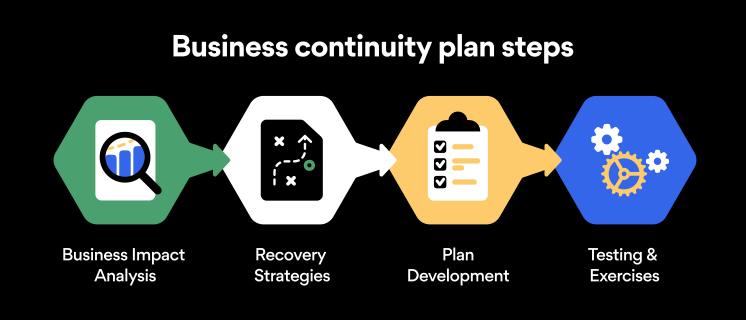
Here are some general guidelines that an organization looking to develop a BCP should consider:
Analysis
A business continuity plan should include an in-depth analysis of everything that could negatively affect the overall organizational infrastructure and operations. Assessing different levels of risk should also be a part of the analysis phase.
Design and development
Once you have a clear overview of potential risks your company could face, start developing a plan. Create a draft and reassess it to see if it takes into account even the smallest of details.
Implementation
Implement BCP within the organization by providing training sessions for the staff to get familiar with the plan. Getting everyone on the same page regarding crisis management is critical.
Testing
Rigorously test the plan. Play out a variety of scenarios in training sessions to learn the overall effectiveness of the continuity plan. By doing so, everyone on the team will be closely familiar with the business continuity plan’s guidelines.
Maintenance and updating
Because the threat landscape constantly changes and evolves, you should regularly reassess your BCP and take steps to update it. By making your continuity plan in tune with the times, you will be able to stay a step ahead of a crisis.
Level up your company’s security with NordPass Business
A comprehensive business continuity plan is vital for the entire organization’s security posture. However, in a perfect world, you wouldn’t have to use it. This is where NordPass Business can help.
Remember, weak, reused, or compromised passwords are often cited as one of the top contributing factors in data breaches. It’s not surprising, considering that an average user has around 100 passwords. Password fatigue is real and significantly affects how people treat their credentials. NordPass Business counters these issues.
With NordPass Business, your team will have a single secure place to store all work-related passwords, credit cards, and other sensitive information. Accessing all the data stored in NordPass is quick and easy, which allows your employees not to be distracted by the task of finding the correct passwords for the correct account.
In cyber incidents, NordPass Business ensures that company credentials remain secure at all times. Everything stored in the NordPass vault is secured with advanced encryption algorithms, which would take hundreds of years to brute force.
If you are interested in learning more about NordPass Business and how it can fortify corporate security, do not hesitate to book a demo with our representative.
