

Skip to content

Windows Registry Forensics – pt. 3

Intro


Continuing where I left off, I will look at some more tools you can use to look at the Registry of your Windows host, as well as some useful keys.


Tooling


I am sure there are many tools out there, created specifically for this purpose, and please feel free to search for them. I will cover the ones that I’ve used or know.

From previous parts, you know that the Registry Editor works only with live systems and can’t load exported hives, so keep that in the back of your mind.

When you need that offline functionality, you can use some of the following tools.


Zimmerman’s Registry Explorer


The author of this tool has created a bunch of tools that can be extremely handy for performing Digital Forensics. (Check out the stuff here)

One of those tools is his Registry Explorer. Registry Explorer has the ability to load multiple hives at the same time, while it can also use/add data from the transaction logs into the hive, enriching it with more accurate data. It also has the Bookmarks functionality which will contain forensically valuable keys. You can use the bookmarks to immediately pull up some interesting keys and/or values.
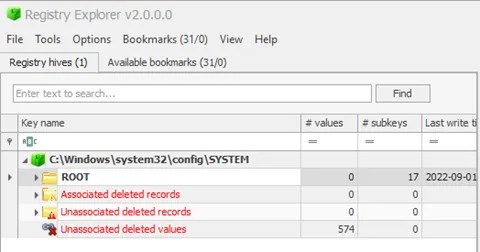
Above, I just loaded one hive (SYSTEM) from my live system, and I already have 31 recommendations (bookmarks) from Registry Explorer. As a very simple demo, when I switch over to that tab, I can immediately glean some interesting information. For example, I can immediately pick up the hostname of the device.

I filtered out the bookmarks here, showing only the Device Name. As you can see, you even have a small window below with the category, name, path, and description of the key.

On the righthand side of this view, I can see my hostname.

Under Data, I can see the name of my device – 4w.

I will circle back to the Registry Explorer, but let me briefly introduce another tool, for the sake of your awareness.


RegRipper


A useful utility that can take the have as input and spit out a report which will try to extract data from (forensically) important keys/values within that specific hive. However, note that RegRipper doesn’t take transaction logs into consideration, which is also stated it in the repo’s readme file:

This tool does NOT automatically process hive transaction logs. If you need to incorporate data from hive transaction logs into your analysis, consider merging the data via Maxim Suhanov’s yarp + registryFlush.py, or via Eric Zimmerman’s rla.exe which is included in Eric’s Registry Explorer/RECmd.

Luckily, you can use the Registry Explorer for this.


SYSTEM – Registry Explorer

As you can see, Registry Explorer will even give you the ControlSet – Control Set is basically the hive that keeps the device configuration data that’s used for the control of the system startup.

From the image above, Registry Explorer apparently has some knowledge about the USB devices I’ve been plugging in these days…

Let’s check it out.

The first USB device on the list is an external DVD/Optical drive that I plugged in to transfer some stuff from a CD. (don’t @ me please, they still have some uses 😊)

And, as you can see, I’ve also plugged in four different USB devices, two of them being Kingston made flash drives. All with the timestamps, etc. (I really did this, as I was transferring/cleaning up some old stuff.)

All this goes to show how simple and useful the Bookmarks option that Registry Explorer has can be.


Specific Registry Keys


Here, I’d like to mention some specific keys/values that might be of interest to you. This can pertain to system, recently used apps, or even a user. That doesn’t matter.


OS Version


For the OS version, I just view the SOFTWARE\Microsoft\Windows NT\CurrentVersion key.

From Registry Explorer, one could ascertain that the device I’m doing this demo from is running Windows 11 Pro.

Current Control Set


As I mentioned before, this hive will have the device config data that is used for the control of the system startup. There are (usually) two sets – ControlSet001 and ControlSet002, within the SYSTEM hive.

Generally, ControlSet001 points to the Control Set your device used to boot. ControlSet002 will be what’s known as last known good config.

They can be found at SYSTEM\ControlSet001 and SYSTEM\ControlSet002.

Do note that there’s also a volatile Control Set, created by Windows, when the device is live, and it’s called CurrentControlSet – location: HKLM\SYSTEM\CurrentControlSet.

This is an important hive, and the one you will probably end up referring to for the most part of your investigation.

In the screenshot above I checked the SYSTEM\Select and within I’ve found the last known good entry which tells me that the ControlSet001 holds the last known good config.

SYSTEM\Select\LastKnownGood – key that will hold the last known good config, regarding the Control Sets.


Computer Name


This one is always important during the investigation, and you will look it up by checking the

SYSTEM\CurrentControlSet\Control\ComputerName\ComputerName

From Registry Explorer. On the righthand side of the app, you’ll see the keys and their values/data.

Timezone Information


This one is usually used to figure out the time zone of the device i.e., where it is located. It can help you figure out that timeline of events, which is of great importance to you – the investigator!

You would want to start here:

SYSTEM\CurrentControlSet\Control\TimeZoneInformation


Devices


This is all about tracking the USB devices that were plugged into the system. It will usually contain the vendor id, version of the USB device, and product id. This is cool as it can help you to identify devices themselves. These locations will also store timestamps for the devices that were plugged in.

 
SYSTEM\CurrentControlSet\Enum\USBSTOR
SYSTEM\CurrentControlSet\Enum\USB


(I already added this screenshot above, where I mentioned the USB I recently plugged in)

It’s also important to know when this USB was plugged in for the first and last time, and you can find that out by checking the

SYSTEM\<CurrentControlSet>\Enum\USBSTOR\<vendor_prod_version>\<serial>\Properties\<some_GUID>\<value>

The values you are interested in are – 0064, 0066, and 0067. 64 is the first connection time, 66 last connection time, and 67 the last removal time.


It would look something like this:

And, on the right hand side, I can see the timestamp associated with my Kingston USB that I’ve used.

For 0067 – when I removed the USB device:

It was on 28th of August, at 17:05. (Which I know is true)

Note that Registry Explorer already parses this data, and you can get it if you select the USBSTOR key.


USB Name


The name of the plugged in USB can be found here:


SOFTWARE\Microsoft\Windows Portable Devices\Devices

Under data, an investigator would figure out that the USB I used to be named – GADFLY.


Conclusion


And there you have it! More registry stuff. I’ve been focusing a bit more on the tooling, as it can really save you a lot of time and trouble. But, I will (sometime in the near future) also make a ‘compilation’ of sorts, regarding more of these interesting keys. Even though I covered some here, there’s a lot more stuff that will be of interest to an investigator.

Stay tuned!

Cover image by Immo Wegmann

#registry_forensics #windows #registry_explorer #regripper

About Version 2 Digital

Version 2 Digital is one of the most dynamic IT companies in Asia. The company distributes a wide range of IT products across various areas including cyber security, cloud, data protection, end points, infrastructures, system monitoring, storage, networking, business productivity and communication products.

Through an extensive network of channels, point of sales, resellers, and partnership companies, Version 2 offers quality products and services which are highly acclaimed in the market. Its customers cover a wide spectrum which include Global 1000 enterprises, regional listed companies, different vertical industries, public utilities, Government, a vast number of successful SMEs, and consumers in various Asian cities.

About VRX
VRX is a consolidated vulnerability management platform that protects assets in real time. Its rich, integrated features efficiently pinpoint and remediate the largest risks to your cyber infrastructure. Resolve the most pressing threats with efficient automation features and precise contextual analysis.

Transient assets: managing the unmanageable

Transient assets can introduce unique challenges to tracking asset inventory and securing your network, especially in the education sector. Students and faculty rely on a diverse range of personal devices and expect to be able to use them everywhere, resulting in high ratios of transient devices on those networks. The term “transient assets” refers to assets that regularly connect and disconnect from your network or other assets. As defined by Applied Risk, a “transient cyber asset is a portable device, such as an operational laptop, which is capable of processing or transporting executable code.” While laptops are often thought of first, mobile devices, IoT devices, and many other device types can be transient if they aren’t always connected to your network. While the surge of remote work and resultant bring-your-own-device (BYOD) has brought the challenge to the doorstep of many industries, the educational sector has been juggling the security implications of transient assets for years.

What’s the problem?

Transient devices aren’t inherently problematic, but failing to track them as part of your inventory can cause security gaps. While organizations that commonly have short-term visitors can segregate a guest network from the rest of the environment, some organizations that see a lot of transient devices need to allow authenticated access to their internal network and data.

Educational organizations tend to see some of the highest ratios of transient devices as students and faculty come and go. Students and faculty are often provisioned accounts and accesses much like staff or employees. As a result, it is especially important to effectively inventory and track these transient devices so that access to internal assets or data can be monitored.

The core security concern related to transient assets is that they are often unknown and unmanageable. While unmanaged devices are a challenge in their own right, transient devices are sometimes better described as unmanageable. Normal BYOD or device provisioning policies can require enrollment in management platforms, but that isn’t typically an option for handling transient devices. As an example in the education sector, students (and their parents or guardians) are unlikely to agree to have their personal devices monitored at the host-level, so the institution needs to be able to build their inventory from network scanning.

On the radar

Grabbing the list of unique MAC addresses connecting to your network over time is a common first step to understanding the scope of transient devices, but that method won’t tell you much about the asset or give you a complete inventory over time. Network scanning is essential to fill in the gaps, and an effective scanning tool can provide detailed information about the assets discovered. Not only will you have a list of IP:MAC address pairings, but you’ll know about device types, hardware, operating systems, and first and last seen dates. Once you have a sense of the scope of those attributes and network traits like commonly detected ports, protocols, and services, you can start categorizing assets until you have a clear picture of what assets show up where and when. From this baseline, you can better identify anomalies and abnormalities, supplementing your security tools with accurate asset attributes so that you can track down problems or security violations.

Zero unknown assets

Building a complete inventory of assets connecting to your network is easy with runZero. The unique combination of unauthenticated active network scanning with comprehensive asset fingerprinting will help you build and maintain a context-rich asset inventory. From there, you can leverage sites, tags, and rules to categorize assets based on the unique needs of your organization. runZero readily detects when assets get new IP addresses and can even notify you by email or Slack, reducing asset duplication in environments with high numbers of transient devices being assigned IP addresses dynamically. Paired with detailed asset attributes, you can use your runZero inventory to really understand what’s on your network at any given time.

About Version 2 Digital

Version 2 Digital is one of the most dynamic IT companies in Asia. The company distributes a wide range of IT products across various areas including cyber security, cloud, data protection, end points, infrastructures, system monitoring, storage, networking, business productivity and communication products.

Through an extensive network of channels, point of sales, resellers, and partnership companies, Version 2 offers quality products and services which are highly acclaimed in the market. Its customers cover a wide spectrum which include Global 1000 enterprises, regional listed companies, different vertical industries, public utilities, Government, a vast number of successful SMEs, and consumers in various Asian cities.

About runZero
runZero, a network discovery and asset inventory solution, was founded in 2018 by HD Moore, the creator of Metasploit. HD envisioned a modern active discovery solution that could find and identify everything on a network–without credentials. As a security researcher and penetration tester, he often employed benign ways to get information leaks and piece them together to build device profiles. Eventually, this work led him to leverage applied research and the discovery techniques developed for security and penetration testing to create runZero.

6 Tips for Enhancing Security Across Your Remote Workforce

Before the pandemic, 17% of employees in the US worked from home five days or more per week – a share that catapulted to 44% during the pandemic, and more than 60% after the pandemic.  The COVID-19 pandemic climaxed the remote working trend, as workers were forced to work from home – a trend that continues as many organizations have embraced remote work within their company culture.

With this growing trend, organizations should enlighten employees on data security and how everyone is responsible for protecting it.  They should also create certain practices and steps to strengthen their organization’s data security. Remote workers must prioritize safe practices, data security education. 

Since 2020 began, the expectations that surround remote work have dramatically changed. The levels at which employees are looking for work-from-home jobs at an increasing rate, and employers are adopting the technologies, culture, and processes to make it happen. Across the globe, more businesses have implemented flexible schedules where employees can work on-site, remotely, or both. An estimate by Upwork stated that 36.2 million Americans will be working remotely by 2025, an 87% increase from pre-pandemic levels. 

While these flexible work options bring a huge range of benefits for both employer and employee, they also bring some challenges, particularly around data protection. The increase in working remotely must prompt organizations also, to level up their network security. Organizations can no longer rely on traditional network security to prevent unwanted network access. What to do is not difficult. It just requires technologies that enable enhancing security. 

One of the main perks of working remotely is location flexibility,  but now that telecommuting has become commonplace data security is more of a concern. This stems from employees using unsecured Wi-Fi networks or bringing company devices with confidential data to public locations. It was reported that 86% of organizations believe that remote workers increase the chances of an organization‘s data security breach. 

So, what can organizations with large remote workforces do to properly secure network access? Here are some viable ways to get started: 

Enhancing Security with a Formal Cybersecurity Policy

The first step in protecting an organization’s data is ensuring all employees view data security as a priority. Believe it or not, today, so many employees might still not know that data security is one of those things they should be highly concerned about, at both professional and personal levels. 

Employees may assume that if they are not working directly with customer data or  higher in the organization’s hierarchy, that they don’t need to worry over data security. Organizations should not assume that their employees know anything about their role or best practices in cybersecurity. 

The best place to start is by creating a cybersecurity policy. Make all existing and new employees sign and review the policy so that everyone in the company holds responsibility for protecting employer data. 

Ensure All Internet Connections Are Secure

The most common way to open your company to a data security breach is to use an unsecured Wi-Fi network. As a remote worker, you know and understand the need to get out of your house now and then. Here, remote workers need to be aware of how to ensure they keep company data secure. 

The easiest way is to ensure employees use a virtual private network (VPN). When they use VPNs before signing into public Wi-Fi networks, the employee’s internet traffic  will be encrypted and monitored for any signs of infection. Remote workers can freely step out of the house, and companies can guarantee that their data is secure. 

Note that not all VPNs are created equal. To ensure your organization uses the appropriate VPN, verify the VPN you are using and ensure it covers every factor you need, not just last-stage encryption. Once you decide on the standards you want, review the reputation of the VPN provider and conduct a cost comparison. 

Keep Strong, Varied Passwords & Use a Password Manager

Another easy way to protect your organization’s data is using strong password hygiene. Many people still don’t consider password safety an important step to prevent data breaches. Many even admit that they use the same password across various programs and devices but informing remote workers about password protection is one of the major keys to securing your company’s data. 

Using a password manager to randomly generate passwords for you is another way to lessen cyber risk. The password manager will store all your passwords safely and prevent the need to remember their different passwords. 

Enhancing Security with Two-Factor Authentication

Many organizations are adopting two-factor authentication to improve their data security. This method authenticates the user by requiring a username and password, along with either entering a PIN sent to their cell phone or answering a secret question. Though passwords can often be stolen or compromised, two-factor verification, it is unlikely for another person to have the PIN or answer a security question. 

Enhancing security even further, organizations could move to multi-factor authentication that requires additional verification, including voice or fingerprint recognition, face identification and voice recognition. This is typically more expensive and complex, but could be warranted depending on the level of security needed by an organization. 

Use Encryption Software

Encryption software is another way organizations, and their remote workers can protect data. Suppose an employee’s device gets lost or stolen. In this case, the information on the lost or stolen device can find its way into the wrong hands and open the company to vulnerabilities and data breaches. Encryption software protects organization data by barring access from unauthorized or third-party users of those devices. 

In addition, the organization should be mindful that any programs used for chatting, applications, or email should use end-to-end encryption. Popular programs like Adobe Acrobat and Microsoft Office, for instance, can easily encrypt documents and files that your remote workers use and share amongst each other.  

Don’t Forget Firewalls, Antivirus Software & Antimalware

Ensure remote workers have up-to-date antivirus software, anti-malware and firewalls on all their devices. In cases where devices are stolen, organizations might also want to wipe the lost or stolen devices remotely. Mobile device management platforms can perform most or all of these services by allowing remote workers to continue using their devices while ensuring the safety of company data.  

Employees might need the help of their employer in ensuring that their devices have these protections installed in them. Employees don’t always have the same technical expertise, so organizations concerned about data security should be ready to offer technical support help. This could mean creating partnerships with tech support services close to their remote workers or forming an internal tech support team that can guide employees through the necessary steps. 

Remote work does not have to negate data security. Once these top cybersecurity procedures are implemented and remote workers are educated, they can become standard practices quickly that the entire organization can easily commit to. . 

Final Thoughts on Enhancing Security for Remote Workers

Diligence from all management and employees is required to ensure these security measures are followed. Following the above guidelines can strengthen your organization’s security posture while keeping your data safe and secure.  

About Version 2 Digital

Version 2 Digital is one of the most dynamic IT companies in Asia. The company distributes a wide range of IT products across various areas including cyber security, cloud, data protection, end points, infrastructures, system monitoring, storage, networking, business productivity and communication products.

Through an extensive network of channels, point of sales, resellers, and partnership companies, Version 2 offers quality products and services which are highly acclaimed in the market. Its customers cover a wide spectrum which include Global 1000 enterprises, regional listed companies, different vertical industries, public utilities, Government, a vast number of successful SMEs, and consumers in various Asian cities.

About Portnox
Portnox provides simple-to-deploy, operate and maintain network access control, security and visibility solutions. Portnox software can be deployed on-premises, as a cloud-delivered service, or in hybrid mode. It is agentless and vendor-agnostic, allowing organizations to maximize their existing network and cybersecurity investments. Hundreds of enterprises around the world rely on Portnox for network visibility, cybersecurity policy enforcement and regulatory compliance. The company has been recognized for its innovations by Info Security Products Guide, Cyber Security Excellence Awards, IoT Innovator Awards, Computing Security Awards, Best of Interop ITX and Cyber Defense Magazine. Portnox has offices in the U.S., Europe and Asia. For information visit http://www.portnox.com, and follow us on Twitter and LinkedIn.。

CloudM announces Industry-Leading Archive Feature

Designed to save businesses time and money whilst meeting compliance demands

Archive allows you to easily, automatically, and safely store and recover user data, without the mounting license fees or complexity of solutions such as e-discovery

CloudM, a SaaS data management platform, has announced the launch of Archive, a new feature which allows users to easily, automatically, and safely store and recover user data, helping businesses to remain compliant without facing the mounting user license fees associated with traditional archiving and ediscovery solutions.

Companies managing their environment through CloudM will now be able to reduce the administrative and economic burden of complying with regulations such as GDPR, HIPAA and FOI, which have traditionally been a manual and time-consuming process.

The new data retention and recovery capability allows users to automatically and securely retain data for employees who have left an organisation, and keeps the data indexed, searchable, and restorable for a time period of the company’s choice. This entire process can be automated as standard, so, as an employee goes through the company’s existing offboarding procedure, their data will automatically be archived into a cloud storage bucket of their choice.

With Archive, IT departments don’t need to worry about the headaches of sifting through old files, or even making sure the data is stored in a compliant manner as Archive manages the whole process. Users can easily search and restore the data that they need, including the emails of a previous employee, at the touch of a button, all within one platform.

A French-Swiss multinational company which manufactures building supplies and operates in 80 countries was among the first to use CloudMs Archive feature to manage its 60,000 user accounts. In total, the company paid €2,100,000 under its existing Google system, and this bill has now been reduced to just €234,000 by switching to CloudM.

Gary Bennion, Managing Director at CloudM, said: “Archive is an industry first, cloud native solution that is designed to help organisations comply with regulations, answer information requests, and deal with conflicts and disputes efficiently while giving them the confidence that the data needed is safe and secure within their chosen storage environment.

“Within any digital workplace it’s vital to keep licence costs down, but this is especially true in organisations with high staff turnover. With current leading SaaS vendors if 200 employees leave an organisation each year that’s 200 unused licenses to add to the bill annually, which can add up really quickly. With Archive that cost is eliminated, but you still have the peace of mind of having kept it in place.”

To find out more about CloudM and Archive, why not read our Ebook? If you want more technical information, we’ve got a blog on that too!

About Version 2 Digital

Version 2 Digital is one of the most dynamic IT companies in Asia. The company distributes a wide range of IT products across various areas including cyber security, cloud, data protection, end points, infrastructures, system monitoring, storage, networking, business productivity and communication products.

Through an extensive network of channels, point of sales, resellers, and partnership companies, Version 2 offers quality products and services which are highly acclaimed in the market. Its customers cover a wide spectrum which include Global 1000 enterprises, regional listed companies, different vertical industries, public utilities, Government, a vast number of successful SMEs, and consumers in various Asian cities.

About CloudM
CloudM is an award-winning SaaS company whose humble beginnings in Manchester have grown into a global business in just a few short years.

Our team of tech-driven innovators have designed a SaaS data management platform for you to get the most from your digital workspace. Whether it’s Microsoft 365, Google Workspace or other SaaS applications, CloudM drives your business through a simple, easy-to-use interface, helping you to work smarter, not harder.

By automating time-consuming tasks like IT admin, onboarding & offboarding, archiving and migrations, the CloudM platform takes care of the day-to-day, allowing you to focus on the big picture.

With over 35,000 customers including the likes of Spotify, Netflix and Uber, our all-in-one platform is putting office life on auto-pilot, saving you time, stress and money.

CloudM is now servicing 1 million users!

We’re growing from strength to strength and as we make our way through 2022, we’ve hit another major milestone – 1 million platform users!

We’ve come a long way
The CloudM platform was launched in 2018, and in those four short years we’ve amassed a staggering 1 million users.

Our SaaS data management platform now helps customers across the globe not only migrate, but also manage their data in Google Workspace and Microsoft 365 for a truly automated experience.

After being initially approached by Google to migrate the Economist magazine from GroupWise to G Suite, a project that went off without a hitch, we’ve grown our software from a simple migration tool to a full SaaS management and automation platform.

And we haven’t stopped evolving. 2021 saw the launch of our innovative Archive feature, which automatically retains user data as part of the offboarding process, with even more news to come in 2022 and beyond.

Our platform has empowered employees around the world to become more efficient using our extensive features and automated tools so it’s no surprise that we’ve now hit this impressive 1 million user milestone.

With over 68 million migrations performed and counting, we’re proud to support our clients and we won’t stop innovating now. We’ve recently won the ‘Cloud Management Solution of the Year’ at the Cloud Excellence Awards and have been shortlisted for many other awards.

As the market shifts and grows and changes, we’ll be right there, supporting our ever-growing list of prestigious clients and developing the latest pioneering cloud technologies.

Bring on the next million users!

From a migration tool to a full platform solution

While our beginnings saw us develop and implement a unique migration tool, today the company and what we offer is very different.

The CloudM platform is a SaaS management tool that helps you get the most out of your digital workspace. Whether it’s Microsoft 365, Google Workspace or other SaaS applications, the CloudM platform drives your business through a simple, easy-to-use interface, helping you to work smarter, not harder.

We have created and developed a unique platform that automates time-consuming tasks like IT admin, onboarding and offboarding, archiving, and of course, migrations, allowing you to get on with the real job – growing your business.

Where we stand today

  • 1 Million Platform users
  • ISO 27001 Certified
  • Employees in the UK, EU and USA
  • Cloud Management Solution of the Year 2021
  • Featured in Gartner Market Guides for SaaS Management
  • Platforms and Cloud Office Migration Tools

“I was so proud of the team when we won the Cloud Management Solution of the Year. The award is an acknowledgment that our transition to a full platform solution for the cloud is complete. We’ve been at the forefront of cloud data management and this is the recognition of that from the industry.”

Gary Bennion, CloudM MD

Some of the biggest names in the business
Our passion is helping our customers, and it’s on that foundation that we’ve built such an impressive list of well-known brands as clients. Household names such as Netflix, Uber and Groupon are all on our list of satisfied customers, along with some of the largest franchises in the world.

Kempinski Hotel Group, for example, is Europe’s oldest luxury hotel group, with a collection of distinguished properties around the world. With more than 70 hotels in over 30 countries, a move to the cloud was inevitable.

We fully migrated all their users to Google Workspace using our platform, transferring existing messages, appointments and contacts.

Jeremy Ward, Senior VP for IT at Kempinski, said “We not only have an email platform to support our future growth, but a collaboration platform that is continuously improved. This will allow us to introduce new functionalities to our employees at a significantly reduced cost compared to our old solution.”


So why do people come to us?

It’s simple; we make your life easier and save you money while we do it.

CloudM is the one-size-fits-all solution for IT Admins. It automates onboarding and offboarding workflows, automatically creates or revokes permissions and access and gives other trusted departments the ability to handle their own affairs like email signatures, freeing up time for the IT team.

Not only are we innovators in the cloud management space, we are also one of the world’s leading migration experts and our trusted migration tool makes the job simple, fast, and secure.

Migrations can be a stressful affair, and if not done correctly, can result in data loss or serious downtime for a company. That’s why choosing the right software partner is so important, and that’s why we’re so passionate about what we do.

Whether you’re a small start-up or a large, globally recognised brand, streamline your business with CloudM.

Our award-winning platform that gives you the ability to automate your office, saving you time, stress and money.

Get in touch to discover what we can do for your organization.

About Version 2 Digital

Version 2 Digital is one of the most dynamic IT companies in Asia. The company distributes a wide range of IT products across various areas including cyber security, cloud, data protection, end points, infrastructures, system monitoring, storage, networking, business productivity and communication products.

Through an extensive network of channels, point of sales, resellers, and partnership companies, Version 2 offers quality products and services which are highly acclaimed in the market. Its customers cover a wide spectrum which include Global 1000 enterprises, regional listed companies, different vertical industries, public utilities, Government, a vast number of successful SMEs, and consumers in various Asian cities.

About CloudM
CloudM is an award-winning SaaS company whose humble beginnings in Manchester have grown into a global business in just a few short years.

Our team of tech-driven innovators have designed a SaaS data management platform for you to get the most from your digital workspace. Whether it’s Microsoft 365, Google Workspace or other SaaS applications, CloudM drives your business through a simple, easy-to-use interface, helping you to work smarter, not harder.

By automating time-consuming tasks like IT admin, onboarding & offboarding, archiving and migrations, the CloudM platform takes care of the day-to-day, allowing you to focus on the big picture.

With over 35,000 customers including the likes of Spotify, Netflix and Uber, our all-in-one platform is putting office life on auto-pilot, saving you time, stress and money.

×

Hello!

Click one of our contacts below to chat on WhatsApp

×