Skip to content

4 Keys to Consider When Evaluating Cloud Data Protection Tools

External Article by Keepit Staff

Keepit’s Chief Customer Officer (and frequent contributing author to the Keepit blog) Niels van Ingen has been featured in Solutions Review as part of their “Premium Content Series” written by industry experts. 

As a true veteran in the data protection and management space — not only from a product point of view but also from a customer and business development one — Niels covers what he finds are the most important elements to consider when evaluating cloud data protection offerings.

Those who work in IT disaster recovery understand that data is perhaps a business’ most valuable asset that needs protection all day, every day. Implementing a SaaS backup and recovery plan is essential for nearly every aspect of business operations, and those who have not made it a top priority are literally flirting with disaster.

To read the full article entitled ‘4 Keys to Consider When Evaluating Cloud Data Protection Tools’ on Solutions Review, click here.

About Version 2 Digital

Version 2 Digital is one of the most dynamic IT companies in Asia. The company distributes a wide range of IT products across various areas including cyber security, cloud, data protection, end points, infrastructures, system monitoring, storage, networking, business productivity and communication products.

Through an extensive network of channels, point of sales, resellers, and partnership companies, Version 2 offers quality products and services which are highly acclaimed in the market. Its customers cover a wide spectrum which include Global 1000 enterprises, regional listed companies, different vertical industries, public utilities, Government, a vast number of successful SMEs, and consumers in various Asian cities.

About Keepit
At Keepit, we believe in a digital future where all software is delivered as a service. Keepit’s mission is to protect data in the cloud Keepit is a software company specializing in Cloud-to-Cloud data backup and recovery. Deriving from +20 year experience in building best-in-class data protection and hosting services, Keepit is pioneering the way to secure and protect cloud data at scale.

ESET Research discovers StrongPity APT group’s espionage campaign targeting Android users with trojanized Telegram app

  • ESET researchers identified an active StrongPity campaign distributing a fully functional but trojanized version of the legitimate Telegram app.
  • This is the first time that the described modules and their functionality have been documented publicly.
  • StrongPity’s backdoor is modular and has various spying features, such as recording phone calls, collecting SMS messages, collecting lists of call logs and contact lists, and much more.
  • If the victim grants the malicious StrongPity app notification access and accessibility services, the malware is able to exfiltrate communication from messaging apps such as Viber, Skype, Gmail, Messenger, and Tinder.
  • A copycat website mimicking Shagle, an adult video-chat service, is used to distribute StrongPity’s mobile backdoor app.
  • The app is a modified version of the open-source Telegram app, repackaged with StrongPity backdoor code.
  • Based on similarities with previous StrongPity backdoor code and the app being signed with a certificate from an earlier StrongPity campaign, we attribute this threat to the StrongPity APT group.

BRATISLAVA, KOŠICE— January 10, 2023 — ESET researchers identified an active StrongPity APT group campaign leveraging a fully functional but trojanized version of the legitimate Telegram app, which despite being non-existent, has been repackaged as „the“ Shagle app. This StrongPity backdoor has various spying features: its 11 dynamically triggered modules are responsible for recording phone calls, collecting SMS messages, collecting lists of call logs, and contact lists, and much more. These modules are being documented publicly for the very first time. If the victim grants the malicious StrongPity app notification access and accessibility services, the app will also have access to incoming notifications from 17 apps such as Viber, Skype, Gmail, Messenger, and Tinder, and will be able to exfiltrate chat communication from other apps. The campaign is likely very narrowly targeted, since ESET telemetry still hasn’t identify any victims.

Unlike the entirely web-based, genuine Shagle site, which doesn’t offer an official mobile app to access its services, the copycat site only provides an Android app to download, with no web-based streaming possible. This trojanized Telegram app has never been made available from the Google Play store.

The malicious code, its functionality, class names, and the certificate used to sign the APK file, are the identical to the previous campaign; thus ESET believes with high confidence that this operation belongs to the StrongPity group. Code analysis revealed that the backdoor is modular and additional binary modules are downloaded from the C&C server. This means that the number and type of modules used can be changed at any time to fit the campaign requests when operated by the StrongPity group.

“During our research, the analyzed version of malware available from the copycat website was not active anymore and it was no longer possible to successfully install and trigger its backdoor functionality. This is because StrongPity hasn’t obtained its own API ID for its trojanized Telegram app. But that might change at any time should the threat actor decide to update the malicious app,” says Lukáš Štefanko, the ESET researcher who analyzed the trojanized Telegram app.

The repackaged version of Telegram uses the same package name as the legitimate Telegram app. Package names are supposed to be unique IDs for each Android app and must be unique on any given device. This means that if the official Telegram app is already installed on the device of a potential victim, then this backdoored version can’t be installed. “This might mean one of two things – either the threat actor first communicates with potential victims and pushes them to uninstall Telegram from their devices if it is installed, or the campaign focuses on countries where Telegram usage is rare for communication,” adds Štefanko.

StrongPity’s app should have worked just as the official version does for communication, using standard APIs that are well documented on the Telegram website, but it no longer does. Compared to the first StrongPity malware discovered for mobile, this StrongPity backdoor has extended spying features, being able to spy on incoming notifications and exfiltrate chat communication, if the victim grants the app notification access and activates accessibility services.

For more technical information about the latest StrongPity app, check out the blogpost “StrongPity espionage campaign targeting Android users” on WeLiveSecurity. Make sure to follow ESET Research on Twitter for the latest news from ESET Research.


Comparing the legitimate website on the left and the copycat on the right

About Version 2 Digital

Version 2 Digital is one of the most dynamic IT companies in Asia. The company distributes a wide range of IT products across various areas including cyber security, cloud, data protection, end points, infrastructures, system monitoring, storage, networking, business productivity and communication products.

Through an extensive network of channels, point of sales, resellers, and partnership companies, Version 2 offers quality products and services which are highly acclaimed in the market. Its customers cover a wide spectrum which include Global 1000 enterprises, regional listed companies, different vertical industries, public utilities, Government, a vast number of successful SMEs, and consumers in various Asian cities.

About ESET
For 30 years, ESET® has been developing industry-leading IT security software and services for businesses and consumers worldwide. With solutions ranging from endpoint security to encryption and two-factor authentication, ESET’s high-performing, easy-to-use products give individuals and businesses the peace of mind to enjoy the full potential of their technology. ESET unobtrusively protects and monitors 24/7, updating defenses in real time to keep users safe and businesses running without interruption. Evolving threats require an evolving IT security company. Backed by R&D facilities worldwide, ESET became the first IT security company to earn 100 Virus Bulletin VB100 awards, identifying every single “in-the-wild” malware without interruption since 2003.

10 IT-Related Employee Experience Questions

When evaluating your organization’s technology choices, there are a few different angles to took at it from:
  1. Usefulness – Do the pieces of tech that make up your stack accomplish what you need them to in the most efficient way possible?
  2. Total cost of ownership – Is your TCO where you want it to be, or can it be improved with different tools?
  3. User experience – Is your chosen tech easy to use? Does it save or suck IT’s time?
  4. Employee experience – How does your technology affect the employee experience at your company? Is it promoting productivity and happiness or frustrating and holding up end users?

This article focuses on the employee experience aspect of your tech evaluation process.

Consider this: 69% of employees are more likely to remain at your company for 3 years if they have a positive onboarding experience. Though onboarding is just one small piece of the employee experience puzzle, it’s an important one, and your technology is the foundation of your onboarding processes.

This is important because if your tech isn’t up to par, then your workflows become disconnected and inefficient, and HR and IT will either have to work harder to make up for that, or your onboarding and identity lifecycle management tasks will be substandard. This leads to IT and HR frustration and burnout, decreased productivity on the end user’s part, and unsatisfied employees, which all negatively affects your bottom line.

A good starting point when evaluating your IT tech stack from the angle of how your tech impacts the employee experience is to survey employees with tech- and IT-specific questions. Here are a handful to get you started:

10 Tech Stack and Employee Experience Questions

Onboarding

1. Rate your onboarding experience in the following areas:

a. Device setup (1-5 scale)

b. Access setup (1-5 scale)

c. Technical orientation (1-5 scale)

2. Did you have access to everything technology-wise that you needed on day 1 of your employment? (Yes/No)

Role and/or Access Changes

3. Have you changed roles or responsibilities since joining the organization? (Yes/No)

a. If yes, rate your role change experience (1-5 scale)

b. If yes, did you have to reach out to IT or HR to fix anything after your role change, or was it all handled correctly behind the scenes? (Had to reach out./Everything was handled appropriately.)

  • If they answer that they had to reach out, you can provide a box for them to further explain the issue.

4. Have your access needs changed over time for any other reason? (Yes/No)

a. If yes, rate how efficiently this was handled (i.e., Did your privileges change in a timely manner to allow you to be productive?) (1-5 scale)

b. If yes, rate how effectively this was handled (i.e., When your privileges were changed, did you have everything you needed to be productive?) (1-5 scale)

Remote/In-Office Work

5. At any point with our organization, did you switch between in-office and remote work? (Yes/No)

a. If yes, when switching from in-office to remote work, did IT and HR ensure that you were set up to be productive from the moment you changed your work style? (Yes/No)

6. When working from a new location, was your technical experience impacted in a negative way? (i.e., Were you able to access everything you needed with the appropriate security measures in place?)  (Yes/No/NA)

Specific Tools

7. How satisfied are you with the apps, software, and other tools you use on a daily basis? (1-5 scale)

Credentials

8. How satisfied are you with the efficiency and ease of daily login processes? (1-5 scale)

9. How satisfied are you with our password management tool? (1-5 scale)

General Pulse Check

10. How satisfied are you with the preparedness of the IT department based on past interactions you’ve had? (1-5 scale)

Creating Your Survey

All of the questions listed here are general suggestions to get you started with evaluating your tech stack vs your employees’ experiences. Modify or remove them as you see fit – feel free to make them more specific or allow employees to write in open-ended answers, to give you a better picture of how your tech truly impacts each person’s day-to-day responsibilities.

If you’re looking to improve the employee experience at your organization, it’s important to find and employ technology that connects seamlessly and reduces any current tech disruptions that your end users face. A good place to start is by ensuring that IT’s directory service and HR’s tool of choice connect well. Employee experience and security issues often begin when these two tools don’t work well together, leading to even bigger issues down the line.

About Version 2 Digital

Version 2 Digital is one of the most dynamic IT companies in Asia. The company distributes a wide range of IT products across various areas including cyber security, cloud, data protection, end points, infrastructures, system monitoring, storage, networking, business productivity and communication products.

Through an extensive network of channels, point of sales, resellers, and partnership companies, Version 2 offers quality products and services which are highly acclaimed in the market. Its customers cover a wide spectrum which include Global 1000 enterprises, regional listed companies, different vertical industries, public utilities, Government, a vast number of successful SMEs, and consumers in various Asian cities.

About JumpCloud
At JumpCloud, our mission is to build a world-class cloud directory. Not just the evolution of Active Directory to the cloud, but a reinvention of how modern IT teams get work done. The JumpCloud Directory Platform is a directory for your users, their IT resources, your fleet of devices, and the secure connections between them with full control, security, and visibility.

Multi-factor authentication best practices & strategy

Multi-factor authentication (MFA) requests more than one identification factor when users log into network services. These factors could be one-time codes delivered by secure third-party providers. Or they could be biometric identifiers.

The aim of MFA is to verify user identities and strengthen network protection beyond the level provided by traditional passwords. But how should you achieve this goal?

This blog will explain some core MFA best practices. It will also lead you through a step-by-step guide to implementing multi-factor authentication. The result should be an MFA system that ensures rock-solid network protection where it matters most.

MFA best practices

Multi-factor authentication is an essential addition to cybersecurity setups. Properly configured, MFA allows workers to relocate to their homes, connect remotely as they travel, and use cloud resources anywhere.

These MFA best practices will help you create an authentication system that meets your needs.

1. Plan the right MFA solution for your business

Multi-factor authentication is not a one-size-fits-all technology. Choose the right authentication system for your business needs. For instance, types of MFA to think about include:

  • Biometric scanning, such as retinal scans and fingerprints.

  • One-time passwords (OTP) delivered by tokens, email, or SMS.

  • Hardware devices such as security badges, cards and tokens.

  • Contextual factors such as keyboard behavior, location data, and the network are used to make a connection.

Workers could benefit from biometric scanning if your business relies on mobile devices. Quick, user-friendly biometrics can provide secure access away from the office. Smartphones are well-suited to techniques like fingerprint scans.

Workforces where remote working is routine, might prefer hardware tokens or tags. These small devices are easy to carry between work and home. The tokens will still be required to access network resources if devices are lost or stolen. So they are a good extra defense measure.

Whatever solution you choose, it must comply with network infrastructure. Find an MFA system that is compatible with critical apps and employee devices.

2. Create an enterprise-wide MFA solution

Multi-factor authentication solutions must cover all access points to network resources.

Carry out a device audit before sourcing any technologies. This will help you understand which types of MFA tech to choose and how to train employees to use authentication systems.

Cloud assets and on-premises resources should all be included. Protect all cloud endpoints with more than one authentication factor, with additional protections for high-value assets.

3. Manage change to bring users on board

The biggest problem with multi-factor authentication is ensuring employees use authentication tools consistently and safely. Workers may lapse into unsafe behavior if MFA is too time-consuming or complex. That’s why change management is all-important.

Plan a staged introduction that makes every user feel part of the process. Extra authentication methods will disrupt working practices, at least for a while. But if you approach employees as participants in the process, they will respond positively.

Inform users about upcoming changes at the start of the project. Explain how MFA will benefit workers and how user identification works. Answer any questions as the project unfolds. Workers need to know exactly what is required and how to comply with security policies.

Change managers can isolate areas of potential resistance. Focus on chokepoints like using third-party devices, managing biometrics, and password management. Provide training and refresh user knowledge after MFA comes online.

4. Create user-friendly MFA systems

When mainstreaming MFA, companies need to craft user-friendly solutions. Systems should minimize friction and maximize speed while remaining secure.

Explore ways to reduce the work of users. Adaptive authentication can remove the need for passwords and use device or location information alongside biometrics. Single sign-on portals can bring services together and make logging on easier.

Where possible, provide multiple options for users. Some workers will embrace retina or fingerprint scanning. For others, it could be impractical or intrusive. They might prefer hardware tokens.

When people choose their own solutions, they are more likely to feel in control. When they “own” their authentication choices, workers will be less likely to back-slide and abandon MFA.

5. Combine MFA with single sign-on (SSO)

As hinted above, one common solution for MFA is single sign-on (SSO). SSO creates a single identity security portal. This gateway allows users to access core resources according to their individual privileges.

SSO fits neatly with MFA. You can combine standard password portals with biometrics and one-time passwords. Using a single portal and extra identity verification factors balances user experience and network security.

  • SSO reduces employee workloads, providing instant system access to all relevant resources. That’s particularly useful when connecting remote workers to cloud assets.

  • MFA supplements password security. This solves some problems associated with SSO, including the repeated use of passwords or the reliance on weak passwords that are easy to hack.

6. Make use of contextual factors

Multi-factor authentication systems use more than biometric scanners and hardware tokens. MFA can also leverage contextual information about individual users and their devices.

Contextual information is passive. Users do not need to provide information consciously. Instead, agents detect data about the user’s device or location. Agents on user laptops can tell whether the computer is in the owner’s home or connected to insecure public wifi. Blacklisting screens out unknown devices or those accessing from unsafe locations.

Users move. They won’t always be located at home. And if employees request access from elsewhere, MFA systems ask them for additional information. That complicates matters for laptop or smartphone thieves with access to worker devices.

More advanced authentication factors are also available for extremely high-security situations. Techniques like liveness testing and biometric keyboard verification provide maximum information about user identities. These contextual factors represent an extremely strong barrier against data thieves when used with physical tokens.

7. Think about passwordless solutions

In some cases, MFA allows companies to remove traditional password access from their network perimeter. Passwords are clumsy to use. Few employees use strong passwords or store them safely. Going passwordless can make a lot of sense from a security perspective.

MFA can use contextual information about mobile devices, user locations, or even user behavior. These factors may be sufficient to allow access when combined with biometric data. This saves time while providing a degree of security. However, strong passwords should be retained to access sensitive data and critical workloads.

8. Implement the least privilege to secure network assets

MFA can apply uniformly to all users, but it’s also better to implement role-based MFA to enforce the principle of least privilege. Part of Zero Trust Network Access (ZTNA), this principle states that users should only have access to essential data and applications. All non-essential resources should be off-limits.

Identity and Access Management and network segmentation are core ZTNA technologies, but MFA also plays a role.

MFA systems can ask for additional information when users try to exercise administrative functions. MFA can also apply conditional access to high-security databases and request additional user credentials at regular intervals.

9. Use provisioning protocols for cloud compatibility

Companies can combine MFA systems and critical cloud assets by using provisioning protocols. For instance, Microsoft Azure Active Directory supports protocols like RADIUS and Oauth 2.0.

Standard protocols like RADIUS make it easier to combine legacy network tools and cloud applications. MFA systems must operate across all network devices and resources. Adopting an approach based on standard protocols makes this possible.

10. See MFA as an ongoing process

Deploying MFA doesn’t end when users start to apply biometrics or hardware tokens. Companies must see authentication as an ongoing challenge requiring constant attention and regular audits.

The threat landscape does not stand still. New phishing techniques emerge monthly. Novel malware threats can compromise previously secure endpoints. Network managers must be aware of these developments. Security teams must update MFA systems to reflect real-world cybersecurity risks.

Regularly assess MFA systems to ensure they are delivering effective security. Are workers using them properly? Do you need to use more or different authentication factors? Are any gaps not covered by authentication processes?

Companies also need to be persistent and determined when deploying MFA. Most MFA solutions experience problems. Users regularly report difficulties, which can cause IT teams to roll back authentication projects. Resist this urge.

Provide support to any departments or individuals experiencing issues. Drill down into the concerns reported by users. They may detect technical issues that were not apparent to security professionals.

Above all, don’t expect overnight success. MFA eventually becomes embedded in everyday work, but this won’t happen immediately.

Step-by-step MFA implementation strategy

When implementing MFA, here are the steps to follow:

1. Train users in how MFA works

Employee education is critical when implementing MFA. Every process must be centered around upskilling and reassuring users.

Poorly informed workers may resist authentication techniques or back-slide to unsafe practices. Here are some things to bear in mind when training staff:

  • Regularly communicate via email from the start of the project. Timely emails will ensure staff are aware of timescales and security policies. They can include contact details for project leaders.

  • Create ways for staff to engage with project managers. Messaging apps like Slack are a good option here. Make staff available to field any queries and provide updates if requested.

  • Stress the positive aspect of MFA. Always focus on why you are introducing MFA and how it will help individuals.

2. Design an MFA system to suit your needs

Choosing the right form of multi-factor authentication is critically important. Some companies find that biometric scanners like facial recognition are appropriate. This works well when end users have access to smartphones with reliable cameras and fingerprint scanners.

Other companies prefer to distribute hardware tokens to remote workers. Tokens provide one-time passwords and can be tracked remotely by security managers.

Questions to ask when choosing an MFA solution:

  • What kind of devices will use your MFA system?

  • Is there a mixture of work-from-home and on-premises end users?

  • Is ease of use more important than pure identity security?

  • Do you need sophisticated solutions with fine-grained MFA controls?

  • Is cost an overriding factor, or can you afford to spend more?

  • What apps and services will your MFA solution interact with? Compatibility is essential to avoid friction and improve the user experience.

3. Apply privileges to roles and individuals

Create privilege levels for different access requests. This allows individuals to access core resources while keeping sensitive data off-limits to those who do not need it.

You might want to request extra identity data when accessing customer records or executing admin commands on cloud platforms. MFA requests every few hours may also be needed when accessing financial records.

Some resources may not need MFA at all. Contextual controls and passwords could be sufficient to protect low-sensitivity resources. However, risk assesses each asset to avoid leaving confidential data exposed.

4. Make sure your MFA implementation is compliant

Authentication is a core aspect of major data security regulations, including HIPAA, GDPR, and PCI-DSS. Sectors like health care or financial processing have specific requirements absent from other business areas. Knowing which regulations affect your business is absolutely vital.

For example, PCI-DSS requires:

  • Strong encryption of all customer data

  • Three-factor MFA for any servers handling customer data

  • Identity management to ensure customer records can only be accessed by authorized individuals

Third-party authentication providers should possess the accreditation. Look for an Attestation of Compliance (AOC) with PCI-DSS or HIPAA. This means the provider has been independently assessed as meeting compliance standards.

5. Create a streamlined way to request backup factors

Sometimes employees lose authentication hardware or business laptops. In these cases, they will probably also lose MFA data. Security best practice involves resetting the user’s account with a backup factor and creating a new set of authentication information.

One option is to enable multiple devices on a single account. If users have more than one authorized device, they can use it to request backup factors and reset their accounts.

Security teams should also be prepared to remove authentication factors from user accounts when thefts occur. There should be a clear process for quarantining compromised factors, making it tough for thieves to use stolen identity credentials.

6. Plan to on-board new remote workers

All work-from-home equipment must be audited and authorized with MFA software installed. But setting up MFA with remote workers can be time-consuming. It may leave security vulnerabilities if staff is left to their own devices.

Many companies provide work laptops for new hires. If you take this route, take time to lead staff through the MFA onboarding process. If necessary, schedule video meetings to explain the process. That way, you can verify that staff properly follow every step.

7. Configure adaptive MFA controls

Before MFA goes live, explore additional security controls your provider offers. This should include adaptive systems to detect anomalies and meet threats proactively.

At this stage, you can blacklist certain access locations. For instance, you may blacklist all public wifi hotspots. But you could even limit access from entire continents.

8. Plan to audit your MFA solution

Plan to reassess your authentication setup regularly. Every MFA implementation experiences some problems. They are generally not deal-breakers and tend to involve easing users into the authentication process.

Check that users are following MFA practices. And make sure privileges match up with risk assessments. Do multiple factors protect confidential data, or can general users access databases?

As new threats emerge, authentication systems can become outdated. Be prepared to update software or add new factors if the situation changes.

How can NordLayer help with MFA implementation?

NordLayer offers a suite of security tools allowing companies to create secure SSE architecture at the network edge. Guard cloud assets, on-premises data centers, and remote work laptops. And make life easy for workers to carry out their tasks.

Our products include 2FA or MFA for authentication to increase security levels while connecting to company networks. NordLayer caters to apps like Google Authenticator or Authy and USB devices to deliver security keys.

Adding MFA is quick and easy, especially when you combine authentication and SSO. The result is all-around security for critical business assets. To find out more, get in touch with the NordLayer team today.

About Version 2 Digital

Version 2 Digital is one of the most dynamic IT companies in Asia. The company distributes a wide range of IT products across various areas including cyber security, cloud, data protection, end points, infrastructures, system monitoring, storage, networking, business productivity and communication products.

Through an extensive network of channels, point of sales, resellers, and partnership companies, Version 2 offers quality products and services which are highly acclaimed in the market. Its customers cover a wide spectrum which include Global 1000 enterprises, regional listed companies, different vertical industries, public utilities, Government, a vast number of successful SMEs, and consumers in various Asian cities.

These days, cybercrime is rampant. It’s no longer a matter of “if” you’re going to suffer an attack but “when” it will happen. All companies want to be ready for any crisis. And this is where a business continuity plan comes into play.

But what is a business continuity plan exactly? Why is it important? What should one include? Today, we’re exploring all these questions in-depth.

What is a business continuity plan?

A business continuity plan (BCP) is a document that sets guidelines for how an organization will continue its operations in the event of a disruption, whether it’s a fire, flood, other natural disaster or a cybersecurity incident. A BCP aims to help organizations resume operations without significant downtime.

Unfortunately, according to a 2020 Mercer survey, 51% of businesses across the globe don’t have a business continuity plan in place.

What’s the difference between business continuity and disaster recovery plans?

We often confuse the terms business continuity plan and disaster recovery plan. The two overlap and often work together, but the disaster recovery plan focuses on containing, examining, and restoring operations after a cyber incident. On the other hand, BCP is a broader concept that considers the whole organization. A business continuity plan helps organizations stay prepared for dealing with a potential crisis and usually encompasses a disaster recovery plan.

Importance of business continuity planning

The number of news headlines announcing data breaches has numbed us to the fact that cybercrime is very real and frequent and poses an existential risk to companies of all sizes and industries.

Consider that in 2021, approximately 37% of global organizations fell victim to a ransomware attack. Then consider that business interruption and restoration costs account for 50% of cyberattack-related losses. Finally, take into account that most cyberattacks are financially motivated and the global cost of cybercrime topped $6 trillion last year. The picture is quite clear — cybercrime is a lucrative venture for bad actors and potentially disastrous for those on the receiving end.

To thrive in these unpredictable times, organizations go beyond conventional security measures. Many companies develop a business continuity plan parallel to secure infrastructure and consider the plan a critical part of the security ecosystem. The Purpose of a business continuity plan is to significantly reduce the downtime in an emergency and, in turn, reduce the potential reputational damage and — of course — revenue losses.

Business continuity plan template

Password security for your business

Store, manage and share passwords.

30-day money-back guarantee

Business Continuity Plan Example

[Company Name]

[Date]

I. Introduction

  • Purpose of the Plan

  • Scope of the Plan

  • Budget

  • Timeline

The initial stage of developing a business continuity plan starts with a statement of the plan’s purpose, which explains the main objective of the plan, such as ensuring the organization’s ability to continue its operations during and after a disruptive event.

The Scope of the Plan outlines the areas or functions that the plan will cover, including business processes, personnel, equipment, and technology.

The Budget specifies the estimated financial resources required to implement and maintain the BCP. It includes costs related to technology, personnel, equipment, training, and other necessary expenses.

The Timeline provides a detailed schedule for developing, implementing, testing, and updating the BCP.

II. Risk Assessment

  • Identification of Risks

  • Prioritization of Risks

  • Mitigation Strategies

The Risk Assessment section of a Business Continuity Plan (BCP) is an essential part of the plan that identifies potential risks that could disrupt an organization’s critical functions.

The Identification of Risks involves identifying potential threats to the organization, such cybersecurity breaches, supply chain disruptions, power outages, and other potential risks. This step is critical to understand the risks and their potential impact on the organization.

Once the risks have been identified, the Prioritization of Risks follows, which helps determine which risks require the most attention and resources.

The final step in the Risk Assessment section is developing Mitigation Strategies to minimize the impact of identified risks. Mitigation strategies may include preventative measures, such as system redundancies, data backups, cybersecurity measures, as well as response and recovery measures, such as emergency protocols and employee training.

III. Emergency Response

  • Emergency Response Team

  • Communication Plan

  • Emergency Procedures

This section of the plan focuses on immediate actions that should be taken to ensure the safety and well-being of employees and minimize the impact of the event on the organization’s operations.

The Emergency Response Team is responsible for managing the response to an emergency or disaster situation. This team should be composed of individuals who are trained in emergency response procedures and can act quickly and decisively during an emergency. The team should also include a designated leader who is responsible for coordinating the emergency response efforts.

The Communication Plan outlines how information will be disseminated during an emergency situation. It includes contact information for employees, stakeholders, and emergency response personnel, as well as protocols for communicating with these individuals.

The Emergency Procedures detail the steps that should be taken during an emergency or disaster situation. The emergency procedures should be developed based on the potential risks identified in the Risk Assessment section and should be tested regularly to ensure that they are effective.

IV. Business Impact Analysis

The Business Impact Analysis (BIA) section of a Business Continuity Plan (BCP) is a critical step in identifying the potential impact of a disruption to an organization’s critical operations.

The Business Impact Analysis is typically conducted by a team of individuals who understand the organization’s critical functions and can assess the potential impact of a disruption to those functions. The team may include representatives from various departments, including finance, operations, IT, and human resources.

V. Recovery and Restoration

  • Procedures for recovery and restoration of critical processes

  • Prioritization of recovery efforts

  • Establishment of recovery time objectives

The Recovery and Restoration section of a Business Continuity Plan (BCP) outlines the procedures for recovering and restoring critical processes and functions following a disruption.

The Procedures for recovery and restoration of critical processes describe the steps required to restore critical processes and functions following a disruption. This may include steps such as relocating to alternate facilities, restoring data and systems, and re-establishing key business relationships.

The Prioritization section of the plan identifies the order in which critical processes will be restored, based on their importance to the organization’s operations and overall mission.

Recovery time objectives (RTOs) define the maximum amount of time that critical processes and functions can be unavailable following a disruption. Establishing RTOs ensures that recovery efforts are focused on restoring critical functions within a specific timeframe.

VI. Plan Activation

  • Plan Activation Procedures

The Plan Activation section is critical in ensuring that an organization can quickly and effectively activate the plan and respond to a potential emergency.

The Plan Activation Procedures describe the steps required to activate the BCP in response to a disruption. The procedures should be clear and concise, with specific instructions for each step to ensure a prompt and effective response.

VII. Testing and Maintenance

  • Testing Procedures

  • Maintenance Procedures

  • Review and Update Procedures

This section of the plan is critical to ensure that an organization can effectively respond to disruptions and quickly resume its essential functions.

Testing procedures may include scenarios such as natural disasters, cyber-attacks, and other potential risks. The testing procedures should include clear objectives, testing scenarios, roles and responsibilities, and evaluation criteria to assess the effectiveness of the plan.

The Maintenance Procedures detail the steps necessary to keep the BCP up-to-date and relevant.

The Review and Update Procedures describe how the BCP will be reviewed and updated regularly to ensure its continued effectiveness. This may involve conducting a review of the plan on a regular basis or after significant changes to the organization’s operations or threats.

What should a business continuity plan checklist include?

Organizations looking to develop a BCP have more than a few things to think through and consider. Variables such as the size of the organization, its IT infrastructure, personnel, and resources all play a significant role in developing a continuity plan. Remember, each crisis is different, and each organization will have a view on handling it according to all the variables in play. However, all business continuity plans will include a few elements in one way or another.

  • Clearly defined areas of responsibility

    A BCP should define specific roles and responsibilities for cases of emergency. Detail who is responsible for what tasks and clarify what course of action a person in a specific position should take. Clearly defined roles and responsibilities in an emergency event allow you to act quickly and decisively and minimize potential damage.

  • Crisis communication plan

    In an emergency, communication is vital. It is the determining factor when it comes to crisis handling. For communication to be effective, it is critical to establish clear communication pipelines. Furthermore, it is crucial to understand that alternative communication channels should not be overlooked and outlined in a business continuity plan.

  • Recovery teams

    A recovery team is a collective of different professionals who ensure that business operations are restored as soon as possible after the organization confronts a crisis.

  • Alternative site of operations

    Today, when we think of an incident in a business environment, we usually think of something related to cybersecurity. However, as discussed earlier, a BCP covers many possible disasters. In a natural disaster, determine potential alternate sites where the company could continue to operate.

  • Backup power and data backups

    Whether a cyber event or a real-life physical event, ensuring that you have access to power is crucial if you wish to continue operations. In a BCP, you can often come across lists of alternative power sources such as generators, where such tools are located, and who should oversee them. The same applies to data. Regularly scheduled data backups can significantly reduce potential losses incurred by a crisis event.

  • Recovery guidelines

    If a crisis is significant, a comprehensive business continuity plan usually includes detailed guidelines on how the recovery process will be carried out.

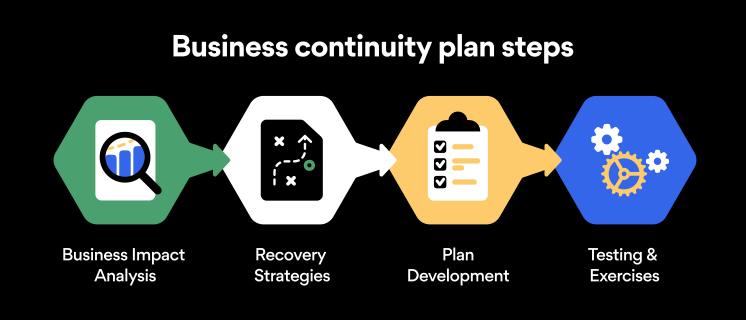
Business continuity planning steps

Here are some general guidelines that an organization looking to develop a BCP should consider:

Analysis

A business continuity plan should include an in-depth analysis of everything that could negatively affect the overall organizational infrastructure and operations. Assessing different levels of risk should also be a part of the analysis phase.

Design and development

Once you have a clear overview of potential risks your company could face, start developing a plan. Create a draft and reassess it to see if it takes into account even the smallest of details.

Implementation

Implement BCP within the organization by providing training sessions for the staff to get familiar with the plan. Getting everyone on the same page regarding crisis management is critical.

Testing

Rigorously test the plan. Play out a variety of scenarios in training sessions to learn the overall effectiveness of the continuity plan. By doing so, everyone on the team will be closely familiar with the business continuity plan’s guidelines.

Maintenance and updating

Because the threat landscape constantly changes and evolves, you should regularly reassess your BCP and take steps to update it. By making your continuity plan in tune with the times, you will be able to stay a step ahead of a crisis.

Level up your company’s security with NordPass Business

A comprehensive business continuity plan is vital for the entire organization’s security posture. However, in a perfect world, you wouldn’t have to use it. This is where NordPass Business can help.

Remember, weak, reused, or compromised passwords are often cited as one of the top contributing factors in data breaches. It’s not surprising, considering that an average user has around 100 passwords. Password fatigue is real and significantly affects how people treat their credentials. NordPass Business counters these issues.

With NordPass Business, your team will have a single secure place to store all work-related passwords, credit cards, and other sensitive information. Accessing all the data stored in NordPass is quick and easy, which allows your employees not to be distracted by the task of finding the correct passwords for the correct account.

In cyber incidents, NordPass Business ensures that company credentials remain secure at all times. Everything stored in the NordPass vault is secured with advanced encryption algorithms, which would take hundreds of years to brute force.

If you are interested in learning more about NordPass Business and how it can fortify corporate security, do not hesitate to book a demo with our representative.


About Version 2 Digital

Version 2 Digital is one of the most dynamic IT companies in Asia. The company distributes a wide range of IT products across various areas including cyber security, cloud, data protection, end points, infrastructures, system monitoring, storage, networking, business productivity and communication products.

Through an extensive network of channels, point of sales, resellers, and partnership companies, Version 2 offers quality products and services which are highly acclaimed in the market. Its customers cover a wide spectrum which include Global 1000 enterprises, regional listed companies, different vertical industries, public utilities, Government, a vast number of successful SMEs, and consumers in various Asian cities.

About NordPass
NordPass is developed by Nord Security, a company leading the global market of cybersecurity products.

The web has become a chaotic space where safety and trust have been compromised by cybercrime and data protection issues. Therefore, our team has a global mission to shape a more trusted and peaceful online future for people everywhere.

Azure AD & Macs: A Better Way to Tango

Until recently, Windows was the de facto platform of choice in the working world as businesses set up their networks on the Microsoft operating system.

They used Word for word processing, Excel for spreadsheet work, PowerPoint for presentations, and Active Directory for domain management. However, the old paradigm has been shifting for some time now.

While Windows-based PCs and laptops are still the market leaders for large and small-to-medium-sized enterprises (SMEs), many organizations have begun to adopt Mac, Linux, and Android devices. Improved usability, convenience, and affordability are commonly cited reasons for switching.

Translation: administrators must manage and control access to their Azure Active Directory from different types of devices and operating systems.

So, can you bind a Mac to Azure Active Directory?

Let’s find out.

Mac and Azure AD: Unwilling Bedfellows

The short answer is yes — you can bind Mac to Azure. But as you can imagine, it is far from straightforward.

Competitors hardly find incentives to make life easy for each other. Think of Pepsi and Coke’s cola wars or Nike and Adidas’ sportswear battles; they’ve been at it for decades. Apple and Microsoft are no different.

flow chart of cloud identity

With Microsoft’s Azure being a leading access management solution, many IT managers have found themselves being the grass that suffers the pinch between the giant boots of these two tech giants.

Since its release in 2000, Active Directory (AD) has been a staple for Windows networks. It provides users and IT admins with identity management, access control, and policy enforcement for Windows servers, desktops, and laptops.

Azure Active Directory (AAD) is Microsoft’s cloud-based version of its traditional on-premise Active Directory service. It allows businesses to securely access their applications and resources from anywhere on their windows device.

However, the problem arises when it comes to Apple’s Macs. While Microsoft has done an excellent job of making Windows computers compatible with AAD, the same cannot be said for Mac users.

The Challenge of Binding Macs to Azure AD

The challenge of binding Macs to Azure Active Directory is twofold:

  1. No thanks to the Apple-Microsoft rivalry, there is no native integration between Macs and AAD.
  1. Even when workaround solutions exist, ensuring a seamless user experience can also take time and effort.

For example, some admins have taken a cobbled approach of creating a domain within Azure using the Azure AD Domain Services (AD DS) before setting up a VPN connection between their Macs and the Azure domain. The problem, however, is that this solution is complicated and even discouraged by Microsoft.

Shot of a young businessman looking bored while working at his desk during late night at work

Others, which already utilize Active Directory, can choose to implement an on-prem directory extension. However, this presents a new set of challenges, from extra costs to more infrastructure to manage.

In addition, this doesn’t enable direct Mac integration into Azure AD. Instead, admins are left with a non-future-proof method of managing endpoints.

The Solution: Step Out of Platforms And Into Identity

A better approach that IT admins take to resolve this problem is to think away from platforms and into identity.

Rather than relying on a cobbled solution that requires managing multiple directories or on-prem extensions, cloud identity management solutions such as the JumpCloud Directory Platform provide a single-user directory that can manage all users’ access to the network and other applications from one central platform.

This solution enables admins to bind not only Macs but also Windows, Linux, and other devices to Azure Active Directory in an intuitive and hassle-free manner. With JumpCloud, admins can securely manage users’ AAD access, regardless of their device or platform.

Also, IT teams that leverage other cloud-computing platforms, such as Amazon’s AWS, or Google Workspace, needn’t worry about managing different identities.

Users can access every network or resource with a single identity, such as Wi-Fi, VPN, web applications, legacy LDAP application, and on-prem or cloud-based file storage solutions. This configuration creates a true single sign-on (SSO) experience for users, making it more convenient and secure.

Manage Identity with the JumpCloud Directory Platform

JumpCloud provides an all-in-one solution for IT admins to bind Macs to Azure Active Directory without any of the earlier-mentioned problems. It’s an identity provider that delivers secure, cloud-based access services to users regardless of their devices.

The platform streamlines user experiences with SSO while unifying admin tools for mobile device management (MDM), multi-factor authentication (MFA), and compliance controls behind one pane of glass. Want to get a better handle on your heterogeneous environment? Watch our demo video and sign up for a free trial today.

About Version 2 Digital

Version 2 Digital is one of the most dynamic IT companies in Asia. The company distributes a wide range of IT products across various areas including cyber security, cloud, data protection, end points, infrastructures, system monitoring, storage, networking, business productivity and communication products.

Through an extensive network of channels, point of sales, resellers, and partnership companies, Version 2 offers quality products and services which are highly acclaimed in the market. Its customers cover a wide spectrum which include Global 1000 enterprises, regional listed companies, different vertical industries, public utilities, Government, a vast number of successful SMEs, and consumers in various Asian cities.

About JumpCloud
At JumpCloud, our mission is to build a world-class cloud directory. Not just the evolution of Active Directory to the cloud, but a reinvention of how modern IT teams get work done. The JumpCloud Directory Platform is a directory for your users, their IT resources, your fleet of devices, and the secure connections between them with full control, security, and visibility.

×

Hello!

Click one of our contacts below to chat on WhatsApp

×